The rapid growth of AI has transformed the security landscape for enterprise and cloud infrastructure. As organizations increasingly use GPU-accelerated environments for sensitive computations such as model training and data analytics, protecting the integrity and confidentiality of data and code in-use has become a crucial concern, often addressed through confidential computing technologies.
Modern CPUs provide technologies such as AMD SEV-SNP and Intel TDX that create trusted execution environments (TEEs) to safeguard data and code. TEEs ensure that memory can only be accessed within their trusted boundaries, blocking external write attempts and returning only encrypted data on reads.
However, GPUs exist outside the CPU TEE's trust boundary and cannot access its memory.
To include a GPU within the CPU TEE's trust boundary (i.e., confidential GPU), the following must hold:
- The GPU must support confidential computing.
- Configure and initialize the GPU in confidential computing mode.
- Secure the communication between the CPU TEE and GPU.
- Attest the GPU before use to ensure trust.
Confidential computing on NVIDIA GPUs
NVIDIA introduced confidential computing on NVIDIA Hopper with support on Blackwell and continuing on to Rubin, which is the 3rd generation confidential computing enabled GPU. H100 was the first GPU that protected the confidentiality and integrity of data and code in use.
Confidential Computing GPUs extend the CPU's trusted execution environment to the GPU and open the door to many use cases where using a shared infrastructure (cloud, colocation, edge) was not possible in the past due to the need to protect data and code in use, and because previous confidential computing solutions were not performant or flexible enough for many workloads.
NVIDIA confidential computing creates a hardware-based trusted execution environment (TEE) that secures and isolates the entire workload running on NVIDIA Hopper and Blackwell GPUs today, and Rubin in the future.
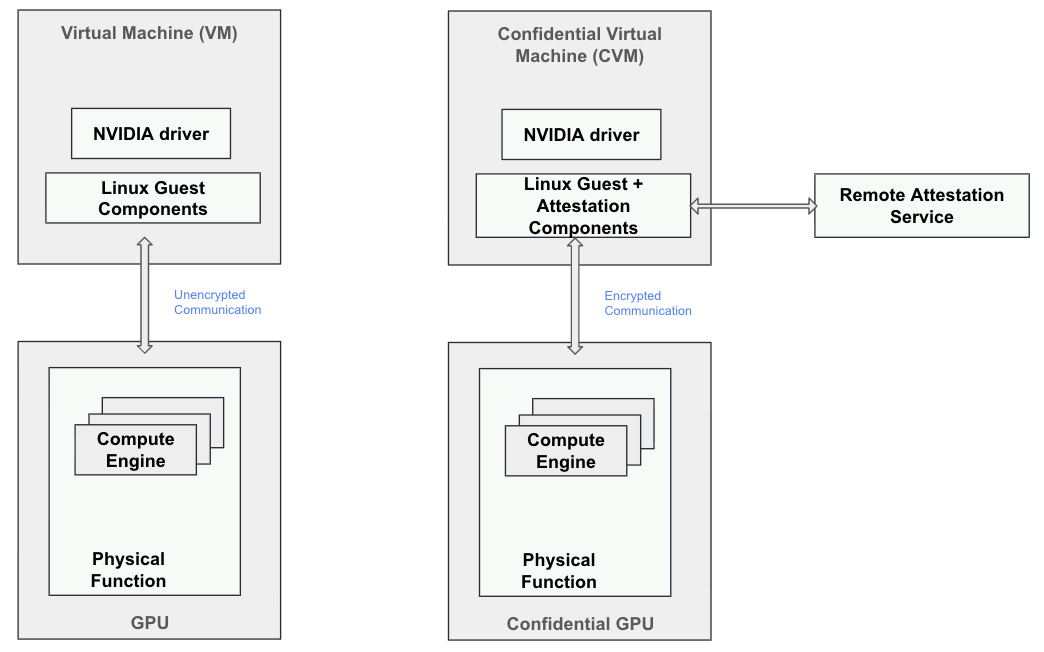
You can establish a confidential computing environment through full CPU TEE and GPU TEE isolation, supported by strong hardware-based security featuring three key elements:
- On-Die Root of Trust (RoT): Before the operating system can communicate with the GPU, the GPU utilizes the RoT to verify the authenticity of the firmware running on the device, ensuring it has not been tampered with by the device owner.
- Device attestation: This feature enables users to confirm that they are interacting with authentic NVIDIA GPUs that have confidential computing capabilities. It ensures that the security state of the GPU aligns with a known and trusted secure state, including its firmware and hardware configuration.
- Encrypted transfers between CPU and GPU: Data transfers between the CPU and GPU are encrypted and decrypted at PCIe line rate using a hardware implementation of AES256-GCM. This method provides both confidentiality and integrity for data transferred across the bus, with encryption keys accessible exclusively to the CPU and GPU TEEs.
This is depicted in Figure 1.
NVIDIA Confidential Computing on GPUs with OpenShift
The following are the key components required for using NVIDIA confidential GPUs in OpenShift:
- Node Feature Discovery (NFD) Operator discovers and labels the nodes with NVIDIA GPU devices.
- NVIDIA GPU Operator is responsible for detecting the GPU capabilities and laying the foundation. These are some of the key components deployed by the GPU operator:
- Nvidia-vfio-manager: During the setup phase, it discovers and binds NVIDIA GPUs and NVSwitches to the vfio-pci kernel driver for VFIO passthrough.
- Nvidia-cc-manager: This component enables required CC mode on supported NVIDIA GPUs.
- Nvidia-sandbox-device-plugin performs three main functions:
- Create the file /var/run/cdi/nvidia.yaml in the worker node listing all NVIDIA GPUs that can be used for GPU passthrough by the kata runtime. This file is also known as host-side Container Device Interface (CDI) specification.
- Allocate NVIDIA GPUs during POD deployment.
- Discover NVIDIA GPUs - including their capabilities - and advertise them to the OpenShift control plane. After that, the GPUs of the node will be listed as allocatable in the
oc describe node <node-name>.
- Red Hat OpenShift sandboxed containers operator is responsible for creating VM TEEs, assigning the GPU device(s) and running the pods inside the VM TEEs. This operator is responsible for setting up the Kata containers runtime, including installing the pre-built initial ramdisk filesystem (initramfs) containing the NVIDIA driver and creating the required runtime classes. The default runtime class for using NVIDIA confidential GPUs is
kata-cc-nvidia-gpu. Another runtime class created for regular NVIDIA GPUs iskata-nvidia-gpu. The OpenShift sandboxed containers operator (based on worker node and GPU capabilities already discovered by NFD and GPU operators) automatically creates the specific runtime classkata-nvidia-gpuorkata-cc-nvidia-gpu. - Red Hat build of Trustee operator - This is responsible for providing remote attestation services for the confidential CPU and GPU
Figure 2 shows how these operators come together to support confidential NVIDIA GPUs with OpenShift sandboxed containers.
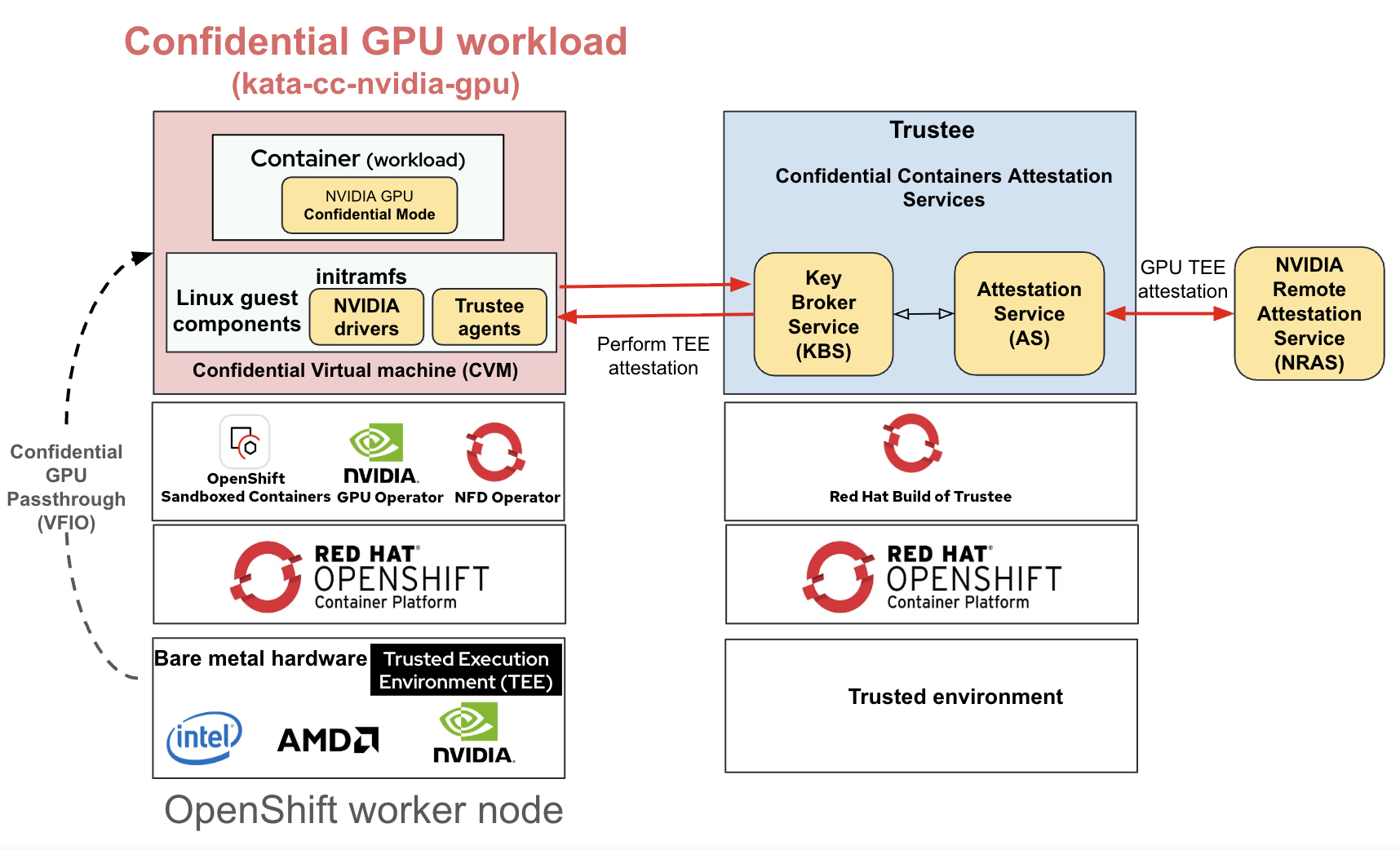
When you deploy a workload requiring confidential GPU using the kata-cc-nvidia-gpu runtime class, the Red Hat build of Trustee agent (part of the initramfs) facilitates secret injection during the workload lifecycle. For example:
- In the early provisioning phase, it can inject a key to verify the workload image signature, if it is signed (recommended).
- In the early provisioning phase, it can inject a key to decrypt the workload image. In some cases, the workload image contains sensitive data.
- In the workload setup phase to install a key pair for network authentication
The Red Hat build of Trustee agent is configured to provide evidence to attest both the CPU and GPU TEEs during the attestation process.
Refer to the following user guide for instructions to set up NVIDIA confidential GPUs with OpenShift sandboxed containers: Configuring confidential containers for NVIDIA GPUs with OpenShift sandboxed containers.
Note that supporting regular NVIDIA GPUs with OpenShift sandboxed containers is also similar, except for the Red Hat build of Trustee agents and attestation piece which are not required (Figure 3).
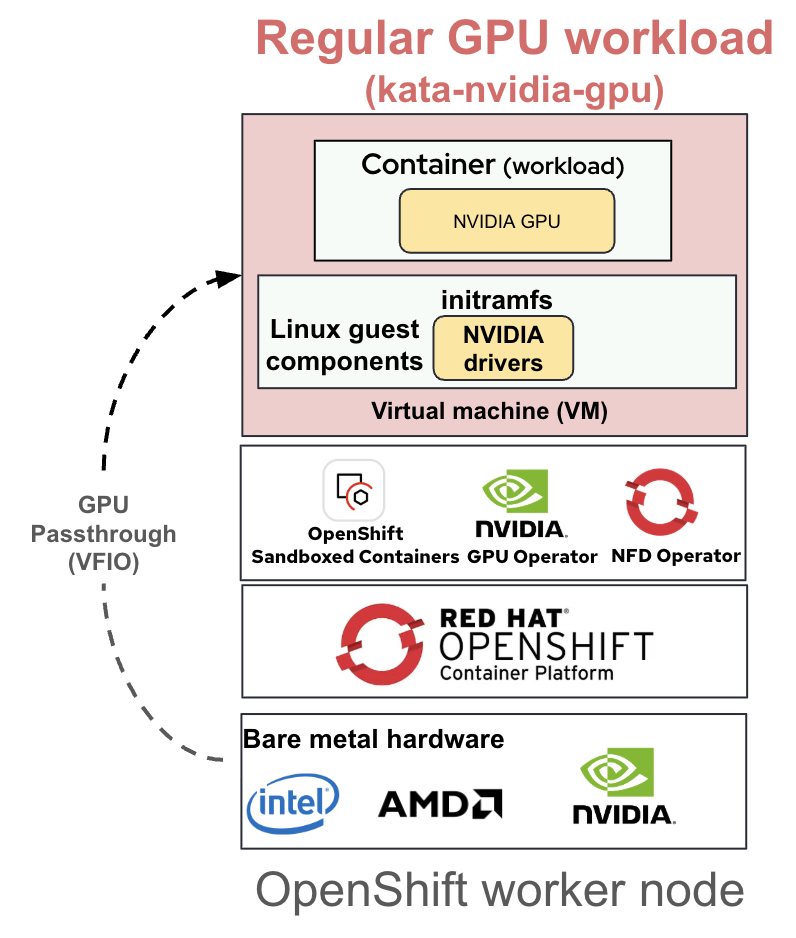
Refer to the user guide, Configuring regular NVIDIA GPUs with OpenShift sandboxed containers, when setting up regular NVIDIA GPUs with OpenShift sandboxed containers:
Attestation of CPU and GPU TEEs with Red Hat build of Trustee
OpenShift sandboxed containers with confidential containers support along with Red Hat build of Trustee provides the required foundation for CPU and GPU attestation.
Red Hat build of Trustee includes support for combined attestation including CPUs and GPUs. NVIDIA Remote Attestation Service (NRAS) provides NVIDIA GPU attestation.
Red Hat build of Trustee provides TrusteeConfig custom resource definition (CRD) for configuration. After installing and configuring the GPU operator, if the TrusteeConfig is created with profileType: Restricted, Red Hat build of Trustee will auto-generate ConfigMaps that enforce strict security properties for both CPU and GPU attestation, as follows:
- trustee-config-kbs-config
- Red Hat build of Trustee KBS configuration. It includes the line
attestation_service.verifier_config.nvidia_verifier.type=”Remote”, which delegates the validation of GPU TEE evidence to NRAS.
- Red Hat build of Trustee KBS configuration. It includes the line
- trustee-config-attestation-policy-cpu
- Attestation policy used to generate trustworthiness claims for the CPU TEE evidence. The default policy requires some CPU reference values to be defined in the trustee-config-rvps-reference-values.
- trustee-config-attestation-policy-gpu
- Attestation policy that will be used to generate trustworthiness claims for the GPU TEE evidence. The default policy does not require any GPU reference value to be defined in the trustee-config-rvps-reference-values, all the validations and measurement checks are done by NRAS, as described in the section Attesting the GPU of the document Confidential Computing.
- trustee-config-rvps-reference-values
- List of reference values required by the attestation policies. By default, this is empty, but the user guide describes how to populate it using veritas.
- trustee-config-resource-policy
- Resource policy used to evaluate the CPU and GPU trustworthiness claims to determine if the KBC environment is in the expected trustworthiness state. If so, the requested resource releases to the KBC.
In Figure 4, the sequence diagram illustrates the end-to-end flow when a kata-cc-nvidia-gpu deployment requests a resource to Red Hat build of Trustee.
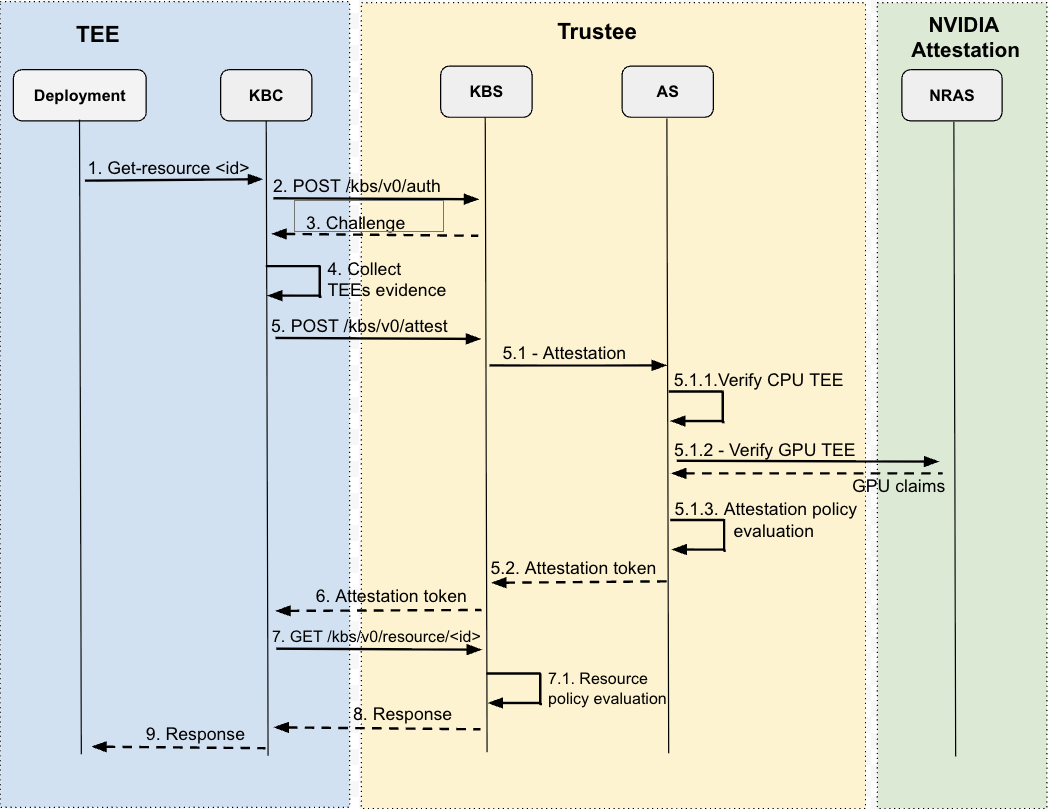
Deployment:
- The resource is typically requested via the RESTful API server (api-server-rest) represented in the diagram as the Key Broker Client (KBC). The api-server-rest is always started in the initramfs as one of the agents.
The resource ID is represented in the format/<repository>/<type>/<tag>as defined in the REST API.
KBC:
The KBS attestation protocol specification further describes the communication between the KBC and the remote KBS at the main branch.
- Before getting any resource, it authenticates itself to the KBS via the /kbs/v0/auth endpoint.
- Receive a response from the KBS that contains a challenge payload and a HTTP Cookie (session identifier). It will use the HTTP cookie later to get resources.
- Collect evidence from the KBC environment for composite attestation. The CPU TEE evidence is considered primary, and other evidence (e.g., the GPU TEE evidence) is considered additional.
- Reply to the challenge via the /kbs/v0/attest endpoint with all evidence collected to prove that the KBC environment is in the expected security state.
KBS:
All KBS endpoints are described in the kbs.yaml at the main branch.
5.1. The TEEs evidence are forwarded to the Attestation Service (AS) for provenance and evaluation.
Attestation Service:
The attestation service is further described in the Trustee AS documentation.
5.1.1. Call the Intel TDX (or AMD SEV-SNP) built-in verifier to validate the CPU TEE evidence. The verifier will check the format and provenance of the evidence as well as generate CPU claims from the evidence.
5.1.2. Delegate the validation of the GPU TEE evidence to NRAS, which will also generate GPU claims from the evidence. NRAS does an extensive validation of the evidence, as described in the Attesting the GPU section of the document Confidential Computing..
5.1.3. Call the Open Policy Engine (OPA) to evaluate the trustee-config-attestation-policy-cpu and trustee-config-attestation-policy-gpu attestation policies and, as a result, generate an attestation token (EAR token) with the trustworthiness claims for each TEE evidence. As defined in the AR4SI specification, the policy must assert the trustworthiness of the KBC (attester) from the perspective of eight AR4SI appraisal groups (e.g., hardware, configuration, executables, etc). The trustworthiness level for each group is typically asserted by matching evidence claims to reference values defined in the trustee-config-rvps-reference-values. If the level is evaluated to a value between 2 and 31, we say that the verifier is affirming the trustworthiness of the respective AR4SI group.
The attestation service will return the generated attestation token to the KBS.
KBS:
5.2. Return the attestation token to KBC.
KBC:
- Receive the attestation token.
- Send the resource request to the KBS via the /kbs/v0/resource/<repository>/<type>/<tag> endpoint along with the HTTP cookie bound to the attestation token.
KBS:
7.1. Authenticate the HTTP Cookie provided.
Call OPA to evaluate the trustee-config-resource-policy resource policy and, as a result, determine if the KBC is in a trustworthy state. If so, the KBS will return the requested resource to the KBC.
In the default resource policy, the KBC is asserted in trustworthy state only if its attestation token has all AR4SI groups in the affirming state, including the groups for CPU and GPU submods. Otherwise, one of the errors defined in the kbs.yaml is returned.
- Return the resource response to the KBC.
KBC:
- Return the resource response to the deployment.
Inspect CPU and GPU attestation
Inspect the CPU and GPU attestation by requesting an attestation token via the /aa/token service following these steps:
- Update the reference values using the
veritas, as described in the user guide. The following command line shows some additional parameters provided toveritas. Make sure the metadata.name field in the rvps-reference-values.yaml file generated by veritas matches the trustee-config-rvps-reference-values.
$ podman run \
  -v ./pull-secret.json:/pull-secret.json \
  -v ./initdata.toml:/initdata.toml \
  quay.io/openshift_sandboxed_containers/coco-tools:1.12 \
  veritas \
  --platform baremetal \
  --tee <TEE> \
  --authfile <PULL_SECRET_PATH> \
  --initdata <INITDATA_PATH> \
  --ocp-version <OCP_VERSION> \
  --hw-xfam-allow x87 \
  --hw-xfam-allow sse \
  --hw-xfam-allow avx \
  --hw-xfam-allow avx512 \
  --hw-xfam-allow pkru \
  --hw-xfam-allow amx \
  --gpu \
  --max-cpu-count 1 \
--kernel-cmdline "tsc=reliable no_timer_check rcupdate.rcu_expedited=1 i8042.direct=1 i8042.dumbkbd=1 i8042.nopnp=1 i8042.noaux=1 noreplace-smp reboot=k cryptomgr.notests net.ifnames=0 pci=lastbus=0 console=hvc0 console=hvc1 debug panic=1 nr_cpus=8 selinux=0 scsi_mod.scan=none agent.log=debug cgroup_no_v1=all devtmpfs.mount=0 agent.guest_components_rest_api=all"<TEE>: Either tdx or snp.<OCP_VERSION>: Your OpenShift version<PULL_SECRET_PATH>: The path to your pull-secret.json file<INITDATA_PATH>: The path to your initdata.toml
- Create the following sample-gpu-pod. Provide the
agent.guest_components_rest_api=allkernel parameter to enable the aa/token feature; however, this kernel parameter is not designed for production because it can make the workload vulnerable to attacks.
apiVersion: v1
kind: Pod
metadata:
  name: sample-gpu-pod
  annotations:
    io.katacontainers.config.hypervisor.kernel_params: "agent.guest_components_rest_api=all"
    io.katacontainers.config.hypervisor.default_memory: "32768"
    io.katacontainers.config.hypervisor.cc_init_data: "<YOUR_INITDATA>"
spec:
  runtimeClassName: kata-cc-nvidia-gpu
  restartPolicy: OnFailure
  containers:
    - name: gpu-cc-verifier
      image: quay.io/openshift_sandboxed_containers/gpu-verifier:ubi9
      imagePullPolicy: IfNotPresent
      command: ["/bin/bash"]
      args:
        - -c
        - |
          /opt/cuda-samples/Samples/0_Introduction/vectorAdd/build/vectorAdd
          sleep 36000
      resources:
        limits:
          nvidia.com/pgpu: 1
           # This ensures correct accounting by the Kubernetes scheduler
          memory: "32768M"
        requests:
          memory: "32768M"
      securityContext:
privileged: false<YOUR_INITDATA>: Your initdata in base64, as described in the user guide.
- Make sure the GPU is working properly.
$ oc logs sample-gpu-pod
[Vector addition of 50000 elements]
Copy input data from the host memory to the CUDA device
CUDA kernel launch with 196 blocks of 256 threads
Copy output data from the CUDA device to the host memory
Test PASSED
Done- Request an attestation token via the
aa/tokenservice and inspect its main fields:cpu0.ear.statusandgpu0.ear.status
Theear.statusshows affirming forcpu0andgpu0submods (i.e., trustee-config-attestation-policy-cpu and trustee-config-attestation-policy-gpu attestation policies passed). Otherwise,ear.statuswould not appear asaffirming. Thus, you can useear.trustworthiness-vectorto identify which AR4SI group is not in the affirming range (from 2 to 31). You can use the respective attestation policy and the Trustee log to further investigate why the AR4SI group failed.cpu0.ear.veraison.annotated-evidence.init_data: Initdata measurementcpu0.ear.veraison.annotated-evidence.init_data_claims: Initdata claims (i.e., content provided via initdata)cpu0.ear.veraison.annotated-evidence.runtime_data_claims.additional-evidenceGPU TEE evidence collected from the KBCcpu0.ear.veraison.annotated-evidence.tdxCPU claims returned by the TDX built-in verifier. This would be snp if the TEE is AMD SEV-SNP.gpu0.ear.veraison.annotated-evidence.init_dataGPU claims returned by NRAS.
$ oc rsh sample-gpu-pod
sh-5.1# dnf install -y jq
sh-5.1# curl http://127.0.0.1:8006/aa/token\?token_type\=kbs | jq -r '.token | split(".") | .[1] | @base64d | fromjson'
{
  "eat_profile": "tag:github.com,2024:confidential-containers/Trustee",
  "iat": 1777093176,
  "ear.verifier-id": {
    "developer": "https://confidentialcontainers.org",
    "build": "attestation-service 0.1.0"
  },
  "submods": {
    "cpu0": {
      "ear.status": "affirming",
      "ear.trustworthiness-vector": {
        "instance-identity": 0,
        "configuration": 2,
        "executables": 4,
        "file-system": 0,
        "hardware": 2,
        "runtime-opaque": 0,
        "storage-opaque": 0,
        "sourced-data": 0
      },
      "ear.veraison.annotated-evidence": {
        "init_data": "3e6191191bd85c162fdbec63c0153801a1129e565d6cfe3e851e51b0ddee080f00000000000000000000000000000000",
        "init_data_claims": {
           ...all initdata claims...
         },
        "runtime_data_claims": {
          "additional-evidence": "...Collected GPU TEE evidence...",
         }
        "tdx": {
         ...CPU claims from TDX built-in verifier...
         }
    "gpu0": {
      "ear.status": "affirming",
      "ear.trustworthiness-vector": {
        "instance-identity": 0,
        "configuration": 3,
        "executables": 3,
        "file-system": 0,
        "hardware": 2,
        "runtime-opaque": 0,
        "storage-opaque": 0,
        "sourced-data": 0
      },
      "ear.veraison.annotated-evidence": {
           ...GPU claims from NRAS...
      }
 }
Here's a demo of confidential GPUs in practice.
Important considerations and limitations
Currently, OpenShift sandboxed containers can only manage a single type of CPU TEE. The cluster nodes must be either AMD SEV-SNP or Intel TDX, but not a combination of them.
NVIDIA H100 and NVIDIA RTX PRO 6000 Blackwell GPUs are tested for confidential computing. OpenShift 4.21.9 or later releases are required for using NVIDIA GPUs with OpenShift sandboxed containers. This is mainly due to the need for the KubeletPodResourcesGet feature gate which is enabled by default from OpenShift 4.21 onwards.
You can cold plug only one confidential GPU to use in the confidential container (pod). For a regular container (pod), you can attach multiple regular GPUs. Currently, all NVIDIA GPUs of the worker node are statically configured for the same runtime class. If configured for the kata-nvidia-gpu-cc runtime class, they won’t be available for other runtime classes without reconfiguring.
Next steps
In this article, we demonstrated how you can integrate NVIDIA confidential computing on GPUs into OpenShift confidential containers. This includes attestation for the CPU and GPU.
The features planned for upcoming OpenShift sandboxed containers releases will be on top of the following capabilities:
- dm-verity support for Kata VM image
- Support for additional NVIDIA GPUs
- Air-gapped support for NVIDIA GPU attestation

