As modern cloud infrastructure becomes increasingly complex and multi-tenant, observability and security monitoring have become foundational requirements for OpenStack operators. One key network diagnostic technique used in traditional and virtualized environments is port mirroring, which allows administrators to capture and analyze traffic flowing through a particular interface. You can redirect mirrored traffic to third-party analytics tools and solutions hosted on a different or same host as the mirror port. Typically, the mirrored traffic is carried over overlay tunnels established between the source and destination of the mirror.
This functionality, when integrated and offered as an easily consumable, scalable service within Red Hat OpenStack Services on OpenShift, is known as TAP-as-a-Service (TAPaaS). TAP refers to a test access point, a logical or physical traffic mirroring point exposed as a service, allowing tenants or operators to capture and analyze network traffic. This article will detail how to operationalize TAPaaS within an OpenStack Services on OpenShift deployment.
Port mirroring
Port mirroring is available at OVS and OVN levels through a CLI interface, however, in highly dynamic, software-defined environments like OpenStack Services on OpenShift, traditional port mirroring doesn’t scale well and does not offer the tenant-level abstraction and isolation.
TAPaaS provides a OpenStack Services on OpenShift integrated framework for scalable port mirroring in a multi-tenant shared environment maintaining the tenant isolation boundaries in deployments.
Port mirroring enables the following:
- Security monitoring: Capture mirrored traffic for inspection by IDS/IPS tools.
- Performance analysis: Monitor bottlenecks, latency, and packet loss in real-time.
- Troubleshooting: Debug issues without logging into tenant VMs or affecting production traffic.
- Compliance auditing: Log and analyze data flows for regulatory purposes.
- Lawful intercept: In jurisdictions that require service providers to support legal requests for targeted surveillance, TAPaaS offers a programmable, isolated way to mirror traffic for specific endpoints without impacting other tenants or violating privacy constraints.
TAPaaS is a Neutron extension that enables on-demand traffic mirroring for tenant or administrator purposes. It allows users to create TAP services that mirror traffic from one or more Neutron ports and redirect it to a TAP destination—often a virtual network packet broker (NPB), intrusion detection system (IDS), or traffic analyzer instance.
Components and workflow for ML2-OVN
The OVN Northbound Database (NB DB) contains logical representations of the network, including:
- Logical switches
- Logical ports
- Mirror configurations with mirror type (remote-GRE, remote-ERSPAN)
When making a TAPaaS request, the ML2-OVN plug-in adds mirror configurations to the NB DB with appropriate tunnel parameters for remote mirroring.
OVN southbound database (SB DB)
The SB DB translates the logical configurations in the NB DB into physical implementations. For port mirroring, it will:
- Map logical mirrors to physical implementation details
- Specify which physical chassis should implement the mirroring
- Determine the encapsulation method (GRE, ERSPAN) for mirrored traffic
- Contain tunnel configuration for remote mirroring
OVN controller
The OVN controller monitors the SB DB for changes. It implements mirror configurations on the compute nodes and uses OpenFlow rules to duplicate traffic, directing mirrored packets to the specified destination. Furthermore, the controller sets up tunneling using GRE or ERSPAN for remote mirroring.
Enable TAPaaS in OpenStack Services on OpenShift
To enable TAPaaS in Neutron, set the service_plug-ins and create service_prvider section in the Neutron customServiceConfig .
Determine the current service_plug-ins and then add taas,tapmirror. Here is a simple script to accomplish that.
#!/bin/bash
set -e
# Find one of neutron pods name
neutron_pod=$(oc get pods -l service=neutron -o name | head -n 1)
if [[ -z $neutron_pod ]]; then
    echo neutron_pod variable is empty
    exit 1
fi
# Read current service_plugins
service_plugins=$(oc exec $neutron_pod -c neutron-api -- crudini --get /etc/neutron/neutron.conf.d/01-neutron.conf DEFAULT service_plugins)
# Append new service plugins
service_plugins+=",taas,tapmirror"
echo service_plugins=$service_plugins
Edit openstackcontrolplane CR, neutron section. Add service_plugins under the DEFAULT section and add the new service_providers as shown in the following output.
$ oc edit openstackcontrolplanes.core.openstack.org controlplane
# Then in your editor change the .spec.neutron.template.customServiceConfig section as shown below:
spec:
  neutron:
    ...
    template:
      ...
      customServiceConfig: |
        [DEFAULT]
        vlan_transparent = true
        agent_down_time = 600
        router_distributed = true
        router_scheduler_driver = neutron.scheduler.l3_agent_scheduler.ChanceScheduler
        allow_automatic_l3agent_failover = true
        debug = true
        default_availability_zones = zone-1,zone-2
        service_plugins = qos,ovn-router,trunk,segments,port_forwarding,log,taas,tapmirror
        [service_providers]
        service_provider = TAAS:TAAS:neutron_taas.services.taas.service_drivers.ovn.taas_ovn.TaasOvnDriver:default
...
Port mirror installation workflow
The diagram in Figure 1 shows the workflow for creating a remote port mirror using TAPaaS in an OpenStack Services on OpenShift deployment.
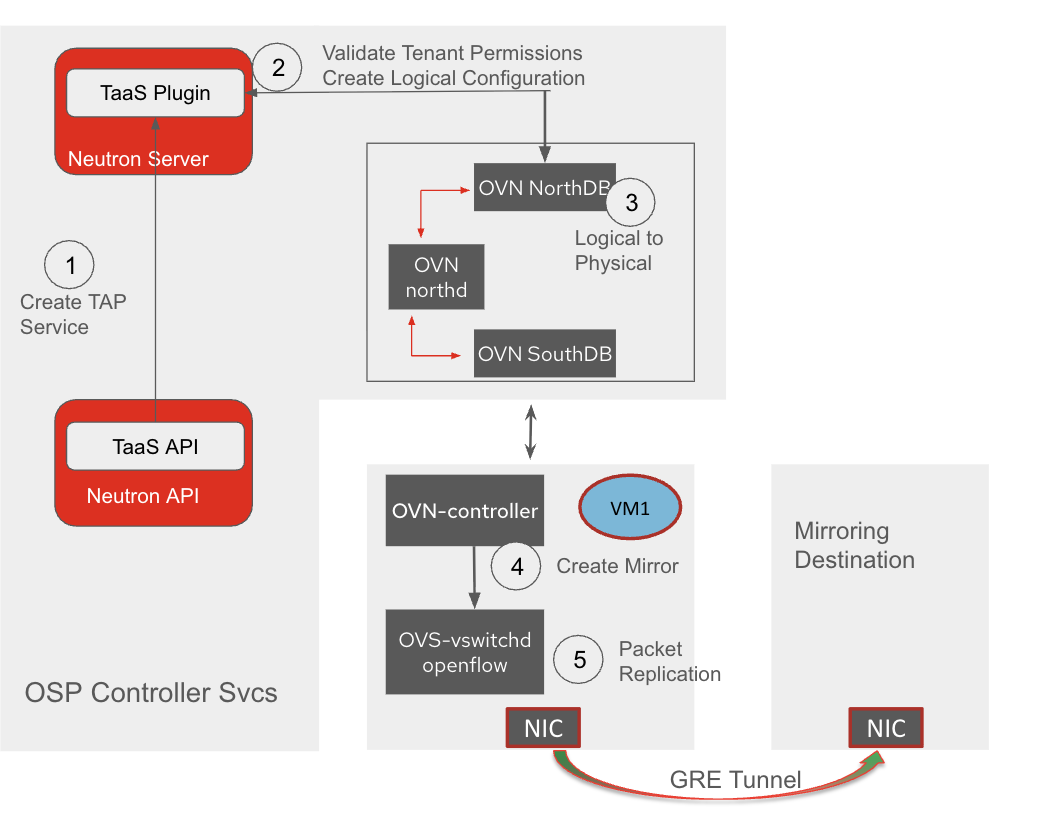
The process involves several steps for operationalizing TAP-as-a-Service (TAPaaS) in an OpenStack Services on OpenShift deployment. First, the ML2-OVN component translates the TAPaaS objects into OVN mirror entries, adding tunneling if necessary. This mirror configuration is then added to the OVN Northbound (NB) DB via an update. The OVN Southbound (SB) DB processes this information, translating it into physical implementation details. Finally, the OVN controller implementation applies the mirroring rules on the compute nodes and creates tunnel interfaces for remote mirroring.
Configure remote port mirroring using TAPaaS
Assuming an existing VM port is called vm_port. This command selects vm_port as the port to mirror. The mirrored traffic will be in the IN (ingress) direction, encapsulated in a erspanv1 which will be tagged with the tag 101. Lastly, the mirrored traffic will be sent to 10.100.0.20 IP.
$ openstack tap mirror create --port vm_port --name mirror1 --directions IN=101 --remote-ip 10.100.0.20 --mirror-type erspanv1
To get other options, use the following command:
openstack tap mirror create –helpTunneling protocols for remote mirroring
Generic routing encapsulation (GRE) is a tunneling protocol that can encapsulate a wide variety of network layer protocols inside virtual point-to-point links. In the context of TAPaaS:
- Encapsulation: Mirrored packets are encapsulated in GRE headers
- Protocol ID: Uses protocol ID 0x6558 for mirrored traffic
- Header format:
- 4 bytes of GRE header with optional fields
- Preserve the original packet as payload
ERSPAN tunneling
Encapsulated remote switched port analyzer (ERSPAN) is a Cisco proprietary tunneling protocol specifically designed for port mirroring over routed networks. It adds more metadata about the mirrored traffic:
- Encapsulation: Mirrored packets are encapsulated in ERSPAN headers + GRE
- Protocol ID: Uses GRE protocol ID 0x88BE
Header format:
- 8-byte ERSPAN header containing:
- Session ID (to identify the mirror session)
- Direction (ingress/egress)
- VLAN information
- Timestamp
- Original packet is preserved as payload
Future work and considerations
Security and performance considerations must be well understood before deploying TAP-as-a-Service. Performance in the form of resource footprint required for deploying a port mirror and the impact on performance of the user workloads. Although port mirroring enables applications such as lawful intercept, additional features may need to be implemented to fully enable lawful intercept using TAPaaS.
The current feature enables TAPaaS for ML2-OVN, but additional feature capabilities such as support for port mirroring in both ingress and egress directions, precautionary quota limits, VM migration need to be investigated. To learn more about TAPaaS, visit the GitHub page.

