Argo CD provides numerous ways to deploy resources from a Helm chart. In this article, you will learn about three patterns used to manage and deploy Helm charts, including when and where to use each pattern in your GitOps environment and the advantages and disadvantages.
3 patterns for Helm charts
We will discuss the following three patterns used to manage and deploy Helm charts:
- Argo application pointing at a chart in a Helm repo.
- Argo application pointing at a chart in a Git repo.
- Argo application pointing at a Kustomize folder to render a chart.
1. Argo application pointing at a chart in a Helm repo
The first option for deploying a Helm chart is by referencing a chart that is hosted in a Helm repository.
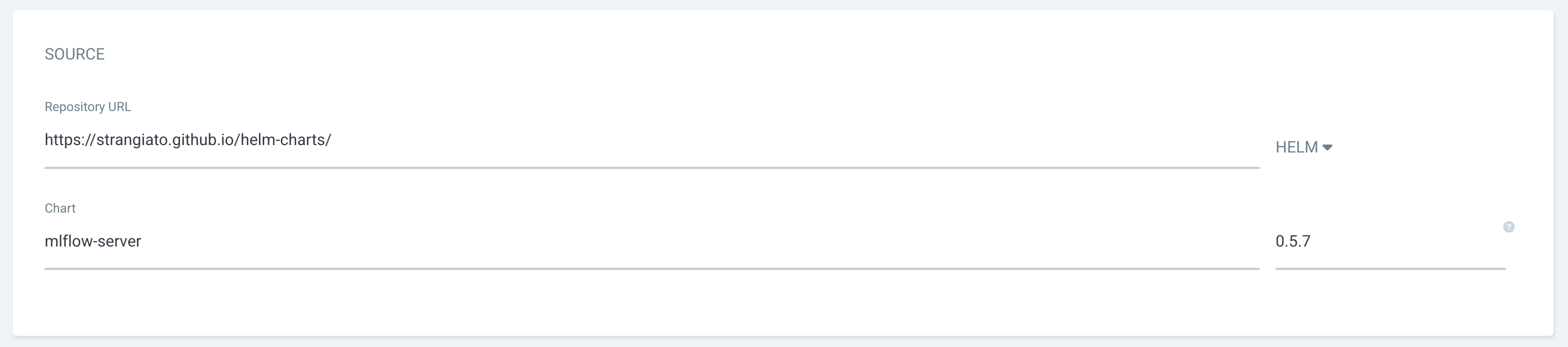
When deploying a chart from the Argo CD UI, users provide a URL to the Helm repo containing a collection of charts and selects the Helm option in the Source menu. The Chart and Version fields will provide a list of available options from a dropdown menu (Figure 1).
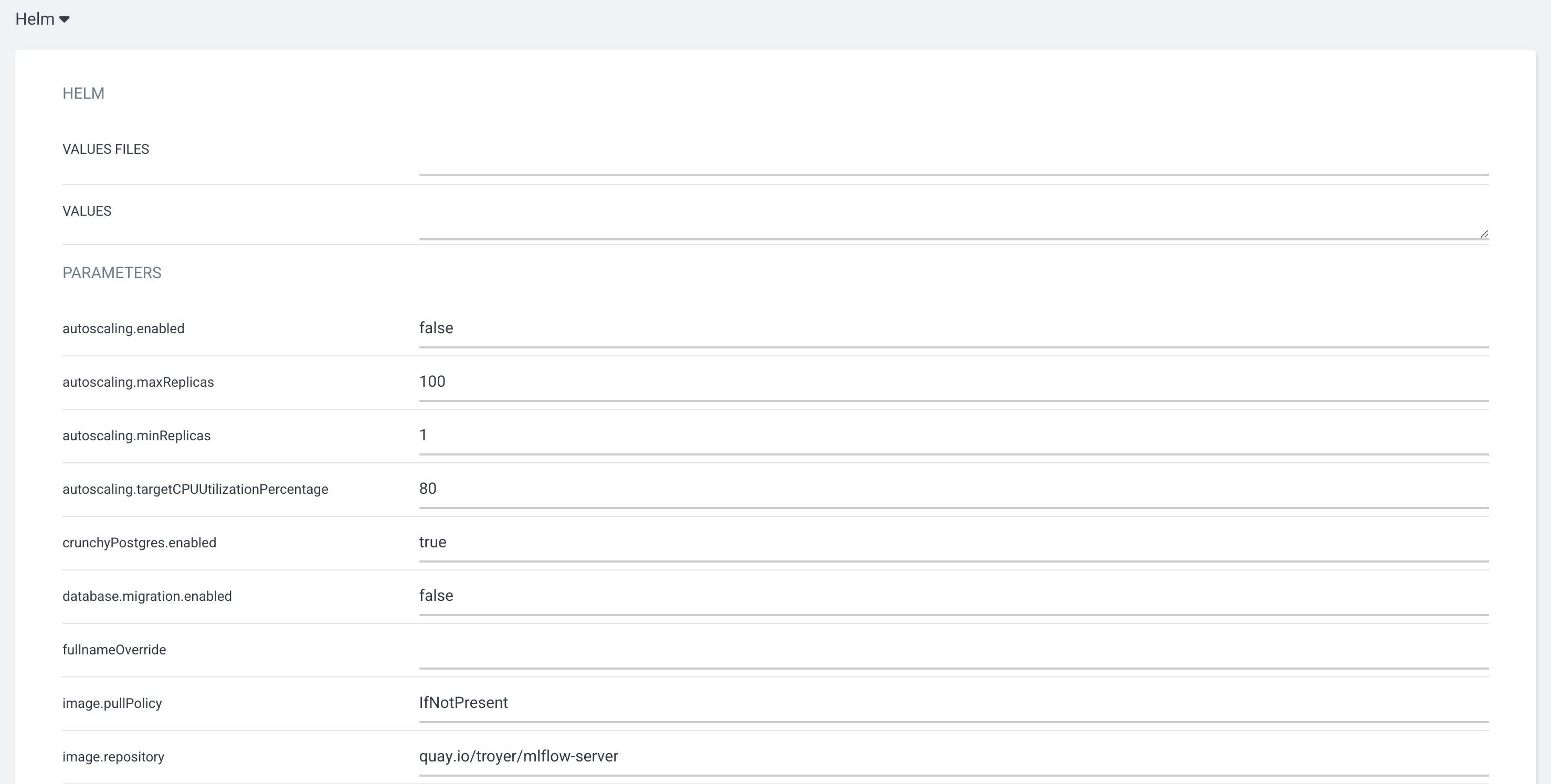
Once you have entered the a chart in the Source section, a Helm section will become available, allowing you to specify a values file, values in a YAML format, or the default parameters auto-populated by the chart (Figure 2).
Advantages and disadvantages of deploying a chart from a Helm repo
The advantage of deploying a chart directly from a Helm repo is that the UI provides a simple and intuitive user experience. The UI auto-populates the default parameters, presenting configurable options to end users and avoiding mistakes such as misspelled parameter names. This ease of use makes this one of the first options for new users of Argo.
However, this option makes it challenging to troubleshoot or render a helm chart from a development machine with the helm template command. Any parameters that are populated in the UI are added into the Argo application object which can be manually duplicated on the command line when running helm template. But this option leaves room for errors and typos. The future option to add a values.yaml file from a separate Git repo greatly improves the ability to render the chart locally, but it can leave the values.yaml file orphaned in the Git repo without any additional context, such as the chart repo, name, and version.
Another disadvantage is that this design pattern does not allow for any flexibility or customization to objects deployed in the chart that are not explicitly allowed by the original chart author. For example, if the original author does not include options to set a nodeSelector in the values, users will not have the ability to set that option in a deployment.
Other considerations
Deploying the chart directly from a Helm repo is best for deploying charts that are well maintained, documented, and require minimal troubleshooting. This option is great for rapid chart deployment and prototyping or set-it-and-forget-it deployments.
The challenges of rendering the chart locally can make this option especially challenging when developing custom charts. In many cases, too much logic and configuration ends up in the Argo application object making it difficult to maintain. This feature in Argo does not currently allow you to utilize another Git repo as a source for the values.yaml file, which is one of the main challenges of using this pattern for resources that need to be maintained over time.
2. Argo application pointing at a chart in a Git repo
Another option for deploying a Helm chart with Argo is generating a chart and storing it directly in a Git repo. When using this option, users provide a Git repo URL and the path to the Chart.yaml file. Argo will automatically detect the Helm chart and render the chart when deploying.
Charts stored in the Git repo can be a fully self-contained chart with their own yaml templates or it can take advantage of chart dependencies to deploy charts hosted in a Helm repo or another chart in the same Git repo. Utilizing a chart to configure a dependency and setting parameters with the values.yaml file of that chart are sometimes referred to as a proxy chart.
To utilize a chart stored in a Helm repo, you can provide the dependency information in the Chart.yaml object as follows:
dependencies:
  - name: "mlflow-server"
    version: "0.5.7"
    repository: "https://strangiato.github.io/helm-charts/"
To reference another chart located in the same Git repo, you can utilize the file:// protocol in the Chart.yaml files repository field:
dependencies:
  - name: "my-local-chart"
    version: "0.1.0"
    repository: "file://../my-local-chart/"
You can configure parameters in the local Helm chart by using the values.yaml file, and Argo will automatically utilize this file when rendering the chart.
Leveraging chart dependencies within the same Git repo allows for a flexible pattern for building out a multi-tiered application deployment to different environments. By creating a simple chart folder structure, such as the following example, users can develop a custom chart for an application deployed to multiple environments and provide configuration differences in the environment-charts values.yaml file.
.
├── common-charts
│   └── my-application
└── environment-charts
    ├── dev
    │   └── my-application
    ├── prod
    │   └── my-application
    └── test
        └── my-application
Advantages and disadvantages of deploying a chart from a Git repo
An advantage of this design pattern provides the most native Helm developer experience and allows developers to take advantage of Helm features, such as helm template and helm lint in their local environment, allowing them to easily render the chart locally for testing.
Another advantage of this pattern is when deploying to multiple environments, it enables you to manage the lifecycle of your chart separately in each environment. When utilizing a dependency of a chart stored in a Helm repo, your dev environment can be utilizing v1.1.0 while your prod environment is utilizing v1.0.0.
A disadvantage of deploying a chart from a Git repo is similar to the Helm repo pattern. If the original author does not provide an option to configure a specific setting, users will not have the ability to set those options.
This option is also limited to only allowing users to provide parameters in the values.yaml file. Users are not able to create separate values.yaml files for different environments in a single chart and instead must create a separate chart for each environment they wish to configure.
Another disadvantage is that this pattern can create junk files for a simple deployment that may not be necessary in the final Git repo, such as .helmignore, Chart.lock or dependent chart *.tgz files downloaded locally for testing. Some of these files may be added to the .gitignore file to reduce clutter in the repo.
Other considerations
This option is ideal for getting maximum flexibility when developing a custom charts. The ability to create a simple chart without packaging and storing it in a Helm repo allows for extremely rapid prototyping.
If you manage a chart with a more complex lifecycle, this pattern allows users to maintain different environments with different chart versions and promote changes through the environments in a similar way that images can be promoted to different environments.
3. Argo application pointing at a Kustomize folder to render a chart
The third pattern for deploying Helm charts with Argo is by rendering a Helm chart with Kustomize. In your kustomization.yaml file, you can provide chart details, including the Helm repo, chart version, and values. This provides similar capabilities to the proxy chart capabilities with the Kustomize tooling.
Values can be provided using valuesFile to reference a file relative to the kustomization.yaml file or with valuesInline where you can directly specify parameters.
apiVersion: kustomize.config.k8s.io/v1beta1
kind: Kustomization

helmCharts:
- name: mlflow-server
  repo: https://strangiato.github.io/helm-charts/
  version: "0.5.7"
  releaseName: mlflow-server
  namespace: my-namespace
  valuesFile: values.yaml
  valuesInline:
    fullnameOverride: helloagain
From your local environment, you can render the chart by running kustomize build . --enable-helm.
To utilize this option with Argo, you must provide the enable-helm flag in the Argo CD object definition as follows:
apiVersion: argoproj.io/v1alpha1
kind: ArgoCD
metadata:
  name: argocd
spec:
  kustomizeBuildOptions: "--enable-helm"
Advantages and disadvantages of rendering a Helm chart with Kustomize
If a team is already heavily relying on Kustomize in their GitOps environments, utilizing Kustomize to render a Helm chart can help to keep a higher consistency with other configurations and reduce the number of tools needed in the repo.
Another advantage is that the combination of Kustomize with Helm also provides a powerful option to patch objects. When leveraging the base/overlays Kustomize pattern, a Helm chart renders in the base layer and additional patches apply in overlays. The ability to apply patches after the Helm chart renders allows you to modify the objects in ways the original chart author did not include.
A disadvantage is that the --enable-helm flag introduces complexity when attempting to troubleshoot a chart locally. Users may also experience issues when attempting to apply the Kustomize resources with oc apply -k since the Kustomize tools built into oc/kubectl do not support the --enable-helm flag. Additionally, this option does require modification to the default Argo CD deployment to enable the feature, which some users may not have permission to do.
Another disadvantage when using this pattern, is that once Kustomize has inflated the chart, the objects are treated just like any other YAML objects, and is no longer Helm chart. When utilizing the base/overlays model as previously described, you will lose the ability to control the chart objects using the values parameters.
Other considerations
This option is ideal for users that are already heavily relying on Kustomize and don't want to introduce another tool their environment. This option is also fantastic when you do not control the Helm chart that you are attempting to deploy, and you need to modify it in a way that the original author didn't include as a configurable option.
Helping you choose a pattern for Helm chart deployment
In future versions of Red Hat OpenShift GitOps, Argo CD will support the ability to define multiple sources for objects, such as a Helm chart from one repo and a values.yaml file from another, which could help to eliminate some of the shortcomings of deploying a Helm chart directly from a Helm repo. This feature is discussed in more detail in the article Multiple sources for Argo CD applications.
One of the major challenges faced by the GitOps community is finding the correct way to manage resources and a GitOps repo with growing complexity. In many cases, there is no one correct solution, and the three options presented here are valid patterns for deploying and managing Helm charts. Hopefully, the advantages and disadvantages discussed in this article provided insight for the next time you need to choose the best option to incorporate a Helm chart into your environment.
Last updated: April 14, 2025
