This article explains how to configure authentication for Red Hat Data Grid in Red Hat OpenShift 4 by delegating console access control to single sign-on (SSO) using Red Hat build of Keycloak. (Note: Direct directory integration using LDAP/LDAPS follows in part 2 of this series.)
What this article covers:
- Red Hat build of Keycloak: Remote cache authentication using Keycloak for single sign-on. Choose this pattern when you need centralized SSO and token management across multiple microservices.
- Data Grid and Keycloak operators: Deploying and configuring Keycloak and Data Grid using Red Hat OpenShift custom resources and Helm.
What this article does not cover:
- Red Hat's single sign-on operator externalization to Data Grid: Remote cache use from Keycloak to Data Grid 8.
- SSO cross-site use or related integrations: Cross-site data backup configurations, which might be unsupported.
Fundamentals
Before configuring the authentication flow, let's review the core components involved and how they interact.
Red Hat Data Grid
Red Hat Data Grid (a Java application) is an in-memory caching solution you can use to externalize any type of data. You can use it for AI optimizations, for example, or cookie externalization in Red Hat JBoss Enterprise Application Platform (JBoss EAP).
You can deploy Data Grid using the Data Grid operator and Helm charts.
As explained in the article How to install and upgrade Data Grid 8 Operator in terms of application operators, Data Grid Operator (a Go application) deploys Data Grid by providing 5 APIs for creating a Data Grid cluster/caches/custom settings. The Data Grid operator provides custom resources (CRs), which are based on template files called custom resource definitions (CRDs). The CRDs are installed together with the Data Grid operator through an Operator Lifecycle Manager (OLM) bundle, and they reside in the etcd database across the Red Hat OpenShift Container Platform cluster.
Data Grid provides authorization, authentication, and encryption for cluster access, defined as follows:
| Type | Purpose |
|---|---|
| Authentication | Allows users to access Data Grid clusters and manipulate data with or without credentials (for example, developer or operator roles). |
| Authorization | Secure access to Data Grid services by configuring role-based access control (RBAC) for users |
| Encryption | Encrypt connections between clients and Data Grid pods with Red Hat OpenShift service certificates or custom TLS certificates |
This article focuses on delegating Data Grid authentication to Red Hat build of Keycloak (deployed by the Keycloak operator) in Red Hat OpenShift Container Platform 4.
Keycloak and Keycloak operator
Red Hat build of Keycloak is Red Hat's solution for identity access management (IAM) based on the Keycloak open source project. Red Hat build of Keycloak is deployed by the Red Hat build of Keycloak Operator.
Red Hat build of Keycloak has fully replaced single sign-on from Red Hat. However, because teams might still be transitioning, we have included comparative details in this article.
Data Grid integration with the Keycloak operator
Delegating Data Grid authentication to Keycloak consolidates access control into a single service instead of managing credentials directly inside Data Grid. It also provides enterprise Keycloak capabilities, including external database backing and automated user exports.
Red Hat build of Keycloak is Quarkus-based and deploys in Red Hat OpenShift 4 through the Keycloak operator (version 26). Data Grid uses OAuth2 introspection (defined in RFC 7662) to verify active access tokens with Keycloak before granting access.
Figure 1 illustrates this authentication flow.
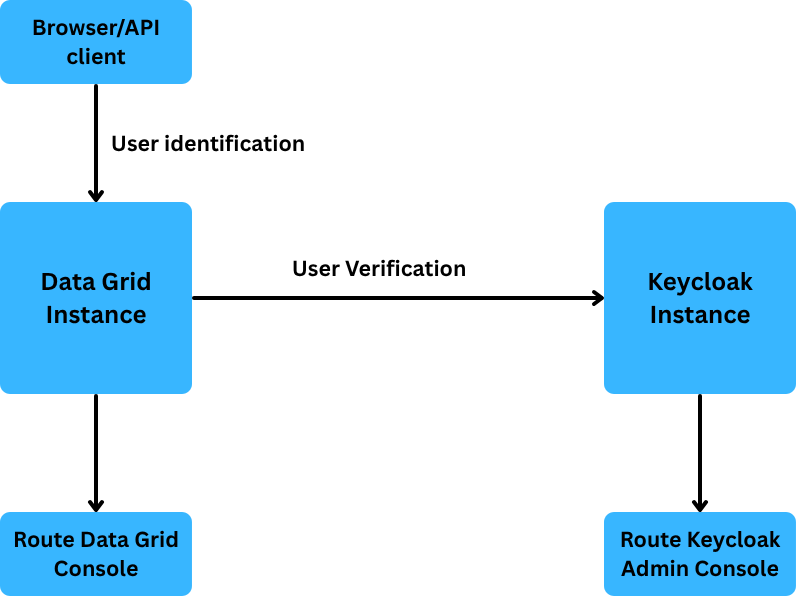
The authentication sequence follows a standard OpenID Connect (OIDC) pattern: Data Grid acts as an OIDC client using the public datagrid-console client to initiate the authorization code flow. After a user logs in through Keycloak, Keycloak redirects the browser back, and Data Grid establishes a session.
Define the Helm values file
For this integration, we deploy Data Grid in Red Hat OpenShift 4 using Helm charts. Create a values file like the following example:
images:
  initContainer: registry.access.redhat.com/ubi8-micro
  server: registry.redhat.io/datagrid/datagrid-8-rhel9
deploy:
  monitoring:
    enabled: false
  clusterDomain: cluster.local
  container:
    imagePullPolicy: Always
    storage:
      ephemeral: false
      size: 1Gi
    resources:
      limits:
        cpu: 1
        memory: 512Mi
      requests:
        cpu: 1
        memory: 512Mi
  security:
    batch: user create admin -p example
  expose:
    type: Route
    nodePort: 0
  logging:
    categories:
      - level: warn
        category: com.arjuna
      - level: error
        category: io.netty.handler.ssl.ApplicationProtocolNegotiationHandler
  infinispan:
    server:
      security:
        securityRealms:
          - name: default
            tokenRealm:
              name: realm-datagrid
              authServerUrl: 'https://${RHBK_HOST}'
              client-id: datagrid-console
              oauth2Introspection:
                clientId: 'datagrid-client'
                clientSecret: 'client-secret'
                introspectionUrl: 'http://rhbk-service.${NAMESPACE}.svc.cluster.local:8080/realms/datagrid/protocol/openid-connect/token/introspect'
            propertiesRealm:
              groupProperties:
                path: groups.properties
              groupsAttribute: Roles
              userProperties:
                path: users.properties
          - name: metrics
            propertiesRealm:
              groupProperties:
                path: metrics-groups.properties
                relativeTo: infinispan.server.config.path
              groupsAttribute: Roles
              userProperties:
                path: metrics-users.properties
                relativeTo: infinispan.server.config.path
        credentialStores:
          - clearTextCredential:
              clearText: secret
            name: credentials
            path: credentials.pfx
      endpoints:
        - securityRealm: default
          socketBinding: default
        - connectors:
            rest:
              restConnector:
                authentication:
                  mechanisms: BASIC
          securityRealm: metrics
          socketBinding: metrics
      interfaces:
        - inetAddress:
            value: '${infinispan.bind.address:127.0.0.1}'
          name: public
      socketBindings:
        defaultInterface: public
        portOffset: '${infinispan.socket.binding.port-offset:0}'
        socketBinding:
          - name: default
            port: 11222
          - name: metrics
            port: 11223
    cacheContainer:
      globalState:
        uncleanShutdownAction: IGNORE
      name: default
      transport:
        cluster: '${infinispan.cluster.name:cluster}'
        node-name: '${infinispan.node.name:}'
        stack: kubernetes
  makeDataDirWritable: false
  podAntiAffinity: |
    preferredDuringSchedulingIgnoredDuringExecution:
      - podAffinityTerm:
          labelSelector:
            matchLabels:
              clusterName: {{ include "infinispan-helm-charts.name" . }}
              app: infinispan-pod
          topologyKey: kubernetes.io/hostname
        weight: 100
  replicas: 2
This Helm configuration deploys Data Grid as a StatefulSet and has authServerUrl and introspectionUrl pointed to the SSO deployment.
In this Helm chart values file, you configure 2 items: the security realm and the endpoint.
Configure Keycloak authentication
Configure the required Keycloak settings, starting with the PostgreSQL database and followed by the Keycloak instance.
Deploy the PostgreSQL database
For this example, deploy PostgreSQL as the database:
---
apiVersion: v1
kind: Secret
metadata:
  name: rhbk-db-credentials
  namespace: ${NAMESPACE}
type: Opaque
stringData:
  username: keycloak
  password: ${POSTGRES_PASSWORD}
---
apiVersion: v1
kind: Service
metadata:
  name: postgresql
  namespace: ${NAMESPACE}
spec:
  selector:
    app: postgresql
  ports:
    - port: 5432
      targetPort: 5432
---
apiVersion: apps/v1
kind: Deployment
metadata:
  name: postgresql
  namespace: ${NAMESPACE}
spec:
  replicas: 1
  selector:
    matchLabels:
      app: postgresql
  template:
    metadata:
      labels:
        app: postgresql
    spec:
      containers:
        - name: postgresql
          image: registry.redhat.io/rhel9/postgresql-15:latest
          env:
            - name: POSTGRESQL_USER
              valueFrom:
                secretKeyRef:
                  name: rhbk-db-credentials
                  key: username
            - name: POSTGRESQL_PASSWORD
              valueFrom:
                secretKeyRef:
                  name: rhbk-db-credentials
                  key: password
            - name: POSTGRESQL_DATABASE
              value: keycloak
          ports:
            - containerPort: 5432
          readinessProbe:
            exec:
              command: ["psql", "-U", "keycloak", "-d", "keycloak", "-c", "SELECT 1"]
            initialDelaySeconds: 10
            periodSeconds: 5
Deploy Red Hat build of Keycloak
After completing the prerequisites, deploy Red Hat build of Keycloak as shown in the following procedure:
Install Keycloak operator 26:
### Subscription file
$ oc get sub rhbk-operator -o yaml
apiVersion: operators.coreos.com/v1alpha1
kind: Subscription
metadata:
  labels:
    operators.coreos.com/rhbk-operator.demo: ""
  name: rhbk-operator
  namespace: dg-integration
spec:
  channel: stable-v26.4
  installPlanApproval: Automatic
  name: rhbk-operator
  source: redhat-operators
  sourceNamespace: openshift-marketplace
  startingCSV: rhbk-operator.v26.4.11-opr.1 <--------------------------- version 26
An OperatorGroup is required for manual installation through the CLI (but not through OperatorHub, which creates it automatically).
### OperatorGroup - required
$ oc get og dg-integration-id -o yaml
apiVersion: operators.coreos.com/v1
kind: OperatorGroup
metadata:
  annotations:
    olm.providedAPIs: Keycloak.v2alpha1.k8s.keycloak.org,KeycloakRealmImport.v2alpha1.k8s.keycloak.org
  name: dg-integration-id
  namespace: dg-integration
spec:
  targetNamespaces:
  - demo
  upgradeStrategy: Default
status:
  namespaces:
  - dg-integration <----------------- RHBK only supports one namespace as target
Note: The OLM annotation lists the provided APIs associated with that OperatorGroup: Keycloak and KeycloakRealmImport.
Create the Keycloak instance:
apiVersion: k8s.keycloak.org/v2alpha1
kind: Keycloak
metadata:
  name: rhbk
  namespace: ${NAMESPACE}
spec:
  instances: 1
  db:
    vendor: postgres
    host: postgresql
    database: keycloak
    usernameSecret:
      name: rhbk-db-credentials
      key: username
    passwordSecret:
      name: rhbk-db-credentials
      key: password
  http:
    httpEnabled: true
  hostname:
    # External hostname used in browser redirects (OIDC login page, token issuer URL).
    # Must be reachable by end-user browsers.
    hostname: https://${RHBK_HOST}
    strict: true
    # true is required when hostname is set: internal backchannel calls (Data Grid →
    # RHBK) resolve via request headers so they still reach the internal service,
    # while browser redirects use the configured hostname above.
    backchannelDynamic: false
  # Trust X-Forwarded-Proto/Host headers set by the OpenShift router so that RHBK
  # knows the external scheme is HTTPS even though it listens on plain HTTP internally.
  proxy:
    headers: xforwarded
  ingress:
    enabled: true
    # Tell the OpenShift Ingress controller to use edge TLS termination:
    # the router presents its wildcard cert to browsers, then forwards
    # plain HTTP to the RHBK service (which listens on 8080).
    annotations:
      route.openshift.io/termination: edge
Create the Data Grid realm custom resource
To complete the core integration for Data Grid, create a Keycloak realm that defines the following details:
- Core realm details
- Clients
- Roles
- Users
Here is the complete file:
apiVersion: k8s.keycloak.org/v2alpha1
kind: KeycloakRealmImport
metadata:
  name: datagrid-realm
  namespace: ${NAMESPACE}
spec:
  keycloakCRName: rhbk
  realm:
    realm: datagrid
    displayName: "Data Grid Realm"
    enabled: true

    clients:
      # ── Public client used by the Data Grid web console (browser-based SSO) ──
      - clientId: datagrid-console
        name: "Data Grid Console"
        enabled: true
        publicClient: true
        standardFlowEnabled: true
        directAccessGrantsEnabled: false
        serviceAccountsEnabled: false
        redirectUris:
          - "https://${DATAGRID_HOST}/*"
        webOrigins:
          - "https://${DATAGRID_HOST}"
        protocol: openid-connect

      # ── Confidential client used by Data Grid server for token introspection ──
      - clientId: datagrid-client
        name: "Data Grid Server"
        enabled: true
        publicClient: false
        standardFlowEnabled: false
        directAccessGrantsEnabled: true
        serviceAccountsEnabled: true
        secret: "${DG_CLIENT_SECRET}"
        protocol: openid-connect

    roles:
      realm:
        - name: admin
          description: "Full read/write access plus administrative operations"
        - name: application
          description: "Full read/write access for application use"
        - name: observer
          description: "Read-only access"
        - name: monitor
          description: "Statistics and monitoring access"

    users:
      - username: admin-user
        enabled: true
        # KC v26 requires firstName, lastName, email and emailVerified=true or
        # logins fail with "Account is not fully set up" even when requiredActions=[].
        firstName: Admin
        lastName: User
        email: admin-user@example.com
        emailVerified: true
        requiredActions: []
        credentials:
          - type: password
            value: "${ADMIN_USER_PASSWORD}"
            temporary: false
        realmRoles:
          - admin

      - username: app-user
        enabled: true
        firstName: App
        lastName: User
        email: app-user@example.com
        emailVerified: true
        requiredActions: []
        credentials:
          - type: password
            value: "${APP_USER_PASSWORD}"
            temporary: false
        realmRoles:
          - application
The KeycloakRealmImport CR is the core of the integration and is directly associated with the Keycloak CR through the spec.keycloakCRName field. It contains all clients, roles, and users.
Configure legacy single sign-on (SSO) clients
If you're managing a single realm, importing a KeycloakRealmImport custom resource is straightforward. If you're migrating from Red Hat's single sign-on technology, however, you need KeycloakClient custom resources.
Although deprecated, this legacy approach is included for migration reference:
- Declare Keycloak custom resources.
Create 2 separate
KeycloakClientcustom resources. The following example shows aKeycloakClientcustom resource:apiVersion: k8s.keycloak.org/v2alpha1 kind: KeycloakClient metadata: name: dg-console namespace: rhbk-namespace spec: keycloakCRName: rhbk-instance realm: datagrid client: clientId: datagrid-console publicClient: true standardFlowEnabled: true redirectUris: - "https://dg-route.apps.example.com/console/*" webOrigins: - "+"Retrieve the initial admin password generated by the operator:
# Create the user
$ oc get secret <instance-name>-initial-admin -o jsonpath='{.data.password}' | base64 --decode
Create the Red Hat OpenShift route:
apiVersion: route.openshift.io/v1
kind: Route
metadata:
  name: keycloak-forwarder
  namespace: rhbk-namespace
spec:
  host: sso.apps.example.com
  to:
    kind: Service
    name: rhbk-instance-service # The service name created by the Operator
    weight: 100
  port:
    targetPort: https
  tls:
    termination: edge # Route decrypts, then forwards (can also use reencrypt)
    insecureEdgeTerminationPolicy: Redirect
Verify the authentication flow
To verify the deployment, navigate to the Data Grid console route in your browser and sign in using the administrator credentials configured in the Keycloak realm. After authentication succeeds, the browser redirects to the Data Grid web console dashboard, as shown in Figure 2.
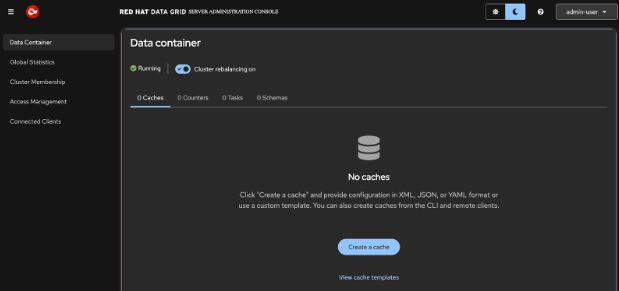
The integration requires 2 client IDs configured in Red Hat build of Keycloak:
datagrid-console: A public client that handles browser-based authentication when users access the Data Grid console through a Red Hat OpenShift route.datagrid-client: A confidential client that the Data Grid server uses to perform token introspection with Red Hat build of Keycloak.
View the sample configuration from the Infinispan tutorial on securing remote caches with Keycloak (Docker environment).
Review the complete Red Hat OpenShift YAML example.
Comparing Red Hat build of Keycloak and single sign-on (SSO)
For Red Hat build of Keycloak, the process is similar, except for the authServerUrl and introspectionUrl parameters. The URL structure varies across different Keycloak versions.
The following table compares the 2 implementations.
| Feature | Red Hat build of Keycloak | Single sign-on |
|---|---|---|
| Runtime foundation | Quarkus | Red Hat JBoss Enterprise Application Platform (JBoss EAP) |
| Custom resources | Keycloak, KeycloakRealmImport | Keycloak, KeycloakClient, KeycloakUser |
| Default endpoint path | /realms/{realm} (no /auth prefix) | /auth/realms/{realm} (requires /auth prefix) |
| Operator package | rhbk-operator | rhsso-operator |
Another difference is the Subscription configuration, because each operator requires a separate installation:
$ cat subscription-sso.yaml
apiVersion: operators.coreos.com/v1alpha1
kind: Subscription
metadata:
  name: rhsso-operator
  namespace: sso-dg-integration
spec:
  channel: stable
  installPlanApproval: Automatic
  name: rhsso-operator
  source: redhat-operators
  sourceNamespace: openshift-marketplace
  startingCSV: rhsso-operator.7.6.11-opr-003
Next steps and resources
The Keycloak integration described in this article builds on Katia Aresti's tutorial on securing Infinispan with Keycloak, demonstrating a deployment in Red Hat OpenShift 4 that has been thoroughly tested.
To test this configuration in your own environment, clone the sample repository and deploy the manifests directly to a Red Hat OpenShift 4 sandbox.
Explore the following resources to learn more about configuring security in Data Grid:
- Red Hat Data Grid documentation
- Infinispan Helm charts repository
- Red Hat Single Sign-On Operator 7.6 documentation (for migration reference)
Coming up in part 2
If your architecture relies on traditional corporate directories rather than token-based identity providers, read part 2, where we cover authenticating Red Hat Data Grid to LDAP and LDAPS.
Need help troubleshooting a production deployment? Open a case with Red Hat support. Special thanks to Santoshi Atmakuru, Will Russell, and the security team for their guidance, testing, and feedback on this architecture.

