Redhat Developers  Logo
  • AI

    Get started with AI

    • Red Hat AI
      Accelerate the development and deployment of enterprise AI solutions.
    • AI learning hub
      Explore learning materials and tools, organized by task.
    • AI interactive demos
      Click through scenarios with Red Hat AI, including training LLMs and more.
    • AI/ML learning paths
      Expand your OpenShift AI knowledge using these learning resources.
    • AI quickstarts
      Focused AI use cases designed for fast deployment on Red Hat AI platforms.
    • No-cost AI training
      Foundational Red Hat AI training.

    Featured resources

    • OpenShift AI learning
    • Open source AI for developers
    • AI product application development
    • Open source-powered AI/ML for hybrid cloud
    • AI and Node.js cheat sheet

    Red Hat AI Factory with NVIDIA

    • Red Hat AI Factory with NVIDIA is a co-engineered, enterprise-grade AI solution for building, deploying, and managing AI at scale across hybrid cloud environments.
    • Explore the solution
  • Learn

    Self-guided

    • Documentation
      Find answers, get step-by-step guidance, and learn how to use Red Hat products.
    • Learning paths
      Explore curated walkthroughs for common development tasks.
    • Guided learning
      Receive custom learning paths powered by our AI assistant.
    • See all learning

    Hands-on

    • Developer Sandbox
      Spin up Red Hat's products and technologies without setup or configuration.
    • Interactive labs
      Learn by doing in these hands-on, browser-based experiences.
    • Interactive demos
      Click through product features in these guided tours.

    Browse by topic

    • AI/ML
    • Automation
    • Java
    • Kubernetes
    • Linux
    • See all topics

    Training & certifications

    • Courses and exams
    • Certifications
    • Skills assessments
    • Red Hat Academy
    • Learning subscription
    • Explore training
  • Build

    Get started

    • Red Hat build of Podman Desktop
      A downloadable, local development hub to experiment with our products and builds.
    • Developer Sandbox
      Spin up Red Hat's products and technologies without setup or configuration.

    Download products

    • Access product downloads to start building and testing right away.
    • Red Hat Enterprise Linux
    • Red Hat AI
    • Red Hat OpenShift
    • Red Hat Ansible Automation Platform
    • See all products

    Featured

    • Red Hat build of OpenJDK
    • Red Hat JBoss Enterprise Application Platform
    • Red Hat OpenShift Dev Spaces
    • Red Hat Developer Toolset

    References

    • E-books
    • Documentation
    • Cheat sheets
    • Architecture center
  • Community

    Get involved

    • Events
    • Live AI events
    • Red Hat Summit
    • Red Hat Accelerators
    • Community discussions

    Follow along

    • Articles & blogs
    • Developer newsletter
    • Videos
    • Github

    Get help

    • Customer service
    • Customer support
    • Regional contacts
    • Find a partner

    Join the Red Hat Developer program

    • Download Red Hat products and project builds, access support documentation, learning content, and more.
    • Explore the benefits

Try Camel on Quarkus in the Developer Sandbox for Red Hat OpenShift

October 6, 2023
Bruno Meseguer
Related topics:
IntegrationQuarkus
Related products:
Developer SandboxRed Hat build of QuarkusRed Hat OpenShiftRed Hat OpenShift Container Platform

    You can now try Apache Camel on Quarkus in the Developer Sandbox for Red Hat OpenShift, an OpenShift environment you can access for a no-cost, hands-on experience in building and deploying cloud-native applications quickly. This article will guide you to the Developer Sandbox and through a Camel Quarkus integration in a fully web-based experience—no local installs needed.

    Camel Quarkus is the latest Camel runtime generation. It allows you to run integration processes with super-low memory usage, fast startup, and outstanding performance. The article Boost Apache Camel performance on Quarkus introduces the topic well.

    To learn more about the various Camel runtimes available, read the 3-part series article Choose the best Camel for your integration ride.

    REST and SOAP with Camel on Quarkus

    One recent addition to Camel Quarkus is the ability to perform SOAP operations using Apache CXF, a well-known Java library historically used by Camel but only recently available for Quarkus. 

    The demo defines a front-facing OpenAPI service called simple, which integrates with a back-end SOAP service. The code also includes the stub to simulate the SOAP endpoint. The flow showcases an adaptation layer from REST to SOAP. It’s a relatively simple use case but very common in the enterprise. It defines a REST API and hides a legacy service behind the scenes (Figure 1).
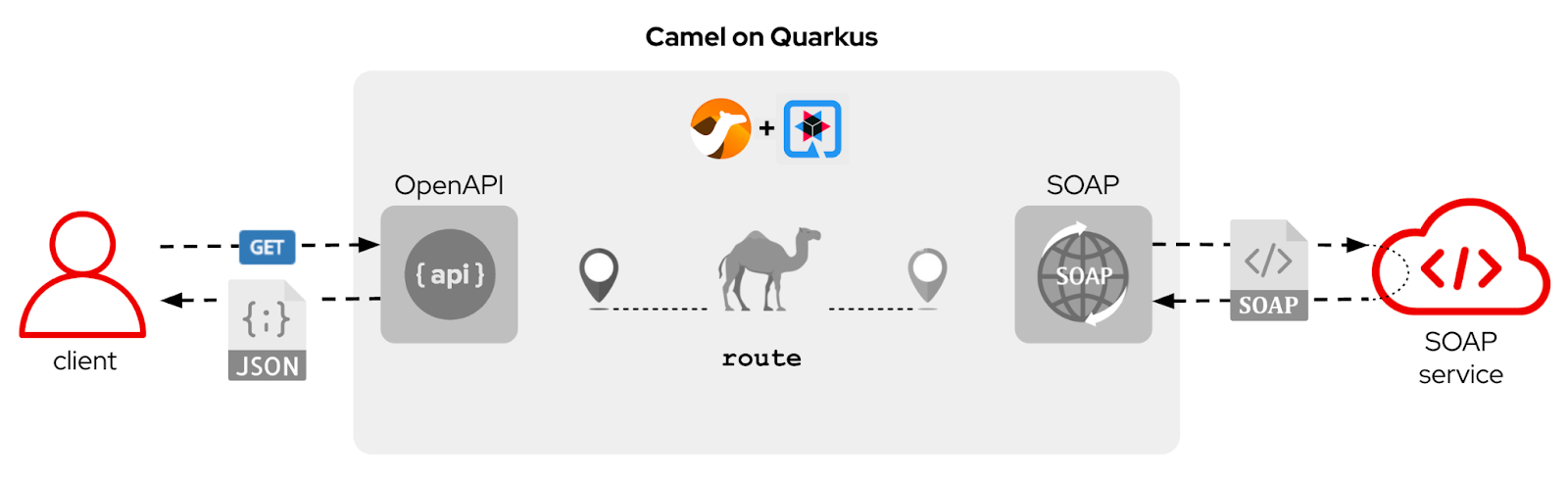
    Diagram showing the Camel on Quarkus flow from client to SOAP service.
    Figure 1: The Camel on Quarkus flow.

    Demo highlights

    The big win for you is the chance to play the demo in a free-to-access environment from your browser and view/edit the code, and build, deploy, and test the application. Regarding Camel on Quarkus, the example stands out on various fronts.

    First of all, both REST and SOAP interfaces are implemented following a contract-first approach. In essence, we rely on the OpenAPI (REST) and WSDL (SOAP) definitions to auto-generate the application’s input/output interfaces. Figure 2 shows how a contract-first OpenAPI helps the developer; this is also valid for SOAP.
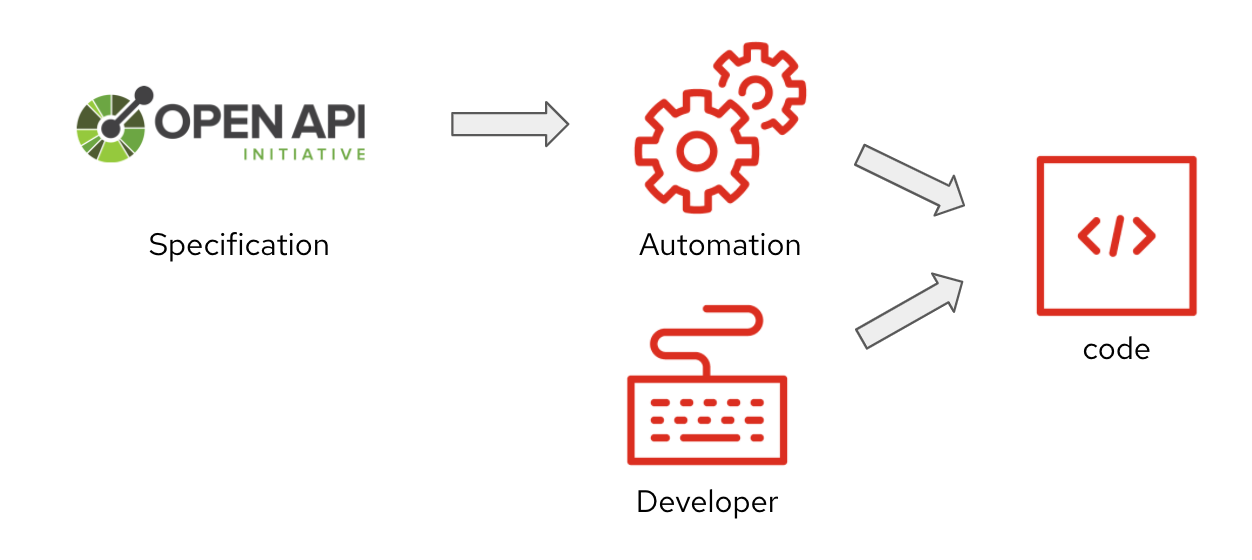
    Figure 2: Contract-first development.
    Figure 2: Contract-first development.

    Another notable feature in the demo is data transformation. JSON input must be mapped to outgoing SOAP during the request flow and perform the reverse operation during the response flow. It is all done in a single transformation stylesheet using XSLTs, as in Figure 3.
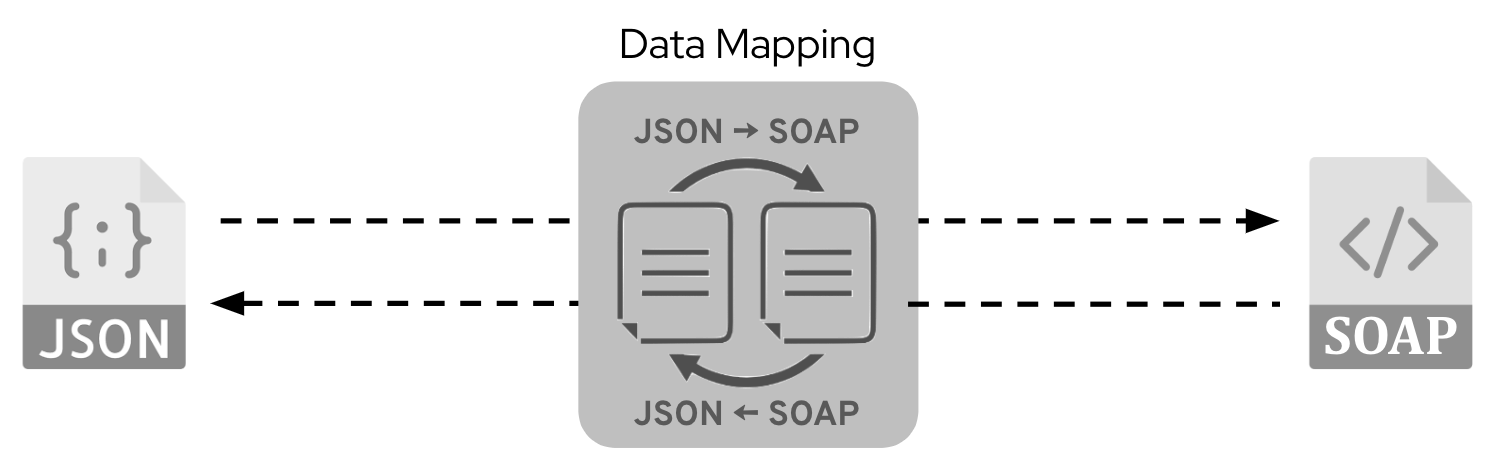
    Diagram of the JSON / SOAP data mapping flow.
    Figure 3: JSON / SOAP data mapping operations.

    And finally, included in the code, you’ll find a test unit (JUnit) to validate the entire request/response flow (Figure 4). You will discover how to use Camel’s testing framework to dynamically spin up an actual SOAP back end to test against, trigger the processing flow, and tear it all down when done.
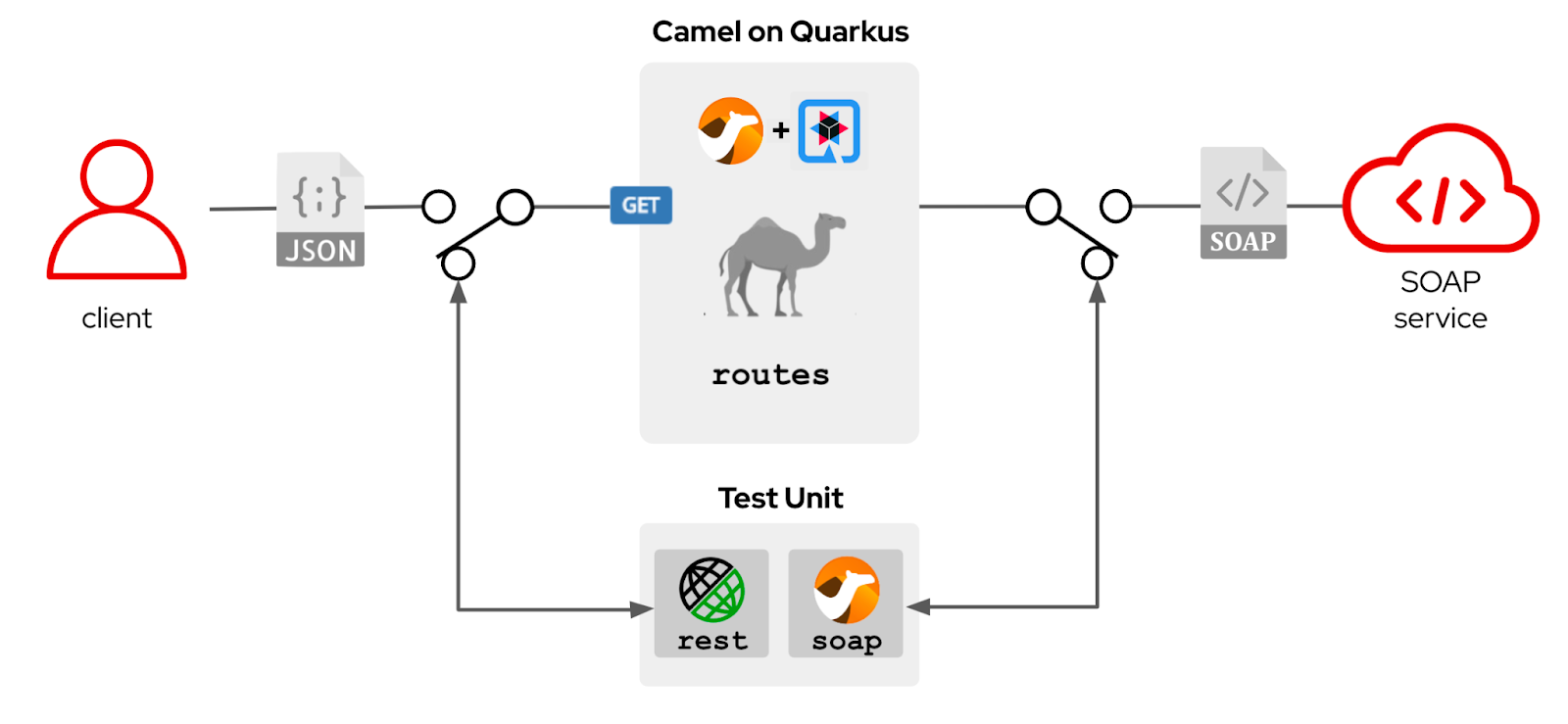
    The unit testing flow with Camel and JUnit.
    Figure 4: Unit testing with Camel.

    What is unique about Camel running on Quarkus, but also true for all runtimes, is how little code is required and how elegantly it is laid out. This simplicity guarantees economical, long-term, and sustainable support for your landscape of implemented Camel services.

    If you would like to see how all of this is done, jump straight into the Developer Sandbox to explore the code and execute it.

    Access the Developer Sandbox

    Follow these instructions to get started in the Developer Sandbox: How to access the Developer Sandbox for Red Hat OpenShift

    Once you have your browser connected to the Developer Sandbox console, you’ll be all set to start the article’s tutorial.

    Inside OpenShift Dev Spaces

    The Developer Sandbox ships with an entire web-based IDE called Red Hat OpenShift Dev Spaces (formerly Red Hat CodeReady Workspaces).

    Set up your dev environment with the Camel tutorials

    The animated sequence in Figure 5 illustrates the actions to follow to open your development environment along with your tutorial instructions.
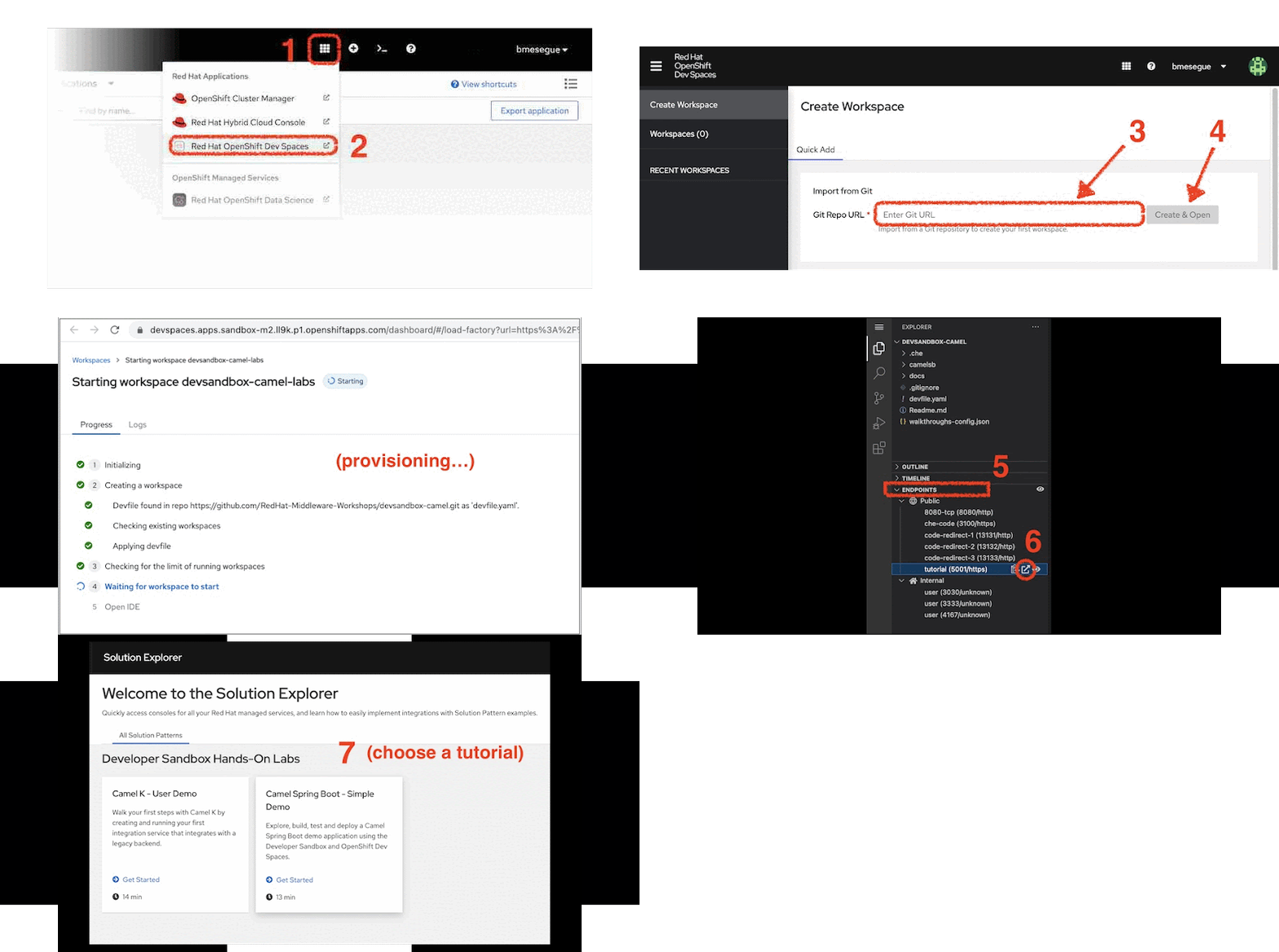
    The steps for setting up your development environment in the OpenShift Dev Spaces user interface.
    Figure 5: The OpenShift Dev Spaces UI.

    Follow these steps:

    1. From the web console, click the Applications icon as shown in Figure 5 (marked 1).
    2. Select Red Hat OpenShift Dev Spaces (2). You will be prompted to log in and authorize access; select the Allow selected permissions option.
    3. When the Create Workspace dashboard in OpenShift Dev Spaces opens, copy the snippet below:

      https://github.com/RedHat-Middleware-Workshops/devsandbox-camel.git

      Then, paste it into the Git Repo URL field (3).

    4. Click Create & Open (4).
    5. When the workspace finishes provisioning and the IDE opens, click the deployable Endpoints accordion (5).
    6. Then, click on the icon (6), which opens the tutorial in a new browser tab.
    7. Choose the tutorial indicated in the next section.

    Start the Camel Quarkus tutorial

    Select the Camel Quarkus - Rest/Soap Demo tile, highlighted in Figure 6.
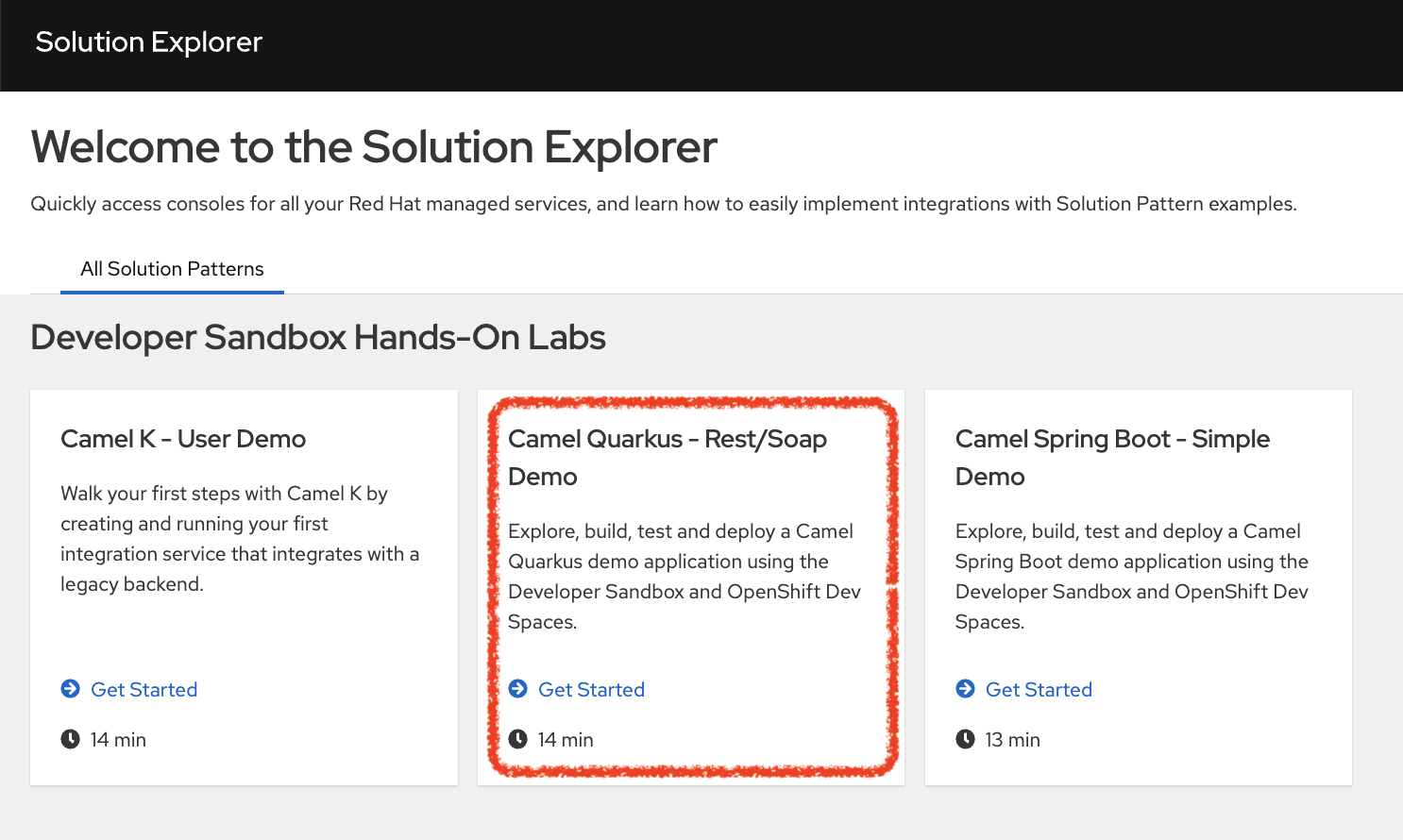
    The Camel Quarkus - Rest/Soap Demo tile highlighted in the Solution Explorer.
    Figure 6: Locating the Camel Quarkus tutorial.

    When you click on the tile, the Solution Explorer will show the lab introductions and the exercise chapters included, which you should be able to complete in around 15 minutes.

    Enjoy the Camel ride!

    Watch a video on how to get started

    Watch the following video to see an execution of the use case described in this article.

    More Apache Camel resources

    This article ends here, but this should only be the start of your journey with Apache Camel. The Developer Sandbox for Red Hat OpenShift gives you the opportunity to play on a Kubernetes-based application platform with an integrated developer IDE (OpenShift Dev Spaces).

    We encourage you to check out the resources below to learn more about Camel and explore different ways to build applications with Apache Camel:

    • Play with more tutorials in the Developer Sandbox for Red Hat OpenShift.
    • Learn more about the different Camel runtimes available by reading Choose the best Camel for your integration ride.
    • Read Boost Apache Camel performance with Quarkus for a detailed look at Camel Quarkus.
    • Visit the Red Hat Integration page on developers.redhat.com to see complementary capabilities around Camel.

    Last updated: November 1, 2023

    Related Posts

    • Choose the best Camel for your integration ride, Part 1

    • How Kamelets simplify Camel integrations on Kubernetes

    • Integrate Apache ActiveMQ brokers using Camel K

    • How to configure SOAP web services with Apache Camel

    • Boost Apache Camel performance on Quarkus

    • Build reactive apps on Kubernetes using Camel K

    Recent Posts

    • Tekton joins the CNCF as an incubating project

    • Federated identity across the hybrid cloud using zero trust workload identity manager

    • Confidential virtual machine storage attack scenarios

    • Introducing virtualization platform autopilot

    • Integrate zero trust workload identity manager with Red Hat OpenShift GitOps

    What’s up next?

    Looking for a quicker way to get your development projects up and running? This hands-on activity demonstrates how you can go from initial app idea to prototype code in as little as five minutes using Quarkus, Podman Desktop, and the no-cost Developer Sandbox for Red Hat OpenShift.

    Start coding
    Red Hat Developers logo LinkedIn YouTube Twitter Facebook

    Platforms

    • Red Hat AI
    • Red Hat Enterprise Linux
    • Red Hat OpenShift
    • Red Hat Ansible Automation Platform
    • See all products

    Build

    • Developer Sandbox
    • Developer tools
    • Interactive tutorials
    • API catalog

    Quicklinks

    • Learning resources
    • E-books
    • Cheat sheets
    • Blog
    • Events
    • Newsletter

    Communicate

    • About us
    • Contact sales
    • Find a partner
    • Report a website issue
    • Site status dashboard
    • Report a security problem

    RED HAT DEVELOPER

    Build here. Go anywhere.

    We serve the builders. The problem solvers who create careers with code.

    Join us if you’re a developer, software engineer, web designer, front-end designer, UX designer, computer scientist, architect, tester, product manager, project manager or team lead.

    Sign me up

    Red Hat legal and privacy links

    • About Red Hat
    • Jobs
    • Events
    • Locations
    • Contact Red Hat
    • Red Hat Blog
    • Inclusion at Red Hat
    • Cool Stuff Store
    • Red Hat Summit
    © 2026 Red Hat

    Red Hat legal and privacy links

    • Privacy statement
    • Terms of use
    • All policies and guidelines
    • Digital accessibility

    Chat Support

    Please log in with your Red Hat account to access chat support.