Page
Serve LLMs efficiently with vLLM

For anyone building or using LLM-based applications, understanding how the underlying inference engine works is critical to building a fast and efficient system. We’ll be working with vLLM, which brings in inference optimizations such as such as continuous batching (so we're not wasting compute waiting for the longest request), PagedAttention for managing the KV (Key-Value) cache in fixed-size blocks with little memory waste, and prefix caching to reuse KV entries when requests share the same system prompt. Plus, it natively supports quantized models like the one we’ve built in this learning path.
Prerequisites:
- A free Developer Sandbox account.
- An OpenShift API token that will be used as your LLM API key.
- Follow the Sandbox LLM guide to retrieve it.
- Follow the Getting started instructions in the Prerequisites lesson.
In this lesson, you will:
- Connect to a vLLM inference server serving a capable small language model.
- Query it using the OpenAI-compatible API.
- Explore model behavior with logprobs and sampling parameters.
- Observe continuous batching and KV cache usage via live Prometheus metrics.
- Demonstrate prefix caching.
Why are we using vLLM?
These days, LLM inference is primarily a memory management problem, not a compute problem. Every generated token requires another pass through the model while the KV Cache continuously grows, making efficient GPU memory usage the key to maximizing throughput (Figure 1).
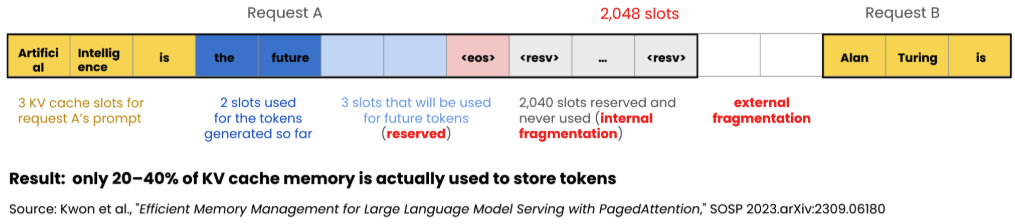
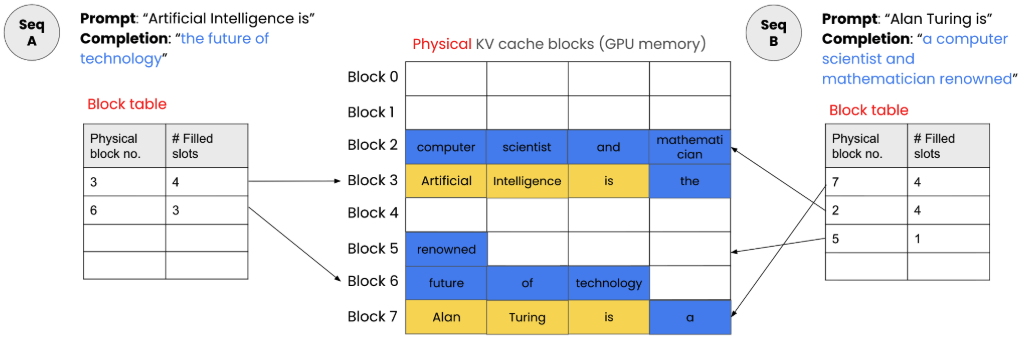
vLLM addresses this with innovations like continuous batching, PagedAttention, and prefix caching, which keep GPUs busy, eliminate KV cache fragmentation, and avoid redundant computation.
The result is lower latency, higher throughput, better GPU utilization, and lower infrastructure costs, making vLLM the production inference engine of choice for Red Hat OpenShift AI and enterprise deployments powered by Red Hat AI Inference (Figure 2).
Deploy a model with vLLM on OpenShift AI
Note
This section is for reference only. This has already been done for you.
If we were serving our model via the command line using vLLM, we would usually need to run a command like this:
vllm serve Qwen/Qwen3-0.6B --dtype=bfloat16 --max-model-len 4096Let's go through what each piece in this command means.
vllm serve:Launches vLLM's built-in inference server. It loads the model weights into the engine (with PagedAttention, continuous batching, and prefix caching enabled by default) and exposes it over HTTP on port 8000.Qwen/Qwen3-0.6B:The model identifier on the Hugging Face Hub. On the first run, vLLM downloads the weights, tokenizer, and config from Hugging Face into the local cache (~/.cache/huggingface/hub), then loads them into memory. Subsequent runs reuse the cached files.--dtype=bfloat16:Loads the weights in BF16 precision.--max-model-len 4096:Caps the context window (prompt + generation) at 4096 tokens. vLLM uses this to size the KV cache block pool up front, so setting it sensibly avoids reserving memory we'll never use.
vLLM wraps the model in an OpenAI-compatible HTTP API. It implements the same routes the OpenAI SDK calls — /v1/models, /v1/chat/completions, /v1/completions, /v1/embeddings — with the same request and response shapes.
Now, since we’re using OpenShift AI, we can use the graphical interface or the command-line interface (CLI) tool to deploy a model using vLLM features like high-availability, for example, the ability to scale up and down as our AI application meets real-world demand.
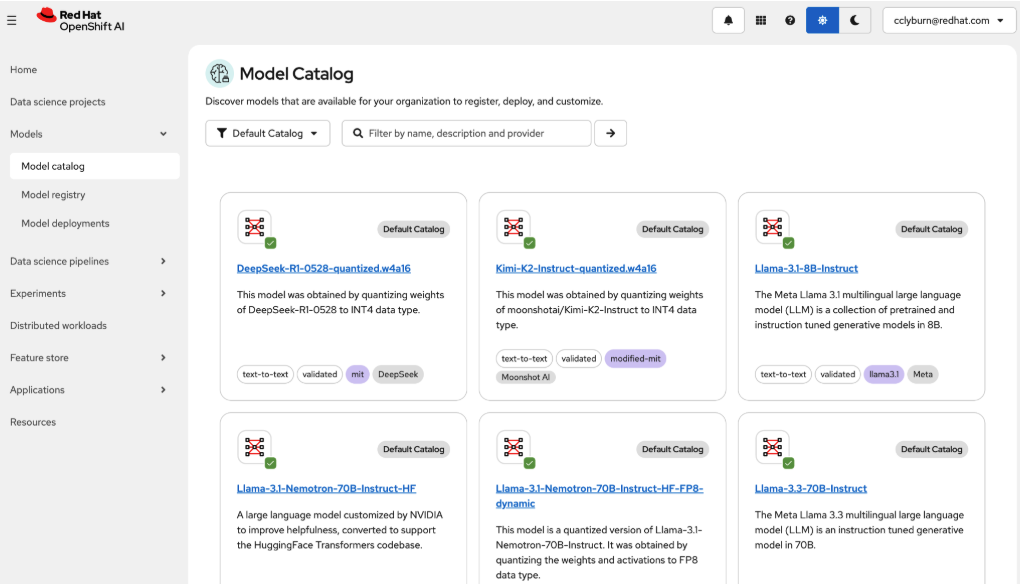
Start here, in the model catalog (Figure 3):
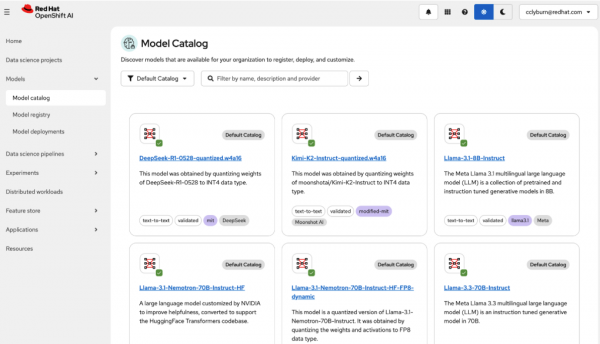
Figure 3: The OpenShift AI model catalog that shows the models available for your organization to register, deploy, and customize.The OpenShift AI model catalog that shows the models available for your organization to register, deploy, and customize. Then, specify where you’d like the model deployed, the runtime and acceleration details, and configuration like routing and authorization (Figure 4).
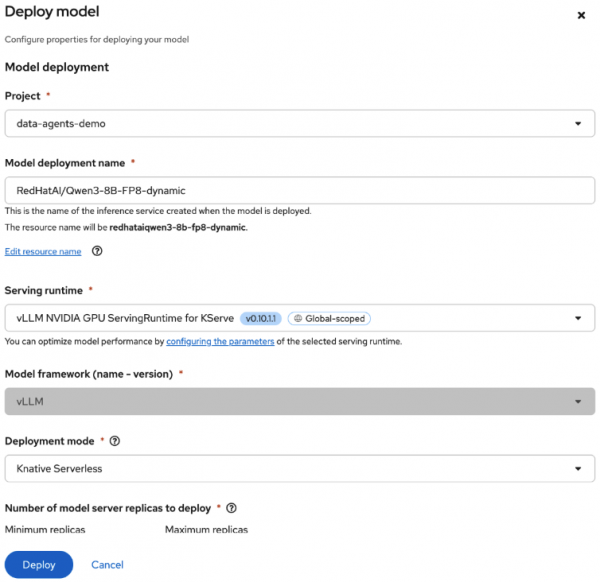
Figure 4: On the deploy models screen, fill in the fields for the model deployment, runtime, acceleration, and configuration.
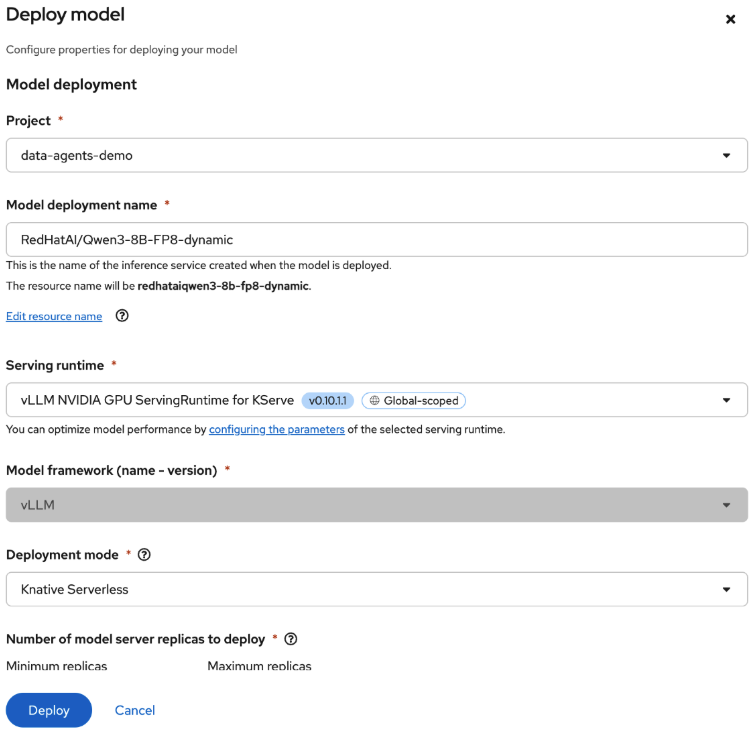
Just like that, your model is accessible to the cluster and that’s exactly how we set up the model you’re using in the learning path right now!
Setting up your requirements
Now, let’s get you hands on in the developer environment where you’ll send requests to the vLLM inference server.
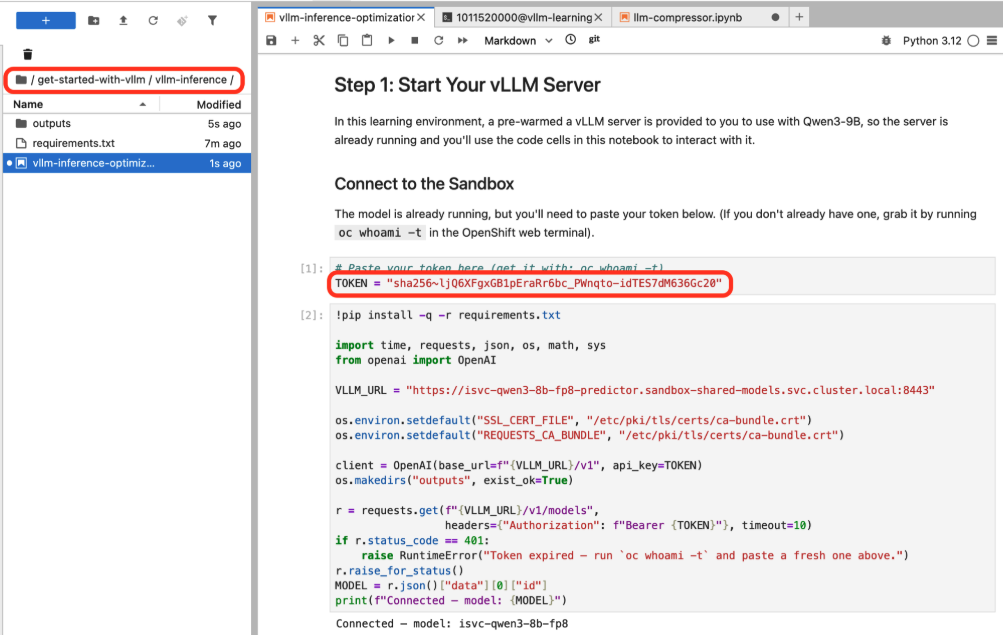
In Jupyter, head to the get-started-with-vllm folder to find the vllm-inference-optimizations.ipynb notebook, which you’ll follow for this lesson.
To send requests to the model, you’ll use the API key that we pulled from the OpenShift terminal earlier. Feel free to return to the Prerequisites page which has instructions if you don’t have the API key already.
Paste your API key to connect to the Sandbox (Figure 5).
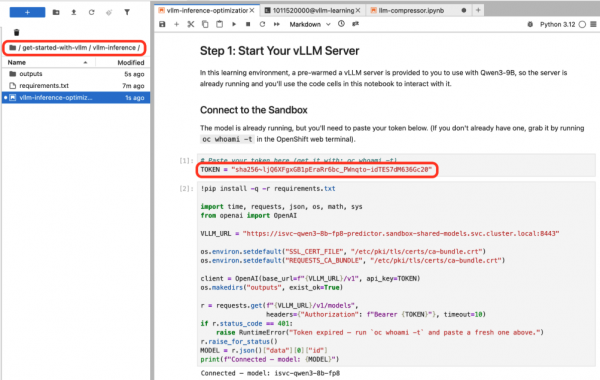
Figure 5: The necessary folder and notebook for the lesson are in the left-hand menu. Input:
# Paste your token here (get it with: oc whoami -t)
TOKEN = "YOUR_TOKEN_HERE"
Send a quick test request to confirm that everything is working.
Input:
pip install -q -r requirements.txt

import time, requests, json, os, math, sys
from openai import OpenAI

VLLM_URL = "https://isvc-qwen3-8b-fp8-predictor.sandbox-shared-models.svc.cluster.local:8443"

os.environ.setdefault("SSL_CERT_FILE", "/etc/pki/tls/certs/ca-bundle.crt")
os.environ.setdefault("REQUESTS_CA_BUNDLE", "/etc/pki/tls/certs/ca-bundle.crt")

client = OpenAI(base_url=f"{VLLM_URL}/v1", api_key=TOKEN)
os.makedirs("outputs", exist_ok=True)

r = requests.get(f"{VLLM_URL}/v1/models",
                headers={"Authorization": f"Bearer {TOKEN}"}, timeout=10)
if r.status_code == 401:
   raise RuntimeError("Token expired — run `oc whoami -t` and paste a fresh one above.")
r.raise_for_status()
MODEL = r.json()["data"][0]["id"]
Output:
Connected — model: isvc-qwen3-8b-fp8
Send the first LLM request
Now, let's send our first request. Since vLLM exposes an OpenAI-compatible API, we can use the standard openai Python client, point it at the internal vLLM service URL, and then use it exactly as if we were calling OpenAI's hosted API. Same client code, same request format, just a different base_url, which is what makes it easy to prototype against a hosted model and then swap in a self-hosted one without rewriting the application.
Let's ask the model if it knows about PagedAttention, the algorithm used by vLLM, then set some sampling parameters.
We'll notice that Qwen3 is a thinking model, but we'll turn that off to keep responses short, and enable it later for us to see.
start = time.time()
resp = client.chat.completions.create(
   model=MODEL,
   messages=[{"role": "user",
              "content": "What is PagedAttention in one sentence?"}],
   max_tokens=80,
   temperature=0.7,
   top_p=0.8,
   extra_body={"top_k": 20,
               "chat_template_kwargs": {"enable_thinking": False}},
)
elapsed = time.time() - start
print(f"Response ({elapsed:.2f}s, {resp.usage.completion_tokens} tokens):")
print(resp.choices[0].message.content)
print(f"\nUsage: {resp.usage.prompt_tokens} prompt + "
     f"{resp.usage.completion_tokens} completion = {
     resp.usage.total_tokens} total")
Output:
Response (2.66s, 31 tokens):
PagedAttention is a technique used to improve the efficiency of attention mechanisms by dividing the attention space into smaller blocks and applying attention to each block independently.
Usage: 21 prompt + 31 completion = 52 total
Explore model behavior
Beyond just getting answers, running vLLM ourselves lets us look inside the model's decision-making. For example, logprobs.
When we ask “The capital of france is” with a temperature of 0 to get deterministic output, we see the model’s confidence for every token it generates, plus the alternatives it considered.
For the output “Paris,” we'll see a very high probability, meaning the model is confident. This is useful for understanding when a model is sure, versus when it's guessing.
resp = client.chat.completions.create(
   model=MODEL,
   messages=[{"role": "user", "content": "The capital of France is"}],
   max_tokens=15,
   temperature=0.0,
   logprobs=True,
   top_logprobs=5,
   extra_body={"chat_template_kwargs": {"enable_thinking": False}},
)
print(f"Response: {resp.choices[0].message.content.strip()}\n")
print("Token-by-token probabilities:\n")
for tok in resp.choices[0].logprobs.content[:8]:
   print(f"  Chosen: '{tok.token}'  (logprob {tok.logprob:.2f})")
   if tok.top_logprobs:
       for alt in tok.top_logprobs[:5]:
           pct = math.exp(alt.logprob) * 100
           bar = "\u2588" * min(20, max(1, int(pct / 5)))
           print(f"    {pct:5.1f}%  {bar}  '{alt.token}'")
   print()
Output:
Response: The capital of France is **Paris**.
Token-by-token probabilities:
Chosen: 'The'  (logprob -0.00)
    99.9%  ███████████████████  'The'
     0.1%  █  'France'
     0.0%  █  'Capital'
     0.0%  █  'Paris'
     0.0%  █  'Le'
Chosen: ' capital'  (logprob -0.00)
   100.0%  ███████████████████  ' capital'
     0.0%  █  ' Capital'
     0.0%  █  ' **'
     0.0%  █  ' French'
     0.0%  █  '**'
Chosen: ' of'  (logprob -0.00)
   100.0%  ███████████████████  ' of'
     0.0%  █  ' city'
     0.0%  █  ' is'
     0.0%  █  ' ('
     0.0%  █  ' and'
Chosen: ' France'  (logprob -0.00)
   100.0%  ███████████████████  ' France'
     0.0%  █  ' **'
     0.0%  █  ' the'
     0.0%  █  'France'
     0.0%  █  ' Europe'
Chosen: ' is'  (logprob -0.00)
   100.0%  ███████████████████  ' is'
     0.0%  █  ' in'
     0.0%  █  ','
     0.0%  █  ' was'
     0.0%  █  ' **'
Chosen: ' **'  (logprob -0.09)
    91.2%  ██████████████████  ' **'
     7.5%  █  ' Paris'
     0.4%  █  ' *'
     0.2%  █  ' Lyon'
     0.1%  █  ' La'
Chosen: 'Paris'  (logprob -0.08)
    92.5%  ██████████████████  'Paris'
     1.7%  █  'B'
     1.2%  █  'M'
     0.8%  █  'L'
     0.6%  █  'N'
Chosen: '**'  (logprob -0.04)
    96.1%  ███████████████████  '**'
     1.8%  █  '.'
     1.4%  █  ','
     0.7%  █  '**,'
     0.0%  █  ' City'
Next, let’s look at temperature. We'll send the same prompt at three different settings, 0, .7, and 1.5. Temperature 0 is deterministic, so we'll most likely get the same tokens every time.
Temperature 0.7 adds some randomness, and 1.5 makes the output more creative.
Compare these outputs. We’ll see the model get progressively more varied. This is how we control the predictability between "I want it this way every time" and "I'm okay with diversity or creativity from the model", which are two common use cases.
prompt = "Write a one-sentence description of what vLLM does."
for temp in [0.0, 0.7, 1.5]:
   resp = client.chat.completions.create(
       model=MODEL,
       messages=[{"role": "user", "content": prompt}],
       max_tokens=60,
       temperature=temp,
       seed=42,
       extra_body={"chat_template_kwargs": {"enable_thinking": False}},
   )
   print(f"temp={temp}:  {resp.choices[0].message.content.strip()}\n")
Output:
temp=0.0:  VLLM is a large-scale language model that enables efficient and scalable training and inference of large language models.
temp=0.7:  VLLM is a library that enables large-scale model training and inference through efficient parallel processing.
temp=1.5:  VLLM is a model-efficient large language modeling framework designed for efficient, scalable processing of text sequences.
Observe vLLM under the hood
Now, let's look at what's happening inside vLLM. It exposes a Prometheus-compatible (a specific format that's easy to scrape) /metrics endpoint, which we can scrape to see how many requests are running or waiting, the KV cache being used, and cumulative token counts.
Key metrics to watch:
num_requests_running / waiting: How many requests are active vs. queued?gpu_cache_usage_perc (or cpu_cache_usage_perc): KV cache memory pressureprompt_tokens_total / generation_tokens_total: Cumulative token counts
This cell defines a helper that parses the metrics endpoint and prints the key stats. If you're running vLLM in the terminal, it also logs throughput and cache stats in real-time.
def get_vllm_metrics(base_url=VLLM_URL):
   """Scrape vLLM Prometheus /metrics and return {name: value}."""
   r = requests.get(f"{base_url}/metrics", headers=_AUTH_HEADERS)
   metrics = {}
   for line in r.text.split("\n"):
       if line.startswith("#") or not line.strip():
           continue
       name = line.split("{")[0].split()[0]
       try:
           metrics[name] = float(line.split()[-1])
       except (ValueError, IndexError):
           continue
   return metrics
metrics = get_vllm_metrics()
print("Current vLLM Metrics:")
for key in ["vllm:num_requests_running", "vllm:num_requests_waiting",
           "vllm:gpu_cache_usage_perc", "vllm:cpu_cache_usage_perc",
           "vllm:prompt_tokens_total", "vllm:generation_tokens_total"]:
   if key in metrics:
       print(f"  {key.replace('vllm:', '')}: {metrics[key]:g}")
with open("outputs/metrics_snapshot.json", "w") as f:
   json.dump(metrics, f, indent=2)
print(f"\nFull metrics saved to outputs/metrics_snapshot.json")
Output:
Current vLLM Metrics:
 num_requests_running: 0
 num_requests_waiting: 0
 prompt_tokens_total: 0
 generation_tokens_total: 0

Full metrics saved to outputs/metrics_snapshot.json
Continuous batching in action
Next, we'll send 5 requests at the same time and watch vLLM handle them. We’ll fire them off concurrently, and while they're in flight, we’ll scrape the metrics to see how many requests are running versus waiting (Figure 6).
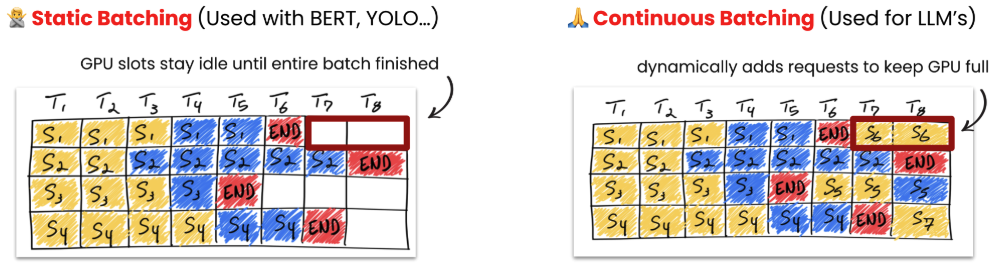
On a GPU, we’ll see multiple requests running simultaneously. That's vLLM's continuous batching ability processing them together, producing tokens for every request in the batch at each step. When one finishes, its slot is immediately filled.
We are here able to see 5 requests running concurrently. One thing to watch is the total time: it's faster than running them one by one because the scheduler is managing them effectively.
PagedAttention is what makes this work at scale. The KV cache that is generated is divided into fixed-size blocks that can go anywhere in memory. When a request is done, its blocks are immediately available for reuse, and space isn't wasted.
import concurrent.futures
prompts = [
   "What is quantization?",
   "Explain KV caching briefly.",
   "What is continuous batching?",
   "Why is LLM inference memory-bound?",
   "What is PagedAttention?",
]
def _ask(prompt):
   return client.chat.completions.create(
       model=MODEL,
       messages=[{"role": "user", "content": prompt}],
       max_tokens=60, temperature=0.7,
       extra_body={"chat_template_kwargs": {"enable_thinking": False}},
   )
before = get_vllm_metrics()
print(f"Sending {len(prompts)} concurrent requests...\n")
start = time.time()
with concurrent.futures.ThreadPoolExecutor(
   max_workers=len(prompts)) as pool:
   futures = {pool.submit(_ask, p): p for p in prompts}
   time.sleep(0.5)
   during = get_vllm_metrics()
   running = during.get("vllm:num_requests_running", "--")
   waiting = during.get("vllm:num_requests_waiting", "--")
   print(f"  [mid-flight]  running: {running}  |  waiting: {waiting}")
   for f in concurrent.futures.as_completed(futures):
       resp = f.result()
       print(f"  done: \"{futures[f][:40]}\" -> {resp.usage.completion_tokens} tokens")
elapsed = time.time() - start
after = get_vllm_metrics()
tokens = after.get("vllm:generation_tokens_total", 0) - before.get(
   "vllm:generation_tokens_total", 0)
print(f"\nAll {len(prompts)} completed in {elapsed:.2f}s")
if tokens > 0:
   print(f"Tokens generated: {tokens:g}  |  ~{tokens / elapsed:.1f} tokens/s")
Output:
Sending 5 concurrent requests...
 [mid-flight]  running: 5.0  |  waiting: 0.0
 done: "What is quantization?" -> 60 tokens
 done: "What is PagedAttention?" -> 60 tokens
 done: "What is continuous batching?" -> 60 tokens
 done: "Explain KV caching briefly." -> 60 tokens
 done: "Why is LLM inference memory-bound?" -> 60 tokens
All 5 completed in 8.35s
Tokens generated: 300  |  ~35.9 tokens/s
What is prefix caching?
Many applications use the same system prompt across every request, and without this prefix caching, vLLM would recompute the KV cache for that shared prefix every time.
To prevent this, we set up a system prompt and send 5 different questions with the same system prompt. The first request pays the full prefill cost, but after that, vLLM recognizes the shared prefix and skips recomputing it (Figure 7).
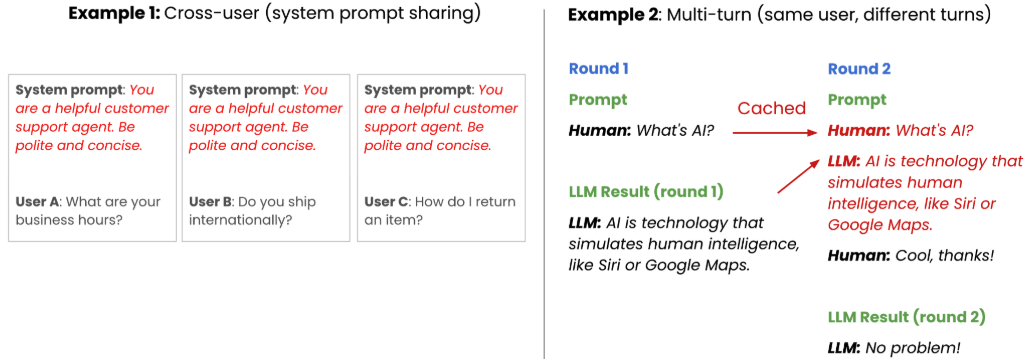
We track the prefix_cache_queries metric before and after. We’ll see it increase after each request, confirming that vLLM is checking and reusing the cache.
While the time savings are negligible for short prompts, this approach significantly reduces computational overhead at production scale—especially when handling thousands of instructions or complex few-shot examples.
SYSTEM_PROMPT = (
   "You are a helpful AI teaching assistant for a course on "
   "LLM optimization. You specialize in explaining concepts like "
   "quantization, inference optimization, and model serving. Keep "
   "answers concise -- one or two sentences."
)
questions = [
   "What is weight quantization?",
   "How does vLLM handle memory?",
   "What is continuous batching?",
   "Why use prefix caching?",
   "What is GPTQ?",
]
before = get_vllm_metrics()
timings = []
tok_counts = []
print("Sending 5 requests with the SAME system prompt...\n")
for i, q in enumerate(questions):
   t0 = time.time()
   resp = client.chat.completions.create(
       model=MODEL,
       messages=[
           {"role": "system", "content": SYSTEM_PROMPT},
           {"role": "user", "content": q},
       ],
       max_tokens=60, temperature=0.7,
       extra_body={"chat_template_kwargs": {"enable_thinking": False}},
   )
   dt = time.time() - t0
   timings.append(dt)
   tok_counts.append(resp.usage.completion_tokens)
   ms_per_tok = dt / resp.usage.completion_tokens * 1000
   print(f"  [{i+1}] {q:<35} {dt:.2f}s  ({resp.usage.completion_tokens} tok, {ms_per_tok:.0f} ms/tok)")
after = get_vllm_metrics()
prefix_before = before.get("vllm:prefix_cache_queries_total", 0)
prefix_after = after.get("vllm:prefix_cache_queries_total", 0)
print(f"\nPrefix cache queries: {prefix_before:g} -> {prefix_after:g}  (+{prefix_after - prefix_before:g})")
cache_keys = [k for k in after if "prefix" in k.lower()
             or "cache_hit" in k.lower()]
for k in sorted(cache_keys):
   b, a = before.get(k, 0), after.get(k, 0)
   if a != b and k != "vllm:prefix_cache_queries_total":
       print(f"  {k}: {b:g} -> {a:g}")
print("\n The increasing prefix_cache_queries count confirms vLLM is ")
print("checking and reusing cached KV blocks for the shared system prompt.")
Output:
Sending 5 requests with the SAME system prompt...
 [1] What is weight quantization?        4.54s  (42 tok, 108 ms/tok)
 [2] How does vLLM handle memory?        2.39s  (22 tok, 109 ms/tok)
 [3] What is continuous batching?        3.80s  (41 tok, 93 ms/tok)
 [4] Why use prefix caching?             2.50s  (31 tok, 81 ms/tok)
 [5] What is GPTQ?                       4.60s  (45 tok, 102 ms/tok)
Prefix cache queries: 278 -> 593  (+315)
The increasing prefix_cache_queries count confirms vLLM is
checking and reusing cached KV blocks for the shared system prompt.
(Optional) KV cache size visualization for Qwen3-0.6B
This optional section teaches how to calculate exactly how much memory the KV cache consumes.
For the Qwen3.6B model (the smallest available) with 28 layers, 8 KV heads, and 128-dimensional head size in bfloat16, we compute the per-token cost and scale it up (Figure 8).
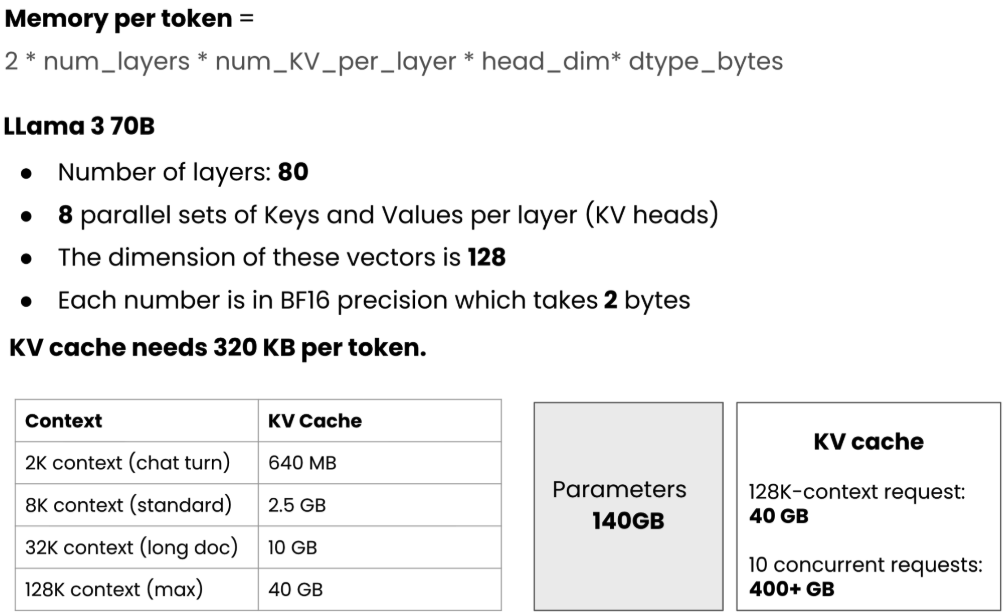
We'll see that while a single token is relatively small, a 4,096-token context window quickly adds up—especially when scaled across ten concurrent users at full capacity.
This compounding footprint highlights the core challenge of managing GPU memory. It is exactly why PagedAttention matters: it manages this memory dynamically and efficiently instead of wastefully pre-allocating for the worst-case scenario.
num_layers = 28
num_kv_heads = 8     # GQA: 16 Q heads, 8 KV heads
head_dim = 128
dtype_bytes = 2      # BF16
per_token = 2 * num_layers * num_kv_heads * head_dim * dtype_bytes
print(f"KV Cache -- Qwen3-0.6B")
print(f"Per token: 2 x {num_layers} x {num_kv_heads} x {head_dim} x {dtype_bytes}"
     f" = {per_token:,} bytes ({per_token // 1024} KB)\n")
print(f"  {'Context':>8}  {'KV Cache':>10}")
print(f"  {'-'*8}  {'-'*10}")
for ctx in [1, 64, 256, 1024, 4096]:
   size = per_token * ctx
   label = f"{size / 1024:.0f} KB" if size < 1024**2 else f"{size / 1024**2:.0f} MB"
   print(f"  {ctx:>7}t  {label:>10}")
print(f"\n  10 concurrent x 4096 ctx = {per_token * 4096 * 10 / 1024**3:.1f} GB")
Output:
KV Cache -- Qwen3-0.6B
Per token: 2 x 28 x 8 x 128 x 2 = 114,688 bytes (112 KB)
  Context    KV Cache
 --------  ----------
       1t      112 KB
      64t        7 MB
     256t       28 MB
    1024t      112 MB
    4096t      448 MB
 10 concurrent x 4096 ctx = 4.4 GB
(Optional) Thinking mode
Earlier, we disabled Qwen3's thinking mode. Let's turn it on and compare the results when we stream the same prompt with thinking off versus thinking on.
With thinking enabled, the model generates a chain-of-thought reasoning process inside these tags before delivering the final answer. While this reasoning usually yields a higher-quality response, it comes at the cost of significantly higher token usage. This means a larger KV cache footprint, increased compute demands, and longer response times.
This is exactly the kind of tradeoff we must navigate in production: balancing better answers against a higher cost per request.
prompt = "What makes continuous batching better than static batching?"
for label, thinking, max_tok in [
   ("Thinking OFF", False, 80), ("Thinking ON", True, 200)]:
   print(f"=== {label} ===\n")
   start = time.time()
   tokens = 0
   stream = client.chat.completions.create(
       model=MODEL,
       messages=[{"role": "user", "content": prompt}],
       max_tokens=max_tok, temperature=0.7, stream=True,
       extra_body={"chat_template_kwargs": {"enable_thinking": thinking}},
   )
   for chunk in stream:
       if chunk.choices[0].delta.content:
           sys.stdout.write(chunk.choices[0].delta.content)
           sys.stdout.flush()
           tokens += 1
   elapsed = time.time() - start
   print(f"\n  [{tokens} tokens, {elapsed:.2f}s]\n")
Output:
=== Thinking OFF ===
Continuous batching is generally considered more effective and efficient than static batching in several key areas:
### 1. **Improved Material Flow and Efficiency**
  - **Continuous batching** allows for real-time adjustments and optimization of material flow, reducing idle time and increasing throughput.
  - It can dynamically adjust to changes in demand or production, ensuring that the system operates at maximum capacity.
### 2. **Better
 [80 tokens, 7.60s]
=== Thinking ON ===
<think>
Okay, the user is asking why continuous batching is better than static batching. Let me start by recalling what these terms mean. Static batching typically refers to a method where the mixture is prepared in batches at fixed times, like using a mixer with a fixed time interval. Continuous batching, on the other hand, involves continuously blending the ingredients, allowing for real-time adjustments and better control.
First, I should mention the key differences. Continuous batching allows for real-time adjustments, which can lead to more accurate mixing. Maybe they can adjust the proportions in real time, which is crucial for optimal results. Also, continuous batching can handle smaller batches, which might be more efficient than fixed batch sizes.
Then, I should think about the benefits. Real-time adjustments help prevent overmixing or undermixing, which can lead to poor quality. Continuous batching allows for better monitoring and control, which is important in manufacturing processes. Additionally, continuous batching can reduce the need for multiple batches, saving time and
 [200 tokens, 19.80s]
Summary
In this lesson, we connected to a running vLLM server using its OpenAI-compatible client, exploring parameters like logprobs and temperature to better understand model behavior. We also used the Prometheus metrics endpoint to watch the server's real-time resource utilization and throughput during inference.
In the next lesson, we'll benchmark it with GuideLLM and evaluate model quality with lm_eval.

