AI
  • Get started with AI

    • Red Hat AI

      Accelerate the development and deployment of enterprise AI solutions.

    • AI learning hub

      Explore learning materials and tools, organized by task.

    • AI interactive demos

      Click through scenarios with Red Hat AI, including training LLMs and more.

    • AI/ML learning paths

      Expand your Red Hat OpenShift AI knowledge using these learning resources.

    • AI quickstarts

      Focused AI use cases designed for fast deployment on Red Hat AI platforms.

    • No-cost AI training

      Foundational Red Hat AI training.

  • Featured resources

    • Red Hat OpenShift AI
    • Open source AI for developers
    • AI product application development
    • Open source-powered AI/ML for hybrid cloud
    • AI and Node.js cheat sheet

Red Hat AI Factory with NVIDIA

Red Hat AI Factory with NVIDIA is a co-engineered, enterprise-grade AI solution for building, deploying, and managing AI at scale across hybrid cloud environments.

Learn
  • Self-guided

    • Documentation

      Find answers, get step-by-step guidance, and learn how to use Red Hat products.

    • Learning paths

      Explore curated walkthroughs for common development tasks.

    • Guided learning

      Receive custom learning paths powered by our AI assistant.

    • See all learning
  • Hands-on

    • Developer Sandbox

      Spin up Red Hat's products and technologies without setup or configuration.

    • Interactive labs

      Learn by doing in these hands-on, browser-based experiences.

    • Interactive demos

      Click through product features in these guided tours.

  • Browse by topic

    • AI/ML
    • Automation
    • Java
    • Kubernetes
    • Linux
    • See all topics
  • Training & certifications

    • Courses and exams
    • Certifications
    • Skills assessments
    • Red Hat Academy
    • Learning subscription
    • Explore training
Build
  • Get started

    • Red Hat build of Podman Desktop

      A downloadable, local development hub to experiment with our products and builds.

    • Developer Sandbox

      Spin up Red Hat's products and technologies without setup or configuration.

  • Download products

    • Red Hat Enterprise Linux
    • Red Hat AI
    • Red Hat OpenShift
    • Red Hat Ansible Automation Platform
    • See all products
  • Featured

    • Red Hat build of OpenJDK
    • Red Hat JBoss Enterprise Application Platform
    • Red Hat OpenShift Dev Spaces
    • Red Hat Developer Toolset
  • References

    • E-books
    • Documentation
    • Cheat sheets
    • Architecture center
Community
  • Get involved

    • Events
    • Live AI events
    • Red Hat Summit
    • Red Hat Accelerators
    • Community discussions
  • Follow along

    • Articles & blogs
    • Developer newsletter
    • Videos
    • Github
  • Get help

    • Customer service
    • Customer support
    • Regional contacts
    • Find a partner

Join the Red Hat Developer program

Download Red Hat products and project builds, access support documentation, learning content, and more.

ConsoleDocsSupport Search
New For you

Recommended

We'll recommend resources you may like as you browse. Try these suggestions for now.

  • Product downloads
  • Cheat sheets
  • Red Hat Developer learning portal
  • Developer blog
  • E-books
  • Developer Sandbox
Log in

Get more with a Red Hat Developer account

  • Product downloads
  • Console access
  • Event registration
  • Training & trials
Explore more account benefitsLog in or register

A subscription may be required for some services.

Contact us

Istio Circuit Breaker: When Failure Is an Option

March 27, 2018
Don Schenck
Related topics:
KubernetesJavaContainersMicroservicesNode.jsService mesh
Related products:
Red Hat OpenShift Container Platform

    The phrase "Failure is not an option" is tossed about with much bravado, as though one could make something work by just their strength of will. But the fact remains, things eventually fail. Everything. How then, do you handle the inevitable failure of your microservices? Well, by combining containers, Kubernetes, Red Hat OpenShift, and Istio, we can skip over-the-top displays of swagger, let the system handle things, and get some sleep at night.

    [This is part four of my ten-week Introduction to Istio Service Mesh series.  My previous article was Part 3: Istio Circuit Breaker: How to Handle (Pool) Ejection.]

    Once again, Istio provides the basis of a popular and well-tested technology: the Circuit Breaker Pattern.

    Like a circuit breaker in an electrical circuit, the software version allows flow to a service to be shut off. The circuit opens in the case where the endpoint is not functioning correctly. The endpoint may have failed or may just be too slow, but it represents the same problem: this container is not working.

    Lagging performance is especially troublesome: Not only can the delay cascade back through any calling services and cause the entire system to lag, but retrying against an already-slow service just makes it worse.

    Breaking: Good

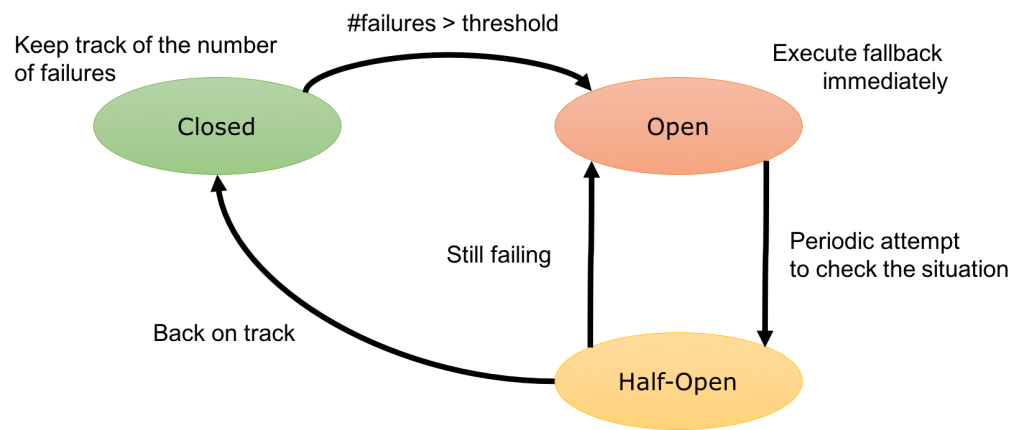
    The circuit breaker is a proxy that controls flow to an endpoint. If the endpoint fails or is too slow (based on your configuration), the proxy will open the circuit to the container. In that case, traffic is routed to other containers because of load balancing. The circuit remains open for a preconfigured sleep window (let's say two minutes) after which the circuit is considered "half-open". The next request attempted will determine if the circuit moves to "closed" (where everything is working again), or it it reverts to "open" and the sleep window starts again. Here's a simple State Transition Diagram for the circuit breaker:
    It's important to note that this is all at the system architecture level, so to speak. At some point your application will need to account for the circuit breaker pattern; common responses include providing a default value or (if possible) ignoring the existence of the service. The bulkhead pattern addresses this, but it's outside the scope of this post.

    The Istio Circuit Breaker in Action

    To start, I've launched two versions of a microservice "recommendation" into OpenShift. Version 1 is running normally while version 2 has a built-in delay. This mimics a slow server. Using the tool siege we can observe the results:

    siege -r 2 -c 20 -v customer-tutorial.$(minishift ip).nip.io
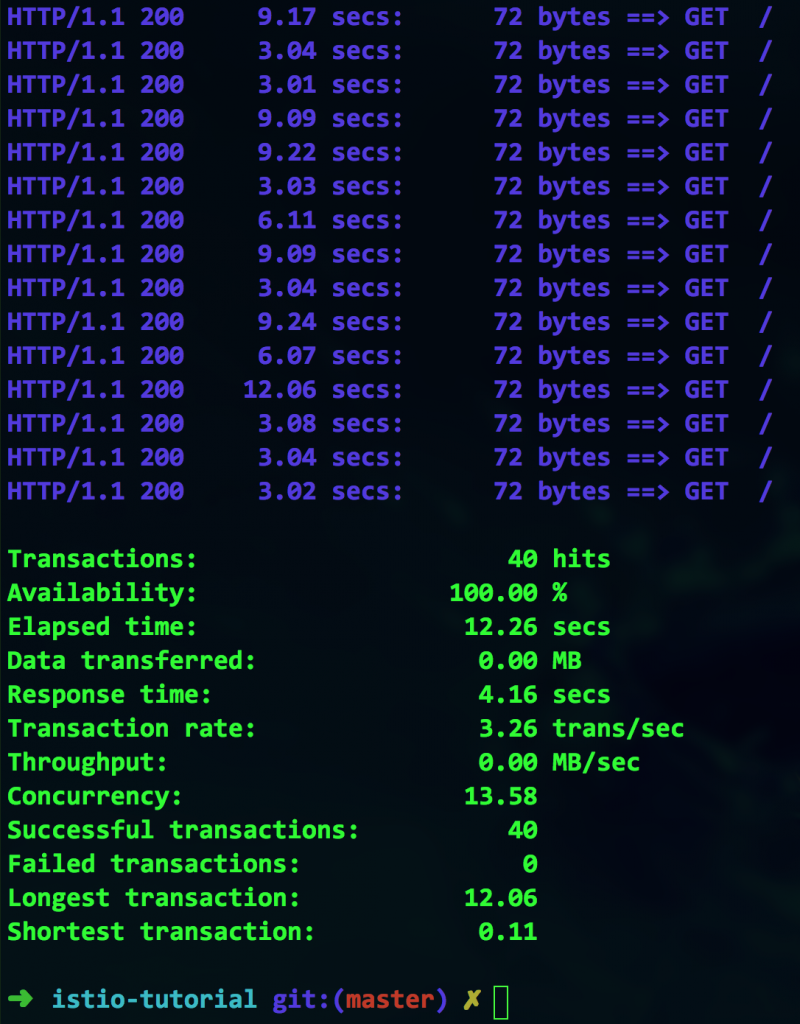
    Everything is working, but at what cost? While 100 percent availability may seem at first glance to be a win, look closer. The longest transaction took over 12 seconds. That's not exactly speedy. We need to somehow avoid this bottleneck.

    We can use Istio's circuit breaker functionality to avoid these slow containers. Here's an example of a configuration file that will implement the circuit breaker:
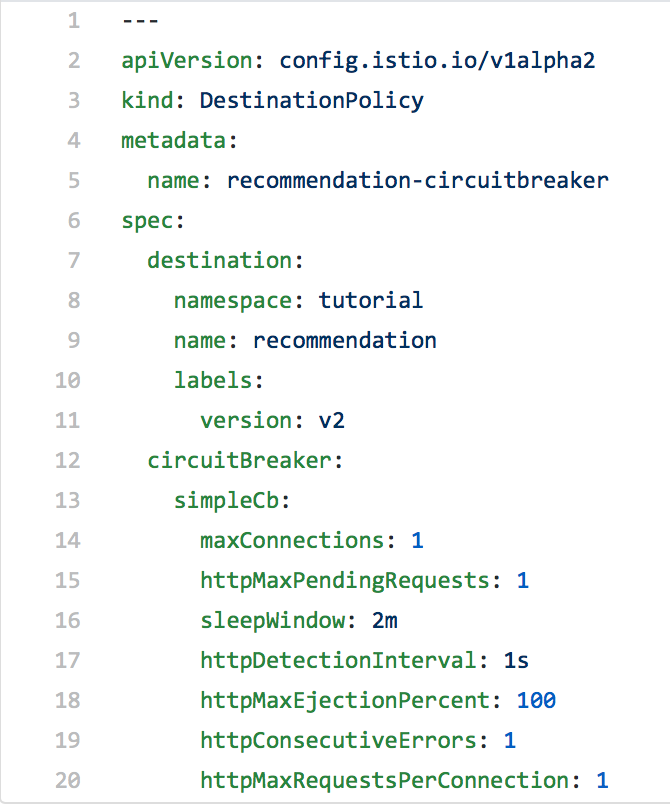
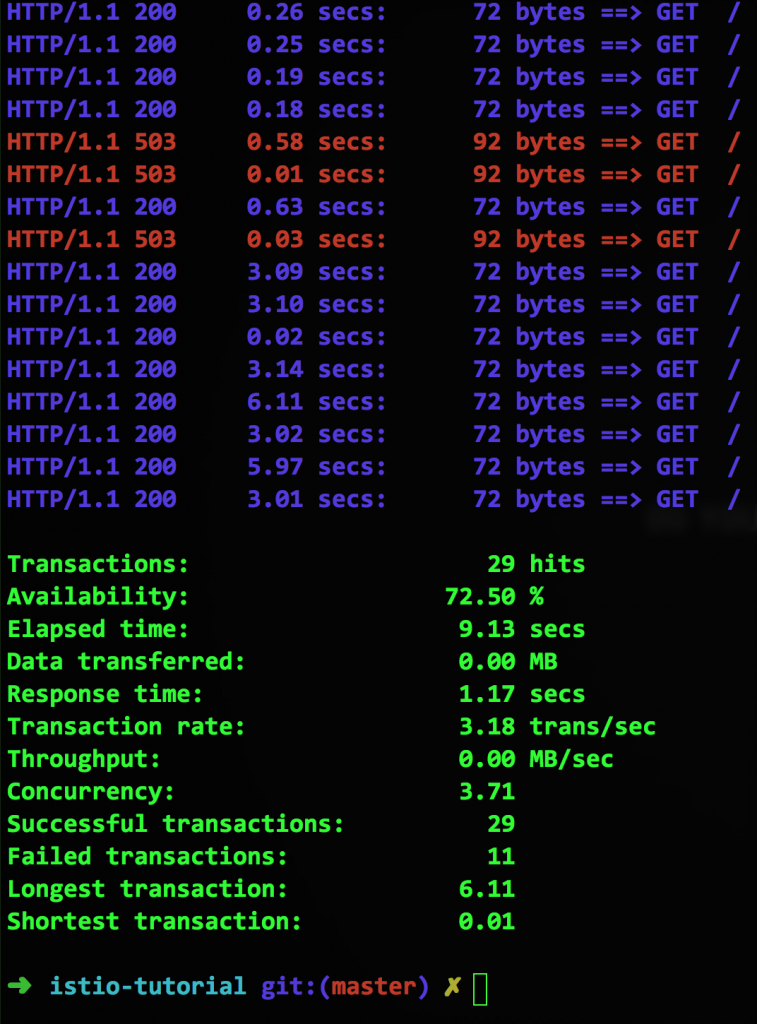
    The last line, "httpMaxRequestsPerConnection", means that if a second connection is attempted against a container that already has an existing connection, the circuit will open. Because we've purposely made our container to mimic a slow service, it will occasionally encounter this condition. When that happens, Istio will return a 503 error. Here's a screen capture from another run using siege:
    The Circuit Is Broken; Now What?

    Without changing our source code, we are able to implement the circuit breaker pattern. Combining this with last week's blog post (Istio Pool Ejection), we can eliminate slow containers until they recover. In this example, a container is ejected for two minutes (the "sleepWindow" setting) before being reconsidered.

    Note that your application's ability to respond to a 503 error is still a function of your source code. There are many strategies for handling an open circuit; which one you choose depends on your particular situation.


    All articles in the "Introduction to Istio" series:

    • Part 1: Introduction to Istio; It Makes a Mesh of Things
    • Part 2: Istio Route Rules: Telling Service Requests Where to Go
    • Part 3: Istio Circuit Breaker: How to Handle (Pool) Ejection
    • Part 4: Istio Circuit Breaker: When Failure Is an Option
    • Part 5: Istio Tracing & Monitoring: Where Are You and How Fast Are You Going?
    • Part 6: Istio Chaos Engineering: I Meant to Do That
    • Part 7: Istio Dark Launch: Secret Services
    • Part 8: Istio Smart Canary Launch: Easing into Production
    • Part 9: Istio Egress: Exit Through the Gift Shop
    • Part 10: Istio Service Mesh Blog Series Recap

    Last updated: September 3, 2019

    Recent Posts

    • What's new for developers in Red Hat Enterprise Linux 10.3 and 9.9

    • Control multicluster costs with right-sizing in Red Hat Advanced Cluster Management 5

    • Lightbits is now certified for Red Hat OpenStack Services on OpenShift

    • What's new in Red Hat OpenShift 5 for developers

    • On-demand screen context in Red Hat Developer Hub intelligent assistant

    Red Hat Developers logo

    Platforms

    • Red Hat AI
    • Red Hat Enterprise Linux
    • Red Hat OpenShift
    • Red Hat Ansible Automation Platform
    • See all products

    Build

    • Developer Sandbox
    • Developer tools
    • Interactive tutorials
    • API catalog

    Quicklinks

    • Learning resources
    • E-books
    • Cheat sheets
    • Blog
    • Events
    • Newsletter

    Communicate

    • About us
    • Contact sales
    • Find a partner
    • Report a website issue
    • Site status dashboard
    • Report a security problem

    Red Hat Developer

    Build here. Go anywhere.

    We serve the builders. The problem solvers who create careers with code.

    Join us if you’re a developer, software engineer, web designer, front-end designer, UX designer, computer scientist, architect, tester, product manager, project manager or team lead.

    Sign me up

    Red Hat legal and privacy links

    • About Red Hat
    • Jobs
    • Events
    • Locations
    • Contact Red Hat
    • Red Hat Blog
    • Inclusion at Red Hat
    • Cool Stuff Store
    • Red Hat Summit
    © 2026 Red Hat

    Red Hat legal and privacy links

    • Privacy statement
    • Terms of use
    • All policies and guidelines
    • Digital accessibility
    Ask AI