If you manage pipelines or platform security for Java teams running Spring Framework 5.3.x, this is how to automate remediation without forcing application rewrites.
Your build failed a security gate. The scanner is right. There's a high-severity Common Vulnerabilities and Exposures (CVE) in a dependency you ship to production, so you do the obvious thing and upgrade to the latest release on that line.
The build fails again. The CVE is still there.
If you run Java services on Spring Framework 5.3.x, that's your situation today, not a thought experiment. Open source support for 5.3.x ended on August 31, 2024, with 5.3.39 as the final free release. CVE-2025-41249 affects 5.3.18 and that final 5.3.39 release, so there's no free version left to upgrade to.
Moving to Spring 6 isn't a routine bump either. It raises the minimum from Java 8 to Java 17 and moves the whole code base from the javax namespace to jakarta. For most teams that's a funded project, not a ticket in this sprint.
Here's a pipeline that blocks that build, remediates it with a drop-in artifact from Lightwell—a service providing enterprise security backports for open source runtimes—proves the result is trustworthy, and automates the whole response. Every command and log line in this article came out of a running lab.
What does "no upstream fix" look like?
The application is an ordinary Spring Boot payment service. Your team upgrades from 5.3.15 to 5.3.18 and pushes. The pipeline's dependency scan runs a live query against OSV.dev and reports this:
$ oc logs -l tekton.dev/pipelineTask=dependency-scan -n cicd

=== Dependency Vulnerability Scan (live) ===
Effective spring-core : 5.3.18
Blocking at           : HIGH+ on spring-core

Upstream findings (OSV.dev):
   HIGH      CVE-2025-41249     spring-core     <- BLOCKING
   LOW       CVE-2026-41848     spring-core
   HIGH      CVE-2022-22970     spring-beans    (report only)
   CRITICAL  CVE-2023-20860     spring-webmvc   (report only)
   HIGH      CVE-2024-38816     spring-webmvc   (report only)
   ... 13 more, report only
Two details matter here.
The blocking finding is in spring-core, and it's present in every 5.3.x release. There's no version number you can type that makes it go away.
The (report only) findings are the inherited debt of an end-of-life line, including a critical finding. You could suppress those. Don't. These unpatched, report-only CVEs are tangible evidence that the 5.3.x line is accumulating irreversible security debt, and your security team is already watching them.
Chasing zero CVEs across a complex legacy workload is usually the wrong target. Focus on distinguishing base image vulnerabilities from the application dependency findings that directly halt your deployment pipeline.
My first version of this scan hard-coded the CVE verdict to keep the demonstration predictable. Within a day the scan was printing "no vulnerabilities" while Red Hat Advanced Cluster Security for Kubernetes flagged a critical CVE on the same image, and both logs were on screen at once. If 2 of your tools contradict each other in front of an audience, nothing else you say lands. Make the scan real on Day 1.
How does the pipeline stop the build?
Separate reporting from enforcement. The dependency-scan task reports findings and always exits 0. Next, a dedicated vulnerability-policy-gate task valuates those results against the pipeline's configuration parameter to decide whether to fail, pass, or patch:
use-lightwell | CVE found | Result |
|---|---|---|
false | Yes | Build fails |
false | No | Passes through |
true | Yes | Remediate, then continue |
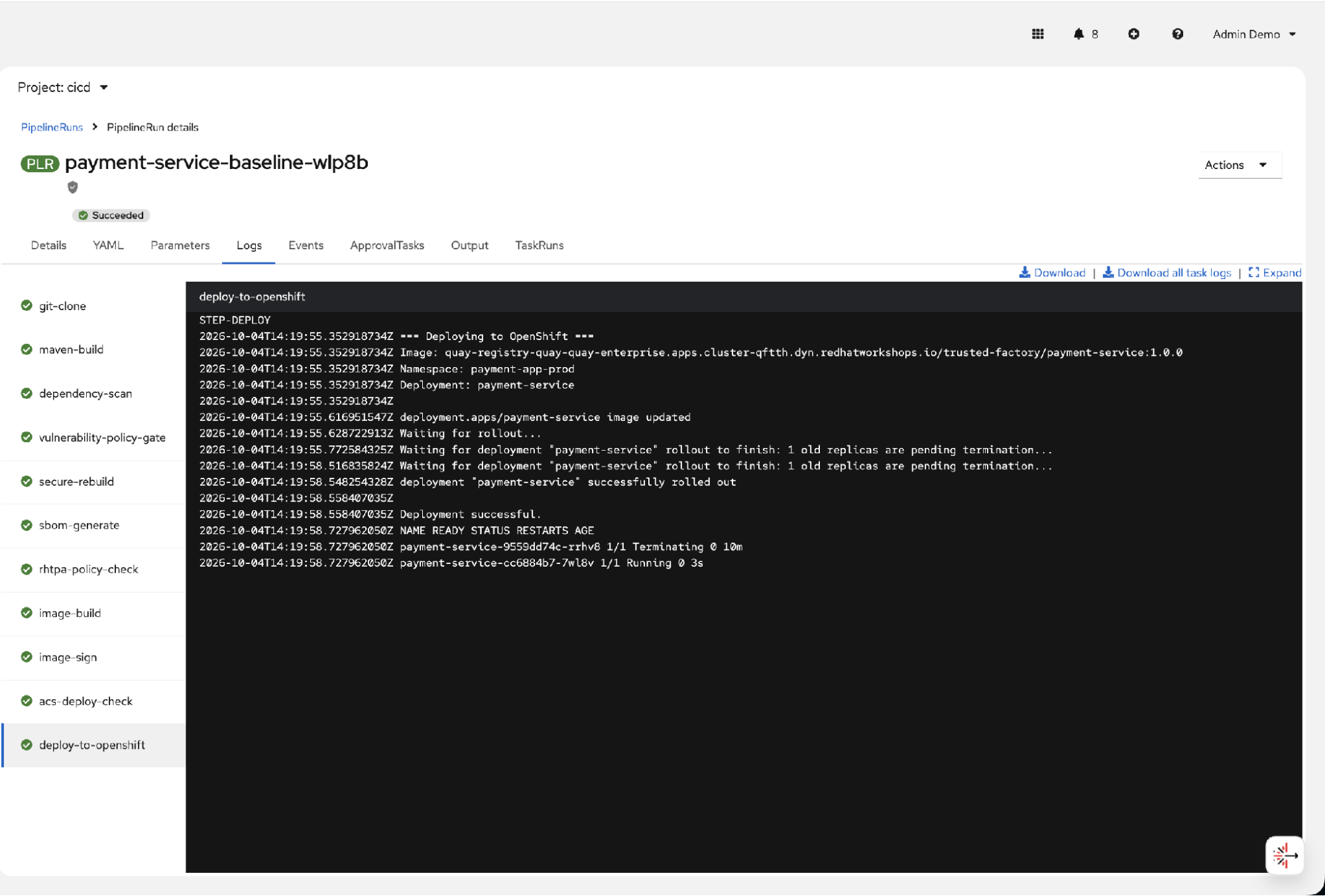
When all checks pass, Red Hat OpenShift Pipelines runs all 11 tasks through deployment, as shown in Figure 1.
When the gate fires, the pipeline doesn't build, push, or deploy anything:
╔════════════════════════════════════════════════════════════╗
║  PIPELINE BLOCKED                                          ║
╠════════════════════════════════════════════════════════════╣
║  Blocking vulnerability CVE-2025-41249 detected            ║
║  Lightwell remediation is DISABLED                         ║
║                                                            ║
║  Spring 5.3.x is end of life - no release on this line     ║
║  fixes this. Upstream's answer is Spring 6 (Jakarta).      ║
║  Lightwell publishes a remediated spring-core build for    ║
║  5.3.18 as a binary-compatible drop-in.                    ║
╚════════════════════════════════════════════════════════════╝
In Red Hat OpenShift, the PipelineRun graph shows execution halting at the policy gate task, as shown in Figure 2.
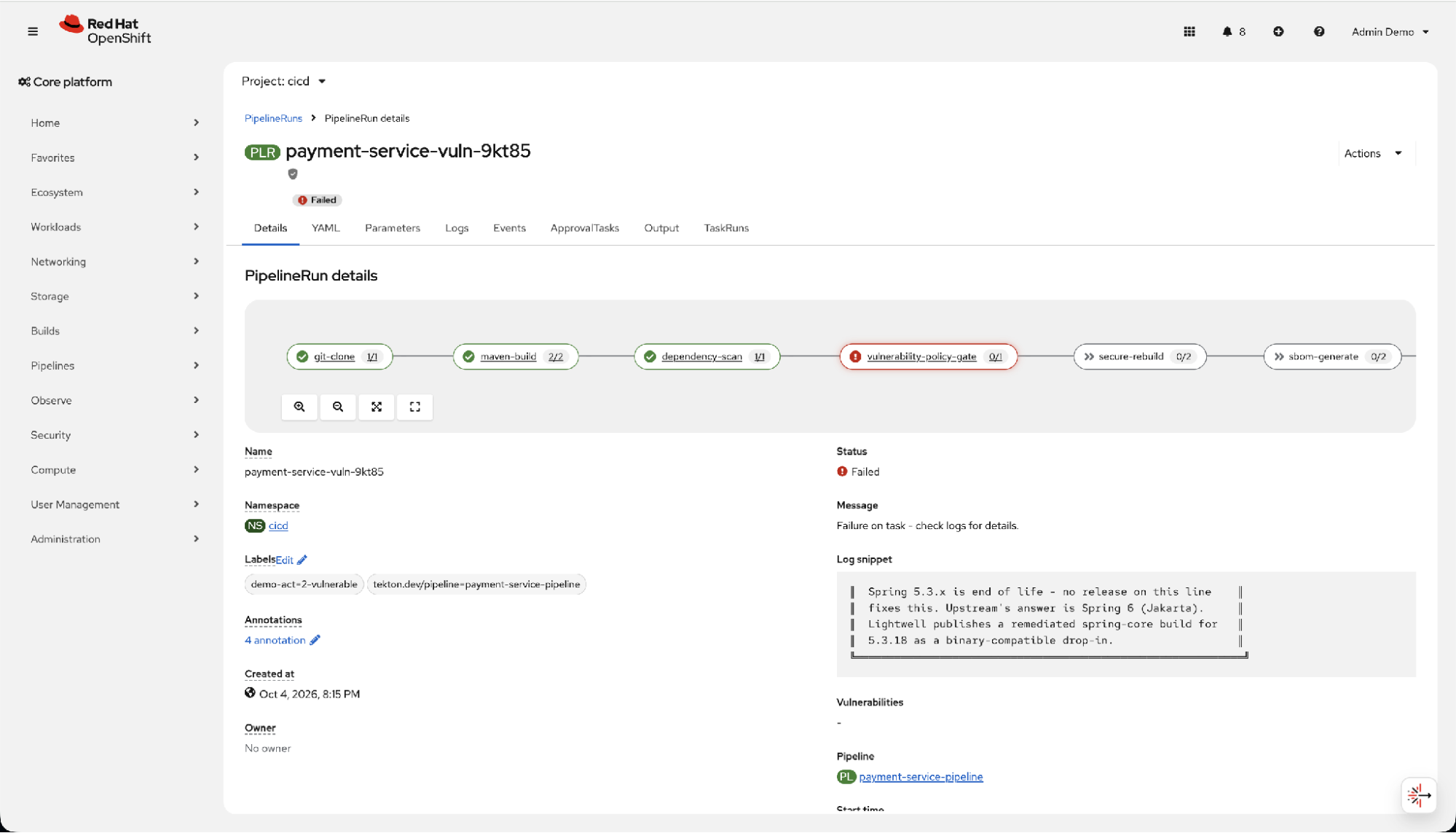
A gate that only says "no" makes you the obstacle. Notice this one tells the developer exactly what to do next.
How does Lightwell fix it without a migration?
Red Hat Lightwell publishes remediated builds of open source artifacts so you can stay on the version you're already running. In the pipeline it's 1 parameter. Same branch, same commit, same code:
  Checking 5.3.18.rhlw-00003 availability ... HTTP 200
  Patching pom.xml: spring-core.version -> 5.3.18.rhlw-00003

╔════════════════════════════════════════════════════════════╗
║  LIGHTWELL REMEDIATION APPLIED                             ║
║  spring-core consumed from Red Hat Lightwell:              ║
║    5.3.18.rhlw-00003  (drop-in, binary compatible)         ║
║  No framework migration, no API changes                    ║
╚════════════════════════════════════════════════════════════╝
The Maven build that follows genuinely resolves it from Red Hat's repository:
Downloading from lightwell-remediated:
  https://packages.redhat.com/.../org/springframework/spring-core/
    5.3.18.rhlw-00003/spring-core-5.3.18.rhlw-00003.jar
One change to your pom.xml makes this work, and you'll hit it too. This cost me most of an afternoon. Spring Boot sets both the bill of materials (BOM) import and the artifact version from a single property. Override it and Maven goes hunting for a spring-framework-bom that Lightwell doesn't publish, and your build dies with a resolution error that has nothing to do with the CVE you were trying to fix. Decouple them:
<properties>
    <spring-framework.version>5.3.18</spring-framework.version>  <!-- BOM, from Maven Central -->
    <spring-core.version>5.3.18</spring-core.version>            <!-- Lightwell swaps this -->
</properties>
Two lines. One artifact moves, the rest of your dependency tree resolves exactly as before.
How do you prove the artifact is trustworthy?
Remediating isn't enough if you can't show what you shipped. Four controls run before anything deploys.
Red Hat Trusted Artifact Signer uses keyless signing for the image: Fulcio issues a short-lived certificate bound to an OpenID Connect (OIDC) identity, and the signature lands in the Rekor transparency log. Four commands, and no key material at any point:
# Take cosign from the TAS CLI server so it matches your deployment
curl -sL "$CLI_SERVER_URL/clients/linux/cosign-amd64.gz" | gunzip > cosign
chmod +x cosign

# Trust your own Sigstore root rather than the public good instance
./cosign initialize --mirror="$TUF_URL" --root="$TUF_URL/root.json"

# Keycloak issues the identity; Fulcio turns it into a 10-minute certificate
TOKEN=$(curl -sf -X POST "$OIDC_ISSUER/protocol/openid-connect/token" \
  -d grant_type=password -d client_id=sigstore -d scope=openid \
  --data-urlencode "username=$SIGSTORE_USER" \
  --data-urlencode "password=$SIGSTORE_PASS" \
  | python3 -c 'import sys,json; print(json.load(sys.stdin)["id_token"])')

./cosign sign --yes --identity-token="$TOKEN" "$IMAGE"
Don't pass endpoint flags to sign. Once cosign initialize has loaded The Update Framework (TUF) signing config, cosign 2.6 rejects --fulcio-url, --rekor-url, and even --oidc-issuer as a conflict. The endpoints come from the TUF root; the issuer travels inside the token. Nearly every example online predates this and passes them explicitly, which is how I ended up debugging a signing step that never reached Fulcio.
Verification asks for a person, not a key fingerprint:
./cosign verify \  --certificate-identity="sigstore-user@redhat.com" \  --certificate-oidc-issuer="$OIDC_ISSUER" \  "$IMAGE"
Verification for .../trusted-factory/payment-service:1.0.0 --The following checks were performed on each of these signatures:  - The cosign claims were validated  - Existence of the claims in the transparency log was verified offline  - The code-signing certificate was verified using trusted certificate    authority certificates
You can inspect the matching Rekor transparency log entry and its short-lived Fulcio certificate in the search interface, as shown in Figure 3.
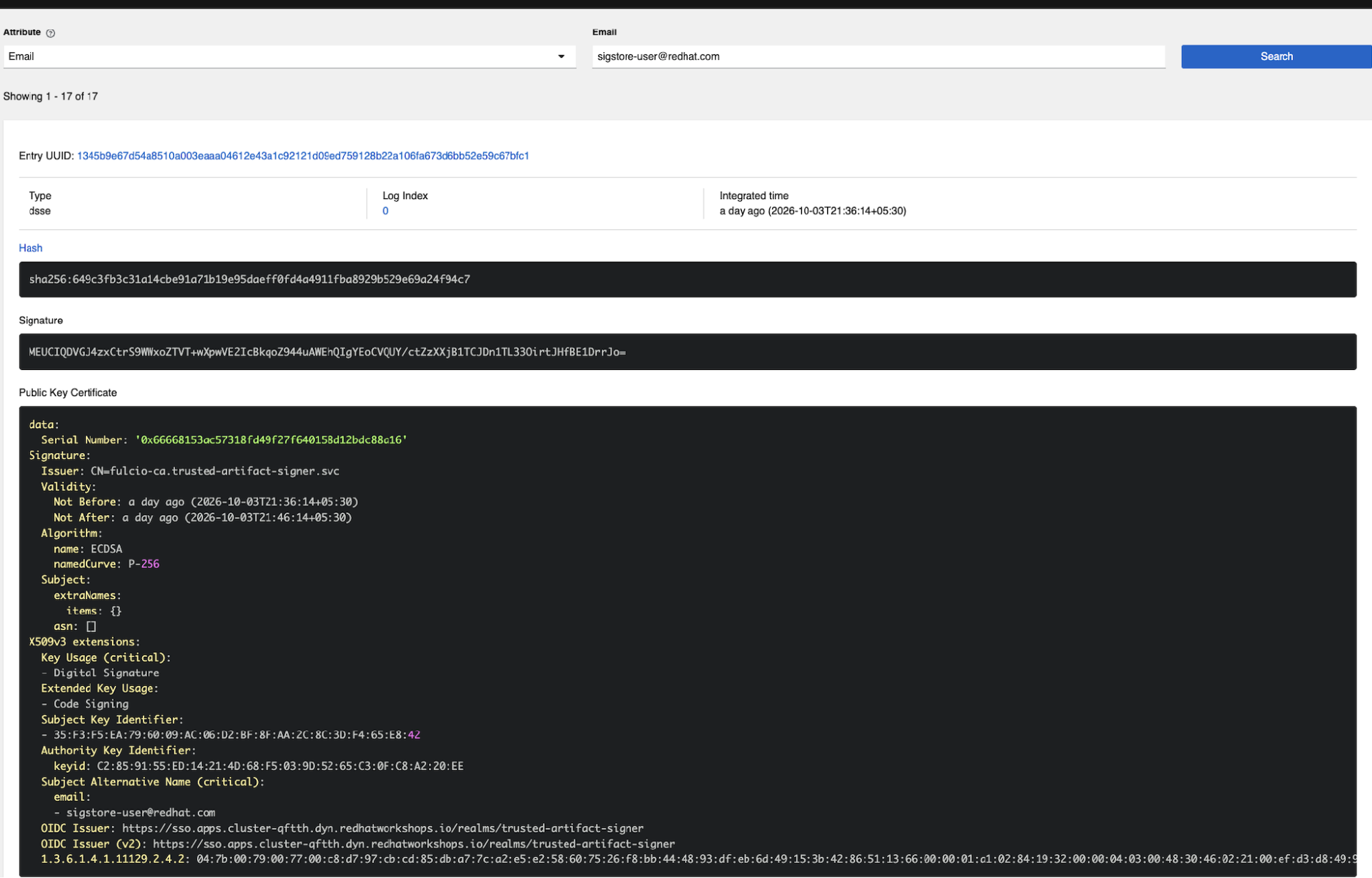
Look at the validity window: 21:36:14 to 21:46:14. The key that signed your production image existed for the duration of the build and doesn't exist now. Nothing sits in a vault to leak, and there's no rotation to forget. The identity is a person authenticated through Keycloak, not a hex fingerprint.
Before anything deploys, the pipeline pushes the CycloneDX software bill of materials (SBOM) into Red Hat Trusted Profile Analyzer so your team can index and query components. Red Hat Advanced Cluster Security then performs a final image check using roxctl image check to ensure no new runtime policy violations slipped past the build.
Who presses the button at 3 AM?
Nobody should. I had this working as a manual button for a while and couldn't defend it: if someone has to click Launch, you've built a more expensive oc create. The honest version has no human in it at all.
Event-Driven Ansible turns this from orchestration into automation. A rulebook listens, and the condition is 15 lines:
condition: >-
  event.payload.alert.policy.severity == "CRITICAL_SEVERITY" or
  event.payload.alert.policy.severity == "HIGH_SEVERITY"
action:
  run_workflow_template:
    name: Lightwell Security Response Workflow
When Red Hat Advanced Cluster Security posts a policy violation, the rule matches and the workflow launches itself. It raises the incident, triggers the remediation pipeline, and writes the compliance report:
$ oc get pipelinerun -n cicd -l triggered-by=ansible-automation-platform
NAME                    SUCCEEDED   REASON      STARTTIME
aap-remediation-tcc2n   True        Succeeded   2m
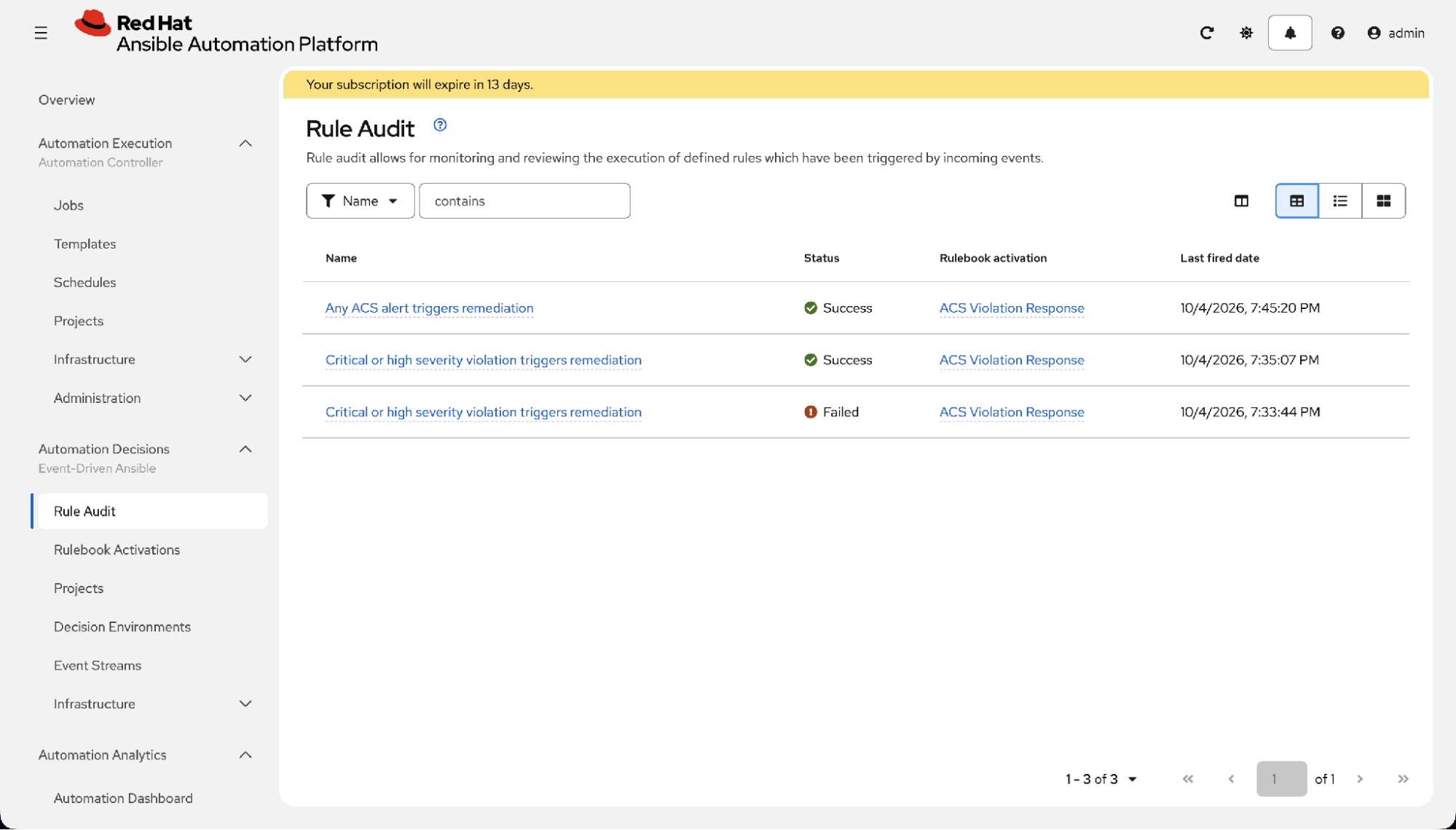
Figure 4 is the screen to show your auditors. It records the causal chain, not just an outcome: this alert, at this time, fired this rule, which launched that workflow.
What should you do next?
Find out whether you're exposed. One command, nothing to install:
curl -s -X POST https://api.osv.dev/v1/query \
  -H 'Content-Type: application/json' \
  -d '{"package":{"ecosystem":"Maven","name":"org.springframework:spring-core"},
       "version":"5.3.18"}' | jq -r '.vulns[].aliases[]' | grep CVE
Swap in whichever version you ship. If findings come back and that line no longer gets security releases, everything described earlier applies to you. Run it across your Java applications and you have your real exposure list, which is usually longer than people expect.
Once you know the scope, 4 principles carry over to any pipeline:
- Separate reporting from enforcement. One task reports everything, and another decides. You can't tune a policy you can't see.
- Make the gate useful. Developers adopt a block that tells them what to do next. They bypass one that says "no."
- Sign keyless. If your team still manages long-lived signing keys, adopting Red Hat Trusted Artifact Signer helps eliminate key rotation, storage, and compromise risks.
- Automate the response. If a human has to launch remediation, it only happens during office hours.
You can test every control described here today in the no-cost Red Hat Developer Sandbox. When you hit the dependencies where community fixes no longer exist, connect with our engineering team to explore how Lightwell keeps your legacy runtimes secure.
Blocking a build is trivial; every scanner does it. Bridging the gap between a broken pipeline and a shippable, compliant release is where engineering velocity is won or lost. Automating drop-in remediations lets you protect your production environments today without derailing your development roadmap tomorrow.

