Upgrading dependencies and patching vulnerabilities in enterprise software is rarely straightforward. Between remote staging environments, slow CI/CD feedback loops, and complex middleware configurations, developers waste hours just trying to test dependency upgrades safely.
To make local testing simpler, the LightwellDeveloperDemo repository provides a developer-first reference project built around 2 goals: running Lightwell integration flows entirely on your local machine and using dependency analytics to simplify package upgrades. This demonstration shows how to prioritize repositories, such as Lightwell, which is a signed and trusted repository. See Figure 1 for the architecture.
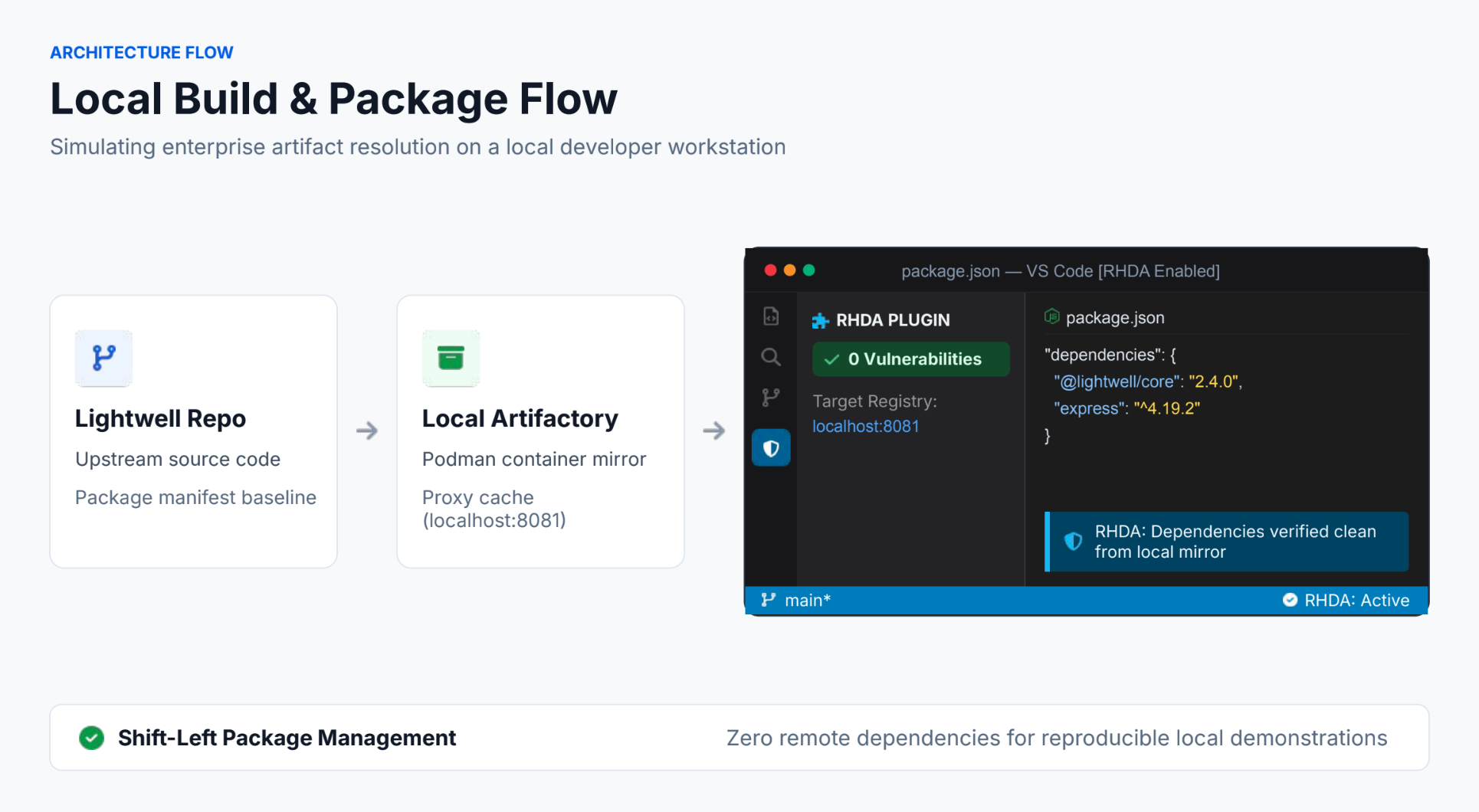
What is Lightwell?
Lightwell is a strategic initiative led by IBM and Red Hat designed to strengthen the security of the global open source software supply chain against the rapid pace of modern cyber threats. It functions as a trusted clearinghouse that identifies and fixes vulnerabilities in the vast world of application-level libraries and dependencies that sit beyond traditional product boundaries.
A major benefit of the project is its ability to backport security patches directly to the specific software versions an organization already uses in production, allowing for rapid protection without disruptive upgrades or code changes. To explore why effective vulnerability management extends beyond point fixes, read 5 reasons why your Lightwell strategy needs more than just patches.
By providing verified, digitally signed fixes and comprehensive compliance records, Lightwell helps organizations protect their existing environments quickly while ensuring all improvements are shared back with the broader open source community.
Why a local sandbox for build demos?
Testing complex enterprise workflows like dependency resolution, container builds, and security gates usually requires connecting to shared, remote infrastructure. For a proof of concept or demonstration, this introduces unwanted friction: network latency, credentials management, and environmental drift across team runs.
To keep this demonstration fully reproducible and isolated, the setup runs a self-contained local build flow:
- Containerized JFrog Artifactory via Podman: Spin up an isolated instance on your workstation to simulate enterprise artifact management, virtual repositories, and proxying without touching shared clusters.
- Tight feedback loops: Test, inspect, and validate package resolution and dependency caching in real time on a single machine.
- Isolated proof of concept: Experiment with package promotion, security remediation, and build flows without polluting shared staging environments.
- No remote dependencies: Run and present the entire demonstration completely offline without requiring active corporate VPNs or remote access.
Using dependency analytics for package upgrades
The repository uses Red Hat's dependency analytics plug-in to detect and patch vulnerable packages directly inside your IDE or cloud development environment (CDE).
By integrating directly with the hosted instance of Red Hat Trusted Profile Analyzer and supporting custom, customer-deployed Trusted Profile Analyzer instances for localized security risk analysis, dependency analytics connects your local workspace directly to enterprise threat intelligence. Instead of waiting for security team audits or long CI/CD scan reports, dependency analytics provides immediate, practical remediation:
- Inline vulnerability flags: Dependency analytics scans your manifest files (
pom.xml,package.json,requirements.txt,go.mod) locally and highlights vulnerable packages directly in your code editor. - Clear upgrade guidance: When a vulnerability is detected, dependency analytics specifies the exact CVE severity alongside the recommended non-vulnerable version.
- Single-step quick fixes: Developers can trigger inline quick fixes to automatically upgrade direct dependencies to safe, hardened versions supplied by Lightwell.
- Transitive dependency insights: For indirect sub-dependencies, dependency analytics pins down which parent package needs to be updated or overridden to eliminate the security risk.
What’s inside the LightwellDeveloperDemo repository?
The LightwellDeveloperDemo repository strips away enterprise bloat to give you a clean, runnable foundation:
- Containerized infrastructure: Container configurations to spin up JFrog Artifactory via Podman locally with minimal footprint.
- Minimal boilerplate: Direct, readable configuration designed so you can see exactly how the local runtime and security tooling fit together.
- Local run configuration: Prepackaged to build and execute straight out of your IDE or terminal.
- Dependency analytics integration flow: Clear examples demonstrating how to use dependency analytics diagnostics to upgrade vulnerable packages cleanly without introducing breaking API changes.
Quick start: Getting started locally
Setting up the demonstration on your machine requires a few standard commands:
Clone the repository:
git clone https://github.com/redhat-ads-tech/LightwellDeveloperDemoNavigate to the project directory:
cd LightwellDeveloperDemo- Follow the build steps in the
README.mdfile to execute locally (including starting Artifactory in Podman). Check the file for local Podman runtime prerequisites and IDE plug-in recommendations.
Clone, upgrade, and contribute
Whether you're onboarding new engineers to Lightwell or looking for an efficient local workflow using JFrog Artifactory in Podman to test dependency analytics-driven package upgrades, the LightwellDeveloperDemo project provides a friction-free starting point. Clone the repository, test it on your local machine, and feel free to open a pull request or issue to share feedback!

