"Can you allow app-client-01 to reach the database on port 5432?"
That's the simple business need. In many organizations, what follows is complicated: someone opens a ticket, team members exchange questions over email and chat, an engineer gathers information from several systems, performs technical analysis, and eventually logs in to the firewalls to add the rules by hand. Throughout the process, multiple people document the change across several disconnected systems. The request is simple, but the process is manual, slow, and fragmented.
For network automation engineers and ITSM administrators, Red Hat Ansible Automation Platform offers a faster, safer alternative: starting from that same ServiceNow ticket, it orchestrates the entire change—from AI-assisted path analysis to human approval and deployment.
First, an AI model analyzes the network topology and proposes the firewall rules. Next, humans approve the change at 2 defined gates. Then Ansible Automation Platform deploys it through a deterministic execution path. At a high level: AI proposes, humans approve, Ansible Automation Platform orchestrates, validates, and executes.
Red Hat Ansible Automation Platform as the trusted execution layer
The workflow connects 4 systems that normally don't talk to each other: ServiceNow handles requests and approvals, GitHub stores the intended firewall configuration and manages pull requests, a large language model (LLM) analyzes user requests and proposes rules, and 2 Palo Alto Networks firewalls serve as the deployment target. Event-Driven Ansible, a capability of Red Hat Ansible Automation Platform, receives events from ServiceNow and GitHub. Ansible Automation Platform jobs then gather data from the firewalls, call the model, create or update records, and deploy the approved rules. See Figure 1.
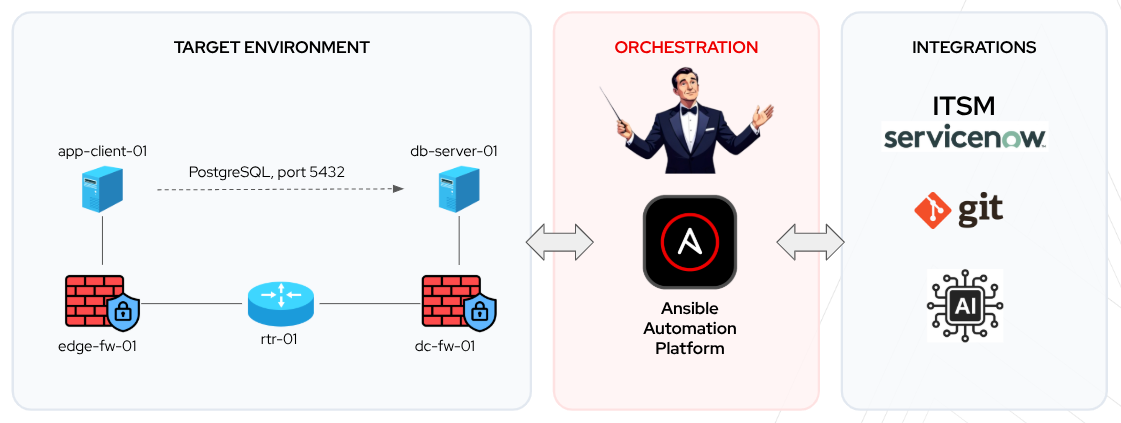
Because LLM output is probabilistic, meaning it can produce different results from the same input, it shouldn't be used for execution without validation. Ansible Automation Platform provides a deterministic execution path based on explicit automation logic defined in rulebooks and playbooks, idempotent modules, and controlled state transitions. In this workflow, the AI never connects to a device or accesses credentials. Secrets remain stored in Ansible Automation Platform and are injected only at runtime. Ansible Automation Platform logs every automation job, including who ran it, what actions it performed, and the results. The AI produces structured data that Ansible Automation Platform renders into a reviewable pull request and deploys only after human approval at 2 defined gates.
Event-driven automation triggers each stage
In this workflow, Event-Driven Ansible listens for ServiceNow webhooks and Git pull request state updates to trigger each execution stage automatically.
When an engineer submits a ServiceNow ticket, Event-Driven Ansible captures the payload, checks live firewalls for configuration drift, and opens a GitHub pull request with AI-generated rule recommendations. Once an engineer approves the pull request, Ansible Automation Platform creates the corresponding change request in ServiceNow and updates the Requested Item (RITM) so that ServiceNow reflects the current workflow state. After an administrator approves the change request in ServiceNow, Ansible Automation Platform executes an Ansible playbook to deploy and validate the firewall rules before updating Git and ServiceNow to close out the workflow.
This event-driven approach connects requests, approvals, and execution in real time, eliminating the need for scheduled polling. Ansible Automation Platform carries key variables—such as IP addresses, ticket IDs, and pull request links—from step to step, ensuring every task has the exact data it needs.
Configuration as Code and drift detection
Ansible Automation Platform stores the intended firewall configuration as structured data in the host_vars directory of the GitHub repository, following a Configuration as Code approach. The main branch represents the last successfully deployed state, while a pull request represents the proposed next state. This gives engineers a chance to review every proposed change in Git before anything touches production. Ansible merges the pull request only after the deployment is verified.
The process follows GitOps principles: changes are proposed in Git, reviewed through pull requests, deployed through automation, and recorded in version control.
Before executing anything, Ansible Automation Platform compares the live firewall configuration with the intended state defined in GitHub. If they don't match, the workflow stops. If no requested change is applied, Ansible Automation Platform records the drift in a ServiceNow work note and closes the ticket. Automation proceeds only from a trusted starting point.
How AI is used in this scenario
AI supports the workflow by analyzing requests, proposing firewall rules, and preparing information for human review by attaching network path analysis and rule rationale directly to ServiceNow tickets, change records, and pull requests. AI doesn't deploy changes. Ansible Automation Platform executes the approved changes only after the required approval gates. Ansible Automation Platform calls the LLM through its API, and the model returns analysis and content:
- Proposes firewall rules: The AI traces the traffic path across firewalls, identifies the relevant security zones, and returns the proposed firewall rules as structured data that Ansible Automation Platform can process.
- Prepares the pull request: The AI attaches the traffic-path analysis and a clear rationale for the proposed change to the pull request. A human reviewer must approve the pull request before the workflow continues.
- Drafts the change record: The AI prepares the ServiceNow change request by summarizing the scope, risk, impact, and rollback plan for Change Advisory Board (CAB) review.
- Updates the request: When no change is required, the AI explains the outcome. For example, this occurs when the traffic is already allowed, the request conflicts with an existing policy, a firewall application ID is not defined, or the network topology can't be determined. Ansible Automation Platform posts this information to the ServiceNow RITM.
The end-to-end workflow
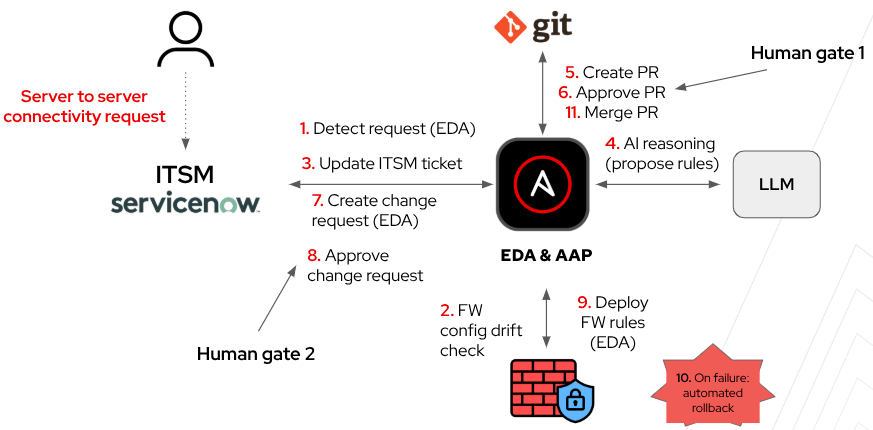
Putting the pieces together, the request moves through the following steps, illustrated in Figure 2:
- The Event-Driven Ansible feature within Ansible Automation Platform detects the ServiceNow request.
- Ansible Automation Platform checks the firewalls for configuration drift.
- Ansible Automation Platform updates the IT Service Management (ITSM) ticket.
- The LLM analyzes the network path and proposes rules.
- Ansible Automation Platform opens a pull request.
- An engineer approves the pull request (human gate 1).
- Ansible Automation Platform creates the ServiceNow change request.
- The Change Advisory Board (CAB) approves the change (human gate 2).
- Ansible Automation Platform deploys the firewall rules.
- If deployment fails, Ansible Automation Platform runs the rollback.
- After successful deployment, Ansible Automation Platform merges the pull request and updates ServiceNow.
Workflow records in ServiceNow and GitHub
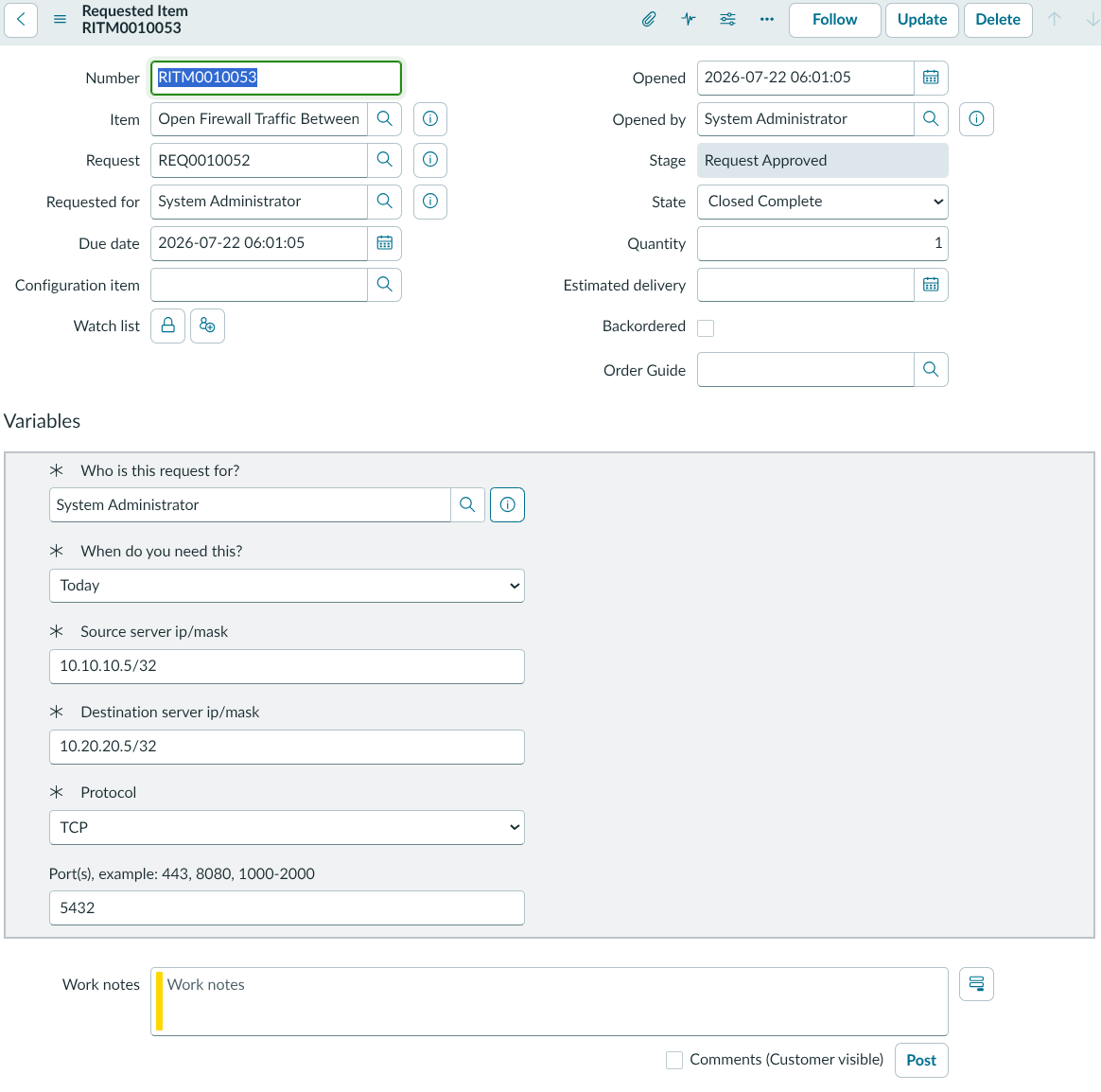
The following screenshots show how Ansible Automation Platform keeps the workflow records synchronized across ServiceNow and GitHub. The ServiceNow RITM contains the original connectivity request, while automated work notes track the progress and outcome of the workflow. Ansible Automation Platform also creates a ServiceNow change request and a GitHub pull request, both enriched with analysis and content generated by the LLM. See Figure 3.
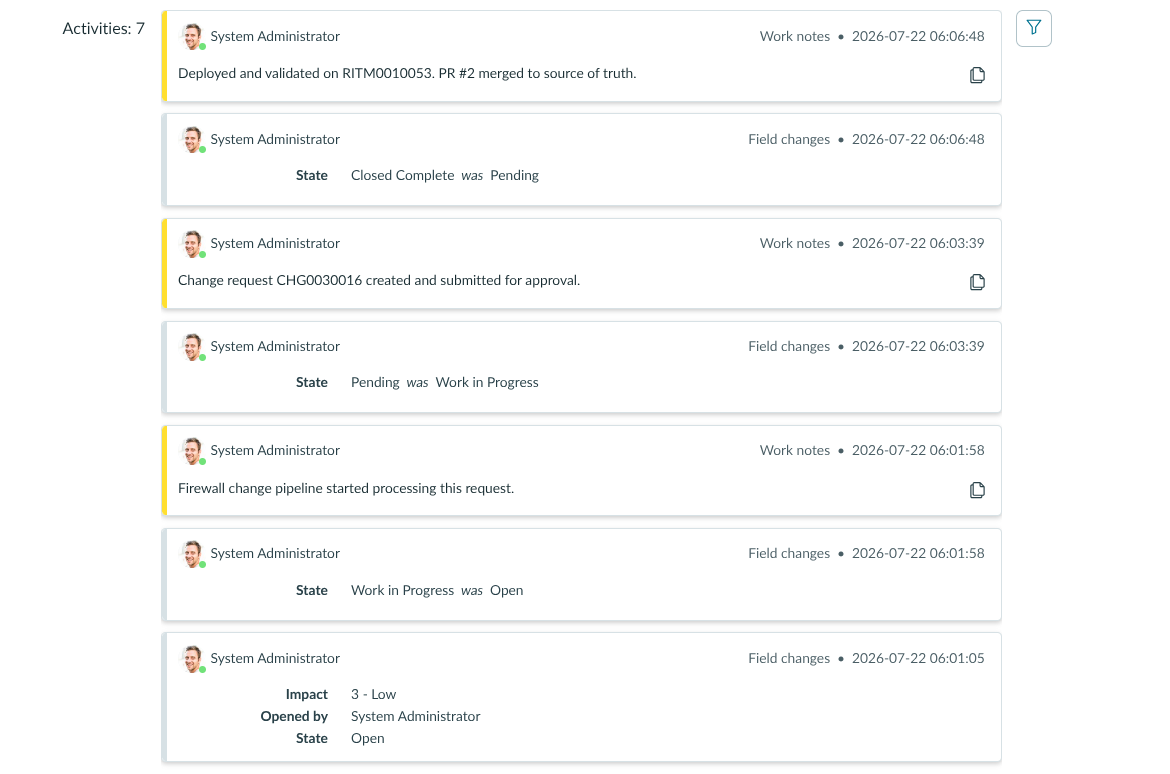
The RITM activity stream displays automated status updates and work notes added during the process (Figure 4).
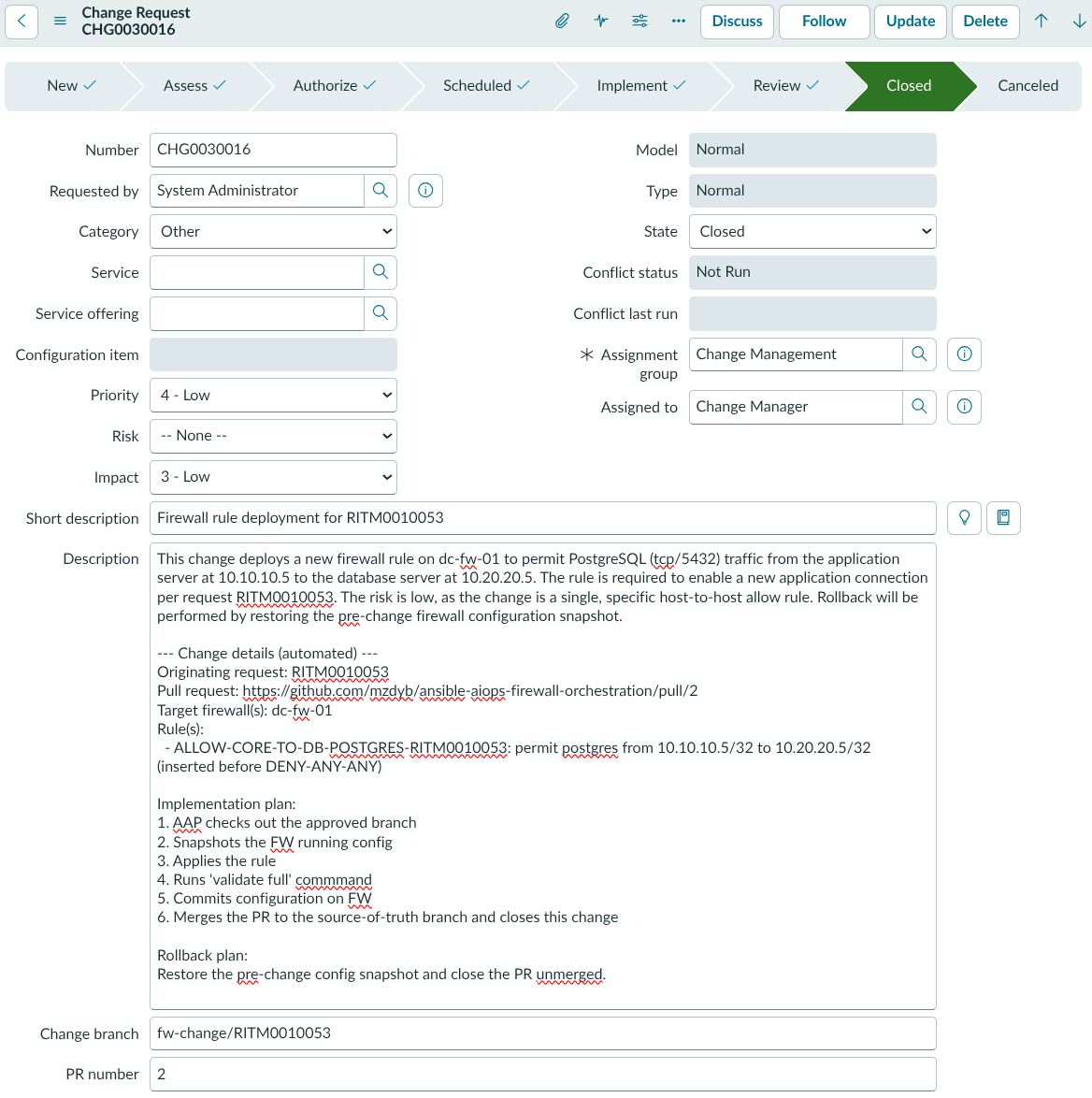
The ServiceNow change request displays automated implementation details generated for CAB review (Figure 5).
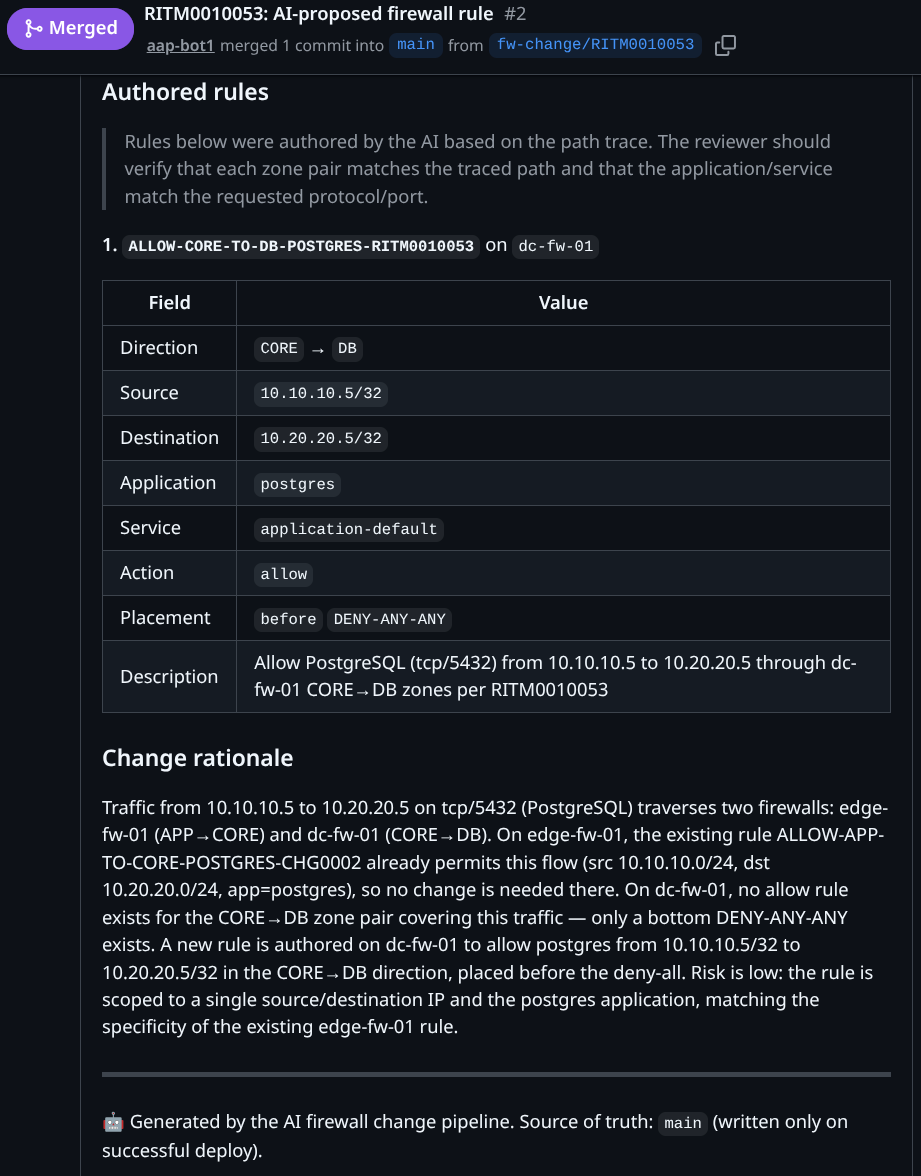
The GitHub pull request, as shown in Figure 6, includes the proposed rule syntax and AI-generated rationale.
The demo lab
The demo lab uses Containerlab and includes:
- 2 Palo Alto Networks VM-Series firewalls
- 1 Arista cEOS router
- 2 Linux containers representing an application client and a database server
You can find the implementation of the workflow, including the lab components used in the demo, in the Ansible AIOps Firewall Orchestration GitHub repository. The Containerlab topology definition, infrastructure details, and supporting files reside in the topology directory.
The lab includes 3 use cases that demonstrate different outcomes:
- Partial coverage: An existing rule already covers part of the PostgreSQL traffic path, so the AI proposes 1 rule on 1 firewall.
- No coverage: No existing rules cover a Secure Shell (SSH) request, so the AI proposes rules on both firewalls.
- Unresolvable request: No corresponding App-ID is defined on the Palo Alto Networks firewalls for the requested port. The workflow stops, and the AI explains in a ServiceNow work note that an engineer must define the App-ID before the request can proceed. App-ID creation could also be automated, but this workflow stops here intentionally.
For more details about the use cases, see the Ansible AIOps Firewall Orchestration GitHub repository.
Extending this architecture beyond firewalls
While this example focuses on Palo Alto Networks firewalls, the same pattern applies anywhere you need AI to analyze intent while Ansible Automation Platform enforces deterministic execution and human approval gates. For example, in access management, an LLM can interpret a new access request, map it to the matching policy, and propose that change in Git, leaving Ansible to deploy it once it is approved.
In each case, Red Hat Ansible Automation Platform acts as the trusted execution layer. It keeps credentials and infrastructure access separate from the AI, enforces approval gates, and applies approved changes through a controlled, deterministic workflow.

