Event-Driven Ansible (EDA) in Red Hat Ansible Automation Platform 2.5 brings a powerful shift in how automation can respond to real-time events. However, it doesn't have an inbuilt plug-in supported. This includes Splunk, a widely used monitoring and observability tool.
In this article, I’ll walk you through a practical workaround to integrate Splunk as an event source for EDA in Ansible Automation Platform 2.5. We will use Splunk alerts with the Webhook app as a post-alert action to feed events into the EDA engine. This guide is based on my testing with Ansible Automation Platform 2.5, though the approach should also work with version 2.4.
Overview: The integration approach
The following prerequisites are required to follow this guide:
- Ansible Automation Platform 2.5 instance with EDA
- A Splunk instance with permissions to create alerts and add a webhook.
In this integration, we will take a webhook-based approach to connect Splunk Alerts with Ansible Automation Platform 2.5 EDA. Since a native Splunk plug-in is not available in Ansible Automation Platform 2.5, we will simulate the integration by exposing a custom webhook endpoint that EDA can listen to.
On the Ansible Automation Platform side, we will configure a listener on a specific port (e.g., 5001). Because Ansible Automation Platform is deployed on Red Hat OpenShift, we’ll also need to expose this port externally by creating an additional route in OpenShift. This setup allows us to receive incoming HTTP POST requests from Splunk. If you are using a virtual machine-based Ansible Automation Platform install, you don't need to create this route. Please note that event stream functionality is not covered in this article.
On the Splunk side, we will create a custom alert based on a defined search query. As part of the alert configuration, we will use a webhook action (available through the Splunk-supported Webhook app) to send a POST request to the exposed Ansible Automation Platform URL created in the previous step.
This straightforward method enables real-time triggering of EDA rulebooks in Ansible Automation Platform based on events detected by Splunk.
Ansible Automation Platform
To begin, ensure that you have Ansible Automation Platform 2.5 installed on your machine. These instructions assume that you have Ansible Automation Platform 2.5 up and running with EDA.
Follow these steps to proceed:
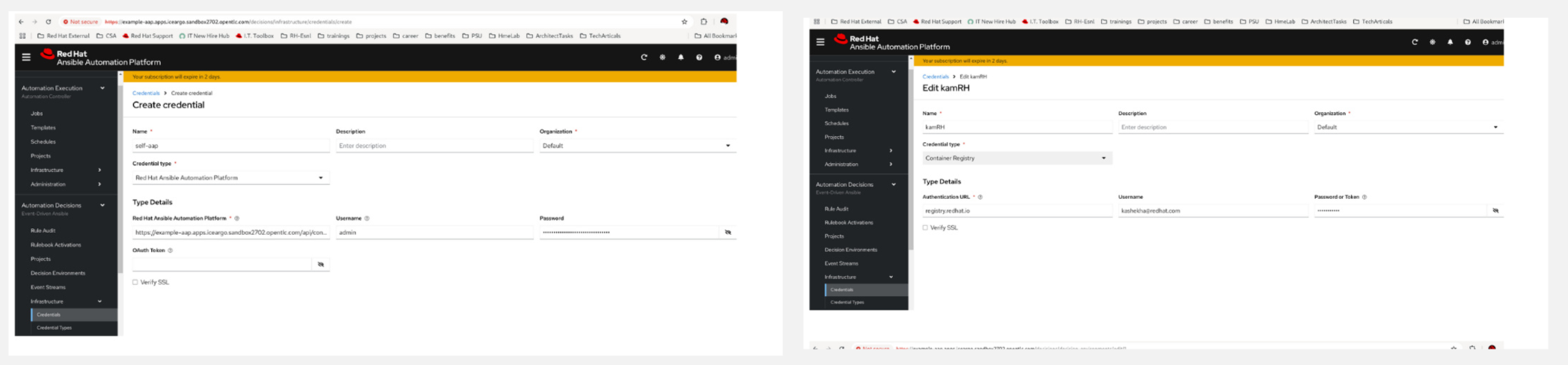
- Create a container and an Ansible Automation Platform credentials by first clicking the Automation Decision tab. The decision environment will be pulled from the registry and the action will take place on Ansible Automation Platform (Figure 1).
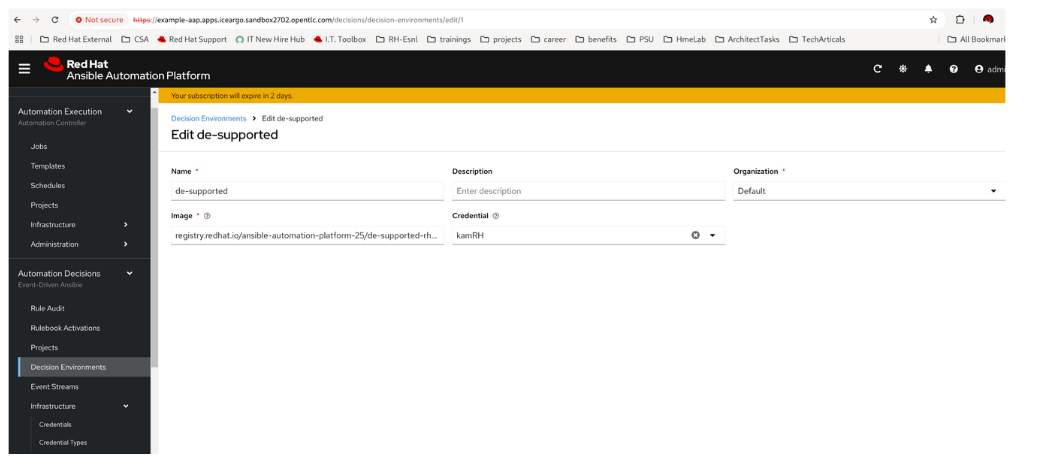
- Click the Decision Environment tab to create a decision environment, as shown in Figure 2.
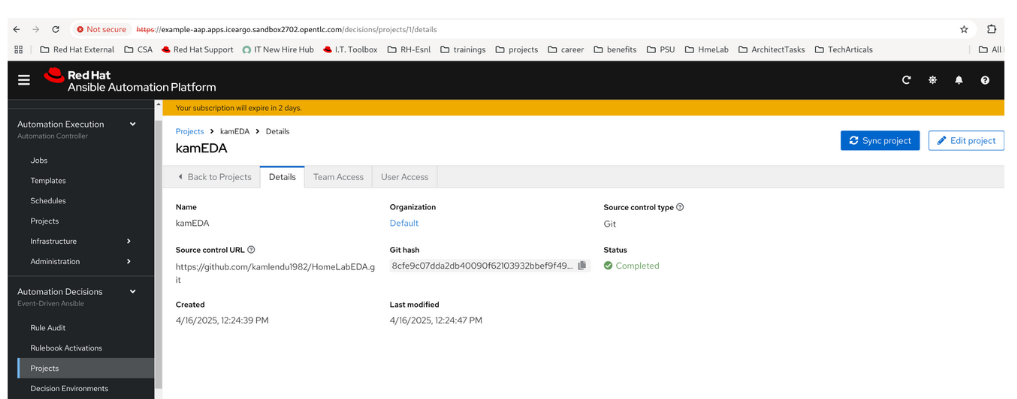
- Click the Projects tab to create a project with the rulebook and perform the sync (Figure 3).
The rulebook should have a webhook. The following is a sample:
---
- name: Listen for events on a webhook
  hosts: web
  ## Define our source for events
  sources:
     - ansible.eda.webhook:
        host: 0.0.0.0
        port: 5001
  rules:
    ## Define the conditions we are looking for
    - name: run if message has aws
      condition: event.payload != null
    ## Define the action we should take should the condition be met
      action:
        run_job_template:
          name: RunOnSplunk
          extra_vars: "{{ event.meta }}"
          organization: Default
- Activate the rulebook by clicking the Create rulebook application button (Figure 4).
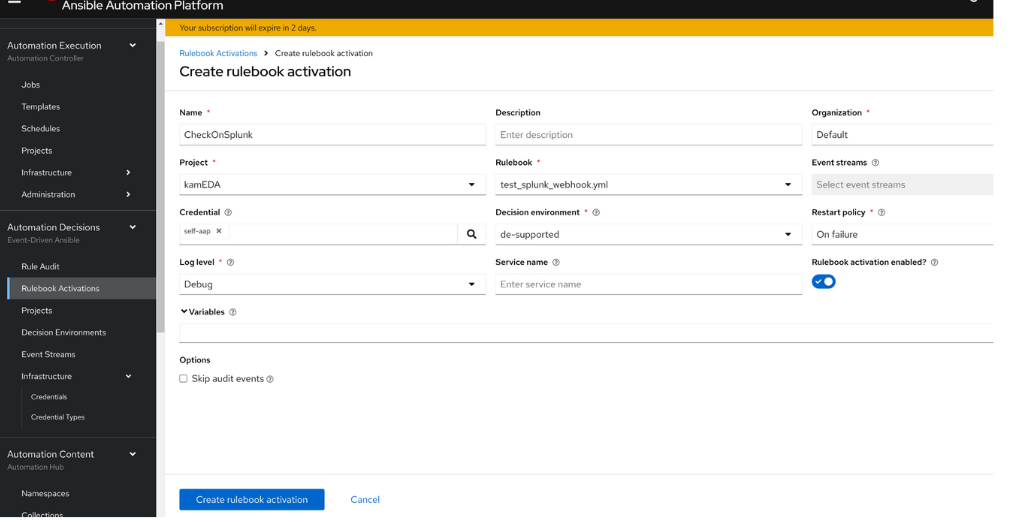
This should create a service in the Red Hat OpenShift Container Platform.
- Create a route for that service, as shown in Figure 5.

Splunk
I created my own Splunk instance, which I ran in my lab in a container. The following are the steps for installation and configuration:
- Log in to a VM where you want Splunk to run.
Make sure it has Podman or Docker installed. If it does not, then execute the following code:
sudo dnf install podman podman run -d -p 8088:8088 -p 8000:8000 -e SPLUNK_START_ARGS='--accept-license' -e SPLUNK_PASSWORD='ansible123' splunk/splunk:latestCheck the container's running status. It should be something like this:
[root@kameda ~]# podman ps
CONTAINER ID  IMAGE                           COMMAND        CREATED     STATUS               PORTS                                                                                                                 NAMES
6c5291d43c24  docker.io/splunk/splunk:latest  start-service  5 days ago  Up 5 days (healthy)  0.0.0.0:8000->8000/tcp, 0.0.0.0:8088->8088/tcp, 8000/tcp, 8065/tcp, 8088/tcp, 8089/tcp, 8191/tcp, 9887/tcp, 9997/tcp  funny_babbage
[root@kameda ~]#
The Splunk URL can be accessed at <VM_IP>:8000. It may take a few minutes before the UI is up.
- We can log in using "admin" as the username and "ansible123" as the password.
- Generate a token we can use to send a message to Splunk as follows:
- Navigate to Settings > Data Inputs > HTTP Event Collector.
- Click New Token.
- Name the token (you can leave the other fields blank) and click Next.
- Click Review and then Submit.
- Save the token.
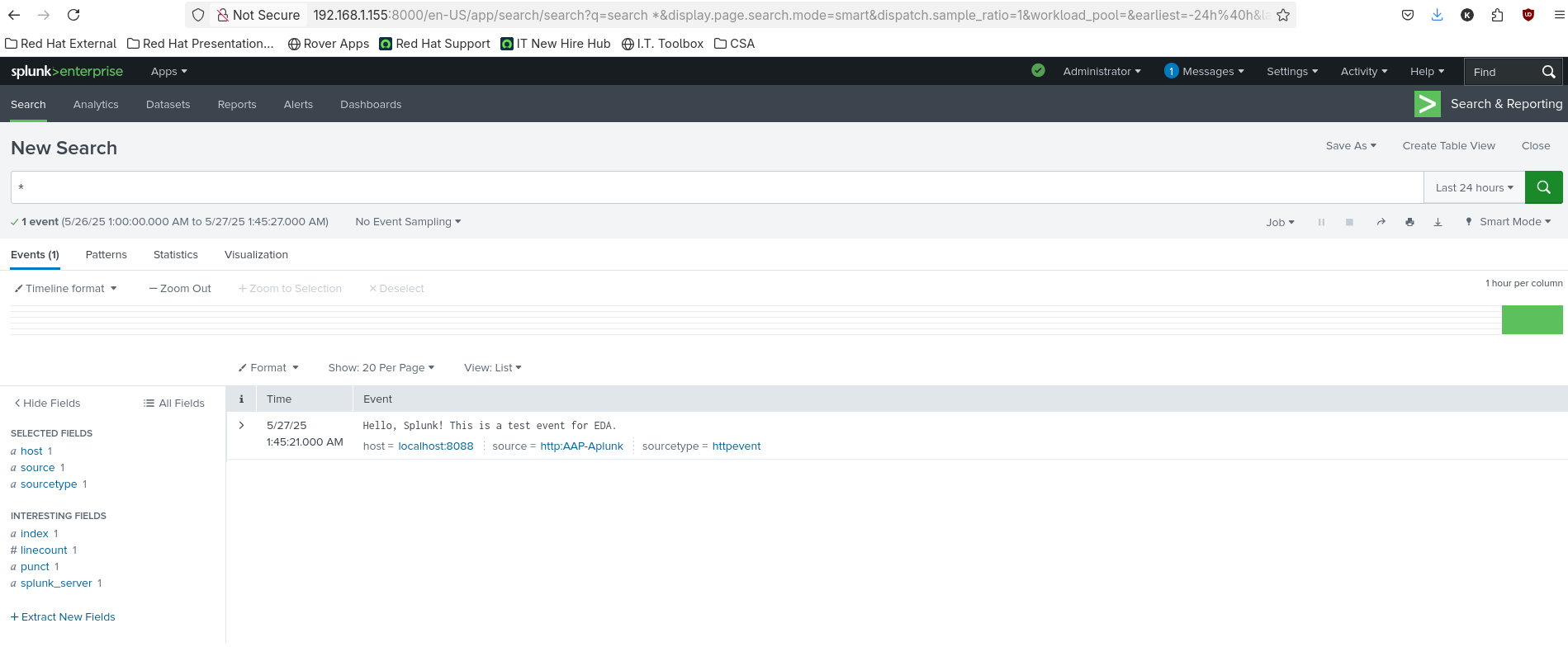
- Create a search in Splunk. I am using * so that any message will show in the result.
Send an event using a curl command:
curl -k "" -H "Authorization: Splunk xxxyour_tokenxxx" -d '{"event": "Hello, Splunk! This is a test event for EDA."}'
https://<your splunk VM ip>:8088/services/collector/event
It should appear as Figure 6 indicates.
- Next, create an alert from the search as follows:
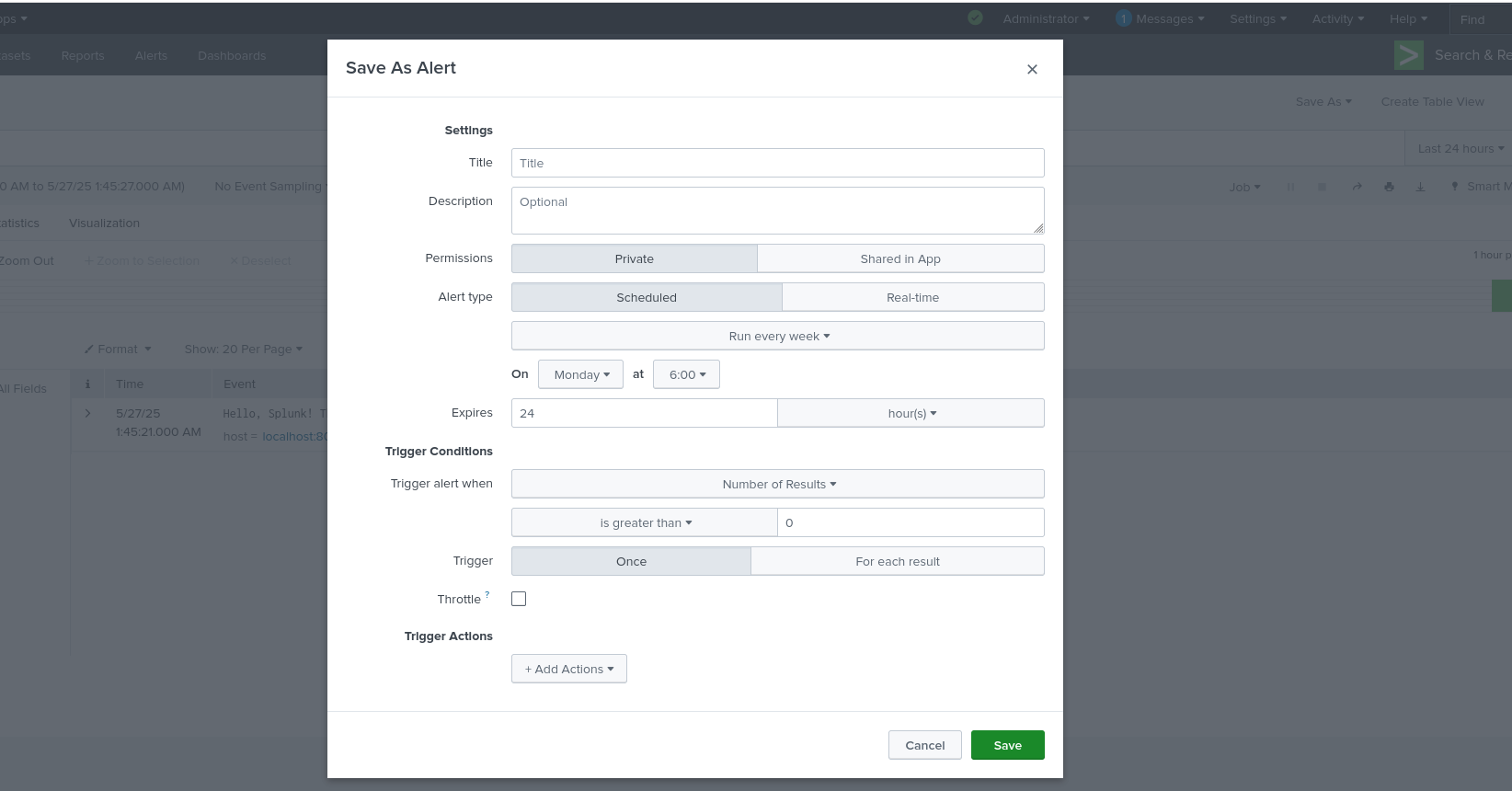
On the right side of the screen, select the Save As option and select the Save As Alert option (Figure 7).
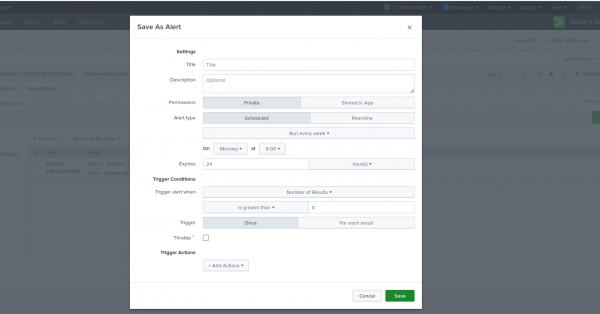
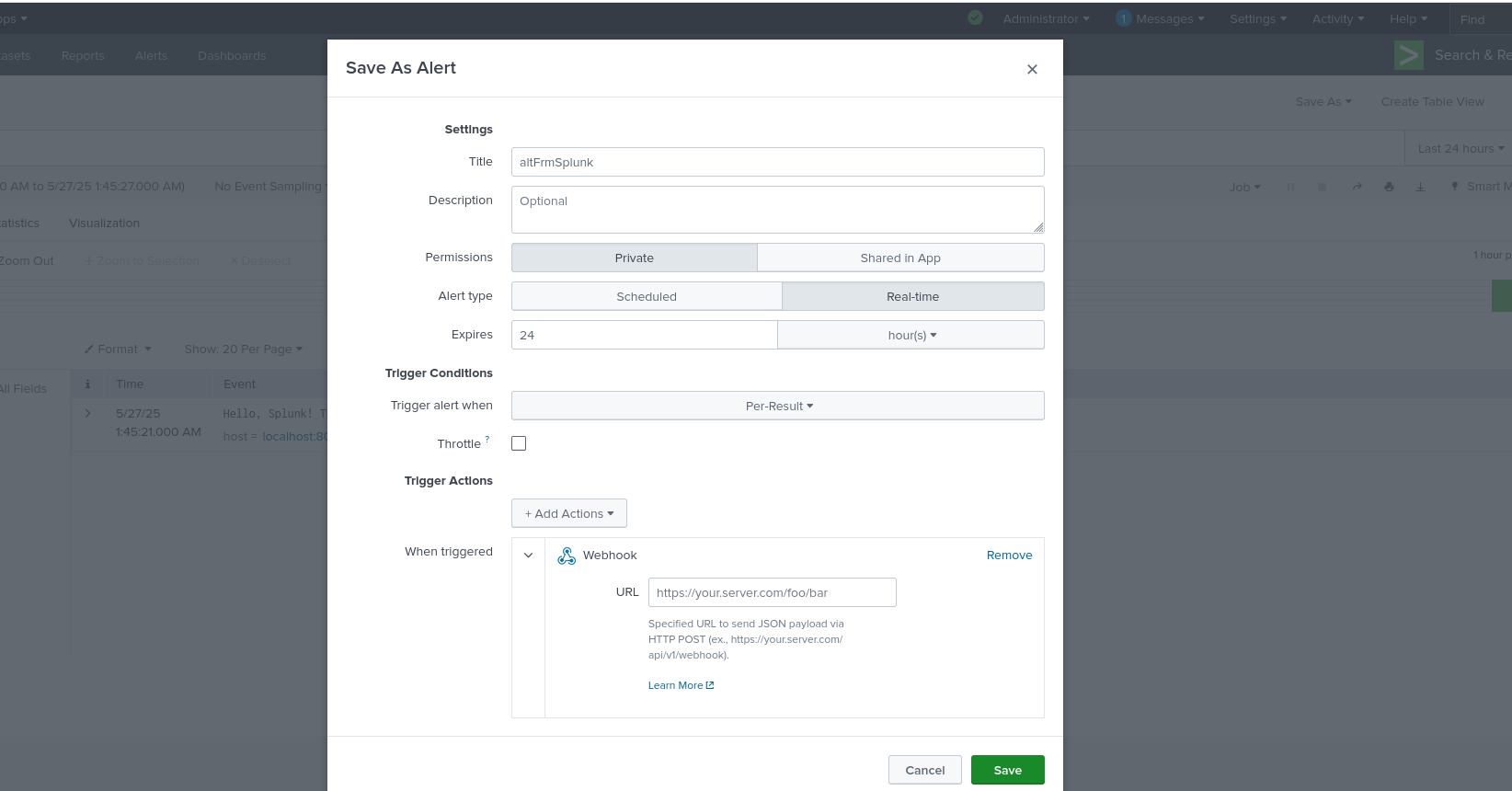
Figure 7: Saving the search as an alert. Select the appropriate fields. Figure 8 shows the options I selected.
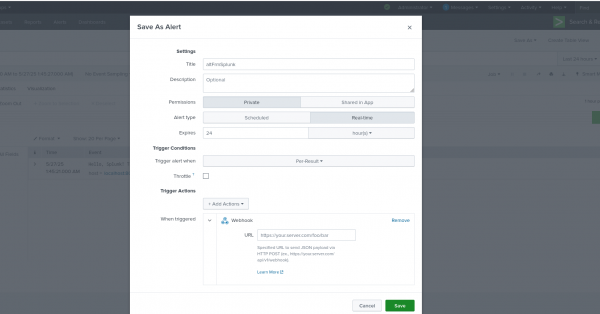
Figure 8: Creation of webhook as post alert action. - Make sure you are selecting Webhook as the Trigger Actions. You can select multiple actions.
- As the webhook URL, provide the URL of the EDA webhook we got from Ansible Automation Platform at the end of the Ansible Automation Platform section.
- Save the alert.
Testing and validation
The final steps in this process are testing and validation.
- Make sure that Splunk receives an event on the alert criteria and the alert kicks in.
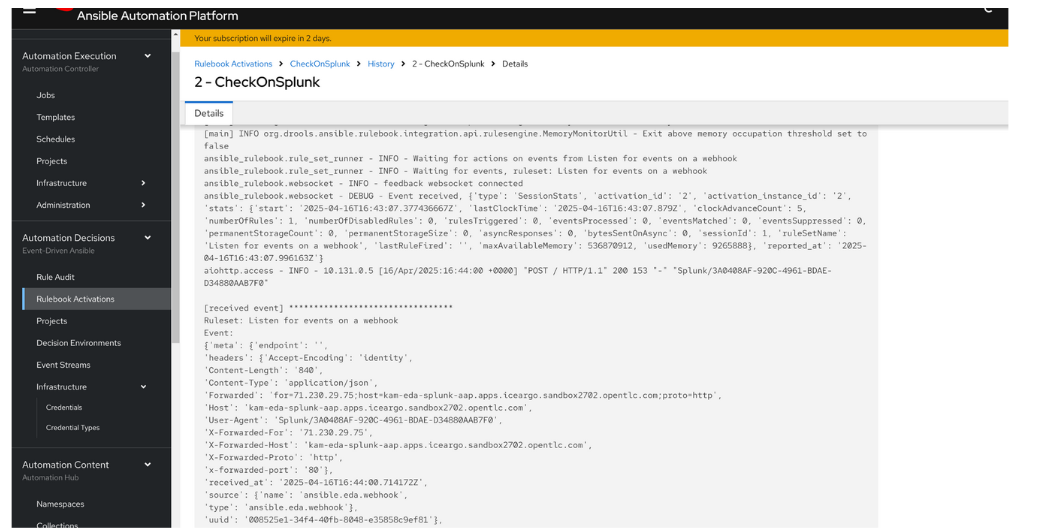
In Ansible Automation Platform, navigate to Automation Decisions > Rulebook Activations > select the rulebook > History > the running instance. You will see something in Figure 10 this once Splunk triggers the alert.

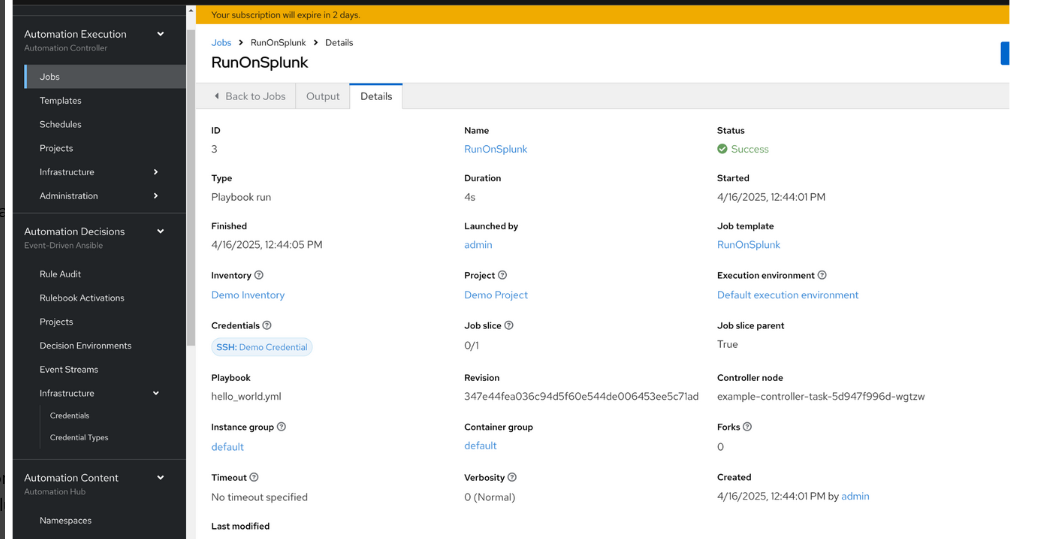
Figure 9: Output on the EDA in case of a received event. - Make sure to create a corresponding job template in automation execution. I am using JT with the name RunOnSplunk in this example (Figure 10).
Final thoughts
This article presents a practical approach to integrating Splunk with Event-Driven Ansible (EDA) in Ansible Automation Platform 2.5. The integration utilizes Splunk alerts in combination with the Splunk Webhook app, allowing event data to be pushed to a custom webhook endpoint.
The setup involves configuring a listening webhook service (in this example, a defined port such as 5001) and exposing it through an OpenShift route, where Ansible Automation Platform is hosted. On the Splunk side, an alert is created based on specific search criteria and configured to trigger a webhook that delivers event data directly to an EDA rulebook listener.
This method provides a lightweight and effective solution for triggering automation based on Splunk alerts, enabling real-time IT operations workflows even in the absence of a native Splunk event plug-in in Ansible Automation Platform.

