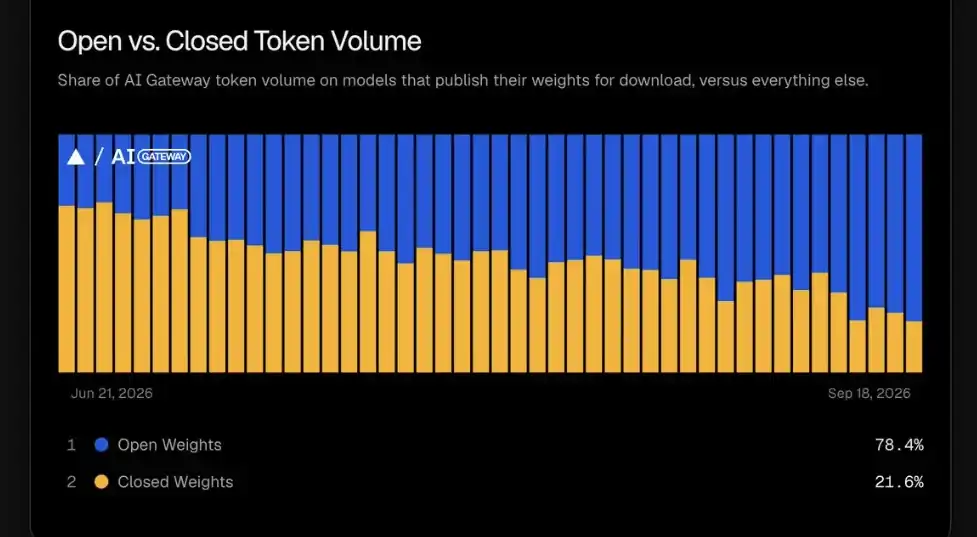
Open models have gone from "worth testing" to powering the majority of AI applications and agents. On Vercel's AI Gateway, open weight models processed almost 80% of production tokens in September (Figure 1), up from less than 10% in December 2025. OpenRouter, a popular gateway for developers using LLMs, shows a similar climb in weekly token usage. As these models handle more traffic, many teams that want to control their data and costs with AI have started asking a natural follow-up question: Why not run these ourselves?
In fact, most agents, RAG pipelines, and AI apps already make that easy, because swapping the backend is usually just a new base URL for an OpenAI-compatible API. But what sits behind that URL really matters. The inference engine decides how requests are scheduled, how GPU memory gets used, and whether users get a response almost instantly or end up waiting around. That's why for at-scale production serving, 2 open source engines come up the most: vLLM and SGLang. Which should you pick? Let's look at how each project was designed, what workloads they're best suited for, and how to read independent benchmarks for your use case.
The problem both engines solve: KV cache
An LLM request involves 2 stages that are useful to understand before comparing vLLM and SGLang:
- Prefill: The model processes your whole prompt at once, and computes the attention keys and values for every input token.
- Decode: The model generates output one token at a time, reusing those keys and values as it goes.
Those stored keys and values are the KV cache. Keeping it around means the model doesn't redo the same math for every new token, but it grows with every conversation and can use a lot of GPU memory. Different workloads also stress different stages. Reading a long document is heavy on prefill, while code generation (lots of output) leans on decode.
An inference engine is really a scheduler and memory manager for the KV cache, deciding which requests run together, where cached state lives, and how to keep the GPU busy as requests come and go. vLLM and SGLang each started with a different answer to that problem. If you're running models on a laptop or consumer hardware instead, check out our llama.cpp vs. vLLM guide.
vLLM: Fixing wasted GPU memory with PagedAttention
vLLM came out of UC Berkeley in 2023 with a focus on 1 big problem: Most serving systems waste KV cache memory. Because a conversation's cache keeps growing (and you don't know how long the output will be), engines reserved large, contiguous chunks of GPU memory up front. The original vLLM paper found that existing systems wasted 60–80% of that memory, which limited how many requests could fit on a GPU at once.
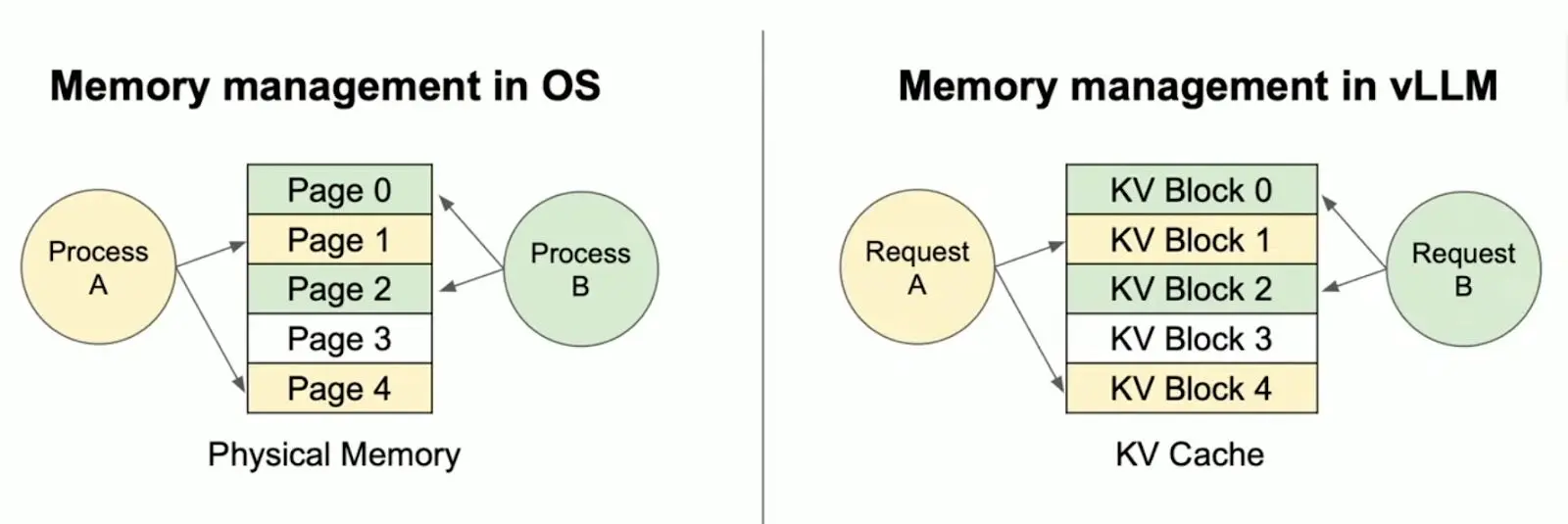
vLLM's answer was PagedAttention. This splits the KV cache into small fixed-size blocks that can live anywhere in GPU memory, similar to how an operating system pages virtual memory (Figure 2). Memory gets allocated as a sequence grows, not reserved ahead of time, so the same GPU can serve many more requests at once.
This idea worked so well that paged KV cache management is now standard across modern serving engines, SGLang included. From there, vLLM grew into a broad serving ecosystem, aiming to run "any model, on any accelerator, on any cloud," with Red Hat as its largest corporate contributor, along with hundreds of other organizations across industry and academia.
SGLang: Reusing work across related requests with RadixAttention
Introduced through LMSYS in January 2024, SGLang stands for Structured Generation Language. That tells you what it was built for: Apps that make many related model calls, like multi-turn chat, extraction workflows, and agents that branch and loop.
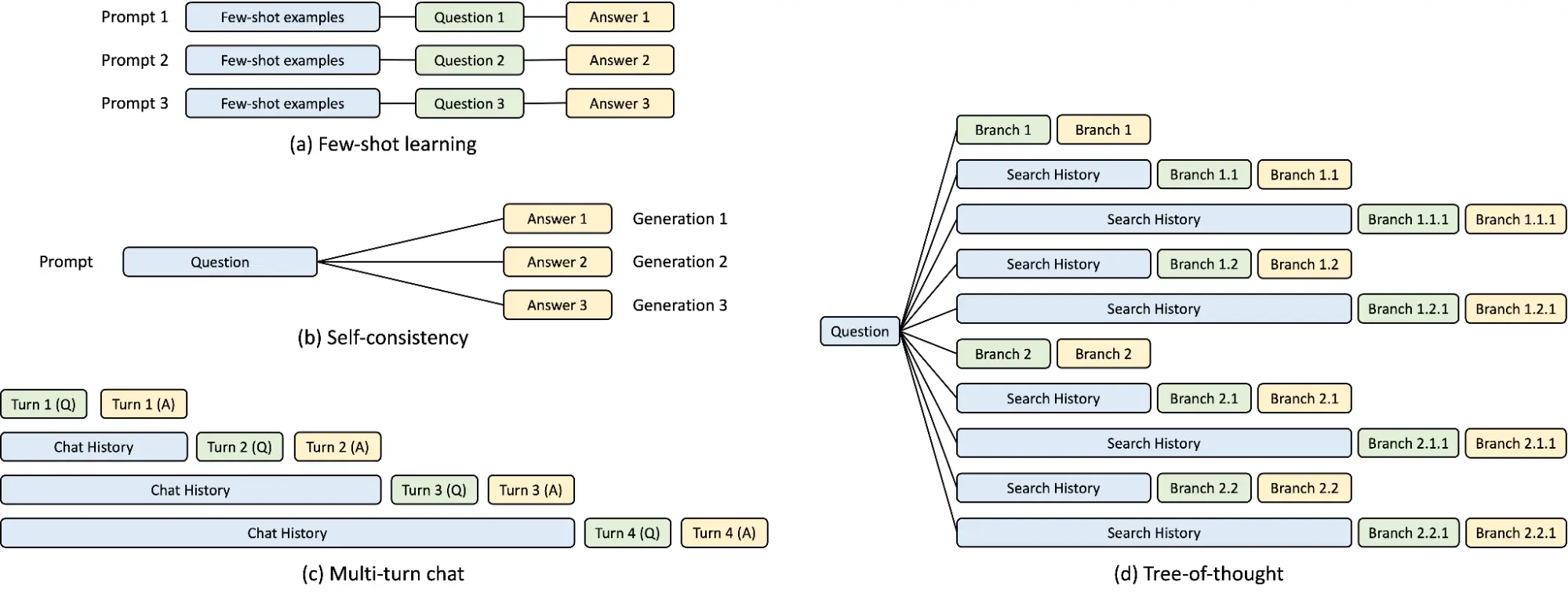
Those types of applications repeat themselves a lot. Think about an agent: Every call sends the same system prompt and the same tool definitions, plus a conversation history that only grows. SGLang's RadixAttention stores computed KV cache in a radix tree, keyed by token prefix. When a new request arrives, the engine walks the tree, reuses everything that matches, and only computes the new part. Branches that haven't been used in a while get evicted first (Figure 3).
SGLang pairs this with cache-aware scheduling, which runs requests that share a prefix close together so the cached branch is still around when they need it.
vLLM vs. SGLang: What's similar
Both projects have expanded well beyond their original optimizations. They each now offer many of the same capabilities, many of which can improve response latency and throughput (which we'll also take a look at).
- Continuous batching: Keeps the GPU busy as requests arrive and finish.
- Prefix caching: Skips recomputing shared prompt instructions.
- Chunked prefill: Splits long prompt processing into smaller portions that can be scheduled alongside other work.
- Structured outputs: Constrains generation to JSON or a grammar.
- Speculative decoding: Proposes and verifies candidate tokens to accelerate workloads.
- Quantization: Reduces memory requirements and can improve performance using lower-precision representations.
- Distributed execution: Spreads larger models and workloads across multiple accelerators.
Model support
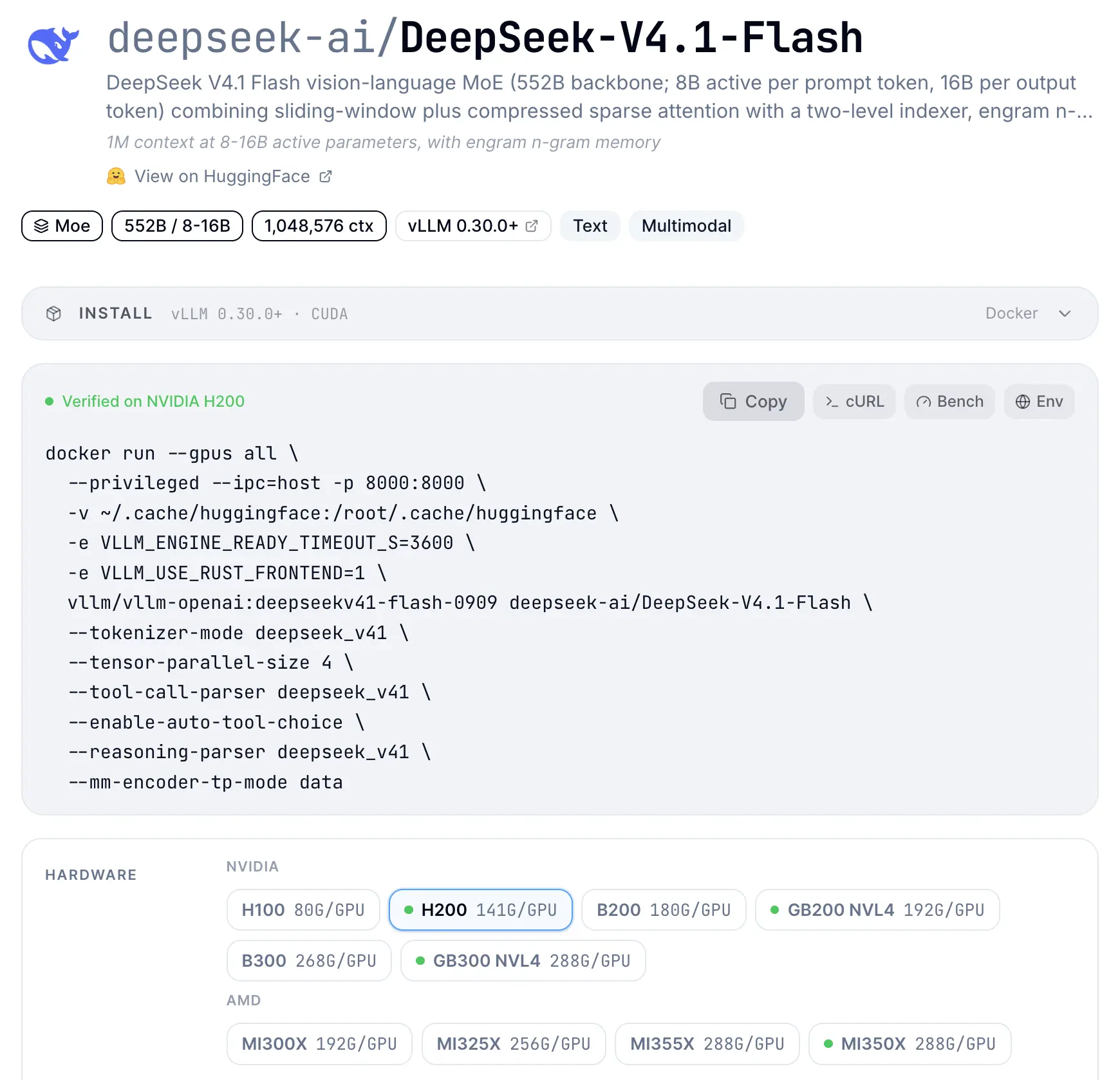
Both engines typically provide Day-0 (day of) support for new models, working with frontier labs and model providers in advance to ensure proper formatting templates and parameters for efficient inference. vLLM has its recipes page (Figure 4), which provides commands for running specific models on your exact hardware, as does SGLang with the SGLang cookbook.
Options for hardware support
These days, both vLLM and SGLang support a diverse set of accelerators, including NVIDIA GPU, AMD GPU, Intel GPU, Google TPU, and more. The engines treat NVIDIA and AMD as first-class, but vLLM's support for TPU, Intel GPU, CPU, and Apple is older and is documented for serving models.
Community and ecosystem
Both projects have a diverse set of contributors. For example, vLLM and SGLang are in the top 10 of GitHub's 2025 Octoverse report (by contributor growth), demonstrating the scale of activity around the project (Figure 5).
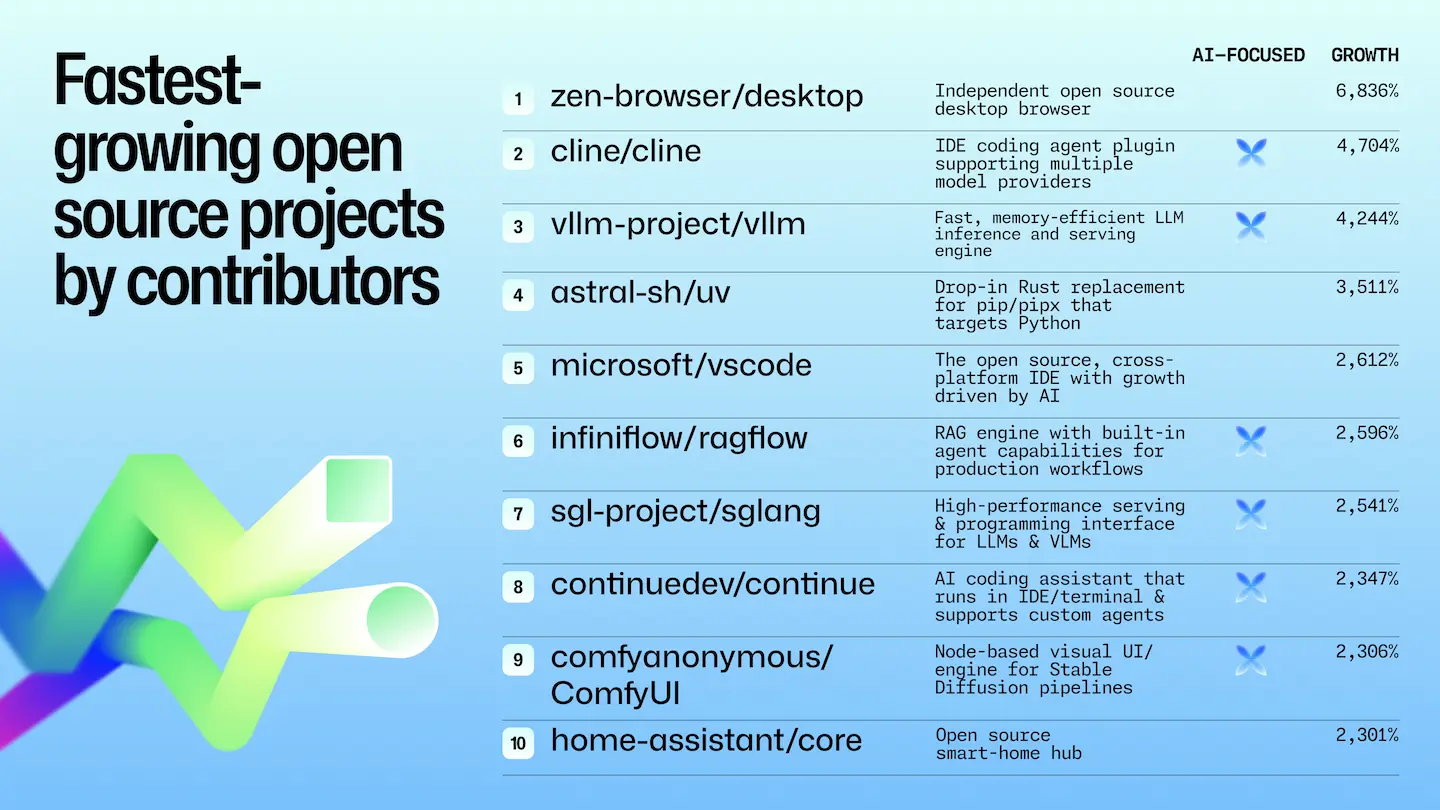
Also in 2025, vLLM and SGLang became part of the PyTorch Foundation ecosystem, with vLLM as a Foundation-Hosted Project (similar to a "Graduated" or mature project), meaning it's passed strict production-use and governance checks. SGLang is an Ecosystem Project (functionally similar to a "Sandbox" status), because it maintains its own independent project governance.
What independent benchmarks show
Modal's LLM Engineer's Almanac tested vLLM, SGLang, and TensorRT-LLM (Figure 6) on more than a dozen models and 10 input/output length combinations, all on NVIDIA GPUs with out-of-the-box settings. Their conclusion: vLLM and SGLang perform comparably, so the choice comes down to other factors, such as how quickly each ships the features you need.
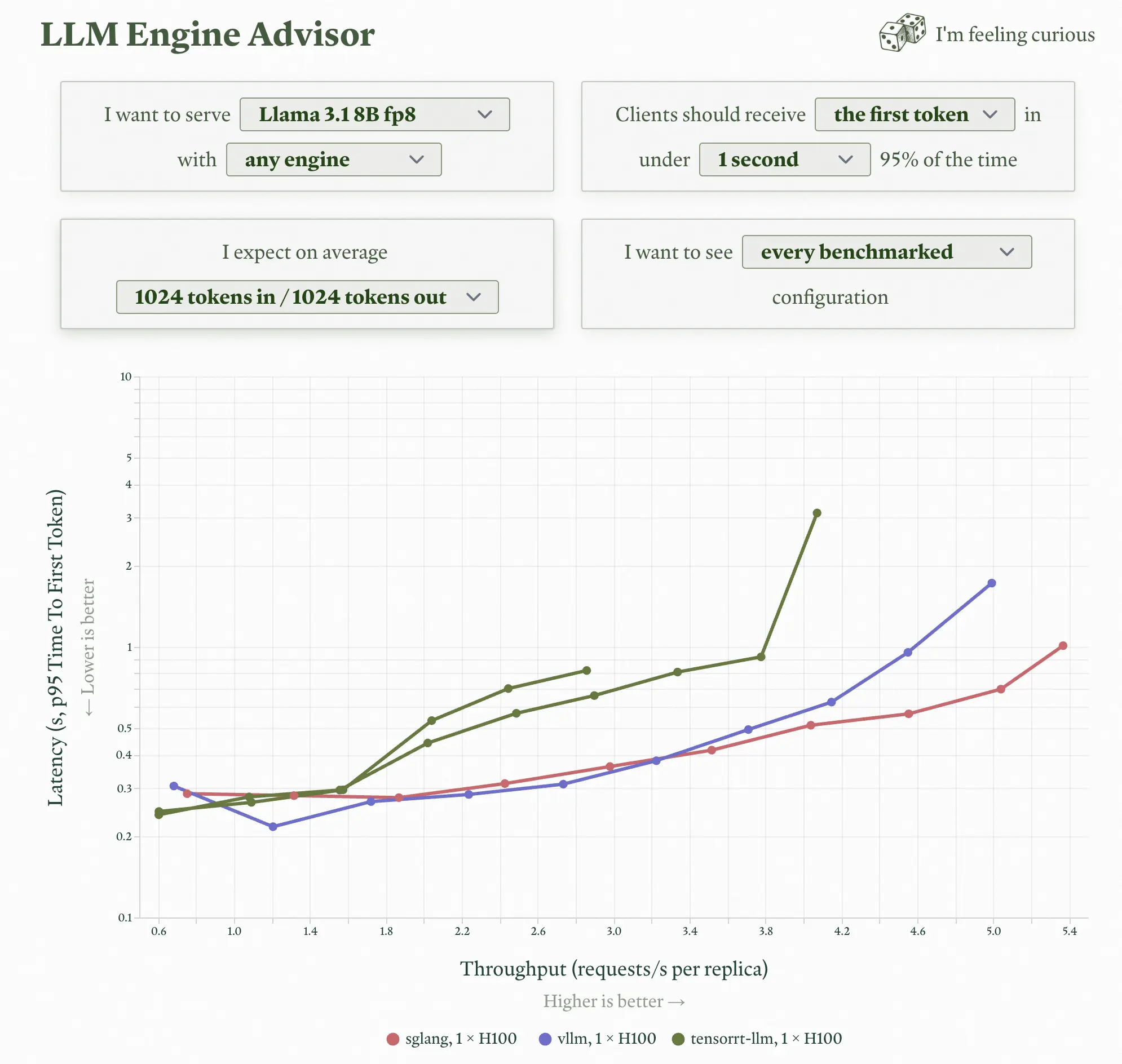
Here's a sample across 3 workload shapes using Llama 3.1 8B on a single H100. For each, we took the highest request rate where each engine still returned the first token in under 1 second (p95), so "throughput" here means requests per second per replica and TTFT is time to first token:
| Workload (tokens in / out) | Closest real use case | vLLM throughput | SGLang throughput | vLLM p95 TTFT | SGLang p95 TTFT |
|---|---|---|---|---|---|
| 1024 / 128 | RAG, summarization | 17.08 req/s | 16.88 req/s | 0.52 s | 0.83 s |
| 128 / 1024 | Code generation | 5.34 req/s | 6.50 req/s | 0.82 s | 0.87 s |
| 2048 / 2048 | Long chat | 1.23 req/s | 1.25 req/s | 0.65 s | 0.74 s |
There's an important detail when reading these results: Modal's test prompts are random chunks of "Pride and Prejudice" by Jane Austen, which means very few requests share a prefix. That's a fair test of independent requests, but it doesn't show the prefix reuse that matters for chat and agents, which is exactly where RadixAttention (and vLLM's prefix caching) make a difference. The results are also from a single replica with default configs, so tuning can change the picture.
The takeaway here is that the best benchmark is your own traffic. Tools like GuideLLM let you run realistic prompts against either engine and measure throughput and latency on your hardware.
Conclusion
vLLM and SGLang started from different answers to the same KV cache problem. vLLM focused on fitting more requests onto a GPU with PagedAttention, and SGLang focused on reusing work across related requests with RadixAttention. Today, both are fast, both are backed by large communities, and both have picked up each other's best ideas. The right choice depends on your workload, your hardware, and the ecosystem you're building in.

