llm-d flow control adds priority-aware admission and tenant fairness scheduling mechanisms for GPUs, giving platform teams a way to prioritize mixed workloads on a shared model pool. This feature is generally available in Red Hat AI Inference 3.5.
Shared inference needs an admission policy
Teams often provision dedicated GPU pools to handle peak demand and isolate latency-sensitive workloads. When traffic falls below that peak, reserved capacity goes unused, even though the platform still pays for it. Sharing a model pool puts that capacity to work by consolidating tenants with different traffic patterns and service objectives on the same GPU resources. The tradeoff is that mixed workloads now contend for the same serving capacity even when they require different service guarantees.
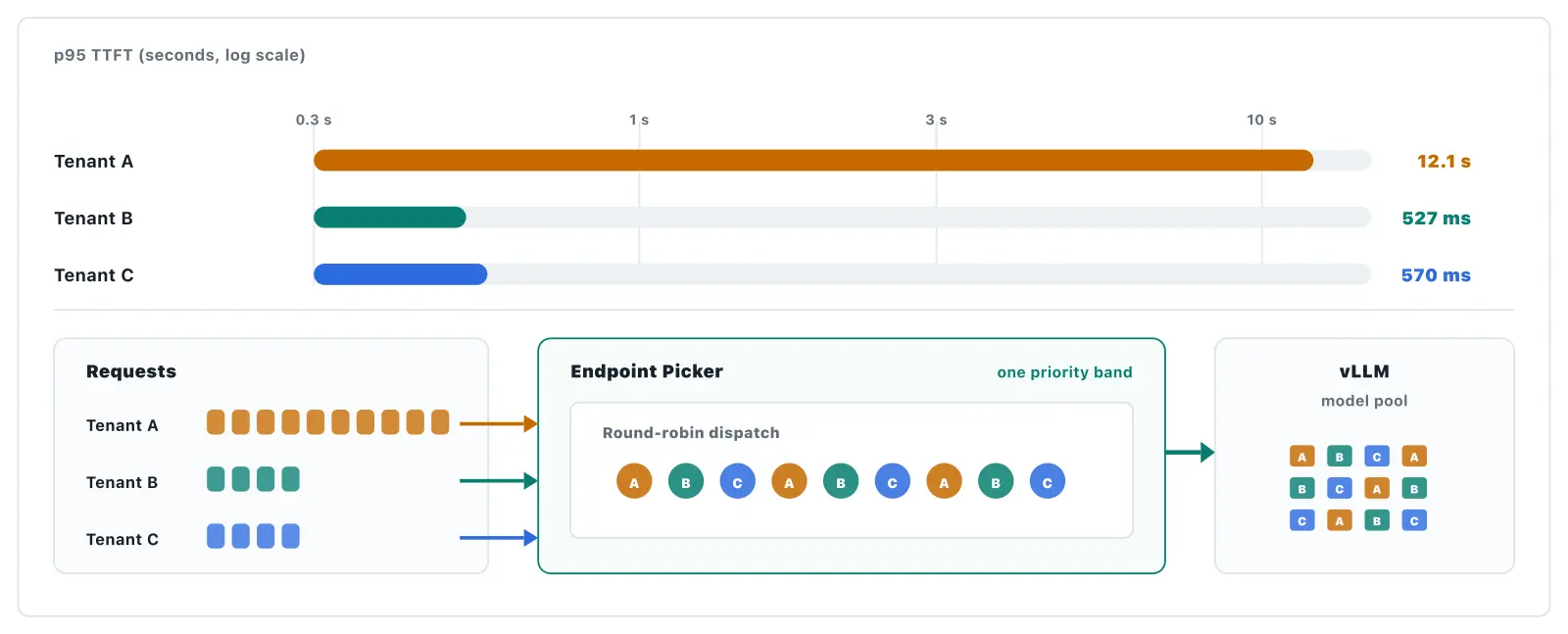
Request count alone does not reflect how long a request occupies serving resources (see Figure 1).
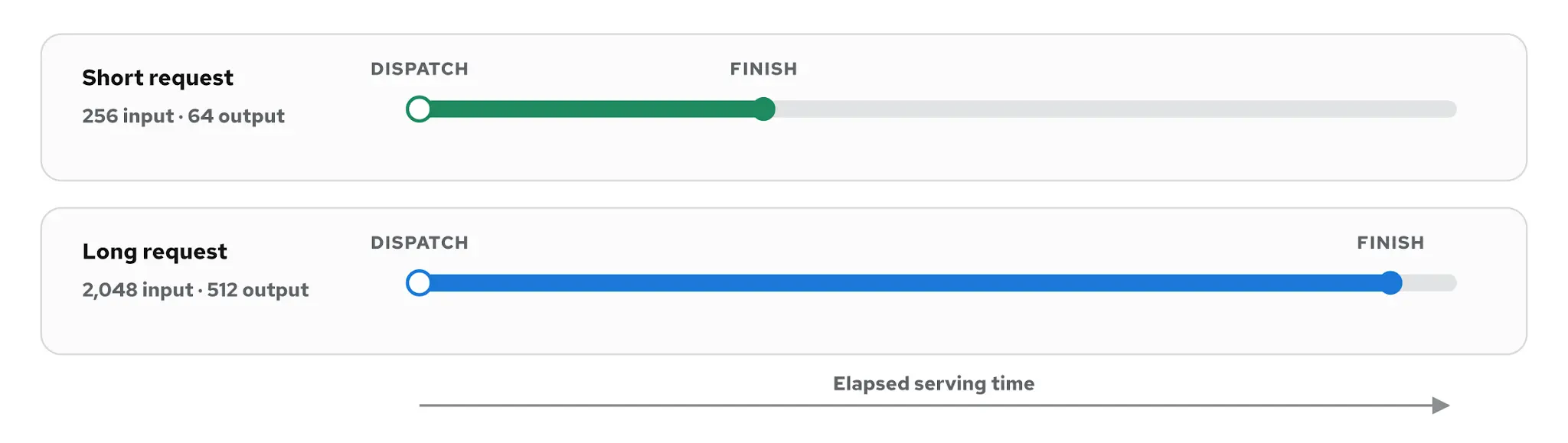
Flow control addresses this problem by adding an explicit admission decision before routing. When demand exceeds capacity, admission determines which requests wait and which queued request advances next. Routing then determines where the admitted request should be routed.
When pool saturation is at or above a priority band's configured usage ceiling, the dispatch gate keeps requests in that band queued in the Endpoint Picker until the band becomes eligible to dispatch. Priority bands determine which traffic is dispatched first, while fairness distributes dispatch turns among tenants within the same band. Only after a request is admitted does the scheduler select a model server.
The utilization detector combines per-replica queue and key-value (KV) cache pressure into one pool-saturation signal.
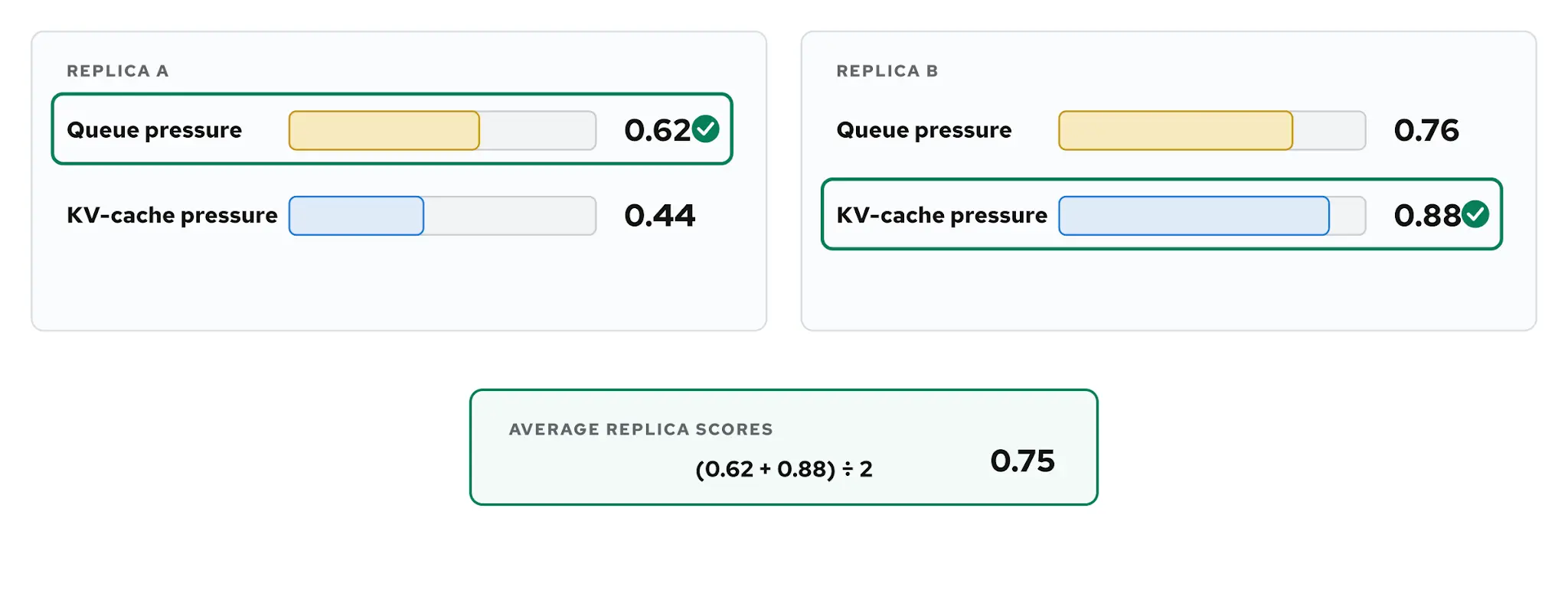
Platform teams can consolidate mixed workloads without relying on arrival order alone to decide what gets served. At saturation, lower-priority requests can remain queued longer, allowing higher-priority requests to continue receiving dispatch opportunities. The model, request shape, vLLM configuration, and available GPUs determine how much work the pool can complete. Flow control determines what waits.
Flow control within the llm-d request path
An inference request reaches an inference gateway and passes through the Endpoint Picker before it reaches a model server. Flow control evaluates active priority bands from the highest to the lowest integer value. When pool saturation reaches a band's configured ceiling, requests in that band and in bands with lower numerical priorities remain queued for the current dispatch attempt. If the band is eligible, the fairness policy selects a tenant queue, and then an ordering policy selects the next request from it. Then, the scheduler selects the highest-scored available vLLM pod, and Envoy forwards the request to it.
The Endpoint Picker applies flow-control admission before backend scheduling. The HTTP request path is outlined in Figure 3.
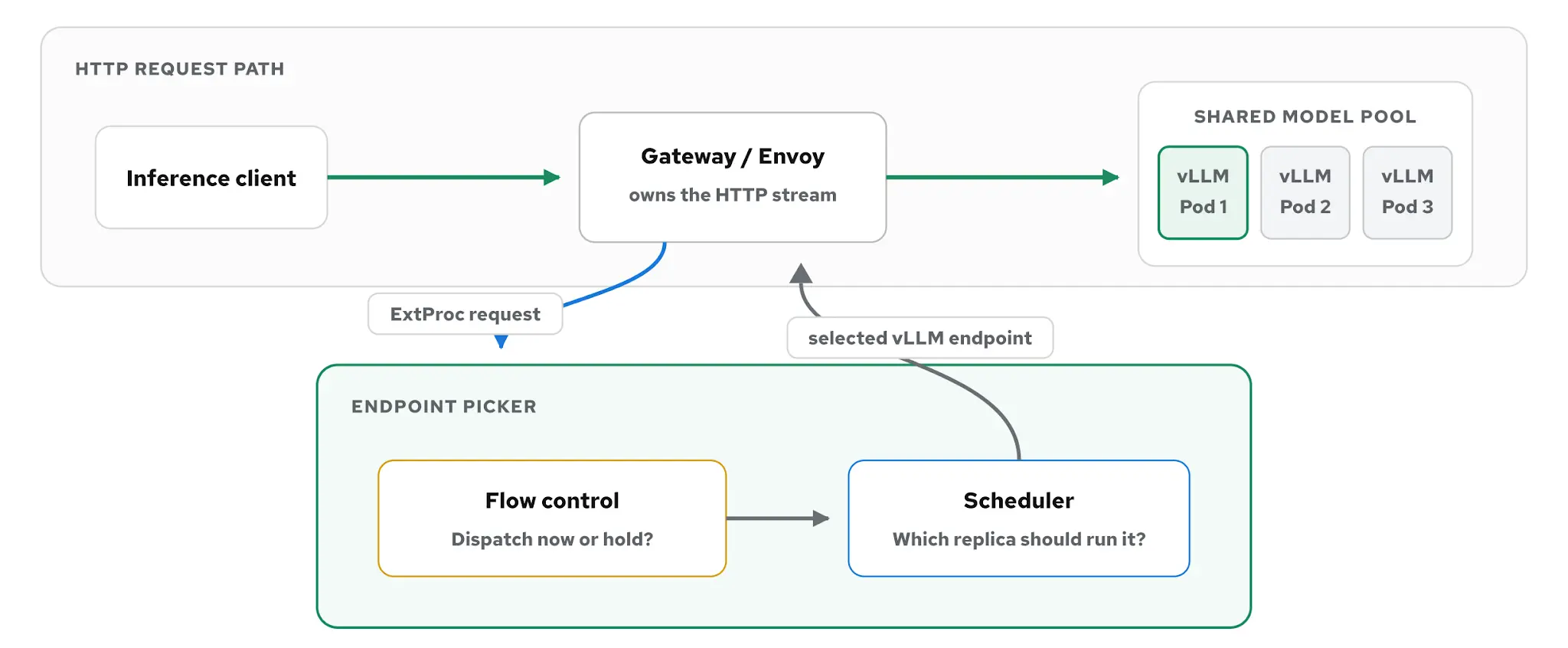
Admission and scheduling answer different questions. Admission determines when a request can advance. Scheduling determines where that admitted request should run. Keeping those decisions separate lets the Endpoint Picker hold requests in a central policy queue, where it can apply priority and tenant fairness before the request enters a backend-local queue.
A configured saturation detector controls when the dispatch gate engages. The detector can reflect back-end utilization or the Endpoint Picker's in-flight request budget, depending on the deployed configuration. Below that point, requests continue toward scheduling. At saturation, the policy queue begins deciding which request can advance next.
Configuring flow control
Flow control is configured in the Endpoint Picker configuration for an inference service. There are 4 settings defining the core policy:
- The saturation detector decides when requests wait
- Priority bands decide which class is considered first
- The fairness policy distributes dispatch turns among tenants in a band
- The ordering policy selects the next request from the chosen tenant queue
An InferenceObjective maps a workload to an integer priority. Traffic is evaluated by an integer value; a higher value indicates higher-priority traffic. Requests at the same priority remain in the same band, where the configured fairness policy determines which tenant receives the next dispatch turn.
Other configurations, such as request TTL, per-band capacity limits, and holdback thresholds, further tune shedding behavior.
Priority, fairness, and ordering select the next request
Once a request reaches the Endpoint Picker, the objective and fairness ID (priority and tenant) header values are resolved into a flow key. Each flow key gets its own request queue inside the appropriate priority band. Missing objectives default to priority 0. In llm-d, a request is "sheddable" when its priority is below 0, meaning the request is eligible to be rejected after it has reached a configured capacity when the system is overloaded.
The objective resolves to a priority, while the fairness ID identifies the tenant queue within that band (Figure 4).
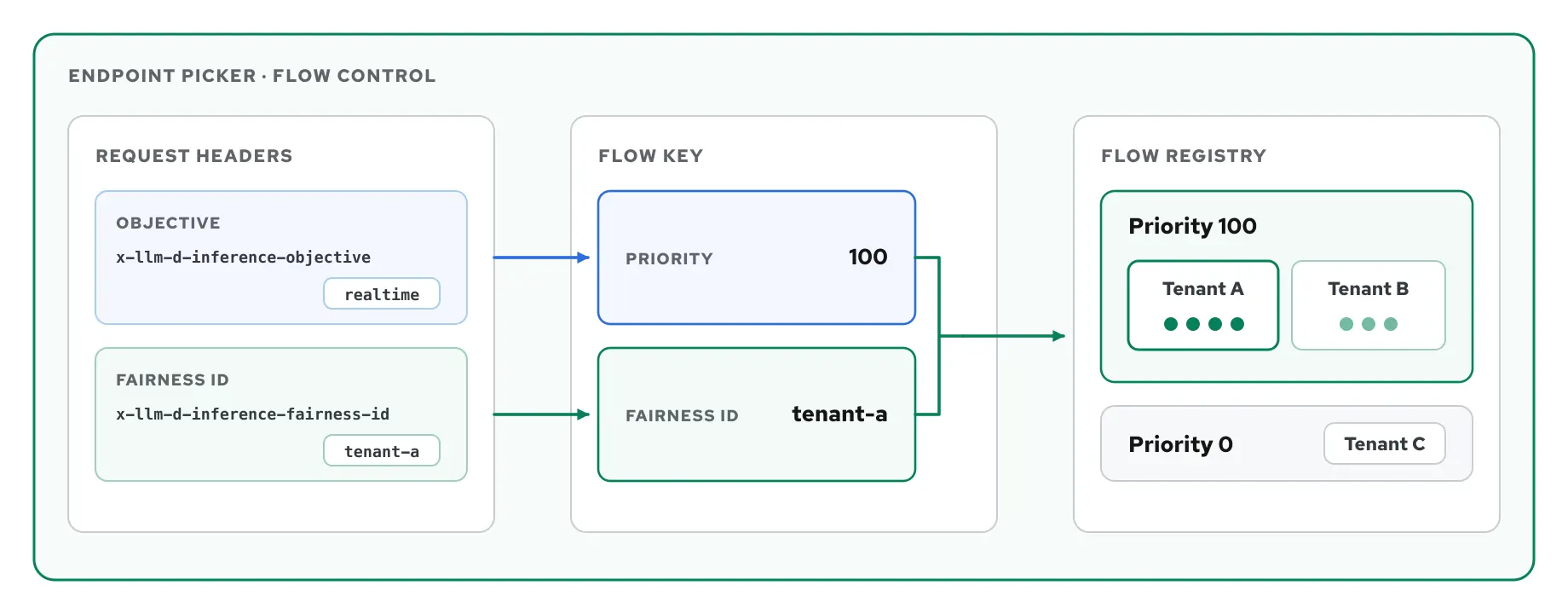
Flow control evaluates active priority bands from the highest to the lowest integer value. When pool saturation reaches a band's configured ceiling, requests in that band and in bands with lower numerical priorities remain queued for the current dispatch attempt. If the band is eligible, fairness selects a tenant queue, and ordering selects the next request within it.
At saturation, selection narrows from eligible priority band to tenant queue to request order (Figure 5).
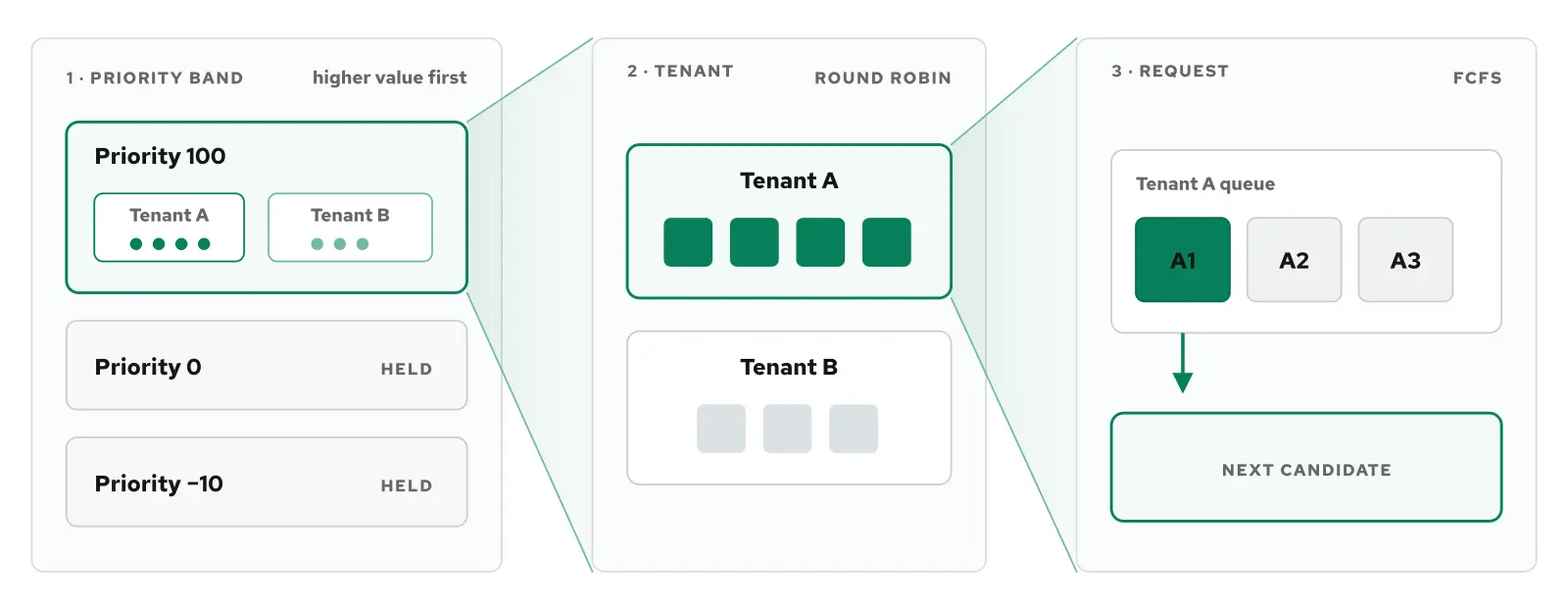
When a request is selected for dispatch, the llm-d scheduler selects the highest-scoring available backend, and Envoy forwards the original request to the chosen vLLM replica. If a request is not yet allowed to advance, it remains in the Endpoint Picker queue until capacity becomes available, its time-to-live expires, or a configured queue limit produces a rejection.
The practical effect is that lower-priority traffic can tolerate greater queue delay at saturation, while higher-priority requests continue to receive dispatch opportunities.
Flow control in action
The benchmark separates 4 production scenarios:
- Consolidation shares capacity across workloads while lower-priority traffic absorbs the latency
- Same-priority fairness prevents one tenant from starving its peers
- Admission tuning determines when the policies engage and changes the latency tradeoff
- Reserved capacity protects the latency of high-priority traffic after dispatch
Each figure isolates one behavior. The benchmark repository contains the measurements, configuration, and reproduction details.
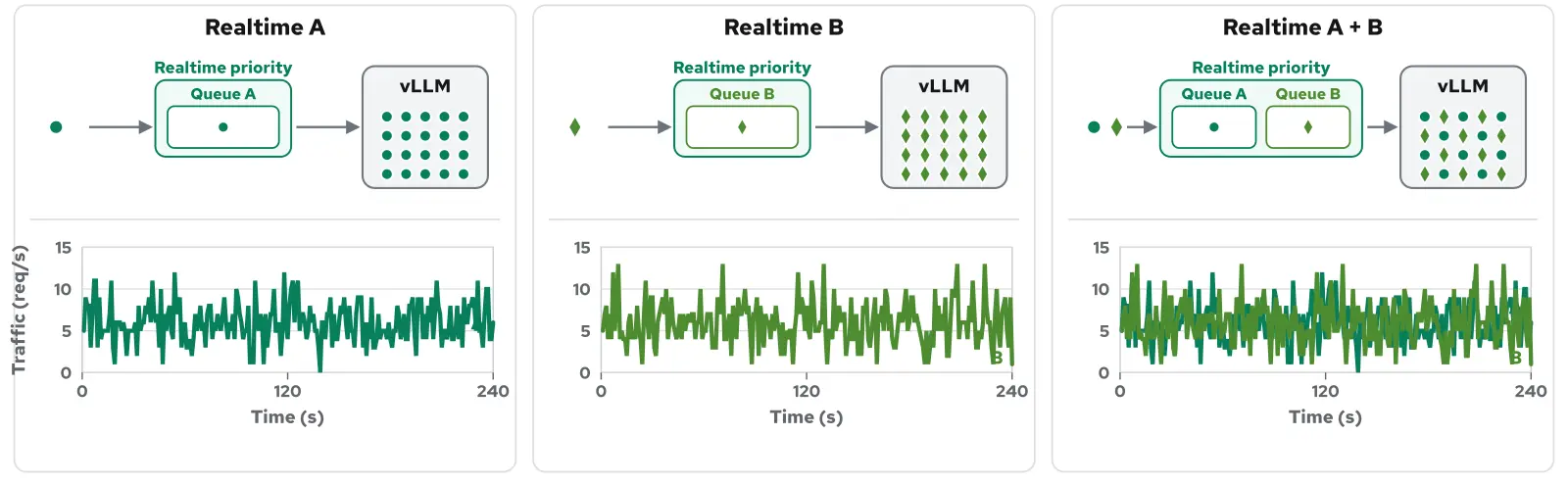
Figure 6 shows 2 real-time tenants sharing a single vLLM replica with separate queues within the same priority band.
Lower-priority Standard traffic shares the replica while its queue absorbs the larger backlog, as shown in Figure 7.
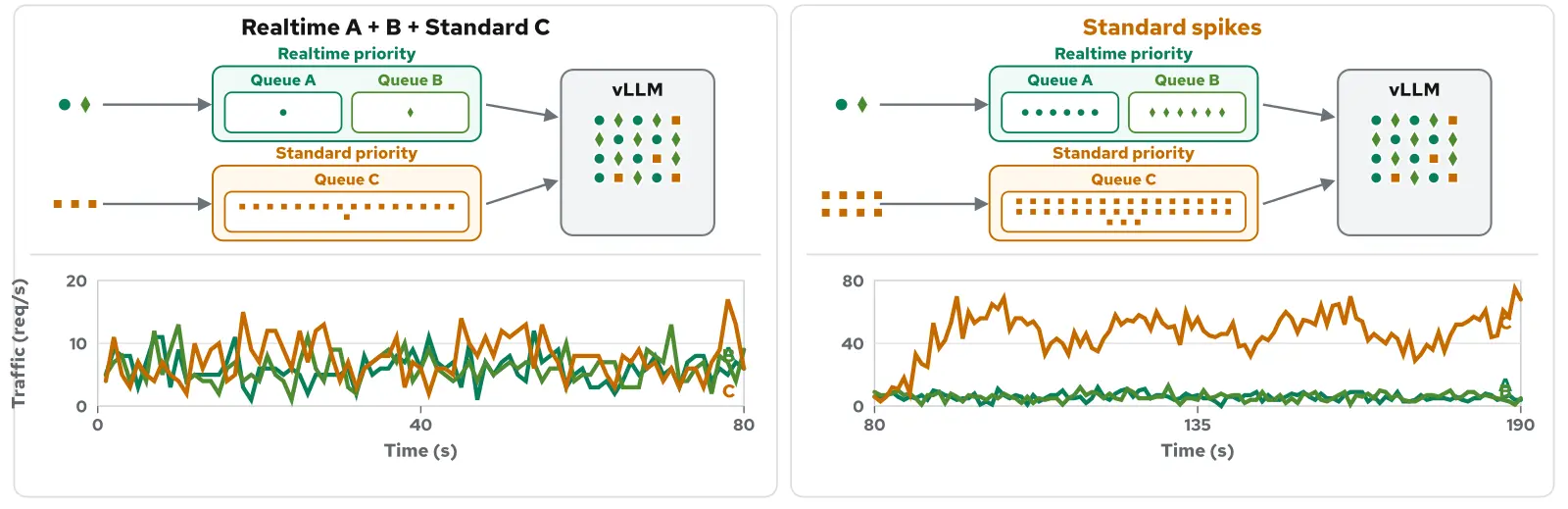
Higher-priority flow control protected priority traffic under saturation while lower-priority traffic absorbed the wait, as illustrated in Figure 8.
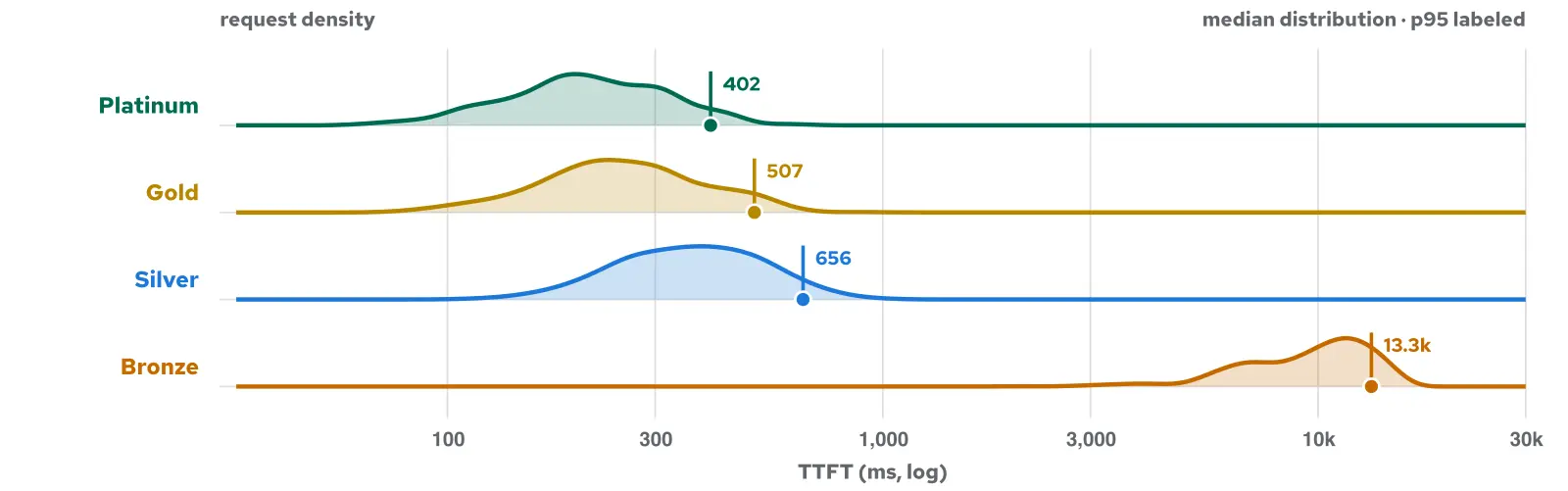
Within the eligible band, round-robin fairness distributed turns among tenant queues, even when one tenant sent a much larger burst. Figure 9 demonstrates fairness being enforced within a priority band.
Tuning the knobs
Flow control tuning combines a pressure signal and a dispatch ceiling with priority bands, fairness and ordering policies, and queue bounds. Together, these controls determine when requests start queueing, what advances next, and what remains queued.
Admission tuning changed the latency tradeoff (see Figure 10).
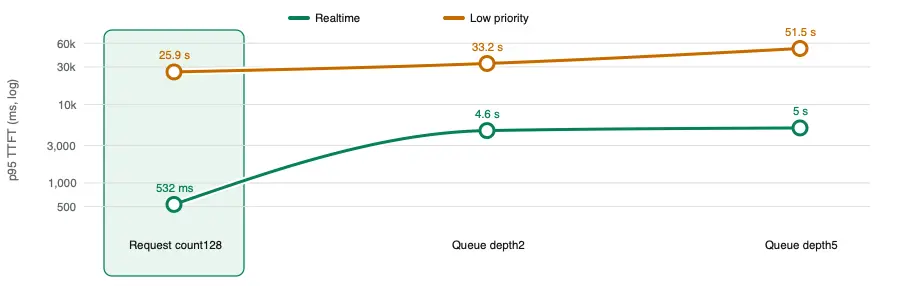
For the EKS environment used in these examples, the values are derived from a benchmark test using the gpt-oss-20B model on H100 GPUs. Each priority band uses round-robin fairness and first-come, first-served request ordering. For each environment, the admission point needs to be validated for the model, request shape, vLLM configuration, and GPU capacity in the target deployment.
The detector and usage limit shape the latency tradeoff most directly. A tighter limit starts queueing sooner and leaves more serving headroom for higher-priority requests, but lower-priority traffic waits sooner. A looser limit keeps requests moving longer, but it can admit so much work that priority and fairness have less opportunity to separate latency before requests reach vLLM.
These settings should be validated against the model, request distribution, vLLM configuration, GPU capacity, and service objectives.
Detector signal and threshold
- What it changes: Measures pressure from in-flight requests or tokens, queue depth, and KV cache use.
- Why it matters: The signal must match the workload; a late signal results in more traffic reaching vLLM (and possibly overloading it) before queueing starts.
Per-replica headroom
- What it changes: Changes when an individual replica is filtered from routing.
- Why it matters: Separates backend eligibility from the pool-wide admission decision.
Dispatch ceiling (usage limit)
- What it changes: Sets the pool-saturation level at which a band may dispatch.
- Why it matters: A tighter ceiling preserves more room for higher-priority work; a looser ceiling queues later.
Priority
- What it changes: Ranks traffic bands.
- Why it matters: Higher numerical values are considered first when demand exceeds capacity.
Fairness
- What it changes: Selects a tenant queue inside the eligible priority band.
- Why it matters: Round-robin prevents a high-volume tenant from taking every dispatch turn.
Ordering
- What it changes: Selects a request inside the chosen tenant queue.
- Why it matters: Determines whether arrival time or another request property controls the sequence.
Queue limits and TTL
- What it changes: Bound queued requests, bytes, and wait time.
- Why it matters: Prevent unbounded growth and define when overload produces rejection or expiry.
Evaluating flow control in your environment
Flow control's priority and fairness model applies across workloads, and its detector and policy settings should reflect the service objectives and request shapes across the full traffic mix. Start with the traffic you need to protect most. Its latency target and request shapes should guide which saturation detector you use and how much headroom you preserve. Then test it alongside the other workloads that share the model pool, including large batch requests that can occupy serving resources for longer after dispatch. Red Hat AI Inference documentation covers the setup procedure. Before production, validate the detector, dispatch ceilings, and queue limits against the model, vLLM configuration, GPU capacity, and traffic mix you expect to run.
- Choose at least two tenant traffic streams that share the model pool. To test fairness, place them in the same priority band; to test priority, assign traffic to two or three different priority bands.
- Define a service objective for each stream, including latency and success or rejection metrics.
- Drive the shared model pool to measured saturation to engage flow-control queueing.
- Observe both control points: Endpoint Picker saturation and queues, plus vLLM running requests, waiting requests, KV cache use, and preemptions.
- Repeat the test across detector thresholds and dispatch ceilings, then verify that higher-priority traffic continues to advance and that queued work drains after the surge.
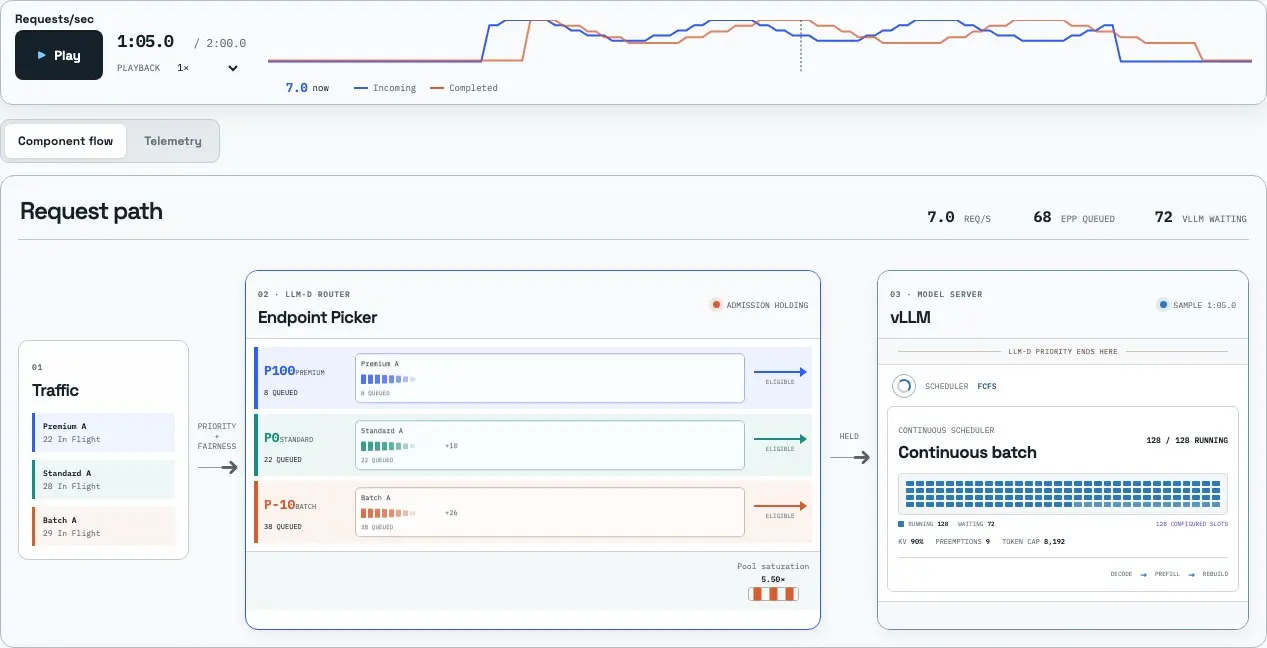
Flow Control Flight Recorder replays client traffic, Endpoint Picker queues, and vLLM pressure on the same timeline. Use it to see when admission begins holding requests, where requests wait, and whether queues drain after a surge.
Flow Control Flight Recorder displays client traffic, Endpoint Picker queues, and vLLM engine state at the same recorded moment (Figure 11).
Conclusion
llm-d flow control gives platform teams policies for deciding which requests advance when different traffic streams share the same model pool. At saturation, priority determines which band advances first, fairness distributes dispatch turns among tenants, and ordering selects the next request within a tenant queue.
In Red Hat AI Inference 3.5, the flow-control feature is generally available for shared model serving. The benchmark results show how priority, fairness, and admission tuning behaved for the tested model, traffic mix, and hardware. Production settings should be validated against the service objectives for the target environment.
Last updated: August 31, 2026
