This is the final installment of our series on hosted control planes, a feature of Red Hat OpenShift. I encourage you to read the first article, Demystify the terminology of OpenShift hosted control planes. Now, we’ll build on those fundamentals by exploring critical architectural considerations essential for a successful hosted control planes adoption. By the end, you will have a clear understanding of the necessary components and the key operational pitfalls to navigate.
Common infrastructure requirements
Whether you deploy hosted clusters on bare metal or Red Hat OpenShift Virtualization, several infrastructure components require planning upfront. These are the things that tend to catch teams off guard after they have already committed to hosted control planes.
Multicluster Engine (MCE) Operator
On the management cluster, the MCE Operator serves as the primary entry point for hosted control planes. It is responsible for bundling and overseeing the HyperShift Operator, which subsequently handles the lifecycle management of hosted control planes. You can install MCE as a standalone operator via the OperatorHub. Deploying the entire Red Hat Advanced Cluster Management for Kubernetes suite is not a prerequisite for utilizing hosted control planes. While Red Hat Advanced Cluster Management incorporates MCE and provides additional features, such as observability, policy-based governance, and an enhanced user interface. MCE provides all the functionality required for hosted control planes.
The most critical decision: Storage for etcd
Every hosted cluster runs an etcd instance as a StatefulSet on the management cluster. Etcd is the backbone of Kubernetes. Every API call, state change, and watch event flows through it; and etcd is famously sensitive to storage latency.
On standalone clusters, etcd typically relies on local disks, providing a straightforward setup that functions effectively, as long as disks meet performance standards. In contrast, hosted control planes utilize persistent volumes for etcd storage, generally provisioned via CSI drivers and/or SAN infrastructure.
Maintaining consistent, low-latency performance is vital for these persistent volumes. Specifically, the WAL (Write-Ahead Log) fsync p99 latency must remain below 10ms. Adhering to this metric is mandatory; failing to meet this storage requirement can lead to etcd leader election instability, degraded API response times, and the risk of data corruption.
The critical detail: this requirement compounds. If you host ten clusters, depending on how your storage backend works, you may have ten etcd instances competing for I/O. Validate your storage with tools like fio or etcd-benchmark before deploying, and test under realistic multi-instance load, not just with a single etcd.
Load balancing
Each hosted cluster exposes its API server endpoint externally. On public cloud platforms, the platform provisions cloud load balancers automatically. On bare metal and OpenShift Virtualization, you need to provide your load balancing solution; typically MetalLB, which we will cover in the bare metal section.
DNS
Every hosted cluster needs DNS entries for its API endpoint and its default ingress (wildcard *.apps). You can configure this with individual DNS records per hosted cluster or with wildcard entries, depending on your DNS infrastructure and naming conventions. Plan your DNS strategy before creating your first hosted cluster.
Bare metal
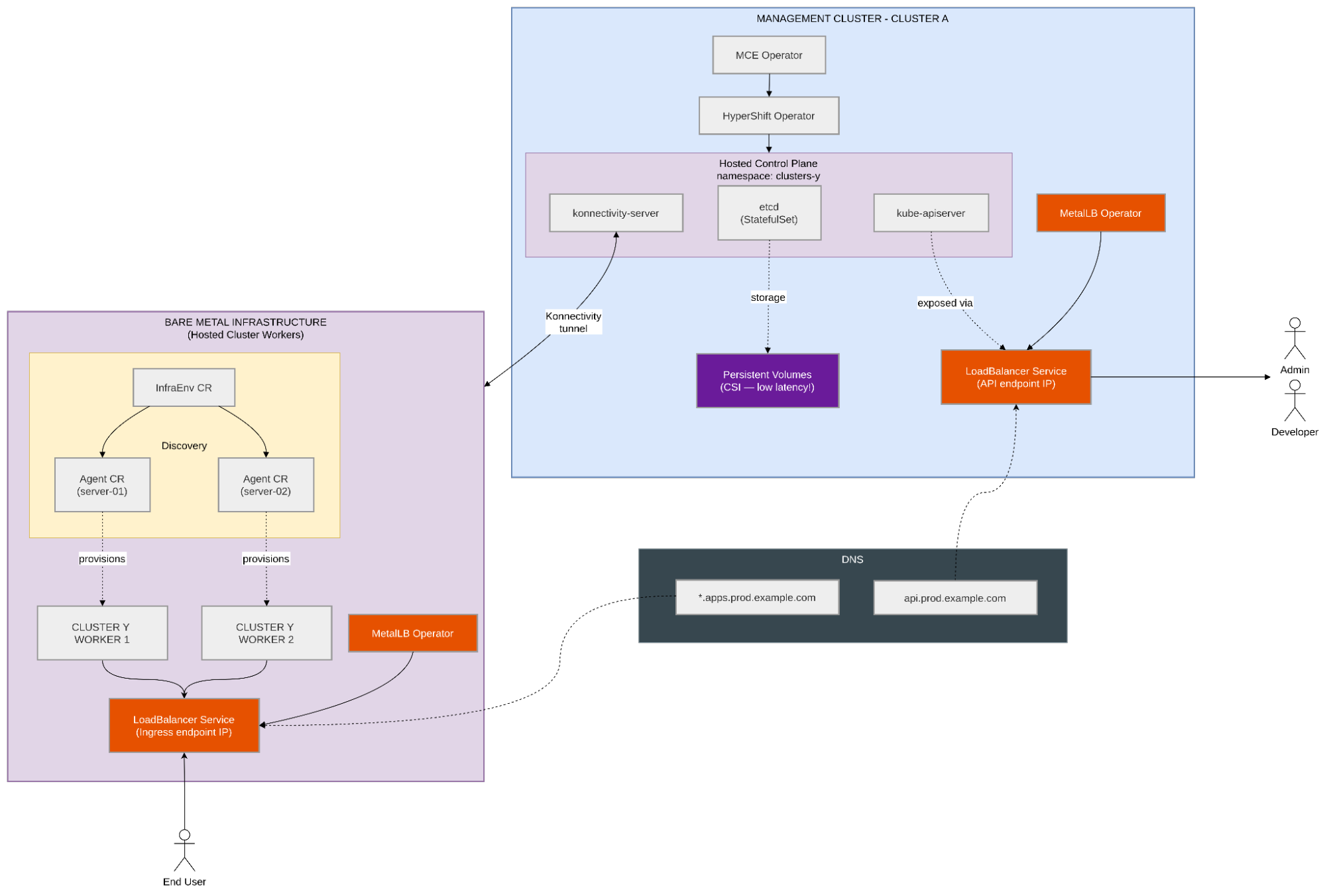
Bare metal is where the hosted control planes infrastructure requirements are most visible. Without a cloud provider handling load balancing and machine provisioning automatically, you need to provide these capabilities (Figure 1).
MetalLB: Your load balancer
On bare metal, there is no cloud load balancer to expose the hosted cluster’s API server. MetalLB fills this gap by advertising LoadBalancer service IPs on your network. You install the MetalLB Operator on the management cluster and configure IP address pools.
Two modes are available:
- L2 mode: MetalLB uses ARP/NDP to advertise Virtual IPs on the local network segment. Simpler to set up, works without any network infrastructure changes. The downside: a single node handles all traffic for each IP, creating a potential bottleneck and a failover delay when that node goes down.
- BGP mode: MetalLB peers with your network routers via BGP and advertises routes to the service IPs. Traffic is distributed across multiple nodes. This requires BGP support on your routers and more configuration, but provides better load distribution and faster failover.
When running multiple hosted clusters, plan your IP address pools carefully. Each hosted cluster needs at least one LoadBalancer IP for its API endpoint, and you may need additional IPs for ingress.
Agent provider: Discovering and provisioning bare metal workers
The Agent provider is how hosted control planes discovers and provisions bare metal servers as workers for hosted clusters. The workflow uses several custom resources:
- An InfraEnv resource defines the discovery image: A bootable ISO or PXE configuration that bare metal servers boot from to register as available agents.
- Agent resources represent discovered servers: Once a server boots the discovery image and reports in, an Agent CR appears on the management cluster with the server’s hardware inventory.
- The NodePool resource references these agents and triggers provisioning, installing Red Hat Enterprise Linux CoreOS, configuring networking, and joining the server to the hosted cluster as a worker.
Network topology
The management cluster and bare metal workers may be on different networks. The Konnectivity tunnel handles control plane communication, but you need to ensure:
- Workers can reach the management cluster’s API endpoint for the Konnectivity connection
- DNS resolution works for the hosted cluster’s API and ingress endpoints
- Firewall rules allow the required ports between networks
OpenShift Virtualization (KubeVirt)
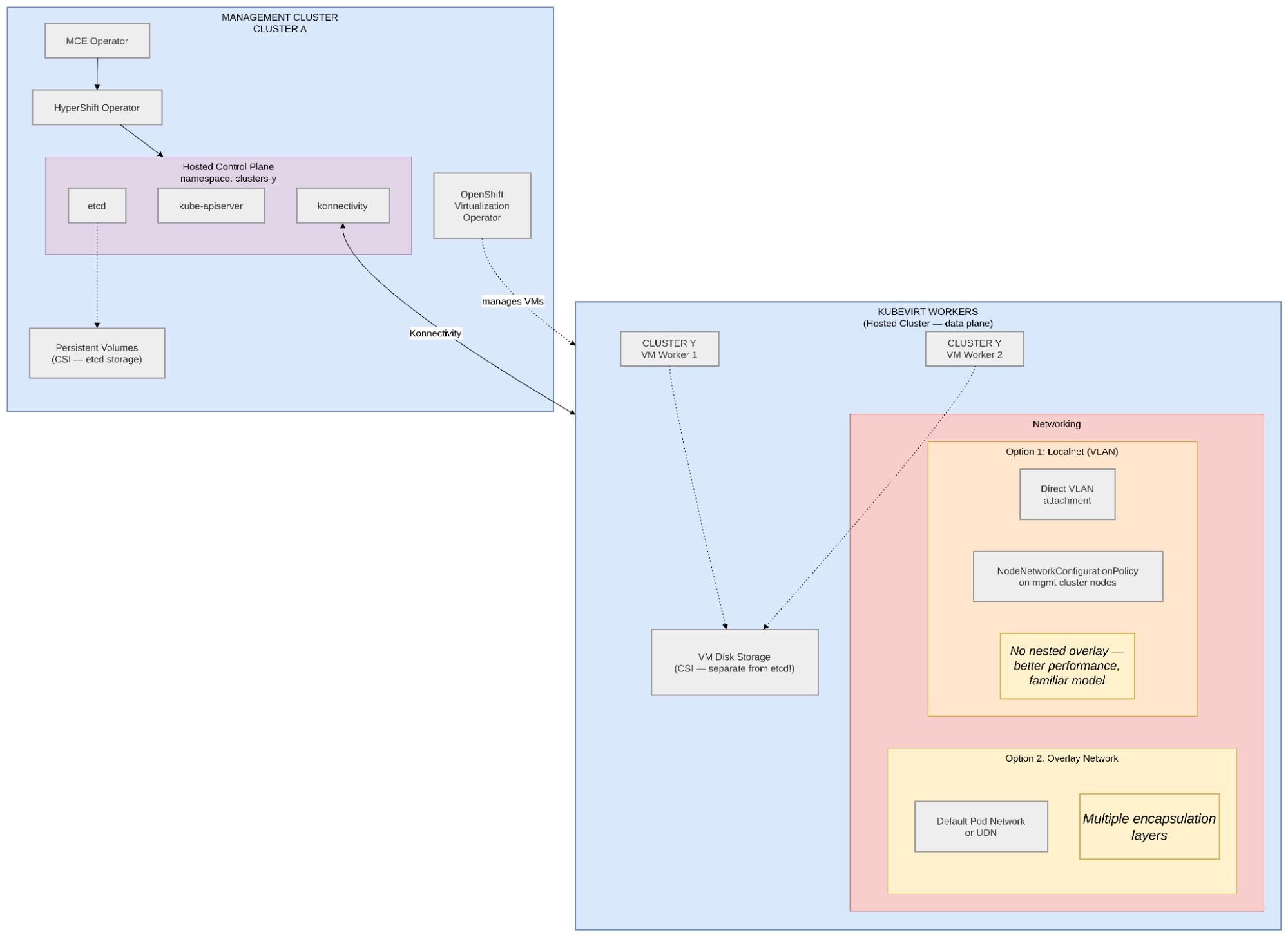
When you use OpenShift Virtualization as the platform for hosted cluster workers, the workers are virtual machines managed by KubeVirt. This adds a layer of abstraction that simplifies provisioning and introduces its architectural decisions (Figure 2).
Where the VMs run
The first decision is whether to run the worker VMs on the same cluster as the management cluster or on a separate infrastructure cluster.
- Co-located (same cluster): Simpler to set up. One cluster runs everything: the MCE Operator, HyperShift Operator, hosted control plane pods, OpenShift Virtualization operator, and the worker VMs. The downside is resource contention. Control plane pods and worker VMs compete for CPU, memory, and storage on the same nodes.
- Separate infrastructure cluster: The management cluster hosts only the control planes. A separate OpenShift cluster with OpenShift Virtualization runs the worker VMs. This provides better isolation and dedicated resources for each role, but adds another cluster to manage.
For production workloads, a separate infrastructure cluster is generally recommended. For development and testing, co-location works well and reduces overhead.
Networking options
This is the most impactful architectural decision for KubeVirt-based hosted clusters.
- Overlay network (default pod network or User Defined Network): VMs use OVN-Kubernetes overlay networking. This is the default and simplest to configure. VMs get pod IPs and communicate through the OVN overlay. You can use either the default pod network or configure a User Defined Network (UDN) for better isolation and traffic control. However, in both cases, you end up with multiple layers of encapsulation: the hosted cluster’s pod network runs inside VMs, which themselves run on the management cluster’s pod network. This nesting makes network troubleshooting significantly more complex and can impact performance.
- Localnet (VLAN): VMs attach directly to a traditional VLAN network via the OVN-Kubernetes localnet topology. Instead of getting pod IPs, VMs get IPs on the physical VLAN. They behave like physical machines on the network. This avoids the nested overlay problem entirely and provides better performance and a more familiar network model. The trade-off: you need VLAN configuration on your physical switches and must configure NodeNetworkConfigurationPolicy (NNCP) resources on the management cluster nodes to map the VLAN to OVN-Kubernetes.
Storage for VM disks
Worker VMs disks require persistent storage, which represents a distinct requirement from the etcd storage previously mentioned. While etcd demands low-latency write operations, VM disk storage focuses on providing sufficient capacity and adequate throughput. It is essential to ensure your storage backend is high-performing and to plan for enough capacity based on the total number of VMs you intend to deploy.
If you co-locate worker VMs with the management cluster, capacity planning is critical. You need to account for:
- Management cluster control plane overhead (its own masters and infra nodes)
- Hosted control plane pods: etcd, API servers, controllers (one set per hosted cluster)
- Worker VMs: each VM needs CPU, memory, and disk allocated from the cluster’s capacity
- OpenShift Virtualization operator overhead
Monitor resource utilization closely and set resource quotas to prevent any single hosted cluster’s VMs from starving the control planes.
Final thoughts
Hosted control planes represent a significant shift in how organizations manage OpenShift at scale, moving beyond simple cluster deployment to a model of centralized management and resource efficiency. However, this evolution is not set and forget. It requires a deliberate architectural approach; one where you make infrastructure decisions around storage performance, network topology, and capacity planning long before provisioning the first cluster.
Whether you are navigating the nuances of bare metal networking with MetalLB or fine-tuning worker VMs on OpenShift Virtualization, success hinges on your foundational decisions.
If you are evaluating hosted control planes for your organization, revisit these critical checkpoints:
- Storage baseline: Have you validated your storage backend against etcd’s strict latency requirements (p99 < 10ms)?
- Networking strategy: Have you accounted for load balancing on bare metal?
- Resource discipline: If co-locating workloads, have you set the necessary boundaries, with resource quotas, for instance, to prevent resource starvation?
By planning for these requirements upfront, you can fully leverage the benefits of hosted control planes.
For the complete guide, refer to the hosted control planes documentation. Ready to move forward with your implementation or have specific questions about your architecture? Contact your account team and reach out to a Red Hat representative by completing a contact form. We are eager to support you throughout this transition.
Last updated: July 21, 2026
