If you have been exploring Red Hat OpenShift hosted control planes, you have probably encountered a few confusing terms, such as HyperShift, HCP, hosted cluster, hosting cluster, management cluster, managed cluster. At first glance, they may seem interchangeable, but they are not. Some are synonyms, some are subtly different, and at least one similar pair—managed cluster and management cluster—refers to completely different concepts.
In this article, we will provide a clear model of every component involved in hosted control planes, an explanation of the honest trade-offs of adopting hosted control planes versus standalone clusters, and the infrastructure decisions to plan for deploying on bare metal or Red Hat OpenShift Virtualization. In the next article, we explore the architectural considerations for hosted control plane adoption. Now, let’s begin with an overview of hosted control planes.
What are hosted control planes?
This terminology confusion is not your fault. It has evolved across upstream projects, product naming, API conventions, and documentation over several years. The CLI tool is called hcp, but its version output says openshift/hypershift. The operator is called the HyperShift Operator, but the product name is hosted control planes. The API group is hypershift.openshift.io, but you will rarely see HyperShift in the official documentation anymore.
Traditionally, Red Hat OpenShift Container Platform deploys in a standalone model with the control plane and data plane coupled on the same cluster. Dedicated master nodes (physical or virtual) run etcd, Kubernetes API server, controller manager, and scheduler. Control planes and worker nodes share the network stack. This model works well, but every cluster requires a set of master nodes, regardless of the cluster’s size or workload.
Hosted control planes introduce a different architecture. The control plane decouples from the data plane and runs as regular pods on a separate OpenShift cluster, called the management cluster. Worker nodes run elsewhere: on bare metal servers, virtual machines, or cloud instances. The control plane communicates with its workers through a Konnectivity tunnel, bridging what may be entirely separate networks.
This matters for three reasons:
- Cost: No dedicated master nodes per cluster. The management cluster shares resources across multiple hosted control planes.
- Speed: Provisioning a new cluster takes minutes instead of the ~45 minutes a standalone installation requires because you are creating pods, not bootstrapping machines.
- Centralized management: A single management cluster can host control planes for multiple OpenShift clusters, potentially running different versions from one place.
Demystifying naming conventions
Let’s establish the vocabulary. We use the official definitions from the OpenShift Container Platform 4.21 documentation. The Watch out part highlights where confusion typically arises.
- Management cluster: The OpenShift cluster where the MCE and HyperShift Operator is deployed and where control planes for hosted clusters are hosted. Watch out: Synonymous with hosting cluster. Not the same as managed cluster.
- Hosting cluster: Synonym for management cluster. Watch out: Sounds like hosted cluster but refers to the opposite role. This is the cluster that does the hosting.
- Hub cluster: Where Red Hat Advanced Cluster Management for Kubernetes server components run. Hub cluster can also imply a multi Red Hat Advanced Cluster Management, hub-and-spoke architecture. In this model, there are other management and/or hosting clusters managed by the hub cluster. This is usually organized regionally, but might be for scope of authority for cluster management. Watch out: Don’t confuse it with management or hosting clusters. Although the MCE/HyperShift components are frequently co-located on the same cluster as the Red Hat Advanced Cluster Management hub, this is not strictly required and may be different. Therefore, hub cluster and hosting cluster frequently means the same cluster, but that is not always the case.
- Hosted cluster: An OpenShift cluster with its control plane and API endpoint hosted on a management cluster. Includes the control plane and its corresponding data plane. Watch out: It is not just the workers. The hosted cluster is the entire logical cluster, even though its control plane runs elsewhere.
- Hosted control plane: The OpenShift control plane that runs on the management cluster: etcd, API server, controller manager, and a VPN (Konnectivity). Watch out: A subset of the hosted cluster, just the control plane portion, running as pods.
- Data plane: The compute, storage, and networking where workloads and applications run. Watch out: Lives on separate infrastructure from the control plane. These are the worker nodes of the hosted cluster.
- Hosted cluster infrastructure: Network, compute, and storage resources in the tenant or end-user cloud account. Watch out: This is where the data plane workers live, owned by the cluster consumer, not the provider.
- Managed cluster: A cluster that the management cluster manages via the multicluster engine for Kubernetes Operator in Red Hat Advanced Cluster Management. Watch out: Not the same as management cluster. This is a lifecycle concept. A managed cluster is a spoke; a management cluster is the hub that runs hosted control planes.
- HostedCluster: A custom resource (hypershift.openshift.io) that defines the control plane and data plane configuration. Watch out: Created on the management cluster. Creating this CR triggers the deployment of the hosted control plane pods in a dedicated namespace.
- NodePool: A custom resource (hypershift.openshift.io) representing a scalable set of worker nodes attached to a HostedCluster. Watch out: Also lives on the management cluster. Defines how and where workers are provisioned (bare metal agents, VMs, cloud instances).
Throughout this article, we use hosted control planes as the canonical product name. You will see HyperShift only where it is technically unavoidable: the operator name (HyperShift Operator), the API group (hypershift.openshift.io), and the CLI version output. The upstream open-source project is called HyperShift, and the Red Hat product is hosted control planes.
The glossary gives you definitions, but you only realize the relationships when you see them. Let’s start simple and build the picture in three layers.
Figure 1 shows the fundamental split between the management cluster and hosted cluster.
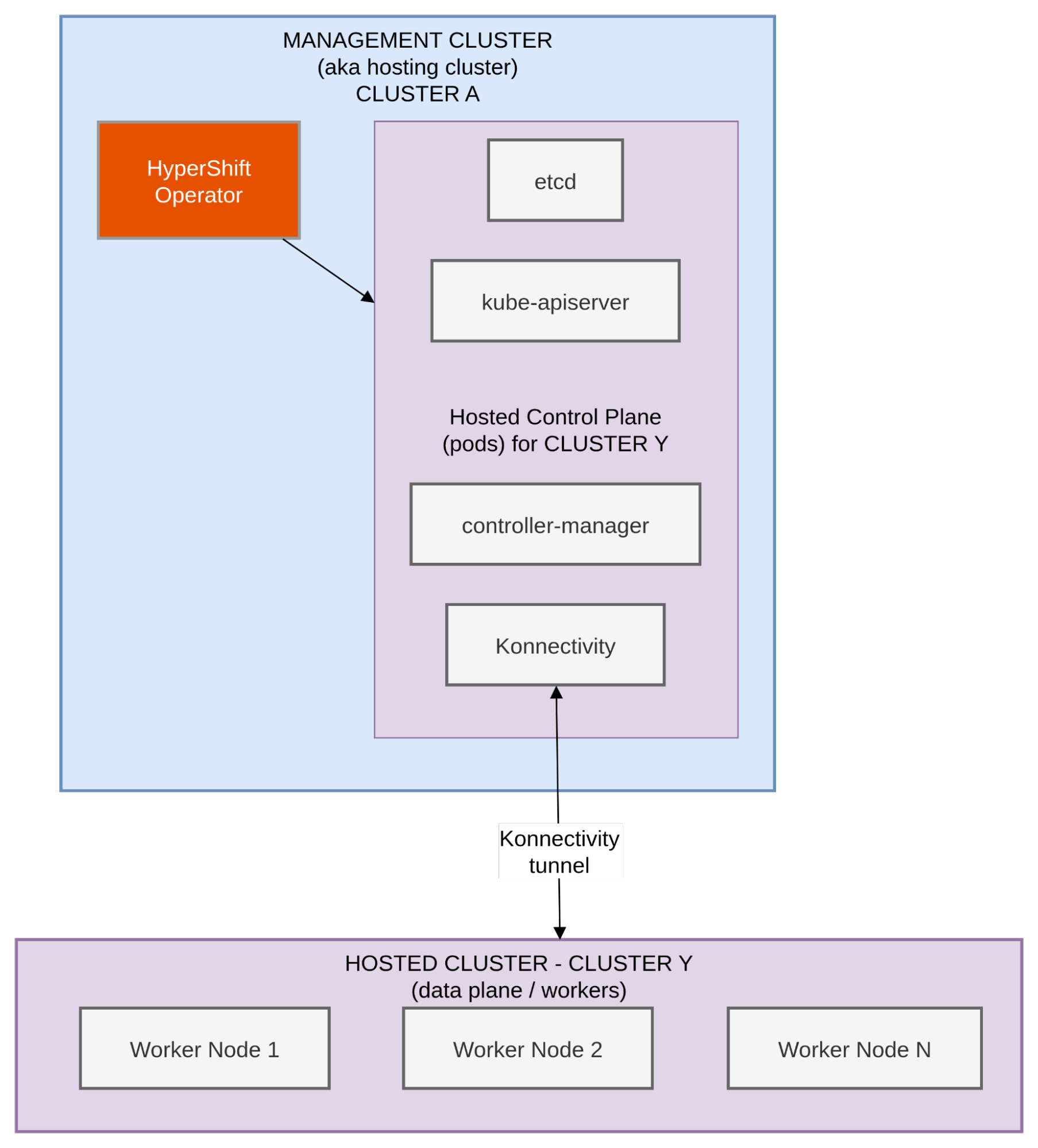
This is the core idea. The management cluster is on top, an OpenShift cluster you already have running. You install the multicluster engine (MCE) operator on it, which deploys the HyperShift Operator. That operator is responsible for creating and managing hosted control planes.
On the bottom, the worker nodes for the hosted cluster is the tenant cluster your teams actually use. Note that its control plane does not run on its own master nodes. Instead, the control plane runs as a set of pods on the management cluster: etcd, the Kubernetes API server, the controller manager, and a Konnectivity agent that tunnels communication to the workers.
The workers (the data plane) run on entirely separate infrastructure. They could be bare metal servers, virtual machines managed by Red Hat OpenShift Virtualization, or cloud instances. The workers do not need direct network access to the management cluster; the Konnectivity tunnel handles all control plane to data plane communication.
It is important to recognize that the management cluster is frequently referred to as the hosting cluster within the documentation. While these terms identify the same entity, we will exclusively use management cluster throughout this post to maintain architectural consistency. To assist with the conceptual breakdown, we will designate the management cluster as CLUSTER A, while specific hosted clusters will be labeled as CLUSTER Y and CLUSTER Z.
Figure 2 shows how the API resources map to running pods.
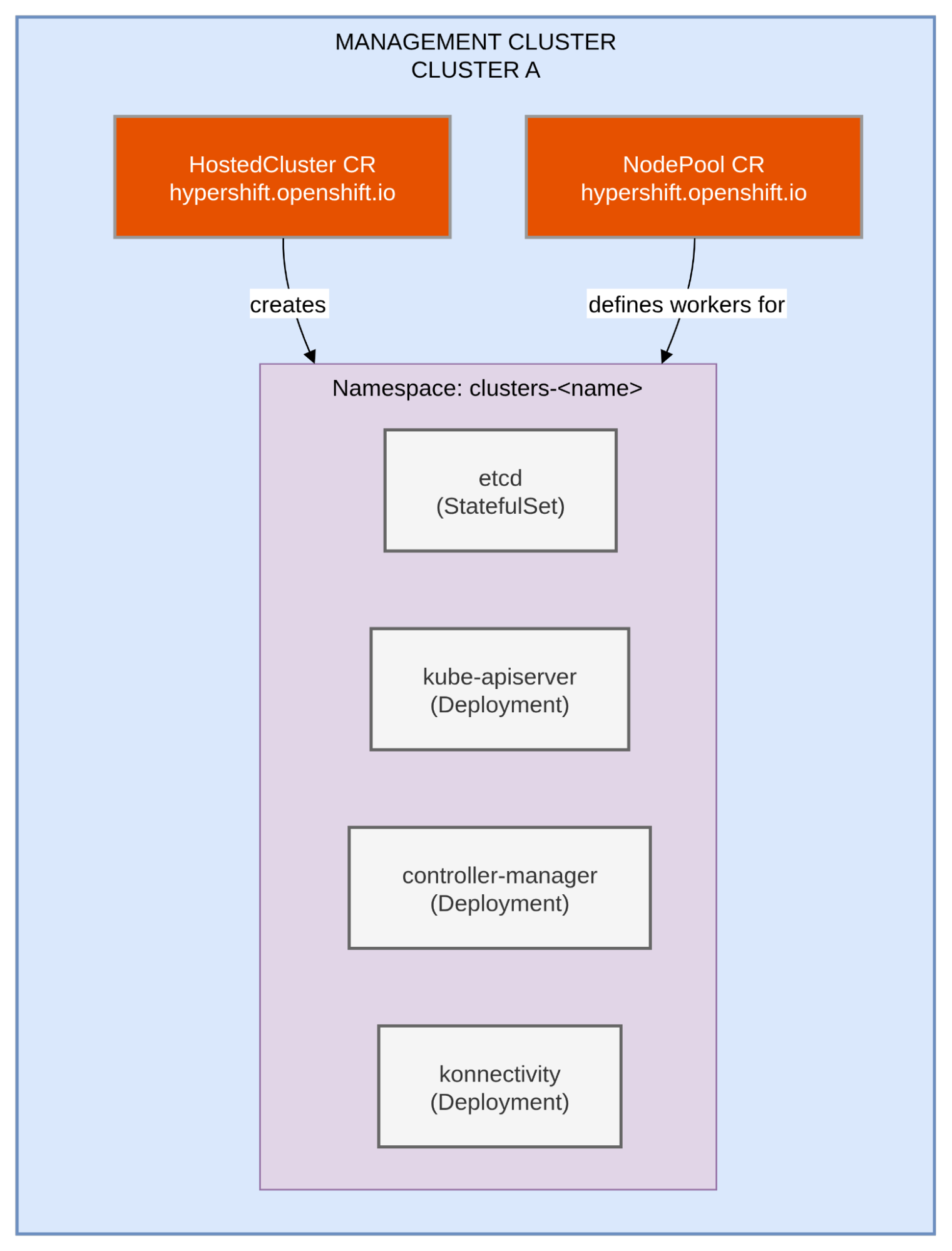
Now let us zoom into the management cluster. When you want to create a new hosted cluster, you create two custom resources on the management cluster:
- The HostedCluster CR defines the overall cluster configuration: networking, release image, platform type, and how the API endpoint is exposed.
- A NodePool CR defines the worker nodes: how many, what type of infrastructure (bare metal agents, VMs, cloud instances), and what OpenShift version they run.
Both resources use the hypershift.openshift.io API group—this is one of those places where the upstream HyperShift name persists in the product.
When you create a HostedCluster resource, the HyperShift Operator creates a dedicated namespace on the management cluster (typically clusters-<name>) and deploys the hosted control plane components into it: etcd as a StatefulSet, the kube-apiserver and controller-manager as deployments, and the Konnectivity server that will establish the tunnel to the workers.
This is an important detail: all the API resources and control plane pods live on the management cluster. The hosted cluster’s workers have no awareness of these resources. They simply connect to their API server endpoint.
Figure 3 shows the full picture of one management cluster, multiple hosted clusters, and various platforms.
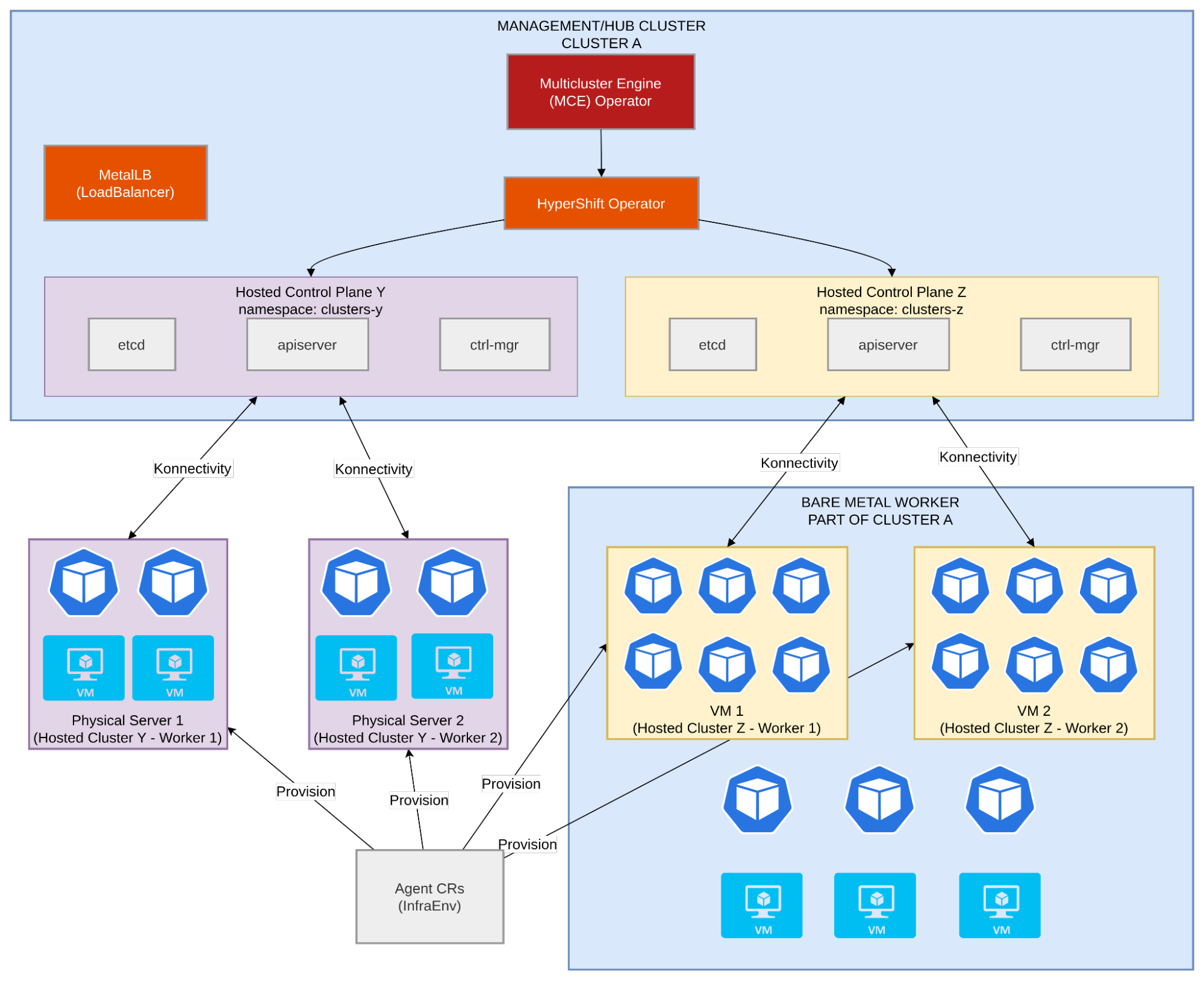
Now we see the complete architecture. A single management cluster running the multicluster engine (MCE) Operator and the HyperShift Operator can host control planes for multiple clusters simultaneously. In this example:
- Hosted Cluster Y uses the Agent provider to provision bare metal workers. Physical servers are discovered and managed through Agent custom resources. MetalLB provides LoadBalancer services since there is no cloud load balancer available.
- Hosted Cluster Z uses OpenShift Virtualization (KubeVirt) to run workers as virtual machines. The VMs can use either an overlay network (the default pod network or a user defined network) or attach directly to a VLAN via localnet, a critical architectural decision we will explore in the architecture section.
Each hosted control plane runs in its own namespace on the management cluster (clusters-y, clusters-z) with its own etcd, API server, and controller manager. They share the management cluster’s compute resources.
This diagram also illustrates why the naming matters. The management cluster is not managed. It is the one doing the managing. The hosted clusters are the tenants. The hosted control planes are just the control plane portion of hosted clusters, running as pods in the management cluster. Mixing these terms up leads to confusion in architecture discussions, runbooks, and incident response.
Naming pitfalls
There are four naming traps that confuse people most often:
- managed cluster ≠ management cluster: This is the most dangerous confusion. A managed cluster is an Red Hat Advanced Cluster Management concept. It is a cluster that the hub cluster manages through the multicluster engine Operator’s cluster lifecycle features. A management cluster is where the HyperShift Operator runs and where hosted control planes are deployed. They can overlap (your management cluster can also be a managed cluster in Red Hat Advanced Cluster Management), but they are fundamentally different concepts.
- hosting cluster = management cluster (and maybe = hub cluster): These three terms often refer to the same cluster, and the documentation frequently uses them as synonyms. While we utilize management cluster throughout this post to ensure consistency, be aware that you may encounter hosting cluster in other resources, as they are functionally identical. The hub cluster specifically denotes where Red Hat Advanced Cluster Management server components run. While it does not strictly have to be the same cluster that runs MCE (i.e., the hosting/management cluster), they are commonly co-located. Consequently, while a hub cluster is not by definition a hosting or management cluster from hosted control planes context, the hub and hosting/management cluster is often the same cluster in practice that serves all the three roles.
- hosted cluster ≠ hosted control plane: The hosted cluster is the entire logical cluster: the control plane running as pods on the management cluster plus the worker nodes running on separate infrastructure. The hosted control plane is just the control plane portion (the pods). When someone says they created a hosted cluster, they mean the whole thing. When they say the hosted control plane is using too much memory, they mean the pods on the management cluster.
- HyperShift = the upstream project: The Red Hat product is called hosted control planes. The open-source upstream project is called HyperShift. But the API group is hypershift.openshift.io, the operator is the HyperShift Operator, and running
hcp versionoutputsopenshift/hypershift. The naming divergence between product and internals is a historical artifact. The product was renamed, but the APIs were not.
Pros, cons, and when to use hosted control planes
Hosted control planes is not universally better than standalone OpenShift. It is a different operational model with its own strengths and costs. Here is an honest look at both sides.
- Lower infrastructure cost: No dedicated master nodes are required per cluster. Control planes run as pods sharing the management cluster’s resources. Note: The management cluster becomes a critical shared resource. Its sizing, availability, and performance may directly affect the hosted clusters, making under-sizing a common early mistake.
- Faster cluster provisioning: Creating a hosted cluster takes minutes, unlike the ~45 minutes required for a standalone installation. Note: Day-2 operations work differently. Your operations team must learn new procedures because there is no machine config operator, direct access to control plane nodes is not available, and update workflows follow a different path.
- Centralized control plane management: One management cluster can host control planes for many clusters, potentially running different OpenShift versions. Note: Pay special attention to the management cluster’s high availability. If the entire management cluster fails, every associated hosted cluster loses its control plane functionality. While existing workloads remain operational, you won't be able to perform API operations or schedule new tasks until restoration. Implementing high availability, such as distributing pods across multiple availability zones, is vital.
- Multi-version hosting: You can run OCP 4.19, 4.20, and 4.21 control planes side-by-side on the same management cluster. Note: The version skew support matrix adds operational complexity. You must track which management cluster version supports which hosted cluster versions, and the HyperShift Operator version must remain in sync.
- Strong separation of concerns: A service provider persona manages the management cluster, while a service consumer persona requests and uses hosted clusters. Note: Networking is more complex than with standalone clusters. The Konnectivity tunnel, external load balancers, DNS configuration, and potential separate networks between the control plane and data plane all require careful planning.
- Standard Kubernetes primitives: The control plane consists of pods, deployments, and statefulsets, allowing you to use familiar tools to monitor and manage it. Note: etcd runs as pods, so the storage backing those pods must meet strict performance requirements. WAL fsync p99 latency must stay under 10ms, a requirement that multiplies with each hosted cluster added.
When to use hosted control planes and when to think twice
The trade-offs inform a practical decision framework. The following lists provide a practical framework to help determine if hosted control planes is the appropriate solution for your needs.
Hosted control planes is a strong fit when:
- You manage several clusters and want centralized lifecycle management from a single pane of glass. The operational overhead of maintaining a management cluster pays for itself at scale.
- You provision clusters frequently. If teams regularly need new clusters for development, testing, or short-lived workloads, hosted control planes minutes-to-ready provisioning is a significant advantage.
- You want to offer cluster-as-a-service to internal teams. The service provider/consumer model maps naturally to the hosted control planes architecture: the platform team manages the management cluster, application teams consume hosted clusters.
- Infrastructure cost reduction is a priority, especially on bare metal and/or if you have or planning to have several small clusters. Removing the requirement for three master nodes per cluster leads to significant savings as your fleet grows.
- You need multi-version environments. Running different OpenShift versions from a single management cluster simplifies testing, migration, and gradual rollouts.
Think twice about hosted control planes when:
- You only run a few clusters. The overhead of maintaining a management cluster, learning new operational procedures, and managing the additional networking complexity is hard to justify for a small fleet.
- Your team has no experience with MCE or Red Hat Advanced Cluster Management and limited bandwidth to learn. Hosted control planes introduces new operators, CRDs, and workflows that differ significantly from standalone OpenShift.
- You need full administrator visibility into control plane nodes. Hosted control planes does not expose the Machine Config Operator, machine sets, or direct SSH access to control plane infrastructure. If your compliance or operational model requires this, standalone may be a better fit.
- Your storage infrastructure cannot guarantee the IOPS and latency that etcd requires. Etcd performance is heavily dependent on storage consistency; if your management cluster cannot maintain sub-10ms p99 WAL fsync latency, the hosted clusters will be impacted. Although standalone clusters also share this requirement, hosted control planes might utilize CSI drivers to connect etcd PVs to a SAN storage. In that case, you must verify that your storage solution provides the stable, high-performance throughput necessary to meet these latency standards.
- You operate in a heavily regulated environment that requires full control plane isolation on dedicated hardware. While hosted control planes provides namespace-level isolation, some regulatory frameworks mandate physical separation.
If you are evaluating hosted control planes for your organization, start with this decision framework and ask: Do you have enough clusters to justify the overhead? Can the storage available in the management cluster meet etcd’s demands? Is your team ready to learn new operational patterns? If the answers are yes, hosted control planes offers a powerful way to streamline your multi-cluster environment.
Next steps
The naming confusion is real, but it comes down to a simple model: The management cluster hosts the control planes, and the hosted clusters are the tenants. The management cluster is also called the hosting cluster. HyperShift is the upstream project that lives on in the API group and operator name, even though the product is called hosted control planes.
Hosted control planes mark a significant evolution in OpenShift cluster management and deployment. Delinking the control plane from the data plane allows hosted control planes to provide centralized management at scale, accelerated provisioning, and reduced costs. However, this model also brings unique infrastructure demands, added operational complexity, and a necessary adjustment for teams familiar with standalone architectures. In our next article, we will explore critical architectural essentials for successful hosted control planes adoption.
For the complete reference, refer to the OpenShift Container Platform 4.21 hosted control planes documentation.
Ready to deploy hosted control planes? Contact your account team and reach out to a Red Hat representative by submitting a contact form. We are eager to support you throughout this transition.
Read part 2: Demystify the architecture of OpenShift hosted control planes
Last updated: July 21, 2026
