In Part 1 of this article series, we deployed Red Hat Advanced Cluster Management for Kubernetes, hosted control plane (HCP) and Red Hat OpenShift Virtualization entirely inside one Red Hat OpenShift cluster. While the all-in-one model is simple and easy to understand, enterprises rarely operate this way in production. Large organizations prefer to separate fleet management from cluster hosting, allowing different teams and infrastructure zones to scale independently and cleanly.
OpenShift clusters
In this topology, we need two OpenShift clusters.
Cluster A (the Red Hat Advanced Cluster Management hub):
- Runs Red Hat Advanced Cluster Management
- Does not host control planes
- Does not run worker VMs
- Manages lifecycle and governance of many clusters
Cluster B (management/hosting cluster multicluster engine for Kubernetes, hosted control plane, and OpenShift Virtualization):
- Runs multicluster engine for Kubernetes
- Runs hosted control plane
- Runs OpenShift Virtualization
- Creates HostedClusters and NodePools
- Hosts both control plane pods and worker VMs
Hosted clusters created in Cluster B are then imported into Cluster A for Day-2 operations (Figure 1).
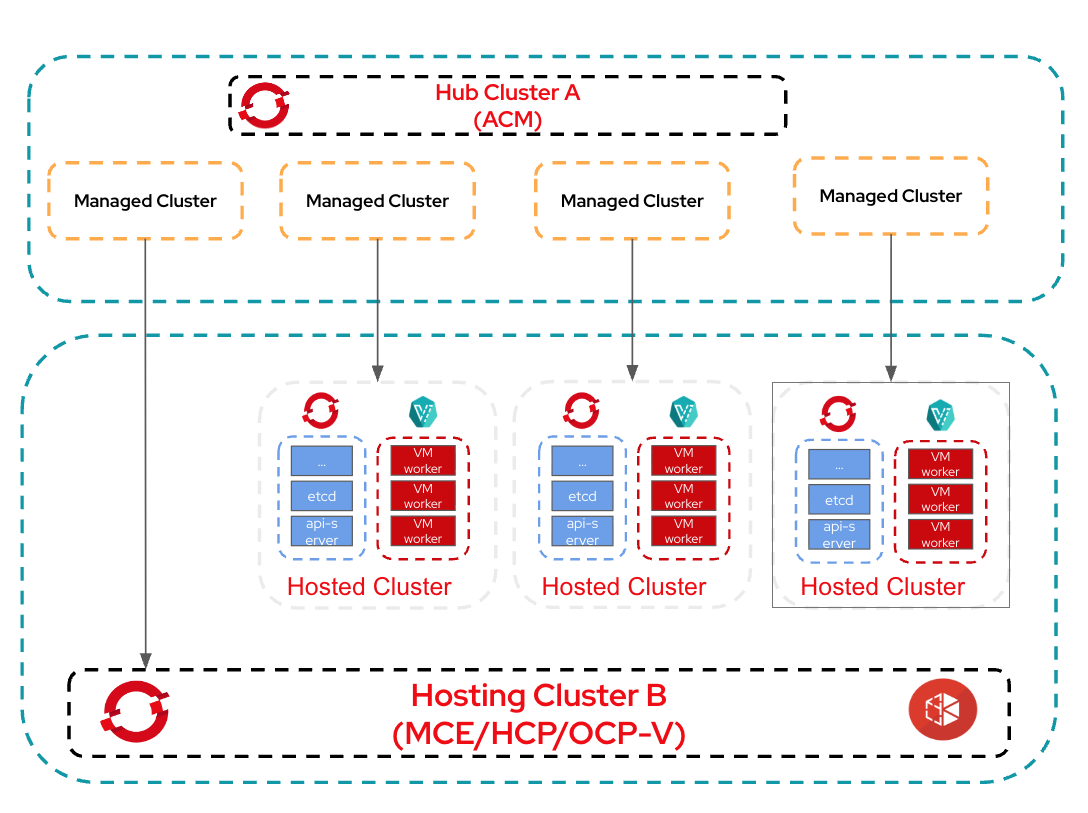
Enterprises choose this model for these reasons:
- Clear separation of duties
- Hub team controls governance, policy, visibility
- Hosting platform team manages actual cluster creation + compute resources
- Red Hat Advanced Cluster Management cluster stays lightweight
- No workload hosting or control-plane workloads overload the hub.
- Multicluster engine for Kubernetes cluster can scale independently
- Add storage, CPU, worker nodes as demand for HostedClusters grows.
- Supports multi-datacenter strategies
- Hub cluster can run centrally; hosting cluster may run in different regions.
Common prerequisites:
DNS entries for the hub cluster pointing to the IP from the same subnet as the nodes of the cluster.
Ingress: *.apps.cluster.example.com
Plan for firewall, LB, DNS entries across clusters
Tools/credentials required:
- OpenShift Installer
- OC CLI
- Pull Secret
- SSH keys
hcpCLIclusteradmCLI plug-in
Cluster A (Red Hat Advanced Cluster Management)
For demonstration purposes, we tested this on VMs running on vSphere using nested virtualization.
Nodes Sizing (Compact 3 node cluster): 3 x Master/Worker Nodes - 8 vCPU / 32G Memory / 1 x 125 GB disk
Once all the pre-requisite are met, install the OpenShift cluster using your preferred installation method.
Then install the Red Hat Advanced Cluster Management operator .
Check whether all the required operators are installed on Cluster A (Figure 2).

Prerequisites for Cluster B (multicluster engine for Kubernetes + hosted control plane + OCP-V):
For the demonstration purpose, this was tested on VMs running on vSphere using nested virtualization.
3 x Master Nodes - 8 vCPU / 32G Memory / 1 x 125 GB disk
3 x Worker Nodes - 16 vCPU / 48G Memory / 1 x 125 GB disk + 1 x 500 GB disk
To keep things simple, we are going to use LVM Storage Class for both etcd PVs of hosted clusters and for OCP-V requirements. But in the real world scenario, consult official Red Hat documentation for choosing the right storage classes.
Install LVM storage operator.
Once the LVMS operator is installed, create the following CR.
$ cat <<EOF | oc apply -f -
apiVersion: lvm.topolvm.io/v1alpha1
kind: LVMCluster
metadata:
  name: lvmcluster-sample
  namespace: openshift-storage
spec:
  storage:
    deviceClasses:
      - fstype: xfs
        thinPoolConfig:
          chunkSizeCalculationPolicy: Static
          metadataSizeCalculationPolicy: Host
          sizePercent: 90
          name: thin-pool-1
          overprovisionRatio: 10
        default: true
        name: vg1
EOF
Once the LVMCluster is available, you should see a new StorageClass created by name lvms-vg1 but we need to create a new StorageClass with VolumeBindingMode: Immediate.
Note: This step is required only when you are using LVM StorageClass for OpenShift Virtualization and for testing purposes. In the production scenario, you might be choosing a different storage solution which supports RWX and VolumeBindingMode: WaitForFistConsumer is recommended.
$ cat <<EOF | oc apply -f -
apiVersion: storage.k8s.io/v1
kind: StorageClass
metadata:
  name: lvm-immediate
  annotations:
    description: Provides RWO and RWOP Filesystem & Block volumes
    storageclass.kubernetes.io/is-default-class: "true"
  labels:
    owned-by.topolvm.io/group: lvm.topolvm.io
    owned-by.topolvm.io/kind: LVMCluster
    owned-by.topolvm.io/name: lvmcluster-sample
    owned-by.topolvm.io/namespace: openshift-storage
    owned-by.topolvm.io/version: v1alpha1
provisioner: topolvm.io
parameters:
  csi.storage.k8s.io/fstype: xfs
  topolvm.io/device-class: vg1
reclaimPolicy: Delete
allowVolumeExpansion: true
volumeBindingMode: Immediate
EOF
Make sure to remove the default SC annotation from lvms-vg1.
$ oc patch storageclass lvms-vg1 \
  -p '{"metadata": {"annotations": {"storageclass.kubernetes.io/is-default-class": null}}}'
Install MetalLB operator.
Configure IPPool & L2Advertisement as per the official documentation.
Once you've installed the MetalLB operator, create the following:
$ cat <<EOF | oc apply -f -
apiVersion: metallb.io/v1beta1
kind: MetalLB
metadata:
  name: metallb
  namespace: metallb-system
EOF

$ cat <<EOF | oc apply -f -
apiVersion: metallb.io/v1beta1
kind: IPAddressPool
metadata:
  name: metallb
  namespace: metallb-system
spec:
  addresses:
  - 192.168.34.205-192.168.34.215
EOF

$ cat <<EOF | oc apply -f -
apiVersion: metallb.io/v1beta1
kind: L2Advertisement
metadata:
  name: l2advertisement
  namespace: metallb-system
spec:
  ipAddressPools:
   - metallb
EOF
Patch network operator:
$ oc patch ingresscontroller -n openshift-ingress-operator default \
  --type=json \
  -p '[{ "op": "add", "path": "/spec/routeAdmission", "value": {wildcardPolicy: "WildcardsAllowed"}}]'
Install OpenShift Virtualization operator and hyperconverged CR.
Once you've installed all the operators successfully, it’s time to test by creating a simple VM to make sure OCP Virtualization is functioning. Once VM validation is successful, proceed with next steps to configure a multicluster engine for Kubernetes.
Install multicluster engine for the Kubernetes operator.
Once you've installed the multicluster engine for Kubernetes successfully, make sure the hub cluster is seen as the managed cluster.
$ oc get managedclusters local-clusterCheck whether all the required operators are installed (Figure 3).
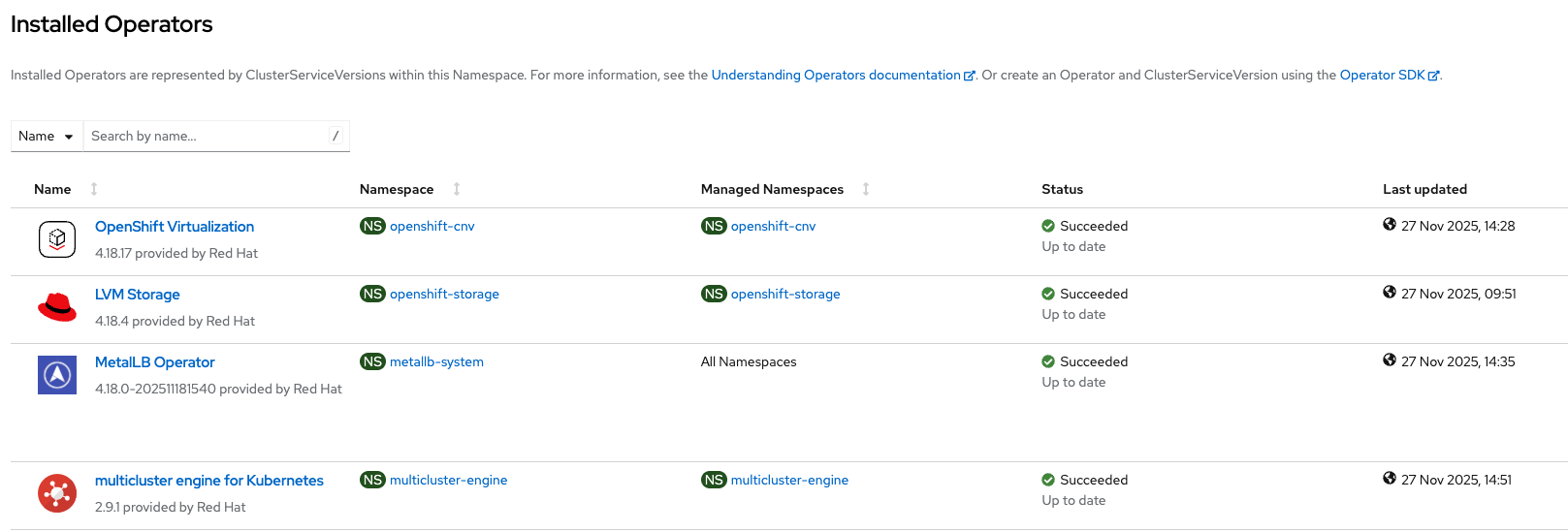
Prepare the multicluster engine for Kubernetes cluster before importing it on Red Hat Advanced Cluster Management cluster.
It is important to complete all the steps outlined in this official documentation to manage the multicluster engine for Kubernetes cluster from Red Hat Advanced Cluster Management and auto-discover hosted clusters imported using the policies.
Do not proceed with the next section before completing this section. Once the multicluster engine for the Kubernetes cluster is imported, we can see Red Hat Advanced Cluster Management (Cluster A) in Figure 4.
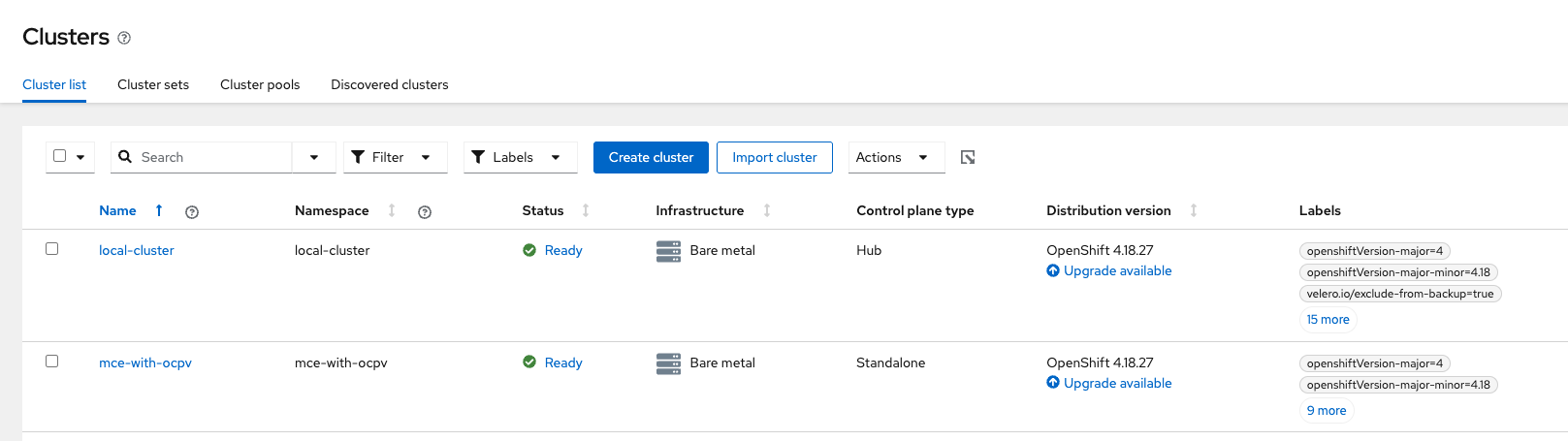
On the multicluster engine for Kubernetes cluster, there is just a local cluster (Figure 5).
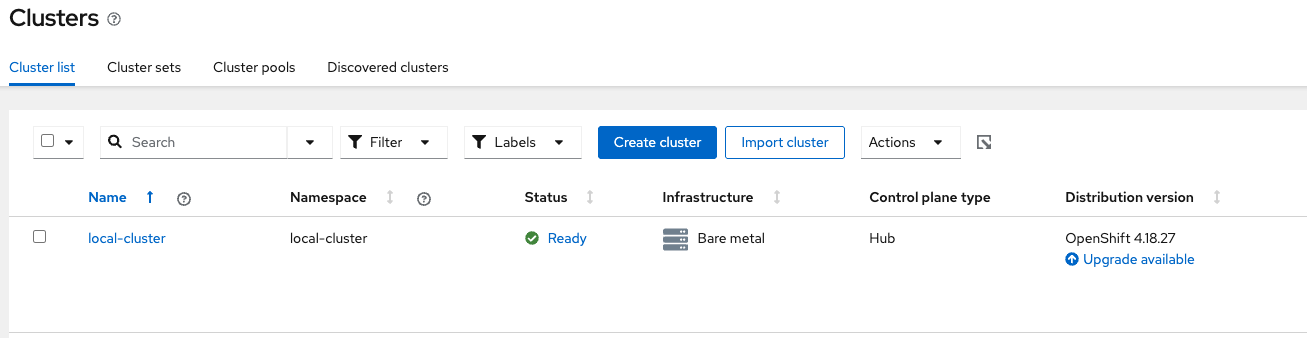
Create a hosted cluster on Cluster B
You cannot create a hosted cluster from the Red Hat Advanced Cluster Management hub cluster. Connect to the multicluster engine for Kubernetes cluster and run hcp create cluster command to create the hosted cluster.
This single hcp create cluster command provisions the hosted cluster on the multicluster engine for Kubernetes (Cluster B) using nodepools VMs using KubeVirt.
$ export KUBECONFIG=kubeconfig-mce

$ hcp create cluster kubevirt \
    --name mce-hc1 \
    --pull-secret pull-secret.txt \
    --node-pool-replicas 2 \
    --memory 8Gi \
    --cores 2 \
    --etcd-storage-class=lvm-immediate \
    --namespace clusters \
    --release-image quay.io/openshift-release-dev/ocp-release:4.18.28-multi
Wait for 10 to 15 minutes to have the hosted cluster created. While waiting, you can check the status on the GUI of the multicluster engine for Kubernetes (aka hosting) cluster (Cluster B).
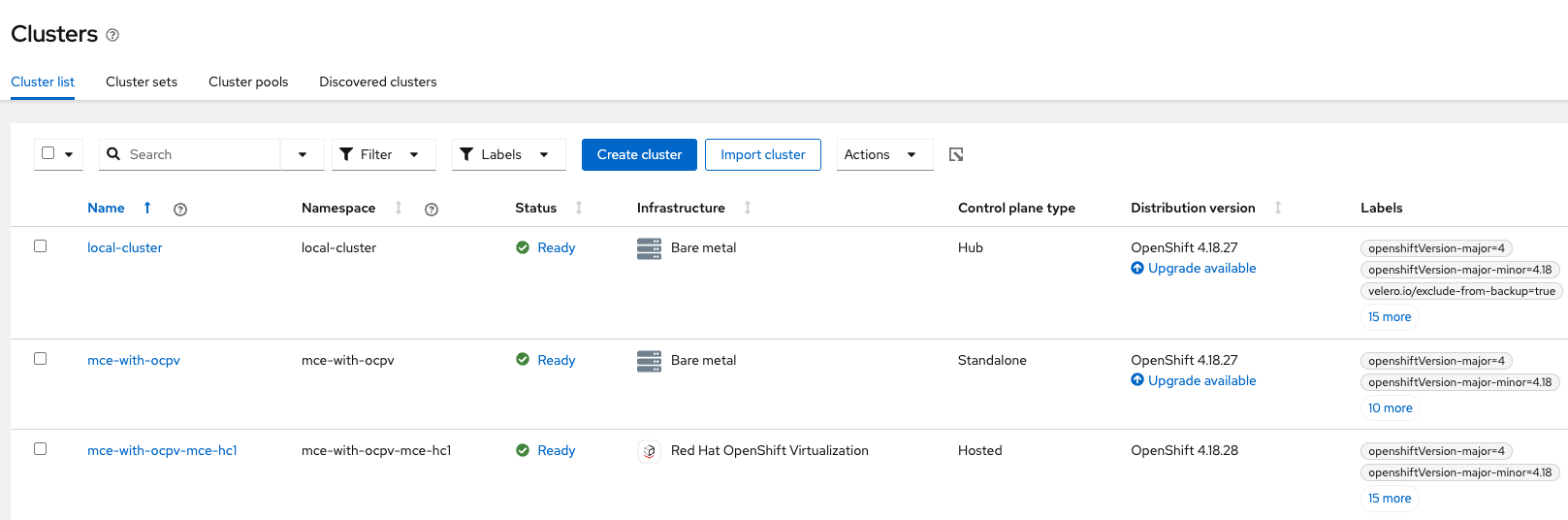
We can check the status of the hosted cluster from Red Hat Advanced Cluster Management (Cluster A) and Nodepools status from the multicluster engine for Kubernetes cluster (Cluster B) as in the following.
$ oc --kubeconfig=kubeconfig-acm get managedcluster
NAME                    HUB ACCEPTED   MANAGED CLUSTER URLS               JOINED   AVAILABLE   AGE
local-cluster           true           https://api.acm.example.com:6443   True     True        46h
mce-with-ocpv           true           https://api.mce.example.com:6443   True     True        4h10m
mce-with-ocpv-mce-hc1   true           https://192.168.34.205:6443        True     True        4h2m
Notice that the hosted cluster mce-hc1 is prefixed with mce-with-ocpv as it was configured to import automatically with the name of the managed cluster.
$ oc --kubeconfig=kubeconfig-mce get managedcluster
NAME            HUB ACCEPTED   MANAGED CLUSTER URLS               JOINED   AVAILABLE   AGE
local-cluster   true           https://api.mce.example.com:6443   True     True        4h26m
mce-hc1         true           https://192.168.34.205:6443        True     True        4h10m

$ oc --kubeconfig=kubeconfig-mce get hostedcluster -n clusters
NAME       VERSION   KUBECONFIG               PROGRESS    AVAILABLE   PROGRESSING   MESSAGE
mce-hc1   4.18.28   mce-hc1-admin-kubeconfig   Completed   True        False         The hosted control plane is available

$ oc --kubeconfig=kubeconfig-mce get vmi -n clusters-mce-hc1
NAME                  AGE    PHASE     IP             NODENAME      READY
mce-hc1-j6vtm-8c5kd   4h4m   Running   10.130.0.158   mce-worker1   True
mce-hc1-j6vtm-gnpc9   4h5m   Running   10.130.0.157   mce-worker1   True
We can see the Red Hat Advanced Cluster Management Cluster A in Figure 6.
Finally, we can check the hosted cluster and run commands.
$ export KUBECONFIG=kubeconfig-mce ; hcp create kubeconfig --name mce-hc1 --namespace clusters > kubeconfig-mce-hc1

$ oc --kubeconfig=kubeconfig-mce-hc1 get nodes
NAME                  STATUS   ROLES    AGE    VERSION
mce-hc1-j6vtm-8c5kd   Ready    worker   4h7m   v1.31.13
mce-hc1-j6vtm-gnpc9   Ready    worker   4h8m   v1.31.13

$ oc --kubeconfig=kubeconfig-mce-hc1 whoami --show-console
https://console-openshift-console.apps.mce-hc1.apps.mce.example.com
Notice that the console is pointing to a wildcard DNS of the Cluster B.
$ oc --kubeconfig=kubeconfig-mce-hc1 whoami --show-server
https://192.168.34.205:6443
Notice that the API address is pointing to the IP address provided by the MetalLB range we previously configured.
The following lists pros & cons of this topology:
Pros:
- The most stable and scalable production design
- Hub is lightweight and secure
- Hosting resources scale independently
- Enterprise teams can align with operational boundaries
Cons:
- Slightly more operational complexity
- HostedClusters must be imported manually (unless automated)
- Networking dependencies between clusters
Wrap up
In this installment, we separated Red Hat Advanced Cluster Management (hub) and the multicluster engine for Kubernetes/hosted control plane/OpenShift Virtualization (management and hosting) across two clusters. This pattern ensures clean isolation, predictable scaling, and clear team responsibilities. But some customers operate on yet another level of scale and flexibility: they split control-plane hosting from worker-node hosting.
In the next installment, we'll discuss where an advanced architecture runs:
- Red Hat Advanced Cluster Management Hub on Cluster A
- Multicluster engine for Kubernetes + hosted control plane on Cluster B
- OpenShift Virtualization (NodePool VMs only) on Cluster C
- NodePools live on Cluster C even though control planes run on Cluster B
This allows incredible flexibility in worker VM placement and multi-zone hosting strategies. Stay tuned for Part 3.

