Redhat Developers  Logo
  • AI

    Get started with AI

    • Red Hat AI
      Accelerate the development and deployment of enterprise AI solutions.
    • AI learning hub
      Explore learning materials and tools, organized by task.
    • AI interactive demos
      Click through scenarios with Red Hat AI, including training LLMs and more.
    • AI/ML learning paths
      Expand your OpenShift AI knowledge using these learning resources.
    • AI quickstarts
      Focused AI use cases designed for fast deployment on Red Hat AI platforms.
    • No-cost AI training
      Foundational Red Hat AI training.

    Featured resources

    • OpenShift AI learning
    • Open source AI for developers
    • AI product application development
    • Open source-powered AI/ML for hybrid cloud
    • AI and Node.js cheat sheet

    Red Hat AI Factory with NVIDIA

    • Red Hat AI Factory with NVIDIA is a co-engineered, enterprise-grade AI solution for building, deploying, and managing AI at scale across hybrid cloud environments.
    • Explore the solution
  • Learn

    Self-guided

    • Documentation
      Find answers, get step-by-step guidance, and learn how to use Red Hat products.
    • Learning paths
      Explore curated walkthroughs for common development tasks.
    • Guided learning
      Receive custom learning paths powered by our AI assistant.
    • See all learning

    Hands-on

    • Developer Sandbox
      Spin up Red Hat's products and technologies without setup or configuration.
    • Interactive labs
      Learn by doing in these hands-on, browser-based experiences.
    • Interactive demos
      Click through product features in these guided tours.

    Browse by topic

    • AI/ML
    • Automation
    • Java
    • Kubernetes
    • Linux
    • See all topics

    Training & certifications

    • Courses and exams
    • Certifications
    • Skills assessments
    • Red Hat Academy
    • Learning subscription
    • Explore training
  • Build

    Get started

    • Red Hat build of Podman Desktop
      A downloadable, local development hub to experiment with our products and builds.
    • Developer Sandbox
      Spin up Red Hat's products and technologies without setup or configuration.

    Download products

    • Access product downloads to start building and testing right away.
    • Red Hat Enterprise Linux
    • Red Hat AI
    • Red Hat OpenShift
    • Red Hat Ansible Automation Platform
    • See all products

    Featured

    • Red Hat build of OpenJDK
    • Red Hat JBoss Enterprise Application Platform
    • Red Hat OpenShift Dev Spaces
    • Red Hat Developer Toolset

    References

    • E-books
    • Documentation
    • Cheat sheets
    • Architecture center
  • Community

    Get involved

    • Events
    • Live AI events
    • Red Hat Summit
    • Red Hat Accelerators
    • Community discussions

    Follow along

    • Articles & blogs
    • Developer newsletter
    • Videos
    • Github

    Get help

    • Customer service
    • Customer support
    • Regional contacts
    • Find a partner

    Join the Red Hat Developer program

    • Download Red Hat products and project builds, access support documentation, learning content, and more.
    • Explore the benefits

Harden local container base images in Podman Desktop

Hardening the software supply chain: Hummingbird extension for Red Hat build of Podman Desktop

August 10, 2026
Axel Stefanini Stevan Le Meur
Related topics:
Hardened images
Related products:
Red Hat DesktopPodman Desktop

    Containers changed how software gets built. Build once, run anywhere, ship faster, scale farther. That part worked. The problem is what comes with the image: pull a base container and you're not just getting a runtime, you're inheriting a full package tree you didn't choose, don't need, and won't maintain when a Common Vulnerabilities and Exposure (CVE) drops. That's the supply chain problem, and it's not abstract. The gap it creates is real: what builds clean on your laptop hits a wall at the platform gate. Not because your code is wrong. Because no one built the container for production.

    To address this, the industry is shifting security left, embedding validations directly into the local workflow. Central to this is the Red Hat build of Podman Desktop and its integration with Red Hat Hardened Images, developed and maintained using the pipeline provided by the upstream Project Hummingbird. Through the Hummingbird extension, developers can discover, evaluate, and adopt container images hardened for security without leaving their local development environment. By starting with pre-hardened bases, developers spend significantly less time auditing unneeded dependencies and tracking upstream CVEs, letting them focus on application logic.

    Here is how the Hummingbird extension brings hardened base images and 1-click migrations directly into your local Podman Desktop workflow.

    What is Project Hummingbird?

    Project Hummingbird is the pipeline used to develop and maintain a catalog of minimal, production-ready container base images built for enterprise environments. Each image starts from Fedora Linux components and strips away everything except what a specific runtime needs—eliminating bloat that inflates attack surfaces and accumulates CVEs. Combine that lean footprint with a highly automated update workflow, and you get images targeting near-zero vulnerabilities by design.

    Available in both AMD64 and Arm64 architectures, these hardened images work directly with Podman, Docker, or Kubernetes—and you can pull them today, at no cost, from the registry for Red Hat Hardened Images.

    The Hummingbird extension: Ship clean, ship fast

    Developers best realize the benefits of images hardened for security when they integrate them effortlessly into their daily workflows. The Hummingbird extension for Podman Desktop does exactly this, operating under the philosophy of "ship clean, ship fast."

    Identifying hardened base images

    Securing a container often requires developers to navigate external registries, verify Software Bills of Materials (SBOMs), and manually construct minimal bases. The Hummingbird extension eliminates this context switching by bringing the catalog of hardened images directly into your local environment.

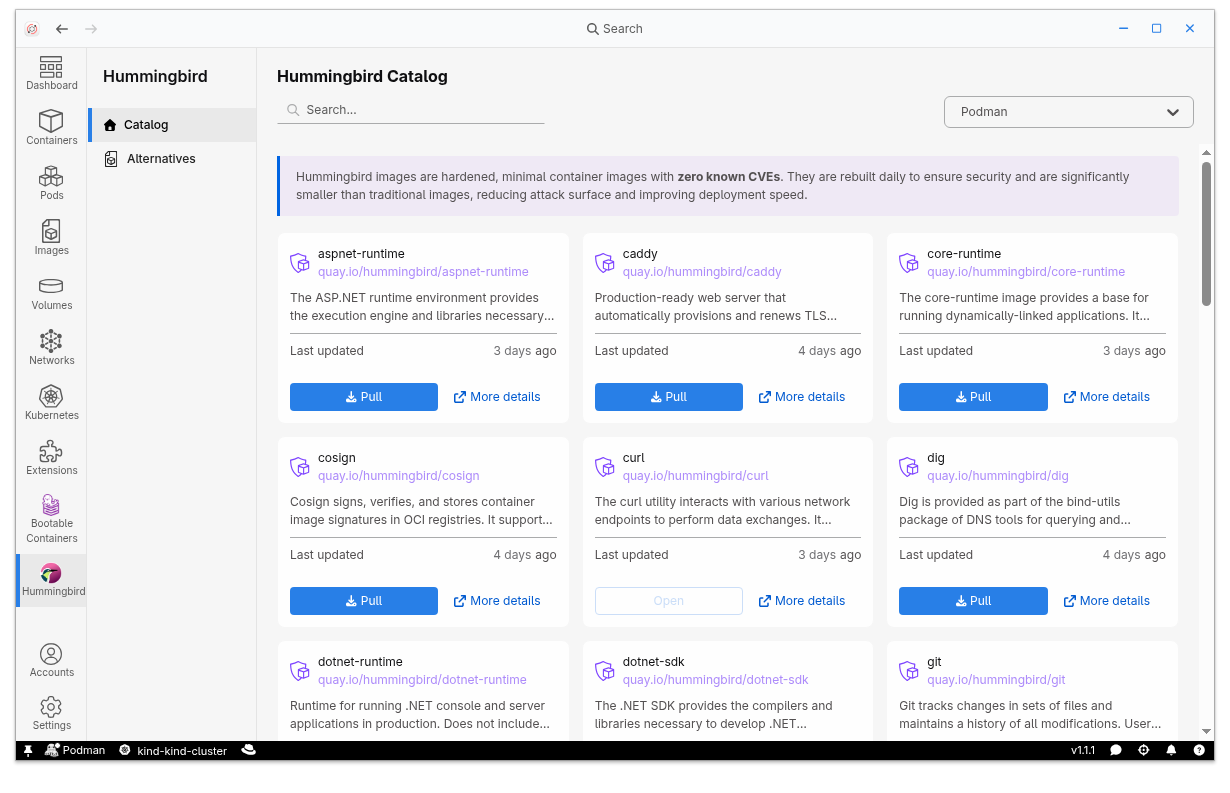
    The extension features a dedicated catalog tab with an integrated search mechanism, as shown in Figure 1. When you search for common runtimes or infrastructure components, the extension badges the Hummingbird alternatives with a visual verification icon. This displays the most secure architectural choices instantly.

    Podman Desktop Hummingbird catalog displaying hardened container base images, including ASP.NET runtime, Caddy, and Git, with options to pull.
    Figure 1: Hummingbird catalog integrated in Podman Desktop through the Hummingbird extension.

    Enhanced scanning with Grype

    The Hummingbird extension becomes even more effective when paired with Grype. Grype is an open source vulnerability scanner that inspects container images for known security flaws. When added to Podman Desktop, it enables real-time local scanning. To unlock analytical capabilities, you can install the Grype extension through the extension catalog.

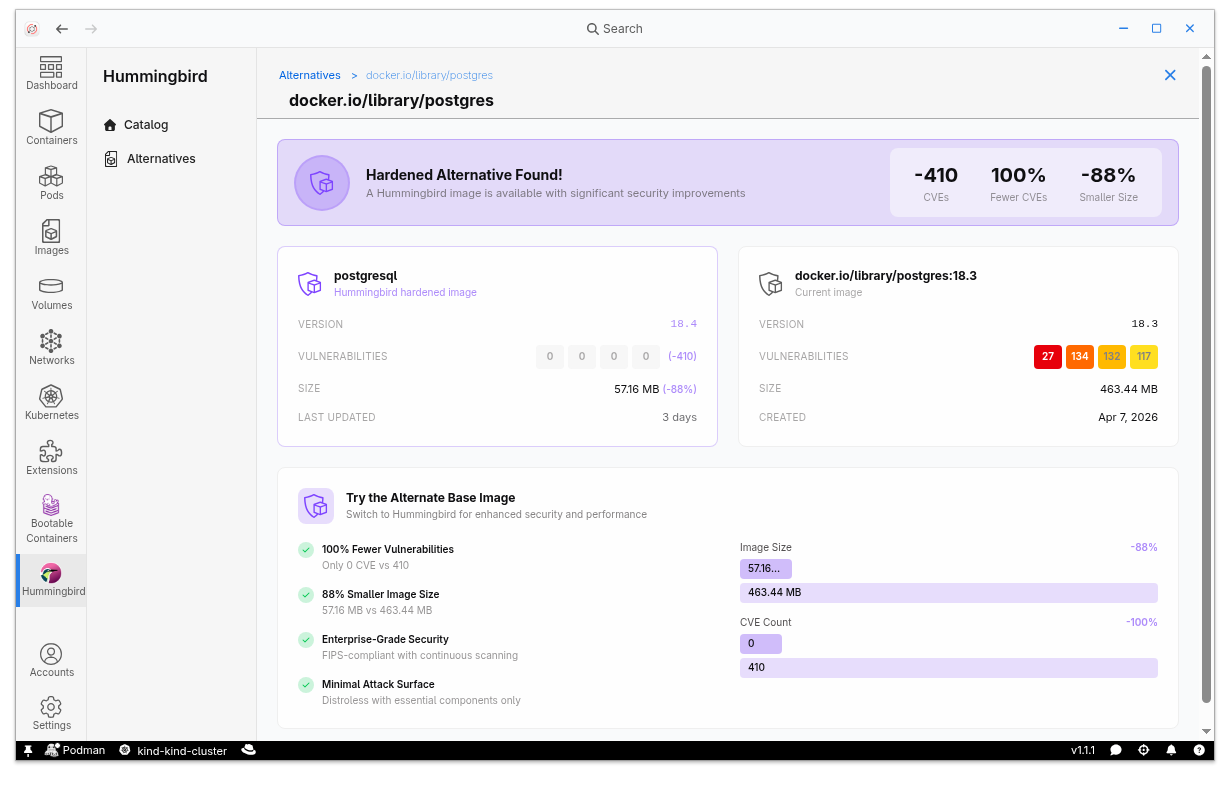
    Paired with Grype, Hummingbird performs local, real-time vulnerability scanning. It cross-references your local images against continuously updated vulnerability databases and actively intervenes to suggest a security-focused Hummingbird image alternative (Figure 2). This localized process happens entirely on your machine, keeping your proprietary data protected.
    Alternatives table listing local container images alongside Quay.io Hummingbird options, highlighting zero CVEs and size reduction percentages.
    Figure 2: Alternatives table showing the Hummingbird extension scanning your local registry to detect images with a Hummingbird equivalent, using the Grype vulnerability scanner to compare the images.

    The optimization dashboard

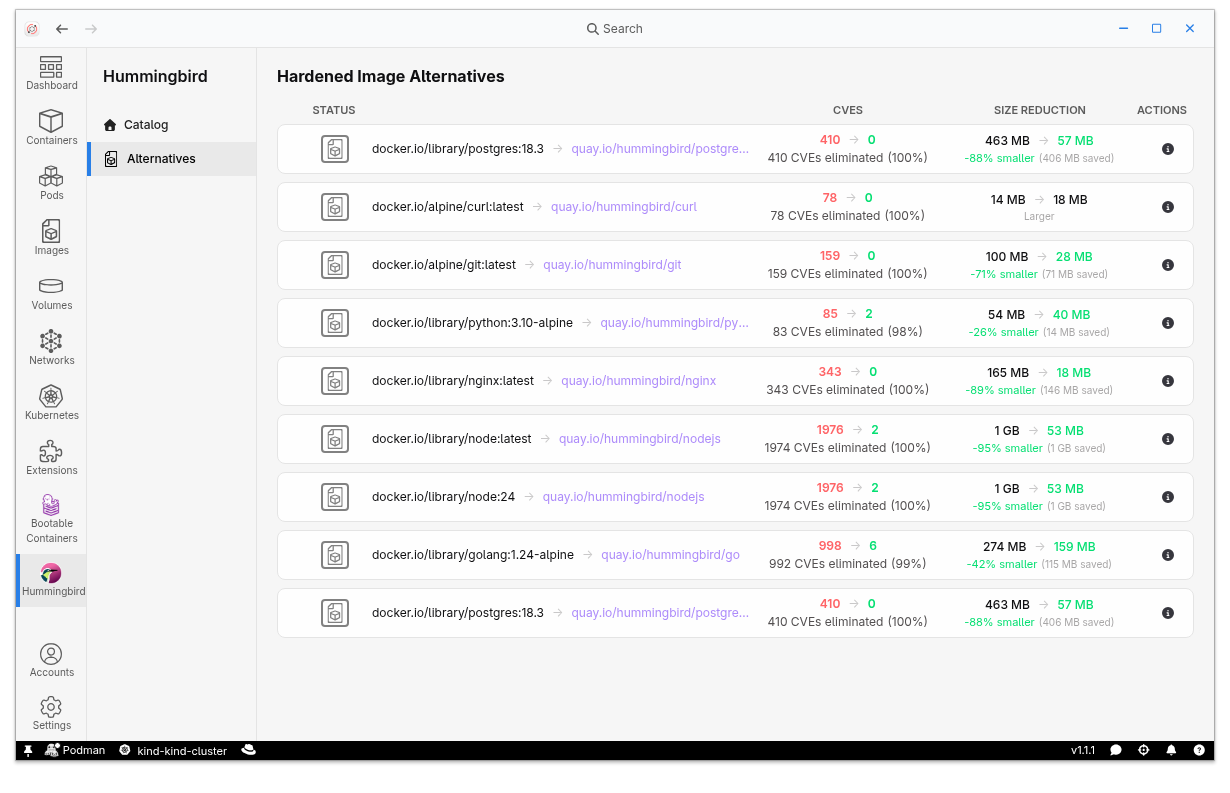
    To see whether migration is worth the effort, developers need concrete proof that migrating yields tangible benefits. When an image in the user's local registry has a Hummingbird alternative available, a dashboard illustrates the pros and cons of switching.

    By eliminating unnecessary software such as package managers and shell environments, Project Hummingbird produces images that are micro-sized compared to standard distributions.

    Dashboard comparing a local Postgres image having 410 CVEs with a Hummingbird hardened alternative featuring 0 vulnerabilities and 88% size reduction.
    Figure 3: Detailed report of a local image compared to the Hummingbird alternative.

    1-click migration and cloning

    Transitioning to a new base image can sometimes introduce configuration errors. The Hummingbird extension addresses this operational hurdle through a dedicated cloning mechanism designed for simplified migrations.

    The Clone feature lets you spin up an identical container using the hardened image as a base image with a single click (Figure 4). The extension orchestrates the swap, carefully preserving your complex runtime configurations, environment variables, and volume mounts. This non-destructive cloning lets you verify application compatibility.
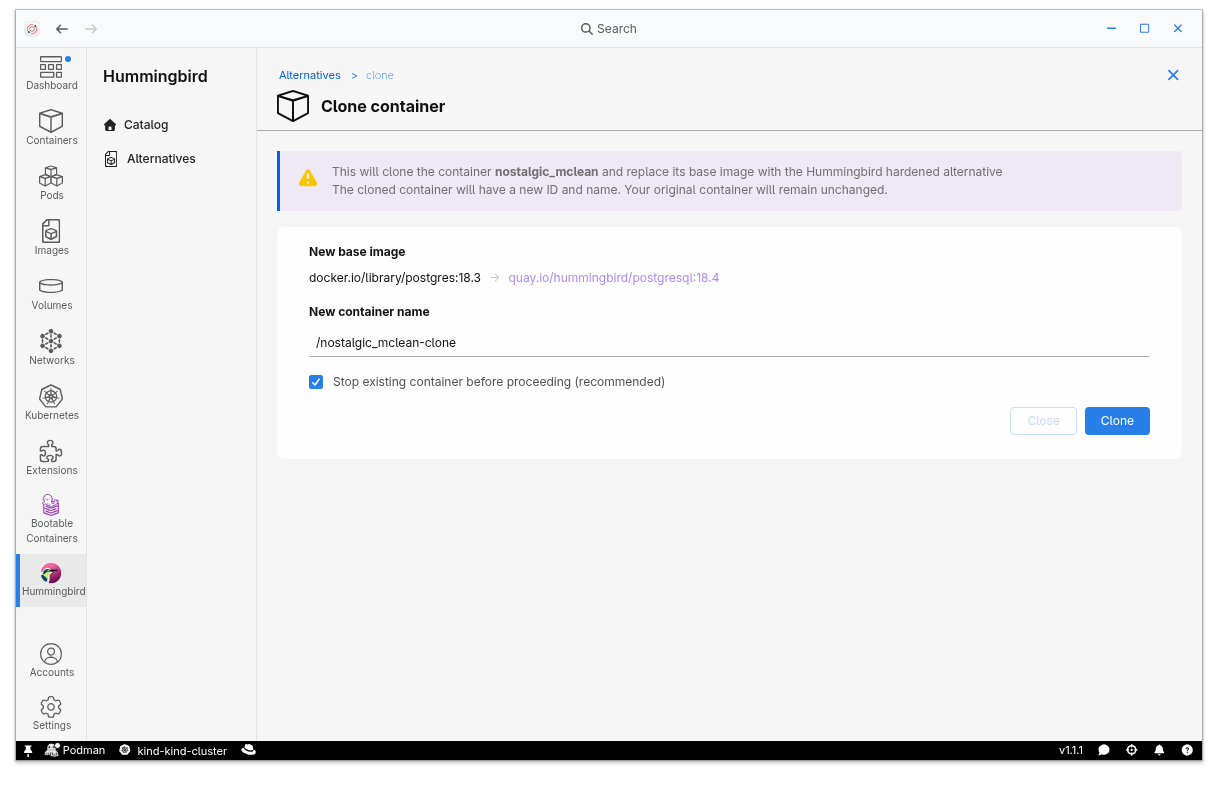
    Clone container screen showing a base image swap to a Quay.io Hummingbird Postgres image, new container name field, and a Clone action button.
    Figure 4: Clone page showing how the Hummingbird extension for Podman Desktop offers a way to switch the base image of your container to a Hummingbird alternative with one click.

    Conclusion

    The Hummingbird extension for Red Hat build of Podman Desktop bridges the gap between local development and production security. By bringing Red Hat Hardened Images into your local workflow, it helps you catch vulnerabilities and cut container bloat before your code ever leaves your workstation.

    Explore the Hummingbird extension on GitHub to start using security-focused images in your workflow.

    Related Posts

    • Red Hat Hardened Images: Top 5 benefits for software developers

    • Build trusted Python containers with Project Hummingbird and Calunga

    • How to simplify your multi-repo workflow with Podman

    • Exploring distroless containers with Project Hummingbird

    • Red Hat UBI vs. Red Hat Hardened Images: How to choose

    • Trusted software factory: Building trust in the agentic AI era

    Recent Posts

    • MiDojo: Improve AI agent security with real-world red-teaming

    • Harden local container base images in Podman Desktop

    • Upgrade OpenShift AI faster using an AI coding assistant

    • The AI layer of observability: Making telemetry human-readable

    • Provisioning image mode for Red Hat Enterprise Linux using Red Hat Satellite

    What’s up next?

    Learning Path RHEL platform card

    Build a Python Flask application with Red Hat Hardened Images

    Develop a Flask application using Red Hat hardened images and Red Hat build...
    Red Hat Developers logo LinkedIn YouTube Twitter Facebook

    Platforms

    • Red Hat AI
    • Red Hat Enterprise Linux
    • Red Hat OpenShift
    • Red Hat Ansible Automation Platform
    • See all products

    Build

    • Developer Sandbox
    • Developer tools
    • Interactive tutorials
    • API catalog

    Quicklinks

    • Learning resources
    • E-books
    • Cheat sheets
    • Blog
    • Events
    • Newsletter

    Communicate

    • About us
    • Contact sales
    • Find a partner
    • Report a website issue
    • Site status dashboard
    • Report a security problem

    RED HAT DEVELOPER

    Build here. Go anywhere.

    We serve the builders. The problem solvers who create careers with code.

    Join us if you’re a developer, software engineer, web designer, front-end designer, UX designer, computer scientist, architect, tester, product manager, project manager or team lead.

    Sign me up

    Red Hat legal and privacy links

    • About Red Hat
    • Jobs
    • Events
    • Locations
    • Contact Red Hat
    • Red Hat Blog
    • Inclusion at Red Hat
    • Cool Stuff Store
    • Red Hat Summit
    © 2026 Red Hat

    Red Hat legal and privacy links

    • Privacy statement
    • Terms of use
    • All policies and guidelines
    • Digital accessibility

    Chat Support

    Please log in with your Red Hat account to access chat support.