The challenge of upgrading Red Hat Advanced Cluster Management for Kubernetes hub clusters has traditionally been a high-risk operation. In-place upgrades carry several significant risks, including extended maintenance windows that can affect hundreds of managed clusters, a higher risk of upgrade failures potentially leaving hubs in inconsistent states, possible disruption to policy enforcement and governance, and critical downtime for management operations.
For organizations running large-scale deployments with hundreds of Zero Touch Provisioning (ZTP) managed clusters, the stakes are even higher. A failed upgrade can impact production workloads across your entire fleet.
The solution: Parallel hub deployment with cluster migration
The multicluster global hub introduces managed cluster migration, a feature that fundamentally changes how you approach Red Hat Advanced Cluster Management hub upgrades. Instead of risky in-place upgrades, you can deploy a new Red Hat Advanced Cluster Management hub with your target version in parallel. Then, you can gradually migrate managed clusters from the old hub to the new hub and validate each migration status before proceeding. Finally, you should decommission the old hub only after full validation.
This approach reduces upgrade risk to near zero while maintaining continuous management of your clusters.
How it works: The migration architecture
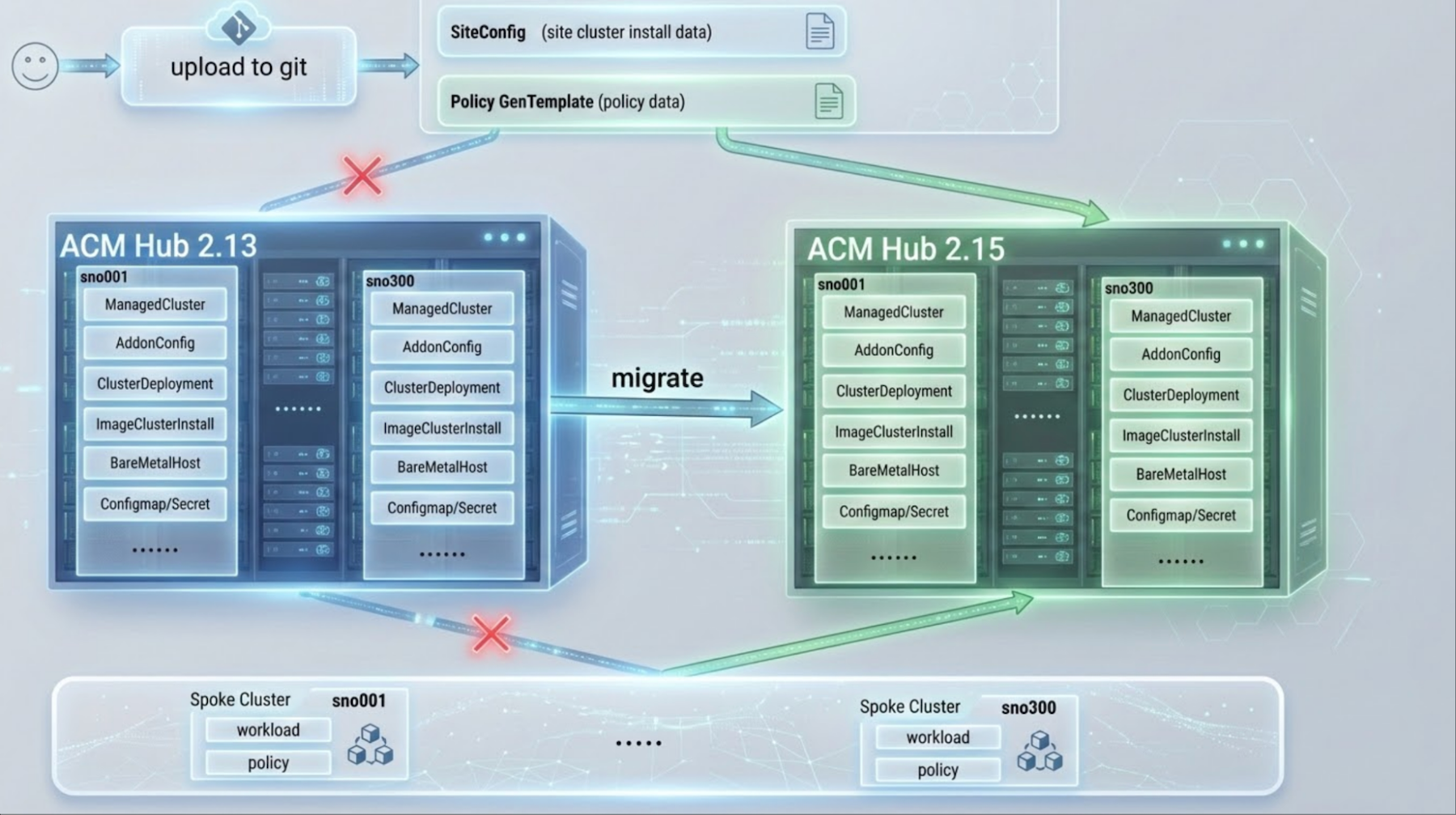
The migration process leverages the global hub as an orchestration layer between source and target hubs (Figure 1). When you initiate a migration, the global hub agent running on the source hub identifies all resources associated with the migrating clusters and packages them for transfer. These resources are then sent to the global hub manager on the target hub, which coordinates the deployment of cluster resources and triggers the re-registration process.
During migration, the managed clusters remain fully operational. The klusterlet agent on each managed cluster receives instructions to disconnect from the source hub and establish a new connection to the target hub. This handoff happens seamlessly, with the cluster continuing to run workloads without interruption. The global hub monitors each phase of the migration, tracking progress at the individual cluster level and the overall batch level.
The architecture ensures consistency by transferring resources in a specific order. Secrets and ConfigMaps are created first, followed by cluster deployment resources, and finally the ManagedCluster resource triggers registration. This sequencing prevents race conditions and ensures that all dependencies are in place before the cluster attempts to join the target hub. If any step fails, the global hub detects the failure and initiates an automatic rollback to restore the cluster's connection to the source hub.
Automatic migration
The migration process transfers all essential resources, including: ManagedCluster and KlusterletAddonConfig for cluster registration and add-on configurations; ClusterDeployment and ImageClusterInstall to preserve deployment configurations and status; BareMetalHost resources for physical server inventory and BIOS configurations; secrets such as admin credentials, kubeconfig, BMC credentials, and pull secrets; and ConfigMaps containing extra manifests referenced by ImageClusterInstall.
Prerequisites
Before starting the migration, ensure both source and target hubs meet the following requirements.
1. Network connectivity: All migrating managed clusters must have network connectivity to the target hub cluster.
2. Version requirements:
- Component: Red Hat Advanced Cluster Management
- Source Hub: Version N
- Target Hub: Version N to N+1
- Notes: and EUS Version support (e.g., Red Hat Advanced Cluster Management 2.13 → 2.15)
- Component: Global Hub
- Source Hub: N/A
- Target Hub: Latest stable
- Notes: Installed on target hub only
3. Target hub configuration: The target hub must be configured with the same components in MultiClusterEngine and MultiClusterHub as the source hub to ensure successful cluster migration.
4. Global hub setup: Install the multicluster global hub operator on your target hub (the Red Hat Advanced Cluster Management hub that will coordinate migrations).
Verify global hub is running.
oc get mgh -n multicluster-global-hub
oc get pods -n multicluster-global-hub
For detailed installation instructions, refer to the Global Hub Installation Guide.
5. Import the source hub cluster into the global hub as a managed hub.
Important note: The global-hub.open-cluster-management.io/deploy-mode: hosted label should be set in managedcluster resource when importing the source hub.
Verify the source hub is imported and Global Hub agent is running.
oc get managedcluster <source-hub-name>
oc get pods -n <agent-namespace> -l name=multicluster-global-hub-agent
You can find detailed import instructions in the Red Hat Advanced Cluster Management import documentation.
The migration process
The migration process consists of five steps: verifying pre-migration, applying policy applications, creating the migration resource, monitoring progress, and validating post-migration.
Step 1: Pre-migration verification
Before initiating migration, verify the current state of your clusters on the source hub.
List all managed clusters on source hub:
oc get managedcluster
# Expected output:
# NAME       HUB ACCEPTED   MANAGED CLUSTER URLS   JOINED   AVAILABLE   AGE
# cluster-001   true                                  True     True        30d
# cluster-002   true                                  True     True        25d
Verify ZTP Resources (for ZTP clusters). Check the ClusterInstance status:
oc get clusterinstance -ACheck ImageClusterInstall status:
oc get imageclusterinstall -ACheck ClusterDeployment status:
oc get clusterdeployment -AImportant note: Only migrate clusters with PROVISIONSTATUS: Completed. Clusters still provisioning should complete before migration.
Step 2: Apply policy applications to target hub
A critical step is applying policy applications to the target hub before creating the migration resource.
Export from the source hub:
oc get application -n openshift-gitops -l app=policies -o yaml > policies-app.yamlApply it to the target hub:
oc apply -f policies-app.yamlVerify the policies are created:
oc get policy -AStep 3: Create migration resource
Migrate clusters in batches for controlled rollout. Use the static cluster list approach when you have a specific list of clusters:
yaml
apiVersion: global-hub.open-cluster-management.io/v1alpha1
kind: ManagedClusterMigration
metadata:
 name: upgrade-migration-batch-1
 namespace: multicluster-global-hub
spec:
 from: source-hub
 to: local-cluster
 includedManagedClusters:
   - cluster-001
   - cluster-002
   - cluster-003
 supportedConfigs:
   stageTimeout: 15m
For large-scale migrations, use Placement for dynamic cluster selection.
apiVersion: cluster.open-cluster-management.io/v1beta1
kind: Placement
metadata:
 name: migration-batch-300
spec:
 numberOfClusters: 300
 clusterSets:
 - global
 predicates:
 - requiredClusterSelector:
     labelSelector:
       matchExpressions:
         - key: migration-batch
           operator: In
           values: ["1"]
---
apiVersion: global-hub.open-cluster-management.io/v1alpha1
kind: ManagedClusterMigration
metadata:
 name: upgrade-migration-batch-1
 namespace: multicluster-global-hub
spec:
 from: source-hub
 to: local-cluster
 includedManagedClustersPlacementRef: migration-batch-300
 supportedConfigs:
   stageTimeout: 15m
Step 4: Monitor migration progress
Check the migration phase.
oc get managedclustermigration -n multicluster-global-hubExample output:
# NAME                        PHASE        AGE
# upgrade-migration-batch-1   Deploying    5m
Migration phases and description:
- Validating: Verifies clusters and hubs.
- Initializing: Prepares target hub and source hub.
- Deploying: Transfers resources to target hub.
- Registering: Re-registers clusters with target hub.
- Cleaning: Removes resources from source hub.
- Completed: Migration finished successfully.
Monitor the individual cluster status and view per-cluster status via ConfigMap:
oc get configmap upgrade-migration-batch-1 -n multicluster-global-hub -o yamlStep 5: Post-migration validation
Verify the cluster availability.
oc get managedclusterVerify the policy compliance:
oc get policy -AApply the ClusterInstance applications for ZTP clusters.
Important: GitOps manages ClusterInstance resources, and it's not automatically migrated.
Update ClusterInstance resources in your Git repository to suppress re-rendering:
spec:
 suppressedManifests:
   - BareMetalHost
   - ImageClusterInstall
Apply ClusterInstance applications to target hub:
oc apply -f clusterinstance-app.yamlVerify ClusterInstance status:
oc get clusterinstance -AAfter validating each batch, repeat steps 3-5 for remaining cluster batches.
Performance at scale: Real-world results
We tested migration with 300 ZTP-managed SNO clusters.
Scenario | Migration Time | Policy Convergence | ClusterInstance Convergence |
Red Hat Advanced Cluster Management 2.13 → 2.15 | ~9 minutes | <2 minutes | <2 minutes |
Key findings:
100% success rate for all 300 clusters
~0.93 seconds per cluster in same-version migrations
No cluster downtime during migration
Automatic rollback when failures occur
Built-in safety: Automatic rollback
If migration fails during any phase, the global hub automatically rolls back, following a process that moves from Deploying (failure) → Rollbacking → Failed. This rollback ensures that clusters remain operational on the source hub, partial resources on the target hub are cleaned up, and the system returns to its pre-migration state.
In our testing, rollback of 300 clusters completed within 5 minutes.
Wrap up
Managed cluster migration transforms Red Hat Advanced Cluster Management hub upgrades from high-risk operations to controlled, reversible processes. This approach allows for deploying new versions in parallel, eliminating the risk associated with in-place upgrades. Migration happens incrementally, enabling validation before proceeding, and automatic rollback ensures that failures do not leave clusters stranded. Furthermore, this method achieves zero downtime, meaning clusters remain managed throughout the upgrade process.
For organizations managing hundreds or thousands of clusters, this approach provides the confidence to upgrade Red Hat Advanced Cluster Management hubs without fear of disruption.
To explore managed cluster migration, review the Global Hub Cluster Migration Guide. For ZTP clusters, refer to the ClusterInstance ZTP Migration Guide. Check out the Migration Performance GitHub for scale testing results.

