We are excited to announce significant upgrades to the cert-manager operator for Red Hat OpenShift. We recently released version 1.19 of the operator, which contains an exciting new feature: the technology preview of trust-manager. The trust-manager controller is an optional add-on feature, enabling administrators to customize and distribute bundles of trusted certificate authorities (CAs) to workloads across Kubernetes clusters. This enhancement accentuates the core capabilities of cert-manager and extends them into the management of trusted CAs. With the combination of cert-manager and trust-manager, cluster administrators can automate the management of TLS certificates at scale, as well as the chains of trust used to verify the provenance of these certificates. These two concepts establish the building blocks for true mutual transport layer security (mTLS) between any workload running on OpenShift.
TLS vs mTLS
To highlight the benefits of trust-manager, we will give a little background about transport layer security (TLS) and its more secure iteration, mutual transport layer security (mTLS). This section provides a high-level overview of these concepts to establish a common understanding of key terms and assumptions. If you would like to explore a deeper understanding of TLS or mTLS, this Cloudflare blog is a good start.
First, to facilitate a secure TLS handshake, we require two artifacts: the CA bundle and the TLS certificate. In an enterprise environment, the CA bundle serves as the trust anchor. It is a collection of public key certificates belonging to the Root CA and, optionally, a set of subsequent Intermediate CAs. This bundle provides the reference needed for a client (and server, in mTLS scenarios) to verify that a presented certificate is authentic. The TLS certificate acts as the identity presented during the handshake process. To establish a connection, this certificate must be part of a valid cryptographic chain terminating at the root CA contained within the CA bundle.
Now, let’s evaluate the steps of a standard (one-way) TLS and (two-way) mTLS handshake. The most common form of network communication is TLS, a methodology found in web browsers or in many protocols that use HTTPS, such as API calls. For TLS, the following occurs:
- The client (e.g., web browser) initiates communication.
- The server (e.g., backend web server) responds to the client with a TLS certificate.
- The client validates the provided certificate against its local CA bundle. It must mathematically prove that a CA present within the bundle signed the certificate.
- Success: The client confirms that the certificate is valid, and the encrypted session is established.
- Failure: The certificate is not valid (e.g., self-signed, expired, issued by an untrusted CA). The client terminates the connection; or in the case of some web browsers, warns the user that it does not trust the server’s certificate, and the user should proceed with caution.
By comparison, in higher security zero trust environments, mTLS can be used to ensure validation from both partners in the handshake:
- The client initiates communication.
- The server responds to the client with its TLS certificate.
- The client validates the provided certificate against its local CA bundle. It must mathematically prove that a CA present within the bundle signed the certificate.
- The client then sends its certificate to the server.
- The server validates the provided certificate against its local CA bundle. It must mathematically prove that a CA present within the bundle signed the certificate.
- Success: The client and server confirm the other certificate is valid, and the encrypted session is established.
- Failure: Either the client or the server cannot verify the other certificate against their respective CA bundles, and the connection terminates.
Back to OpenShift
Now that we have laid the groundwork, let’s shift our focus back to OpenShift.
cert-manager
The cert-manager operator for OpenShift has been available for a long time, and since its GA release back on OpenShift 4.14, its adoption has grown considerably. The core tenet of cert-manager is the automated lifecycle management of TLS certificates for applications living on OpenShift. This covers half the battle by enabling teams to automate the issuance, renewal, and rotation of TLS certificates.
Industry trends are shifting away from longer lived certificates (>= 90 days) towards certificates issued at much shorter intervals, including every 24 hours in some instances. One of the basic principles of zero trust architecture is to assume there is always a breach. As a result, reducing the lifespan of a certificate that a malicious actor could utilize to impersonate a trusted entity can significantly reduce the blast radius or impact of such a leaked certificate. However, this presents another issue: scale. Shorter certificate lifespans necessitates certificate issuance and a much higher rate. Performing the manual rotation of thousands of certificates in production on significantly shorter intervals is simply infeasible, but cert-manager’s capabilities enable security conscious teams to adopt these methodologies at scale on OpenShift.
trust-manager
To continue, let’s use a simple example of a passport, where the certificate is the passport. In order to verify a passport, the customs agent will look for a few things: watermarks, holographic seals, etc. This happens before the agent eventually attempts to verify that the passport is legitimate and that you are the real owner of said passport. This is where CA trust bundles come into play. Agents are trained and informed ahead of time in order to validate the question: Is this passport actually created and issued by a legitimate authority?
For a TLS handshake, this is where the CA bundle comes into play. A typical web browser has access to a bundle of well known, publicly trusted certificates from reputable sources. However, for enterprises, relying on public CAs is not possible as scaling and sovereignty issues arise very quickly. For example, public CAs can only issue certificates for domains that can be verified on the public internet. This requirement breaks down for any non-public DNS use case with internal domains such as cluster.internal.corp. Instead, enterprises manually build bundles of trusted CAs and distribute these across multiple clusters, namespaces, and users.
Trust-manager enables DevSecOps teams to perform three vital tasks associated with distributing trust across an OpenShift cluster: constructing custom bundles of CAs, distributing these custom bundles to workloads, and automatically updating the custom bundles when CA certificates are renewed or rotated. This makes it an obvious solution for enterprises searching for a way to more closely align with zero trust principles in a scalable and automated fashion.
Trust-manager introduces a new Custom Resource (CR) called a Bundle (see the following example), which can group CA certificates from multiple sources and secretRefs. One caveat is that CA certificates must exist in the trustNamespace which is configured during the controller installation process. This is intended as an extra layer of security to the trust-manager controller. Additionally, these bundles can be distributed to specific namespaces or made available cluster-wide. In the following example, you can see the option namespaceSelector is used to inject the trust Bundle into any namespace with the trust.cert-manager.io/inject: "true" label. The Bundle resource supports any Secret or ConfigMap as a source and trust-manager will synchronize the generated trust bundle whenever one of the sources is updated whether manually or through automation. This is particularly convenient for certificates managed by cert-manager as trust-manager is able to track the changes made by cert-manager automatically and at scale. Finally, trust-manager supports the parameter useDefaultCAs as a source, simplifying the process of injecting platform level CAs into bundles for workload consumption.
apiVersion: trust.cert-manager.io/v1alpha1
kind: Bundle
metadata:
  name: demo-trust-bundle
spec:
  sources:
    - secret:
        name: intermediate-ca-secret
        key: "tls.crt"
    - secret:
        name: root-ca-secret
        key: "ca.crt"
    - useDefaultCAs: true
  target:
    configMap:
      key: "ca-bundle.crt"
    namespaceSelector:
      matchLabels:
        trust.cert-manager.io/inject: "true"
Trust-manager for TLS and mTLS
At this point we’ve covered a whole lot of information, and while the picture might be starting to take shape, we have not made it clear exactly how cert-manager and trust-manager changes the landscape for mTLS. These next two sections will hopefully help complete the picture.
Standard TLS
Figure 1 illustrates how you might deploy trust-manager for standard TLS implementations.
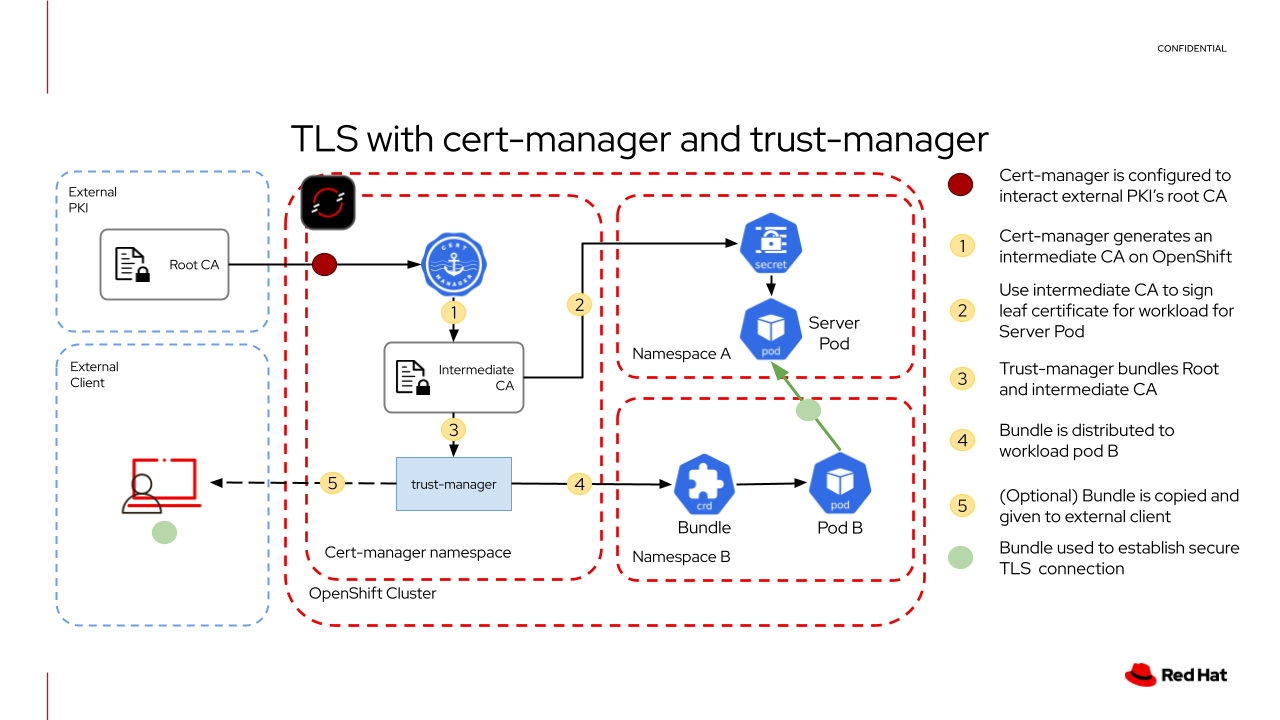
The critical first step here is that trust-manager benefits from cert-manager’s ability to connect to almost any external PKI. This means that an enterprise can wire up cert-manager to connect to their PKI of choice. Cert-manager handles the process of issuing and renewing TLS CA and leaf certificates, and trust-manager takes care of bundling the necessary CA certificates into usable trust bundles. You’ll also note that the Root CA should live within the external PKI and is not expected to be loaded to the OpenShift cluster. This introduces a significant improvement to the security of an organization as a whole as a breach to the OpenShift cluster will never expose the Root certificate authority private key, which is used as the highest level of authority for minting TLS certificates. Instead, we use cert-manager’s core feature set to create an Intermediate CA that can be used to establish a chain of trust all the way to the Root CA.
Furthermore, you can follow the path of how certificates and bundles are distributed within different namespaces. In the simple example above, the server pod in namespace A receives a TLS certificate minted by the intermediate CA in the cert-manager namespace, and the client pod in namespace B receives the Bundle from trust-manager including the public keys of the intermediate and root CAs so that when it communicates with the server pod, it can verify that the TLS certificate supplied was properly signed by both CAs.
Mutual TLS
Continuing on to mTLS, we can see that double the number of resources are necessary. For the previous simple example, we needed one TLS certificate and one trust bundle. Now we need two of each. In Figure 2, we can follow the requirements for a simplified mTLS scenario.
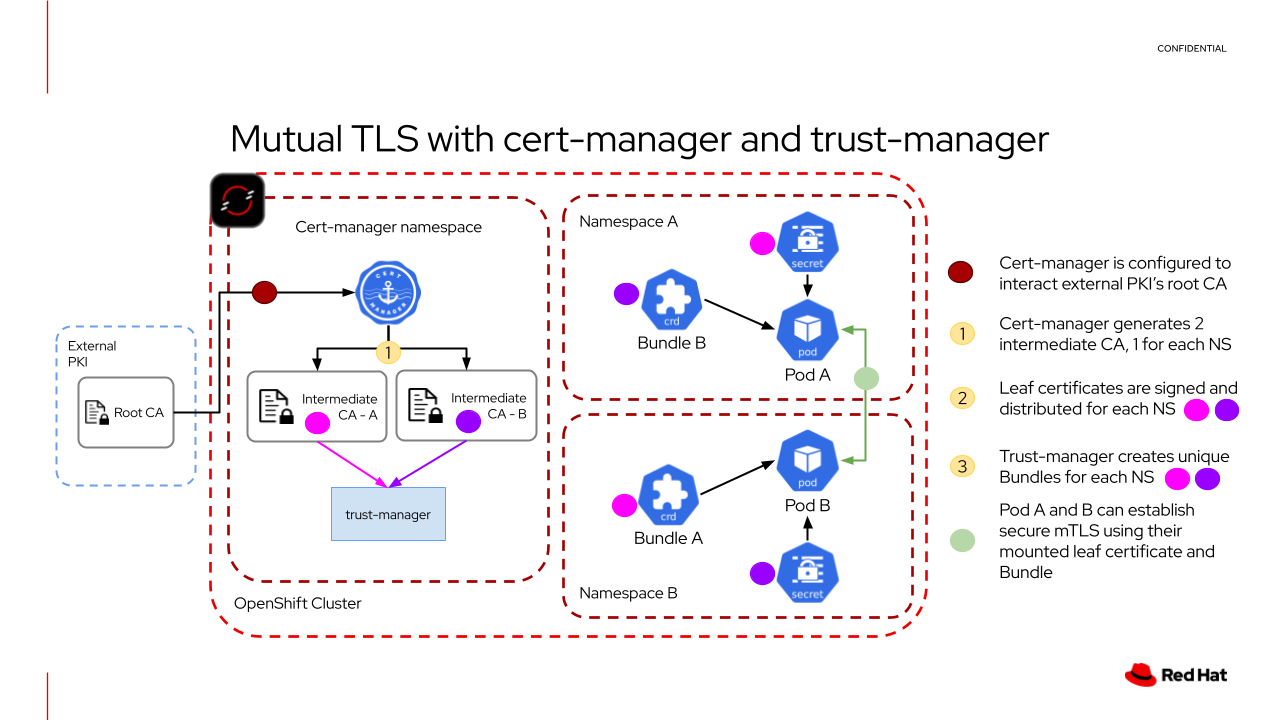
Compared to the standard TLS scenario, there are two significant differences:
- Each namespace gets the trust bundle including the public keys from the root CA and the intermediate CA of its counterpart.
- Each running workload (i.e., pod) gets a signed TLS certificate. Pod A in namespace A get a TLS certificate signed by intermediate CA - A, and Pod B gets a TLS certificate signed by intermediate CA - B
From here, the mTLS handshake proceeds as described in the previous introductory section. However, it is important to point out one critical trait about each of the trust bundles. They are completely unique to each other. Bundle A will only include the public keys from their respective intermediate CA and the root CA. This introduces an additional layer of security as a bad actor would need to access both namespaces to gain complete knowledge of how these workloads interact with each other.
The impact of trust-manager
Trust-manager extends the feature set of cert-manager significantly. But what does this look like in a production environment? We can simplify the blast radius of a breach in two dimensions: time and impact (permissions). A credential leak that is long lived and highly permissive is the worst possible scenario. For TLS, leaking either the certificate or the CA bundle can be disastrous. The CA bundle essentially contains a map of who to trust and how, including important metadata like internal hostnames or infrastructure layout. This information is vital to bad actors in their goals of exploiting gaps in security.
At scale, it becomes very difficult for IT teams to manage hundreds, or thousands of TLS certificates let alone creating, managing, and distributing custom CA bundles associated with these certificates. As a result, it is common practice to have fewer CA bundles rotated or renewed at much longer intervals of 90 days or more. Additionally, the implicit requirement for fewer bundles results in bundles with more generalized chains of trust that apply to multiple teams, workloads, or pillars within an organization. While this reduces the workload of IT teams to a manageable level, it also increases the risk and impact of a breach.
With the combination of cert-manager and trust-manager, you can rotate leaf and CA certificates at much shorter intervals, significantly reducing the overall impact of a breach. Previously, it was much more difficult to rotate CA certificates at shorter intervals because this added additional manual tasks of reconstructing and distributing new trust bundles. Trust-manager automatically reconciles its bundle object with new CA certificate public keys whenever cert-manager rotates the CA certificate, and redistributes the new bundle to designated namespaces. This significantly reduces the manual workload of updating CAs, and makes it much easier to rotate not only leaf certificates at shorter intervals but the CAs that mint these leaf certificates. This allows DevSecOps teams to completely automate away the toil associated with manually managing TLS certificates and the bundles of trust used to validate them.
As an added benefit, using trust-manager introduces another core pillar of zero trust: the principle of least privilege. Since you can now automate at scale the management of trust bundles, it is much easier to create and maintain curated bundles of trust for specific workloads or groups of workloads, where only extremely specific certificate authorities are trusted. OpenShift clusters can now have many, smaller bundles of trust dedicated to specific namespaces, limiting the risk of a breach since no one bundle will contain the complete map of the kingdom.
Try trust-manager
If you are interested in trying this out for yourself, head to the GitHub repository. It contains a simple demo of mTLS in action with trust-manager and cert-manager. Additionally, you can find documentation on how to install trust-manager on OpenShift. You can also find more details about the trust-manager controller in the upstream documentation.

