Welcome to our series on the Data Governance Copilot. In part 2, we explored the theoretical shift from retrieval-augmented generation (RAG) to agentic AI and how large language models (LLMs) have revolutionized the text-to-SQL task. In this article, we will provide a more in-depth engineering view of the copilot container-level architecture, the differences between using high-level frameworks like Llama Stack versus lower-level Python libraries, and the complex mechanics of formatting inbound and outbound LLM messages.
Series note
This is part 3 in a series covering how to build a governance-aware, agentic conversational analyst for PostgreSQL using Red Hat OpenShift AI and EnterpriseDB's (EDB's) PG Airman MCP server. Read the other parts in the series:
Behind the curtain: The copilot architecture
Figure 1 highlights the container-level architecture of the Data Governance Copilot. The user application (copilot-ui), built using the Svelte Kit user interface (UI) framework, is responsible for serving static TypeScript and HTML files to the browser. The browser communicates directly with the copilot-backend using HTTP and SSE (Server-Sent Events). SSE and Python generators allow the copilot-backend to stream the LLM’s results and other events that occur within the agentic loop to the browser as they are generated, creating a highly reactive and transparent experience for users. We will examine this pattern in more detail later.
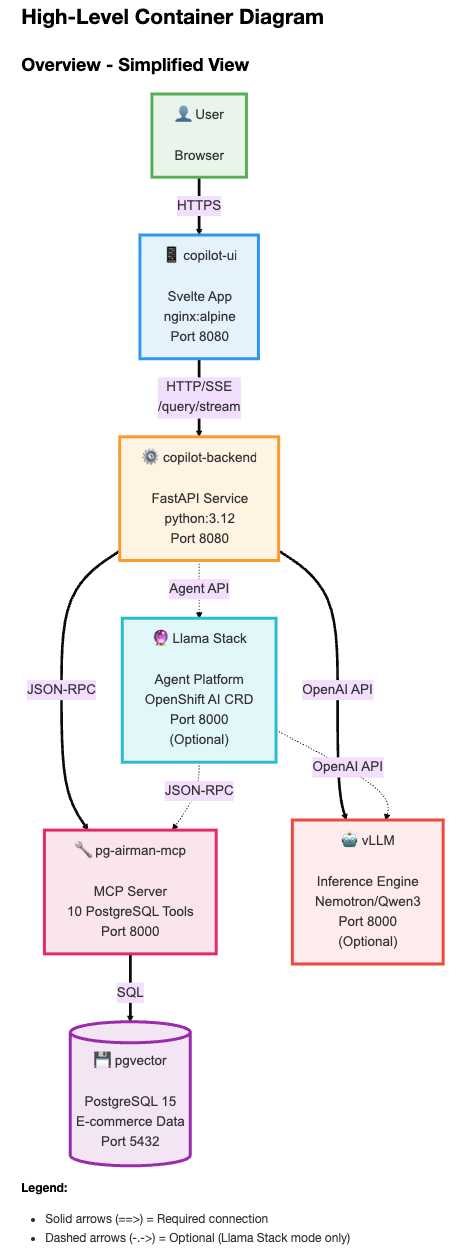
The copilot-backend Python package implements the service endpoints that support the application’s features, including conversation management, query processing, and data governance policy management. The following table lists nine FastAPI service endpoints. We’ll only discuss the /query/stream endpoint that contains the heart of the orchestrator–the agentic loop that controls the interaction between user queries, the LLM, and the PG Airman MCP server.
Method | Path | Description |
|---|---|---|
GET | /health | Basic health check; returns MCP tool count and deployment mode |
GET | /provider/info | Gets additional provider capabilities |
POST | /query/stream | Processes user query using eight defined Server-Sent Events (detailed in Part 4) |
GET | /tools | Lists available MCP tools |
GET | /conversations | Lists all conversations managed by the in-memory conversation store |
DELETE | /conversations/{conversation_id} | Deletes a conversation |
POST | /policy/upload | Uploads a data governance policy |
DELETE | /policy | Detaches the active data governance policy |
GET | /policy/status | Gets the status of the governance policy |
Llama Stack vs. lower-level Python libraries
Before examining the query submission process, let's review the two deployment modes the copilot supports. The Llama Stack mode uses Red Hat's Integrated Llama Stack distribution to manage the core agentic loop, while the MCP-direct mode uses foundational Python libraries (e.g., MCP client library and OpenAI SDK) to achieve more direct control. The copilot-backend makes these deployment options transparent to the user interface through a factory pattern that instantiates either the llama_stack or mcp_direct provider. Both providers implement a common interface and emit the same server-sent events (SSE) profile (we’ll cover this in Part 4 of this series).
This architectural choice—high-level framework versus lower-level library composition—is one you'll face when building agentic applications. To help you evaluate the tradeoffs and build a foundational understanding, the copilot quickstart supports both approaches (see README.md for deployment instructions).
As our article series will show, building a robust, secure conversational analyst requires careful attention to prompt construction, tool orchestration, context management, and security—areas where Red Hat Integrated Llama Stack can help. The appropriate choice will largely depend on your need for customization. To help you make this decision and gain a foundational understanding of the underlying mechanics of modern agentic AI, we will focus on the MCP-direct approach.
User query flow and a simple agentic loop
The sequence diagram in Figure 2 shows the flow across services when a user submits a query.
Given a user query (e.g., calculate LTV for our top 5 customers), the copilot user interface starts by posting the query to the /query/stream FastAPI endpoint. Since the quickstart implements two strategies for orchestrating LLM inference with tool calling (Llama Stack and MCP-Direct), a light service wrapper receives the request first and delegates it to the orchestrator you chose during deployment.
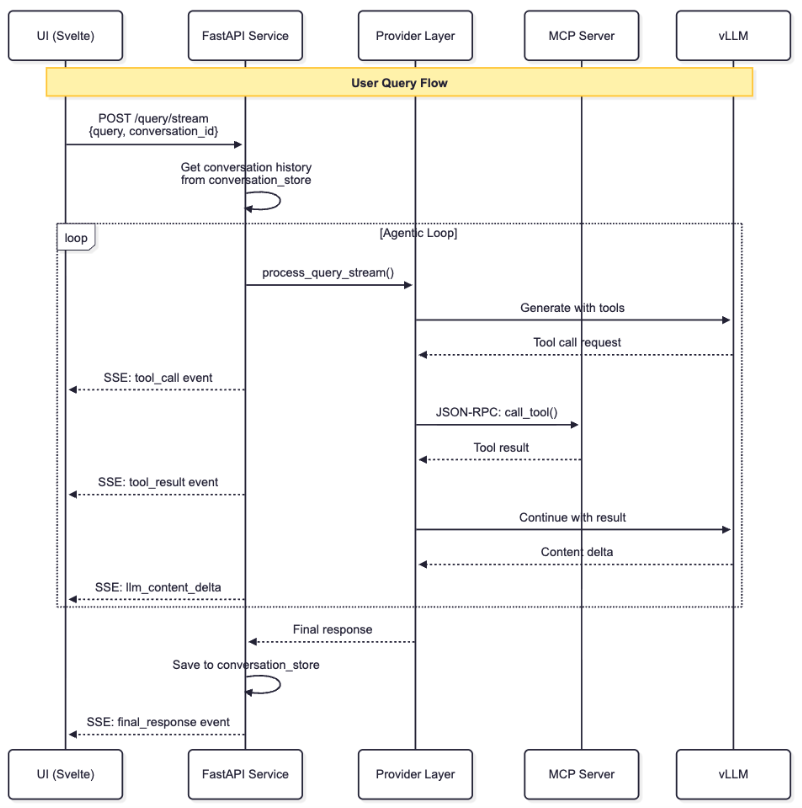
For MCP-Direct deployments, the mcp_direct orchestrator takes over. It initially performs some housekeeping on the conversation, including initializing a new conversation ID (if necessary), appending the system role message (which includes the data governance policy) and obtaining initial timestamps to support performance metrics.
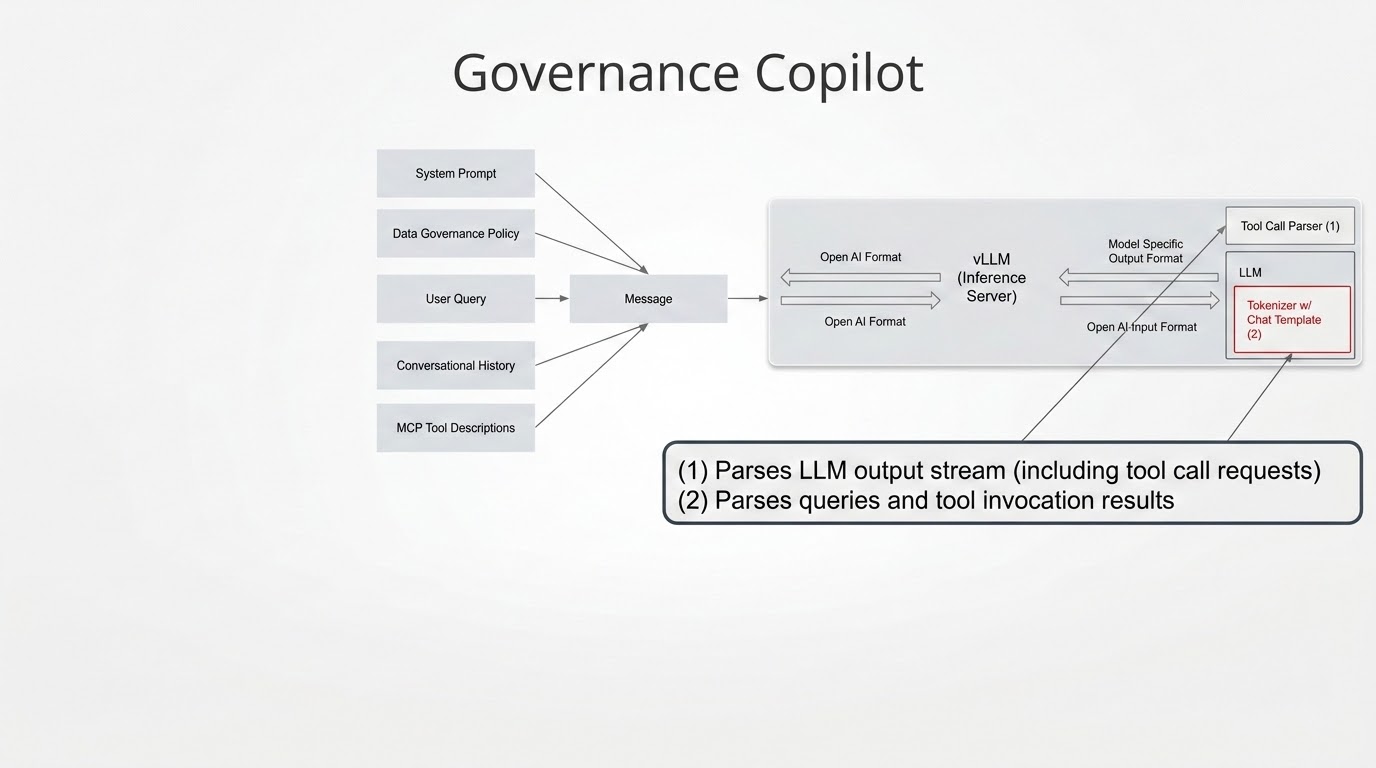
The dotted box labeled Agentic Loop in Figure 2 captures the core interaction between the orchestrator, the LLM, and PG Airman MCP server. The orchestrator initiates the loop with a description of PG Airman MCP’s tools (the functions and their details listed in the table) and submits this information to the LLM along with the user’s query, system prompt, and any prior queries and responses that are part of the same conversation.
Figure 3 shows this message construction process. Since these tools are designed for performance analysis versus conversational analytics, they are not included in this quickstart. Consult the PG Airman documentation to learn how to enable them.
The LLM may respond to the orchestrator with a request to execute some tools. It’s the orchestrator’s responsibility to parse these requests, which are in the OpenAI API format, and execute each tool request on the MCP server. The mcp Python library uses the MCP protocol and simplifies this step. The orchestrator receives the MCP server’s response and forwards it to the LLM so that it can interpret the information and take another conversation turn toward a final answer.
Note that the asterisked tools require optional Postgres extensions (hypopg and pg_stat_statements):
list_schemas: Lists schemas within a database.list_objects: Lists objects within a schema (tables, views, etc.)get_object_details: Provides details for a database object.execute_sql: Executes SQL statements with read-only limitations when connected in restricted mode.explain_query: Gets the execution plan for a SQL query. Can be invoked with hypothetical indexes to simulate the behavior after adding indexes.get_top_queries*: Reports the slowest SQL queries.analyze_workload_indexes*: Analyzes the database workload to recommend optimal indexes.analyze_query_indexes*: Analyzes a list of SQL queries and recommends optimal indexes for them.analyze_db_health: Performs comprehensive health checks.add_comment_to_object: Adds a comment to a table, view, or column (allowed in restricted mode only ifALLOW_COMMENT_IN_RESTRICTED=true). Useful for linking database objects to generic data governance policies. The quickstart deploys with this setting turned off for added security.
Inbound and outbound LLM messages
LLMs rely on a text-based message exchange format for incoming and outgoing messages. We must adapt this text-based format for use with tool calling. An example is when an MCP server had a method named play. When the orchestrator receives a response from the LLM that includes this word, how will it know whether this is just one of the words the LLM has generated in its answer versus a request to execute the MCP method? The entire LLM’s output arrives in one continuous token stream.
We can easily solve this problem by using formats with XML or special delimiters. The challenge is that different LLMs generate and expect different formats. Remember with agentic AI, tool calling logic pushes into the LLM. Hence, the format for tool descriptions, their results, and how the LLM requests their execution all become a function of the LLM’s training and are not easily changed. Since LLMs vary with respect to these tool-related formats, we need some way to standardize matters so our orchestrator avoids LLM lock-in.
Figure 3 depicts the message construction process for user queries with the components that handle LLM-specific formatting and parsing.
Inbound message formatting
While the copilot generates inbound messages using the OpenAI API de facto standard, the Red Hat inference server (vLLM) maps this format to an LLM-specific counterpart using a template embedded in the model’s tokenizer (e.g, most open-weight models embed Jinja template strings into their tokenizer for use by the Jinja template engine).
Figure 4 shows a section of the template string embedded into the NVIDIA Nemotron Nano 9B model’s tokenizer.
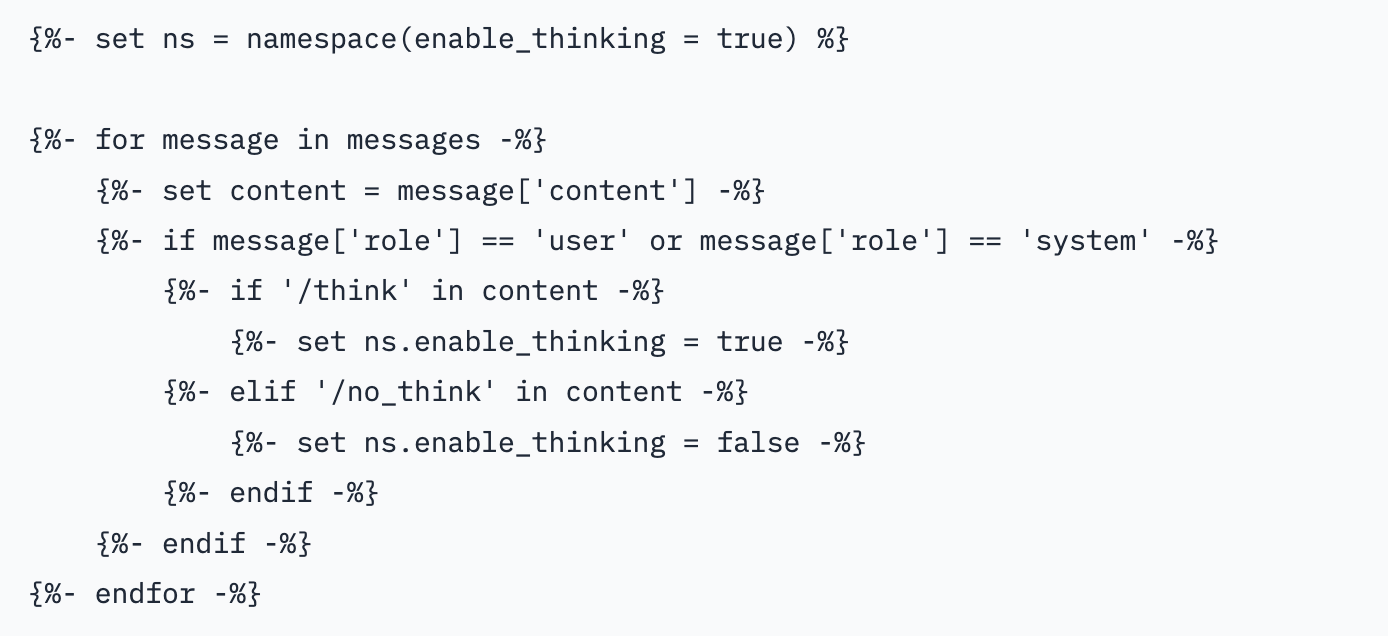
Note the special flags for turning reasoning on and off. If we enable the reasoning, the format uses XML-like tags to separate the model’s reasoning (thinking) output from the rest of its response. We can use other XML-like tags for tool call integration such as <TOOL_RESPONSE>, <AVAILABLE_TOOLS> (not shown in Figure 4). These tags help the LLM interpret tool call results and descriptions. Once again, our orchestrator is free to provide this information in a standard OpenAI format since the vLLM inference server in OpenShift AI uses the chat template to make the necessary conversions.
Outbound message formatting
To transform each model’s output stream to the OpenAI API syntax, a similar transformation occurs using tool call parsers invoked by the inference engine. The tool call parser is configured in the Additional Serving Runtime Arguments section of the OpenShift AI model setup screen as follows:
--enable-auto-tool-choice
--tool-call-parser hermes
The quickstart includes these and other configuration parameters within the respective deployment Helm charts for the Qwen3 and Nemotron Nano models. The Nemotron model, however, presents a more advanced case, which we will discuss next to demonstrate the inherent diversity you may encounter when deploying open-weight LLMs.
Custom tool call parsing
Nemotron’s tool call parser is not among the native parsers embedded in vLLM. Instead, it uses a custom parser that you must register through the vLLM’s plug-in system. There are several steps required to make this work, but it carries some disadvantages that suggest an alternative approach, one which you may need to consider for other models as well.
One issue with the custom tool call parser NVIDIA provides for Nemotron is that it does not support streaming mode. The user must wait for the model to produce a complete response versus seeing the results as they generate. While this may be suitable in some cases, most users will be frustrated by being unable to see the results as they are generating.
Hence, when deployed with the Nemotron model, our quickstart handles tool call output manually (we’ll refer to this as client-side tool call parsing). This is not too difficult, but it does introduce additional code complexity. Note that even with client-side tool call parsing, it is necessary to configure vLLM with some tool call parser. Replace hermes with mistral.
The following JSON example shows tool call requests from the Nemotron model. Note the XML-like <TOOLCALL> tags that wrap tool call requests.
{
  "role": "assistant",
  "content": "Okay, the user wants to list all tables in the public schema. Let me check the available tools. There's the list_objects function which can list objects in a schema. The parameters require schema_name and optionally object type. Since they want tables, I should set object type to 'table'. The schema_name is 'public'. So I need to call list_objects with schema_name as 'public' and object type as 'table'. That should give the user the list of tables they need. \n</think> \n\n<TOOLCALL> [{\"name\": \"list_objects\", \"arguments\": {\"schema_name\":\"public\",\"object_type\":\"table\"}}]</TOOLCALL>\n",
  "refusal": null,
  "annotations": null,
  "audio": null,
  "function_call": null,
  "tool_calls": [],
  "reasoning_content": null
}
The Nemotron response differs from the Qwen3 response shown in the following snippet. Qwen3 uses the hermes tool call parser built into the vLLM to successfully extract tool calls into the tool_calls section of the OpenAI format.
{
  "content": "\n\n",
  "role": "assistant",
  "tool_calls": [
    {
      "function": {
        "arguments": "{\"schema_name\": \"public\", \"object_type\": \"table\"}",
        "name": "list objects"
      },
      "id": "chatcmpl-tool-022e5648f1f24ca48047f1a544956052",
      "type": "function"
    }
  ]
}
Next steps
We've successfully mapped out how the Data Governance Copilot orchestrates the agentic loop, formats messages, and extracts tool calls using native and custom tool call parsers. But how do we standardize the way our orchestrator talks to external tools? Will we need a custom orchestrator for each MCP server we wish to integrate into our agentic application? And more importantly, how do we make this process secure, performant, and transparent to the user?
In our final installment, we will discuss the MCP, event-streaming architectures and the defense-in-depth security measures needed to run agentic applications in the enterprise.
Read it here: Deploy secure agentic AI: Protocols and performance tuning
Last updated: July 1, 2026
