In 1991, Mark D. Weiser (CTO of Xerox PARC) wrote, “The most profound technologies are those that disappear.” Weiser was expressing his intuitive observation that the most reliable and successful technologies reach such a high degree of integration with our day-to-day lives that we cease to notice them. In this regard, relational database technology stands in an elite league, quietly and reliably supporting nearly every function within the enterprise for over half a century. Despite the emergence of numerous non-relational database options, relational databases remain the core data workload technology used by most companies based on the projected market size of $140.36 billion by 2030 40% of the global database market.
In this article, we will walk through the integration of Red Hat OpenShift AI and EnterpriseDB's (EDB) PG Airman MCP server, setting up the core foundation for a secure, AI-driven PostgreSQL interface.
Series note
This is part 1 in a series covering how to build a governance-aware, agentic conversational analyst for PostgreSQL using Red Hat OpenShift AI and EnterpriseDB's (EDB's) PG Airman MCP server. Read the other parts in the series:
- Part 1: Integrate OpenShift AI and PG Airman MCP Server
- Part 2: The evolution of agentic AI and text-to-SQL
- Part 3: How to integrate OpenShift AI and PG Airman MCP Server
- Part 4: Deploy secure agentic AI: Protocols and performance tuning
The prestige act of AI and relational databases: Text-to-SQL
If anything about modern AI feels like magic, it's the ability to generate code from natural language requirements, particularly SQL for its foundational role in data analytics. Though the reliability and pervasive integration of relational databases have fueled the effect Weiser described, a significant technical hurdle remains that hampers the analytic workflow in most organizations, namely the inability for non-technical staff to directly interact with databases using SQL.
The problem
Imagine you've been asked as a sales analyst minutes before a meeting to determine customer lifetime value (LTV) for your product line. You've gained access to the massive EDB Postgres data warehouse, but when you list the tables, you see hundreds of objects with cryptic names (cust_pdata_b, sales_rpt_v2, v_cust_ltv_agg, customer_master_DEPRECATED). You have two major problems:
- Discovery: You have no idea which table or view is the correct, "certified" source for LTV.
- Compliance: You know some tables contain highly sensitive personally identifiable information (PII). Querying the wrong table could lead to incorrect analysis or worse, a serious compliance violation.
The solution
Waiting for IT could take days or weeks; but with agentic AI, you can enter your query in natural language and get an answer in minutes, with visualizations and governance warnings if the data contains PII.
SQL was designed to simplify data access, but over the years databases and the SQL language have grown in complexity and become inaccessible to non-technical users. Providing a natural language interface to your relational databases removes this barrier to accelerate nearly every business function within your enterprise.
Red Hat OpenShift AI & EnterpriseDB
EnterpriseDB provides a suite of AI-enabled database technologies based on PostgreSQL. In this article, we will focus on PG Airman MCP, EDB's open-source library that uses the Model Control Protocol (MCP) to connect LLMs with PostgreSQL databases. To keep the information within the boundaries of your controlled network, OpenShift AI provides a flexible and scalable AI platform to help you build, evaluate, monitor, and host your agentic AI applications across hybrid cloud environments.
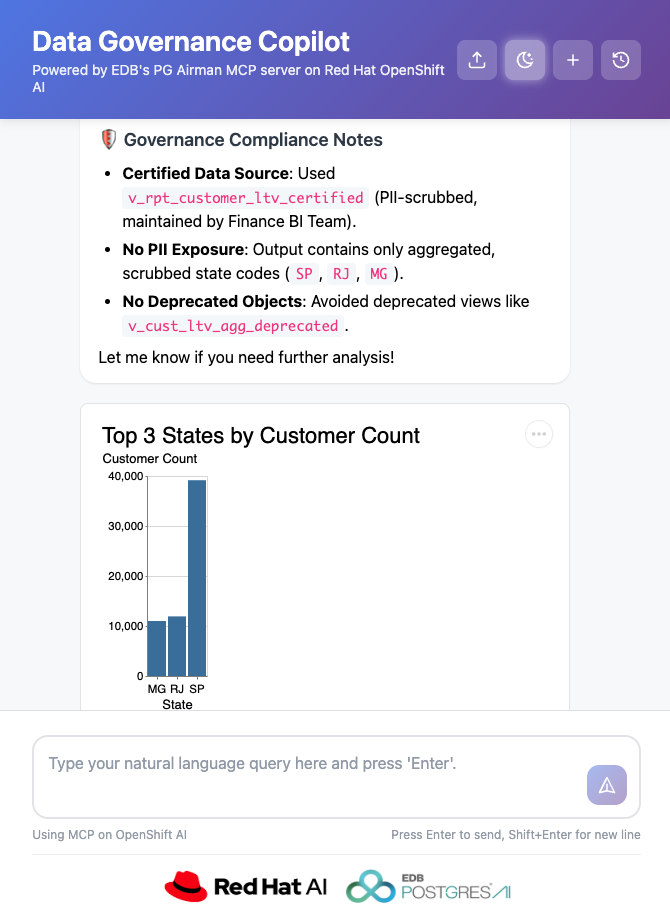
You can see the copilot's response for the query, “Visualize the top three states with the highest customer count and list any related data governance comments.” Figure 1 shows the copilot's main user interface with results for a sample query, visualizing the top three states with the highest customer count and listing any related data governance comments. The screen shows several compliance notes related to PII and deprecated tables with a bar graph that shows the number of customers for three states.
System overview
In this section, we will review the basics of deploying the copilot and present a summary of features.
Deployment
Make sure you are logged in to your OpenShift cluster. After you clone the AI quickstart from the GitHub repository. Change to the data-governance-co-pilot/helm directory and run the make command.
make install NAMESPACE=your-namespace \
 PROVIDER_MODE=mcp_direct \
 DEPLOY_MODEL=true \
 MODEL=nemotron \
 postgres.userId=postgres \
 postgres.password=<provide a password> \
 postgres.databaseName=postgres
 postgres.readonlyPassword=<provide a password>
The make file will install and load a Postgres database with sample ecommerce data. Set the values for the database's superuser and read-only MCP user for the postgres.password and postgres.readonlyPassword parameters respectively. The AI quickstart and PG Airman MCP server (which we will review in detail in this article series) can be used with any Postgres database; however, combining PG Airman MCP with other EDB Postgres AI technologies may provide additional functionality. You can learn more by visiting enterprisedb.com.
The make file includes several deployment options, including the choice to use your own LLM; however, except for the minimum hardware and software requirements documented in the README.md file, the command above will deploy everything you need to run the AI quickstart. This includes EDB's PG Airman MCP server which you can find on GitHub.
Copilot features
Once deployment is complete, the makefile will print the URL for the AI quickstart's user interface where you can submit your natural language queries or simply select from one of the sample queries provided on the screen. A good place to start is to ask the copilot, "Tell me about this database” or “Tell me about the tables and views in the public schema." You can then ask more complex questions, such as "Compare our total sales in 2017 to 2018." The toolbar buttons on the top right in Figure 1 allow you to upload a data governance policy, enable reasoning output (for the Nemotron model), and manage your conversations.
Data governance in a data sovereign platform
The copilot supports safe data discovery by orchestrating the interaction between the PG Airman MCP server and the LLM to combine schema and other governance metadata embedded within the database and the user-provided data governance policy to generate governance-aware SQL statements and analysis. The system diagram in Figure 2 shows the high-level components and data flow for user queries.
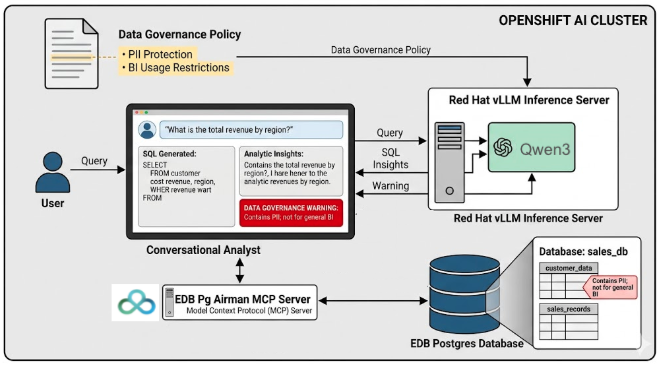
The AI quickstart's approach–to combine a high-level data governance policy with object-level metadata–closely matches how data governance is applied in many organizations. Generic data governance policies are written by legal and data governance experts. While these policies describe high-level requirements, they lack specific guidance on how they apply to the organization's databases and the objects they contain. This mapping step is typically performed by data owners and analysts manually, resulting in a process that is inefficient, error prone and inaccessible to stakeholders who lack either the schema knowledge or SQL expertise. The copilot automatically bridges these components–governance policies, schema metadata and SQL expertise–in a powerful AI-assisted conversational analyst that generates and executes compliant SQL statements and provides insight analysis.
The entire solution runs within your controlled hybrid or on-prem network using EDB's PG Airman MCP server and an open-weight LLM on the OpenShift AI platform. PG Airman MCP provides the schema information and SQL execution capability while the LLM and Red Hat's vLLM inference server provides the generative AI capability (SQL generation, data analysis and visualization). The result is a governance aware, data and AI sovereign solution that offers the flexibility to choose any model and run it on your ideal infrastructure, freeing you from vendor lock-in while maintaining strict data privacy.
Metadata and policy management
EDB has enhanced the PG Airman MCP server to make it easy to read and update the metadata attached to database objects without deploying the MCP server in unrestricted mode, which would grant full access to the target database with the full expressivity of SQL and is not recommended. We discuss this feature in greater detail in the security section later. You can view an example of object metadata by asking the copilot to: “Show me the comments in the dim_customer table.”
In addition to schema metadata management, the AI quickstart employs a governance policy uploader that allows users to upload their organization's data governance standards as a text file. Effective policies should be brief and as concrete as possible, providing examples of policy rules for each category or classification of data. For example: “You can use all customer location data (such as state and country) for general analysis, but it must be marked sensitive.”
AI quickstart scope
AI quickstarts are sample AI applications meant to help organizations evaluate different ways AI can drive enterprise transformation. This copilot AI quickstart illustrates the use of OpenShift AI and EDB technologies to implement a powerful conversational analyst geared toward safe data discovery.
To extend the AI quickstart for production use, however, you will need to consider additional integration tasks, such as combining the solution with your organization's identity provider to enable authentication and authorization services. Deploying a production grade application within a complex application map requires in-depth planning and extensive on-site testing. While our AI quickstart helps you get a jump start on this process, it's provided as a proof-of-concept versus an out-of-the-box solution for your exact needs.
Next steps
You now have a working conversational analyst deployed on your OpenShift cluster, proving that safe, governance-aware data discovery is possible in minutes. But what makes this agentic approach different from just bolting a chatbot onto a database? In part 2 of this series, we will unpack the evolution of agentic AI, compare it to standard retrieval-augmented generation (RAG) applications, and explore why this modern approach fundamentally changes the text-to-SQL landscape.
Read it here: The evolution of agentic AI and text-to-SQL
Last updated: July 1, 2026
