Managing DNS, DHCP and IP addresses across hybrid, multi-cloud environments is one of those invisible jobs that is only noticed when something breaks. An IP conflict takes down a production service. A stale DNS record sends traffic to a decommissioned host. A manual subnet change propagates inconsistently across locations. These are not hypothetical scenarios. They are a common reality for network and cloud operations teams managing DDI (DNS, DHCP, and IPAM) infrastructure at scale.
As infrastructure changes accelerate, teams need a way to manage DDI operations with consistency and speed. Infoblox Universal DDI provides a centralized and authoritative platform for managing DNS, DHCP and IPAM across hybrid environments. When combined with Red Hat Ansible Automation Platform, this integration provides a repeatable, auditable, and version-controlled approach to automating DDI operations at scale.
In this article, I'll walk you through a Configuration-as-Code approach to automating Infoblox DDI with Ansible Automation Platform, from provisioning infrastructure to managing the full lifecycle of hosts, using a working project you can explore on GitHub.
Why automate DDI management?
When NetOps, CloudOps and DevOps teams manage DDI resources through separate tools and manual processes, problems appear quickly. Human errors cause IP conflicts and outages, provisioning takes longer, changes are harder to track and configuration drift begins to build across environments that should be identical.
With Ansible Automation Platform and the Infoblox Certified Content Collection, teams can replace repeated manual tasks with idempotent playbooks that manage DDI resources in the same way each time. This reduces manual effort, shortens provisioning time, and gives teams a record of every change.
Configuration-as-Code: A single source of truth for DDI
The basis of this approach is treating DDI configuration the same way application teams treat code. Instead of creating subnets, zones and host records through a web interface, you define the desired state of the DDI environment in version-controlled YAML files.
In this project, all configuration is stored under inventory/host_vars/infoblox_portal/ with each resource type in its own file: IP spaces, DNS views, subnets, zones and hosts.
A simplified example for DNS zones looks like this:
# inventory/host_vars/infoblox_portal/zones.yml
zones:
  - fqdn: "example.com"
    view: "default"
    primary_type: "cloud"
    description: "Main production zone"
  - fqdn: "internal.example.com"
    view: "internal"
    primary_type: "cloud"
    description: "Internal services zone"
This structured data becomes the single source of truth for DDI configuration. Every change goes through version control. There's a full history of who changed what and when, and you can revert changes by rolling back a commit.
Ansible roles for the full DDI lifecycle
The project organizes automation into four Ansible roles that cover the full lifecycle of DDI resources.
The infrastructure_setup role creates the base DDI resources, including IP spaces, DNS views, subnets and DNS zones. This is the Day 0 and Day 1 setup layer that creates the network resources workloads depend on.
The workload_provision role handles host provisioning within that setup by allocating IP addresses, creating DNS records and, when needed, configuring fixed DHCP or MAC reservations. This is the role teams are most likely to use during day-to-day service deployment.
The infrastructure_verify and workload_verify roles query the Infoblox API and show the current state of infrastructure and provisioned workloads. Verification is part of the workflow rather than a separate manual task.
A key part of the design is idempotency. Ansible only makes a change when the current state differs from the defined state. If the desired configuration is already present, nothing changes. This allows playbooks to be run again safely without creating duplicate records or disrupting existing services.
Workflows on Ansible Automation Platform
Running Ansible Playbooks from the command line is fine for development and testing, but production automation should be orchestrated through Ansible Automation Platform. In this project, Ansible Automation Platform workflow job templates connect synchronization, provisioning and verification steps in a fixed sequence.
Each workflow follows the same pattern. First, the Ansible Automation Platform project repository and inventory are synchronized in parallel to ensure the Ansible Automation Platform controller has the latest code and configuration. Then the main provisioning job runs. Finally, a verification job confirms that the changes were applied correctly. If any step fails, the workflow stops so incomplete or unverified changes are not left behind.
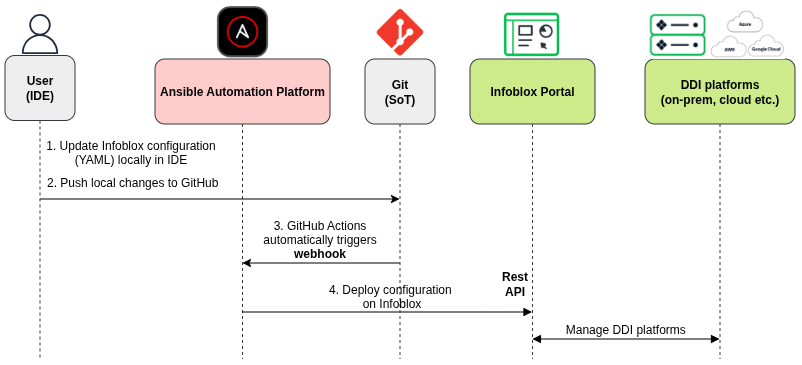
There are two Ansible Automation Platform workflows. Figure 1 shows the workflow for infrastructure changes such as IP Spaces, DNS Views, Subnets and Zones. Figure 2 shows the workflow for workload changes, such as host provisioning. A GitHub Actions workflow in the repository checks which files changed after a push to the main branch and triggers the correct Ansible Automation Platform workflow through a webhook.


This means that the entire DDI configuration change process is as follows (Figure 3):
Edit a YAML file, commit, and push. GitHub actions detects the change type and triggers the right Ansible Automation Platform workflow. It applies the changes in Infoblox and then verifies the result.
Containerized execution for consistency
The project includes an execution environment definition that packages all required Ansible collections, Python dependencies, and other components into a container image. This is important for a practical reason; it ensures that the same automation runs identically on a developer's laptop and on Ansible Automation Platform. There's no "it works on my machine" problem because the execution environment is the same everywhere.
Ways to automate Infoblox with Ansible Automation Platform
The Configuration-as-Code workflow covered in this article is just one approach. Depending on your needs, there are many other possible use cases for automating Infoblox with Ansible Automation Platform. The following two examples will illustrate this.
Self-service provisioning with Ansible Automation Platform Surveys allows users provision hosts through a web form without touching any code. An Ansible Automation Platform job template presents fields for FQDN, subnet CIDR, MAC address, owner and environment. When submitted, Ansible Automation Platform runs the provisioning and verification workflow and can send a notification with the results via email, Slack, or Microsoft Teams. This is particularly valuable for application teams needing DNS and DHCP records as part of their deployment process.
ServiceNow-initiated provisioning integrates DDI automation into your existing ITSM workflows. A user submits a ServiceNow catalog item, ServiceNow calls the Ansible Automation Platform REST API to launch the provisioning workflow, and the Ansible servicenow.itsm collection updates and closes the request with the results. This keeps the request process in ServiceNow while removing the manual work of translating tickets into configuration changes.
These are just two examples, but you can use Infoblox's API and Ansible Automation Platform's workflow engine together to automate a wide range of DDI tasks.
Get started
The complete project is available on GitHub. You can clone the repository and start exploring the playbooks, roles, and configuration structure.
Here are some resources to help you dive deeper:
- Start a trial of Red Hat Ansible Automation Platform.
- Explore the Infoblox Certified Content Collection on Automation Hub.
- Learn more about the Red Hat and Infoblox joint solution.
- Watch the Ansible Tech Journey webinar on Infoblox automation.
- Read the Infoblox blog post: Automating Infoblox DDI with Red Hat Ansible: Bringing Configuration as Code to Critical Network Services

