Confidential Containers integrate trusted execution environments (TEEs) into cloud-native platforms to provide hardware-backed workload isolation. A TEE is a secure execution context enforced by confidential computing-capable hardware, ensuring that code and data remain confidential and protected in terms of integrity—even from privileged system software like the host kernel or hypervisor.
At the heart of Confidential Containers is the confidential virtual machine (CVM), a hardware-isolated virtual machine created within the TEE. Confidential Containers utilize Kata Containers as the runtime layer for launching and managing these CVMs. Each Kubernetes pod maps to a dedicated Kata VM instantiated as a CVM when running on TEE-enabled hardware. This approach preserves the standard Kubernetes pod abstraction while enhancing isolation by transitioning from OS-level containers to hardware-enforced boundaries, effectively creating confidential containers.
The second critical component of Confidential Containers is remote attestation. Attestation verifies that a given CVM is operating on genuine TEE hardware in an expected, untampered state. This includes conditions like measured boot and compliance with defined policies. In Confidential Containers, the Trustee project provides the attestation and key broker service (KBS). It assesses attestation evidence against established policies and, upon successful verification, supplies sensitive materials (e.g., decryption keys, credentials, or configuration secrets) required by the workload.
Kata-based VM isolation, TEE enforcement, and policy-driven attestation create a zero-trust execution model where:
- Each pod operates within its own hardware-isolated VM boundary.
- Secrets release only after cryptographic verification of runtime integrity.
- It excludes the host, hypervisor, and cluster operators from the trusted computing base (TCB).
This architecture enables confidential containers to provide strong confidentiality and integrity guarantees for Kubernetes workloads without requiring changes to the applications themselves.
Figure 1 shows the overall confidential containers solution architecture in Red Hat OpenShift.
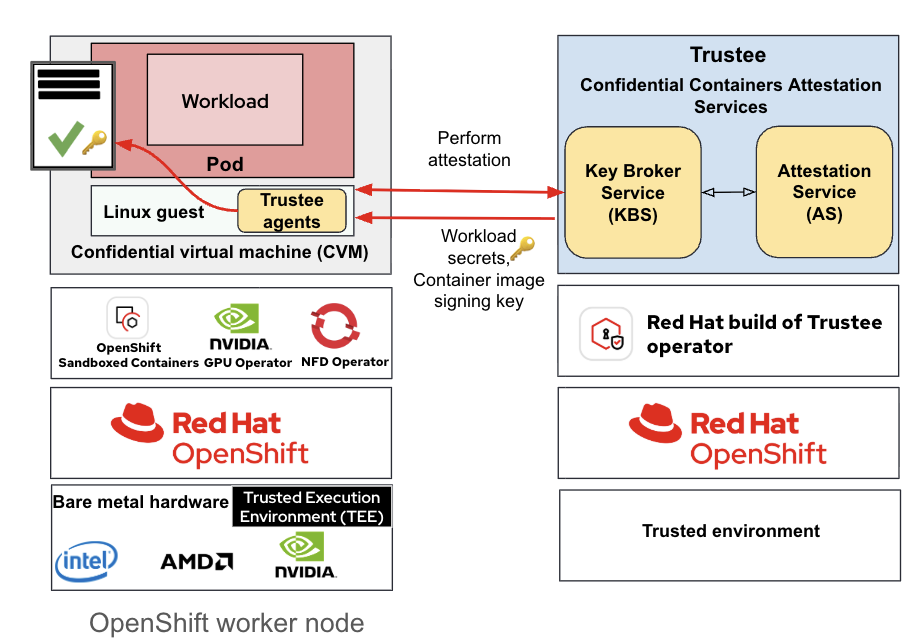
These are the key OpenShift operators constituting the entire confidential containers on bare-metal solution:
- OpenShift sandboxed containers operator: This operator is the key provider of confidential containers runtime (currently based on Kata containers). This installs and configures Kata runtime along with Qemu for bare-metal confidential containers.
- Node feature discovery (NFD) operator: This operator is responsible for discovering the type of TEE and confidential GPUs present in the cluster and exposing the features as node labels for use in configuration and management by other operators.
- NVIDIA GPU operator: This operator manages the GPUs in the cluster (required when using NVIDIA GPUs with OpenShift sandboxed containers).
- Red Hat build of Trustee operator: This operator provides the remote attestation services required for confidential containers.
Next, we'll take a look at important aspects of the solution for confidential containers on bare metal.
Pod bootstrap configuration
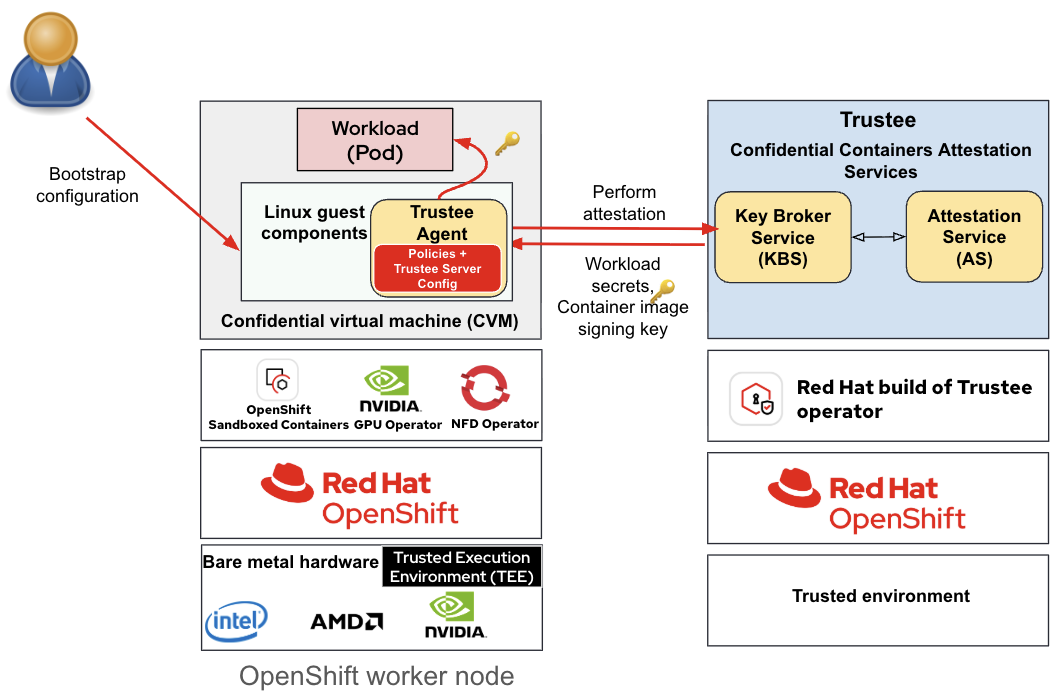
Confidential containers provide you with the option to add bootstrap configurations through measured initdata. The initdata specification defines a structured, cryptographically verifiable payload used to initialize a confidential container with workload-specific configuration at runtime. Injected at pod creation time, it becomes part of the attested state of the CVM, allowing the binding of policy decisions (e.g., secret release) to the platform and workload configuration.
The initdata can carry the following classes of configuration:
- Trust and connectivity: TLS certificates and endpoints for secure communication with the Red Hat build of Trustee remote attestation service
- Secrets and identity material: Secrets provisioned post-attestation
- Supply chain and image controls: Container image policies (e.g., allowlists, signature requirements)
- Registry authentication credentials and certificates: Registry secrets provisioned post-attestation when using authenticated container registries
- Runtime enforcement: Kata Containers agent policy for agent RPC restriction (i.e., allowing "exec" for specific commands, disabling specific volume mounts, etc.).
The following components consume the initdata inside the CVM (Figure 2):
- Attestation agent (AA): Generates and submits attestation evidence to the KBS (e.g., via Red Hat build of Trustee), including the initdata (or its hash) in the measured state, enabling policy decisions to depend on workload configuration (e.g., role, image policy).
- Confidential data hub (CDH): Handles secure retrieval, caching, and secrets delivery within the CVM after successful attestation, ensuring sensitive materials are only accessible within the attested environment.
- Kata agent: Enforces runtime constraints and manages container lifecycle inside the VM, applying the policies defined in initdata.
You define the configuration in a TOML file, which is then:
- Serialised and compressed (gzip)
- Base64-encoded
- Attached to the pod spec as an annotation:
io.katacontainers.config.hypervisor.cc_init_data
At runtime, pass this payload into the CVM and measure it as part of the TEE state. Because initdata is part of the attestation context, any modification changes the measurement and can invalidate policy checks, providing strong binding between workload intent and secret provisioning.
Remote attestation improvements
The confidential containers solution introduces remote attestation-related improvements.
Profile-driven configuration
Red Hat build of Trustee introduces a new custom resource TrusteeConfig to simplify the configuration. TrusteeConfig is a Kubernetes custom resource that simplifies Red Hat build of Trustee deployment by automating resource creation. It includes the secrets, config maps, and lower-level resources required for deployment.
TrusteeConfig supports profile-driven configuration, allowing operators to choose between different security postures in a simplified manner:
- Permissive profile (development / evaluation)
- KBS exposed via ClusterIP (internal access)
- Resource policy allows all requests
- Minimal configuration, optimized for ease of setup
- Restricted profile (production / secure environments)
- KBS exposed over HTTPS with valid certificates using a pass-through OpenShift route
- Strict resource policies enforcing fine-grained access control
- Attestation token verification enabled and enforced
The KbsConfig CRD is available for advanced configurations. For detailed configuration steps refer to the user guide.
Support for Hashicorp Vault as KBS resource backend
HashiCorp Vault is a centralized secrets management system used to securely store and control access to sensitive data such as tokens, passwords, certificates, and encryption keys. It provides strong security primitives including fine-grained access controls (ACLs), audit logging, and encryption at rest.
Within the confidential containers architecture, Red Hat build of Trustee integrates with Vault as a resource backend for the key broker service (KBS). Specifically, Trustee leverages the KV (key-value) secrets engine v1 to persist and retrieve gated resources.
The KV v1 backend enables KBS to:
- Store workload-specific secrets (e.g., decryption keys, credentials, certificates) in a centralized and hardened secrets store
- Retrieve secrets dynamically during the attestation flow, based on policy decisions
- Delegate persistence, durability, and security controls to Vault rather than embedding them in KBS
From a control-flow perspective:
- Secrets are provisioned and managed in Vault under defined paths
- KBS, acting as a policy enforcement point, queries Vault upon a successful attestation decision
- Retrieved secrets are released to the attested workload inside the CVM
This design cleanly separates responsibilities:
- Vault: secure storage, access control, auditing, and lifecycle management of secrets
- KBS (Red Hat build of Trustee): attestation verification and policy-gated secret release
This integration allows confidential containers deployments to inherit enterprise-grade secret management capabilities without expanding the trusted computing base of the attestation components.
Air-gapped support for SNP TEE
You can configure SNP remote attestation in a completely air-gapped environment. Please refer to the user guide for configuration instructions.
NVIDIA confidential GPU attestation support
Red Hat build of Trustee includes support for combined attestation, including CPUs and GPUs. NVIDIA Remote Attestation Service (NRAS) provides NVIDIA GPU attestation.
Workload considerations
When using the confidential containers solution, you must keep the following considerations in mind.
Pod specification changes
Running a workload as a confidential container requires minimal but explicit opt-in changes to the pod spec:
- RuntimeClass: selects the Confidential Containers execution path.
- Initdata annotation: injects workload-specific bootstrap configuration
apiVersion: v1
kind: Pod
metadata:
 name: coco-pod
 annotations:
   io.katacontainers.config.hypervisor.cc_init_data: <b64(gzip_initdata)>
spec:
 runtimeClassName: kata-cc
 containers:
   - name: coco-pod
image: my.registry.io/image:1.0- runtimeClassName: kata-cc ensures the pod is scheduled using Kata containers with confidential computing support
- The initdata annotation is passed into the CVM and becomes part of the attested workload state.
Using signed container images
For a bare-metal deployment of confidential containers to achieve its security guarantees, the integrity and provenance of the software running within the trusted execution environment (TEE) are paramount. A crucial component of this assurance is the use of signed container images.
Why signed images are essential for confidential containers:
- Integrity verification: Signed container images provide a cryptographic guarantee that the image has not been tampered with since it was built and signed by the trusted entity (e.g., the application developer or a verified CI/CD pipeline). This is achieved through digital signatures embedded in the image's manifest. Before a Confidential Containers workload is launched within the TEE, the runtime must verify this signature. If the signature is invalid or missing, the launch is aborted, preventing the execution of potentially malicious or compromised code.
- Preventing supply chain attacks: Container image registries are a potential vector for supply chain attacks. An attacker could potentially replace a legitimate image with a malicious one. By mandating signed images, the Confidential Containers environment defends against this. Even if a registry is compromised, the malicious image will lack the necessary, private-key-generated signature from the authorized party and will therefore be rejected by the Confidential Containers runtime.
In summary, while the TEE hardware provides the foundation for confidentiality and integrity by isolating the workload, signed container images are the necessary software mechanism to guarantee the authenticity and integrity of the specific application code running within that secure boundary. Their implementation is non-negotiable for a robust, security-first confidential containers bare-metal deployment.
Please refer to the user guide to configure container image signature policy for confidential containers.
In-guest confidential containers workload APIs
In-guest APIs are available to the confidential containers workload to retrieve resources post remote attestation.
Secret resource release API (GET) endpoint
The secret resource release API endpoint is available at http://127.0.0.1:8006/cdh/resource/ inside the POD.
Let's say if a key is available under default/enckey/key.pem in Red Hat build of Trustee KBS, then the complete path to retrieve the key will be: http://127.0.0.1:8006/cdh/resource/default/enckey/key.pem.
Sealed secrets
A sealed secret is an encapsulated secret available only within the TEE after successful verification of the integrity of the TEE environment via remote attestation. Using a sealed secret is like using any other OpenShift secret.
Let's take the previous Red Hat build of Trustee KBS secret example default/enckey/key.pem.
To provide this secret via sealed secrets, the first step is to create a JSON file containing the location of the secret.
# secret.json
{
    "version": "0.1.0",
    "type": "vault",
    "name": "kbs:///default/enckey/key.pem",
    "provider": "kbs",
    "provider_settings": {},
    "annotations": {}
}
Then you can use the following command to create the sealed secret. In this release, we don't support signed sealed secrets. Hence, you see the fake header.
SEALED_SECRET="sealed.fakejwsheader.$(cat secret.json | basenc --base64url -w0).fakesignature"The key is the base64url encoding of the secret.json file and adding the required prefix and the suffix.
Now, you can create a regular OpenShift secret and use it in your pod. The plaintext secret will be available inside the pod.
oc create secret generic mysecret --from-literal=$SEALED_SECRETHere is an example pod manifest example where the sealed secret is used via environment variable and volume mount. The plaintext secret (i.e., key.pem) is only available inside the TEE.
apiVersion: v1
kind: Pod
metadata:
  name: ocp-cc-pod
  labels:
    app: ocp-cc-pod
  annotations:
    io.katacontainers.config.hypervisor.cc_init_data: <b64(gzip_initdata)>
spec:
  runtimeClassName: kata-cc
  containers:
    - name: skr-openshift
      image: registry.access.redhat.com/ubi9/ubi:latest
      volumeMounts:
        - name: secret-volume
          mountPath: "myvalue"
      env:
      - name: PROTECTED_SECRET
        valueFrom:
          secretKeyRef:
            name: mysecret
            key: mysecret
      command:
        - sleep
        - "36000"
      securityContext:
        privileged: false
        seccompProfile:
          type: RuntimeDefault
  volumes:
    - name: secret-volume
      secret:
        secretName: mysecret
In-guest image pull and CVM root disk size requirements
Unlike standard containers, confidential containers workloads require container images to be pulled inside the CVM.
The key implications of in-guest image pull:
- Download container images into a memory-backed filesystem within the CVM.
- Default CVM memory (2048M = 2 GB) will be insufficient for larger images. You must explicitly increase pod memory requests/limits to accommodate:
- Image layers
- Runtime overhead
- Application memory
Failure to size memory appropriately will result in container creation failure.
Here is an example manifest creating a CVM with 48GB memory. Note that you must use the annotation io.katacontainers.config.hypervisor.default_memory to specify the size of the CVM (Qemu VM). The value is in MB.
Also you must set the memory requests and limits to the size specified in the previous annotation. This ensures Kubernetes scheduler accounting for the used memory.
apiVersion: v1
kind: Pod
metadata:
  name: sample-cc-pod
  annotations:
    #default Confidential Containers VM is 2048M, 49152M = 48G
    io.katacontainers.config.hypervisor.default_memory: "49152"
spec:
  runtimeClassName: kata-cc
  restartPolicy: OnFailure
  containers:
    - name: cc-pod
      image: quay.io/fedora/fedora:43
      imagePullPolicy: IfNotPresent
      command: ["/bin/bash"]
      args:
        - -c
        - |
          sleep 36000
      resources:
        limits:
          # This ensures correct accounting by the Kubernetes scheduler
          memory: "49152M"
        requests:
          memory: "49152M"
      securityContext:
        privileged: false
In-guest image pull from authenticated registries
A user might want to use container images from private OCI registries, hence requiring authentication. The registry authentication credentials are also exposed to the worker node and are not currently a confidential feature.
You must create a registry authentication file, in the containers-auth.json format. Also it’s not supported glob URLs nor prefix-matched paths as in Kubernetes interpretation of config.json.
Create the registry authentication file (e.g., containers-auth.json) as follows:
export AUTHENTICATED_IMAGE="my-registry.local/repository/image:latest"
export AUTHENTICATED_IMAGE_NAMESPACE="$(echo "$AUTHENTICATED_IMAGE" | cut -d':' -f1)"
export AUTHENTICATED_IMAGE_USER="MyRegistryUser"
export AUTHENTICATED_IMAGE_PASSWORD="MyRegistryPassword"
cat <<EOF>> containers-auth.json
{
	"auths": {
		"${AUTHENTICATED_IMAGE_NAMESPACE}": {
			"auth": "$(echo ${AUTHENTICATED_IMAGE_USER}:${AUTHENTICATED_IMAGE_PASSWORD} | base64 -w 0)"
		}
	}
}
EOF
Provision this file as a secret (e.g., regcred ) in Red Hat build of Trustee KBS and update initdata.toml to refer to it.
Create the OpenShift secret in the trustee-operator-system namespace.
oc create secret regcred -n trustee-operator-system --from-file=./containers-auth.jsonAdd this secret to Red Hat build of Trustee.
oc get kbsconfig trusteeconfig-kbs-config -n trustee-operator-system -o json \
  | jq '.spec.kbsSecretResources'


oc patch kbsconfig trusteeconfig-kbs-config \
  -n trustee-operator-system \
  --type=json \
  -p="[
    {\"op\": \"add\", \"path\": \"/spec/kbsSecretResources/-\", \"value\": \"regcred\"},
  ]"


oc get kbsconfig trusteeconfig-kbs-config -n trustee-operator-system -o json \
  | jq '.spec.kbsSecretResources'


oc rollout restart deployment/trustee-deployment -n trustee-operator-system
You should see regcred in the list of kbsSecretResources.
Refer to the following user guide for additional details related to provisioning secret resources in Red Hat build of Trustee KBS.
The final step is to update the initdata.toml with the registry secret. Add the following entries to your initdata.toml.
[image]
authenticated_registry_credentials_uri = 'kbs:///default/credential/regcred'
Refer to the following user guide for instructions to create initdata.toml.
Persistent storage for confidential containers
When thinking about persistent storage inside of Kubernetes, we think of persistent volume claims (PVCs) and persistent volumes (PVs) which provision storage via container storage interface (CSI) drivers. The best way to think of CSIs is as an orchestrator of storage operations across the worker nodes and storage platforms which map the storage into a container. A simple example is the LVM operator.
When you request a PVC:
- The LVM operator provisions a logical volume.
- It formats and mounts the logical volume in the worker node.
- It maps the mounted directory into the container within the pod.
- All of these options happen automatically for the end user.
The challenge from a confidentiality perspective is that the worker node has access to the volume. All the formatting occurs at the worker node level. So if encryption occurs, it occurs where the worker node operating system. The untrusted worker node in the confidential container model must not have access to plaintext data. To maintain the integrity of data within the TEE, encryption must happen within the confidential container.
Confidential containers on bare metal solution supports mounting and encrypting raw block volumes inside the TEE via a storage helper. The storage helper creates and manages LUKS (Linux unified key setup) formatted volume using the raw block device, including encryption key handling via Red Hat build of Trustee KBS.
Refer to the user guide for configuration details.
Ingress routes for confidential containers
The confidential containers bare metal offering introduces a critical security requirement: the Transport Layer Security (TLS) connections must terminate inside the Trusted Execution Environment (TEE).
The necessity of in-TEE TLS termination
If the TLS termination happens outside the TEE (e.g., in the untrusted worker node or a service running alongside the TEE but not protected by it), the sensitive data exchanged over the connection (such as user credentials, API keys, or proprietary data) would be exposed in plaintext before it enters the trusted boundary.
By terminating TLS inside the TEE, the entire decryption and subsequent processing of the application layer data occurs within the hardware-protected, attested environment. This ensures:
- Protection against privileged attackers: A malicious cloud administrator or a compromised hypervisor/host OS cannot intercept the plaintext data stream, as the key management and decryption operations are handled within the isolated TEE.
- End-to-end integrity: The TEE's integrity guarantees secures the entire path, from the client's negotiation of the TLS handshake to the processing of the decrypted data by the application.
Implementing in-TEE TLS termination has several architectural implications:
- Networking stack: The TEE must host a fully functional and secure networking stack (e.g., a protected kernel or user-space network library) capable of handling the TCP/IP connection and the TLS protocol.
- Key management: The private key used for TLS termination must be provisioned and managed securely within the TEE. This usually involves remote attestation: The TEE must first prove its integrity (via remote attestation) to a key management service before it is permitted to receive the TLS private key or certificate.
- Client verification: The necessity of in-TEE TLS termination is particularly relevant for services that require mutual TLS (mTLS) or robust client authentication because the verification of client certificates must also occur within the trusted environment to prevent spoofing.
Future improvements
There are improvements planned for upcoming releases, such as support for encrypted container images in CRI-O (work in progress), support for heterogeneous TEEs in the same cluster, integrity protection for the Kata VM image, and signed sealed secrets support.
Here is a brief demo of confidential containers on bare-metal worker nodes using NVIDIA confidential GPU.
Summary
In this article, we provided a brief overview of the confidential containers solution on bare-metal worker nodes including details on some of the key features. You can find more articles related to confidential containers here.

