Every AI agent has the same Achilles' heel, memory. Once a conversation ends, the context vanishes. The agent forgets what it learned, the user's preferences, and the resources it had. Traditional RAG systems try to solve this with flat vector databases, but they bring their own problems, such as fragmented context, ballooning token costs, and retrieval pipelines that behave like black boxes. OpenViking, an open source context database from ByteDance's Volcengine team, takes a different approach. The OpenViking OpenShift project provides a starting point for deploying it on Red Hat OpenShift, with self-hosted embeddings, TLS-terminated routes, and compatibility with OpenShift's security model.
What OpenViking actually does
OpenViking replaces flat vector storage with a hierarchical virtual filesystem. Instead of dumping all your agent's context into embeddings and hoping semantic search returns the right chunk, OpenViking organizes everything (memories, resources, skills) into directories accessible via a viking:// protocol. It's basically a structured file system for your agent's brain.
The interesting part is tiered context loading. Every piece of context processes into three layers:
- L0 (abstract): A one-sentence summary (roughly 100 tokens) used for quick identification and cheap retrieval.
- L1 (overview): Core information and usage context (around 2K tokens) is enough for planning and decision-making.
- L2 (full content): The complete original document is only loaded when the agent needs deep detail.
Let's say you have an agent helping with incident response that needs to consult 50 internal runbooks. With traditional RAG, it might load retrieved chunks totaling over 50K tokens. With OpenViking, it can scan the L0 abstracts of all 50 runbooks (~5K tokens total), narrow down to the three most relevant via their L1 overviews (~6K tokens), and only pull the full L2 content for the one it actually needs. Your mileage will vary depending on the workload and how well the L0/L1 summaries capture what your agents need, but the potential savings on API costs are real.
Retrieval isn't just a semantic search. OpenViking's directory recursive retrieval uses vector similarity to identify the right directory, then does a secondary search within that directory, drilling down recursively into subdirectories. Every step of that traversal is logged as a visible trajectory. When your agent retrieves the wrong context, you can debug it instead of staring at a black box.
The deployment architecture with Red Hat AI
The OpenViking-OpenShift repository provides a clean, Kustomize-based deployment across two namespaces:
First, the openviking-models component utilizes two KServe InferenceServices running in RawDeployment mode, both served by vLLM on a shared A100 80GB GPU through Red Hat OpenShift AI model serving. Qwen3-Embedding-0.6B handles embedding generation (1024 dimensions with Matryoshka support for truncation down to 32 dimensions), while Qwen3-32B handles VLM and L0/L1 summary generation. Both models share the GPU via GPU time-slicing and run entirely in-cluster with no external API calls. You can configure the models by swapping in alternatives through updates to the ServingRuntime definitions and the ov.conf file.
Second, the OpenViking server, deployed from quay.io/aicatalyst/openviking:latest and exposing a REST API on port 1933, serves as the context database and handles resource ingestion, the virtual filesystem, semantic search, session management, and the tiered context loading pipeline. Clients can connect via the REST API, the Python SDK (SyncHTTPClient / AsyncHTTPClient), or the ov CLI.
Figure 1 shows the OpenViking Deployment Architecture with Red Hat AI.
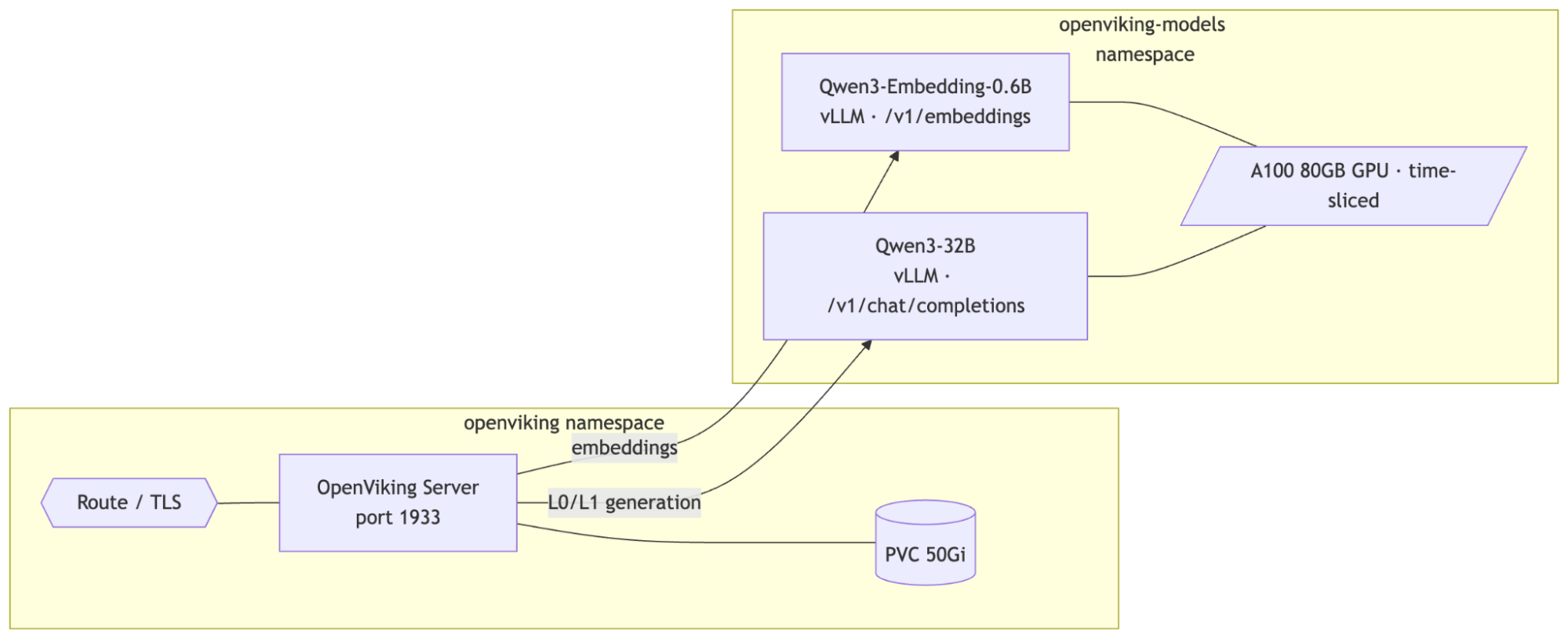
The deployment uses persistent storage for OpenViking's vector index and AGFS file storage, with an OpenShift Route providing TLS edge termination for external access.
Before deploying, edit manifests/02-openviking-secret.yaml and replace the placeholder root key value with a strong key for API access (e.g., generate one with openssl rand -hex 16).
If you're sharing a single GPU between both models, you'll need NVIDIA GPU time-slicing enabled. Create a ConfigMap in the nvidia-gpu-operator namespace with a time-slicing config (2 replicas per GPU) and patch the ClusterPolicy to reference it. This makes the GPU schedulable by both InferenceServices.
Then deploy the stack. First, apply the OpenShift AI manifests and run the model download jobs to pull the weights from HuggingFace into PVCs:
oc apply -k manifests/openshift-ai/
oc apply -f manifests/openshift-ai/07-download-jobs.yaml
Once the downloads complete and the InferenceServices are ready, deploy OpenViking:
oc apply -k manifests/Why this architecture matters for OpenShift AI teams
It's still an early project, but the manifests handle several OpenShift-specific concerns that anyone who's tried to run AI workloads on the platform will recognize.
It works with restricted-v2 SCC out of the box. The OpenViking manifests and the OpenShift AI model serving manifests run cleanly under restricted-v2, OpenShift's default security context constraint. That means runAsNonRoot: true, allowPrivilegeEscalation: false, all capabilities dropped, and seccomp profile set to RuntimeDefault. No fsGroup: 0 hacks, no privileged containers. HOME and temp directories are redirected to writable emptyDir volumes. If you've spent hours debugging SCC issues before, you'll appreciate this.
Self-hosted models eliminate all external dependencies. Running Qwen3-Embedding-0.6B and Qwen3-32B via vLLM on OpenShift AI means the entire pipeline (i.e., embedding generation, L0/L1 summary generation, and VLM inference) runs inside the cluster. No API keys for external services, no egress traffic for inference, no external rate limits to hit. The stack is fully self-hosted.
Kustomize-native deployment fits into GitOps workflows. The numbered manifests (namespace, PVCs, deployments, services, secrets, and route) plus the OpenShift AI overlay are structured for oc apply -k and easy to integrate with ArgoCD or OpenShift GitOps if you want to take this further.
From deployment to usage
Once the stack is running, OpenViking exposes a REST API through the Route. You can add documents, URLs, or entire GitHub repositories as context:
curl -sk -X POST "${OV_URL}/api/v1/resources" \
  -H "Content-Type: application/json" \
  -H "X-API-Key: ${ROOT_KEY}" \
  -d '{"path": "https://github.com/your-org/your-repo"}'
OpenViking processes the content asynchronously. You can check ingestion status via the API while it indexes and generates the L0/L1 summaries.
Then browse the ingested content through the virtual filesystem. The ls, tree, read, abstract, and overview operations all work through the API, giving your agents (or your debugging sessions) structured access to the context hierarchy.
Semantic search combines vector similarity with the hierarchical structure:
curl -sk -X POST "${OV_URL}/api/v1/search/find" \
  -H "Content-Type: application/json" \
  -H "X-API-Key: ${ROOT_KEY}" \
  -d '{"query": "how does authentication work"}'
Sessions let agents accumulate long-term memories from conversations. You create a session, add messages, and when you commit, OpenViking extracts durable memories that persist across future interactions. Over time, agents can actually get better as they build up context.
Client access: REST API, Python SDK, and CLI
Beyond the REST API, OpenViking provides a Python SDK and CLI for connecting to your OpenShift-hosted instance. Using Python SDK, install openviking and use the SyncHTTPClient (or AsyncHTTPClient) to connect programmatically:
import openviking as ov

client = ov.SyncHTTPClient(url="https://YOUR-ROUTE", api_key="YOUR-ROOT-KEY")
client.initialize()
results = client.find("how does authentication work")
client.close()
The ov command-line tool reads connection settings from ~/.openviking/ovcli.conf (or the path set via OPENVIKING_CLI_CONFIG_FILE):
{"url": "${OV_URL}", "api_key": "${ROOT_KEY}"}ov status
ov add-resource https://github.com/your-org/your-repo
ov find "how does config work"This allows you to use your OpenShift cluster as a shared context backend for your team's AI workflows. Agents that connect get access to the same structured knowledge base, accumulated memories, and retrieval pipeline, with visibility into how context is selected and served.
The bigger picture
OpenViking hit over 13K GitHub stars shortly after its public release (as of early 2026), and it's easy to see why. The flat vector storage model that most RAG systems depend on was designed for search, not for structured, evolving context management that agentic workflows need. OpenViking's filesystem paradigm is a different way to think about the problem. With OpenShift AI providing enterprise model serving, including autoscaling, health checks, and GPU scheduling, the entire stack is now fully self-hosted with no external API dependencies. Embedding generation, L0/L1 summarization, and VLM inference all stay inside the cluster.
It's also worth noting that OpenViking's REST API is compatible with the OpenAI-style file_search and vectorstore APIs, so teams already using OpenShift AI's RAG capabilities could integrate OpenViking as a drop-in backend for those workflows, layering its hierarchical context management on top of the existing stack.
It's still early-stage and moving fast. Treat it as an experiment worth running, not a production dependency. The openviking-openshift repo makes it easy to try. It now includes OpenShift AI manifests for vLLM model serving alongside the OpenViking deployment manifests. If you're running OpenShift 4.x with an available GPU node and can run oc apply -k, you can have a running instance once the models are downloaded.
If your team is thinking about how AI agents should manage persistent context and you want something beyond flat vector search, it's worth checking out.
OpenViking is licensed under Apache 2.0. The openviking-openshift deployment manifests are also Apache 2.0 licensed.

