In 2026, Hugging Face elevated kernels to a first-class repository type (alongside models, datasets, and spaces) on their hub. If you are responsible for distributed AI inference in production, your first reaction probably would be: "My images already ship kernels, and they are working, what actually has changed?"
The short answer is that nothing has changed inside your inference runtime. However, the versioned, multi-vendor distribution channel for pre-compiled GPU compute kernels is now available for public use, and that could be a great developer tool. It's not an enterprise-grade software supply chain artifact, and it is not trying to be one.
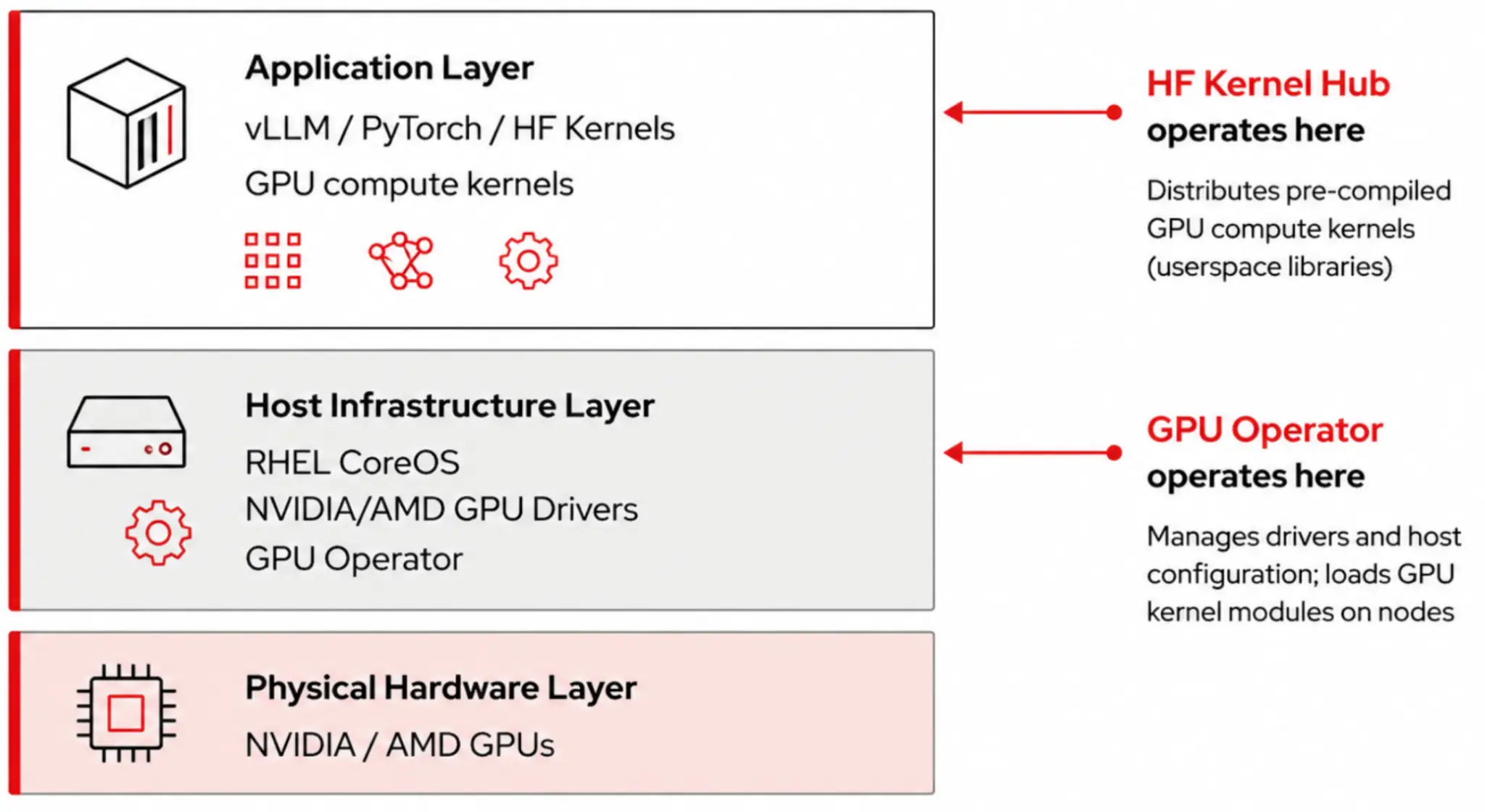
This article serves as disambiguation for the term "kernel", and shows a minimal working example of a kernel. We explain where we think each approach (developer-centric and production-centric) belongs when you're running distributed inference. Throughout this discussion, we consider agility and compliance, both of which are legitimate concerns, but neither should be conflated with the other, especially at the production fleet scale.
What is a kernel?
The word "kernel" can refer to two unrelated duties, so mixing them up can quickly derail architecture discussions.
- Operating system (OS) kernel: The Linux kernel on a Kubernetes worker node manages scheduling, memory, cgroups, namespaces, and—critically for us—the GPU driver kernel module (
nvidia.kooramdgpu.ko) loaded by an NVIDIA or AMD GPU operator. There is exactly one OS kernel per node or host. Every container on that node shares it, and this is the layer your cluster admin and your GPU operator care about. - GPU compute kernel: A small compiled program (CUDA PTX/SASS bytecode, ROCm GCN/CDNA bytecode, or Triton IR) that are executed on a GPU's compute units, not on the CPU. They are pure userspace artifacts and live inside the container image next to PyTorch and vLLM, and get loaded into the GPU through the driver interface at runtime. Think of them as the GPU equivalent of optimized BLAS libraries like MKL or OpenBLAS, but for attention, normalization, activation, and quantized matmul.
This distinction matters because it tells you what admission control, SBOM scanning, and CVE tracking actually cover. Your Kubernetes admission policies and image scanners operate on the container. The GPU operator works on the node and host, the Hugging Face Kernel Hub only ever touches the former.
The stack
The contract between these layers is stable and well understood. The GPU operator is the only component that touches the OS kernel. The Red Hat OpenShift AI operator manages everything above the host through ServingRuntime custom resource definitions (CRD), KServe, and (for distributed inference) prefill and decode roles for llm-d. Anything the Kernel Hub publishes exists strictly in a container, alongside your PyTorch dependencies.
Nothing about the Kernel Hub changes how the GPU operator works, or how drivers are loaded, or the node-local taints and tolerations you already use.
When someone says, "We need to update the cluster to use hub kernels," make sure they clarify which kernel they mean!
What is the Hugging Face Kernel Hub?
The Kernel Hub distributes pre-compiled GPU compute kernels the same way the Model Hub distributes weights: As versioned repositories pulled at runtime by a small Python client. We've published a complete minimal example at redhat-et/hfkernel-example. Here's the core of gelu-and-mul-test.py, trimmed down to just the essentials:
from kernels import (
    use_kernel_forward_from_hub, use_kernel_mapping,
    LayerRepository, Mode, kernelize,
)

# Map the layer name to a hub repo, per device
kernel_layer_mapping = {
    "GeluAndMul": {
        "cuda": LayerRepository(
            repo_id="kernels-community/activation",
            layer_name="GeluAndMul",
            version=1,
        )
    }
}

# Pure-PyTorch fallback, decorated to allow hub override
@use_kernel_forward_from_hub("GeluAndMul")
class GeluAndMul(nn.Module):
    def forward(self, x: torch.Tensor) -> torch.Tensor:
        d = x.shape[-1] // 2
        return F.gelu(x[..., :d], approximate="none") * x[..., d:]

model = GeluAndMul()
torch_out = model(x) # CPU-style reference

with use_kernel_mapping(kernel_layer_mapping):
    model = kernelize(
        model, device="cuda",
        mode=Mode.INFERENCE | Mode.TORCH_COMPILE,
    )
    hub_out = model(x) #hub kernel path

assert torch.allclose(hub_out, torch_out, atol=1e-3, rtol=1e-3)
A few things to notice:
- The decorator
@use_kernel_forward_from_hubkeeps a correct, vendor-neutral PyTorch fallback in the source. If the hub is unreachable or the hardware is not supported, then the module still runs. That's a nice property for edge and air-gapped clusters, and for the disaster-recovery region that may not have Kernel Hub access. LayerRepositorymakes the Kernel Hub pull device-scoped. Today the example ships CUDA and Apple Metal builds of the activation kernel. ROCm is still evolving, and support is progressing.- The consumer pattern is
kernelize(model, device=..., mode=...). It integrates withtorch.compile. The first call resolves the repository, downloads the pre-built shared object, and caches it. Subsequent loads on the same node are fast. - The container side is just as minimal. The
Containerfilebases onnvcr.io/nvidia/cuda:13.0.3-cudnn-devel-ubi9, installstorch==2.11and thekernelspip package, and that's essentially it. The kernel itself is not in the image. It is pulled at first use.
Why use the Kernels Hub?
The Kernel Hub provides a collection of optimized kernels for a variety of hardware accelerators. There are other sources of high performance kernels, like FlashInfer or aiter, so why use the Kernel Hub instead of those other collections? Kernel Hub is a simple interface to use, and is fairly intuitive for data scientists used to working in PyTorch. It's possible to use other libraries of kernels from PyTorch but it can require considerable effort that's probably better spent solving actual problems.
The Kernel Hub serves as a small, fast path from a Python module to a pre-compiled device binary, without dragging a compilation toolchain into your container. Keep that in mind while we look at a production distributed inference cluster.
What does a distributed production inference stack look like?
A single-pod demo is only useful to a point. A production distributed inference deployment on Kubernetes typically looks like this:
- Red Hat AI Inference is your serving runtime, packaging hardened vLLM with EngineCore, continuous batching, PagedAttention, LLM compressor, and a pinned set of pre-compiled GPU compute kernels (FlashAttention, Marlin, Machete, and others).
- KServe + Knative Serving provides the control plane,
InferenceServiceCRDs, revision management, traffic splitting, and scale-from-zero. - llm-d is the Kubernetes-native distributed inference framework, splitting the workload into prefill and decode roles, adding KV-cache-aware routing, and pooling GPUs across nodes so a single request can span replicas that were never meant to share memory on one box.
- NVIDIA or AMD GPU operators manage drivers and device plug-ins.
- Red Hat OpenShift platform services work as usual: Image scanning, admission, SBOM, FIPS, multi-tenancy, disconnected mirror registries.
Now look at where the GPU compute kernels live in that stack. Every one of those vLLM workers—the prefill replicas, the decode replicas, the draft model for speculative decoding, the embedding sidecars—need the same set of device binaries loaded into the same versions of PyTorch and CUDA or ROCm. In Red Hat AI Inference, those kernels ship inside the container. They are compiled from source code that Red Hat controls, pinned to specific versions, signed as part of the image, and covered by the image SBOM.
This is an implicit design choice to make AI Inference operation "boring"—in the good way of course. Pod #47 behaves exactly like pod #1 and an autoscaler event at 3 AM doesn't bother waking anyone up.
What breaks when you mix "pull at first use" with "50 replicas"
Imagine a migration of the example above into a production ServingRuntime: A thin image, kernels pip package, get_kernel() at first request. For a developer machine, this is delightful. For a production fleet on Kubernetes, it introduces four problems that compound:
- Image pull churn: Every replica, on every new node, on every scale-up event, pulls the kernel artifact from a public registry at first request. KNative scale-from-zero amplifies this, because the first request to a cold revision triggers the download. Your p99 cold-start goes up and becomes non-deterministic, which makes the autoscaler's feedback loop noisy.
- Supply chain hotspot: A registry you don't control, reachable over the public internet, now sits on the critical path for every scale event. In a disconnected or sovereign-region cluster, it does not sit there at all. The pod just fails. "Offline" is no longer a one-time install problem. It's every time a new pod starts.
- CVE blast radius becomes larger, not smaller: When a kernel has a bug, you cannot simply roll an image. You have to coordinate: Invalidate caches, pin a new version, make sure every replica picks it up, confirm that revisions you thought were cold did not retain the old artifact. The unit of rollout stopped being the image.
- Observability goes sideways: Your image scanner sees a thin runtime image and approves it. The actual shared objects loaded into GPU memory are not in the SBOM. At fleet scale this gap is how regulated workloads fail audits.
None of this is the Kernel Hub's fault. The Kernel Hub is doing what it was designed to do: Make kernels fast and open for developers. The mismatch is between developer-speed artifact distribution and production-fleet supply chain discipline.
Agility and compliance at scale
The practical question for platform engineers is not whether agility or compliance is better, it's "which lane is this workload in?"
The Hugging Face Kernel Hub is useful for:
- Rapid kernel experimentation in dev and staging clusters (for example, a research team testing out a novel fused attention on a branch belonging to the Kernel Hub).
- Custom operators that are not upstream yet. Before an op is in vLLM mainline, the Kernel Hub is the cleanest delivery vehicle to iterate on it.
- Unsupported or emerging hardware. Apple Metal, newer GPUs, experimental ROCm builds. The Hub carries community builds earlier than any enterprise distribution.
- Thin developer images where you just want a kernels-backed PyTorch without a full vLLM, useful for unit tests and model surgery.
Red Hat AI Inference in production distributed inference thrives for:
- Regulated workloads where provenance is auditable and reproducible: Build from source, pinned, signed, SBOM-covered.
- Disconnected or sovereign-region OpenShift clusters where pulling from a public registry at pod startup is not an option.
- Knative scale-from-zero behavior that must be deterministic. A pinned image gives you a predictable cold-start profile. An external pull does not.
- llm-d prefill and decode deployments where all replicas in a role pool must load identical kernels. Pinning at build time removes an entire class of "my pod is different" bugs.
- Multi-tenant clusters where admission control needs to reason about a pinned, known set of kernel binaries rather than whatever the pod chose to download on first request.
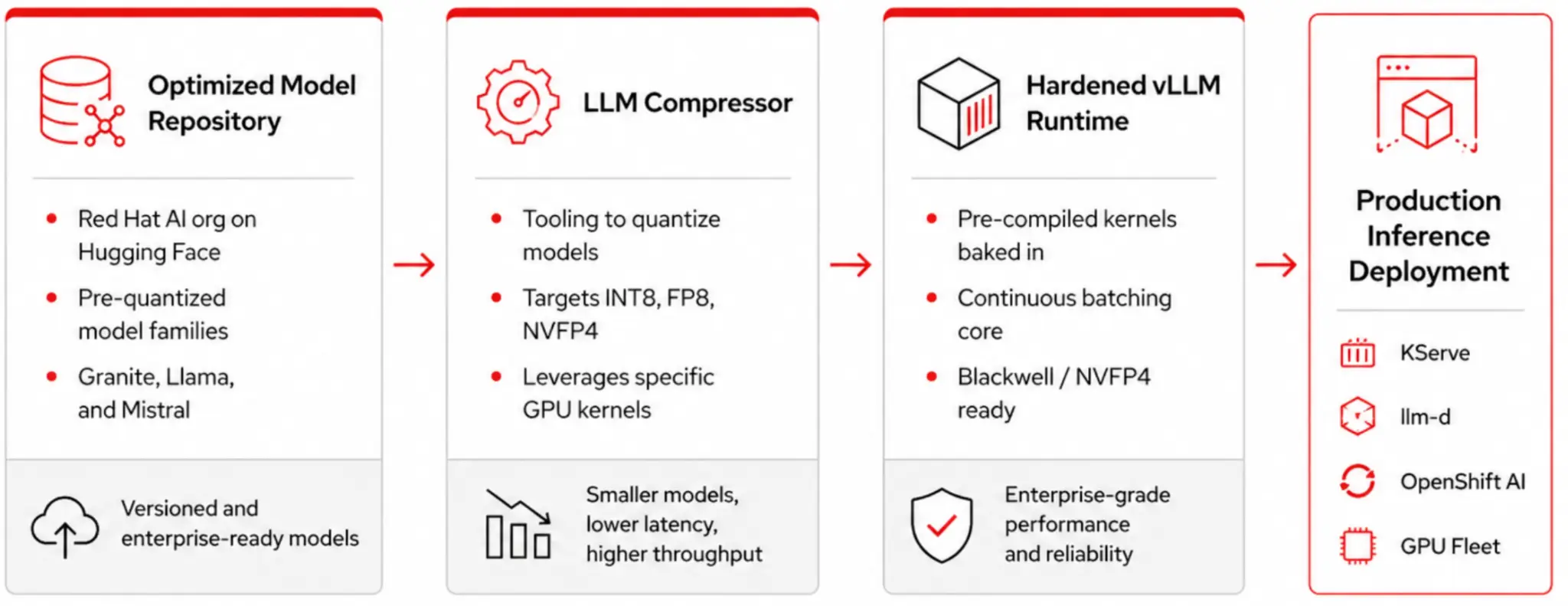
A kernel from the Hugging Face Kernel Hub doesn't automatically give you a single multi-vendor image. You still need per-vendor PyTorch builds, per-vendor userspace runtimes (CUDA, ROCm, OneAPI), and sometimes different library version pins for each stack. The Kernel Hub solves one piece of the vendor-specific puzzle but it does not collapse the rest. Anyone promising that from the Kernel Hub alone is overlooking the PyTorch, runtime, and dependency layers that still need to match the hardware. At fleet scale, those are the layers you have to get right every time.
For agility at fleet scale, use GPU Kernel Manager (GKM)
For teams that like the fast-iteration of Kernel Hub but cannot accept runtime pulls from a public registry on the scale-up path, Red Hat Emerging Technologies has an answer: the GPU Kernel Manager (GKM).
Some kernels are small, so JIT compilation is the right trade-off between binary size and first-request latency. The problem on a distributed Kubernetes deployment is that the JIT cost is paid on every pod startup, on every node, every time an autoscaler event happens. That negatively affects KServe and KNative scale-from-zero behavior, and gives the llm-d scheduler a moving target when it tries to place decode replicas quickly.
GKM pays that cost once per hardware target, bundling the resulting caches as versioned artifacts, and then distributing them to the right nodes using a DaemonSet. Pods then start against a pre-warmed cache instead of compiling from scratch. You keep deterministic pod startup across a fleet, you keep build-from-source provenance, and you get kernel-swap agility at the cluster level rather than the pod level. That is exactly the property you want when llm-d is trying to add three decode replicas in under ten seconds.
GKM is on the upstream path to KServe, and you can use it as a standalone solution today. If you're running heterogeneous GPU fleets on OpenShift, with NVIDIA on some nodes, AMD on others, maybe a handful of accelerator pools for draft models, then this is the project to follow.
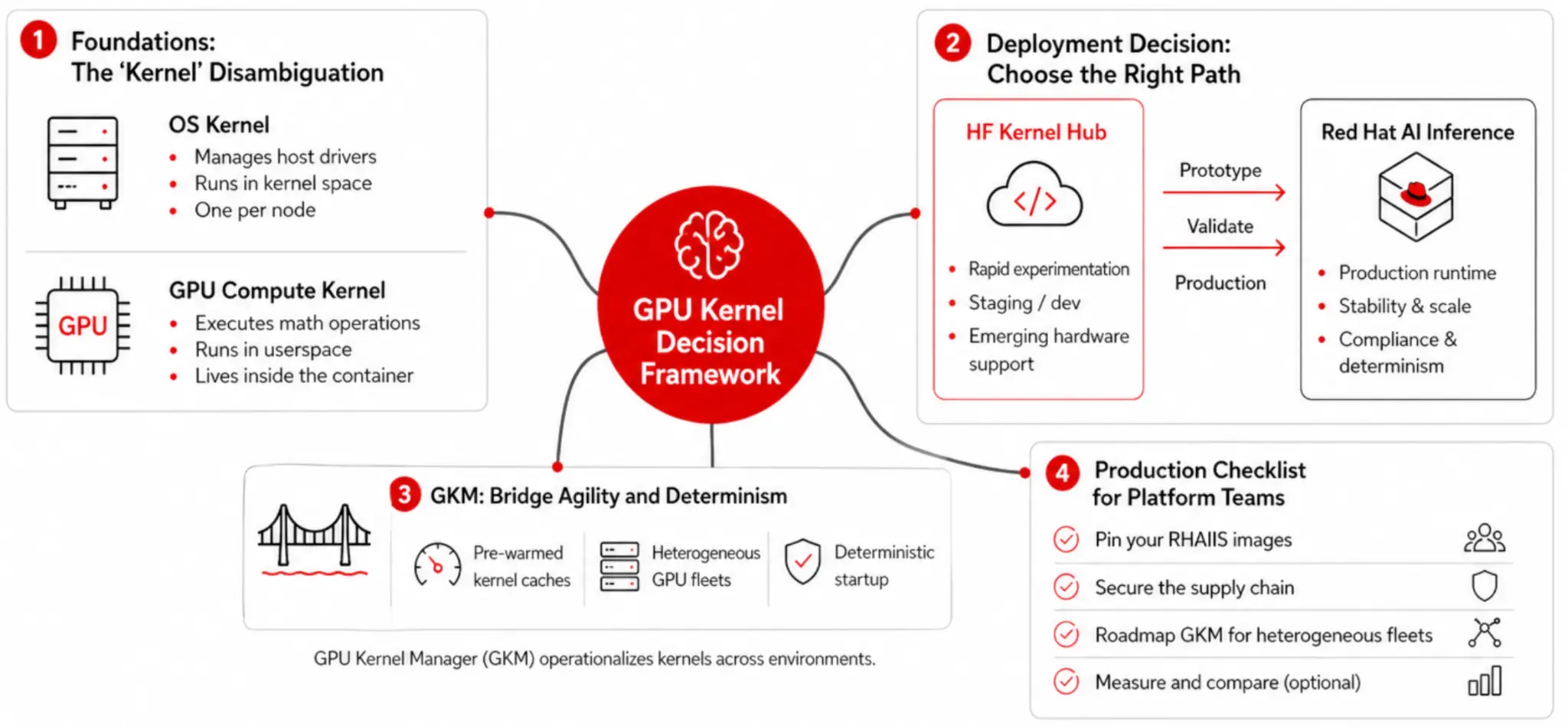
Here's a short and practical checklist for Red Hat OpenShift and Red Hat OpenShift AI platform teams running vLLM at fleet scale with KServe and llm-d:
- Keep running Red Hat AI Inference as your serving runtime. Nothing in the Kernel Hub launch changes that path, and nothing needs to. Your prefill pool, decode pool, and draft model pool should all use pinned Red Hat AI Inference images.
- Treat the
kernelsPython package and the Hub as a dev and staging tool. Use it in research and pre-production clusters to prototype custom operators. When an op proves its worth, upstream it into vLLM and let it flow through the next Red Hat AI Inference release into your production fleet. - Write your
ServingRuntimespecs withimagePullPolicy: IfNotPresentagainst a mirrored Red Hat AI Inference image in your internal registry. Do not let a fleet event depend on public-registry reachability. - If experimentation clusters do pull from the Hub, pin the repo
versionand scan the pulled artifacts with the same image tooling you use for the rest of your OCI supply chain. Do not let an unversionedget_kernel()call become a silent external dependency across replicas. - If you have a mixed NVIDIA and AMD fleet, put GKM on your roadmap. It is the cleanest answer for deterministic kernel startup on heterogeneous hardware, and it composes with KServe and llm-d.
- Put the distinction between an OS kernel and a GPU kernel into your runbook. It saves forty-five minutes on the first call with every new platform engineer joining the team.
Two lanes, one clear line, and a bridge
The Kernel Hub is not a threat or replacement to Red Hat AI Inference, and Red Hat AI Inference is not a rebuttal of the Kernel Hub. They are two different paths serving two different phases of the AI lifecycle: Experimentation and production.
The risk is mixing them in the same blueprint, because you would lose the strength of both. At single-pod scale, the risk is theoretical. At fleet scale (KServe, llm-d, autoscaling across dozens of pods on heterogeneous GPU nodes, some of them in disconnected regions) the risk is operational, which is subject to penalty (both business and regulatory).
- Red Hat AI Inference: The fortified lane. Build-from-source, pinned, signed, supported, reproducible across every replica.
- HF Kernel Hub: Experimental lane. Fast, open, community-driven, correct-by-default with its PyTorch fallbacks.
- GKM: The bridge for teams wanting the speed of the second inside the guarantees of the first, distributed across a fleet.
Pick the path that matches the workload, keep them separate, let GKM bridge where it has to. Keeping your production distributed inference deployment boring, for platform engineers, is the whole point.
To learn more, take a look at these resources:
- The working example this post is built on, by Steven Royer
- GPU Kernel Manager for Kubernetes and KServe
- llm-d is a Kubernetes-native distributed inference framework
- Red Hat's kernel collection on the Kernel Hub
- Red Hat AI Inference Server Technical Deep Dive
- Hugging Face kernels documentation

