Redhat Developers  Logo
  • Products

    Platforms

    • Red Hat Enterprise Linux
      Red Hat Enterprise Linux Icon
    • Red Hat AI
      Red Hat AI
    • Red Hat OpenShift
      Openshift icon
    • Red Hat Ansible Automation Platform
      Ansible icon
    • See all Red Hat products

    Featured

    • Red Hat build of OpenJDK
    • Red Hat Developer Hub
    • Red Hat JBoss Enterprise Application Platform
    • Red Hat OpenShift Dev Spaces
    • Red Hat OpenShift Local
    • Red Hat Developer Sandbox

      Try Red Hat products and technologies without setup or configuration fees for 30 days with this shared Red Hat OpenShift and Kubernetes cluster.
    • Try at no cost
  • Technologies

    Featured

    • AI/ML
      AI/ML Icon
    • Linux
      Linux Icon
    • Kubernetes
      Cloud icon
    • Automation
      Automation Icon showing arrows moving in a circle around a gear
    • See all technologies
    • Programming languages & frameworks

      • Java
      • Python
      • JavaScript
    • System design & architecture

      • Red Hat architecture and design patterns
      • Microservices
      • Event-Driven Architecture
      • Databases
    • Developer experience

      • Productivity
      • Tools
      • GitOps
    • Automated data processing

      • AI/ML
      • Data science
      • Apache Kafka on Kubernetes
    • Platform engineering

      • DevOps
      • DevSecOps
      • Red Hat Ansible Automation Platform for applications and services
    • Secure development & architectures

      • Security
      • Secure coding
  • Learn

    Featured

    • Kubernetes & cloud native
      Openshift icon
    • Linux
      Rhel icon
    • Automation
      Ansible cloud icon
    • AI/ML
      AI/ML Icon
    • See all learning resources

    E-books

    • GitOps cookbook
    • Podman in action
    • Kubernetes operators
    • The path to GitOps
    • See all e-books

    Cheat sheets

    • Linux commands
    • Bash commands
    • Git
    • systemd commands
    • See all cheat sheets

    Documentation

    • Product documentation
    • API catalog
    • Legacy documentation
  • Developer Sandbox

    Developer Sandbox

    • Access Red Hat’s products and technologies without setup or configuration, and start developing quicker than ever before with our new, no-cost sandbox environments.
    • Explore the Developer Sandbox

    Featured Developer Sandbox activities

    • Get started with your Developer Sandbox
    • OpenShift virtualization and application modernization using the Developer Sandbox
    • Explore all Developer Sandbox activities

    Ready to start developing apps?

    • Try at no cost
  • Blog
  • Events
  • Videos

Run multiple OpenStack Services on OpenShift with HCPs

May 5, 2026
Gil Rosenberg
Related topics:
Cloud servicesAutomation and managementKubernetesVirtualization
Related products:
Red Hat Advanced Cluster Management for KubernetesRed Hat OpenShiftRed Hat OpenShift Data FoundationRed Hat OpenShift Virtualization

    When we introduced Red Hat OpenStack Services on OpenShift in early 2025, our consultants and solutions architects noticed a recurring theme: organizations wanted to do more with less. This led to releasing support for multiple OpenStack services on a single Red Hat OpenShift cluster, a project we internally called MultiRHOSO phase 1. 

    But we didn't stop there. To provide even greater granularity and efficiency, we are now focusing on deploying OpenStack Services on OpenShift using hosted control planes (HCPs).

    What are hosted control planes?

    Hosted control planes (HCPs) are an OpenShift cluster deployment mechanism that utilizes an OpenShift hub cluster and multiple hosted clusters through a variety of infrastructure providers. This architecture enables the use of multiple independent OpenShift clusters sharing the same OpenShift infrastructure for the control plane (hub cluster different namespaces) with multiple options to deploy the hosted clusters' dataplane, such as virtual machines (OCPVirt) and bare metal nodes.

    Using hosted control planes with Red Hat OpenStack Services on OpenShift offers three distinct advantages:

    • Version isolation: Because each hosted cluster has isolated custom resource definitions (CRDs) and operators, you can deploy different versions or feature releases of OpenStack services without version conflicts.
    • Granular security: You can separate the cluster administrator persona across environments, reducing the attack surface and enabling finer-grained administration across versions.
    • Reduced hardware footprint: By using the Red Hat OpenShift Virtualization provider, you can maintain a consistent hardware footprint on the hub cluster while deploying multiple isolated OpenStack environments based on available resources.
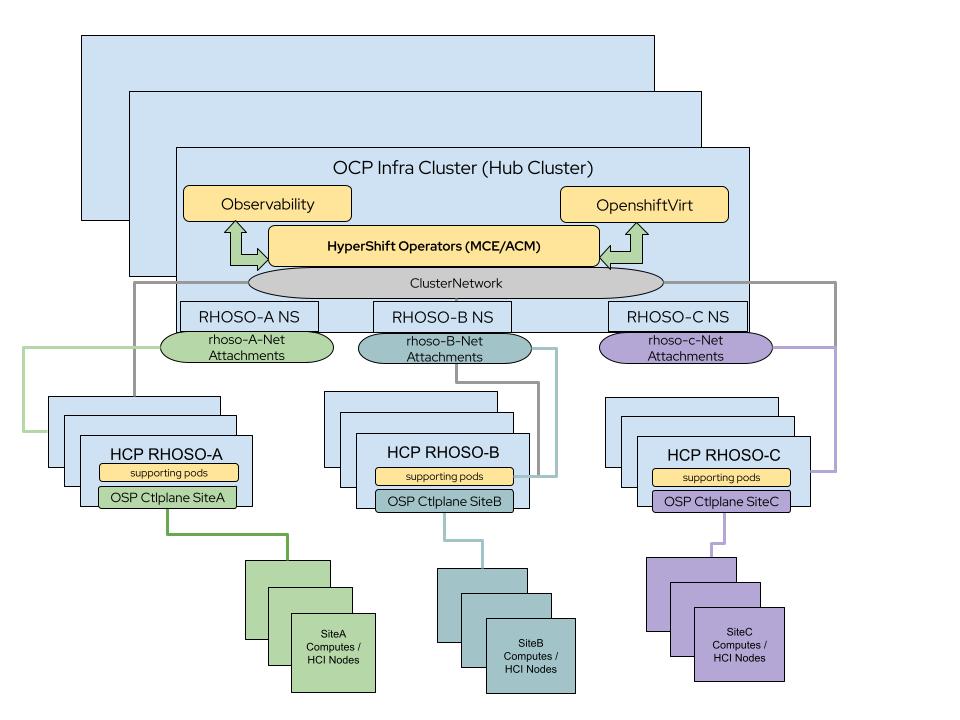
    A diagram of the MultiRHOSO architecture with hosted clusters.
    Figure 1: High-level diagram of the MultiRHOSO architecture with hosted clusters.

    Hub cluster prerequisites and installation

    To set up multiple OpenStack clusters with hosted control planes, you must first install the hub cluster.

    Hub cluster requirements:

    • At least 3 nodes (master/worker compact cluster)
    • Minimum of 16 CPU cores and 32 GB of RAM per node and the requirements for each hosted cluster
    • A dedicated NIC or bond for network attachments
    • An NVMe or SSD-backed StorageClass for hosted cluster etcd pods
    • A wildcard-enabled ingress controller or a dedicated network per hosted cluster to expose APIs

    Step 1: Install required operators

    Install the following operators on the hub cluster:

    • Red Hat OpenShift Virtualization
    • Storage provider for etcd (e.g., LVM Storage)
    • Storage provider for VMs (e.g., Red Hat OpenShift Data Foundation)
    • MetalLB and NMState
    • Multicluster engine for Kubernetes or Red Hat Advanced Cluster Management for Kubernetes

    Step 2: Configure the network

    Create a NodeNetworkConfigurationPolicy (NNCP) for each node to define VLANs and bridges for isolated networks. In addition, action network attachment definitions are required in the hosted cluster namespace on the hub cluster to map the NNCP bridges to the networks required for OpenStack Services on OpenShift network isolation. You can do this either after the HCP cluster creation or during its creation (Figure 2). 
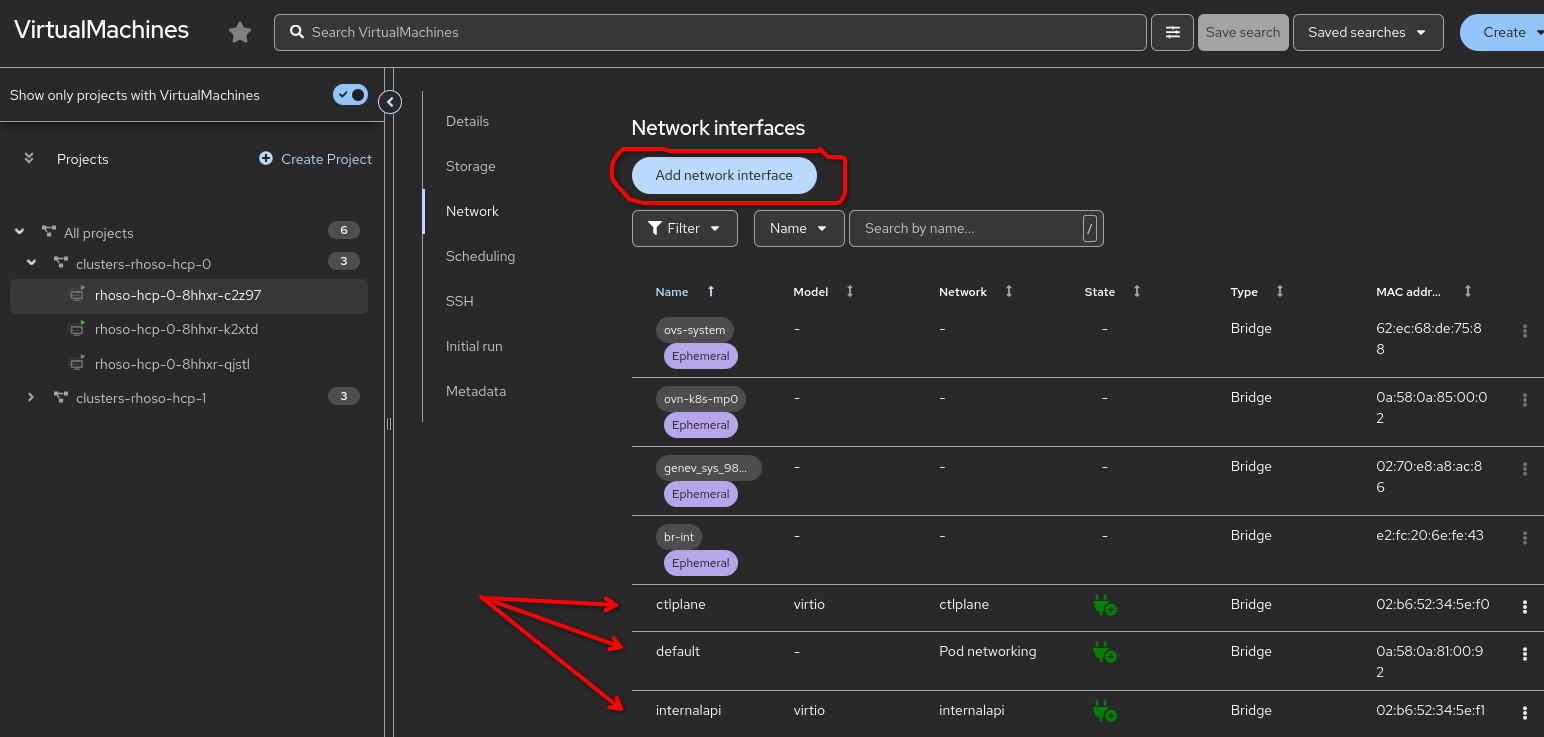
    A chart showing added net-attachments to the OCPVirt RHOSO hosted worker.
    Figure 2: Example of added net-attachments to the OCPVirt OpenStack Services on OpenShift hosted worker.

    Step 3: Deploy the hosted cluster

    Use the hcp command line interface (CLI) to create the hosted cluster using the kubevirt provider as in the following example.

    cluster using the kubevirt provider.
    hcp create cluster kubevirt \
     --name rhoso-hcp-0 \
     --node-pool-replicas 3 \
     --pull-secret /root/.docker/config.json \
     --additional-trust-bundle /root/hcpscripts/bastion-ocp4.crt \
     --memory 32Gi \
     --cores 16 \
     --etcd-storage-class=lvms-vg1 \
     --root-volume-storage-class=ocs-external-storagecluster-ceph-rbd \
     --root-volume-size 85 \
     --release-image=quay.io/openshift-release-dev/ocp-release:4.18.34-x86_64

    Step 4: Configure OpenStack services on the hosted cluster

    Once the hosted cluster is live, gain access using the generated kubeconfig and deploy the supporting operators, including the OpenStack operator. 

    Note: Disable the openstack-baremetal operator if no Metal3 operator is present in the OpenShift Virtualization hosted cluster provider.

    Final thoughts

    By combining OpenStack Services on OpenShift with hosted control planes, your organization can achieve a highly isolated, version-agnostic environment that maximizes your existing hardware. This deployment model empowers IT operations teams to do more with less by providing three distinct advantages: version isolation, granular security, and a smaller hardware footprint.

    Ultimately, this architecture allows IT operations teams to manage multiple development tiers or hundreds of edge locations with a consistent, automated experience. For more details, including configuring pre-provisioned data plane nodes, refer to the KBA.

    Related Posts

    • Deploy TAP-as-a-Service in OpenStack Services on OpenShift

    • Enable Firewall-as-a-Service in OpenStack Services on OpenShift

    • Improve efficiency with OpenStack Services on OpenShift

    • Deploy hosted control planes with OpenShift Virtualization

    Recent Posts

    • Build trusted Python containers with Project Hummingbird and Calunga

    • Simplify distributed tracing: ObservabilityInstaller installation

    • Storage isolation with OpenStack Services on OpenShift distributed zones

    • Run multiple OpenStack Services on OpenShift with HCPs

    • Kafka Monthly Digest: April 2026

    What’s up next?

    Learning Path Feature image for Red Hat OpenShift

    Deployment of Red Hat OpenShift Data Foundation using GitOps

    Deploy Red Hat OpenShift Data Foundation (ODF), a unified data storage...
    Red Hat Developers logo LinkedIn YouTube Twitter Facebook

    Platforms

    • Red Hat AI
    • Red Hat Enterprise Linux
    • Red Hat OpenShift
    • Red Hat Ansible Automation Platform
    • See all products

    Build

    • Developer Sandbox
    • Developer tools
    • Interactive tutorials
    • API catalog

    Quicklinks

    • Learning resources
    • E-books
    • Cheat sheets
    • Blog
    • Events
    • Newsletter

    Communicate

    • About us
    • Contact sales
    • Find a partner
    • Report a website issue
    • Site status dashboard
    • Report a security problem

    RED HAT DEVELOPER

    Build here. Go anywhere.

    We serve the builders. The problem solvers who create careers with code.

    Join us if you’re a developer, software engineer, web designer, front-end designer, UX designer, computer scientist, architect, tester, product manager, project manager or team lead.

    Sign me up

    Red Hat legal and privacy links

    • About Red Hat
    • Jobs
    • Events
    • Locations
    • Contact Red Hat
    • Red Hat Blog
    • Inclusion at Red Hat
    • Cool Stuff Store
    • Red Hat Summit
    © 2026 Red Hat

    Red Hat legal and privacy links

    • Privacy statement
    • Terms of use
    • All policies and guidelines
    • Digital accessibility