Overview: Red Hat OpenShift Virtualization disaster recovery
Red Hat OpenShift Virtualization is a powerful platform for running virtual machines (VMs) alongside containers, but does not include a built-in disaster recovery solution. Instead, users are encouraged to use the disaster recovery capabilities of Red Hat OpenShift Data Foundation, which is typically backed by Red Hat Ceph Storage or IBM Storage FlashSystem, and offers a tightly integrated ecosystem. Enterprise environments that have existing third-party storage solutions, however, need a different disaster recovery strategy.
Prerequisites:
- Two running Red Hat OpenShift clusters
- One NFS storage for each cluster
- Red Hat OpenShift Virtualization
- OpenShift APIs for Data Protection operator installed on each cluster
- A running S3 storage shared by the two clusters
- Cluster-admin privileges
In this learning path, you will:
- Install OpenShift APIs for Data Protection plug-ins that will dynamically patch PVs and convert snapshots to PVCs.
- Back up a VM's metadata while excluding its volume data.
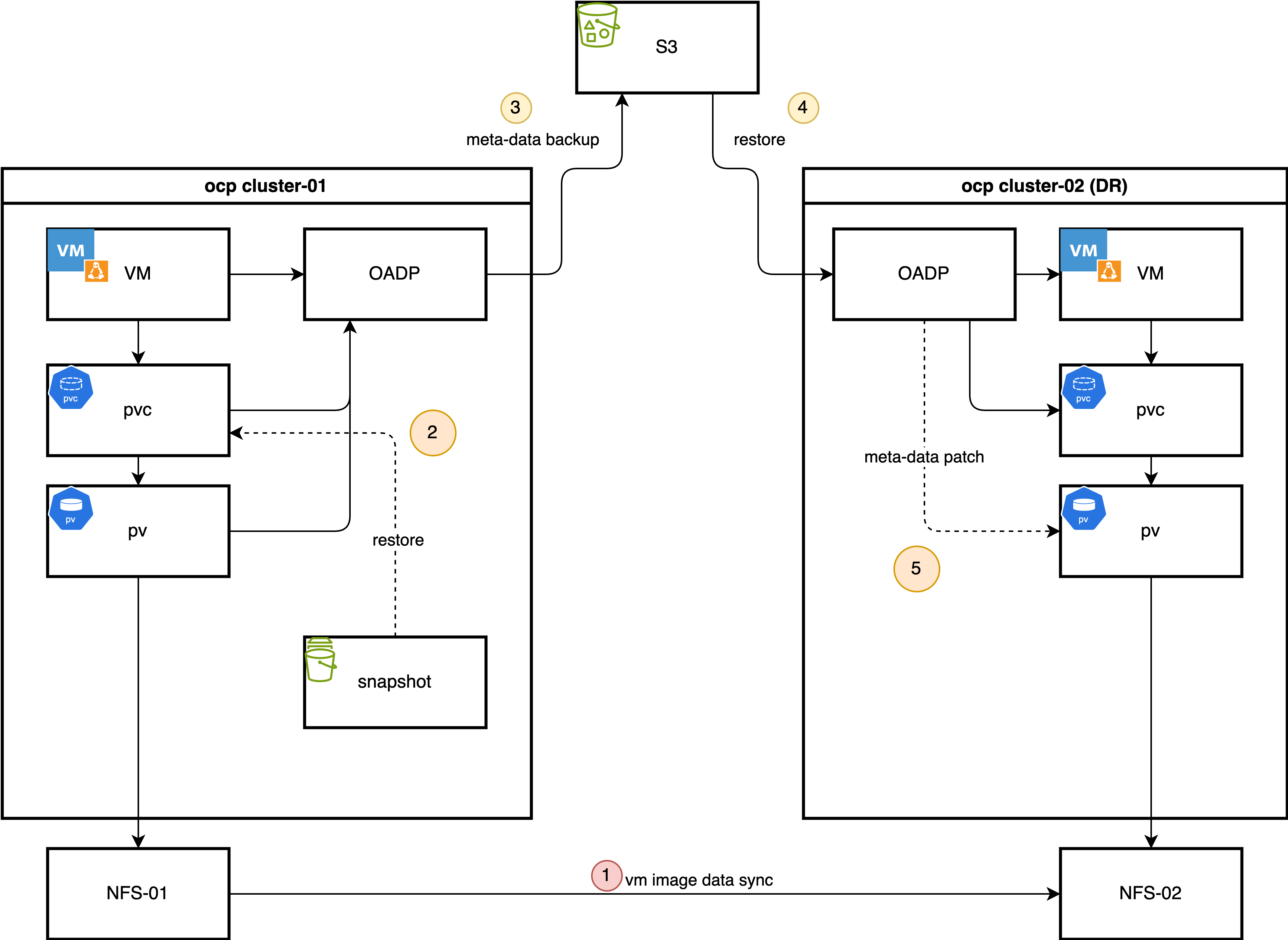
- Synchronize storage data.
- Restore metadata with OpenShift APIs for Data Protection.
- Automate backups.
Disaster recovery with OpenShift APIs for Data Protection and storage replication
This learning path outlines an alternative hybrid disaster recovery strategy that combines Red Hat OpenShift's backup tools with storage replication, optimizing for speed and consistency. These are the core components of this solution:
- OpenShift APIs for Data Protection: Enables metadata-only backups, allowing users to capture essential Kubernetes and Red Hat OpenShift Virtualization object configurations, persistent volume claims (PVCs), and related resources. We deliberately exclude the volume data from the OpenShift APIs for Data Protection backup to avoid the time-consuming process of data compression, transference, and decompression during the restore phase.
- Storage-level replication: The VM disk data, contained within persistent volumes (PVs), is replicated from the primary site to the disaster recovery site using the storage array's remote replication capabilities. This method is significantly faster for large volumes when compared to the file-based data movers of OpenShift APIs for Data Protection.
- OpenShift APIs for Data Protection plug-ins: Two custom plug-ins connect the metadata backup with the replicated storage.
- Snapshot-to-PVC plug-in (backup time): This plug-in activates during the backup process to compensate for storage systems that do not support replicating snapshots. It creates a new PVC from a volume snapshot, effectively recreating the snapshot as a replicable volume. This new PVC is then included in the OpenShift APIs for Data Protection metadata backup.
- PV patching plug-in (restore time): This plug-in intercepts PV objects at the disaster recovery site and modifies their definitions (i.e., by changing storage server IPs or volume paths) to match the configuration of the disaster recovery site's storage infrastructure. This ensures that the restored PVs can correctly map to the replicated storage logical unit numbers (LUNs).
The daily backup
These components are put to work during two primary processes: a daily backup and a failover.
In a typical operational cycle, the primary site performs these daily, automated backups:
- Metadata backup initiation: OpenShift APIs for Data Protection triggers a scheduled backup of all specified Kubernetes object metadata and stores it in an object store compatible with Amazon Simple Storage Service (S3).
- Snapshot-to-PVC promotion: The custom plug-in identifies volume snapshots associated with the VMs backup. For each snapshot, it creates a new, corresponding PVC provisioned from the snapshot's data.
- Inclusion of new PVCs and PVs: The OpenShift APIs for Data Protection backup process adds the newly created PVCs and their associated PVs to the metadata backup set, ensuring that the backup contains a complete, consistent, and replicable state of the application.
Failover process
When there is a disaster at the primary site, it initiates the following failover process:
- Quiesce primary site: When VMs at the primary site shut down, the underlying storage volumes set to read-only to ensure data consistency.
- Finalize storage synchronization: Finalizing storage replication ensures the disaster recovery site has the latest copy of the data.
- Present storage at disaster recovery site: Present the replicated volumes to the disaster recovery cluster.
- Restore metadata with PV patching: Restore the OpenShift APIs for Data Protection metadata backup to the disaster recovery cluster. During this process, the custom PV patching plug-in modifies the PV definitions to align with the correct storage resources at the disaster recovery site.
- Start VMs: With the metadata restored and the storage correctly mapped, virtual machines can start on the disaster recovery cluster, resuming operations.
The process for failing back from the disaster recovery site to the primary site follows the same logic in reverse. This learning path takes users manually through this process before outlining how to automate the solution with Red Hat Ansible Automation Platform. We will use a simple NFS storage backend to simulate the process. First, we'll demonstrate the manual steps and then outline a path toward full automation (Figure 1).