This article is for developers who want to see what is missing in their GitHub pull requests or GitLab merge requests. We will explain the advantage of automatically merging GitHub pull requests when meeting the conditions and provide information about the status mail about pull requests in specific GitHub repositories.
Read the previous article for inspiration, Testing Farm as GitHub Action: User stories.
Prerequisites
Auto-merger relies on labels marking PRs with missing CI and/or reviews. You can use auto-merge-wrapper GitHub Action to set these labels automatically. Follow the instructions described in the README documentation. As an example, you can refer to our postgresql-container, where the auto-merge-wrapper is on-boarded.
The GitHub Action will regularly check opened PRs and set labels based on their state. Additionally, it will create comments on PR with status. The validation in Figure 1 shows the status of the pull request.
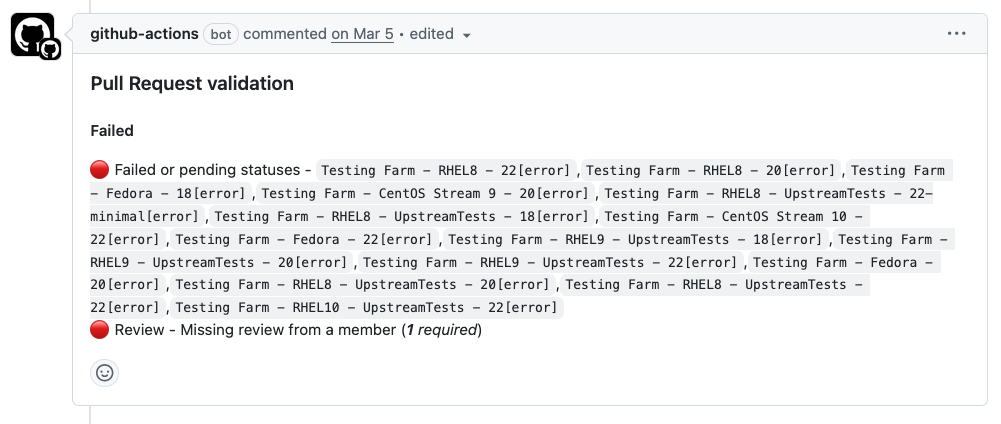
The auto-merge-wrapper GitHub Action is a composite action that uses pull-request-validator and auto-merge GitHub Actions in the background. These actions can be additionally configured to ignore specific CI jobs, adjust the number of reviewers, or interact with Bugzilla bugs and Jira issues. For more information, follow the documentation from the README.
To check GitHub repositories, you must generate an API token, as described in GitHub. Before running the auto-merger github-checker tool, run the following command:
$ export GH_TOKEN=<your token>To check GitLab repositories, generate the API token, as described in this GitLab. Before running the auto-merger gitlab-checker tool, run this command:
$ export GITLAB_TOKEN=<your token> Installing and configuring auto-merger
First, you need to install auto-merger by command.
$ pip3 install git+https://github.com/sclorg/auto-merger.git
Auto-merger must have a configuration file placed in the $HOME directory with the name ".auto-merger.yaml".
The configuration file for GitHub looks like this:
github:

 namespace: "sclorg"

 repos:

    - s2i-ruby-container

    - s2i-perl-container

    - s2i-nodejs-container

 # How many approvals should have PR - default is 2

 approvals: 1

 # How many days, PR should be opened - default is 1 day

 pr_lifetime: 1

 # Labels that blocks merges

 blocker_labels:

    - "pr/failing-ci"

    - "pr/missing-review"

 # Labels that should be present in pull request before merging

 approval_labels:

    - "READY-to-MERGE"
The configuration file for GitLab looks like this:
gitlab:

 namespace: “redhat/rhel/containers”

 repos:

 - postgresql-16

 - mysql-84

 - python-312-minimal

 approvals: 1

 # How many days, PR should be opened - default is 1 day

 pr_lifetime: 1

 # Labels that blocks merges

 blocker_labels:

 - "ci-failing"

 - "review-missing"

 # Labels that should be present in pull request before merging

 approval_labels:

 - "READY-to-MERGE"
Both configurations merge into one file.
The fields in the GitHub or GitLab sections are defined as follows:
- namespace - The namespace in GitHub where repositories mentioned.
- repos - The repositories we will check.
- approvals - The number of approvals needed to allow automatic merging.
- pr_lifetime - Specify the lifetime during which each pull request should be opened.
- blocker_labels - Specify the blocker labels that block auto-merging each pull request.
- approval_labels - Specify the approval labels that should be present in each pull request
Now that auto-merger has set all the information, let’s see what auto-merger can do.
How to receive GitHub pull requests status
Let’s gather all the information about the GitHub repositories mentioned in the configuration file, using the following command:
$ auto-merge github-checkerIf you would like to receive information about what’s going on, add –send-email to the previous command with your email address.
The output may look like this:
$ auto-merge github-checker

Pull requests that are blocked by labels [pr/failing-ci, pr/missing-review]

Let's check repository in sclorg/s2i-ruby-container

Add PR'579' of 's2i-ruby-container' to blocked PRs.

Add PR'575' of 's2i-ruby-container' to blocked PRs.

Add PR'570' of 's2i-ruby-container' to blocked PRs.

Let's check repository in sclorg/s2i-perl-container

Add PR'331' of 's2i-perl-container' to blocked PRs.

Let's check repository in sclorg/s2i-nodejs-container

Add PR'477' of 's2i-nodejs-container' to blocked PRs.

Add PR'476' of 's2i-nodejs-container' to blocked PRs.


SUMMARY OF BLOCKED PULL REQUESTS

Pull requests that are blocked by labels [pr/failing-ci, pr/missing-review]

s2i-ruby-container

https://github.com/sclorg/s2i-ruby-container/pull/579 pr/missing-review

https://github.com/sclorg/s2i-ruby-container/pull/575 pr/missing-review pr/failing-ci

https://github.com/sclorg/s2i-ruby-container/pull/570 pr/missing-review pr/failing-ci

s2i-perl-container

https://github.com/sclorg/s2i-perl-container/pull/331 pr/missing-review

s2i-nodejs-container

https://github.com/sclorg/s2i-nodejs-container/pull/477 pr/missing-review pr/failing-ci

https://github.com/sclorg/s2i-nodejs-container/pull/476 pr/missing-review
How to receive GitLab merge requests status
Let’s gather all the information about the repositories mentioned in the GitLab configuration file, using the following command:
$ auto-merge gitlab-checkerIf you would like to receive information, you can add –-send-email to the previous command with your email address.
The output may look like this:
$ auto-merge gitlab-checker

Let's check repository in redhat/rhel/containers/postgresql-16

- Checking PR 235 for redhat/rhel/containers/postgresql-16

- Checking PR 234 for redhat/rhel/containers/postgresql-16

- Checking PR 180 for redhat/rhel/containers/postgresql-16

- Checking PR 178 for redhat/rhel/containers/postgresql-16

Let's check repository in redhat/rhel/containers/mysql-84

- Checking PR 72 for redhat/rhel/containers/mysql-84

- Checking PR 71 for redhat/rhel/containers/mysql-84

- Checking PR 68 for redhat/rhel/containers/mysql-84

- Checking PR 67 for redhat/rhel/containers/mysql-84

- Checking PR 31 for redhat/rhel/containers/mysql-84

Let's check repository in redhat/rhel/containers/python-312-minimal

- Checking PR 73 for redhat/rhel/containers/python-312-minimal

- Checking PR 72 for redhat/rhel/containers/python-312-minimal

- Checking PR 71 for redhat/rhel/containers/python-312-minimal

- Checking PR 68 for redhat/rhel/containers/python-312-minimal

- Checking PR 49 for redhat/rhel/containers/python-312-minimal

- Checking PR 40 for redhat/rhel/containers/python-312-minimal

- Checking PR 38 for redhat/rhel/containers/python-312-minimal

- Checking PR 37 for redhat/rhel/containers/python-312-minimal

- Checking PR 12 for redhat/rhel/containers/python-312-minimal


SUMMARY

GitLab merge requests that are blocked by labels [pr/failing-ci, pr/missing-review]

redhat/rhel/containers/postgresql-16

------

https://gitlab.com/redhat/rhel/containers/postgresql-16/-/merge_requests/235 'chore(deps): update konflux references'

https://gitlab.com/redhat/rhel/containers/postgresql-16/-/merge_requests/234 'checking if tests run'

https://gitlab.com/redhat/rhel/containers/postgresql-16/-/merge_requests/180 'chore(deps): update registry.stage.redhat.io/rhel9/s2i-core:9.6 docker digest to cd24a28'

https://gitlab.com/redhat/rhel/containers/postgresql-16/-/merge_requests/178 'chore(deps): update registry.stage.redhat.io/rhel10/s2i-core:10.0 docker digest to 07d5729'


redhat/rhel/containers/python-312-minimal

------

https://gitlab.com/redhat/rhel/containers/python-312-minimal/-/merge_requests/73 'Update registry.access.stage.redhat.com/ubi10/ubi-minimal:10.1 Docker digest to 26a30ce'

https://gitlab.com/redhat/rhel/containers/python-312-minimal/-/merge_requests/72 'Konflux update python-312-minimal-10-0'

https://gitlab.com/redhat/rhel/containers/python-312-minimal/-/merge_requests/71 'checking if tests run'

https://gitlab.com/redhat/rhel/containers/python-312-minimal/-/merge_requests/68 'Use remote build pipeline'

https://gitlab.com/redhat/rhel/containers/python-312-minimal/-/merge_requests/49 'RPM updates'

https://gitlab.com/redhat/rhel/containers/python-312-minimal/-/merge_requests/40 'Update Konflux references'

https://gitlab.com/redhat/rhel/containers/python-312-minimal/-/merge_requests/38 'RPM updates'

https://gitlab.com/redhat/rhel/containers/python-312-minimal/-/merge_requests/37 'Update registry.stage.redhat.io/ubi9/ubi-minimal:9.6 Docker digest to db2f908'

https://gitlab.com/redhat/rhel/containers/python-312-minimal/-/merge_requests/12 'Update sources based on the upstream'


redhat/rhel/containers/mysql-84

------

https://gitlab.com/redhat/rhel/containers/mysql-84/-/merge_requests/72 'Lzachar trying 9.7.0'

https://gitlab.com/redhat/rhel/containers/mysql-84/-/merge_requests/71 'Konflux update mysql-84-9-6'

https://gitlab.com/redhat/rhel/containers/mysql-84/-/merge_requests/68 'Update registry.access.stage.redhat.com/ubi10/s2i-core:10.1 Docker digest to 6d3cfdc'

https://gitlab.com/redhat/rhel/containers/mysql-84/-/merge_requests/67 'Try newer task-prefetch-dependencies-oci-ta'

https://gitlab.com/redhat/rhel/containers/mysql-84/-/merge_requests/31 'Update registry.stage.redhat.io/rhel9/s2i-core:9.6 Docker digest to cd24a28'
When GitHub pull requests meet criteria
What should you do in case pull requests meet all criteria? Let’s call auto-merger to enable automatic merging.
In case a pull request meets following criteria:
- The READY-to-MERGE labels are present.
- The pull request has enough approvals.
Then the auto-merger tool merges the pull request.
Currently, if "pr/failing-ci" and "pr/missing-review" are present in the pull request, then the pull request is merged as well.
Soon there will be a flag like "merge_even_blocker_labels" that will allow it or disable it.
To enable auto-merging support, use this easy command:
$ auto-merger mergerTo receive information about the merged pull request, add –-send-email to the previous command with your email address.
If nothing will be merged, you'll see a message like this:
$ auto-merge merger

SUMMARY

There is nothing to merge.
When there is something to be merged, you will see message like this:
$ auto-merge merger

https://github.com/sclorg/s2i-python-container/pull/731 -> CAN BE MERGED

Let's try to merge 731....

Pull request 731 was merged
Next steps
You can run the auto-merger tool per user request or execute regularly on some host which is a long-time machine, such as a cronjob. The tool is on-boarded in our organization (e.g., details in the postgresql-container) and sent daily reports about pull requests. From now on, you can execute auto-merger daily, weekly, or even hourly.
You can also find out what's going on with your pull request or merge-request. In the end, if you see that something is ready to merge, then execute the auto-merger merger option to automatically merge your pull request or merge request. Do not waste your time browsing web pages. You can run this tool, and it will show you the results.
What are the next steps?
The option for exporting results to JSON or YAML will follow (i.e., usage for CI systems).
Allow disable merging in case of blocker_lables.
Improve all GitLab merge requests.

