Red Hat OpenShift Virtualization allows organizations to run and manage virtual machines alongside containers on a unified Kubernetes-based platform. By integrating VMs into a cloud-native environment, OpenShift Virtualization ensures high availability, performance, and security while simplifying operations. This makes it a perfect choice for running business critical applications such as SAP HANA, an in-memory database that enables data processing, advanced analytics, and seamless integration across operations.
SAP HANA's real-time analytics capabilities facilitate quick decision-making, allowing companies to respond rapidly to market changes and capitalize on emerging opportunities. Due to its critical role in the IT stack in modern enterprises, any interruptions can have a huge impact on the business operations. To address this requirement for continuous availability and minimal disruption, OpenShift Virtualization supports a feature known as live migration. This allows virtual machines to move between hosts without downtime, it enables seamless maintenance, workload balancing and proactive failure prevention.
We will demonstrate that SAP HANA workloads running in huge virtual machines of range 1TB and 3TB perform reliably in OpenShift. We conducted testing with BWH (BW/4HANA SAP Business Warehouse for HANA) creating significant load on the system during migration.
Please be advised that SAP does not support running SAP HANA on OpenShift Virtualization for production workloads at the moment. However, it’s fine for development and QA systems and customers will have full support from Red Hat for all workloads.
Live migration without data loss
Our tests demonstrated highly reliable live migration across all scenarios:
- In idle and cooled-off scenarios (Phase 1), as well as Phases 2 and 3, live migration completed successfully with zero data loss or corruption.
- Under high-load BWH conditions (busy scenario, Phase 1), migrations progressed as expected in most cases—even with large volumes of dirty pages. In extreme cases where migration couldn't complete, the operation safely canceled while maintaining full VM and data integrity (no corruption or loss instances).
Now, let’s explore how we achieved these results.
Environment setup and optimization
To support the migration test of a 1TB and 3TB memory virtual machine, we first built an OpenShift Virtualization 4.17 environment. This environment includes two worker nodes with large memory configurations (1GB hugepages) and multiple shared storage volumes, ensuring that the virtual machine can operate with high memory and high I/O load.
We followed the steps in this article to deploy the SAP HANA workload in the OpenShift Virtualization environment. The process includes using the roles sap_hypervisor_node_preconfigure and sap_vm_provision from the Ansible collection redhat.sap_infrastructure to tune node and guest settings according to SAP's system requirements In order to install the SAP workloads such as HANA and Netweaver, the roles from the collection redhat.sap_install were used.
To address the network bandwidth required for live migration of huge virtual machines, we added 100Gbps network cards to the OpenShift nodes and configured them as a dedicated backup network specifically for live migration.
Hardware information:
BareMetal machines as worker node:
	CPU model: Intel(R) Xeon(R) Platinum 8276L CPU @ 2.20GHz (Cascade Lake)
	Sockets: 8
	Memory: 12 TB
	Network card:
	Intel Corporation Ethernet Connection X722 for 1GbE - for connection to cluster
	Mellanox ConnectX-5 for 100Gb - for connection to NFS server
	Mellanox ConnectX-5 for 100Gb - for migration
BareMetal machine as controller:
	CPU model: Intel(R) Xeon(R) Silver 4216 CPU @ 2.10GHz
	Memory: 128 GB
	NFS server:
	Storage: 10TB ssd
Version information:
OpenShift: 4.17.15
OpenShift Virtualization: 4.17.15
Guest operating system: RHEL 9.4
HANA database: 2.00.081.00.1733303410
NetWeaver: 7.5
Figure 1 illustrates the network topology we used for our experiments.
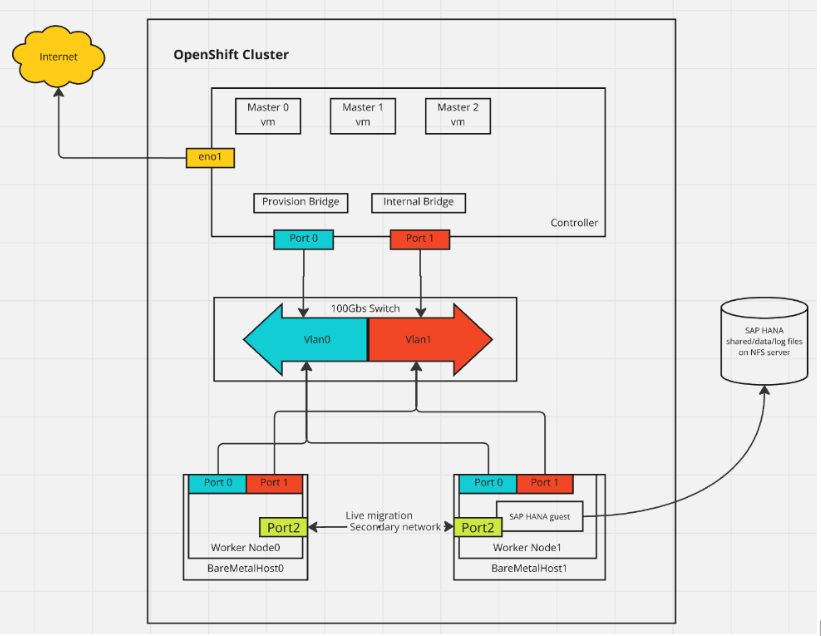
Figure 1: Representation of the network topology used for our experiments.
SAP HANA Benchmark Workload (BWH) benchmark test
SAP HANA’s BWH is a standardized test to verify the performance of an in-memory database system under large data loads and high-load conditions. During this test, SAP HANA performs large-scale data loading and processing, requiring high CPU and memory resources. Our goal was to verify whether we could successfully perform live migration of virtual machines during the BWH process.
Live migration test
The BWH process is divided into three phases, and we performed live migration testing during each phase and scenario:
Phase 1: data load phase
In the data load phase, we load a number of datasets (a dataset contains approximately 1.3 billion records) and test live migration under different load conditions. This phase includes three scenarios:
- Idle scenario: In this scenario, we finished loading a dataset, and then the database is idle. The CPU and memory load is low, and live migration should be completed successfully.
- Busy scenario: In this scenario, we load a second dataset, and the virtual machine’s CPU and memory load rise sharply, placing the system under high load. Because of the large number of dirty pages generated, it is normally challenging for the live migration process to converge during this window, but it should still be able to complete successfully as long as the bandwidth is large enough to push the dirtied pages. When the network is not fast enough to catch the speed of page dirtying, migration might be canceled after a specific timeout.
- Cooled off scenario: After the data loading is complete, the system enters a cooling phase where CPU load decreases, but memory is almost fully utilized (about 99%). Live migration should be able to complete without errors at this stage.
Phase 2: query execution (throughout) phase
In this phase, we focus on testing the performance of the virtual machine during query operations after the data load. The virtual machine remains under continuous load and resource utilization is high. We need to ensure that the query completes successfully and that there are no errors in its results.
Phase 3: query execution (runtime) phase
In this phase, the virtual machine executes actual workloads, and resource utilization peaks. All query operations are running and CPU and memory usage are at their maximum. At this point, we verify whether the query can be completed successfully under these high-load conditions without data errors or virtual machine corruption.
Technical challenges and issues
The biggest technical challenge in this test was ensuring the integrity of the database data. During the SAP HANA BWH benchmark test, there is extreme high I/O load. To optimize SAP HANA database's performance, we configured 1GB memory hugepages in the guest. However, this complicates migration processes, as even if only one bit is flipped, the whole page is dirty.
These dirty pages need to be synchronized and processed during live migration, and they are generated at a rapid pace, especially under high-load conditions. During the live migration, the rapid accumulation of dirty pages often prevents the migration operation from completing within the designated time.
To address this issue, we implemented the following optimizations:
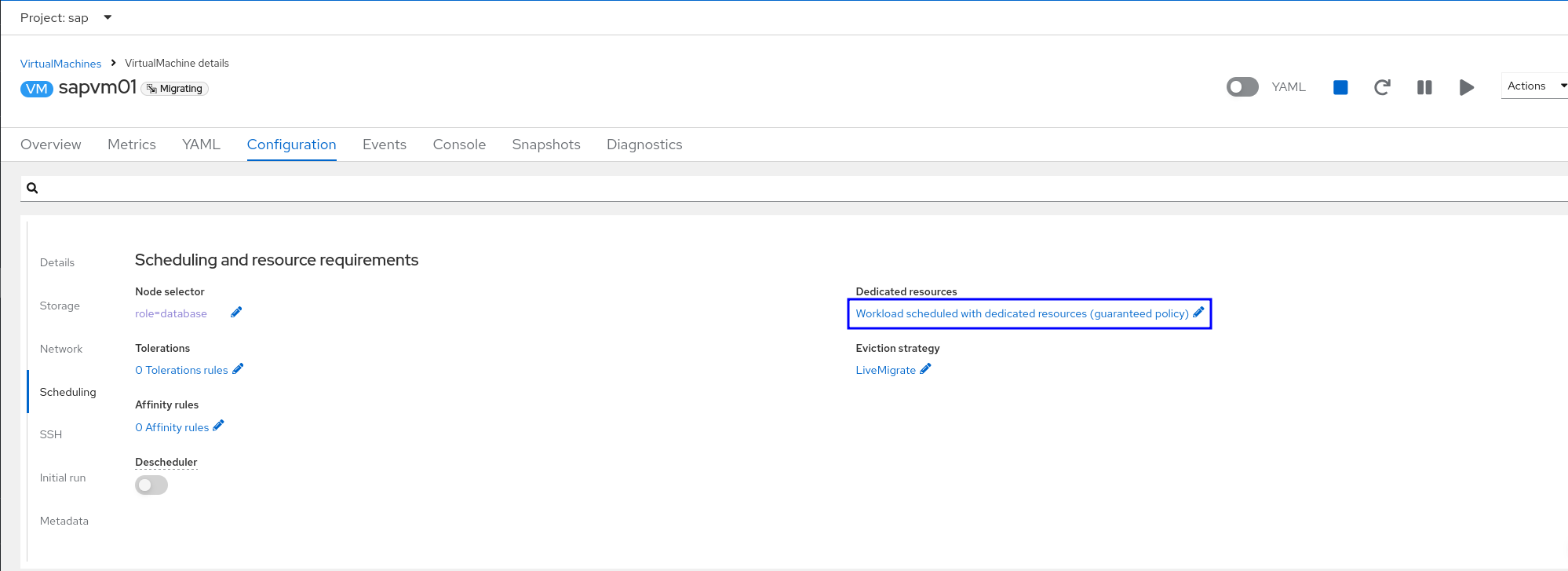
CPU, memory optimization: In the configuration of guest, we can make sure the dedicated resources option is enabled and the worker nodes have the label “cpumanager=true”. By using dedicated resources, we can improve the performance of the virtual machine and the accuracy of latency predictions (Figure 2).
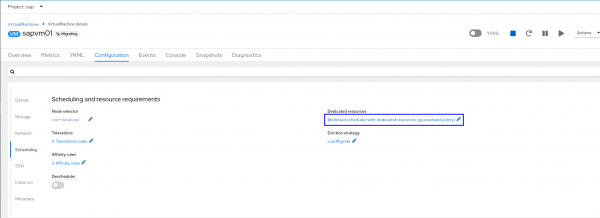
Figure 2: Enable the dedicated resource option by clicking the link :”Workload scheduled with dedicated resources”- Network Optimization: To ensure sufficient network bandwidth during migration, we optimized the network by adding a secondary network between OpenShift worker nodes, exclusively used for live migration traffic. Additionally, we set the network's MTU (Maximum Transmission Unit) to 9000, which significantly improves network efficiency, especially for large data packet transfers. This reduces the overhead of packet segmentation and reassembly, thus improving the migration process's transmission speed and stability.
Here is the configuration of the secondary network:
apiVersion: "k8s.cni.cncf.io/v1"
kind: NetworkAttachmentDefinition
metadata:
  name: my-secondary-network
  namespace: openshift-cnv
spec:
  config: '{
    "cniVersion": "0.3.1",
    "name": "migration-bridge",
    "type": "macvlan",
    "master": "eth1",
    "mode": "bridge",
    "ipam": {
      "type": "whereabouts",
      "range": "10.200.5.0/24"
    }
  }'
Here is the network setting in hyperconverged configuration:
apiVersion: hco.kubevirt.io/v1beta1
kind: HyperConverged
metadata:
  name: kubevirt-hyperconverged
  namespace: openshift-cnv
spec:
  liveMigrationConfig:
    completionTimeoutPerGiB: 800
    network: my-secondary-network
    parallelMigrationsPerCluster: 5
    parallelOutboundMigrationsPerNode: 2
    progressTimeout: 150
# ...
- Storage optimization: The test environment in this case used the NFS-CSI driver for local shared storage due to the lack of external storage infrastructure. (This is a testing-optimized implementation, not suitable for production use). To meet SAP HANA's high-performance requirements, all data logs and program files are stored on the shared storage, so that multiple nodes can access and process the data, ensuring data consistency and high availability during migration. Specifically, the shared storage is located on SSD hardware to ensure high-speed data read/write performance.
- Virtual machine optimization: To maximize resource utilization and minimize performance loss, we optimized the virtual machine's resource allocation as follows:
- Enable
IOMMUin kernel argument to improve memory access efficiency under high-load conditions. - Given the high memory requirements of SAP HANA BWH workload, we set the virtual machine's memory to 1TB or 3TB and used 1GB huge pages.
- Apply the Ansible role
sap-hana-rhv-guestin the guest, it will set tuned for sap hana.
Here is the content of tuned configuration:
- Enable
[main]
summary=Optimize for SAP HANA
[cpu]
force_latency=cstate.id:3|70
governor=performance
energy_perf_bias=performance
min_perf_pct=100
[vm]
transparent_hugepages=never

[sysctl]
kernel.sem = 32000 1024000000 500 32000
kernel.numa_balancing = 0
kernel.sched_min_granularity_ns = 3000000
kernel.sched_wakeup_granularity_ns = 4000000
vm.dirty_ratio = 40
vm.dirty_background_ratio = 10
vm.swappiness = 10
Key technologies for live migration
During this test, we used several key technologies to ensure that live migration could run stably under high-load environments:
- Pre-copy: This technology copies the VM’s memory to the target node previous to switching the running VM to the target. Due to the nature of SAP HANA running under heavy load, a lot of memory pages are changed and invalidated (or dirtied) during migration. Hence those pages will have to be copied again, this is an iterative process.
- Multi-fd: With Multi-fd, we significantly improved the data transfer speed during migration by sending the data over the network via multiple streams. This allows live migration to continue transferring data quickly while dirty pages were being generated, ensuring that the migration process is not affected by I/O load and can be completed. Multi-fd helps to maximize the network bandwidth utilization. Of course, having a sufficiently large dedicated bandwidth in the environment is equally important. The combination of high bandwidth and Multi-fd enhances the chances of a successful migration.
Test results and validation
The BWH result log files were analyzed regarding errors. We considered only the error-free runs as successful.
Here is the screenshot of live migration result on OpenShift Virtualization, you can find it in the Metrics page of VirtualMachine details (Figure 3):

Figure 3: The Metrics tab
Figure 4 shows the SAP HANA BWH Query Execution result in transaction SE38, check the result and make sure there is no error:

Figure 4: Screenshot of SAP HANA BWH query execution.
What's next
Through the verification of live migration during the SAP HANA BWH benchmark test, we have demonstrated that OpenShift Virtualization can successfully live-migrate virtual machines with a minor performance impact and no impact on data integrity. Note: this is not an audited result. This result proves the reliability and high availability of OpenShift Virtualization as a virtualization platform for enterprise applications.
In the future, we will conduct similar tests on 6TB virtual machines to validate OpenShift Virtualization performance at larger memory scales.
Visit the Red Hat OpenShift Virtualization product page to learn more.
Last updated: March 12, 2026
