Page
Create an OAuth application in Red Hat Ansible Automation Platform for Red Hat Developer Hub
Now that we have single sign-on (SSO) established, Red Hat Developer Hub (Developer Hub) still needs a secure way to "speak" to Ansible Automation Platform. Without OAuth, Developer Hub cannot trigger job templates or sync the catalog, effectively leaving your developer portal without its automation engine. This lesson solves This lesson solves the absence of an automation engine by creating an OAuth application within Ansible Automation Platform by creating an OAuth application within Ansible Automation Platform, so Developer Hub can exchange authorization codes for access tokens. By the end of this lesson, you will have the final set of credentials needed to bridge the gap between your developer's self-service requests and the actual execution of automation playbooks.
Prerequisites:
- You must have administrative access to a Red Hat OpenShift Container Platform cluster.
- Install the OpenShift command-line interface (CLI) and Kustomize locally.
- A valid Red Hat subscription is required.
- Install Ansible Automation Platform, Keycloak, and Developer Hub operators and run the base instances on your cluster (Lesson 1).
- Create and configure the Red Hat build of Keycloak client for SSO (Lesson 2).
- Integrate Ansible Automation Platform with the Red Hat build of Keycloak (Lesson 3).
In this lesson, you will:
- Create a confidential OAuth application within Ansible Automation Platform.
- Configure redirect uniform resource identifiers (URIs) to ensure token exchange with Developer Hub.
- Enable the
skip_authorizationflag via the API.
Create an OAuth application in Ansible Automation Platform for Red Hat Developer Hub
Let’s create an OAuth application in Ansible Automation Platform that Developer Hub will use to make API calls on behalf of users.
Method 1: The Ansible Automation Platform UI
If you prefer to use UI:
- Log into Ansible Automation Platform as an admin.
- Click OAuth Applications → Create OAuth Application.
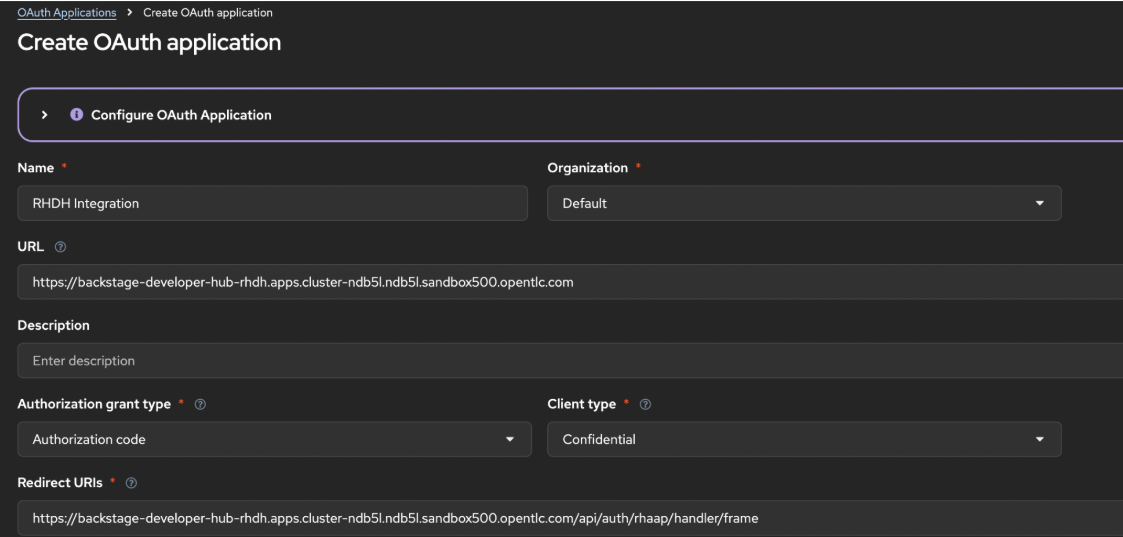
Configure the application by filling in these fields as shown in Figure 1:
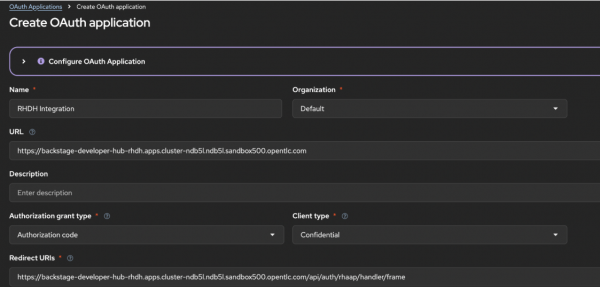
Figure 1: Ansible Automation Platform OAuth application configuration for Developer Hub integration.
Field | Value |
|---|---|
Name |
|
Description |
|
Organization |
|
Redirect URIs |
|
Authorization grant type |
|
Client type |
|
Redirect URIs |
|
- Click Save to capture credentials. Copy the Client ID and Client Secret immediately–the Client Secret is only shown once!
The Ansible Automation Platform UI does not expose the
skip_authorizationoption, so you must enable it via the API. This setting bypasses the OAuth consent screen that would normally prompt users to approve the application’s access.APP_ID=$(curl -sk "${AAP_URL}/api/gateway/v1/applications/" \ -u "admin:${AAP_PASSWORD}" \ -H "Content-Type: application/json" | \ jq -r '.results[] | select(.name=="RHDH Integration") | .id') curl -sk -X PATCH \ "${AAP_URL}/api/gateway/v1/applications/${APP_ID}/" \ -u "admin:${AAP_PASSWORD}" \ -H "Content-Type: application/json" \ -d '{"skip_authorization": true}'
Method 2: Direct API calls
For a faster, scriptable approach, use the following commands:
Set variables:
AAP_URL=$(oc get route aap -n aap -o jsonpath='https://{.spec.host}')

AAP_PASSWORD=$(oc get secret aap-admin-password -n aap \
  -o jsonpath='{.data.password}' | base64 -d)

CLUSTER_DOMAIN=$(oc get ingresses.config.openshift.io cluster -o jsonpath='{.spec.domain}')

BACKSTAGE_URL="https://backstage-developer-hub-rhdh.${CLUSTER_DOMAIN}"

REDIRECT_URI="${BACKSTAGE_URL}/api/auth/rhaap/handler/frame"
Create the OAuth application:
RESPONSE=$(curl -sk -X POST \
  "${AAP_URL}/api/gateway/v1/applications/" \
  -u "admin:${AAP_PASSWORD}" \
  -H "Content-Type: application/json" \
  -d '{
    "name": "RHDH Integration",
    "description": "OAuth application for Red Hat RHDH integration",
    "client_type": "confidential",
    "authorization_grant_type": "authorization-code",
    "app_url": "'"${BACKSTAGE_URL}"'",
    "redirect_uris": "'"${REDIRECT_URI}"'",
    "skip_authorization": true,
    "organization": 1
  }')
Extract credentials:
AAP_OAUTH_CLIENT_ID=$(echo $RESPONSE | jq -r '.client_id')
APP_OAUTH_CLIENT_SECRET=$(echo $RESPONSE | jq -r '.client_secret')

echo "AAP_OAUTH_CLIENT_ID=$AAP_OAUTH_CLIENT_ID" >> .env
echo "APP_OAUTH_CLIENT_SECRET=$APP_OAUTH_CLIENT_SECRET" >> .env
Troubleshooting: OAuth redirect
If the OAuth redirect from Ansible Automation Platform back to Developer Hub fails or times out after successful authentication in Keycloak, and you are stuck on a blank page after logging in, manually navigate back to your Developer Hub URL. The session cookie will have been established, and you will be logged in.
Success! The OAuth application is created, and the skip_authorization flag is enabled. You are now ready to generate personal access tokens.

