Page
Configure single sign-on with the Red Hat build of Keycloak
Even with the infrastructure deployed, users are still challenged by managing separate credentials for different platforms, while administrators struggle to maintain security-focused, synchronized access across the technologies. Without a centralized identity provider, the hand-off between Red Hat Developer Hub (Developer Hub) and Red Hat Ansible Automation Platform leaves your environment vulnerable to configuration drift and security gaps.
Learn how to configure the Red Hat build of Keycloak for single sign-on (SSO) integration with Ansible Automation Platform and Developer Hub. The guide covers creating Keycloak clients, updating redirect uniform resource identifiers (URIs) and web origins, and retrieving SSO credentials.
Prerequisites:
- You must have administrative access to a Red Hat OpenShift Container Platform cluster.
- Install the OpenShift command-line interface (CLI) and Kustomize locally.
- A valid Red Hat subscription is required.
- Install Ansible Automation Platform, Keycloak, and Developer Hub operators and run the base instances on your cluster (Lesson 1).
In this lesson, you will:
- Configure Keycloak clients for both Ansible Automation Platform and Developer Hub.
- Dynamically update redirect URIs and cross-origin resource sharing (CORS) origins based on your cluster domain.
- Retrieve client secrets needed for OAuth.
Configure the Red Hat build of Keycloak
Now that Ansible Automation Platform is up and running, let’s set up the SSO integration. The Red Hat build of Keycloak will serve as the identity provider for Ansible Automation Platform, and Ansible Automation Platform will then serve as the OAuth provider for Developer Hub.
Set up the Red Hat build of Keycloak client for Ansible Automation Platform
We need to create a Red Hat build of Keycloak client that Ansible Automation Platform will use for SSO authentication. This client allows Ansible Automation Platform to delegate authentication, and will look like this:
export DOMAIN=$(oc get ingresses.config.openshift.io cluster -o jsonpath='{.spec.domain}')To create this client:
Update the redirect URIs for Ansible Automation Platform's OAuth callbacks from the Red Hat build of Keycloak:
yq -i '.spec.client.redirectUris = [https://aap-aap.$DOMAIN/api/gateway/social/complete/*,https://aap-aap.$DOMAIN/*]' \
  clusters/demo/instances/rhsso-config/patches/keycloakclient-aap.yaml
Update the web origins for CORS:
yq -i '.spec.client.webOrigins = ["https://aap-aap.$DOMAIN"]' \
  clusters/demo/instances/rhsso-config/patches/keycloakclient-aap.yaml
Note
Instead of modifying the demo files directly, consider creating your own cluster overlay! This keeps your environment-specific configurations separate and makes upgrades easier.
Set up the Red Hat build of Keycloak client for Developer Hub
Now, we need to create a Red Hat build of Keycloak client that Developer Hub will use for cataloging synchronization. This client will look like this:
export DOMAIN=$(oc get ingresses.config.openshift.io cluster -o jsonpath='{.spec.domain}')To create this client:
Update the redirect URIs for Developer Hub's OAuth callbacks from Keycloak:
yq -i '.spec.client.redirectUris = [https://backstage-developer-hub-rhdh.$DOMAIN]' \
  clusters/demo/instances/rhsso-config/patches/keycloakclient.yaml
Update the web origins for CORS:
yq -i '.spec.client.webOrigins = ["https://backstage-developer-hub-rhdh.$DOMAIN/api/auth/oidc/handler/frame"]' \
  clusters/demo/instances/rhsso-config/patches/keycloakclient.yaml
Note
Even if you haven’t deployed Developer Hub yet, you can determine the expected URL in advance. The URL follows the pattern: https://backstage-developer-hub-<project>.apps.<cluster-domain>.com.
Apply the configuration to create the Red Hat build of Keycloak client
The following command will create an OpenID Connect (OIDC) client named aap and RHDH in the Red Hat build of Keycloak. This will be used by Ansible Automation Platform for SSO. We can also use this command to set up test users for initial testing.
oc apply -k clusters/demo/instances/rhsso-configRetrieve the SSO credentials for Ansible Automation Platform
Now we need to get the client secret that the Red Hat build of Keycloak generated for the aap client. To do this, you have two options:
Option 1: Use the command line.
Get the client secret from the Kubernetes secret:
oc get secret keycloak-client-secret-aap-client -n rhsso \
  -o jsonpath='{.data.CLIENT_SECRET}' | base64 -d
You should see output like:
## xGtqZLqUqJOiXXXXXXXXXXXXXXXXXXXX
Option 2: Use the Red Hat build of Keycloak admin console.
Get the Red Hat build of Keycloak URL:
KEYCLOAK_URL=$(oc get route keycloak -n rhsso -o jsonpath='https://{.spec.host}')
echo "Keycloak Console: $KEYCLOAK_URL"
Get admin password:
KEYCLOAK_ADMIN_PWD=$(oc get secret credential-rhsso -n rhsso -o jsonpath='{.data.ADMIN_PASSWORD}' | base64 -d)
echo "Admin Password: $KEYCLOAK_ADMIN_PWD"
Note
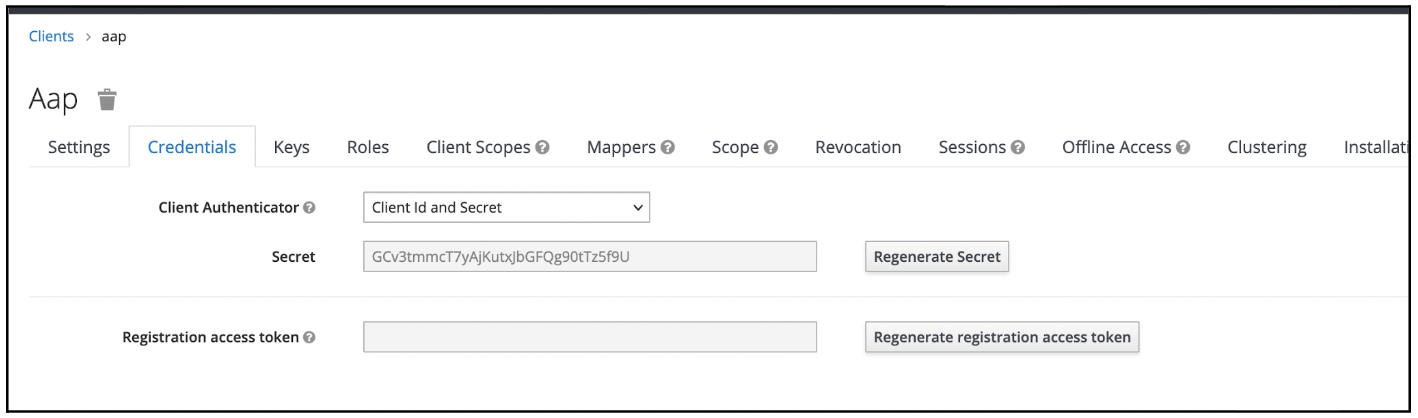
If using the console, log in with admin credentials (retrieve them from the credential-rhsso secret), navigate to the RHDH realm, select Clients → aap, click on the Credentials tab, and copy the Secret (retrieve them from the credential-rhsso secret) value (Figure 1).
If you choose the console route:
We’ve successfully configured our SSO with the Red Hat build of Keycloak, enabling a token-based authentication flow that eliminates the need for multiple login prompts. You now have the necessary client secrets to proceed with the final integration steps.

