Training a model grabs the headlines: the GPU clusters, the weeks of compute, the incredibly large budgets. But the majority of the cost of AI in production isn't training, it's inference. Training happens once. Inference happens every single time a user sends a request.
Since inference powers coding agents, RAG, and so much more, together with DeepLearning.AI, we built a free, hands-on course that walks through the full AI inference lifecycle: optimize, deploy, and benchmark using vLLM and the open-source tooling around it. It's called Fast & Efficient LLM Inference with vLLM, and it's available for free today.
Efficient LLM serving in production requires balancing memory, latency, and throughput. In this course, you'll learn the techniques that make that possible with vLLM.
Andrew Ng, from Fast & Efficient LLM Inference
How do we efficiently serve LLM's?
Here's a common situation when deploying your own AI models: Take Llama 3 70B on a standard production node of four 80 GB GPUs. The weights alone eat about 140 GB, leaving roughly 180 GB for the KV cache. In theory, that leftover memory is enough to serve around 18 long-context users in parallel. But with a naive serving setup and poor memory management, that number collapses to two or three.
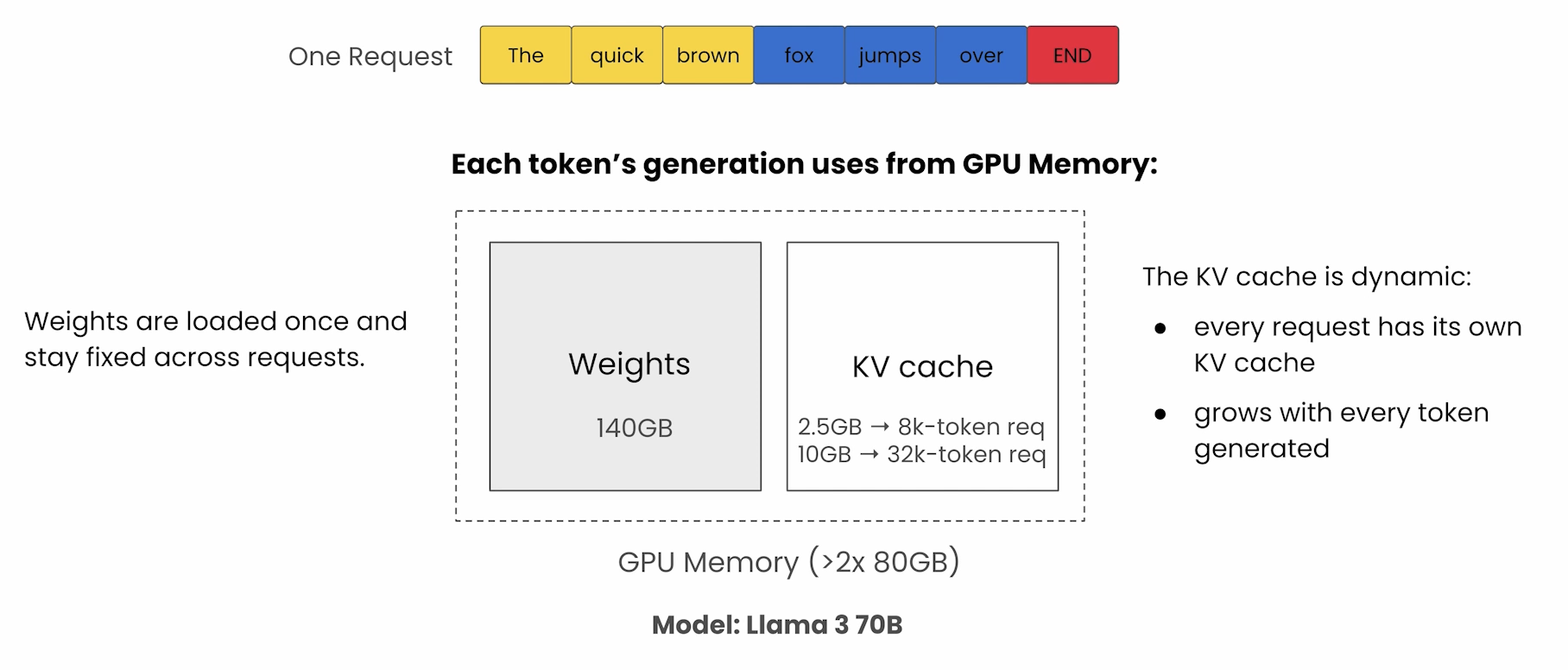
That gap between what your hardware can do and the reality of managing multiple AI model users (or, these days, agents) is what this course is built around. The good news is that the open-source ecosystem has matured to the point where you can easily compress a model (LLM Compressor), efficiently serve it (vLLM), and benchmark it (GuideLLM). The course teaches all three as part of the AI deployment lifecycle, because that's how production deployments actually come together.
What went into creating this course
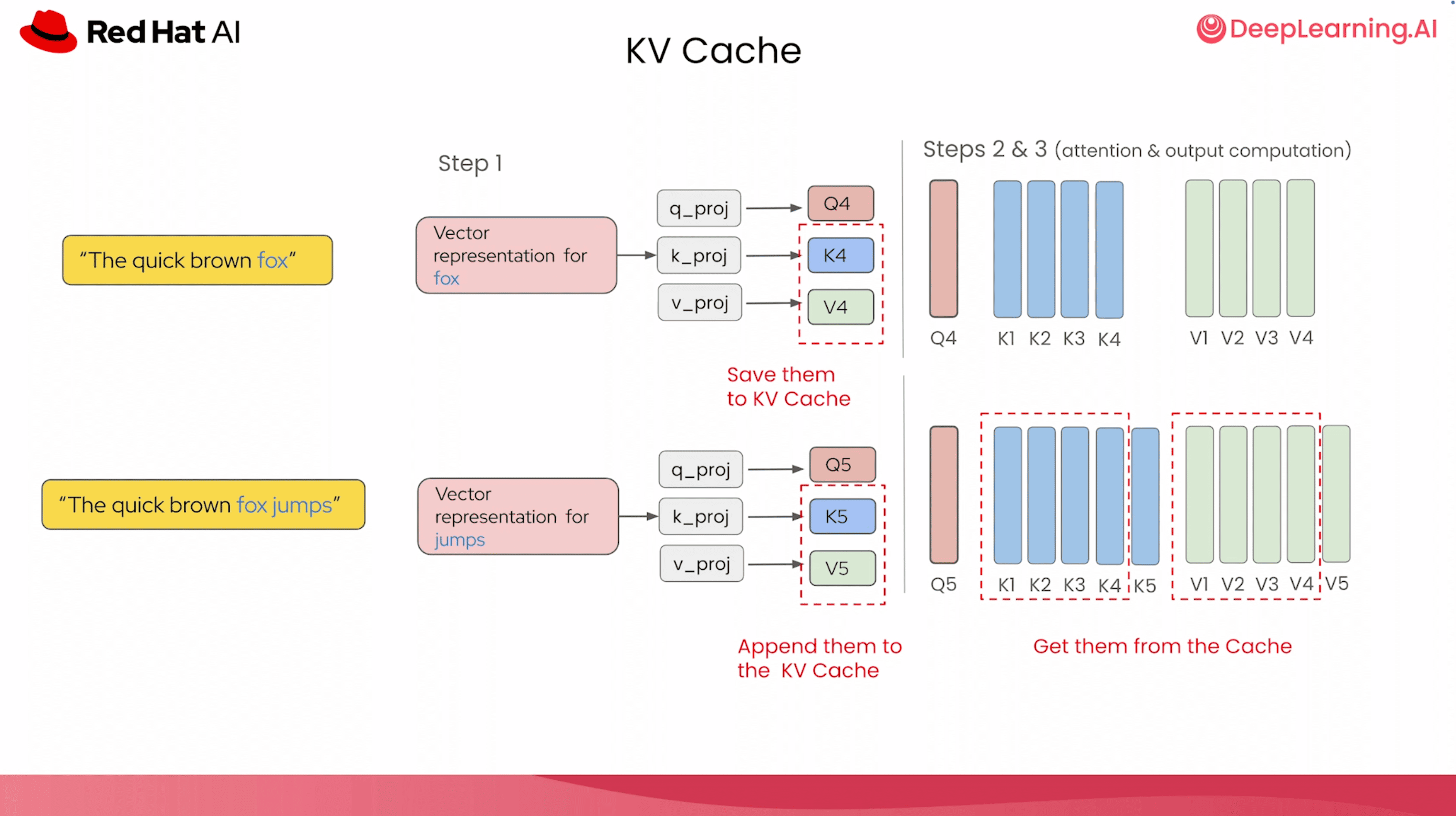
A lot of the work went into visualization, and picturing what's actually happening during inference after you make a request to an LLM.
So before any code runs, the course covers the fundamentals: what happens during a forward pass, how tokens flow through the transformer's attention and feed-forward layers, and why the KV cache, not the weights, is the dominant memory concern in modern inference. We break down how the cache grows with every token generated (why a single 128k-token request can demand around 40 GB on top of the model) and why serving many concurrent users turns that into serious memory pressure.
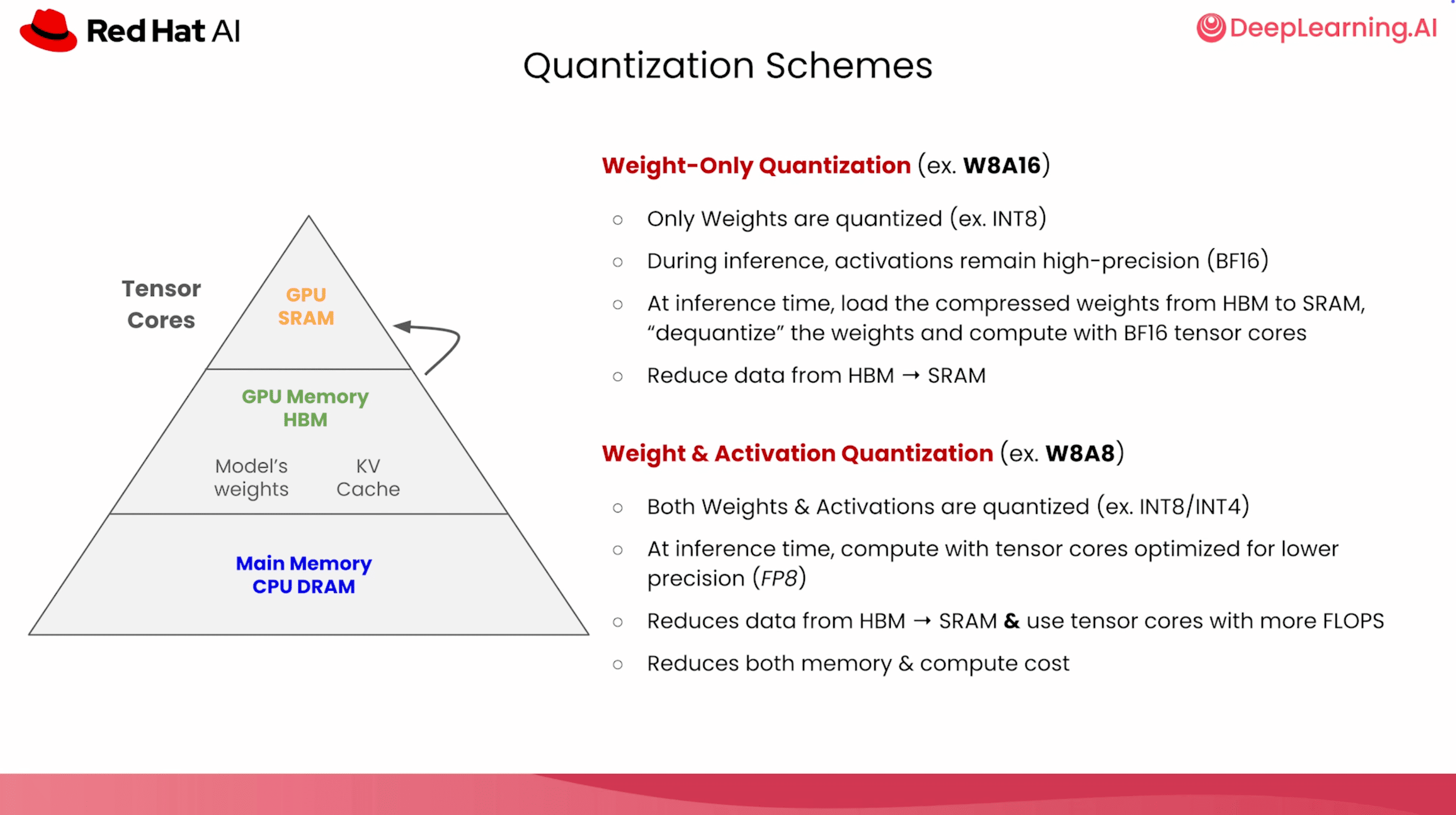
We do the same for quantization: what actually changes when you move a model's weights from the typical default released precision of BF16 down to INT8 or INT4, and what you keep, what you lose, and how calibrated techniques like GPTQ and AWQ recover accuracy that naive rounding would throw away.
What will you learn in this vLLM course?
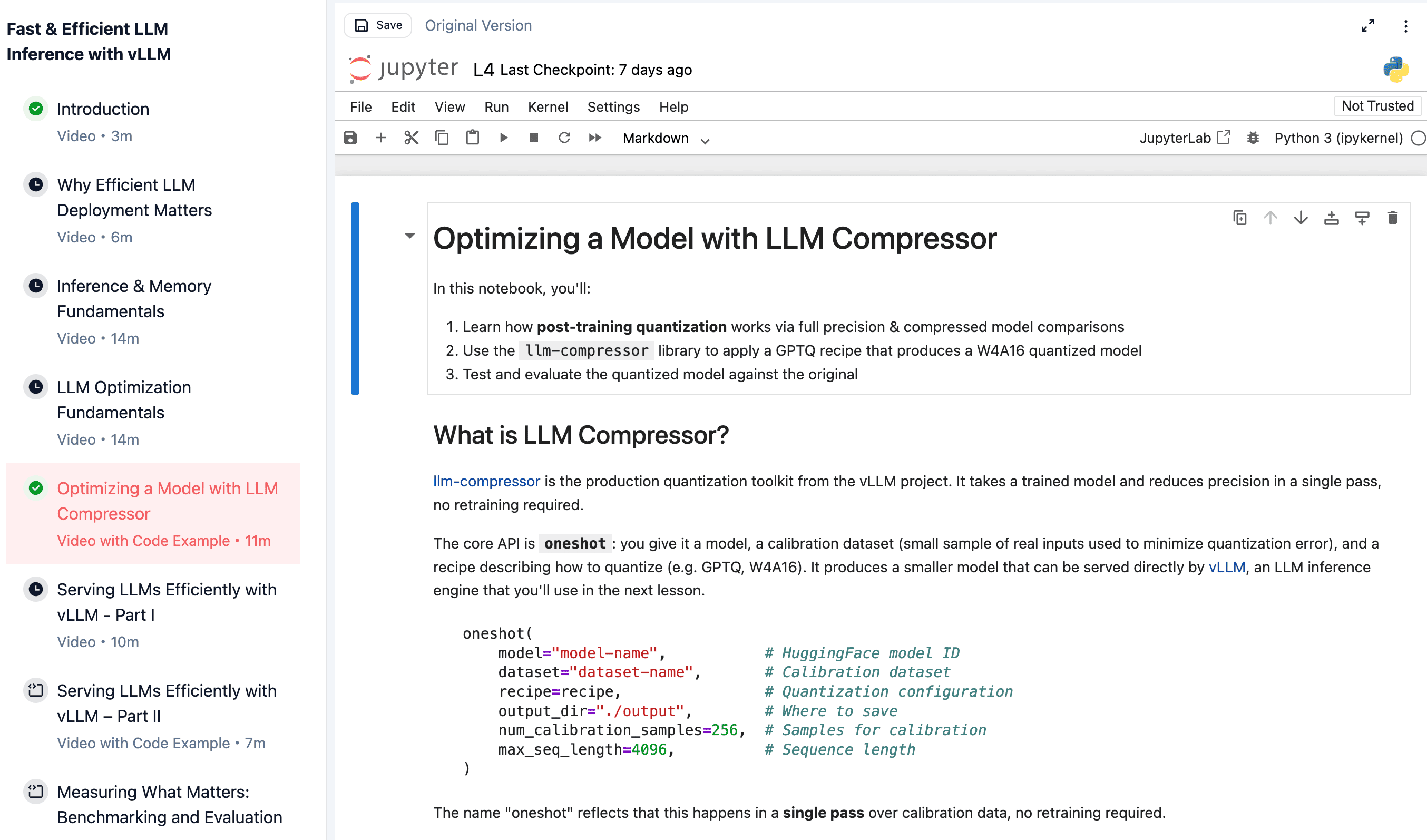
The course is structured around three hands-on labs in a JupyterLab environment, where you work with real models and a running vLLM server. Don't worry, we'll handle the infrastructure.
Step 1: Compress
You take a full-precision Qwen model, quantize it with LLM Compressor, compare the model sizes before and after, and measure perplexity to put a real number on the accuracy-tradeoff. By the end of the lab, you have a concrete feel for how much GPU memory you can reclaim and what it costs, the same workflow that can take a model from needing three GPUs down to one.
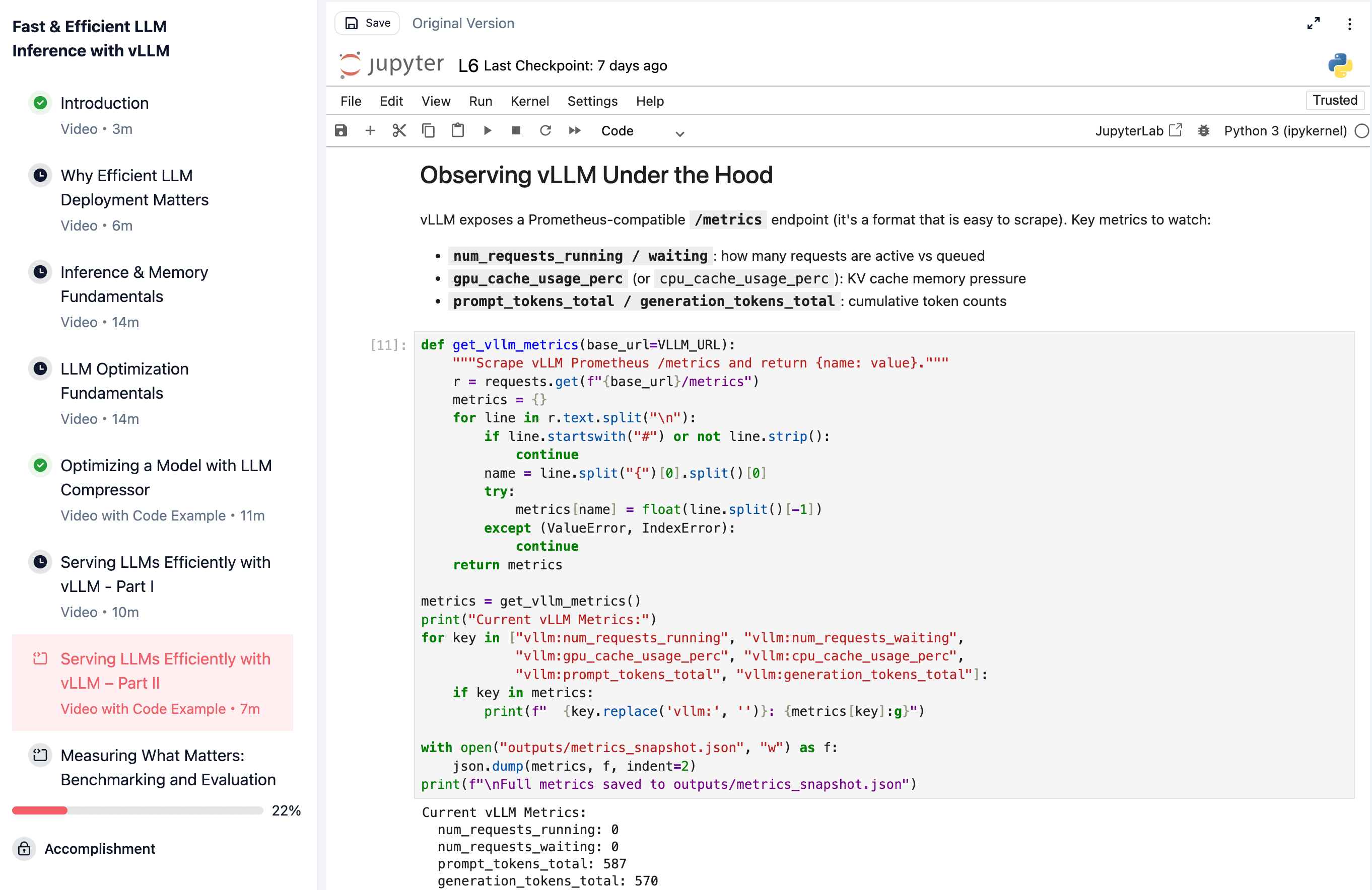
Step 2: Serve
You deploy the quantized model with vLLM and interact with it through the OpenAI-compatible API. The interesting part is watching the optimizations work in real time via vLLM's metrics endpoint: continuous batching keeps the GPU busy, PagedAttention manages KV cache memory without fragmentation, and prefix caching skips redundant computation when requests share a system prompt. You send concurrent requests and see memory utilization and cache hits move in real time.
Step 3: Benchmark
Finally, you put the deployment under load with GuideLLM, simulating realistic traffic patterns and measuring the metrics that map directly to your SLOs: time to first token, inter-token latency, and throughput. Then you confirm quality holds up with lm-eval. You'll learn why the p95 and p99 matter more than the mean, and how to read a model card's recovery numbers to decide whether a quantized model is good enough to ship.
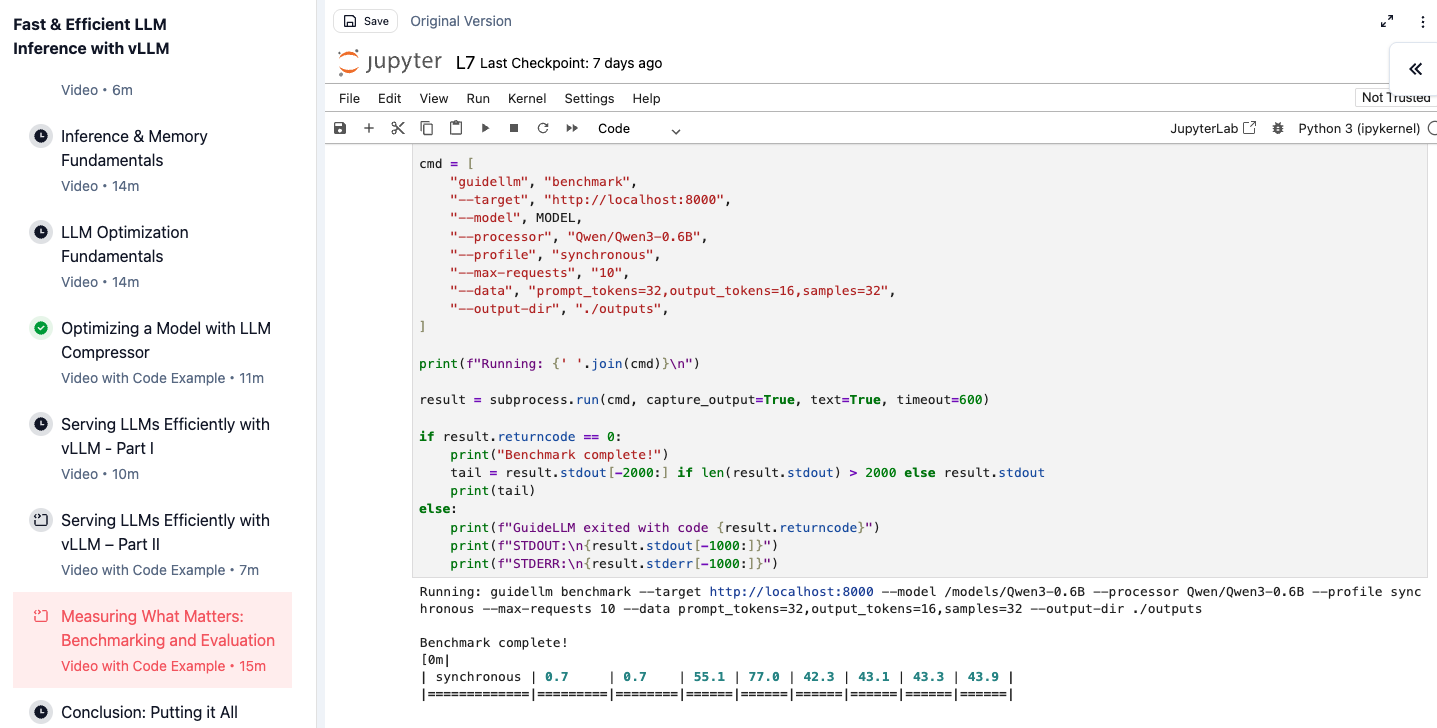
By the end, you've run the complete optimize, deploy, and benchmark workflow on a real model and understand the accuracy, speed, and cost tradeoffs well enough to make informed decisions in production.
The course details
- Course: Fast & Efficient LLM Inference with vLLM
- Instructor: Cedric Clyburn, Senior Developer Advocate at Red Hat
- Duration: ~1.5 hours, 9 video lessons, 3 hands-on code labs
- Level: Intermediate (assumes familiarity with Python and basic LLM concepts)
If you've been running open-source models locally or at scale and want to understand what's happening under the hood, or you've heard of vLLM and want to finally get hands-on, this is built for you. It's also a solid resource for onboarding teammates new to inference tooling in a sandboxed environment.
Where to go next
Everything in this course is open source and ready to use today. Once you've gone through it, the natural next steps are to try LLM Compressor on your own models, spin up a vLLM server on your own hardware, and run GuideLLM against your real workloads to see where you land on the tradeoff triangle. Here at Red Hat AI, we focus on supporting enterprise-grade workloads running on any hardware accelerator across the hybrid cloud. And if you want to go further, take a look at llm-d for distributed, disaggregated inference, separating the prefill and decode phases to optimize each independently, which is where a lot of the frontier serving work is heading.
A quick thank you, because this wasn't a solo effort: Saša Zelenović, Michael Goin, and Sawyer Bowerman from Red Hat shaped the content and built the labs, Hawraa Salami at DeepLearning.AI drove the curriculum and production, and thanks to Andrew Ng for making room for open-source inference tooling in the catalog. Go build with open source!

