Welcome to the Q1’26 edition of Red Hat’s quarterly newsletter, all about Apache Camel! This series aims to share all the noteworthy Camel goodness from the last quarter, so you don’t miss a thing! Be sure to read the previous editions to catch up on all the exciting updates and insights in Q1, Q2, Q3, and Q4 of 2025.
The First Steps with Kaoto
Ready to take your first steps with visual integration design? We recently revamped the Kaoto documentation to make building Apache Camel integrations easier than ever. As part of this update, our new quickstart gives you hands-on experience with the Kaoto extension for VS Code. You will not just build a basic "Hello World." Instead, you will design a local, AI-powered text summarizer using Ollama right inside your IDE.
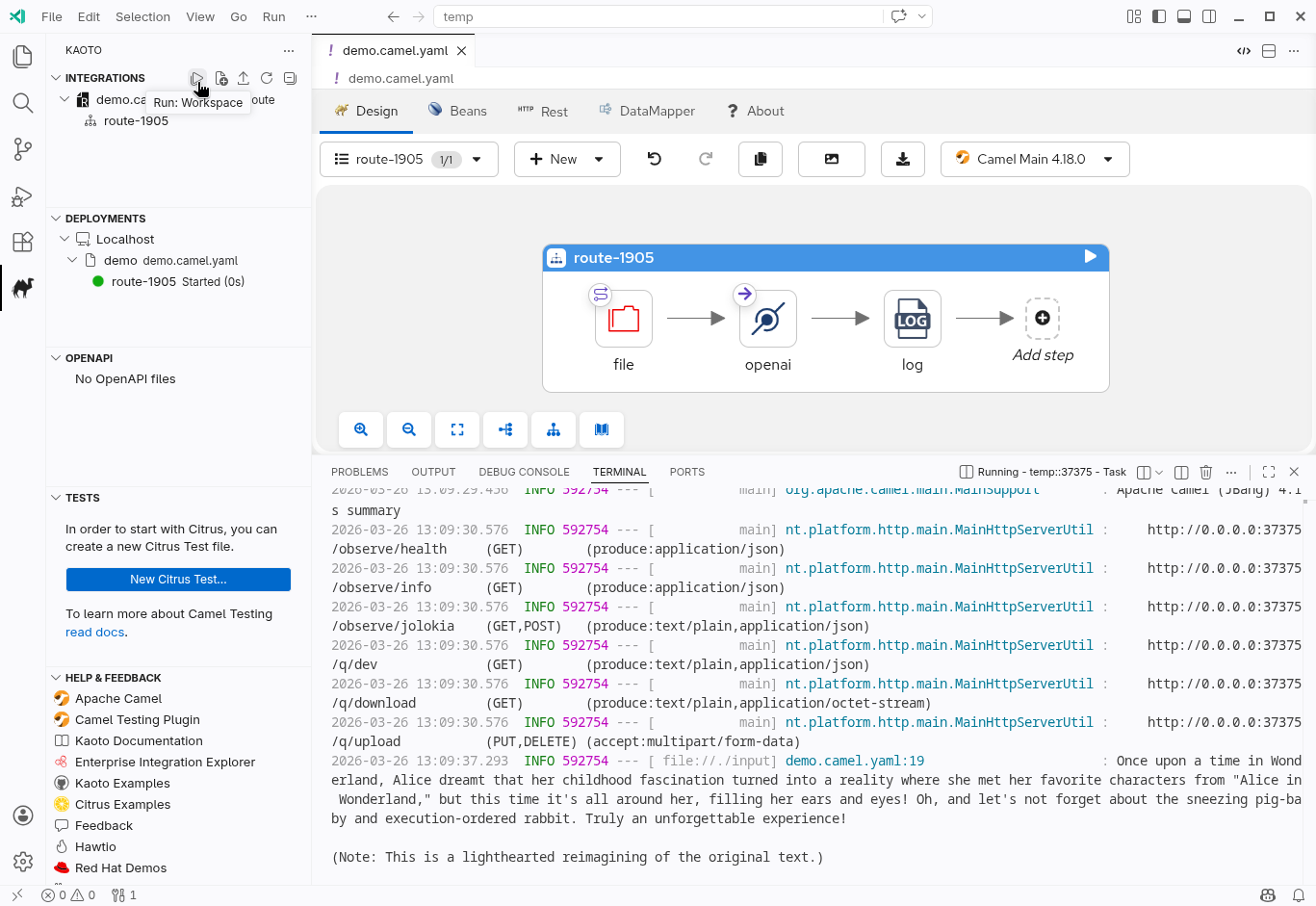
The tutorial focuses on your journey as a developer. It teaches you how to confidently use Kaoto's visual designer. You will learn how to swap nodes using the component catalog and spot missing settings through helpful visual cues. You will also see how to manage your node options using the property panel.
Finally, the newly structured documentation shows you how to handle your integration from start to finish. You will see how easy it is to run, monitor, and stop your Camel routes directly from the workspace (Figure 1). Dive into the new guides to learn the Kaoto interface and start visually designing today!
Camel OpenAI and RAG
Integrating AI into enterprise architectures doesn't require handing over control to unpredictable autonomous agents. Instead, the camel-openai component allows developers to treat Large Language Models (LLMs) as reliable semantic processors, securely bridging the gap between AI models and enterprise data. Recent guides highlight this approach across several practical workflows:
Making LLMs Boring: From Chatbots to Semantic Processors: This article from Ivo Bek explores how to safely connect AI to enterprise systems like databases and message queues. It highlights three architectural patterns for building testable integrations: generative parsing for strictly structuring data, semantic routing for directing flow based on intent, and grounded pipelines to ensure contextual integrity without giving models direct access to sensitive systems.
Automated Email Triage: A hands-on guide from Zineb Bendhiba to building an AI-powered email agent using Apache Camel JBang with zero boilerplate. The pipeline uses camel-openai, the SimpleFunction interface, and Gmail DataType Transformers to fetch messages, sanitize complex HTML, leverage strict JSON schemas for categorization, and asynchronously draft smart replies.
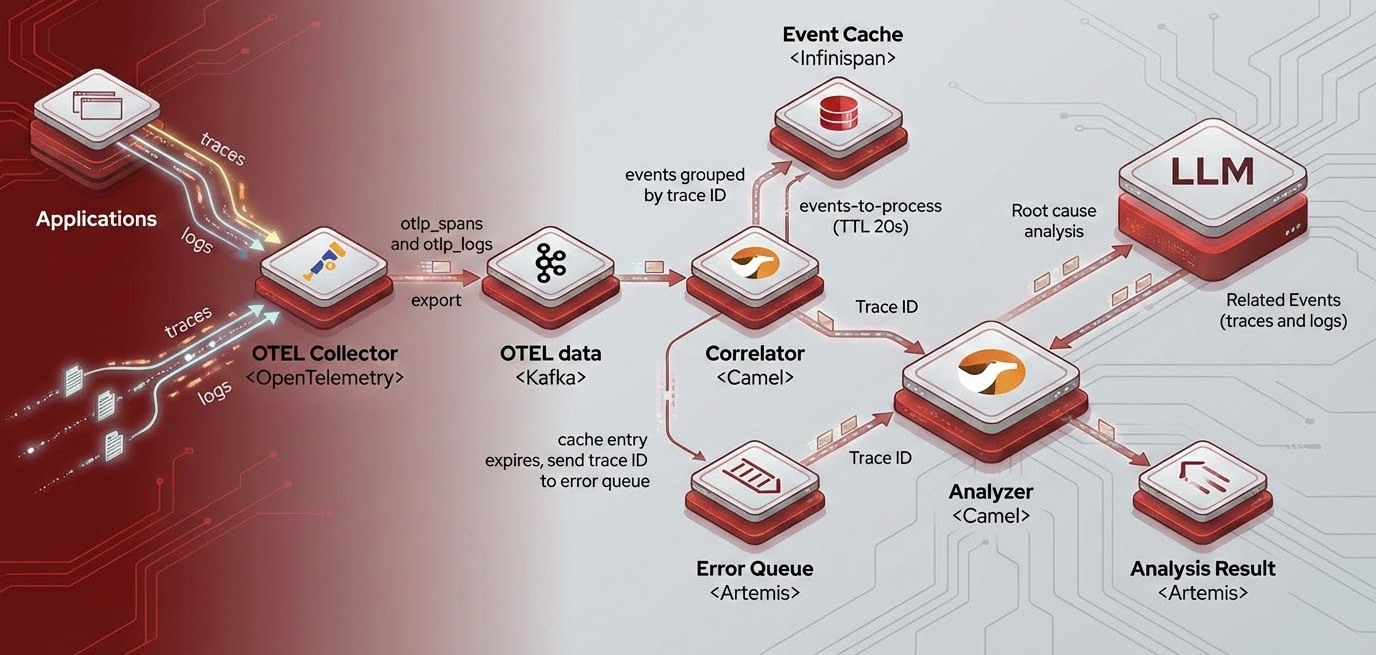
Building a Smart Log Analyzer (Figure 2): This guide from Federico Mariani and Marco Carletti details a distributed log analyzer that decouples event correlation from analysis. An ingestion route transforms OpenTelemetry data and stores it in Infinispan, while a separate analyzer route detects errors and passes the context to a local LLM for root cause analysis. It also highlights how Camel's YAML DSL and tools like JBang and Kaoto streamline LLM-assisted development.
Local AI Summarization with Kaoto: This quickstart from Ricardo Martinez demonstrates how to visually design a Camel route that monitors a directory for text files and automatically generates summaries. By pairing the Kaoto visual designer with the camel-openai component and a local Ollama instance (running models like Granite), developers can rapidly configure system prompts and build local AI document-processing workflows without writing any code.
"Boring RAG" with PostgreSQL: This deep dive from Ivo Bek simplifies Retrieval-Augmented Generation (RAG) into a standard backend task. By combining camel-openai text embeddings with PostgreSQL and pgvector, semantic similarity becomes a straightforward SQL query. This securely indexes documents and generates grounded answers while isolating AI from core databases. This also enables pipelines for use cases like semantic product searches or automated ticket deduplication.
Articles
Dive into the latest developments within Apache Camel 4 through our curated selection of articles.
Drag & Drop in Kaoto: Integration at the Speed of Sight
In this post, Shivam Gupta explores how the newly graduated drag-and-drop capabilities in Kaoto 2.10 streamline visual integration design for Apache Camel. Discover how developers can visually reorganize routes with ease, seamlessly insert components directly onto connection edges, and move entire containers alongside their nested children. By providing real-time visual feedback and eliminating the need for tedious manual reconnections, this feature accelerates the development process and makes building or modifying complex integration flows more intuitive than ever.
The Kaoto Team announces the release of Kaoto 2.10, which includes some major new features. You can now drop in an OpenAPI 3.0 specification and have Kaoto generate the Camel Rest DSL routes for you. REST endpoints, operations, and bindings are all configurable through Kaoto’s intuitive tree-based interface. The DataMapper has also been significantly expanded to handle complex, multi-file enterprise schemas and JSON source bodies directly. There is also a brand new view dedicated to managing and running Citrus tests along with numerous usability enhancements throughout Kaoto.
The Camel team announces the release of Apache Camel 4.18, the LTS release that Red Hat build of Apache Camel 4.18 will be based on. This release significantly upgrades the Simple language with over 50 new functions (totaling 114), initialization blocks for local variables, and new operators including the elvis (?:), ternary (? :), and chain (~>) operators. Camel now also ships with an MCP Server that exposes the Camel Catalog and a set of specialized tools to AI coding assistants. There is also a modern camel-mina-sftp component for OpenSSH certificate-based authentication, and greatly simplified security configuration for Kafka. This release also introduces new components for IBM WatsonX AI, AWS Security Hub, and Azure Functions, while resolving several JDK 25 compatibility issues.
Camel JBang in Motion: Two New Hands-on Labs for Fast-Paced Learning
In this article, Bruno Meseguer describes two new hands-on labs he created with interactive scenarios utilizing Apache Camel JBang. "The Tennis Match" teaches fundamental event flow and CLI commands by simulating players' volleying messages, while "The Grand Prix" uses a motor racing theme to explore advanced routing, live telemetry, and real-time code evolution using the --dev flag. You can run these action-oriented labs entirely from the terminal or jump straight into a pre-configured, browser-based environment via the Red Hat Developer Sandbox.
Apache Camel MCP Server: Bringing Camel Knowledge to AI Coding Assistants
Andrea Cosentino introduces the new Apache Camel Model Context Protocol (MCP) Server which exposes the extensive Camel Catalog to AI coding assistants like Claude Code and OpenAI Codex. Delivered as a Quarkus uber-JAR, this server gives AI tools real-time, structured access to component documentation, Kamelets, and enterprise integration patterns. By providing 15 specialized tools across areas like route validation and security analysis, the MCP server empowers LLMs to accurately explain complex routes, catch typos in endpoint URIs, and flag security vulnerabilities like hardcoded credentials.
Upcoming
Here’s a look at our key planned milestones and where you can connect with us at upcoming conferences:
April
- 20 Apr - JCON Europe
- AI-driven unstructured data extraction using Apache Camel and LangChain4J by Alexandre Gallice
- 22 Apr - Devoxx France
- Camel engineer Zineb Bendhiba will be at the Red Hat booth.
- 23 Apr - The modern integration blueprint: Building AI-ready pipelines (online webinar - recording)
May
- Red Hat build of Apache Camel 4.18 GA
- 4-7 May - IBM Think 2026 in Boston
- 11-14 May - Red Hat Summit 2026 in Atlanta
July
- 14 July - Red Hat Tech day in London

