JupyterLab is a flexible and powerful tool for working with Jupyter notebooks. Its interactive user interface (UI) lets you use terminals, text editors, file browsers, and other components alongside your Jupyter notebook. JupyterLab 3.0 was released in January 2021.
Project Thoth develops open source tools that enhance the day-to-day lives of developers and data scientists. Thoth uses machine-generated knowledge to boost your applications' performance, security, and quality through reinforcement learning with artificial intelligence. (Watch this video to learn more about resolving dependencies with reinforcement learning.)
This machine learning approach is implemented in Thoth adviser, a recommendation engine for Python applications. Thoth integrations use this knowledge to provide software stack recommendations based on user inputs.
This article introduces you to jupyterlab-requirements, a JupyterLab extension for managing and optimizing Python dependencies in your Jupyter notebooks. As you will learn, using the jupyterlab-requirements extension is a smart and easy way to ensure that your code and experiments are always reproducible.
Making application dependencies reproducible
When creating code or conducting experiments, reproducibility is an important requirement. Ensuring that others can rerun experiments in the same environment the creator used is critical, especially when developing machine learning applications.
Let’s consider one of the first steps for developing an application: specifying dependencies. For example, your project might depend on pandas for data exploration and manipulation or TensorFlow for training a model.
One approach to this task is to run a command in the notebook cell to install the dependencies directly on the host, as shown in Figure 1. This way, the next user can run the same cell and install similar packages.

Another potential strategy is to provide a requirements.txt file that lists all of the dependencies so that someone else can install them before starting the notebook. Figure 2 shows an example.

Do you see any issues with these two approaches to specifying dependencies?
Neither one supports reproducibility!
In the first scenario, let's say another user tried to rerun the same cell sometime after a new version of the library was released. They might experience different behavior from the initial notebook output.
The same issue can arise with the requirements.txt file, only with the package names. Even if you stated the direct dependencies with the exact version number, each of those dependencies might depend on other so-called transitive dependencies that are also installed.
To guarantee reproducibility, you must account for all dependencies with specific version numbers for direct and transitive dependencies, including all hashes used to verify the provenance of the packages for security reasons (check these docs to learn more about security in software stacks). To be even more precise, the Python version, operating system, and hardware all influence the code’s behavior. You should share all of this information so other users can experience the same behavior and obtain similar results.
Project Thoth aims to help you specify direct and transitive dependencies so that your applications are always reproducible and you can focus on more pressing challenges.
Dependency management with jupyterlab-requirements
The Thoth team has introduced jupyterlab-requirements, a JupyterLab extension for dependency management that is currently focused on the Python ecosystem. This extension lets you manage your project's dependencies directly from a Jupyter notebook, as shown in Figure 3.
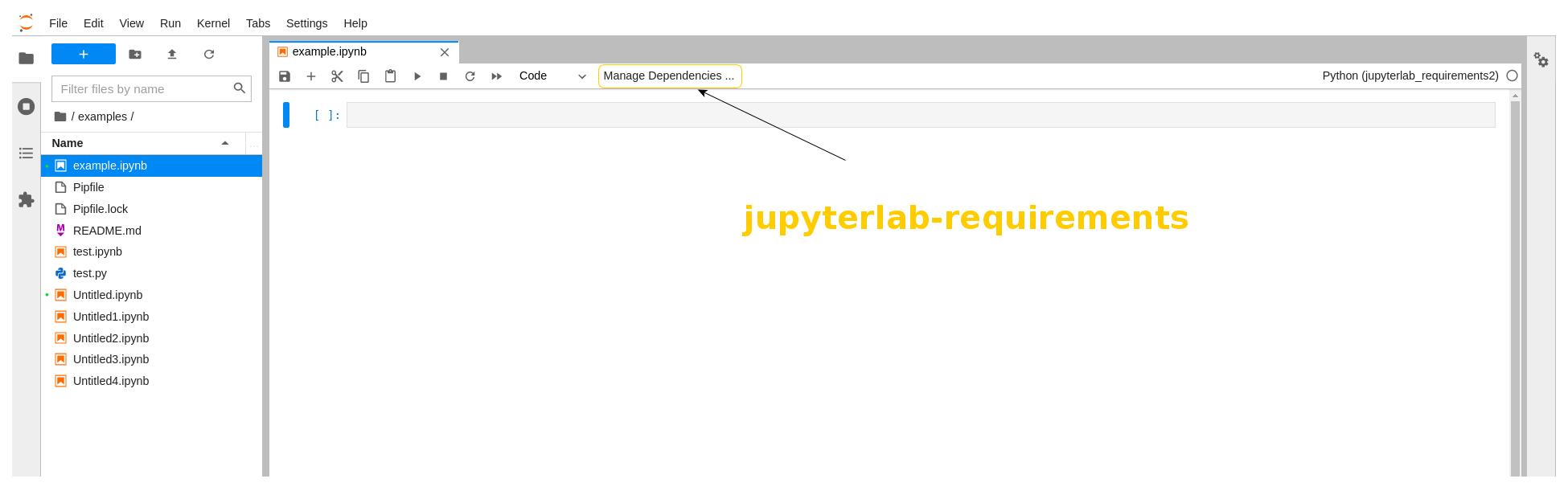
When you click Manage Dependencies, you will see the dialog box shown in Figure 4.

Initially, the extension will not identify any dependencies when you start a new notebook; it checks the notebook metadata to detect them. You can add your packages by clicking the button with the plus-sign (+) icon, as shown in Figure 5.
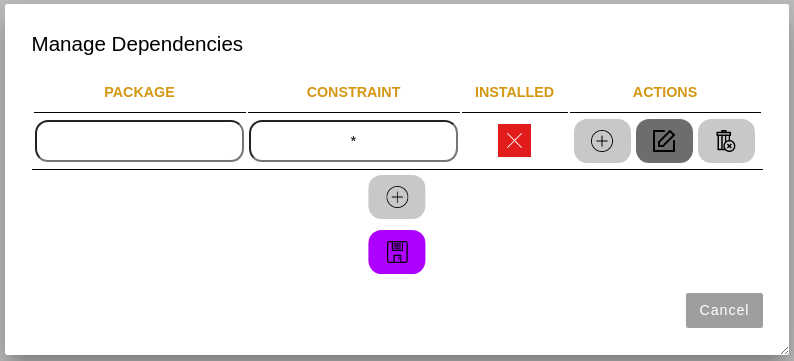
After saving, an Install button will appear. You can check the package names and versions before installing the dependencies, as shown in Figure 6.
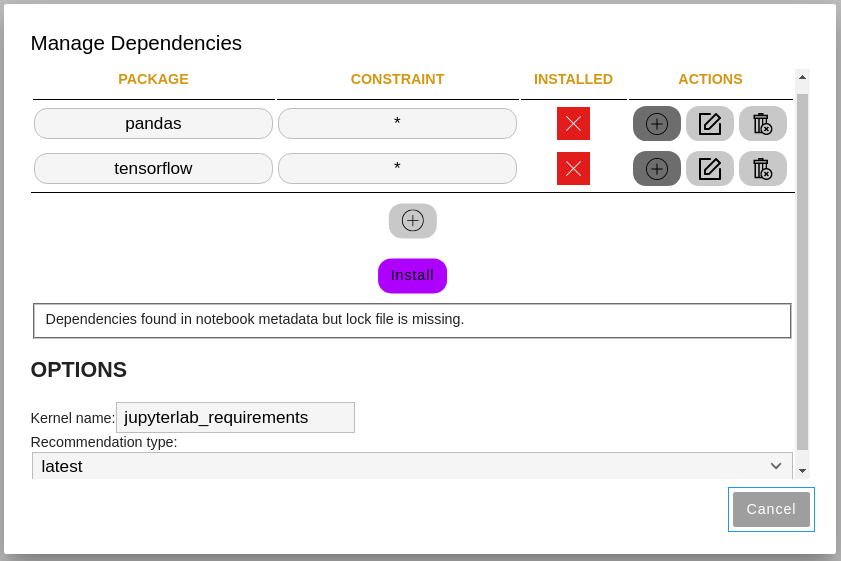
After clicking Install, you will see the screen shown in Figure 7.
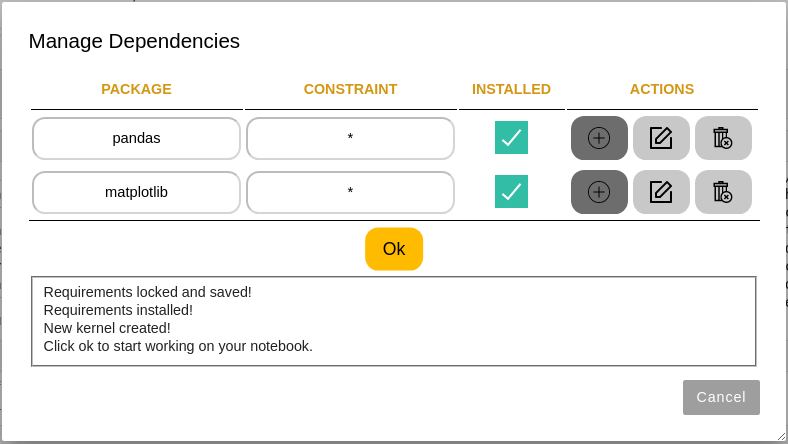
All dependencies—both direct and transitive—will be locked, saved in the notebook metadata, and installed. What’s more, the extension automatically creates and sets the kernel for your notebook. No human intervention is necessary, and you are ready to work on your project.
Managing dependencies in an existing notebook
If you have existing notebooks with code, you can still use the jupyterlab-requirements extension to share them. The invectio library analyzes code in the notebook and suggests libraries that must be installed to run the notebook. Figure 8 shows an example.

Once again, you can just install the dependencies and start working on your project.
Locking dependencies with Thoth or Pipenv
The resolution engine you use to lock dependencies provides two files: a Pipfile and a Pipfile.lock. The Pipfile.lock file states all direct and transitive project dependencies with specific versions and hashes. The notebook metadata stores these files and information about the Python version, operating system, and hardware detected. This way, anyone using the same notebook can re-create the environment that the original developer used.
Two resolution engines are available at the moment: Thoth and Pipenv.
Currently, Thoth is used by default, with Pipenv as a backup. This setup guarantees that the user will receive the software stack to work on their projects. In the future, users will be able to select a specific resolution engine.
Using the Thoth resolution engine, you can request an optimized software stack that satisfies your requirements from the Thoth recommendation system. You can choose from the following recommendation types according to your particular needs:
- Latest
- Performance
- Security
- Stable
- Testing
For more information about the various recommendation types, visit the Project Thoth website.
Note: The notebook metadata stores which resolution engine was used so that anyone can immediately see which one was used to resolve dependencies.
Configuring the runtime environment
You don’t need to worry about the runtime environment when using the Thoth resolution engine. Thoth automatically identifies the information needed to generate a recommendation and creates a Thoth configuration file containing the following parameters:
host: {THOTH_SERVICE_HOST}
tls_verify: true
requirements_format: {requirements_format}

runtime_environments:
  - name: '{os_name}:{os_version}'
    operating_system:
      name: {os_name}
      version: '{os_version}'
    hardware:
      cpu_family: {cpu_family}
      cpu_model: {cpu_model}
      gpu_model: {gpu_model}
    python_version: '{python_version}'
    cuda_version: {cuda_version}
    recommendation_type: stable
    platform: '{platform}'
Note: If you use the Thoth resolution engine, the notebook metadata will also contain information about the runtime environment used for the notebook. In this way, other data scientists using the notebook will be warned about using a different one.
Installing dependencies and creating the kernel
Once a lock file is created using either Thoth or Pipenv, the micropipenv tool installs the dependencies in the virtual environment. The micropipenv tool supports dependency management in Python and beyond ("one library to rule them all").
Once all of the dependencies are installed in your kernel, you are ready to work on your notebook.
You can choose the name of the new kernel and select the requirements from the drop-down menu. Once everything is installed, the kernel is assigned to the current notebook automatically.
Conclusion
The jupyterlab-requirements extension is an open source project maintained by the Thoth team. We are currently exploring new features for the UI, and we welcome anyone who would like to contribute or give us feedback about the extension.
Have a look at the open issues and get in touch with the team if you like the project or if you find any issues with the extension. The Thoth team also has a public channel where you can ask questions about the project. We are always happy to collaborate with the community on any of our repositories.
Last updated: February 5, 2024
