Redhat Developers  Logo
  • AI

    Get started with AI

    • Red Hat AI
      Accelerate the development and deployment of enterprise AI solutions.
    • AI learning hub
      Explore learning materials and tools, organized by task.
    • AI interactive demos
      Click through scenarios with Red Hat AI, including training LLMs and more.
    • AI/ML learning paths
      Expand your OpenShift AI knowledge using these learning resources.
    • AI quickstarts
      Focused AI use cases designed for fast deployment on Red Hat AI platforms.
    • No-cost AI training
      Foundational Red Hat AI training.

    Featured resources

    • OpenShift AI learning
    • Open source AI for developers
    • AI product application development
    • Open source-powered AI/ML for hybrid cloud
    • AI and Node.js cheat sheet

    Red Hat AI Factory with NVIDIA

    • Red Hat AI Factory with NVIDIA is a co-engineered, enterprise-grade AI solution for building, deploying, and managing AI at scale across hybrid cloud environments.
    • Explore the solution
  • Learn

    Self-guided

    • Documentation
      Find answers, get step-by-step guidance, and learn how to use Red Hat products.
    • Learning paths
      Explore curated walkthroughs for common development tasks.
    • Guided learning
      Receive custom learning paths powered by our AI assistant.
    • See all learning

    Hands-on

    • Developer Sandbox
      Spin up Red Hat's products and technologies without setup or configuration.
    • Interactive labs
      Learn by doing in these hands-on, browser-based experiences.
    • Interactive demos
      Click through product features in these guided tours.

    Browse by topic

    • AI/ML
    • Automation
    • Java
    • Kubernetes
    • Linux
    • See all topics

    Training & certifications

    • Courses and exams
    • Certifications
    • Skills assessments
    • Red Hat Academy
    • Learning subscription
    • Explore training
  • Build

    Get started

    • Red Hat build of Podman Desktop
      A downloadable, local development hub to experiment with our products and builds.
    • Developer Sandbox
      Spin up Red Hat's products and technologies without setup or configuration.

    Download products

    • Access product downloads to start building and testing right away.
    • Red Hat Enterprise Linux
    • Red Hat AI
    • Red Hat OpenShift
    • Red Hat Ansible Automation Platform
    • See all products

    Featured

    • Red Hat build of OpenJDK
    • Red Hat JBoss Enterprise Application Platform
    • Red Hat OpenShift Dev Spaces
    • Red Hat Developer Toolset

    References

    • E-books
    • Documentation
    • Cheat sheets
    • Architecture center
  • Community

    Get involved

    • Events
    • Live AI events
    • Red Hat Summit
    • Red Hat Accelerators
    • Community discussions

    Follow along

    • Articles & blogs
    • Developer newsletter
    • Videos
    • Github

    Get help

    • Customer service
    • Customer support
    • Regional contacts
    • Find a partner

    Join the Red Hat Developer program

    • Download Red Hat products and project builds, access support documentation, learning content, and more.
    • Explore the benefits

Introduction to Tekton and Argo CD for multicluster development

September 3, 2020
Ryan Cook
Related topics:
CI/CDDevOpsKubernetesOperators
Related products:
Red Hat OpenShift Container Platform

    Over the last two years, my coworkers and I have worked on developing a multicluster project for Kubernetes and Red Hat OpenShift. We needed a way to efficiently deploy applications, oversee access and authorization, and manage application placement across clusters. This need led us to develop with Argo CD and GitOps.

    Recently, I switched to another team that also focuses on multicluster development. During my interviews, I promised to help create a catalog of our projects and develop a process to deploy them rapidly. Together, the catalog and process would allow the team to just work on things, rather than trying to figure out how to get them operational. However, I quickly hit a wall. With Argo CD, I couldn't control when and in what order cluster objects were deployed onto new or existing clusters. Eventually, I discovered Tekton, a powerful addition to my development toolset.

    In this article, I briefly describe my process for developing the catalog and process tool. I'll introduce the components involved, explain a little about how Tekton Pipelines works, and leave you with a tool that you can share with your organization and teams.

    Argo CD and Tekton

    Argo CD watches cluster objects stored in a Git repository and manages the create, update, and delete (CRUD) processes for objects within the repository. Tekton is a CI/CD tool that handles all parts of the development lifecycle, from building images to deploying cluster objects.

    Tekton runs one or more tasks, which launch the appropriate container(s) and execute a specific set of commands. A user can combine a series of tasks to form a Tekton pipeline. In a pipeline to build a container image, for example, the developer pushes the code to a repository. Tekton sees the change and launches a pipeline, which builds the code, creates a container image, and pushes it to the image registry.

    Developing the catalog project

    For the catalog project, I needed to deploy two clusters and connect them using Amazon Web Services (AWS) Virtual Private Cloud (VPC) peering. Then, I needed to deploy objects to both clusters. To start, I installed the OpenShift Operators for Hive and Argo CD. I stored my Hive cluster deployments within a Git repository, then had Argo CD watch the repository to deploy the clusters.

    The issue was that I couldn't get the cluster to import into Argo CD and programmatically create the Argo CD YAML files, which I needed to deploy the Kubernetes objects from the Git repository. To overcome the issue, I used Tekton. The diagram in Figure 1 shows how I used Tekton pipelines to define precisely when each item should be applied to the newly created clusters.
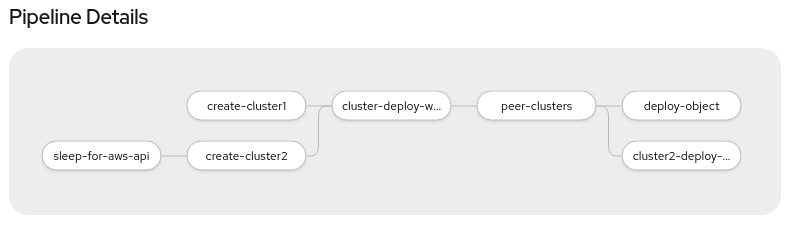
    Diagram showing the flow through the pipeline
    Figure 1: The Tekton pipeline for importing into Argo CD and programmatically creating the Argo CD YAML files.

    Getting started

    I set up the tekton-argocd project repository to help guide you through this workflow. Before getting started, fork the repository. You will add clusters to the /clusters directory. Modify the repository and create the application within Argo CD:

    $ cd ~/git/tekton-argocd
    
    $ sed -i ‘s/cooktheryan/YOURUSERNAME/g’ argo-app/*.yaml
    
    $ oc create -f argo-app
    

    These commands create a multitude of tasks and a pipeline within the Hive namespace, all of which are managed by Argo CD.

    Running a pipeline

    Log into the OpenShift console and select the project hive and the Pipelines menu from the list of available components. You will find your newly created pipelines there. After adding the clusters to your Git repository, specify the required variables as shown:

    Field Value
    pathToYamlFile1 clusters/east1
    pathToYamlFile2 clusters/east2
    cluster1 east1
    cluster2 clusters/east2
    pathToYamlFile3 acm
    git-source Create Pipeline Resource

    Once the dialog box is filled out (see Figure 2), run the pipeline.
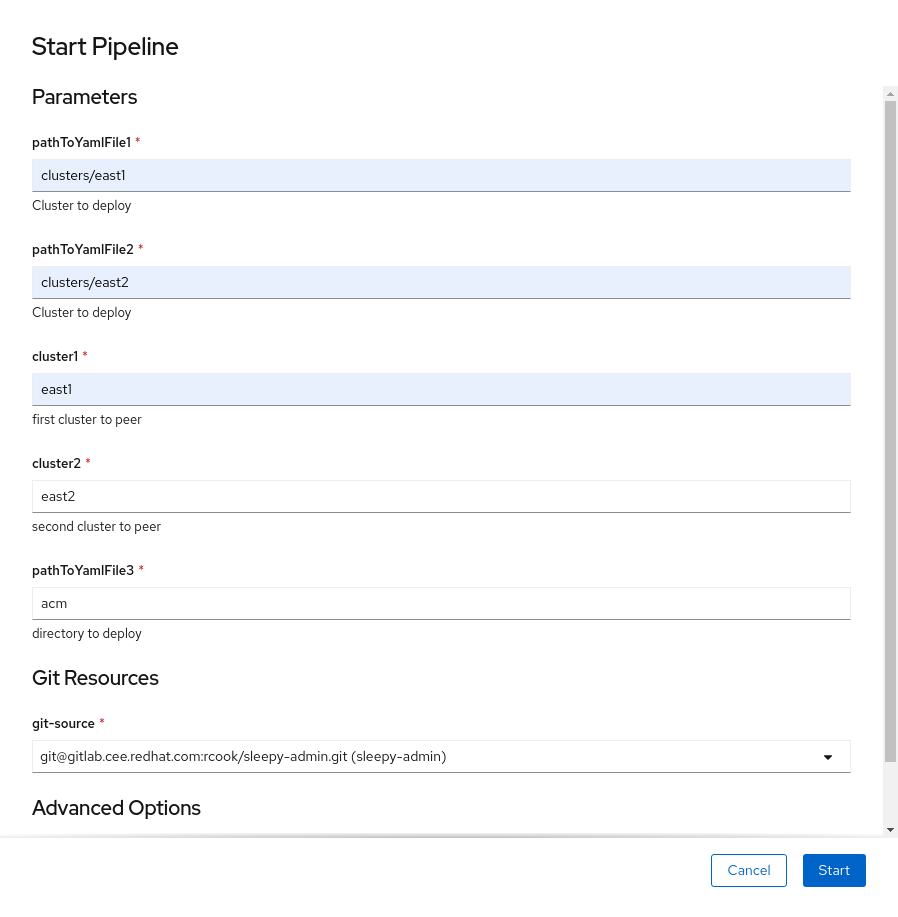
    The OpenShift "Start Pipeline" dialog box filled out for the example.
    Figure 2: Specify the required variables, and run the pipeline in the OpenShift console.

    You now have a repeatable process to deploy two clusters, peer them together, and deploy an application to each of the clusters. This operation is possible because Hive saves the kubeconfigs for the newly created clusters as a secret. It then creates a task called remote-cluster-apply, which uses the secret and issues kubectl create -f commands against the Hive-created clusters.

    Within the repository, you will notice additional Tekton pipelines. You can use these pipelines to create a single cluster and remotely apply one or more objects to the cluster. I have included pipelines within the repository cleanup to help with managing the cluster lifecycle.

    Using Tekton for CI and Argo for CD

    Think of pipelines as an extra pair of hands for ensuring that no request or workflow process is ever forgotten. Combining Argo CD and Tekton creates safer and repeatable processes, which allows everyone on the team to be successful. Watch this video to learn more about combining Argo CD and Tekton: GitOps Continued: Using Tekton for CI and Argo for CD.

    Conclusion

    There is no perfect tool to accomplish everything. With this project, I found a way to pair specific tools to create a consistent and repeatable experience. Sharing Tekton tasks among your organization, distributed by Argo CD, allows teams to collaborate and increases team efficiency across the development and operational lifecycles.

    Last updated: October 31, 2023

    Recent Posts

    • Protect data offloaded to GPU-accelerated environments with OpenShift sandboxed containers

    • Case study: Measuring energy efficiency on the x64 platform

    • How to prevent AI inference stack silent failures

    • Preventing GPU waste: A guide to JIT checkpointing with Kubeflow Trainer on OpenShift AI

    • How to manage TLS certificates used by OpenShift GitOps operator

    Red Hat Developers logo LinkedIn YouTube Twitter Facebook

    Platforms

    • Red Hat AI
    • Red Hat Enterprise Linux
    • Red Hat OpenShift
    • Red Hat Ansible Automation Platform
    • See all products

    Build

    • Developer Sandbox
    • Developer tools
    • Interactive tutorials
    • API catalog

    Quicklinks

    • Learning resources
    • E-books
    • Cheat sheets
    • Blog
    • Events
    • Newsletter

    Communicate

    • About us
    • Contact sales
    • Find a partner
    • Report a website issue
    • Site status dashboard
    • Report a security problem

    RED HAT DEVELOPER

    Build here. Go anywhere.

    We serve the builders. The problem solvers who create careers with code.

    Join us if you’re a developer, software engineer, web designer, front-end designer, UX designer, computer scientist, architect, tester, product manager, project manager or team lead.

    Sign me up

    Red Hat legal and privacy links

    • About Red Hat
    • Jobs
    • Events
    • Locations
    • Contact Red Hat
    • Red Hat Blog
    • Inclusion at Red Hat
    • Cool Stuff Store
    • Red Hat Summit
    © 2026 Red Hat

    Red Hat legal and privacy links

    • Privacy statement
    • Terms of use
    • All policies and guidelines
    • Digital accessibility

    Chat Support

    Please log in with your Red Hat account to access chat support.