Redhat Developers  Logo
  • AI

    Get started with AI

    • Red Hat AI
      Accelerate the development and deployment of enterprise AI solutions.
    • AI learning hub
      Explore learning materials and tools, organized by task.
    • AI interactive demos
      Click through scenarios with Red Hat AI, including training LLMs and more.
    • AI/ML learning paths
      Expand your OpenShift AI knowledge using these learning resources.
    • AI quickstarts
      Focused AI use cases designed for fast deployment on Red Hat AI platforms.
    • No-cost AI training
      Foundational Red Hat AI training.

    Featured resources

    • OpenShift AI learning
    • Open source AI for developers
    • AI product application development
    • Open source-powered AI/ML for hybrid cloud
    • AI and Node.js cheat sheet

    Red Hat AI Factory with NVIDIA

    • Red Hat AI Factory with NVIDIA is a co-engineered, enterprise-grade AI solution for building, deploying, and managing AI at scale across hybrid cloud environments.
    • Explore the solution
  • Learn

    Self-guided

    • Documentation
      Find answers, get step-by-step guidance, and learn how to use Red Hat products.
    • Learning paths
      Explore curated walkthroughs for common development tasks.
    • Guided learning
      Receive custom learning paths powered by our AI assistant.
    • See all learning

    Hands-on

    • Developer Sandbox
      Spin up Red Hat's products and technologies without setup or configuration.
    • Interactive labs
      Learn by doing in these hands-on, browser-based experiences.
    • Interactive demos
      Click through product features in these guided tours.

    Browse by topic

    • AI/ML
    • Automation
    • Java
    • Kubernetes
    • Linux
    • See all topics

    Training & certifications

    • Courses and exams
    • Certifications
    • Skills assessments
    • Red Hat Academy
    • Learning subscription
    • Explore training
  • Build

    Get started

    • Red Hat build of Podman Desktop
      A downloadable, local development hub to experiment with our products and builds.
    • Developer Sandbox
      Spin up Red Hat's products and technologies without setup or configuration.

    Download products

    • Access product downloads to start building and testing right away.
    • Red Hat Enterprise Linux
    • Red Hat AI
    • Red Hat OpenShift
    • Red Hat Ansible Automation Platform
    • See all products

    Featured

    • Red Hat build of OpenJDK
    • Red Hat JBoss Enterprise Application Platform
    • Red Hat OpenShift Dev Spaces
    • Red Hat Developer Toolset

    References

    • E-books
    • Documentation
    • Cheat sheets
    • Architecture center
  • Community

    Get involved

    • Events
    • Live AI events
    • Red Hat Summit
    • Red Hat Accelerators
    • Community discussions

    Follow along

    • Articles & blogs
    • Developer newsletter
    • Videos
    • Github

    Get help

    • Customer service
    • Customer support
    • Regional contacts
    • Find a partner

    Join the Red Hat Developer program

    • Download Red Hat products and project builds, access support documentation, learning content, and more.
    • Explore the benefits

Developing and testing on production with Kubernetes and Istio Workspace

July 14, 2020
Bartosz Majsak
Related topics:
ContainersDevOpsKubernetesMicroservices
Related products:
Red Hat OpenShift

    Due to container-orchestration platforms like Kubernetes and Red Hat OpenShift, developers have become very efficient about deploying and managing distributed and containerized applications. But can we say the same about application development and testing?

    In this article, I briefly discuss how cloud-native development is transforming the traditional development cycle of coding, building, and testing. I then introduce the idea of testing on production, not as a meme but as a necessity. Finally, I introduce Istio Workspace, a tool for developers working with distributed systems running on Kubernetes or OpenShift.

    Note: This article includes a video demonstration for testing on production with Istio Workspace, you can find it at the end.

    Cloud-native redefines the inner loop of development

    Those of us who come from a traditional background of working on self-contained systems (also known as monoliths) are accustomed to certain things: Running our applications locally, having instant access to the entire codebase, and being able to debug and reason about the application with ease. We are so spoiled by the undisturbed, inner-loop development cycle of coding, building, and testing that we take it for granted. Figure 1 illustrates the inner loop of a traditional development cycle.
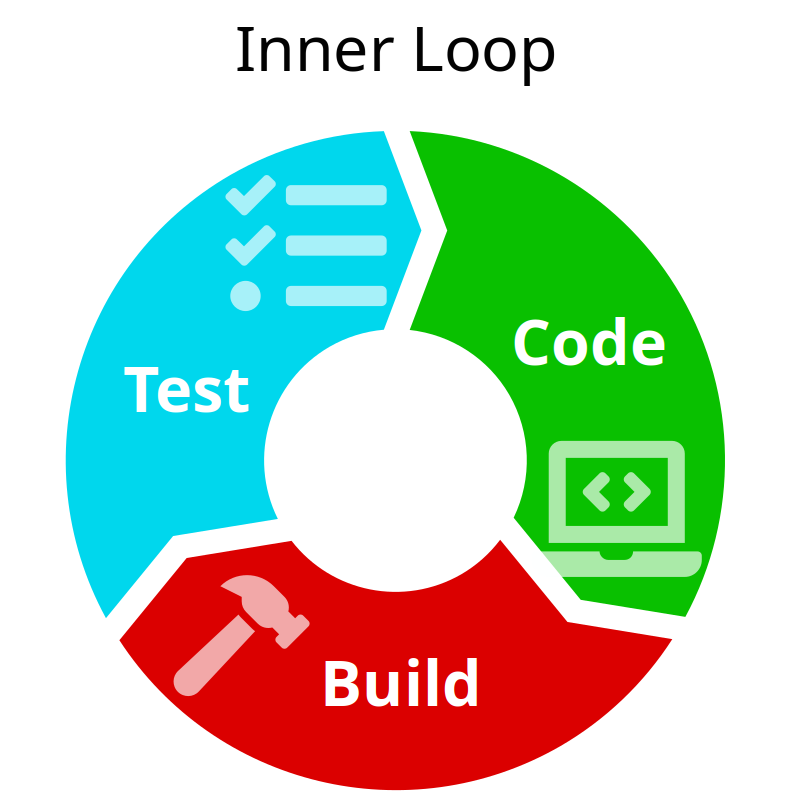
    A flow diagram of the inner-loop of test, code, and build.

    These days, when embracing the new world of containerized, cloud-native applications, we want the traditional activities of inner-loop development to be available out of the box. But, in addition to convenience, these technologies introduce layers of complexity. The cloud-native inner loop has to accommodate activities like building and pushing images, and deploying new services, as shown in Figure 2.
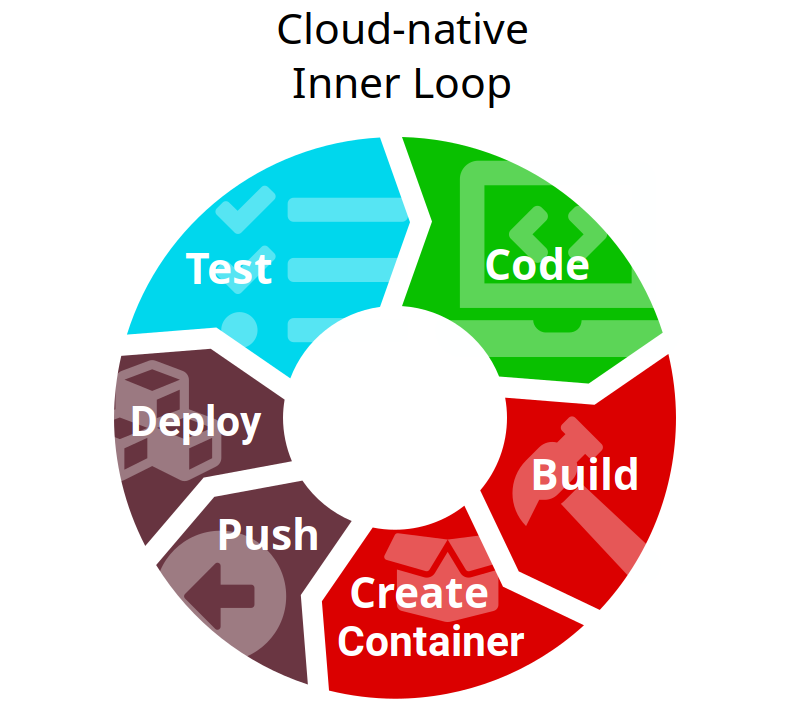
    A flow diagram of the cloud-native inner loop with new activities.

    Each of these new activities adds time to the development process. Most developers would rather spend that time doing interesting things, not waiting on the build process. Luckily, we have plenty of tools to shorten the development cycle, improve productivity, and provide faster feedback. Microservices are not that new, nor are containers and their orchestration platforms. Some of these tools require changing the traditional application infrastructure, and adopting new technologies comes with a learning curve—but that's the exciting part.

    The challenges of testing locally

    Testing new functionality before it reaches production has always been hard, but the shift from monoliths to microservices has brought scale, which has increased the challenge of testing locally. We see developers trying to use tools like Red Hat CodeReady Containers or Minikube to spin up whole applications composed of multiple services.  While this approach works well when projects are relatively small, it's not so easy when you introduce more fine-grained services, and the graph starts to grow. It is not feasible to spin up even a medium-sized distributed system on your own machine.

    Using replicated environments such as staging or quality engineering (QE) gives some confidence, but it's expensive in terms of both cost and maintenance. Despite the effort of defining infrastructure as code, there are still potential differences in the target machines' configuration; they just show up on the operating system and hardware level. It is also frequently impossible to get the same load and volume of data on the test system that is in the actual system. Therefore, testing on production is no longer a meme: It's a reality and a necessity.

    What's needed is a way to use your favorite tools to develop, build, and debug your code locally, but have your application behave as if it were running in the production cluster.

    Testing on production with Istio Workspace

    Testing on production sounds scary and dangerous because a lot of things can go wrong. One thing to worry about is the impact on regular application users. Fortunately, Istio Workspace supports testing on production in an unobtrusive way. It lets you test your changes without users noticing a glitch.

    In the following video, we introduce Istio Workspace as a tool for developing and testing distributed systems running on Kubernetes or OpenShift, while leveraging a service mesh. As you will see, Istio Workspace lets you run the service you are working on locally while interacting with other services running in the cluster. All you need to do is invoke ike develop. Sounds interesting? Watch the demo to get a feeling for what you can do with Istio Workspace.

    Last updated: March 30, 2023

    Recent Posts

    • Debugging image mode with Red Hat OpenShift 4.20: A practical guide

    • EvalHub: Because "looks good to me" isn't a benchmark

    • SQL Server HA on RHEL: Meet Pacemaker HA Agent v2 (tech preview)

    • Deploy with confidence: Continuous integration and continuous delivery for agentic AI

    • Every layer counts: Defense in depth for AI agents with Red Hat AI

    Red Hat Developers logo LinkedIn YouTube Twitter Facebook

    Platforms

    • Red Hat AI
    • Red Hat Enterprise Linux
    • Red Hat OpenShift
    • Red Hat Ansible Automation Platform
    • See all products

    Build

    • Developer Sandbox
    • Developer tools
    • Interactive tutorials
    • API catalog

    Quicklinks

    • Learning resources
    • E-books
    • Cheat sheets
    • Blog
    • Events
    • Newsletter

    Communicate

    • About us
    • Contact sales
    • Find a partner
    • Report a website issue
    • Site status dashboard
    • Report a security problem

    RED HAT DEVELOPER

    Build here. Go anywhere.

    We serve the builders. The problem solvers who create careers with code.

    Join us if you’re a developer, software engineer, web designer, front-end designer, UX designer, computer scientist, architect, tester, product manager, project manager or team lead.

    Sign me up

    Red Hat legal and privacy links

    • About Red Hat
    • Jobs
    • Events
    • Locations
    • Contact Red Hat
    • Red Hat Blog
    • Inclusion at Red Hat
    • Cool Stuff Store
    • Red Hat Summit
    © 2026 Red Hat

    Red Hat legal and privacy links

    • Privacy statement
    • Terms of use
    • All policies and guidelines
    • Digital accessibility

    Chat Support

    Please log in with your Red Hat account to access chat support.