Red Hat OpenShift Serverless 1.5.0 (currently in tech preview) runs on Red Hat OpenShift Container Platform 4.3. It enables stateful, stateless, and serverless workloads to all operate on a single multi-cloud container platform. Apache Camel K is a lightweight integration platform that runs natively on Kubernetes. Camel K has serverless superpowers.
In this article, I will show you how to use OpenShift Serverless and Camel K to create a serverless Java application that you can scale up or down on demand.
Prerequisites
The following three technologies need to be installed before beginning this exercise:
- Red Hat OpenShift Container Platform 4.3
- Red Hat OpenShift Serverless 1.5.0 Tech Preview
- Apache Camel K Operator 1.0.0 RC1
Other technologies used
Knative Serving and Kamel (the Camel K CLI tool) will be installed as part of this exercise. Knative Serving on OpenShift Container Platform 4.3 builds on Kubernetes and Kourier to support deploying and serving serverless applications. It creates a set of custom resource definitions (CRDs) that are used to define and control the behavior of serverless workloads on an OpenShift cluster.
The kamel CLI tool interacts with the Camel K integration framework, letting us configure our clusters and run integrations. Together with Knative Serving, this tool helps us build and deploy serverless applications and test our integration. The Kamel CLI will run locally to deploy your Camel route directly onto a Kubernetes or OpenShift cluster.
Install OpenShift Serverless Operator
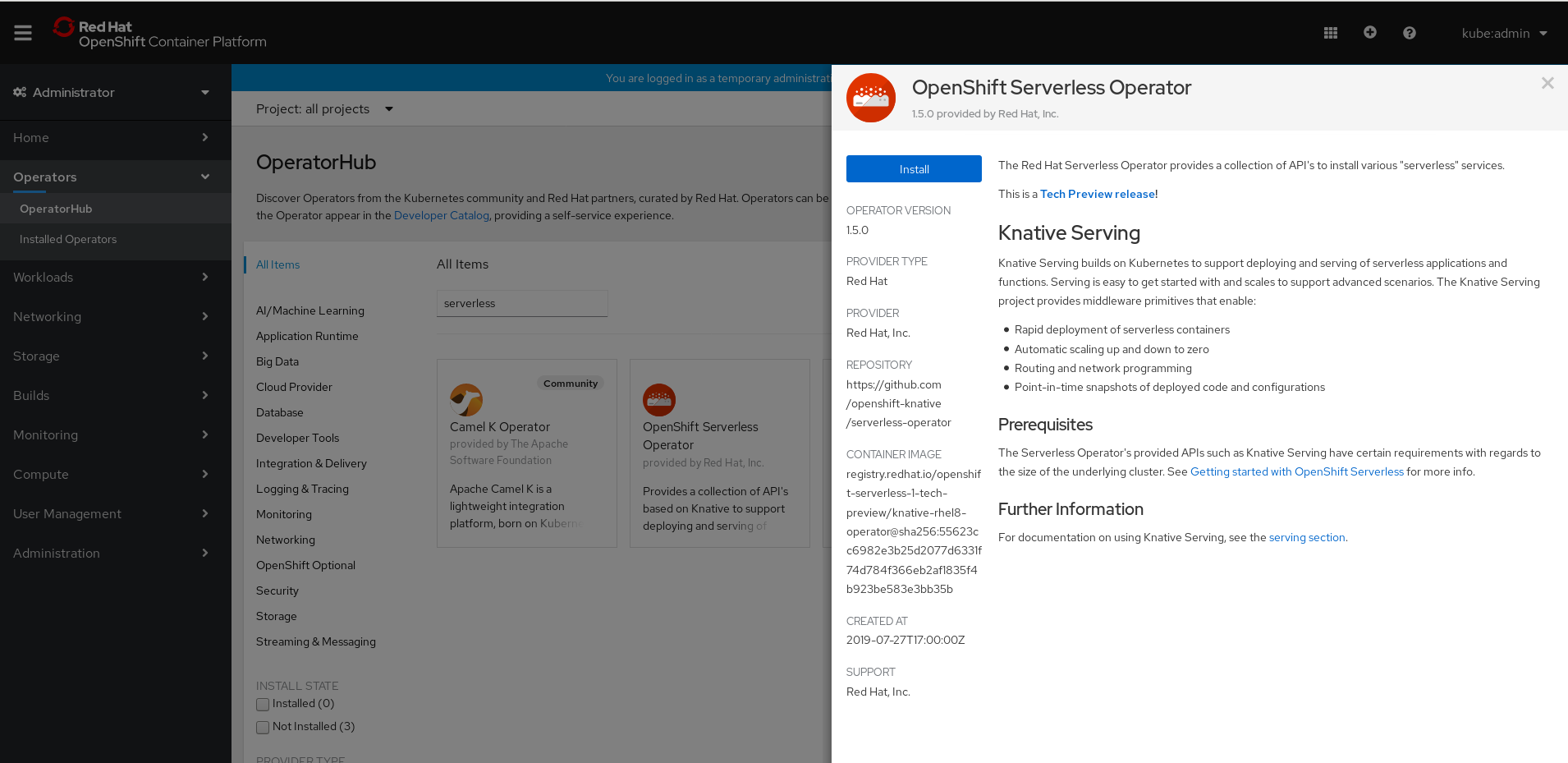
OpenShift Serverless 1.5.0 Tech Preview is compatible with OpenShift Container Platform (OCP) 4.3. Assuming that you have OpenShift Container Platform 4.3 in your development environment, navigate to OCP's OperatorHub in the web console. Select OpenShift Serverless Operator from the list of available operators, then click Install, as shown in Figure 1.
Before we continue, let's verify that we've installed OpenShift Serverless Operator:
$ oc get csv -n openshift-operators
You should receive the following confirmation:
NAME                       DISPLAY                       VERSION REPLACES                    PHASE
serverless-operator.v1.5.0 OpenShift Serverless Operator 1.5.0    serverless-operator.v1.4.1 Succeeded
Install Knative Serving
Next, we'll install Knative Serving, which we'll use to deploy our serverless application. The serving.yaml file creates a KnativeServing object in the knative-serving namespace:
apiVersion: v1
kind: Namespace
metadata:
  name: knative-serving
---
apiVersion: operator.knative.dev/v1alpha1
kind: KnativeServing
metadata:
  name: knative-serving
  namespace: knative-serving
Enter the following command to apply the object:
$ oc apply -f serving.yaml
namespace/knative-serving created
knativeserving.operator.knative.dev/knative-serving created
Check for pods
After you have installed the KnativeServing object, check for pods in the new knative-serving-ingress and knative-serving namespaces:
$ oc get pods -n knative-serving-ingress
You should see the following pods created in the knative-serving-ingress namespace:
NAME                                    READY STATUS  RESTARTS AGE
3scale-kourier-control-568f886865-fptx4 1/1   Running 0        27m
3scale-kourier-gateway-785c6bd959-b2t6c 1/1   Running 0        27m
Now, check the knative-serving namespace:
NAME                            READY STATUS   RESTARTS AGE
activator-7cc6dbf497-4zwdf      1/1   Running  0        27m
autoscaler-798cfcd656-gqkdc     1/1   Running  0        27m
autoscaler-hpa-5cb5655744-cxff2 1/1   Running  0        27m
controller-55c7dd95f6-9qftj     1/1   Running  0        27m
webhook-769f994744-mjsrr        1/1   Running  0        27m
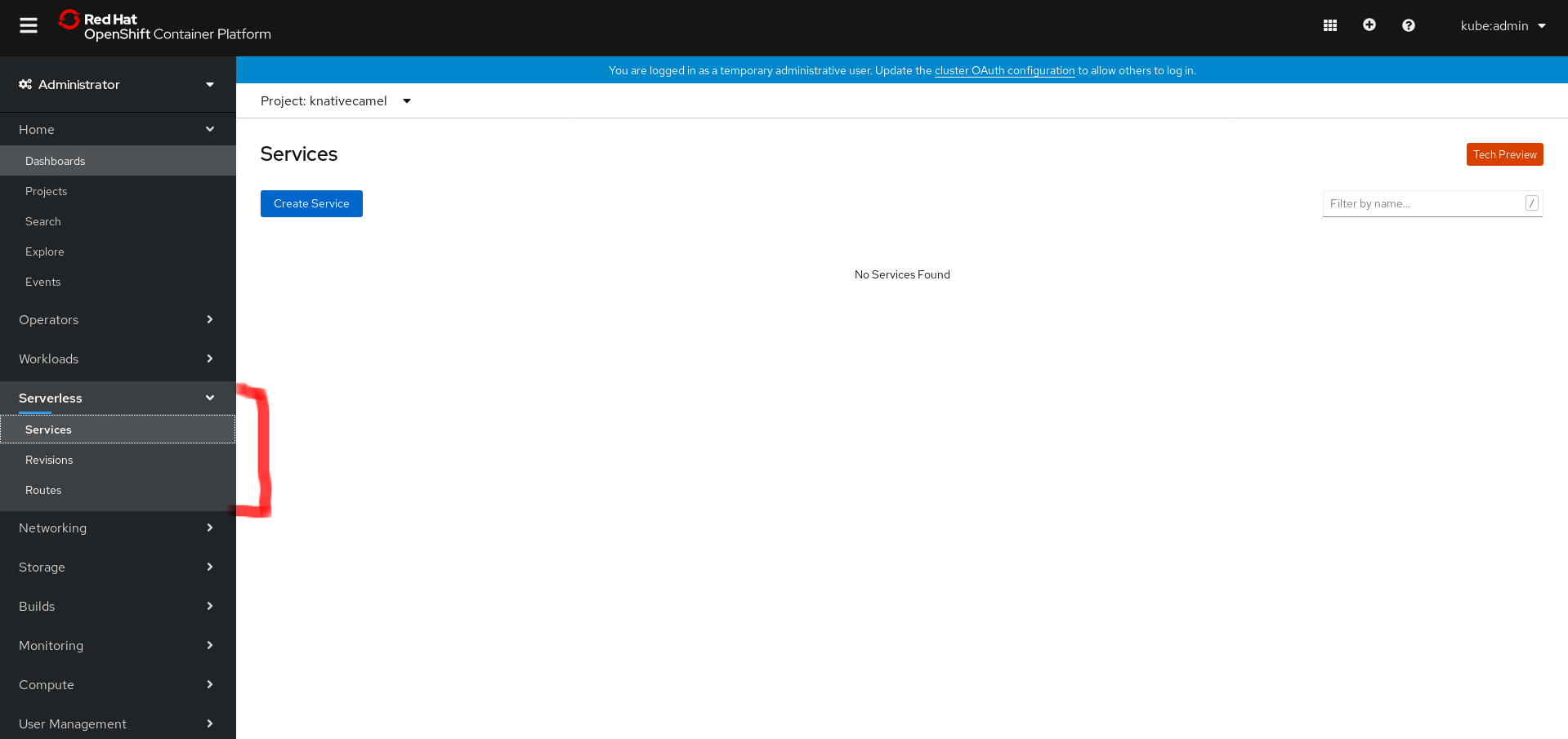
You should also see a new Serverless tab in OpenShift Container Platform's Administrator console, as shown in Figure 2.
Install the Camel K Operator
Next, we'll install the Camel K Operator. Start by creating a new project for it:
$ oc new-project camelknative
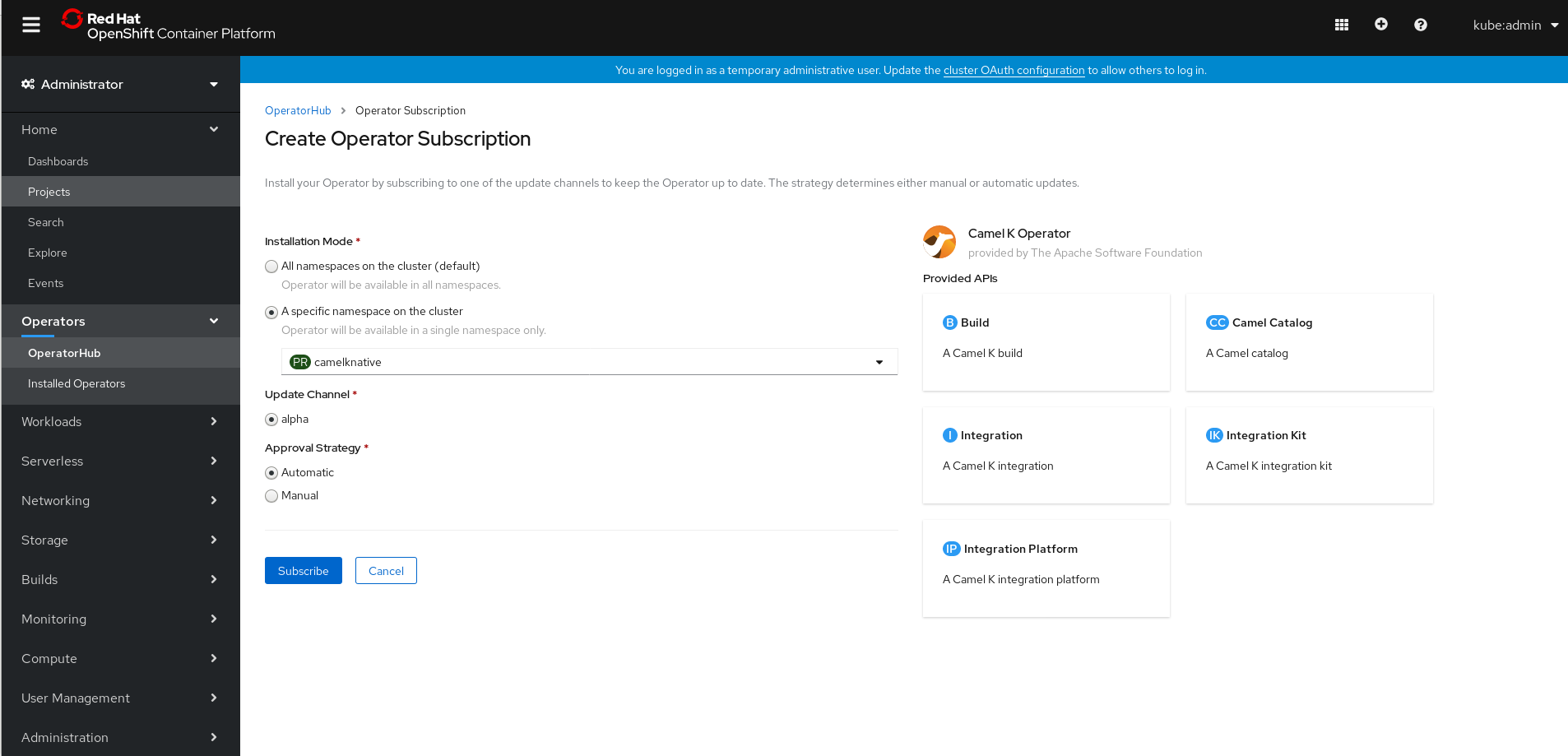
Install the Camel K Operator from OpenShift Container Platform's OperatorHub, as shown in Figure 3.

Select the camelknative namespace, as shown in Figure 4.
Verify the installation status:
$ oc get csv -n camelknative
You should get a confirmation that the installation was successful:
NAME                        DISPLAY          VERSION   REPLACES                    PHASE
camel-k-operator.v1.0.0-rc2 Camel K Operator 1.0.0-rc2 camel-k-operator.v1.0.0-rc1 Succeeded
Before we can continue, we need the kamel binary, which we'll use to configure our cluster and run integrations on it.
Install kamel
Check for the most recent kamel release here. Once you've downloaded kamel, add it to your system path. On Linux, this would be /usr/bin/kamel.
Verify that you installed kamel:
$ kamel version
Camel K Client 1.0.0-M4
Our development environment is complete. Next, we'll try out a simple deployment.
Deploy a Camel route
We'll start with a simple route that uses Undertow for its HTTP consumer:
// Sample.java
import org.apache.camel.builder.RouteBuilder;

public class Sample extends RouteBuilder {

   @Override
   public void configure() throws Exception {
           from("undertow:http://0.0.0.0:8080/test")
          .setBody(constant("{{env:CAMEL_SETBODY}}"))
          .log("Hello Camel-K");
   }
}
Run the following to build and deploy the Sample.java route:
$ kamel run Sample.java --name sample --dependency camel-undertow --env CAMEL_SETBODY="Response received from POD : {{env:HOSTNAME}}"
integration "sample" created
Test the integration
Now we'll test our integration. To start, make sure it's running:
$ oc get it
You should see the following confirmation:
NAME      PHASE     KIT                        REPLICAS
sample    Running   kit-bppjp84iis5hj6nb3vk0   0
Next, we call our pods:
$ oc get pods
None of the pods has served a request, so the integration is currently scaled to zero:
NAME                                       READY     STATUS      RESTARTS   AGE
camel-k-kit-bppjp84iis5hj6nb3vk0-1-build   0/1       Completed   0          18m
camel-k-operator-775dfccddf-5r7zg          1/1       Running     0          56m
$ oc get deployment sample-4srfn-deployment
NAME                      READY     UP-TO-DATE   AVAILABLE   AGE
sample-4srfn-deployment   0/0       0            0           8m3s
When we send a request to the application, it automatically scales to one:
$ curl http://sample.camelknative.apps.shsinghocp43.lab.com/test
Response received from POD : sample-4srfn-deployment-5dfbf746c5-dw8wr
Call $ oc get pods again, and you should see the following:
NAME                                       READY     STATUS      RESTARTS   AGE
camel-k-kit-bppjp84iis5hj6nb3vk0-1-build   0/1       Completed   0          28m
camel-k-operator-775dfccddf-5r7zg          1/1       Running     0          66m
sample-4srfn-deployment-5dfbf746c5-dw8wr   2/2       Running     0          14s
The sample integration has scaled to one:
$ oc get it
NAME      PHASE     KIT                        REPLICAS
sample    Running   kit-bppjp84iis5hj6nb3vk0   1
$ oc get deployment sample-4srfn-deployment
NAME                      READY     UP-TO-DATE   AVAILABLE   AGE
sample-4srfn-deployment   1/1       1            1           14m
Once a pod is ideal (when no traffic is served by the application), it automatically scales down to zero:
NAME                                       READY     STATUS      RESTARTS   AGE
camel-k-kit-bppjp84iis5hj6nb3vk0-1-build   0/1       Completed   0          31m
camel-k-operator-775dfccddf-5r7zg          1/1       Running     0          69m
$ oc get it
NAME      PHASE     KIT                        REPLICAS
sample    Running   kit-bppjp84iis5hj6nb3vk0   0
Delete the application
When you're done testing the integration, you can use kamel to delete the simple route we created with Camel K:
$ kamel delete sample
Integration sample deleted
Conclusion
I hope this article has given you a quick start on developing serverless applications with OpenShift Serverless and Camel K. Note again that Red Hat OpenShift Serverless 1.5.0 is currently in tech preview.
Last updated: February 5, 2024