Argo CD has evolved over the years from a promising GitOps project into a widely adopted tool for cloud-native application delivery. Its maturity has opened the door to new "pull-based" architectures addressing complex requirements around scale and security. This evolution is reflected in Red Hat's vision for Argo CD through Red Hat OpenShift GitOps, which brings proven Argo CD patterns together with the capabilities needed to operate GitOps at scale. We've explored these architectures and the evolution of GitOps at scale in previous articles, including Manage clusters and applications at scale with Argo CD Agent on Red Hat OpenShift GitOps and Scaling GitOps: The "pull" architecture for global fleets.
This post focuses on a key piece of that journey: argocd-agent, now generally available with Red Hat Advanced Cluster Management for Kubernetes 5.
The integration between argocd-agent and Advanced Cluster Management for Kubernetes brings automated centralized cluster management to multicluster Argo CD architectures, including the ability to bootstrap and configure Argo CD environments at scale. In particular, we take a closer look at managed mode, which provides the classical Argo CD experience to help a new user simplify operations while still fitting the needs of the majority of multicluster use cases (and remain comfortable because it's close to the existing classical Argo CD experience).
A conceptual introduction to argocd-agent in managed mode
The argocd-agent, in managed mode, contains components deployed separately both in the hub and in the spoke clusters. Before the Argo CD agent was created, all components would run in the hub in "push-mode". Now, the environment would simply look like Figure 1.
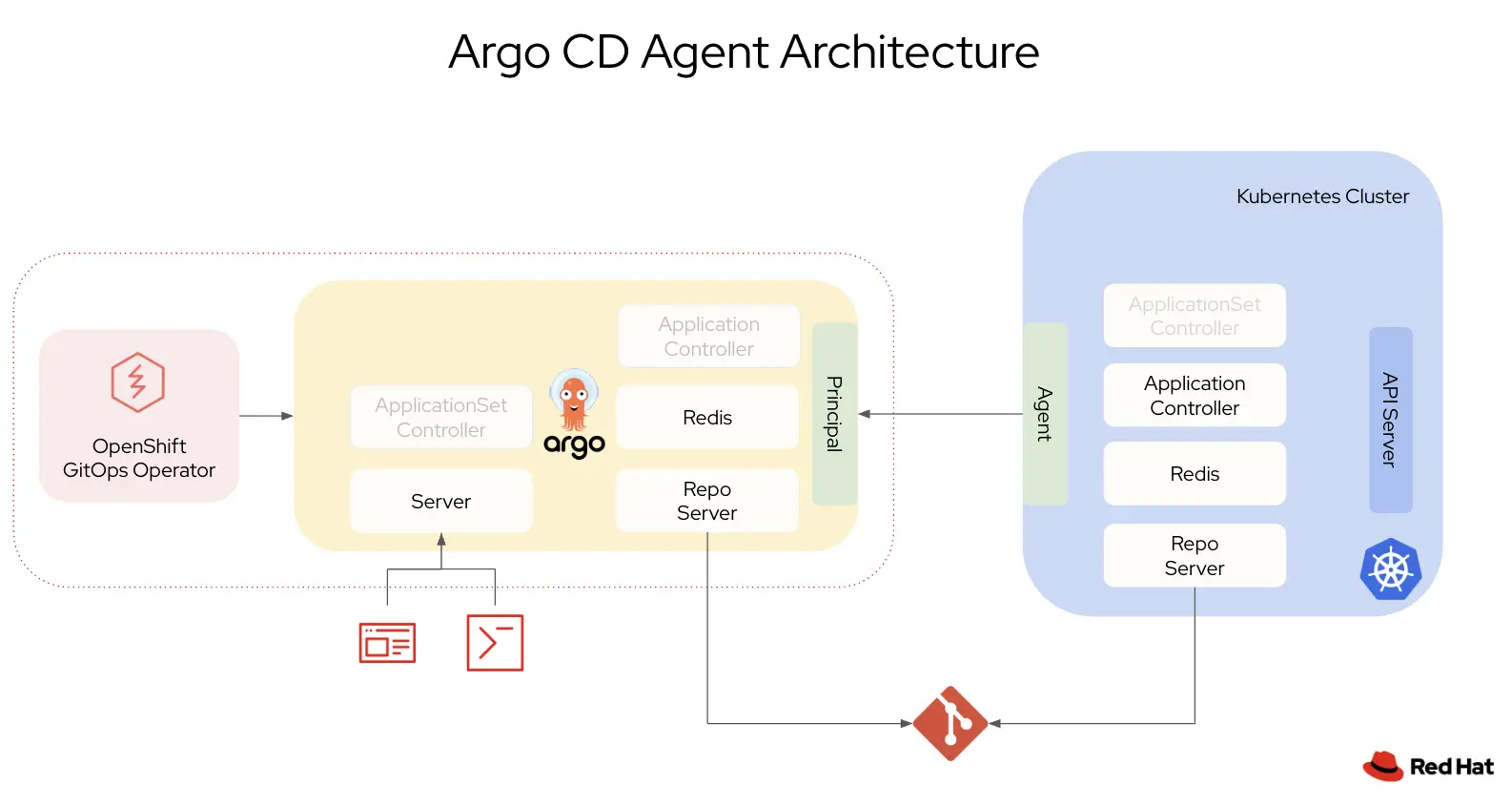
This principal component manages the communication with the agent that runs on the spoke clusters, and controls.
The agent receives all of its configuration (for example, Applications and AppProjects) from the principal.
Here are the benefits of managed mode:
- The hub is the single entry point for configuration and the single place where you review and audit changes, through the UI or API.
- The agent uses a bi-directional gRPC connection to the principal. That connection is outbound-only from the spoke. No need for custom network topologies or ingress rules from the spoke clusters.
- Even if the hub goes offline, the spoke continues to reconcile the application.
- The Redis proxy keeps the central UI responsive without caching every resource in the fleet.
- The reconciliation happens on each spoke.
- The components in gray in figure 1 are optional..
How Advanced Cluster Management for Kubernetes helps
Configuring these modes and setup details no longer requires manual, tedious and manual operational effort. Within Advanced Cluster Management for Kubernetes, crucial system integration tasks between control planes and managed clusters are set up using Add-ons (built on the Add-on Framework). A variety of critical platform services already leverage this exact pattern, including observability for central metrics harvesting and automated security workflows for credential rotation and access management.
GitOps Add-on
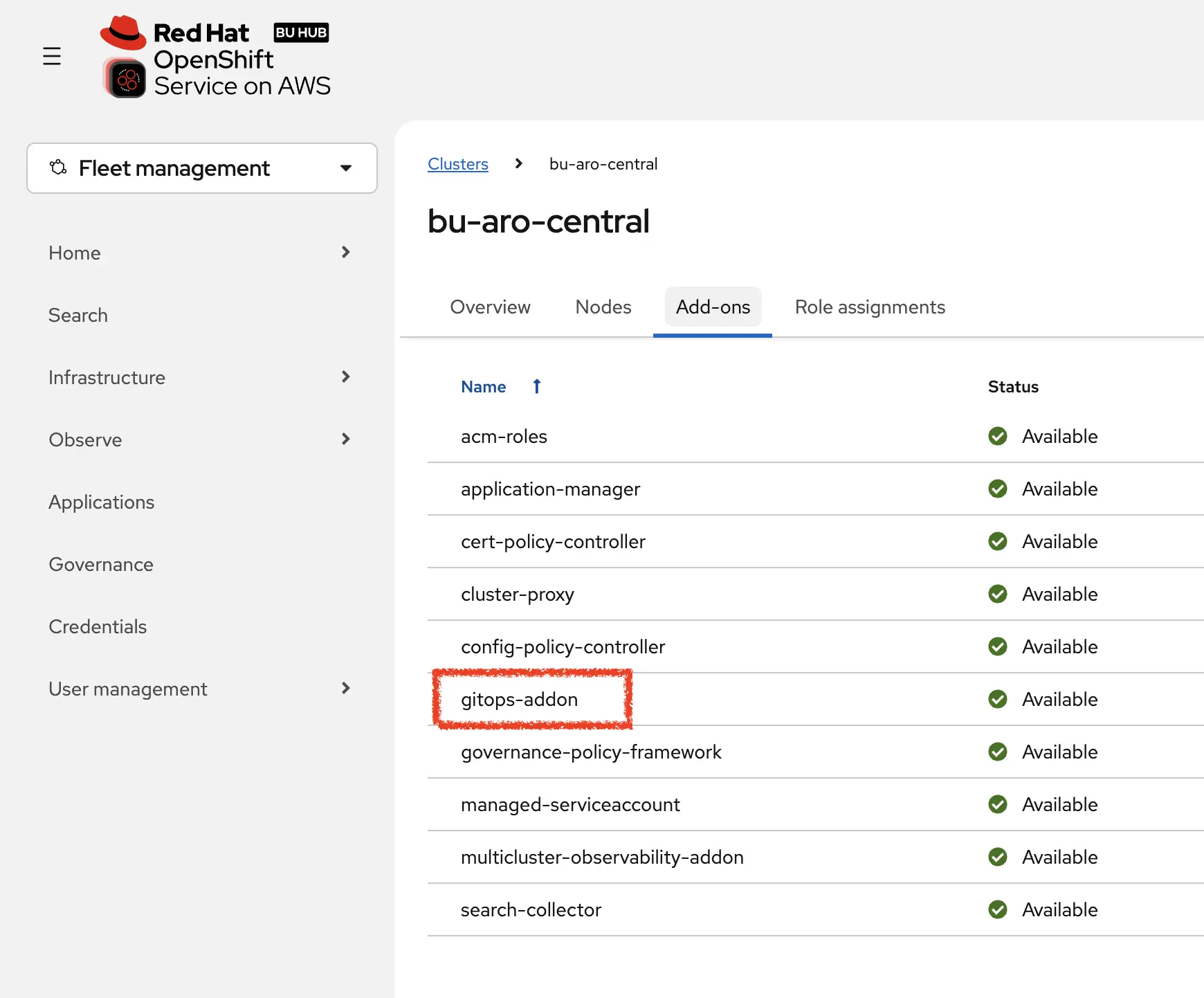
The GitOps Add-on (gitops-addon, as seen in Figure 2) automates the entire bootstrapping lifecycle (both principal and agent) with Advanced Cluster Management for Kubernetes, eliminating the need for manual, tedious operational effort.
This works with both Red Hat OpenShift and Kubernetes distributions certified by the Cloud Native Computing Foundation (CNCF) and is fully supported on both, including disconnected environments (using ManagedClusterImageRegistry to point clusters at your mirror registry). Some details (such as OLM and Routes) might need to be handled separately depending on the target cluster, because these are components specific to Red Hat OpenShift. These can be easily disabled for other clusters.
Another benefit is that because spoke clusters only make outbound connections, all traffic is protected by mTLS, and the certificate lifecycle is automated. All the setup is driven by Advanced Cluster Management for Kubernetes using multicluster APIs (such as Placement) and a GitOpsCluster. Let's check out how to enable the Add-on.
The glue: GitOpsCluster resource
This is where the magic happens. This is the control resource that brings everything together. The GitOpsCluster API/resource gathers all the information required by Argo CD and Advanced Cluster Management for Kubernetes, providing a single place where users can:
- Define which Argo CD server to use (in case there are multiple).
- Set the operating mode (in this case, managed mode).
- Auto-discover and sync destination clusters directly from Advanced Cluster Management for Kubernetes, including server addresses and port.
- Set other custom or non-required configs.
Here's a real-world example:
apiVersion: apps.open-cluster-management.io/v1beta1
kind: GitOpsCluster
metadata:
  name: gitops-agent
  namespace: openshift-gitops
spec:
  argoServer:
    argoNamespace: openshift-gitops
  placementRef:
    kind: Placement
    apiVersion: cluster.open-cluster-management.io/v1beta1
    name: all-clusters
    namespace: openshift-gitops
  gitopsAddon:
    enabled: true
    overrideExistingConfigs: true
  argoCDAgent:
    enabled: true
    mode: managed
    propagateHubCA: true
After applying the resource above, Advanced Cluster Management for Kubernetes would deploy the GitOps Add-on and consequently configure argocd-agent in the spoke/managed clusters. All clusters belonging to the referenced Placement resource would be affected. This resource also makes sure ApplicationSets can reference remote clusters through their names, which then would route each application to the right agent. Here's an example:
apiVersion: argoproj.io/v1alpha1
kind: ApplicationSet
metadata:
  name: guestbook-fleet
  namespace: openshift-gitops
spec:
  generators:
    - list:
        elements:
          - cluster: cluster-a
          - cluster: cluster-b
  template:
    metadata:
      name: 'guestbook-{{cluster}}'
    spec:
      project: default
      source:
        repoURL: https://github.com/argoproj/argocd-example-apps
        targetRevision: HEAD
        path: guestbook
      destination:
        name: '{{cluster}}'     # destination-based mapping routes this to the agent
        namespace: guestbook
      syncPolicy:
        automated: {}
Finally, an Argo CD instance on the hub with both the controller and the principal enabled would look like this:
apiVersion: argoproj.io/v1beta1
kind: ArgoCD
metadata:
  name: openshift-gitops
  namespace: openshift-gitops
spec:
  controller:
    # hub-local apps are reconciled by the hub controller
    enabled: true
  sourceNamespaces:
    - '*'
  argoCDAgent:
    principal:
      enabled: true
      destinationBasedMapping: true
      auth: 'mtls:CN=system:open-cluster-management:cluster:([^:]+):addon:gitops-addon:agent:gitops-addon-agent'
      namespace:
        allowedNamespaces:
          - '*'
      server:
        route:
          enabled: true
These details deserve attention:
controller.enabled: trueis what makes hybrid mode truly hybrid. Without it, the hub has no controller to deploy hub-local applications.destinationBasedMapping: truemeans yourApplicationSetsaddress remote clusters throughdestination.name, which routes each application to the correct agent.
Managed mode, autonomous mode, and hybrid mode
Wondering what operating options exist beyond managed mode? As discussed earlier, all agent modes overcome the limitations of classic "push-based" architectures by shifting workload reconciliation directly to target clusters. This eliminates single points of failure while retaining centralized visibility and hub management. However, each operating mode offers unique characteristics.
Managed mode
In managed mode, all configuration is received from the control plane. You author Application and ApplicationSet resources on the hub (the principal), and agents on the managed clusters (the spokes) pull and apply them.
- Where apps are authored: Hub cluster (principal)
- Who controls the application spec: The hub, fully
- Where apps can deploy: Managed clusters
- Hub Argo CD controller: Not used for fleet workloads
- Routing: Destination-based mapping from hub to agent
- Typical use case: Centralized GitOps control and policy enforcement
Autonomous mode
In autonomous mode, configuration is on workload clusters, and the agent provides status to the control plane. The application resources are owned by the spoke clusters, and the hub only provides visibility.
- Where apps are authored: Workload cluster (spoke)
- Who controls the application spec: The spoke; the hub copy is read-only and any change is reverted
- Where apps can deploy: The spoke itself
- Hub Argo CD controller: Not used for fleet workloads
- Routing: Local-only reconciliation
- Typical use case: Decentralized or air-gapped environments needing local autonomy
Hybrid mode
Exactly like managed mode, but with the added capability to reconcile apps on the hub.
- Where apps are authored: Hub cluster (principal)
- Who controls the application spec: The hub, fully
- Where apps can deploy: Managed clusters and the hub cluster
- Hub Argo CD controller: Enabled, for hub-local apps
- Routing: Destination-based mapping to agents; hub-local apps handled by the hub controller
- Typical use case: Central control for the fleet plus GitOps for hub-hosted components
Managed mode is preferred in most cases, unless autonomy is fundamentally required by the spoke clusters. Managed mode is also a strong fit for compliance-driven environments (for example, SOC 2 or ISO 27001) where the hub should be the single, guarded authority for what gets deployed. Consider hybrid mode if you need to deploy to the local hub, especially for its own platform components, policies, operators and other common services.
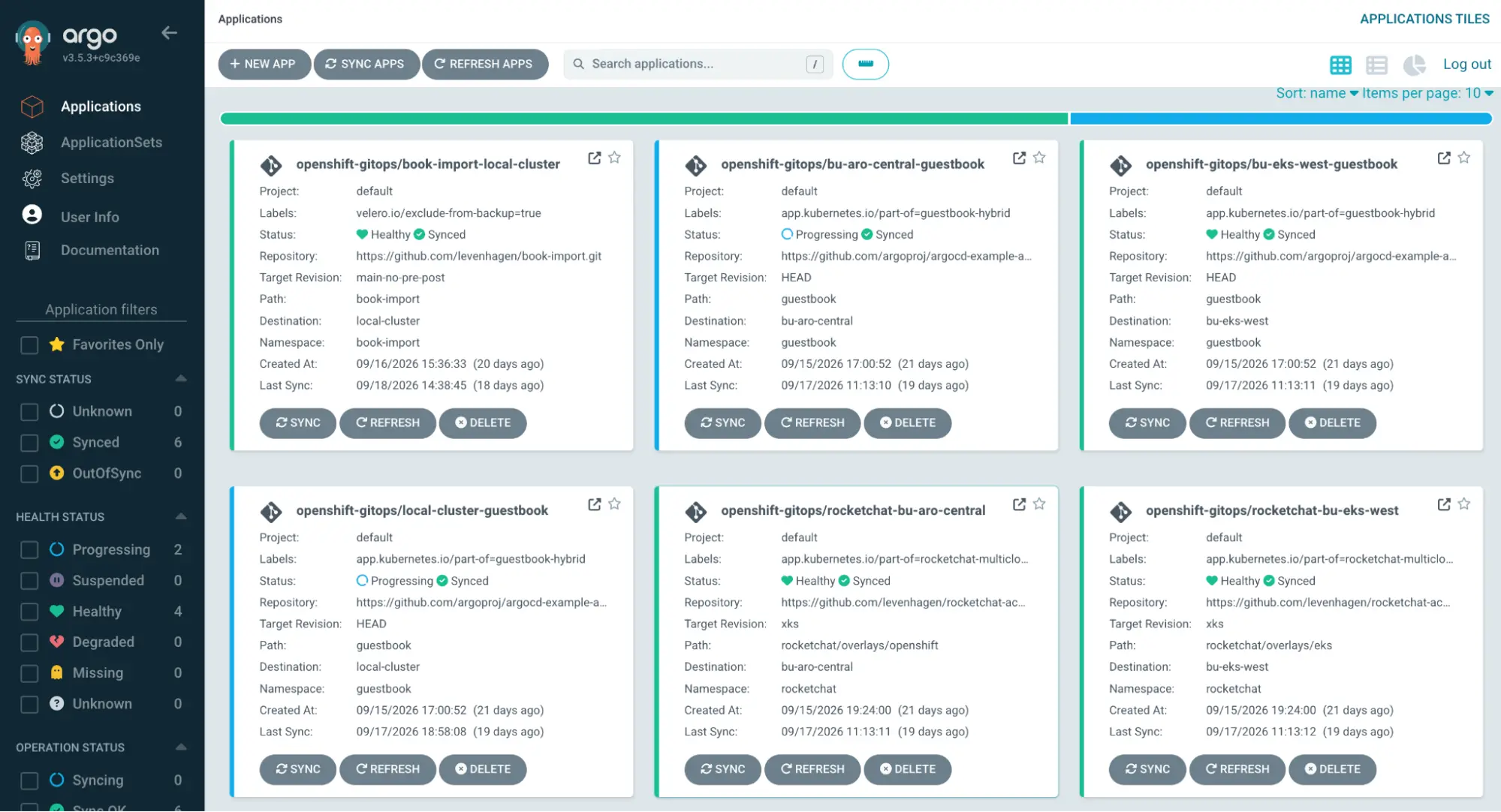
local-cluster) and remote clusters (EKS, ARO).Hybrid mode has a few trade-offs to keep in mind:
- Larger hub footprint: Running the controller on the hub alongside the principal means the hub does more work than in a pure managed mode setup. Hub-local apps are reconciled by the hub, not by an agent.
- Higher privileges on the hub: The hub controller needs permissions on the hub cluster. Keep them as narrow as your apps allow.
- Two paths, one golden rule: Keeping the hub out of the
GitOpsClusterplacement is what keeps these 2 paths from colliding. It must not point to the hub cluster (local-cluster).
Conclusion
Again, the managed mode design , in particular, is basically very close to the traditional push-model in usability, as it provides the classical Argo CD experience. A new user to argocd-agent is comfortable right away because it's close to the existing experience. It's also a particularly good match for edge scenarios, from high-latency satellite links to large retail footprints, where network resilience can't be taken for granted. If a spoke loses contact with the hub, it keeps working, while keeping a small footprint.
In managed mode, argocd-agent resolves the classic trade-off between scalability and security in multi-cluster GitOps: Reconciliation runs where the workloads live, while the hub keeps authoring and observability. Hybrid mode extends that model so the hub can run its own GitOps workloads through the same set of Application and ApplicationSet resources, with this clear rule to keep it safe: The GitOpsCluster only ever selects remote clusters, never the hub. Autonomous mode would still work in very specific use-cases where the spoke needs full autonomy.