Introduction
ApplicationSets in Argo CD automate the generation of Applications using external inputs of information such as a git repository structure, the list of clusters configured in Argo CD and more. They automate the process of having to manually create, delete and modify Applications as the information from these inputs change.
ApplicationSets accomplish this integration with inputs using Generators, each Generator has its own configuration and outputs a set of JSON parameters that are then consumed by a template to output the Application(s). The parameters for each Generator are documented however some of the generators support ad-hoc parameters for additional dynamism.
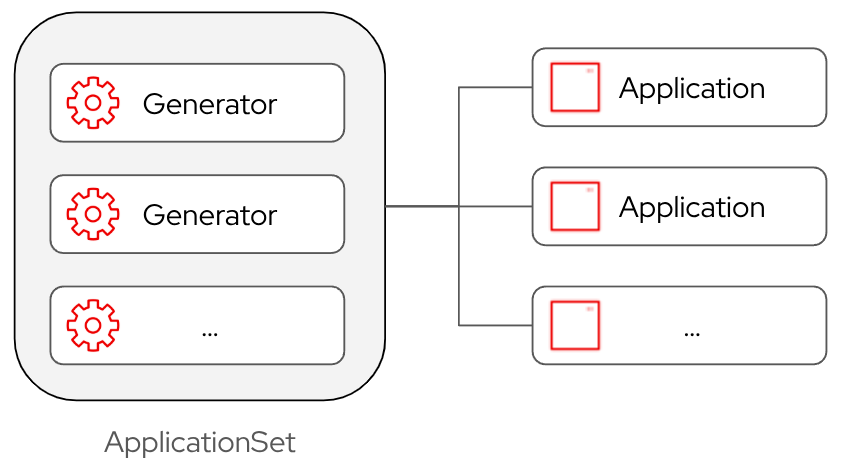
Some of the commonly used Generators include:
- List. A simple generator with a static list of elements.
- Cluster. A generator that outputs the list of clusters configured in Argo CD, clusters are selectable based on labels.
- git. Creates Applications based on the contents of a git repository.
- Pull Request. Used to list Pull Requests in a git repository, often used to generate environments to support testing.
In addition to those and other generators, there are also generators that can combine the outputs of other generators:
- Matrix. Combines parameters of two generators into a single list by performing a simple join.
- Merge. Also combines parameters of two generators; however it performs a merge based on matching configured keys from the first generator with available keys in the second.
When using multiple Generators together, or when dealing with Generators that enable some form of ad-hoc parameters, it can be tricky to troubleshoot the ApplicationSet without being able to view the parameters. Additionally if like me you tend to think more visually being able to view the parameters can be really useful in understanding some of the more complex Generators and scenarios.
While Argo CD doesn’t provide a way to view the parameters directly, there is a way to do it with a tiny bit of hacking which we will review in this first part of this blog series. In forthcoming future blogs in the series we will use this technique with follow-up in-depth looks at Generators and templating.
Using argocd CLI
To access the parameters we will use the argocd CLI to generate the Applications from the ApplicationSet. As the processing of the ApplicationSet happens in-cluster by the running applicationset-controller the argocd CLI will need to login into a cluster with Argo CD inalled on it.
There are a couple of ways to login into Argo CD, assuming you are using SSO with Argo CD the following command should do the trick:
$ argocd login --sso --skip-test-tls <argocd host>Note: Here we use --skip-test-tls because in my OpenShift environment the login command hangs without it.
If for some reason this doesn’t work, and as the user you have access to the namespace where Argo CD is installed, then the login can alternatively be done using the kubectl context with the --core switch.
$ oc project <namespace where Argo CD is installed>
$ argocd login --core
Viewing ApplicationSet Parameters
To extract the ApplicationSet parameters, let’s start with a simple, slightly tweaked, ApplicationSet that uses a List generator from the Argo CD documentation:
apiVersion: argoproj.io/v1alpha1
kind: ApplicationSet
metadata:
  name: guestbook
  namespace: argocd
spec:
  goTemplate: true
  goTemplateOptions: ["missingkey=error"]
  generators:
  - list:
      elements:
      - cluster: engineering-dev
        url: https://kubernetes.default.svc
      - cluster: engineering-prod
        url: https://kubernetes.default.svc
  template:
    metadata:
      name: '{{.cluster}}-guestbook'
    spec:
      project: "default"
      source:
        repoURL: https://github.com/argoproj/argo-cd.git
        targetRevision: HEAD
        path: applicationset/examples/list-generator/guestbook/{{.cluster}}
      destination:
        server: '{{.url}}'
namespace: guestbookImportant: Change the namespace and project to match how your environment is configured otherwise generating Applications may fail.
Now generate the Applications for it with the argocd CLI:
$ argocd appset generate appset_list.yamlThis will provide the following output:
NAME                               CLUSTER                         NAMESPACE  PROJECT  STATUS  HEALTH  SYNCPOLICY  CONDITIONS  REPO                                     PATH                                                               TARGET
argocd/engineering-dev-guestbook   https://kubernetes.default.svc  guestbook  default                  Manual      <none>      https://github.com/argoproj/argo-cd.git  applicationset/examples/list-generator/guestbook/engineering-dev   HEAD
argocd/engineering-prod-guestbook  https://kubernetes.default.svc  guestbook  default                  Manual      <none>      https://github.com/argoproj/argo-cd.git  applicationset/examples/list-generator/guestbook/engineering-prod  HEAD
We can see two Applications were generated corresponding to the two list elements that were included in the generator. Now to have a look at the parameters, modify the ApplicationSet and add the new .spec.template.spec.info below:
apiVersion: argoproj.io/v1alpha1
kind: ApplicationSet
metadata:
  name: guestbook
  namespace: argocd
spec:
  goTemplate: true
  goTemplateOptions: ["missingkey=error"]
  generators:
  - list:
      elements:
      - cluster: engineering-dev
        url: https://kubernetes.default.svc
      - cluster: engineering-prod
        url: https://kubernetes.default.svc
  template:
    metadata:
      name: '{{.cluster}}-guestbook'
    spec:
     info:
        - name: "parameters"
          value: |
            {{ toPrettyJson . }}
      project: "default"
      source:
        repoURL: https://github.com/argoproj/argo-cd.git
        targetRevision: HEAD
        path: applicationset/examples/list-generator/guestbook/{{.cluster}}
      destination:
        server: '{{.url}}'
        namespace: guestbook
Remember that the ApplicationSet passes the parameters to the template as a JSON document. Here we have added a new info element to the template spec to output the root of the JSON parameter document as a multi-line string field.
Note: The info field is a supported field in an Argo CD Application, it's meant to provide additional context about the Application (Author, Organization, etc). Since it supports multi-line strings and has no impact on the functionality of the Application it's an ideal candidate to use for outputting parameters.
Generate the ApplicationSet again but output it as YAML:
$ argocd appset generate appset_list.yaml -o yamlLook through the Applications that have been generated and notice the info field is now being shown with the parameters for that specific Application:
- apiVersion: argoproj.io/v1alpha1
  kind: Application
  metadata:
    finalizers:
    - resources-finalizer.argocd.argoproj.io
    name: engineering-dev-guestbook
  spec:
    destination:
      namespace: guestbook
      server: https://kubernetes.default.svc
    info:
    - name: parameters
      value: |
        {
          "cluster": "engineering-dev",
          "url": "https://kubernetes.default.svc"
        }
    project: default
    source:
      path: applicationset/examples/list-generator/guestbook/engineering-dev
      repoURL: https://github.com/argoproj/argo-cd.git
      targetRevision: HEAD
Each Application shows the parameters that are specific to that Application which is fine, however when troubleshooting problems with parameters it is very desirable to see them as a single JSON document. Fortunately this is easily done with the jq utility.
Generate the ApplicationSet again but now pipe the output to jq as follows:
$ argocd appset generate appset_list.yaml -o json | jq '[.[].spec.info.[].value | fromjson]'We now have the parameters as a single document:
[
  {
    "cluster": "engineering-dev",
    "url": "https://kubernetes.default.svc"
  },
  {
    "cluster": "engineering-prod",
    "url": "https://kubernetes.default.svc"
  }
]
At this point the reader could be excused for thinking: "Great I’ve done all this work but I’m seeing exactly what I already had defined in the generator so what’s the point?". Where this technique really shines is when looking at more complex examples so let’s do that next.
Cluster Generator
We can use the Cluster Generator next to provide a more dynamic example again leveraging an example from the Argo CD documentation:
apiVersion: argoproj.io/v1alpha1
kind: ApplicationSet
metadata:
  name: guestbook
  namespace: argocd
spec:
  goTemplate: true
  goTemplateOptions: ["missingkey=error"]
  generators:
  - clusters: {} # Automatically use all clusters defined within Argo CD
  template:
    metadata:
      name: '{{.name}}-guestbook' # 'name' field of the Secret
    spec:
     info:
        - name: "parameters"
          value: |
            {{ toPrettyJson . }}
      project: "default"
      source:
        repoURL: https://github.com/argoproj/argocd-example-apps/
        targetRevision: HEAD
        path: guestbook
      destination:
        server: '{{.server}}' # 'server' field of the secret
        namespace: guestbook
Generate the ApplicationSet again outputting it as JSON and using jq to assemble the parameters into a single document:
$ argocd appset generate appset_list.yaml -o json | jq '[.[].spec.info.[].value | fromjson]'You will then see the output from your configured clusters, In this example above is from my homelab where I am using RHACM to decorate the Argo CD cluster secrets with additional information about each specific cluster.
[
  {
    "metadata": {
      "annotations": {
        "baseDomain": "hub.ocplab.com",
        "clusterID": "1800df5d-06d8-4eea-bef8-e7f9ec791610",
        "infrastructureID": "hub-zcvzl",
        "subdomain": "apps.hub.ocplab.com",
        "targetRevision": "v1.1.0"
      },
      "labels": {
        "app.kubernetes.io/name": "hub-prod-local",
        "argocd.argoproj.io/secret-type": "cluster",
        "env": "prod",
        "region": "local",
        "type": "hub"
      }
    },
    "name": "hub-prod-local",
    "nameNormalized": "hub-prod-local",
    "project": "",
    "server": "https://kubernetes.default.svc"
  },
  {
    "metadata": {
      "annotations": {
        "argocd.argoproj.io/skip-reconcile": "true",
        "baseDomain": "home.ocplab.com",
        "clusterID": "fef08928-3f49-4dcb-8a70-ea2da63dcd2b",
        "infrastructureID": "home-ncb8t",
        "subdomain": "apps.home.ocplab.com",
        "targetRevision": "v1.1.0"
      },
      "labels": {
        "app.kubernetes.io/name": "workload-prod-local",
        "argocd-agent.argoproj-labs.io/agent-name": "workload-prod-local",
        "argocd.argoproj.io/secret-type": "cluster",
        "env": "prod",
        "region": "local",
        "type": "workload"
      }
    },
    "name": "workload-prod-local",
    "nameNormalized": "workload-prod-local",
    "project": "",
    "server": "https://argocd-agent-principal-resource-proxy.argocd.svc.cluster.local:9090?agentName=workload-prod-local"
  }
]
The Cluster generator is an example of one that includes dynamic parameters, namely labels and annotations that have been added to the Argo CD cluster secret. Outputting the parameters assists users in building out the ApplicationSets by understanding what is provided by the generators.
Troubleshooting Limitations
While this technique is really useful in understanding generators and the parameters they output it has a notable limitation when used as a troubleshooting tool.
When ApplicationSets fail many times it's because of a mismatch between what the template is looking for and the parameters that have been provided, for example the template referencing a parameter that does not exist. Unfortunately when this occurs no output is generated and thus we cannot see the parameters embedded in the Applications.
To workaround this limitation, temporarily replace the template with something that has minimal references to the parameters and can be processed successfully. Once you have the parameters as a JSON document and can locate the problem simply restore the original template with the correction.
There is a proposal in Argo CD to be able to optionally only output the parameters which address this issue plus does not require embedding the additional info element in the template.
Conclusion
I have found this technique very helpful in improving my understanding of how generators work and troubleshooting ApplicationSet issues and I hope readers find it similarly helpful.
In the next part of this blog we will use this technique to provide an in-depth look at generators.

