Configuring automated testing for open source projects usually means writing boilerplate continuous integration (CI) workflows and wrestling with test metadata by hand. Testing Farm gives Red Hat Enterprise Linux and Fedora engineering teams flexible multi-environment testing, but setting up Test Management Tool (TMT) metadata, API tokens, and CI pipelines manually involves plenty of friction.
Whether you maintain an upstream project on GitHub or an internal component on Red Hat GitLab, this agentic CI/CD skill automates the configuration across both public and enterprise environments. Here is how to configure Claude Code with the Testing Farm skill to generate your TMT metadata and CI workflows automatically.
Core capabilities of the Testing Farm agent
This AI skill helps developers onboard their repositories to Testing Farm for automated test execution. It guides you step by step through obtaining API access, initializing TMT metadata, and configuring CI pipelines across various platforms.
You can use this skill when integrating Testing Farm into repositories hosted on:
- GitHub (via GitHub Actions workflows)
- GitLab (via GitLab CI pipelines)
- Red Hat internal GitLab (
gitlab.cee.redhat.com)
The agent covers key features, including:
- API token setup and authentication guidance
- TMT/Flexible Metadata Format (FMF) test metadata creation
- GitHub Actions and GitLab CI pipeline integration
- Testing Farm command-line interface (CLI) tool configuration
Prerequisites
Before you begin, ensure you have:
- Claude Code CLI installed and authenticated in your terminal environment
- A Testing Farm API token (from api.testing-farm.io)
- Git and the
tmtutility installed locally to lint generated metadata files
Installing the Testing Farm AI agent
To get started, you need to download, copy, or link the AI agent skill to your project or workspace.
You can set this up on your local machine using one of the following methods.
Option 1 (recommended): Symlink the ai-agents repository to your project.
$ git clone https://github.com/sclorg/ai-agents.git ~/ai-agents
$ cd /path/to/your/project
$ mkdir -p .claude/skills
$ ln -s ~/ai-agents/skills/testing-farm .claude/skills/testing-farm
Option 2: Copy the skill directly into your project.
$ cp -r ~/ai-agents/skills/testing-farm /path/to/your/project/.claude/skills/
Option 3: Symlink into your user-level skills directory.
$ ln -s ~/ai-agents/skills/testing-farm ~/.claude/skills/testing-farm-onboardingInvoking the skill for onboarding
Once you install the skill, you can trigger it directly inside Claude Code using any of the following approaches.
Interactive slash command
Start an interactive Claude Code session and execute the command:
$ claude
/testing-farm-onboarding
Direct prompts via CLI
Alternatively, you can run single commands directly from your terminal:
# General onboarding prompt
$ claude "Onboard this repo to Testing Farm"

# Target specific platforms
$ claude "Add Testing Farm CI to this GitHub repository"
$ claude "Set up Testing Farm for our GitLab project"
$ claude "Integrate Testing Farm with gitlab.cee.redhat.com"
The agent will analyze your repository, detect existing test suites or CI configurations, prompt you for any required secrets or target operating systems, and automatically generate the necessary TMT metadata (.fmf files) alongside CI pipeline definitions.
Real-world example: Onboarding a GitHub repository
To see how this works in practice, let’s walk through a real-world example using the sclorg/ci-scripts repository.
This repository currently lacks FMF/TMT test metadata, but it already contains several existing test suites written using the tox Python testing framework.
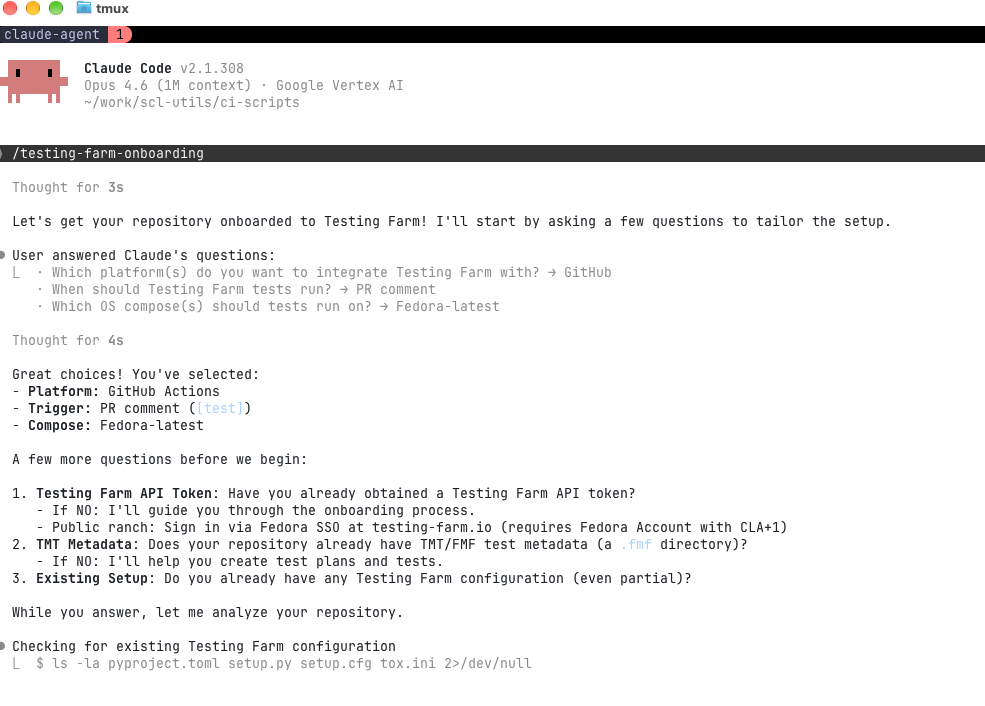
Step 1: Initialize onboarding and select the target platform
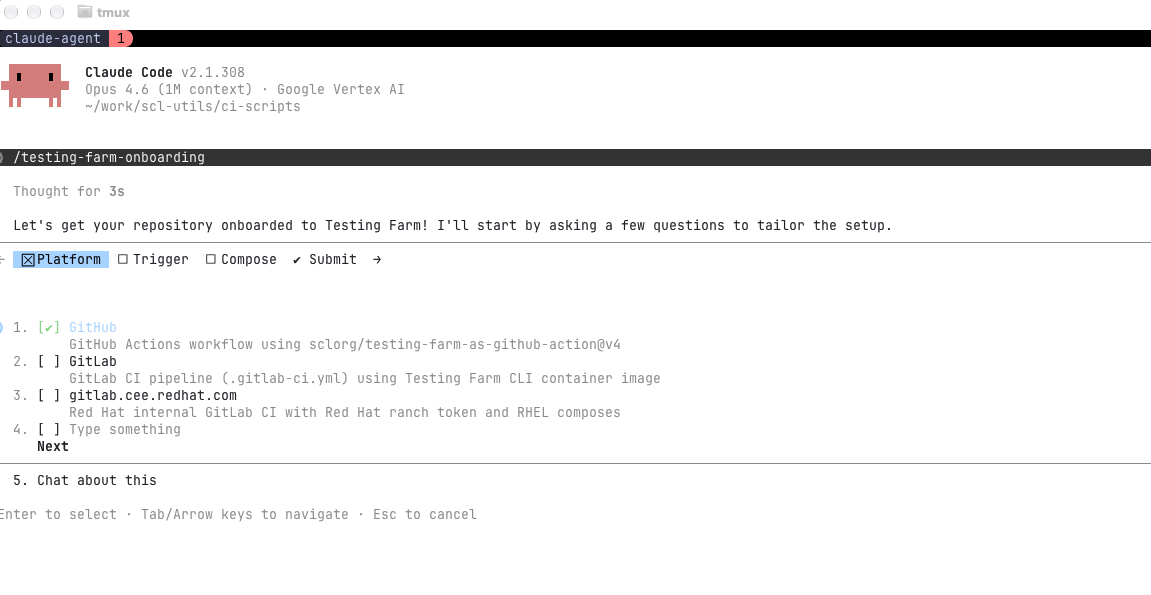
First, initiate the /testing-farm-onboarding skill and select GitHub as your host platform. When you launch the skill, Claude Code prompts you to choose your Git host—whether public GitHub, GitLab.com, or Red Hat's internal GitLab instance, as shown in Figure 1.
Step 2: Choose workflow triggers
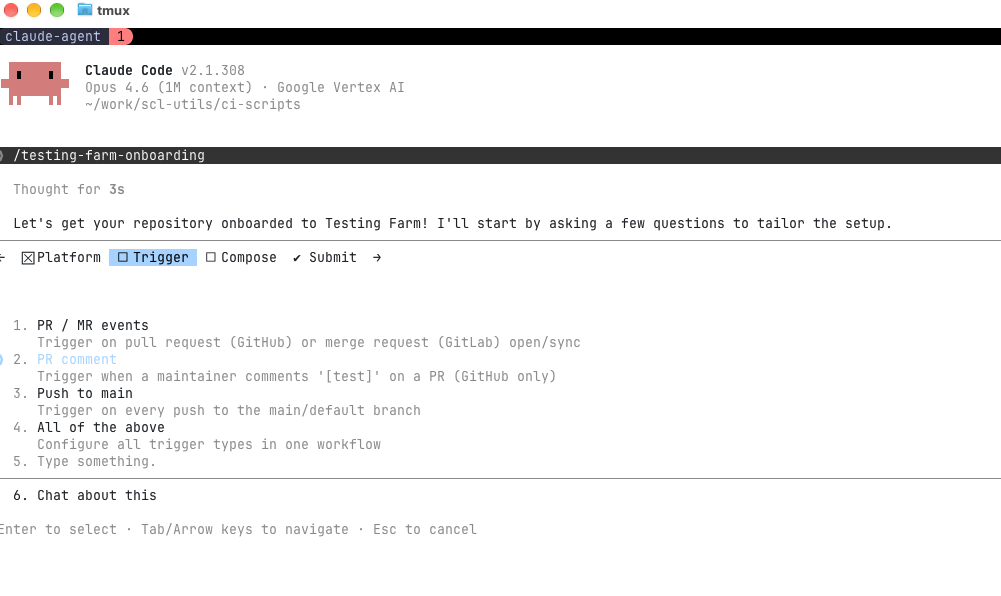
Next, select the events that should trigger test runs in Testing Farm, such as pull request events, pushes to the main branch, or manual dispatch, as shown in Figure 2.
Step 3: Define target composes and environment matrix
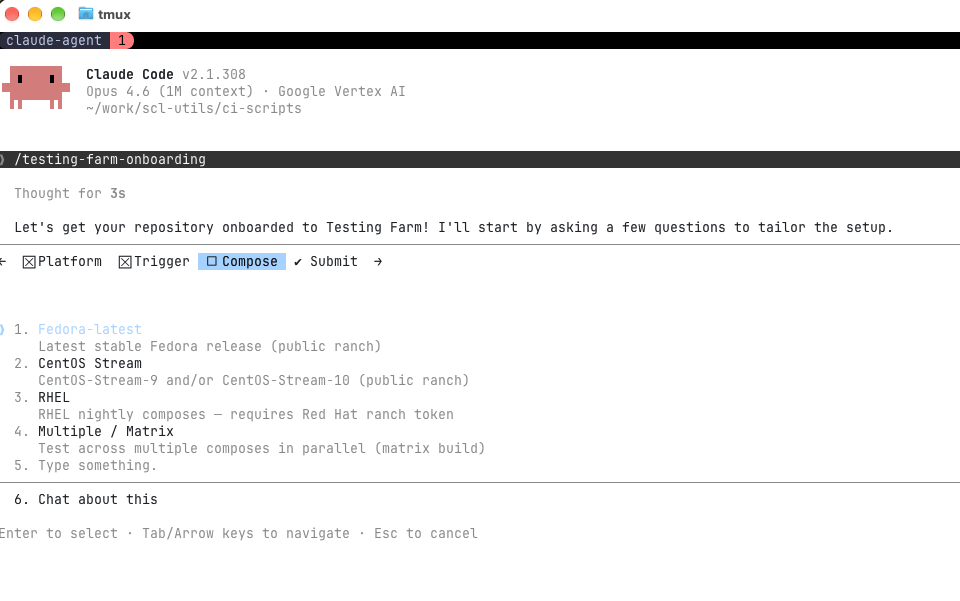
Specify which operating system compose will execute your test suite, as shown in Figure 3. In this example, we select Fedora-latest, but you can also configure a matrix strategy to test across multiple distributions simultaneously.
Step 4: Submit configuration to the agent
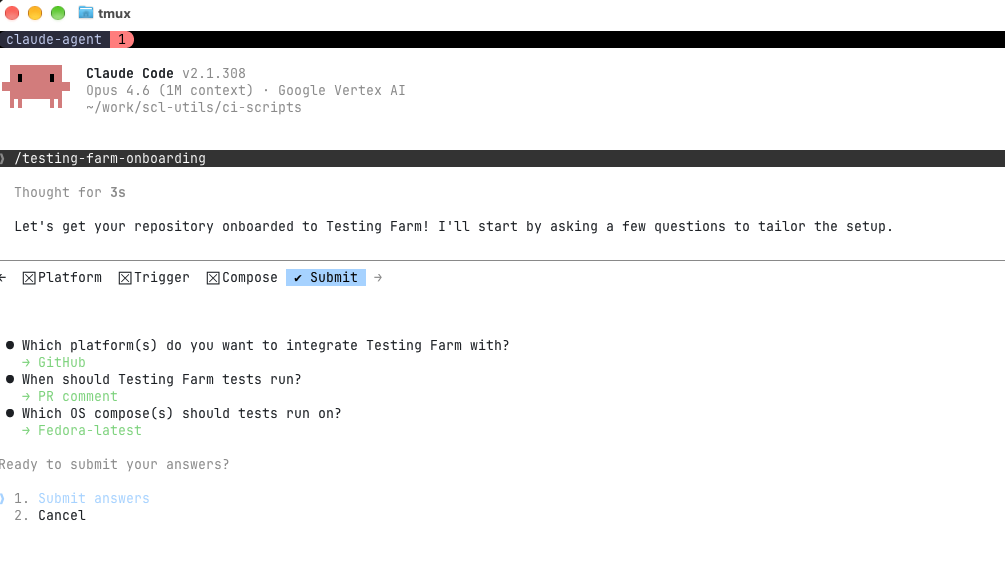
Once you've specified your preferences, submit your choices, as shown in Figure 4. The agent collects these answers and prepares the onboarding sequence.
Step 5: Interactively provide missing metadata
If the agent detects missing information—such as missing TMT metadata or required authentication credentials—it interactively prompts you for input, as shown in Figure 5. In this step, provide your Testing Farm API token and confirm existing repository structures.
Step 6: Review generated files and pull request
After collecting all parameters, the agent analyzes the tox test configuration, generates valid TMT metadata (.fmf files), and creates the GitHub Actions workflow definition required to trigger Testing Farm runs automatically (Figure 6).
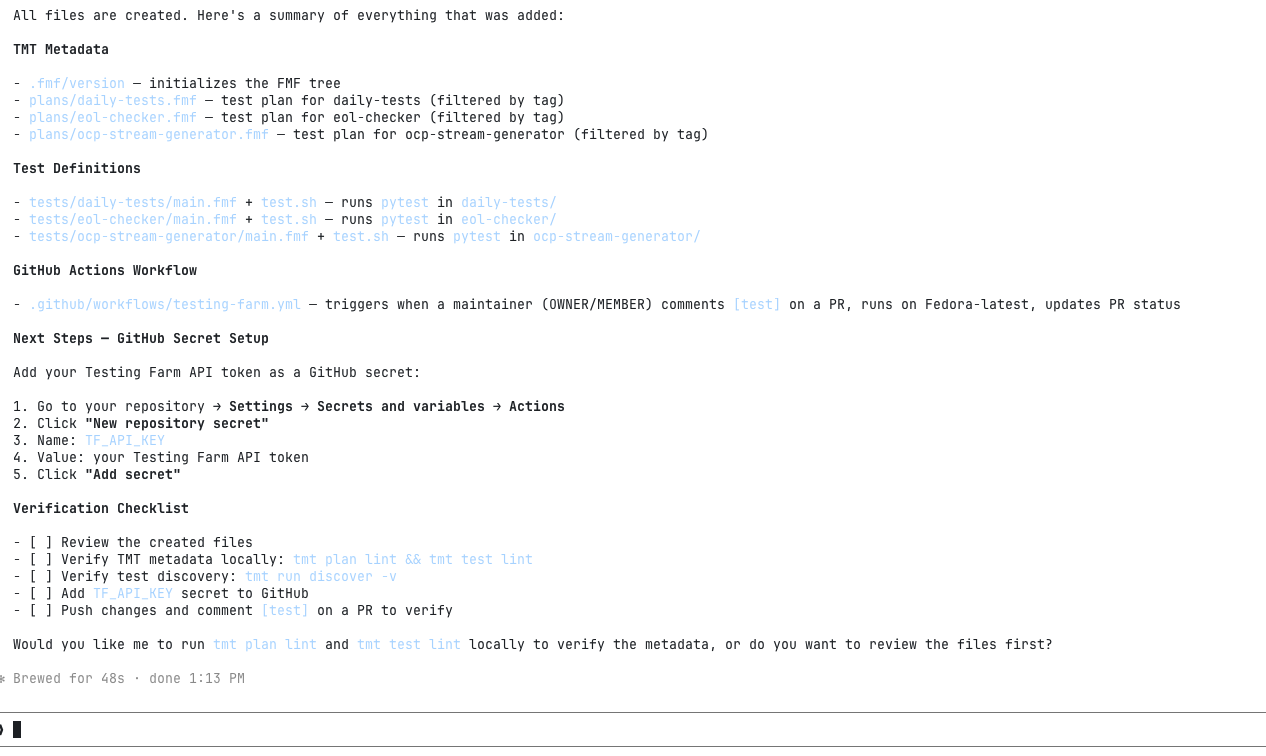
Once the agent completes its run, inspect the generated configuration files and review the changes before committing them to your repository.
1. Validate test plans
First, run the linter across all generated test plans:
$ tmt plan lintIn our example repository, the output verifies that all plans (daily-tests, eol-checker, and ocp-stream-generator) pass all schema and execution step checks:
$ tmt plan lint
/plans/daily-tests
pass C000 fmf node passes schema validation
pass C001 summary key is set and is reasonably long
pass P001 correct keys are used
pass P002 execute step defined with "how"
pass P003 execute step methods are all known
pass P004 discover step methods are all known
skip P005 no remote fmf ids defined
pass P006 phases have unique names
pass P007 execute phase 'default-0' does not require specific guest
skip P008 no environment files found
pass P009 All step data is valid

/plans/eol-checker
pass C000 fmf node passes schema validation
pass C001 summary key is set and is reasonably long
pass P001 correct keys are used
pass P002 execute step defined with "how"
pass P003 execute step methods are all known
pass P004 discover step methods are all known
skip P005 no remote fmf ids defined
pass P006 phases have unique names
pass P007 execute phase 'default-0' does not require specific guest
skip P008 no environment files found
pass P009 All step data is valid

/plans/ocp-stream-generator
pass C000 fmf node passes schema validation
pass C001 summary key is set and is reasonably long
pass P001 correct keys are used
pass P002 execute step defined with "how"
pass P003 execute step methods are all known
pass P004 discover step methods are all known
skip P005 no remote fmf ids defined
pass P006 phases have unique names
pass P007 execute phase 'default-0' does not require specific guest
skip P008 no environment files found
pass P009 All step data is valid

Lint checks on all
pass G001 no duplicate ids detected
2. Validate individual tests
Next, lint the individual test definitions to verify script paths and attributes are configured correctly:
$ tmt test lintThe output confirms test scripts exist on disk and all required fields are valid:
$ tmt test lint
tmt test lint
/tests/daily-tests
pass C000 fmf node passes schema validation
pass C001 summary key is set and is reasonably long
pass T001 correct keys are used
pass T002 test script is defined
pass T003 directory path is absolute
pass T004 test path '/Users/phracek/work/scl-utils/ci-scripts/tests/daily-tests' does exist
skip T005 legacy relevancy not detected
skip T006 legacy 'coverage' field not detected
skip T007 not a manual test
skip T008 not a manual test
skip T009 library/file requirements not used

/tests/eol-checker
pass C000 fmf node passes schema validation
pass C001 summary key is set and is reasonably long
pass T001 correct keys are used
pass T002 test script is defined
pass T003 directory path is absolute
pass T004 test path '/Users/phracek/work/scl-utils/ci-scripts/tests/eol-checker' does exist
skip T005 legacy relevancy not detected
skip T006 legacy 'coverage' field not detected
skip T007 not a manual test
skip T008 not a manual test
skip T009 library/file requirements not used

/tests/ocp-stream-generator
pass C000 fmf node passes schema validation
pass C001 summary key is set and is reasonably long
pass T001 correct keys are used
pass T002 test script is defined
pass T003 directory path is absolute
pass T004 test path '/Users/phracek/work/scl-utils/ci-scripts/tests/ocp-stream-generator' does exist
skip T005 legacy relevancy not detected
skip T006 legacy 'coverage' field not detected
skip T007 not a manual test
skip T008 not a manual test
skip T009 library/file requirements not used

Lint checks on all
pass G001 no duplicate ids detected
Summary
Setting up TMT plans and CI triggers manually requires writing repetitive .fmf definitions and pipeline YAML. Delegating that scaffolding to an interactive agent gets your repository linted and test-ready in minutes instead of hours:
- Automated metadata generation: The agent analyzes existing test setups (such as
tox,pytest, or custom bash scripts) and automatically creates valid TMT test and plan configurations. - Cross-platform support: It supports onboarding repositories hosted on GitHub, GitLab, and Red Hat internal infrastructure (
gitlab.cee.redhat.com). - Interactive guidance: It prompts you only for required configuration options, such as API tokens, target operating system composes, or execution triggers.
- Verification and reliability: It integrates directly with native CLI tooling like
tmt lintso you can validate generated plans before pushing changes upstream.
Conclusion
Automating infrastructure and integration testing shouldn't be a barrier to maintaining high code quality. The testing-farm-onboarding AI agent skill simplifies pipeline setup, making it easy to run automated multi-distribution tests on every pull request.
To simplify your test setup, clone the skill from sclorg/ai-agents and onboard your first repository today. If you encounter edge cases or want to request support for additional CI runners, open an issue in the repository and share your feedback with the Fedora QE and Testing Farm communities.

