Red Hat Quay is a container image registry that stores, distributes, and helps secure container images across on-premise, cloud, and hybrid environments. When a large enterprise customer needed to validate Quay's performance capabilities for their deployment, we turned this sizing request into a systematic method for profiling every component in the architecture. Here is how we uncovered hidden bottlenecks across storage, client runtimes, and Red Hat OpenShift node limits, and how you can benchmark your own Quay cluster.
The request
A large enterprise customer operating Red Hat Quay across 160 nodes spanning 2 edge clusters was experiencing pull failures under load. Their question was straightforward: How many concurrent pulls can Quay handle before it breaks?
We wanted to go beyond answering for 1 customer. The goal was to produce general sizing recommendations for a standard Quay deployment—numbers any customer or technical account manager (TAM) could use as a baseline, with the understanding that real-world performance would differ based on their specific environment, deployment choices, and resource allocation.
Why sizing Quay isn't a simple answer
Quay isn't a monolithic application. A QuayRegistry deployment is a system of 10 configurable components, each of which can be operator-managed or externally provided. Five directly affect pull throughput:
| Component | What it does | Options |
|---|---|---|
quay | Application pods serving the registry API | Replicas, vCPU, memory, Gunicorn workers |
postgres | Metadata storage (repositories, tags, users, and permissions) | Operator-managed or external (Amazon Relational Database Service (RDS), standalone) |
objectstorage | Image layer blobs | NooBaa/Red Hat OpenShift Data Foundation, Amazon S3, Azure Blob, Google Cloud Storage, Ceph RADOS, and 6 others |
redis | Build logs, model cache, garbage collection (GC) locking | Managed or external |
route | External ingress / TLS termination | HAProxy, Envoy, custom Ingress |
The remaining 5 (clair, horizontalpodautoscaler, mirror, monitoring, and tls) handle scanning, autoscaling, mirroring, metrics, and certificates—each configurable but less relevant to raw pull performance.
Any one of these components can cap the throughput of the entire system. A customer using AWS S3 directly will see different numbers from one using NooBaa on Red Hat OpenShift Data Foundation. A deployment with 2 Quay replicas behind HAProxy behaves differently from 10 replicas behind Envoy. There's no universal "maximum throughput"—only throughput for a given configuration.
We chose a specific configuration, documented it precisely, and tested against it. The numbers we produced are tied to that configuration. Customers should use them as a starting point, not a guarantee.
Our system under test
| Component | Configuration |
|---|---|
| Platform | AWS self-managed OpenShift, OVN-Kubernetes software-defined networking (SDN) |
| Nodes | 3 control plane + 3 worker, m5.4xlarge (upgraded to m5.8xlarge for 16 vCPU tests) |
| Network | Up to 10 Gbps, Elastic Block Store (EBS) up to 4,750 Mbps |
| Quay pods | 2 replicas, scaled from 2 to 16 vCPU per pod, Gunicorn workers \= CPU x 4 |
| PostgreSQL | External, gp3 50Gi, 3,000 input/output operations per second (IOPS) baseline, 125 MB/s throughput, 500m CPU / 2Gi memory |
| Object storage | NooBaa on Red Hat OpenShift Data Foundation, S3-compatible, endpoint replicas varied during testing |
| Redis | External deployment in quay-enterprise namespace |
| HPA | Disabled (to control horizontal pod autoscaler (HPA) replica count explicitly) |
| Clair | Disabled (not relevant to pull performance) |
| Load balancer | OpenShift Router (HAProxy) |
| Test images | 171 MB each, 100 layers |
We used quay-performance-scripts, an open source framework that deploys an orchestrator pod on Red Hat OpenShift. The orchestrator creates worker pods that generate load against Quay, replicating what a container runtime does internally: authenticate, fetch the image manifest, and then download each layer blob over HTTP—6 layers in parallel per image, matching Podman's default behavior.
We monitored every component using Dittybopper with Grafana dashboards backed by Prometheus—tracking CPU, memory, network, and connection counts across Quay, PostgreSQL, NooBaa, Redis, and HAProxy during every test run.
First iteration: Establishing baselines
We ran pull tests across 4 Quay configurations:
| Quay vCPU/pod | Memory | Workers | Concurrency | Images/sec | Content MB/s | Total images |
|---|---|---|---|---|---|---|
| 2 | 8Gi | 8 | 65 | ~0.17 | 28.83 | 100 |
| 4 | 16Gi | 16 | 300 | ~0.20 | 34.80 | 300 |
| 8 | 32Gi | 32 | 3,700 | ~0.22 | 37.62 | 3,700 |
| 16 | 64Gi | 64 | 9,000 | ~0.23 | 39.34 | 9,000 |
The concurrency ceiling scaled with vCPU—higher configurations could handle more simultaneous pulls without errors. But the per-image throughput was suspiciously flat. Quadrupling server resources from 2 to 8 vCPU only improved throughput from 0.17 to 0.22 img/s. Something was capping performance, and it wasn't the Quay application.
As shown in Figure 1, pod processing limits were quickly reached during initial concurrency tests on the 4 vCPU configuration.
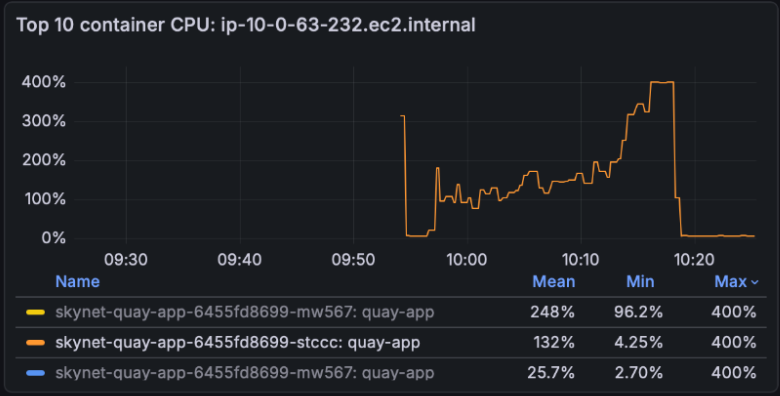
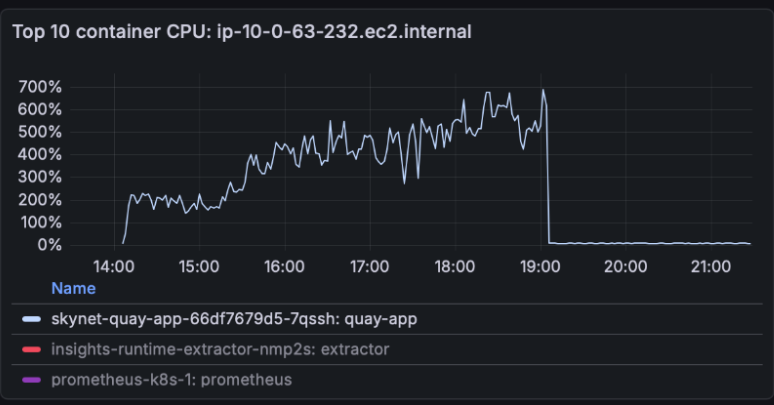
Figure 2 illustrates the extended CPU profile when scaling the Quay pod allocation to 8 vCPU.
Investigating the test output, we found the test framework averaged failed pulls (which timed out at 300 seconds) with successful ones, dragging down the reported throughput. We fixed the metrics to compute durations from successful pulls only (PR #94), which gave us accurate numbers to work with in subsequent tests.
Systematic bottleneck elimination
The following bottlenecks reflect our specific test architecture. While exact thresholds vary by storage, network, and platform setup, these findings highlight important areas to investigate when profiling your own Quay environment.
Bottleneck 1: NooBaa storage saturation
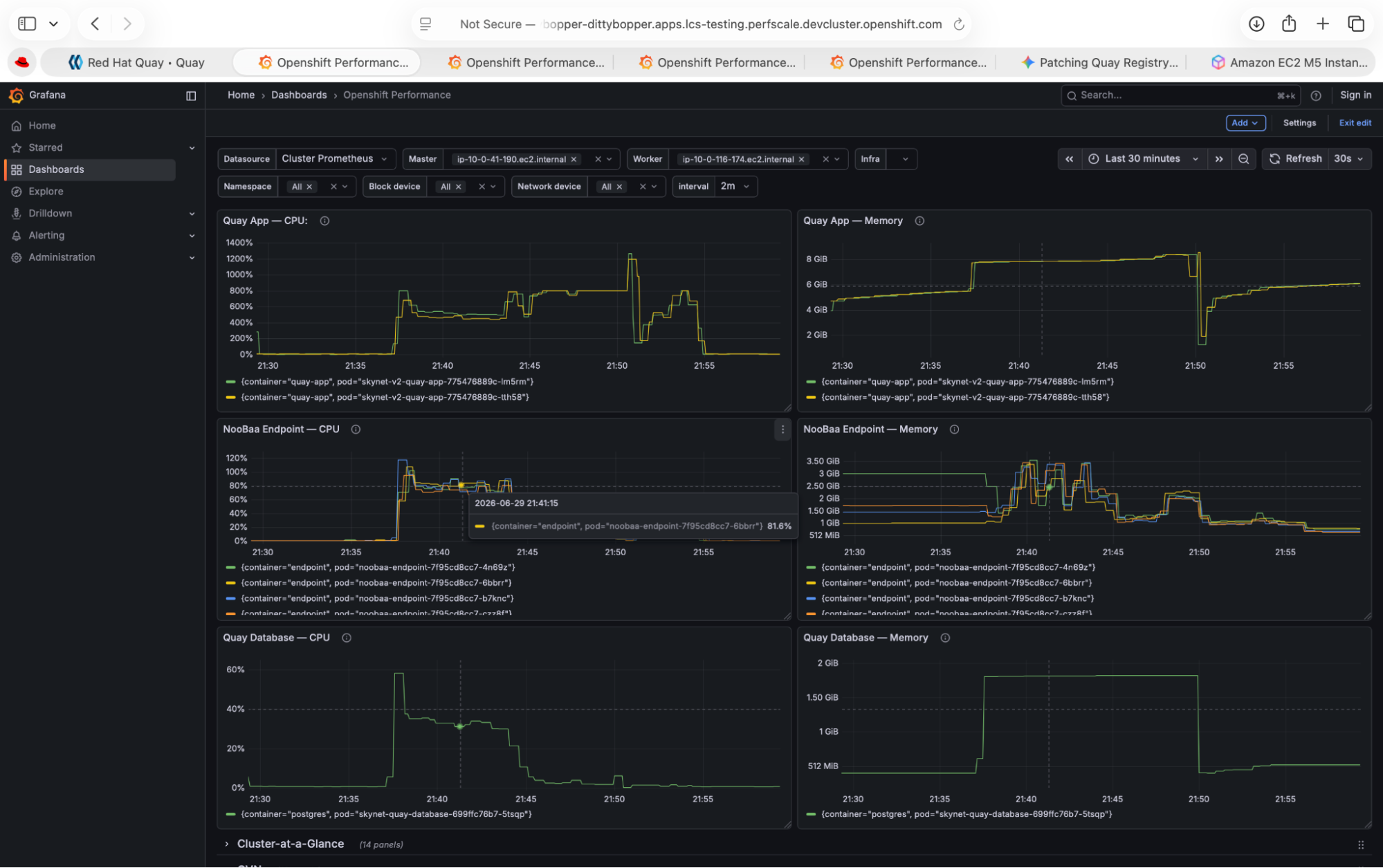
The Grafana dashboards told the story. During test runs, NooBaa object storage endpoints were hitting CPU and connection limits well before Quay pods experienced stress. Quay would request a blob, and NooBaa was the one struggling to serve it.
We ran a systematic sweep, varying the NooBaa endpoint count for each configuration:
| Quay vCPU | NooBaa endpoints | Concurrency | Images/sec | Success |
|---|---|---|---|---|
| 8 | 4 | 500 | 0.22 | 245/500 |
| 8 | 6 | 500 | 0.52 | 500/500 |
| 8 | 6 | 750 | 0.49 | 748/750 |
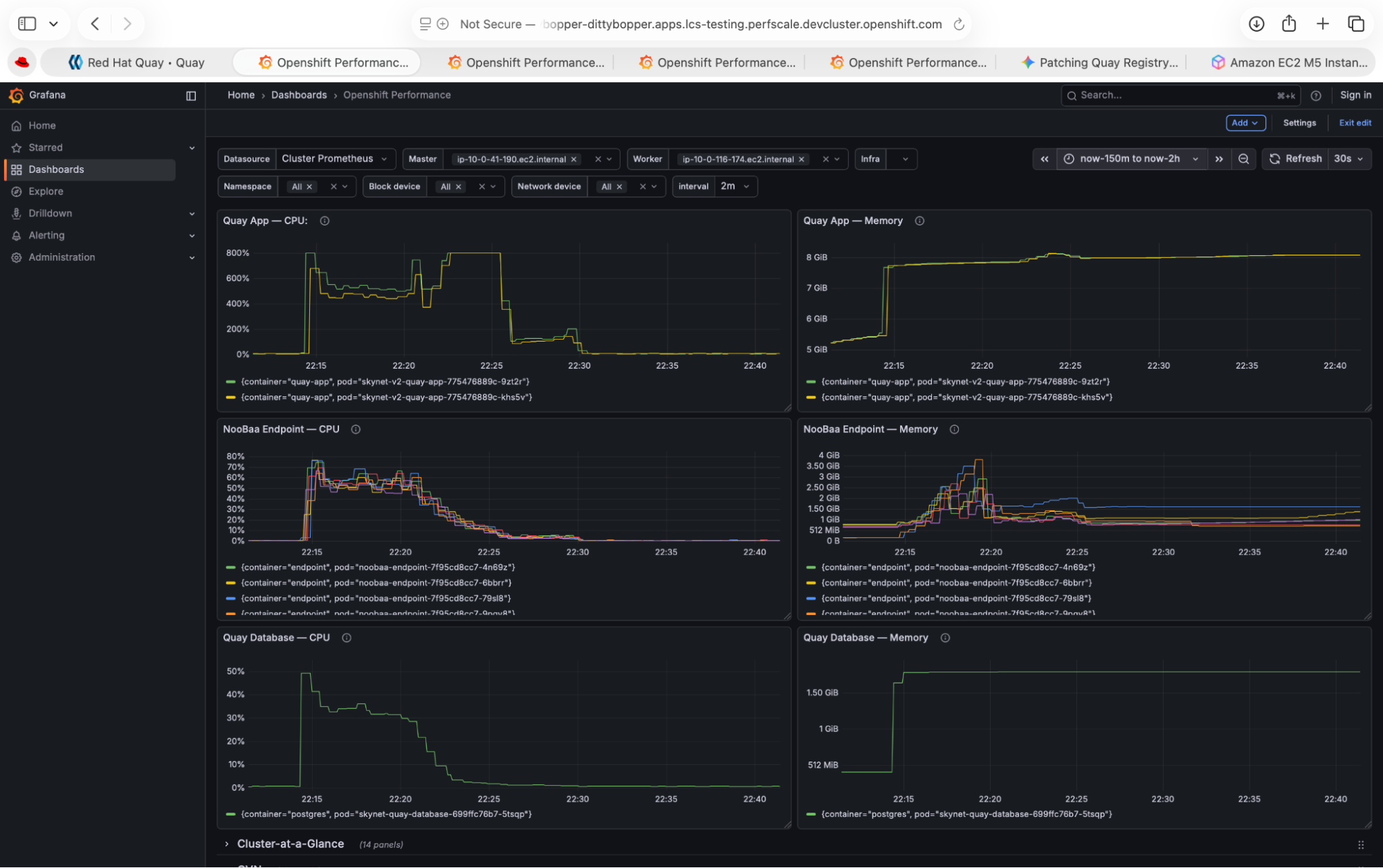
Scaling NooBaa from 4 to 6 endpoints more than doubled throughput and recovered from 49% failure to 100% success. The load barely stressed the Quay pods—they were waiting on storage.
Figure 3 demonstrates how 4 NooBaa storage endpoints experienced CPU saturation during a 500-concurrency pull test.
As shown in Figure 4, adding 2 additional NooBaa endpoints distributed the processing load and restored throughput.
This was our first major lesson: you must size the storage back end proportionally with Quay. The application pods are only one part of the overall architecture.
Bottleneck 2: The test client itself
Once we properly scaled NooBaa, we expected 16 vCPU Quay to outperform 8 vCPU. Instead:
| Quay vCPU | Concurrency | Images/sec | Success |
|---|---|---|---|
| 8 (6 NooBaa) | 750 | 0.49 | 748/750 |
| 16 (8 NooBaa) | 300 | 0.56 | 300/300 |
| 16 (8 NooBaa) | 400 | 0.07 | 45/400 |
The 8 vCPU configuration handled 750 concurrent pulls successfully, but the 16 vCPU configuration—with double the server resources—collapsed at 400.
A tcpdump analysis of the client pod revealed TCP zero-window (win 0) packets; at 16 vCPU, Quay was serving data faster than the test client could consume it. The client's receive buffer was full.
The root cause: Python's Global Interpreter Lock (GIL). The test framework uses ThreadPoolExecutor for concurrency. Python's GIL allows only 1 thread to execute bytecode at a time. At 400+ threads, the overhead of acquiring and releasing the lock thousands of times per second overwhelmed the actual HTTP work.
We confirmed this by splitting 400 concurrency across 4 pods (100 each). Throughput recovered to approximately 1.5 img/s—a 21x improvement over the single-pod result, with the same total concurrency hitting the same Quay deployment.
This was a critical finding: Performance numbers are only as reliable as the test client's ability to generate realistic load.
During these long-running high-concurrency tests (some lasting 44+ hours), we also discovered authentication tokens were expiring mid-test. The original code retried with the same expired token, turning a transient issue into permanent failure. We added token refresh logic (PR #93) that detects 401 responses and requests a fresh token without consuming a retry attempt.
Bottleneck 3: Thread and process identifier (PID) exhaustion
At 5,000 concurrency on a single pod, we hit the kubelet daemon's podPidsLimit of 16,384. We raised this to 65,536 using a KubeletConfig custom resource (CR) and set corresponding cgroup limits in the container. This is a platform configuration issue any team running high-concurrency workloads on Red Hat OpenShift should be aware of.
Sizing recommendations
After systematically eliminating bottlenecks at each layer, we ran a final iteration with proper NooBaa endpoint scaling and produced these recommendations for our specific configuration (2 Quay replicas, NooBaa storage, 171 MB/100-layer images):
| Quay vCPU/pod | Recommended maximum concurrency | NooBaa endpoints | Throughput (img/s) | Content MB/s |
|---|---|---|---|---|
| 2 | 25 | 2 | 0.22 | 37.62 |
| 4 | 75 | 2 | 0.37 | 63.27 |
| 8 | 750 | 6 | 0.49 | 83.79 |
| 16 | 300* | 8 | 0.56 | 95.56 |
*The 16 vCPU concurrency ceiling reflects a single test client limitation, not Quay capacity. With distributed clients, 16 vCPU handles higher concurrency.
What we learned
When providing sizing recommendations for a multicomponent system like Quay, you must profile and tune every component in the architecture—not just the application itself. Each bottleneck we removed revealed the next one: storage → client tooling → platform limits.
The numbers we produced are specific to our deployment configuration and will differ for customers using different storage back ends (such as S3, NooBaa, or GCS), different database tiers, different node types, or different network topologies.
There's no single "Quay supports X concurrent pulls" answer. But with a documented reference configuration, systematic testing, and proper observability across every component, it's possible to establish reliable baselines for a given environment and scale from there.
The approach we used—isolate each component, profile under load, and eliminate bottlenecks one at a time—applies to any Quay deployment regardless of configuration.
Red Hat doesn't currently publish official capacity planning guidance for Quay. We hope this work—and the improvements to the open source test framework—helps define these performance baselines and provides a framework for testing Quay in your own environment.
Resources:
- quay/quay-performance-scripts: Load testing framework
- Red Hat Quay Operator Components: Managed versus unmanaged components
- cloud-bulldozer/performance-dashboards: Grafana dashboards (Dittybopper)
- cloud-bulldozer/orion: Performance regression detection

