Enterprise AI environments are increasingly moving from dedicated GPU servers toward shared accelerator infrastructure that can support multiple users, teams, and workloads on the same hardware. This shift creates an important infrastructure question: How can organizations increase GPU utilization while maintaining strong workload isolation and predictable performance?
AMD Instinct MI300X GPUs provide hardware-assisted SR-IOV capabilities that allow a physical accelerator to be partitioned into multiple virtual functions (VF). When combined with Red Hat OpenStack Services on OpenShift, OpenStack Nova can discover and schedule these VFs and assign them directly to tenant virtual machines using VFIO PCI passthrough.
In this article, we describe validation performed with an 8-GPU AMD Instinct MI300X system running Red Hat OpenStack Services on OpenShift. The environment exposed 64 GPU VFs from 8 physical MI300X GPUs, demonstrated a maximum-density configuration of 64 virtual machines with 1 VF each, exercised configurations with as many as 32 VFs assigned to a single VM, and measured GPU memory bandwidth at approximately 96–99% of the bare-metal baseline for the primary BabelStream operations tested.
The results demonstrate that hardware-partitioned MI300X GPUs can provide an efficient foundation for multi-tenant AI and HPC virtual machines while also highlighting important architectural boundaries around GPU peer-to-peer communication, device lifecycle, and large PCI passthrough configurations.
Note
The performance validation described in this article used a lab-built GIM package on Red Hat Enterprise Linux 9.6 (RHEL). Production OpenStack Services on OpenShift deployments should follow the Red Hat Validated Architecture and the applicable Red Hat and AMD support path for driver delivery. Building GIM with DKMS directly on EDPM hosts is not a supported production deployment workflow today.
Why hardware SR-IOV matters for GPU virtualization
GPU virtualization can be implemented in several ways. Software-mediated approaches provide flexibility and work well for many use cases, but some enterprise environments require stronger device isolation and predictable resource allocation.
With AMD GPU-IOV Manager (GIM), MI300X resources can be partitioned into hardware-backed VFs and assigned directly to virtual machines. For platform teams, this provides several advantages:
- Near-native memory bandwidth: In our testing, MI300X VFs delivered about 96–99% of bare-metal memory bandwidth for primary BabelStream operations.
- Hardware-backed isolation: Each VF receives its own PCI function and VRAM allocation, while the host IOMMU provides DMA isolation.
- Native OpenStack scheduling: GPU VFs are represented as PCI resources that Nova can inventory, schedule, and allocate.
- Predictable density: In CPX mode, each MI300X GPU exposes 8 VFs. An 8-GPU compute node therefore provides up to 64 schedulable GPU VFs.
- Standard VM consumption model: Tenants request GPU capacity through Nova flavors, while libvirt and VFIO attach the selected PCI device directly to the guest.
For Red Hat OpenStack Services on OpenShift, this fits naturally into the architecture: The OpenStack control plane runs on OpenShift, while GPU-equipped Red Hat Enterprise Linux (RHEL) compute nodes are managed through External Data Plane Management (EDPM).
Architecture overview
The validated architecture has 3 primary layers (see figure 1):
- OpenStack Services on OpenShift control plane
- RHEL-based EDPM compute nodes with AMD Instinct MI300X GPUs
- Tenant VMs consuming GPU VFs through PCI passthrough
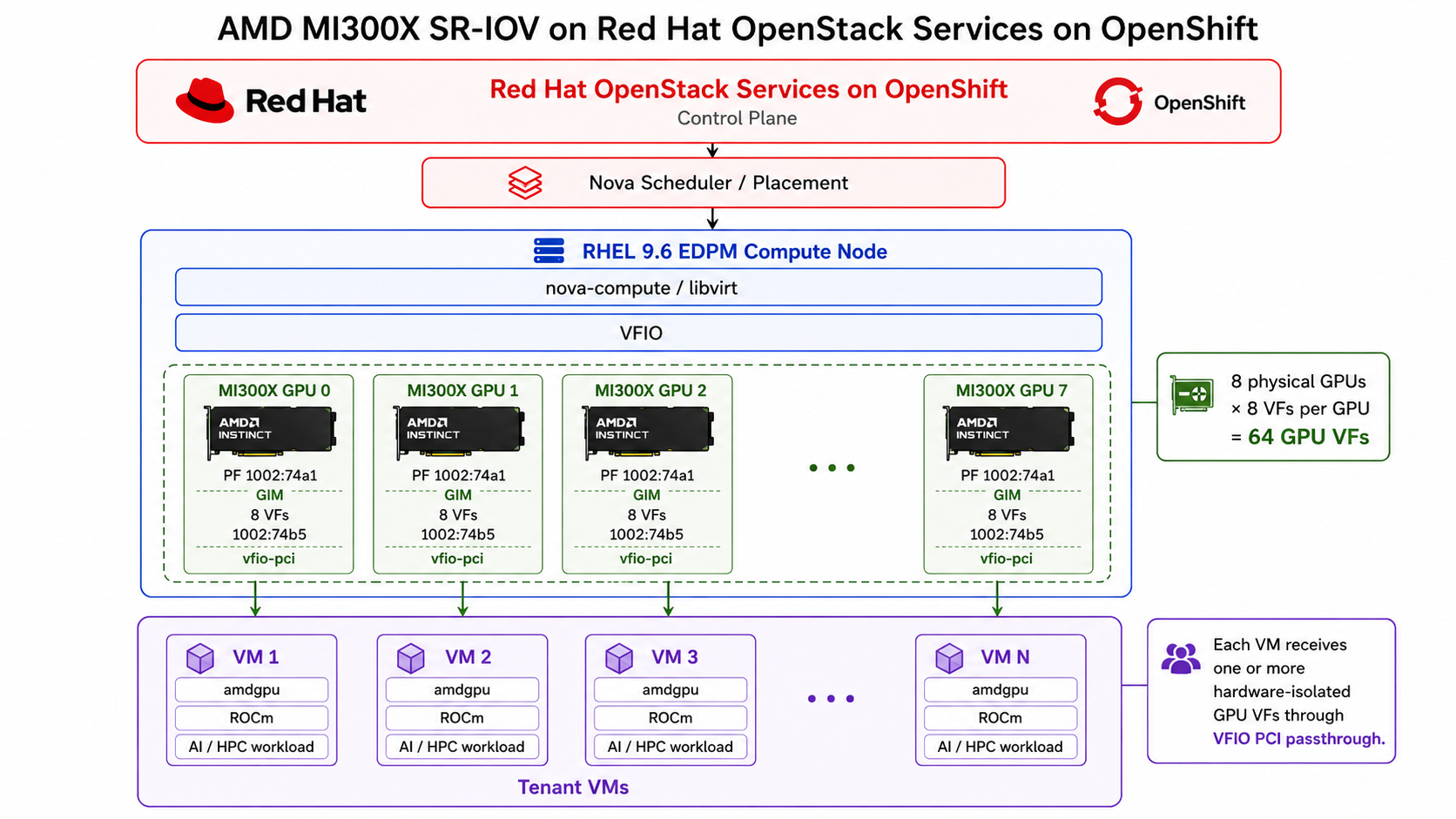
The responsibilities are deliberately separated:
- AMD GIM manages the MI300X physical functions and the lifecycle of GPU VFs
- VFIO and the host IOMMU provide PCI assignment and DMA isolation
- Nova and Placement inventory and schedule available GPU VFs
- libvirt/QEMU attach the selected PCI device to the VM
- The guest
amdgpudriver and ROCm provide access to the GPU from inside the VM
Validation environment
The following environment was used for the performance and lifecycle validation:
- Platform: Red Hat OpenStack Services on OpenShift 18.0 (FR5)
- Operating system: RHEL 9.6
- GPUs: 8× AMD Instinct MI300X
- GPU partitioning: AMD GIM driver 8.6.0 (
vf_num=8, CPX mode) - Virtual functions: 64
- Virtualization: OpenStack Nova + VFIO
- Guest compute: ROCm 7.1.1
The performance validation was performed on Red Hat OpenStack Services on OpenShift 18.0 FR5. The resulting MI300X Validated Architecture developed from this work is published in the 18.0-fr6 architecture branch.
How MI300X GPU partitioning works
An AMD Instinct MI300X contains 304 compute units and 192 GB of HBM memory. In CPX mode, the GPU is divided into 8 compute partitions. Each partition exposes an SR-IOV virtual function (figure 2).
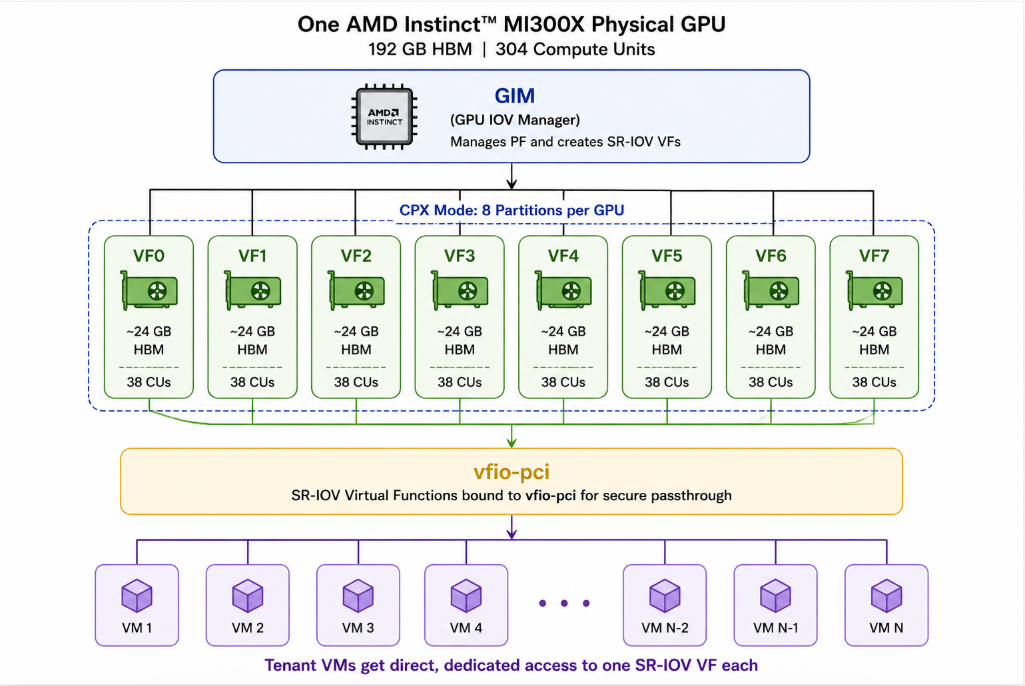
Across 8 physical GPUs:
8 MI300X GPUs × 8 VFs per GPU = 64 GPU VFs
From Nova's perspective, these VFs become PCI resources that can be scheduled to virtual machines.
Configuring the platform
The configuration can be understood as 6 stages:
- Prepare the EDPM compute node
- Configure GIM and VFIO
- Configure Nova GPU VF scheduling
- Prepare the guest image with ROCm
- Create a GPU flavor and launch a VM
- Scale and validate performance
Step 1: Prepare the EDPM compute node
The host commands below reflect the RHEL 9.6 lab environment used during validation. For a Red Hat OpenStack Services on OpenShift deployment, start with the pre-provisioned RHEL 9.6 EDPM host and GIM prerequisites described in the MI300X Validated Architecture. Host kernel arguments, VFIO binding, and related configuration should follow the EDPM workflow defined by that architecture rather than being treated as a separate manual production procedure.
Enable AMD IOMMU support on the EDPM compute node, and verify that PCI passthrough is available.
Confirm that MI300X devices are visible:
lspci -nn | grep -i amdEnable IOMMU in the kernel command line:
amd_iommu=on iommu=ptUpdate GRUB:
sudo grubby --update-kernel ALL --args 'amd_iommu=on iommu=pt'
sudo reboot
After reboot, verify that the host IOMMU is enabled (see figure 3):
dmesg | grep -i iommu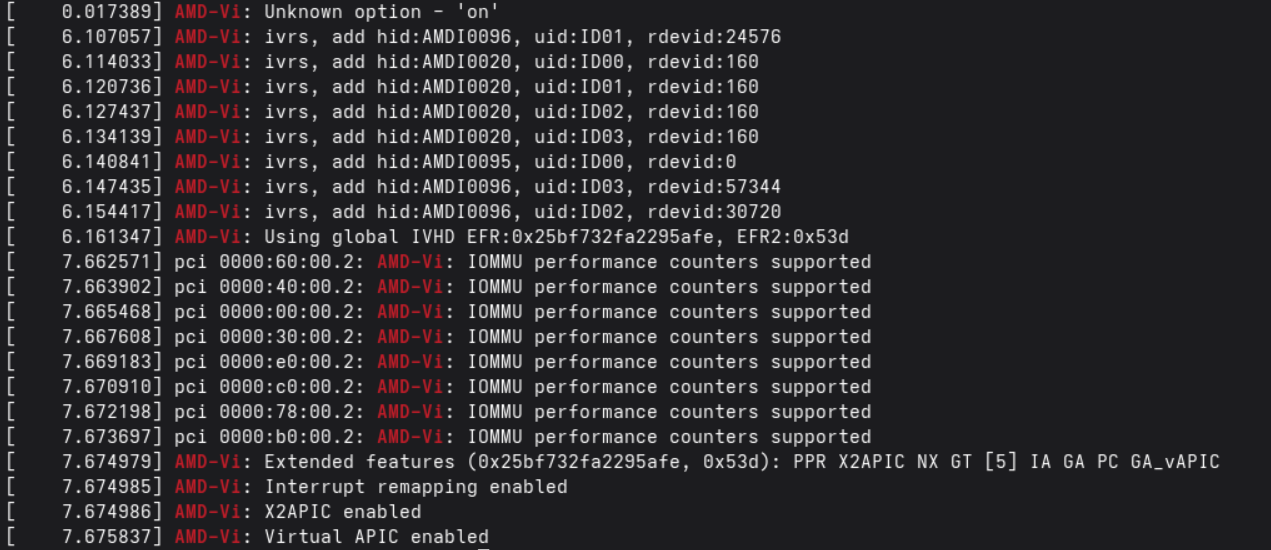
The important architectural point is that the host is being prepared to pass GPU VFs to tenant VMs. The host amdgpu driver should not claim the PF/VF devices used by the OpenStack Services on OpenShift passthrough configuration.
Production deployments should use the EDPM configuration and service ordering defined by the Validated Architecture rather than treating these host settings as independent manual configuration.
Step 2: Configure GIM and VFIO
The AMD GIM driver partitions each physical MI300X GPU into SR-IOV virtual functions. In the validated configuration, each MI300X GPU operates in CPX mode and exposes 8 VFs.
Without GIM, Nova does not see the physical accelerator as a set of individual VF resources in this configuration.
Support note
The gim-dkms-8.6.0.K package used during this validation is DKMS-based. Building or installing GIM with DKMS directly on a RHEL EDPM host is not a supported production workflow. Production deployments should follow the GIM delivery method documented in the MI300X Validated Architecture and the applicable Red Hat and AMD support path.
To install GIM in the validation environment:
sudo dnf groupinstall -y "Development Tools"
sudo dnf install kernel-devel dkms autoconf automake
wget https://github.com/amd/MxGPU-Virtualization/releases/download/8.6.0.K/gim-dkms-8.6.0.K-0.noarch.rpm
sudo dnf install ./gim-dkms-8.6.0.K-0.noarch.rpm
The validation used GIM 8.6.0 with RHEL 9.6 and kernel 5.14.0-570.60.1.el9_6.
Load GIM in CPX mode with 8 VFs per GPU:
sudo modprobe gim vf_num=8With 8 GPUs, this creates 64 VFs total. Verify:
$ lspci -d 1002: | wc -l
72
The output shows 8 Physical Functions + 64 virtual functions (72 devices):
  [vevenugo@cisco-bronco-ccs-aus-e03-10 GIM-Driver]$ lspci -d 1002:
04:00.0 PCI bridge: Advanced Micro Devices, Inc. [AMD/ATI] Device 1501
05:00.0 Processing accelerators: Advanced Micro Devices, Inc. [AMD/ATI] Aqua Vanjaram [Instinct MI300X]
05:02.0 Processing accelerators: Advanced Micro Devices, Inc. [AMD/ATI] Aqua Vanjaram [Instinct MI300X VF]
05:02.1 Processing accelerators: Advanced Micro Devices, Inc. [AMD/ATI] Aqua Vanjaram [Instinct MI300X VF]
[...]
5b:02.7 Processing accelerators: Advanced Micro Devices, Inc. [AMD/ATI] Aqua Vanjaram [Instinct MI300X VF]
The VFs use PCI ID 1002:74b5 and must be bound to vfio-pci so Nova and libvirt can assign them to tenant VMs. In the Validated Architecture, the EDPM vfio-pci-bind service handles the host-side VFIO configuration, including driver binding and the required boot configuration.
The resulting path is:
MI300X PF → GIM → 8 VFs/GPU → vfio-pci → Nova / tenant VMs
For the complete production-oriented GIM and VFIO configuration, refer to the Validated Architecture, AMD Instinct MI300X vGPU (GIM SR-IOV)..
Step 3: Deploy Red Hat OpenStack Services on OpenShift and configure Nova for GPU VF scheduling
For a new deployment, use the MI300X Validated Architecture from the 18.0-fr6 branch. Deployment follows the ordered stages defined in the README.md: Install the operators, configure storage, deploy the control plane, then configure and deploy the data plane.
Clone the architecture repository and switch to the example directory:
git clone -b 18.0-fr6 \
https://github.com/openstack-k8s-operators/architecture.git
oc project openstack
cd architecture/examples/va/vaf/amd/mi300x-vgpu
Install the OpenStack K8s operators and dependencies
Deploy the Red Hat OpenStack Services on OpenShift operators and the dependency OLM operators (Cert-Manager, MetalLB, and NMState) by following the documentation for creating the OLM subscriptions (stage 1 reference, operators + dependencies).
Install and prepare the OpenStack Operator (includes cert-manager prerequisite).
Prepare Red Hat OpenShift Container Platform and Red Hat OpenStack Services on OpenShift networks (MetalLB + NMState operators).
Configure a storage class
Configure the backing storage class for the control plane. In the Validated Architecture, this is an LVMS LVMCluster exposing the lvms-vg1 StorageClass (used in place of CHANGEME_STORAGE_CLASS). Follow the VA storage instructions, or the official product documentation for persistent storage, then verify:
oc get storageclass lvms-vg1Configure networking and deploy the control plane
Following control-plane.md, edit the node network configuration, render it, apply it, and wait for it to converge:
vim nncp/values.yaml
kustomize build nncp > nncp.yaml
oc apply -f nncp.yaml
oc wait nncp -l osp/nncm-config-type=standard --timeout=300s \
  --for jsonpath='{.status.conditions[0].reason}'=SuccessfullyConfigured
Customize the control-plane service values, render, and apply. Applying the control plane triggers the Red Hat OpenStack Services on OpenShift operator to auto-generate the required OpenStack service passwords (osp-secret):
vim service-values.yaml
kustomize build . > control-plane.yaml
oc apply -f control-plane.yaml
oc wait osctlplane controlplane --for condition=Ready --timeout=600s
Configure and deploy the data plane (EDPM nodeset)
Following dataplane.md, render the nodeset manifest first, then fill in your environment-specific secrets and CHANGEME values before applying it:
vim edpm/nodeset/values.yaml
kustomize build edpm/nodeset > dataplane-nodeset.yaml
Edit dataplane-nodeset.yaml and provide:
- Container image registry credentials (pull secret)
- Red Hat Subscription Manager (
subscription-manager) credentials - Remaining
CHANGEMEand environment values, including the MI300X VF PCI product ID 74b5 (not the Physical Function ID 74a1), plus SSH keys, host FQDN and Ansible host IP, NIC MACs, and PCI BDFs. Defaults provide 8 VFs per PF in CPX mode, so adjust as needed for your slicing configuration.
After that's done, apply the changes:
oc apply -f dataplane-nodeset.yamlRender and run the corresponding OpenStackDataPlaneDeployment:
vim edpm/deployment/values.yaml
kustomize build edpm/deployment > dataplane-deployment.yaml
oc apply -f dataplane-deployment.yaml
Note
Use the VF product ID, not the PF. Both when editing dataplane-nodeset.yaml above and in the Nova PCI alias below, use the MI300X VF product ID 74b5 rather than the Physical Function product ID 74a1. Using the PF ID prevents Nova/Placement from tracking the individual VFs.
[pci]
alias = {"name": "mi300x-vf", "vendor_id": "1002", "product_id": "74b5", "device_type": "type-VF", "numa_policy": "preferred"}
[filter_scheduler]
pci_in_placement = True
This allows Nova and Placement to track available MI300X VFs and select an appropriate device when a VM requests the mi300x-vf PCI alias.
MI300X VFs → Nova/Placement → Nova Scheduler → libvirt/VFIO → Tenant VM
The complete OpenStackControlPlane, OpenStackDataPlaneNodeSet, and OpenStackDataPlaneDeployment configuration is maintained in the Validated Architecture AMD Instinct MI300X vGPU (GIM SR-IOV).
Step 4: Prepare the guest image with ROCm
After the Red Hat OpenStack Services on OpenShift dataplane is deployed and Nova can schedule the MI300X VFs, the tenant VM needs the AMD GPU software stack to use the assigned accelerator.
For this validation, we used a RHEL 9.6 guest with ROCm 7.1.1.
Configure the AMDGPU and ROCm repositories inside the guest using the applicable AMD ROCm repository instructions. Add the AMDGPU and ROCm repositories:
sudo tee /etc/yum.repos.d/amdgpu.repo <<'EOF'[amdgpu]name=amdgpubaseurl=https://repo.radeon.com/amdgpu/31.40/el/9/main/x86_64/enabled=1priority=50gpgcheck=1gpgkey=https://repo.radeon.com/rocm/rocm.gpg.keyEOF
sudo tee /etc/yum.repos.d/rocm.repo <<'EOF'[rocm]name=ROCm 7.1.1 repositorybaseurl=https://repo.radeon.com/rocm/el9/7.1.1/mainenabled=1priority=50gpgcheck=1gpgkey=https://repo.radeon.com/rocm/rocm.gpg.key
[amdgraphics]name=AMD Graphics 7.1.1 repositorybaseurl=https://repo.radeon.com/graphics/7.1.1/el/9.6/main/x86_64/enabled=1priority=50gpgcheck=1gpgkey=https://repo.radeon.com/rocm/rocm.gpg.keyEOF
Install the AMD GPU driver and ROCm stack:
sudo dnf clean allsudo dnf install amdgpu-dkms rocmsudo usermod -a -G video,render $LOGNAMEVerify that the assigned MI300X VF is visible to the guest and ROCm:
sudo modprobe amdgpurocminfo | grep "Marketing Name"
amd-smi version
The software path inside the VM is:
MI300X VF → guest amdgpu → ROCm → AI/HPC workload
For repeated deployments, use a RHEL guest image with the required AMD GPU and ROCm packages preinstalled as a reusable GPU-enabled image.
Step 5: Create a GPU flavor and launch a VM
After Nova can inventory the MI300X VFs and the guest image contains the required ROCm stack, create a flavor that requests an MI300X VF. The Validated Architecture uses the mi300x-vf PCI alias configured in the previous step.
Create a flavor requesting a VF:
openstack flavor create mi300x-vf-1 \
 --ram 32768 --vcpus 8 --disk 100 \
 --property "pci_passthrough:alias"="mi300x-vf:1"
The :1 value requests a MI300X VF for the instance.
Launch a test VM using the GPU-enabled flavor:
openstack server create \
 --flavor mi300x-vf-1 \
 --image <rhel-9.6-rocm-image> \
 --network <tenant-network> \
 mi300x-test-vm
The provisioning flow is:
GPU flavor → Nova selects VF → VFIO assigns VF → Tenant VM
After the VM boots, verify that the assigned VF is visible inside the guest:
lspci -nn | grep 1002:74b5
rocminfo | grep "Marketing Name"
The VM detects the assigned MI300X VF and make it available to applications through ROCm.
Step 6: Scale and validate performance
After validating a single GPU-backed instance, we exercised larger deployment configurations, including the maximum-density configuration of 64 VMs with a VF each (8 MI300X GPUs × 8 VFs = 64 GPU VFs → 64 GPU-backed VMs).
64 VM × 1 VF
- VMs: 64
- VFs per VM: 1
- Result: PASS
8 VMs × 8 VFs, same-GPU mapping
- VMs: 8
- VFs per VM: 8
- Result: PASS
8 VM × 8 VF, distributed mapping
- VMs: 8
- VFs per VM: 8
- Result: PASS
4 VM × 16 VF
- VMs: 4
- VFs per VM: 16
- Result: PASS
2 VM × 32 VF
- VMs: 2
- VFs per VM: 32
- Result: PASS
1 VM × 64 VF
- VMs: 1
- VFs per VM: 64
- Result: Under investigation
Configurations with more than 8 passthrough devices required additional PCIe root ports in the guest topology.
Configurations with up to 32 VFs per VM were successfully exercised. The single-VM 64-VF configuration remains under investigation because of virtual-IOMMU behavior encountered at very high PCI passthrough device counts.
Performance validation
The validation included GPU memory-bandwidth, compute, transfer, and lifecycle testing.
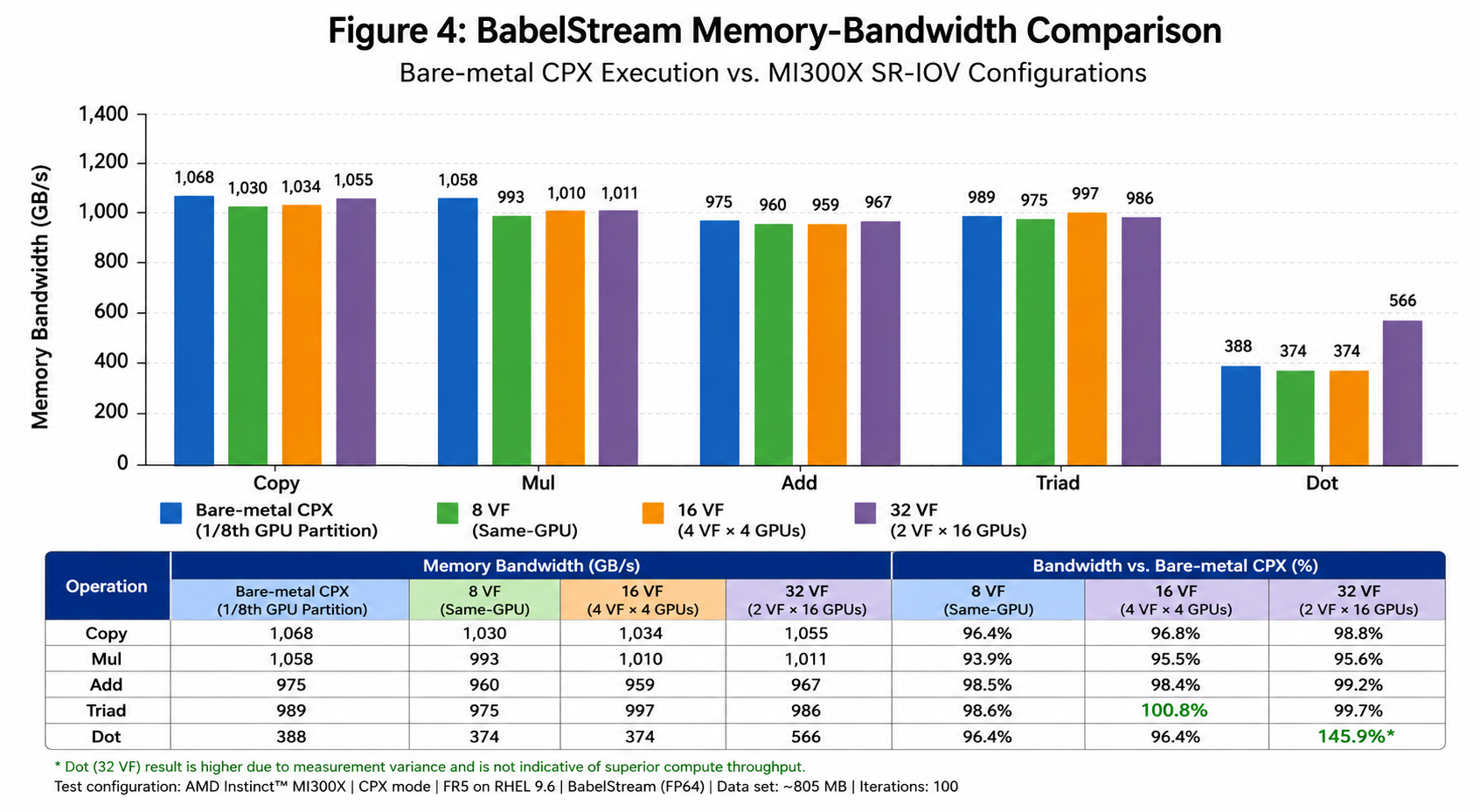
BabelStream: GPU memory bandwidth
BabelStream measures sustained GPU memory bandwidth. Testing used FP64 data, an approximately 805 MB dataset, and 100 iterations.
For the primary streaming operations, the tested SR-IOV configurations achieved approximately 96–99% of the bare-metal GPU memory-bandwidth baseline.
The Dot result showed different scaling behavior, and is interpreted separately rather than as part of the primary 96–99% claim (figure 4).
CoralGemm: FP64 compute throughput
CoralGemm was used to measure FP64 dense matrix multiplication (figure 5).
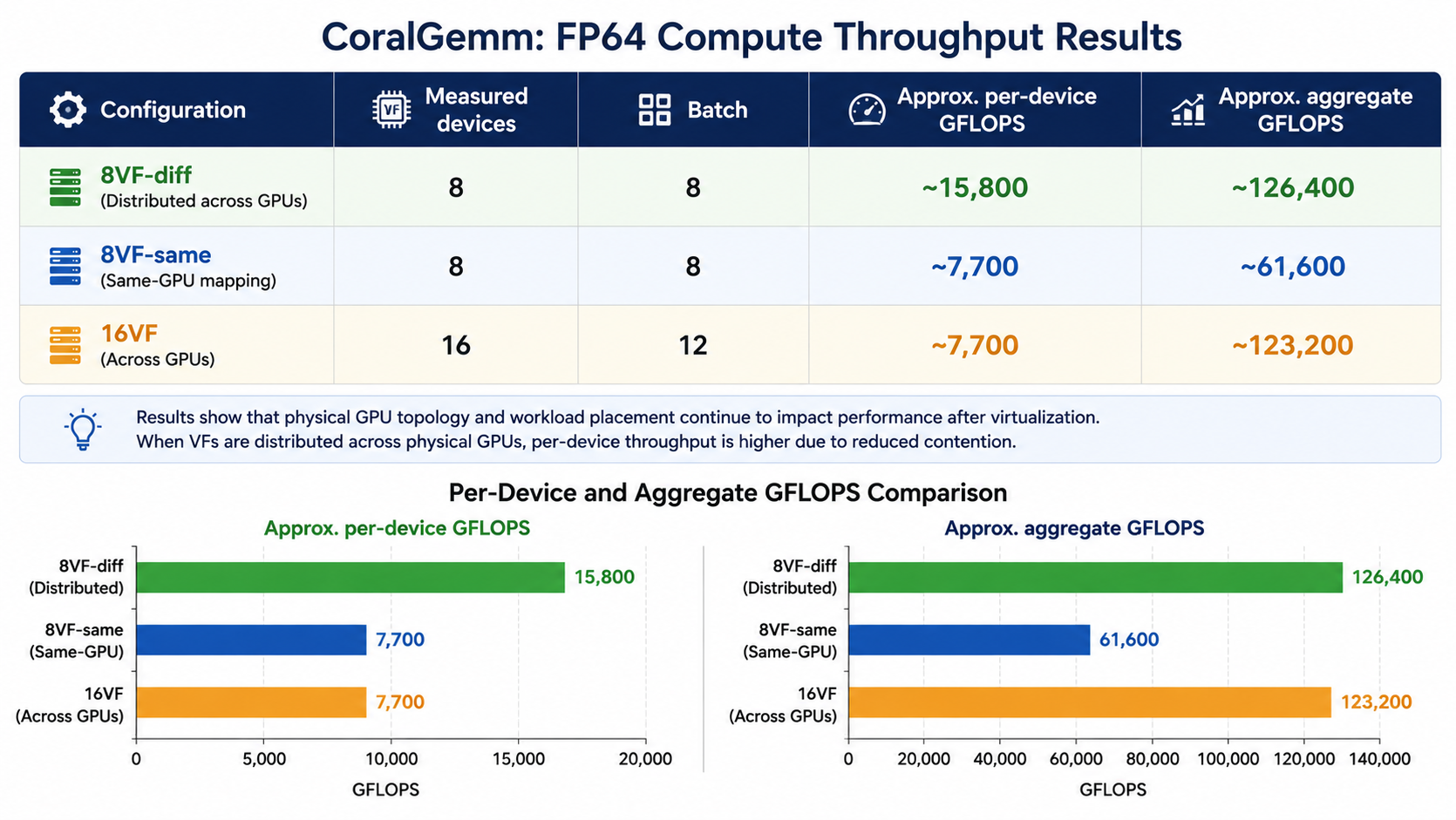
The results show that physical GPU topology and workload placement continue to matter after virtualization.
When the measured VFs were distributed across physical GPUs, the workloads experienced less contention for the underlying GPU resources. When multiple active VFs consumed resources associated with the same physical GPU, per-VF throughput decreased.
SR-IOV therefore provides hardware isolation, but placement topology still influences application performance.
GPU peer-to-peer communication
An important architectural boundary identified during testing was direct GPU-to-GPU peer-to-peer communication between isolated VFs. Bare-metal transfer testing measured approximately:
- 503–518 GB/s unidirectional XGMI bandwidth
- 840–926 GB/s bidirectional XGMI bandwidth
In the tested SR-IOV configurations, IOMMU isolation blocked direct P2P DMA between VFs.
CPU-to-GPU transfers remained available at approximately 42 GB/s.
This makes SR-IOV particularly well suited to independent accelerator workloads such as inference services, embedding generation, RAG services, independent GPU applications, and isolated research workloads.
Tightly coupled multi-GPU applications that depend on direct GPU-to-GPU DMA or high-bandwidth P2P communication may require full physical GPU or bare-metal deployment instead.
Stability and lifecycle validation
We performed repeated VM lifecycle tests across the major configurations.
8 VM × 8 VF, same-GPU
- Completed Cycles: 100
- Result: PASS
8 VM × 8 VF, distributed
- Completed Cycles: 100
- Result: PASS
4 VM × 16 VF
- Completed Cycles: 50
- Result: PASS
2 VM × 32 VF
- Completed Cycles: 50
- Result: PASS
64 VM × 1 VF
- Completed Cycles: 100
- Result: PASS
The completed tests verified VM boot and shutdown, GPU visibility, VF reclamation, and host health. No VF leaks were observed in the completed validation runs.
Known limitations and operational considerations
- Boot-time VF binding: The tested GIM configuration requires GPU VFs to be prepared and bound to
vfio-pciduring host initialization. Runtime VF unbinding caused host hangs during testing. - GPU P2P: Direct VF-to-VF GPU P2P DMA is blocked by IOMMU isolation in the tested configuration.
- Large PCI configurations: Configurations up to 32 VFs per VM were successfully exercised. The 64-VF single-VM case remains under investigation.
- VF memory capacity: Each CPX VF exposes approximately 24 GB of VRAM. Workloads requiring the complete physical GPU memory capacity need a different GPU-consumption model.
- Driver lifecycle: Production deployments should follow the supported Red Hat and AMD GIM delivery path and the configuration documented in the Validated Architecture rather than relying on a lab DKMS installation.
What we demonstrated
This validation demonstrated that:
- 8 AMD Instinct MI300X GPUs can expose 64 SR-IOV GPU VFs in CPX mode.
- Red Hat OpenStack Services on OpenShift can inventory and schedule those VFs through Nova's PCI resource model.
- A maximum-density configuration of 64 VMs, each with one VF, was successfully exercised.
- Individual VMs were tested with as many as 32 GPU VFs.
- The primary BabelStream operations delivered approximately 96–99% of bare-metal GPU memory bandwidth.
- Repeated lifecycle testing demonstrated consistent VF allocation and reclamation in the completed test configurations.
- The validation identified important boundaries around P2P communication, runtime VF lifecycle, and very large PCI passthrough configurations.
Next Steps
Are you ready to evaluate AMD Instinct MI300X GPU partitioning on Red Hat OpenStack Services on OpenShift? Start with the Validated Architecture AMD Instinct MI300X vGPU (GIM SR-IOV) to understand the OpenStack Services on OpenShift control-plane, EDPM, GIM, VFIO, and Nova configuration used for this architecture.
- AMD Instinct MI300X vGPU (GIM SR-IOV) Validated Architecture
- AMD MxGPU Virtualization / GIM
- AMD Instinct MI300X
- ROCm documentation
- Red Hat OpenStack Services on OpenShift 18 documentation
- Deploying GPU workloads on Red Hat OpenStack Services on OpenShift 18
- Configuring PCI passthrough
- BabelStream
- AMD CoralGemm
Begin with a single GPU-backed VM, validate the workload characteristics that matter for your environment, and then scale the configuration based on your GPU capacity and application requirements.
Conclusion
AMD MI300X SR-IOV provides a practical approach for increasing GPU utilization in multi-tenant virtualized environments running Red Hat OpenStack Services on OpenShift.
The architecture combines AMD GIM, VFIO, Nova PCI scheduling, Placement, and standard OpenStack tenant VMs. In the tested configuration, eight physical MI300X GPUs provided a pool of 64 GPU virtual functions, enabling workloads to consume GPU capacity through the standard OpenStack VM provisioning model. The validation also demonstrates that workload characteristics matter when choosing the appropriate accelerator-consumption model. For deployment, Validated Architecture AMD Instinct MI300X vGPU (GIM SR-IOV) is the source of truth for the production-oriented Red Hat OpenStack Services on OpenShift configuration.
Independent and partition-friendly workloads can take advantage of MI300X CPX SR-IOV to increase workload density while retaining hardware-backed isolation. Workloads that require the full MI300X memory capacity or tightly coupled cross-GPU communication may be better suited to full physical GPU assignment.

