Overview: Partition AMD Instinct GPU accelerators via device config manager (DCM) in Red Hat OpenShift
High-end AI accelerators like the AMD Instinct MI300X pack an incredible amount of compute power and memory. However, dedicating an entire physical GPU to a single, lightweight inference workload often means leaving expensive resources sitting idle. In a multi-tenant cluster, this underutilization is costly and wasteful.
GPU partitioning solves this problem by allowing you to slice a single physical GPU into multiple, isolated devices. On MI300X, for example, partitioning Core Partition X (CPX) and Non-Uniform Memory Access (NUMA) Per Socket (NPS) 4 (NPS4) transforms 8 physical accelerators into 64 independently schedulable GPU resources, enabling up to 8x the workload concurrency from the same hardware investment.
This learning path shows you how to transition your systems from a default unpartitioned state SPX (no partitions) to a maximum multi-tenancy configuration (above) that uses CPX and NPS4. By the end of this learning path, you will be able to multiply your workload density—getting more out of your infrastructure investments.
The table below summarizes the recommended compute and memory pairings for AMD Instinct MI300X systems. This learning path uses the CPX + NPS4 combination for maximum multi-tenant density.
Compute mode | Memory mode | Logical GPUs per physical GPU | Use case |
|---|---|---|---|
SPX | NPS1 | 1 | Maximum performance (single tenant) |
DPX | NPS2 | 2 | Balanced performance and locality |
CPX | NPS4 | 8 | Maximum density (multi-tenant) |
For the full list of valid combinations and constraints, see the AMD MI300X partitioning overview.
Prerequisites:
Before beginning the GPU partitioning procedure, ensure your environment meets the following requirements:
- Hardware: A system with AMD Instinct MI300X GPUs.
- Firmware/VBIOS: For MI300X systems, the minimal VBIOS version supported for partitioning is 022.040.003.042 (see official docs). It is highly recommended to update to the latest firmware and BIOS versions from your vendor, especially if some available partitions are not displaying.
- Cluster environment: A single-node OpenShift cluster or a multi-node Red Hat OpenShift environment.
- Required components: The AMD GPU Operator (and dependencies) must be installed, as the device config manager (DCM) is a component of this operator.
- Storage (optional): If you plan to run the vLLM validation workload and want to store the model cache via a PersistentVolumeClaim (PVC), you will need a storage backend configured, such as LVMS.
- Credentials (optional): A Hugging Face token stored as a Kubernetes Secret is required only if you intend to deploy and access gated models during the validation step.
In this learning path, you will:
- Gain an understanding of the concepts of GPU partitioning and the specific compute (CPX) and memory (NPS) pairings required for AMD Instinct accelerators.
- Configure the AMD DCM by creating Kubernetes-native partition profiles and manifests.
- Verify that Red Hat OpenShift control plane workloads tolerate the DCM taint and understand which pods will be evicted during partitioning.
- Trigger hardware-level partitioning to split a single physical GPU into multiple isolated logical devices.
- Deploy a vLLM inference server to a partitioned GPU slice to validate your configuration.
GPU partitioning with DCM
The device config manager (DCM) is a component of the AMD GPU Operator that handles GPU partitioning on Kubernetes clusters. You define partition profiles in a ConfigMap resource, and DCM applies the corresponding compute and memory layout to each GPU node (see official docs).
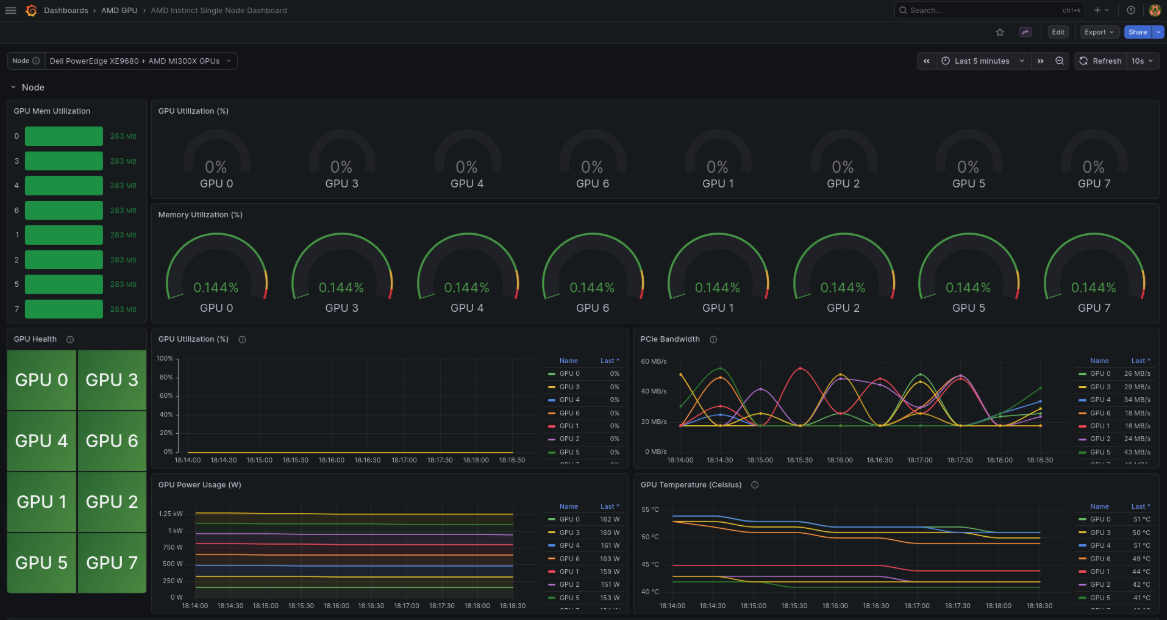
By default, MI300X systems initially start in SPX mode (no partitions), as shown below in Figure 1.
In this learning path, we show you how to configure partitioning for optimal multi-tenant use cases (i.e., CPX + NPS4 pairing) in single-node OpenShift.

