Managing modern, large-scale Kubernetes environments presents a unique set of challenges, particularly when maintaining visibility and performing rapid troubleshooting across distributed clusters. As the number of managed clusters grows, the cognitive load on platform engineers and administrators increases, often leading to slower response times during critical incidents. It's a lot.
Red Hat Advanced Cluster Management for Kubernetes has long been the standard for multicluster governance and lifecycle management. Yet, managing operations at massive scale often exceeds what traditional manual queries can quickly surface. Integrating natural language context allows platform teams to synthesize complex fleet data in seconds during critical incidents.
This is where the new MCP server for Red Hat Advanced Cluster Management for Kubernetes (Technology Preview) fits in. By integrating this component with Red Hat OpenShift Lightspeed, we can transform how administrators interact with their entire fleet. Today, Red Hat Advanced Cluster Management administrators must construct manual search queries and sift through scattered cluster outputs to answer fleet-wide questions. Instead of crafting manual search queries, administrators can now ask fleet-wide questions in plain English to get timely answers.
In this post, we'll show you how to connect OpenShift Lightspeed to your Red Hat Advanced Cluster Management search deployment using the Model Context Protocol (MCP), allowing you to query, analyze, and diagnose resources running across your entire fleet using natural language.
1. Setting up the MCP server
The MCP server uses the Model Context Protocol (MCP) to bridge AI models and Kubernetes APIs. It translates natural language prompts into structured search queries across your managed clusters. You can easily deploy it in your hub cluster using Helm. Once you're connected to your hub cluster using the command-line interface (CLI), run the following commands to deploy it:
helm repo add acm-search https://raw.githubusercontent.com/stolostron/search-mcp-server/main/charts
helm repo update
helm install acm-mcp-server acm-search/acm-mcp-server --create-namespace --namespace acm-search
Once deployed, the Helm chart creates the necessary resources to run the service in your hub cluster, including the deployment, service, service account, and role-based access control (RBAC) roles required to interact with the Red Hat Advanced Cluster Management Search API.
2. Configure OpenShift Lightspeed with OpenShift MCP
OpenShift Lightspeed is Red Hat’s AI-powered assistant that improves productivity and accessibility for OpenShift users. Beyond core cluster management, OpenShift Lightspeed can connect to external model context tools to expand its operational reach. In our case, we'll connect the MCP server deployed in the previous section to allow natural language queries across multicluster fleets.
Before applying the configuration, it helps to understand how the request flows: OpenShift Lightspeed receives your query, communicates through the MCP endpoint to run a search on the hub cluster, and formats the results for LLM analysis. Once the OpenShift Lightspeed Operator is running and connected to your preferred large language model (LLM) provider, apply the following configuration to your OLSConfig custom resource (CR) to register the MCP server:
spec:
  featureGates:
    - MCPServer
  mcpServers:
    - headers:
        - name: Authorization
          valueFrom:
            type: kubernetes
      name: acm
      timeout: 30
      url: 'http://acm-mcp-server.acm-search.svc.cluster.local/mcp'
For more information, see Enabling a custom MCP server.
Note we use type: kubernetes for the authorization header. This instructs the assistant to automatically use the service account token for internal cluster authentication. Finally, specify the MCP service url.
Why bypass human-in-the-loop approval for read-only MCP searches?
OpenShift Lightspeed includes human-in-the-loop approvals as a core security guardrail. This guardrail ensures administrators review and confirm AI actions before any cluster state changes occur.
However, the MCP server is inherently a read-only tool because it focuses strictly on querying, filtering, and retrieving resource data rather than modifying your cluster state. Given its safe, read-only nature, requiring manual approval for every search query would unnecessarily introduce latency and interrupt the conversational flow of your troubleshooting sessions. For scenarios like this, you can simplify the user experience by bypassing these approval gates in your OLS configuration:
spec:
  ols:
    toolsApprovalConfig:
      approvalTimeout: 600
      approvalType: never
With this configuration in place, the MCP server exposes an MCP endpoint that OpenShift Lightspeed uses to communicate with your infrastructure. When you submit a query about resources in a managed cluster, OpenShift Lightspeed translates your natural language query into a search expression compatible with Red Hat Advanced Cluster Management Search. The MCP server then executes the query against the hub cluster and returns the structured results to the LLM for analysis.
3. Remote fleet management in action
Let's look at how this setup performs with real queries. Navigate to the OpenShift Lightspeed interface in your Red Hat Advanced Cluster Management hub cluster and start with a practical query (Figure 1):
Which managed clusters are running an older version of OpenShift than 4.21?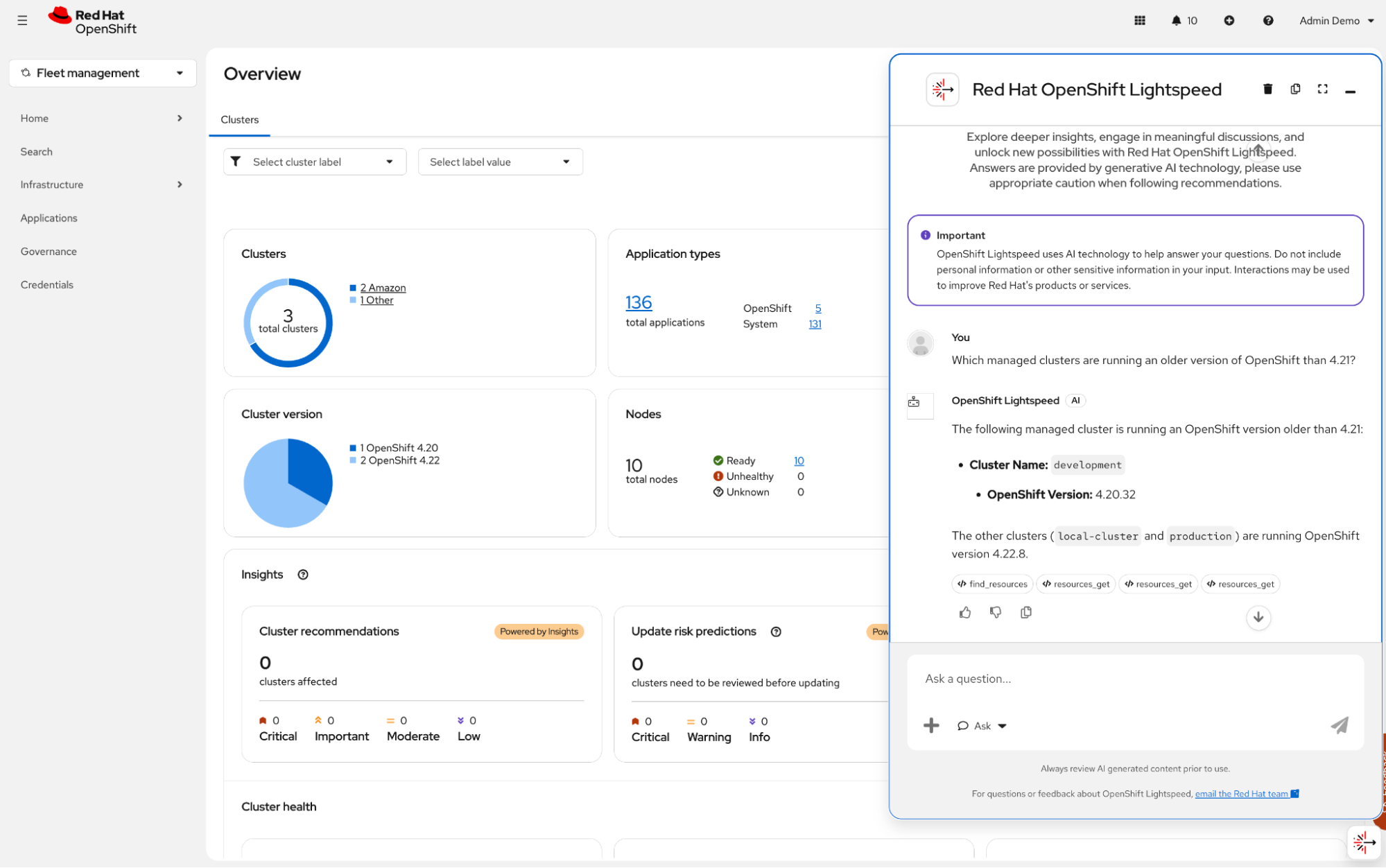
Here, OpenShift Lightspeed responds by analyzing the clusters managed by Red Hat Advanced Cluster Management. But here's the trick: the model decided to call the MCP server to list the clusters, but the OpenShift version information comes from the resources_get tool, provided by OpenShift Lightspeed’s built-in MCP server. This tool extracts cluster version information from the ManagedCluster and ManagedClusterInfo custom resources (CRs) in the hub cluster. This initial query reminds us OpenShift Lightspeed works in Red Hat Advanced Cluster Management as it does in a standard OpenShift cluster.
Next, let’s put the MCP server through a realistic multicluster scenario. Try asking the following question (Figure 2):
Show me the information of all the pods running in my app-prod namespace in the production managed cluster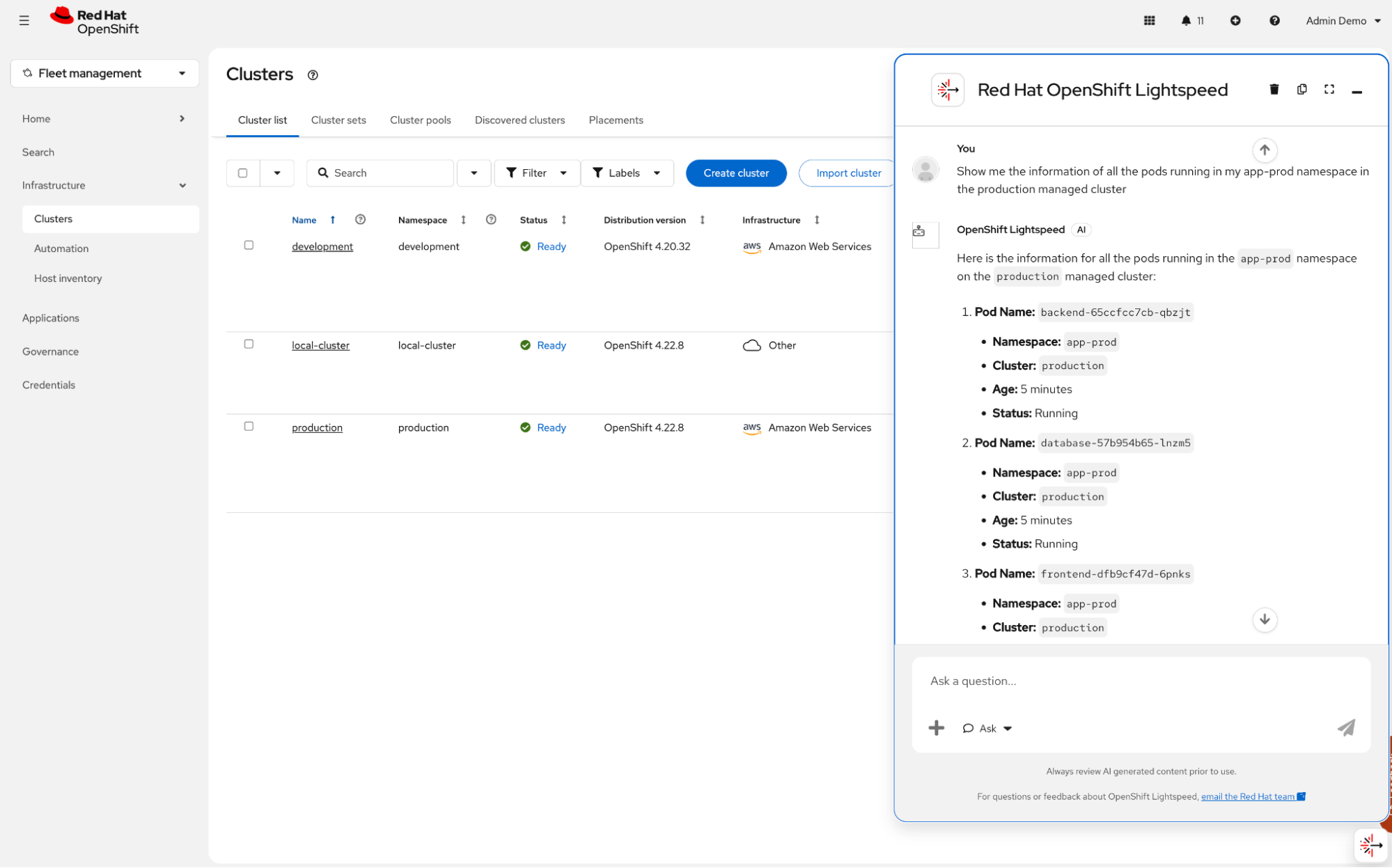
Where is this information coming from? From our MCP server, of course. We can see the data collected by selecting the find_resources tool invoked at the end of the response (Figure 3). Note the arguments used during the tool call (cluster=production and namespace=app-prod).
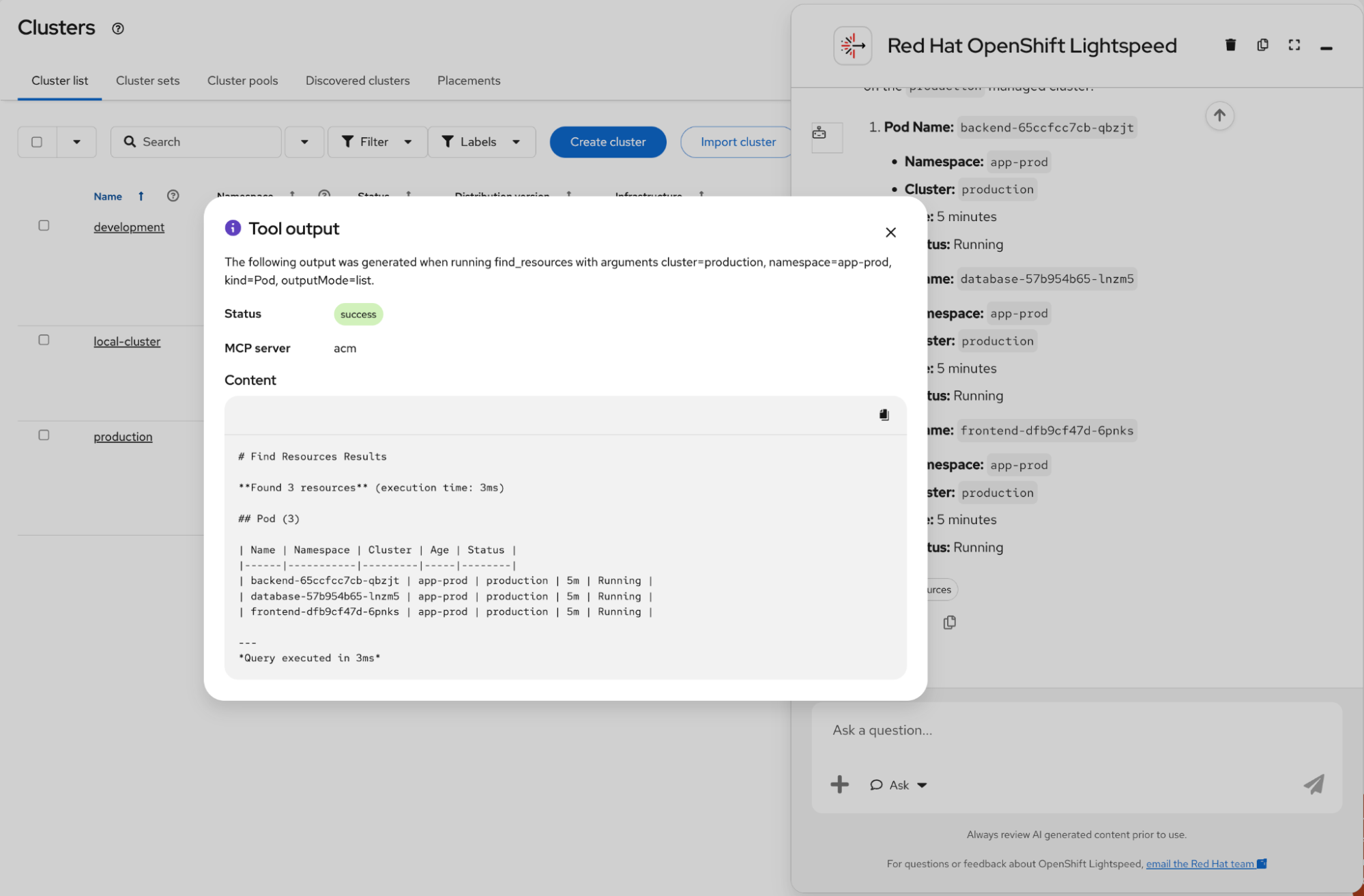
Great! Up to this point, we've used OpenShift Lightspeed to ask about our managed clusters and resources running in a specific cluster. But a key capability of the MCP server is the ability to query your entire fleet, allowing you to manage and observe it from a single point of view. Let’s end our testing scenario with a more generic query (Figure 4):
Are there any unhealthy VMs in my fleet of managed clusters? If so, show me the VM information and briefly explain how to fix it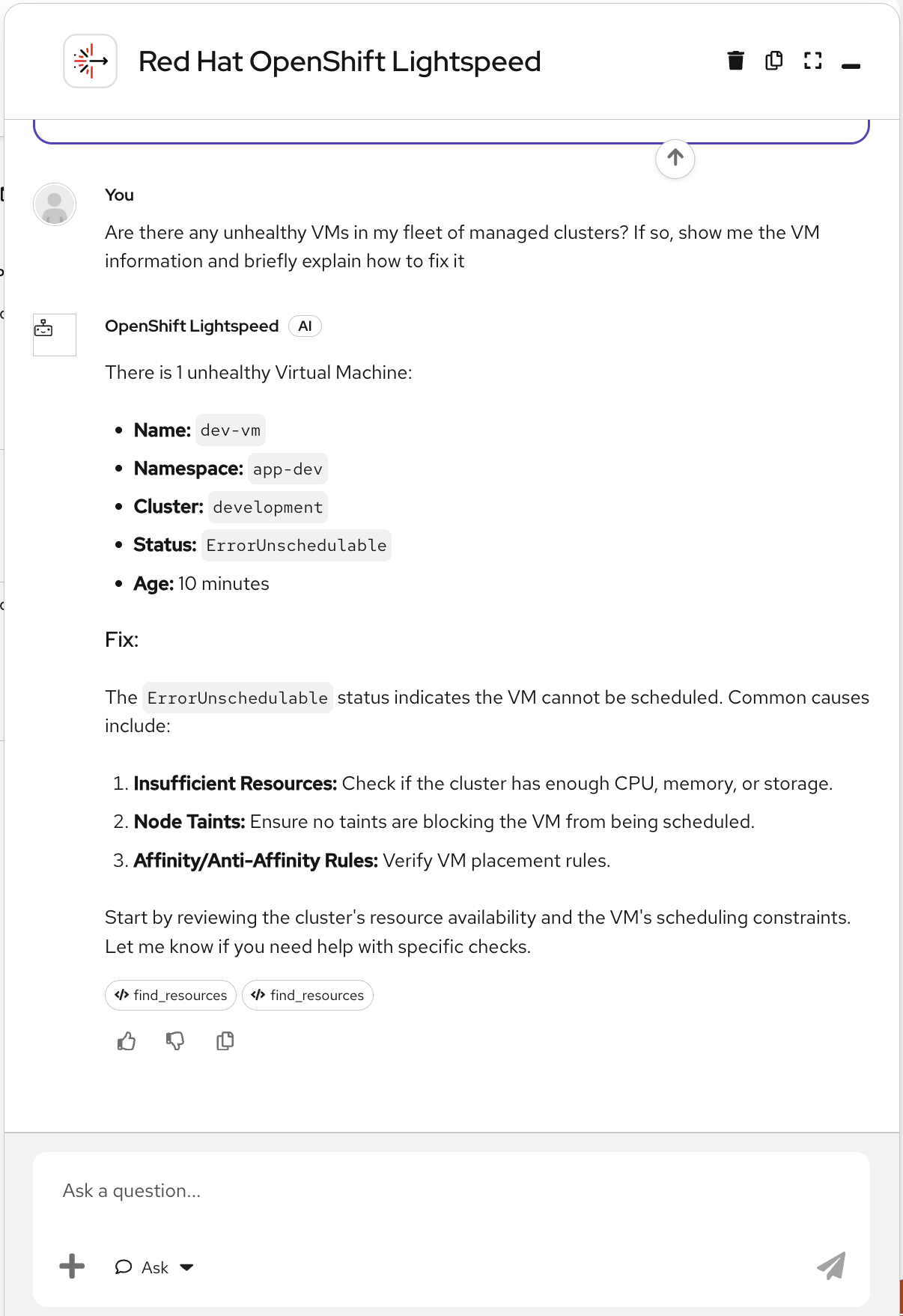
In this scenario, asking OpenShift Lightspeed to surface fleet-wide issues allowed us to detect a dev-vm stuck in an ErrorUnschedulable condition in the development managed cluster. Rather than surfacing a status code, the assistant delivered diagnostic guidance, converting a complex multicluster investigation into a natural conversational experience. By surfacing this stuck dev-vm across clusters instantly, operators bypass minutes of manual cluster-switching. In high-stakes outages, this natural language synthesis reduces mean time to detect (MTTD) and lets engineers address bottlenecks before end users are affected.
Using natural language to query Red Hat Advanced Cluster Management through OpenShift Lightspeed lets administrators find fleet-wide issues in seconds without building complex search queries. Head over to the MCP server repository to try the Technology Preview in your lab environment today.

