Red Hat Advanced Cluster Management for Kubernetes provides multicluster management capabilities for Kubernetes environments. Within Red Hat Advanced Cluster Management, a multicluster global hub extends management to a fleet-of-fleets scale, managing multiple hubs from a single control plane, providing unified inventory, policy compliance, and cluster lifecycle visibility across thousands of clusters.
The multicluster global hub agent is a key component of a multicluster global hub, which runs on each managed hub. It serves as the distributed control plane for a global hub. This article focuses on how it can also function independently as an event exporter.
Overview
In large-scale multicluster environments, event data is fundamental to operations and automation. Managing hundreds or thousands of clusters across multiple hubs requires real-time visibility into cluster state changes, extending beyond standard metrics, logs, and traces. These events contain significant business value, but the single-hub management model faces several challenges.
Each Red Hat Advanced Cluster Management hub event exists only locally, isolated from external systems. Operations teams must log into each hub individually to view events, making it impossible to get a unified view of cluster states across the fleet. When managing 10+ hubs with hundreds of clusters each, this fragmentation becomes a major operational burden.
Kubernetes native events have complex structures with varying formats across different resources. A ManagedCluster event looks different from a ClusterDeployment event, which differs again from a policy event. This inconsistency makes it difficult for consumers to build unified parsing logic, forcing each integration to handle multiple event formats.
Enterprise automation tools like Red Hat Ansible Automation Platform and security platforms like Splunk cannot directly access cluster events from Kubernetes. Without a standardized event stream, automation workflows break at the cluster boundary. Teams resort to polling APIs or building custom integrations, adding complexity and latency. During critical operations like cluster provisioning via Hive (which can take 40+ minutes), there is almost no event coverage. Operators wait blindly with no visibility into progress or failures.
The multicluster global hub agent solves this by acting as an event exporter, collecting, standardizing, and publishing multicluster events as open streams that any enterprise system can consume, with the flexibility to extend to other custom resources as needed.
The agent's dual role
The global hub agent runs on each managed hub and serves two distinct roles.
Role 1: Distributed control plane
As part of the multicluster global hub system, the agent acts as the distributed control plane deployed across all managed hubs. In this role, the agent:
- Executes tasks from the global hub: Receives and applies configurations, and resources distributed by the global hub manager.
- Collects and reports status: Synchronizes cluster status, policy compliance data, and resource states back to global hub storage as inventory, serving as the data source for multi-hub cluster fleet Grafana visualization.
This role is essential for global hub's core functionality—managing resources and maintaining visibility across the entire multicluster fleet.
Role 2: Event exporter
Independent of its control plane responsibilities, the agent can function as a standalone event exporter. In this role, the agent:
- Collects events: Watches for lifecycle events such as ClusterProvisionStarted, ClusterProvisionCompleted, ClusterImported, and more, continuously expanding the list.
- Transforms to CloudEvents format: Converts raw Kubernetes events into standardized CloudEvents for easy consumption.
- Publishes to transport: Sends events to Kafka topics where any external system can subscribe.
This role opens the global hub's event stream to the enterprise ecosystem. Any Kafka-capable system (e.g., Ansible EDA, Splunk, ServiceNow, or custom platforms) can subscribe to these events and implement their own automation logic, without requiring any changes to the global hub.
How the agent exports events
The agent operates as an event exporter in three stages: collect, transform, and publish (Figure 1).
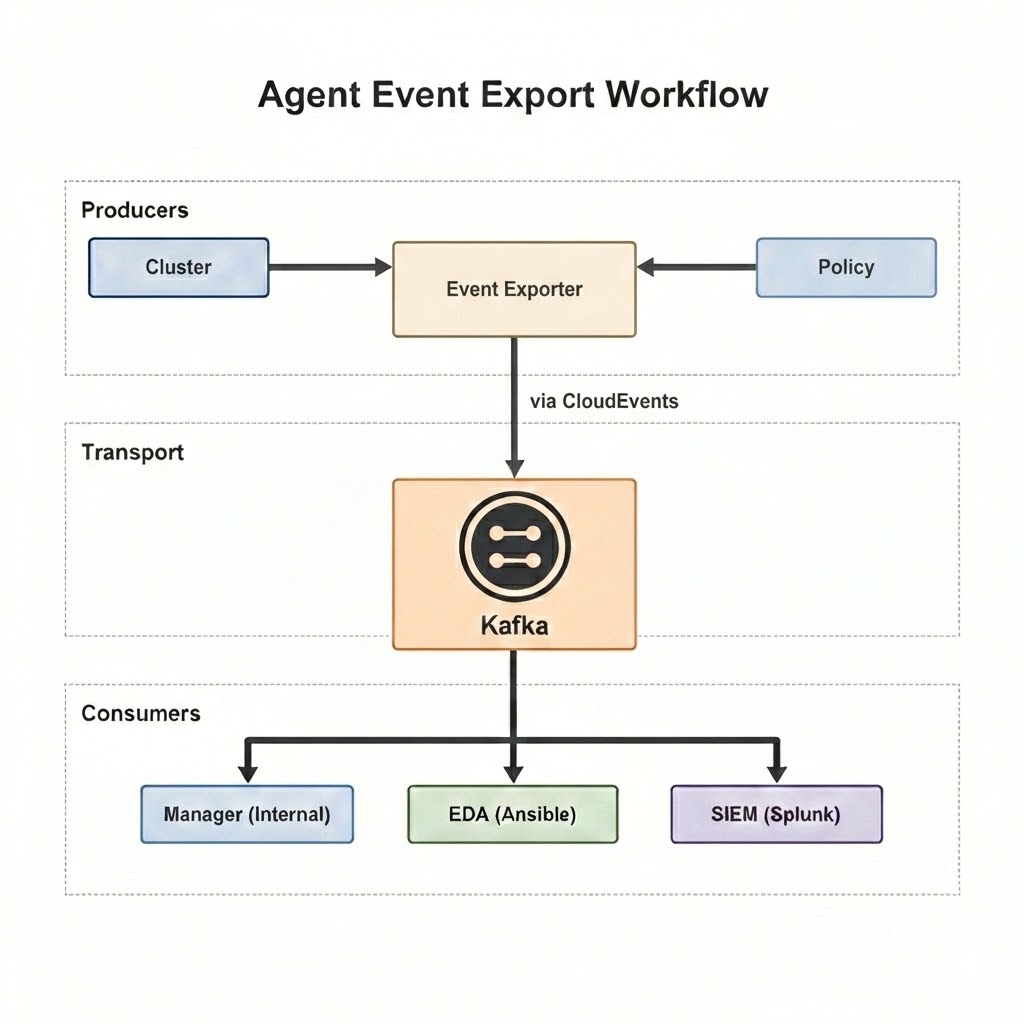
The agent watches various resources on the managed hub to detect state changes. These are not limited to Kubernetes Events. The agent monitors resource status changes directly, including ManagedCluster state transitions, policy compliance updates, and ClusterGroupUpgrade status.
Raw resource events contain complex structures with low-level details. The agent filters these events and performs semantic transformation, extracting business-relevant information (e.g., cluster name, event reason, compliance state, and provisioning progress) and packaging it in CloudEvents format.
We publish transformed CloudEvents via Kafka. The global hub manager consumes these events internally and stores them in the database, while any external system can simultaneously subscribe to the same topic.
The core design principle is collect once, consume everywhere. The agent handles collection and standardization without concern for consumers. Consumers simply subscribe to Kafka without needing to understand event origins.
Multicluster event types
The agent exports multiple event types covering core multicluster management scenarios. Cluster lifecycle events are the cornerstone of multicluster management, as they provide visibility into the state of every cluster across the entire fleet.
All events use the CloudEvents standard protocol. CloudEvents is a CNCF specification that defines a common event structure, ensuring interoperability between different systems.
The benefit of CloudEvents is that consumers don't need to understand Red Hat Advanced Cluster Management, Hive, or Kubernetes internals. An Ansible Rulebook only needs to match event.body.reason == "Imported" to trigger the corresponding automation workflow, significantly reducing integration complexity.
Cluster lifecycle events
In a multicluster environment managing hundreds or thousands of clusters, understanding cluster state is critical. The following cluster lifecycle events record the complete journey from creation to destruction.
- ProvisionStarted: Triggered when Hive begins cluster creation. Enables recording start time and notifying stakeholders.
- ProvisionCompleted: Triggered when cluster creation completes. Enables post-provisioning configuration workflows.
- ProvisionFailed: Triggered when cluster creation fails. Enables alerts, automatic cleanup, or retry logic.
- Imported: Triggered when a cluster is successfully imported to a hub. Enables post-import configuration (storage, monitoring, logging).
- Detaching: Triggered when a cluster begins detaching from a hub. Enables resource cleanup workflows and inventory updates.
Each cluster event includes a rich context that identifies the cluster within the multicluster hierarchy.
Context Attributes,
  specversion: 1.0
  type: io.open-cluster-management.operator.multiclusterglobalhubs.event.managedcluster
  source: hub1
  id: 49aa624c-c3d9-4016-9c7d-23c5825a4fef
  time: 2025-10-23T02:34:36.943743765Z
  datacontenttype: application/json
Extensions,
  extversion: 4.7
  kafkamessagekey: io.open-cluster-management.operator.multiclusterglobalhubs.event.managedcluster
  kafkaoffset: 1828
  kafkapartition: 0
  kafkatopic: gh-status.hub1
  sendmode: single
Data,
  {
    "eventNamespace": "cluster1",
    "eventName": "cluster1.1870fe215eb1712a",
    "clusterName": "cluster1",
    "clusterId": "bfca8e6a-cfce-4860-85b9-3aab253d4ce8",
    "leafHubName": "hub1",
    "message": "The cluster1 is currently becoming detached",
    "reason": "Detaching",
    "reportingController": "managedcluster-import-controller",
    "reportingInstance": "managedcluster-import-controller-managedcluster-import-controller-v2-b6cbc7658-dvp9t",
    "type": "Normal",
    "createdAt": "2025-10-23T02:34:33Z"
  }
The CloudEvent contains three layers:
- Context Attributes - Event metadata
- type: Identifies this as a ManagedCluster event
- source: Originated from managed hub
hub1 - time: When the event occurred
- Extensions - Kafka transport metadata
- kafkatopic: Published to gh-status.hub1 topic
- sendmode: single means one event per message
- Data - Business payload
- clusterName / clusterId: Cluster identity
- leafHubName: Which hub owns this cluster, enabling multicluster hierarchy identification
- reason: Detaching (the cluster is removed from its hub)
- message: Human-readable event description
- reportingController: The controller that generated this event
Policy state events
Policy events record cluster compliance state changes. In multicluster environments, ensuring all clusters comply with security and configuration policies is a critical task. Policy events provide the foundation for automated compliance response.
- Compliant: Triggered when a cluster passes a policy check. Enables updating compliance reports.
- NonCompliant: Triggered when a cluster violates a policy. Enables auto-remediation or alerts.
- PolicyStatusSync: Triggered during policy status synchronization. Enables tracking policy distribution progress.
Policy events contain rich context including policy ID, cluster ID, and violation reasons. Consumers can use this information to precisely locate issues and take appropriate action. For example, the following event shows a cluster that has become non-compliant with a security policy.
Context Attributes,
  specversion: 1.0
  type: io.open-cluster-management.operator.multiclusterglobalhubs.event.localreplicatedpolicy.update
  source: kind-hub2
  id: 5b5917b5-1fa2-4eb8-a7fa-c1d97dc96218
  time: 2024-02-29T03:01:16.387894285Z
  datacontenttype: application/json
Extensions,
  ...
Data,
  {
    "leafHubName": "kind-hub2",
    "clusterName": "kind-hub2-cluster1",
    "clusterId": "0884ef05-115d-46f5-bbda-f759adcbbe5b",
    "policyId": "1f2deb7a-0d29-4762-b0fc-daa3ba16c5b5",
    "compliance": "NonCompliant",
    "reason": "PolicyStatusSync",
    "message": "NonCompliant; violation - limitranges [container-mem-limit-range] not found in namespace default",
    "createdAt": "2024-02-29T03:01:14Z"
    }
Scenarios for the multicluster events
The multicluster event exporter supports essential enterprise automation scenarios for managing large fleets of clusters. It enables fleet-wide cluster tracking, providing real-time state dashboards and alerts for over 1000 clusters. Furthermore, it automates Day 2 operations like deploying agents and applying policies upon cluster readiness, and streamlines failure recovery by collecting diagnostics, cleaning up resources, and creating incident tickets when provisioning fails.
Scenario 1: Fleet-wide cluster tracking
When managing 1000+ clusters across 10 hubs, tracking cluster state manually is impossible. Cluster events enable:
- Real-time dashboard showing all clusters in provisioning state
- Automatic alerts when provisioning exceeds expected duration
- Daily reports on cluster creation/update trends
Scenario 2: Automated day 2 operations
When a cluster reports Imported, downstream systems can automatically:
- Configure cluster storage classes based on the cloud provider.
- Deploy monitoring and logging agents.
- Apply security policies and network configurations.
- Register the cluster in CMDB and inventory systems.
Scenario 3: Failure recovery
When ProvisionFailed occurs:
- Collect diagnostic information from Hive and ClusterDeployment.
- Clean up orphaned cloud resources.
- Create an incident ticket with failure context.
- Optionally, retry provisioning with adjusted parameters.
Final thoughts
The multicluster global hub agent, acting as an event exporter, bridges the gap between Kubernetes multicluster environments and enterprise automation ecosystems. By collecting, standardizing, and publishing cluster events in CloudEvents format to Kafka, it eliminates event silos across hubs, removes integration barriers for enterprise platforms, and provides full cluster lifecycle visibility, including provisioning phases previously invisible to operators.
This validated design supports 3,500+ cluster event processing. It delivers event-driven automation that reduces manual intervention while enabling seamless integration with any Kafka-capable system, such as Ansible EDA, Splunk, and ServiceNow. By following the principle of collect once, consume everywhere, the event exporter extends the value of the multicluster global hub beyond multicluster management, making cluster events a shared resource for the entire enterprise.
For more information, visit the multicluster global hub repository and read the article, Leveraging TALM Events for Automated Workflows with Event Driven Ansible in OpenShift.

