Redhat Developers  Logo
  • AI

    Get started with AI

    • Red Hat AI
      Accelerate the development and deployment of enterprise AI solutions.
    • AI learning hub
      Explore learning materials and tools, organized by task.
    • AI interactive demos
      Click through scenarios with Red Hat AI, including training LLMs and more.
    • AI/ML learning paths
      Expand your OpenShift AI knowledge using these learning resources.
    • AI quickstarts
      Focused AI use cases designed for fast deployment on Red Hat AI platforms.
    • No-cost AI training
      Foundational Red Hat AI training.

    Featured resources

    • OpenShift AI learning
    • Open source AI for developers
    • AI product application development
    • Open source-powered AI/ML for hybrid cloud
    • AI and Node.js cheat sheet

    Red Hat AI Factory with NVIDIA

    • Red Hat AI Factory with NVIDIA is a co-engineered, enterprise-grade AI solution for building, deploying, and managing AI at scale across hybrid cloud environments.
    • Explore the solution
  • Learn

    Self-guided

    • Documentation
      Find answers, get step-by-step guidance, and learn how to use Red Hat products.
    • Learning paths
      Explore curated walkthroughs for common development tasks.
    • Guided learning
      Receive custom learning paths powered by our AI assistant.
    • See all learning

    Hands-on

    • Developer Sandbox
      Spin up Red Hat's products and technologies without setup or configuration.
    • Interactive labs
      Learn by doing in these hands-on, browser-based experiences.
    • Interactive demos
      Click through product features in these guided tours.

    Browse by topic

    • AI/ML
    • Automation
    • Java
    • Kubernetes
    • Linux
    • See all topics

    Training & certifications

    • Courses and exams
    • Certifications
    • Skills assessments
    • Red Hat Academy
    • Learning subscription
    • Explore training
  • Build

    Get started

    • Red Hat build of Podman Desktop
      A downloadable, local development hub to experiment with our products and builds.
    • Developer Sandbox
      Spin up Red Hat's products and technologies without setup or configuration.

    Download products

    • Access product downloads to start building and testing right away.
    • Red Hat Enterprise Linux
    • Red Hat AI
    • Red Hat OpenShift
    • Red Hat Ansible Automation Platform
    • See all products

    Featured

    • Red Hat build of OpenJDK
    • Red Hat JBoss Enterprise Application Platform
    • Red Hat OpenShift Dev Spaces
    • Red Hat Developer Toolset

    References

    • E-books
    • Documentation
    • Cheat sheets
    • Architecture center
  • Community

    Get involved

    • Events
    • Live AI events
    • Red Hat Summit
    • Red Hat Accelerators
    • Community discussions

    Follow along

    • Articles & blogs
    • Developer newsletter
    • Videos
    • Github

    Get help

    • Customer service
    • Customer support
    • Regional contacts
    • Find a partner

    Join the Red Hat Developer program

    • Download Red Hat products and project builds, access support documentation, learning content, and more.
    • Explore the benefits

OSFT explained: Prevent catastrophic forgetting in LLM fine-tuning

July 28, 2026
Oleg Silkin
Related topics:
Artificial intelligenceData sciencePython
Related products:
Red Hat OpenShift AI

    Even as prompt engineering and model orchestration get more sophisticated, there are tasks where fine-tuning a smaller, specialized large language model (LLM) is the more practical path. It's how you teach a model to handle your specific data, your domain, or your format. Fine-tuning works, until it quietly breaks something you didn't test.

    You train a model on your data, try a few prompts, and everything looks great. Then you deploy it and discover it's forgotten how to do basic math. Or it stopped following safety guidelines. Or it lost a language it used to handle fluently. The new skill landed, but something old disappeared.

    This is not a fluke, and it's not something you can fix by tweaking your learning rate. It's a fundamental problem with how Supervised Fine-Tuning (SFT) and Low-Rank Adaptation (LoRA) work. Orthogonal Subspace Fine-Tuning (OSFT) addresses it.

    The problem with SFT and LoRA

    When you fine-tune a model with SFT or LoRA, the training process changes the model's internals to fit your data. The issue is it has no way of knowing which parts are responsible for capabilities you care about keeping. It overwrites whatever it needs to learn the new task.

    This creates a tradeoff hard to manage: The better the model gets at your task, the more of its original abilities it risks losing. Researchers call this catastrophic forgetting, and it's not an edge case.

    In the OSFT paper, Sculpting Subspaces (published at the International Conference on Learning Representations (ICLR) 2026), researchers fine-tuned a model that could solve 29% of grade-school math problems on eight new tasks. Afterward, its math score dropped to 2%. The fine-tuning succeeded on every new task and destroyed a skill the model already had.

    LoRA reduces this somewhat because it changes less of the model overall, but it doesn't solve the core problem. It still has no mechanism for protecting what the model already knows.

    What OSFT does differently to fix catastrophic forgetting

    Orthogonal Subspace Fine-Tuning adds one thing missing in SFT and LoRA: protection for existing capabilities.

    Before training starts, OSFT figures out which parts of the model are responsible for its current skills and locks them. Training then proceeds normally, but it's only allowed to update the parts of the model that won't interfere with what's already there.

    A simple analogy: Imagine the model's knowledge is written on a whiteboard. SFT and LoRA erase parts of the board to make room for new notes. OSFT finds blank space on the board and writes there, leaving everything else untouched.

    The OSFT paper tested this on TRACE, a benchmark chaining eight diverse tasks together: domain-specific question and answer (Q\&A), multilingual text, code, and arithmetic. As shown in Figure 1, Standard fine-tuning left the model at around 23% average accuracy and made it worse on earlier tasks. OSFT, using the same model and data, reached 48.4% and slightly improved earlier tasks. It didn't forget less; it learned more overall because it wasn't destroying its own previous work.
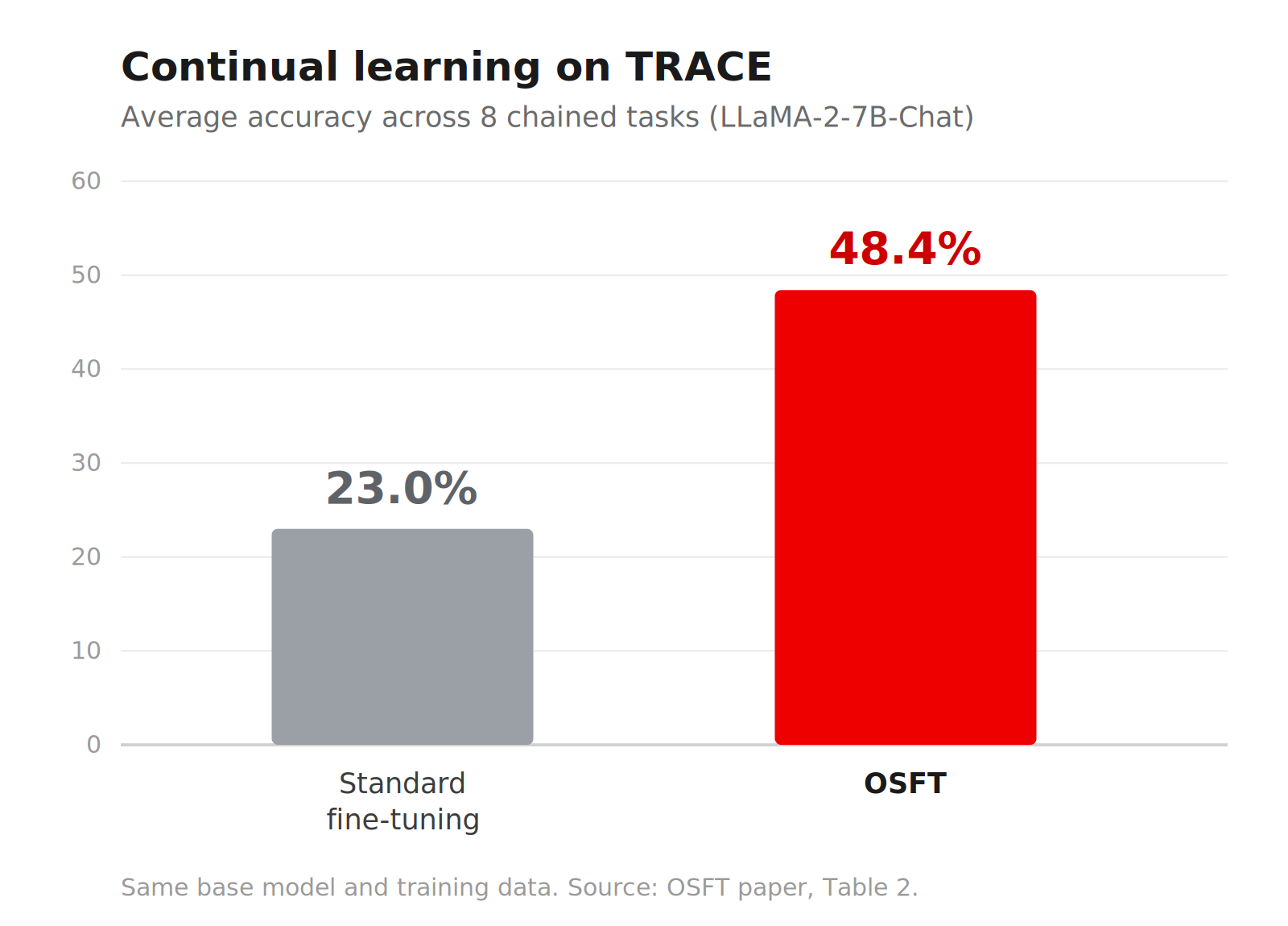
    Bar chart comparing average accuracy on the TRACE benchmark: standard fine-tuning at 23.0% versus OSFT at 48.4%.
    Figure 1: OSFT more than doubles average accuracy over standard fine-tuning (48.4% vs. 23.0%) when a LLaMA-2-7B-Chat model learns eight TRACE tasks in sequence, using the same base model and training data.

    When you should use OSFT instead of SFT or LoRA

    OSFT is most valuable when you're fine-tuning a model already doing useful things and you can't afford to lose those abilities:

    • You're adding domain knowledge (medical, legal, financial) to a general-purpose model and need it to keep its conversational and reasoning abilities.
    • You're training on multiple datasets in sequence, and each round of training undoes some of what came before. For example, you add a new language, then domain-specific Q\&A, and then a custom output format.
    • Your users depend on a base model's existing skills across many tasks, not only the one you're fine-tuning for.

    If you're fine-tuning for a single narrow task and don't need the model's other abilities, SFT or LoRA might still be the simpler choice. OSFT's advantage is specifically in preserving what the model already knows.

    How to fine-tune models with OSFT in Training Hub

    Training Hub is an open source, algorithm-centered Python library for LLM post-training, fully supported and available for enterprise customers within Red Hat OpenShift AI. If you already use Training Hub for SFT, switching to OSFT is straightforward. The API is the same: You call osft instead of sft and set one additional parameter:

    from training_hub import osft
    
    osft(
        model_path="meta-llama/Llama-3.1-8B-Instruct",
        data_path="./my_data.jsonl",
        ckpt_output_dir="./checkpoints",
        unfreeze_rank_ratio=0.3,
    )
    

    The unfreeze_rank_ratio parameter controls how much of the model is open to training. At 0.3, roughly 70% of the model is reserved for existing capabilities and 30% is available for learning your new data. This is a good starting point: enough room to learn your task without putting too much of the original model at risk. Your data format, your configs, your infrastructure: all of it stays the same.

    OSFT supports the same model families you already fine-tune: Qwen, Llama, Granite, Gemma, gpt-oss, Phi, and others.

    Because Training Hub is also included in Red Hat OpenShift AI, you get it preinstalled and ready to run inside your workbench images alongside the rest of your machine learning (ML) stack. When you're ready to move beyond local experiments, this guide walks through scaling Training Hub from a notebook to distributed, production-grade training jobs.

    Get started

    Ready to try it yourself?

    • Run through our OSFT example notebook to fine-tune Llama-3.1-8B-Instruct on your own data.
    • Dive into our comprehensive tutorial for a step-by-step look at how to tune your parameters.

    Related Posts

    • Unsloth and Training Hub: Lightning-fast LoRA and QLoRA fine-tuning

    • Scale LLM fine-tuning with Training Hub and OpenShift AI

    • Get started with language model post-training using Training Hub

    • Improve vLLM Semantic Router accuracy with fine-tuning

    • Estimate GPU memory for LLM fine-tuning with Red Hat AI

    • Introduction to supervised fine-tuning dataset formats

    Recent Posts

    • Build a distributed RAG pipeline with Ray Data on OpenShift AI

    • OSFT explained: Prevent catastrophic forgetting in LLM fine-tuning

    • Enrich OpenShift compliance results with custom metadata

    • How we designed customizable dashboards in OpenShift

    • Standardize project context with AGENTS.md and Agent Skills

    What’s up next?

    Learning Path intro-to-OS-LP-feature-image

    Introduction to OpenShift AI

    Learn how to use Red Hat OpenShift AI to quickly develop, train, and deploy...
    Red Hat Developers logo LinkedIn YouTube Twitter Facebook

    Platforms

    • Red Hat AI
    • Red Hat Enterprise Linux
    • Red Hat OpenShift
    • Red Hat Ansible Automation Platform
    • See all products

    Build

    • Developer Sandbox
    • Developer tools
    • Interactive tutorials
    • API catalog

    Quicklinks

    • Learning resources
    • E-books
    • Cheat sheets
    • Blog
    • Events
    • Newsletter

    Communicate

    • About us
    • Contact sales
    • Find a partner
    • Report a website issue
    • Site status dashboard
    • Report a security problem

    RED HAT DEVELOPER

    Build here. Go anywhere.

    We serve the builders. The problem solvers who create careers with code.

    Join us if you’re a developer, software engineer, web designer, front-end designer, UX designer, computer scientist, architect, tester, product manager, project manager or team lead.

    Sign me up

    Red Hat legal and privacy links

    • About Red Hat
    • Jobs
    • Events
    • Locations
    • Contact Red Hat
    • Red Hat Blog
    • Inclusion at Red Hat
    • Cool Stuff Store
    • Red Hat Summit
    © 2026 Red Hat

    Red Hat legal and privacy links

    • Privacy statement
    • Terms of use
    • All policies and guidelines
    • Digital accessibility

    Chat Support

    Please log in with your Red Hat account to access chat support.