Red Hat build of Agent Sandbox provides developers with a programmable API for running workloads in isolated environments, without requiring knowledge of the underlying sandboxing technology. Developers request a sandbox, and the platform delivers one. Whether Kata Containers (through OpenShift sandboxed containers) or another runtime provides the underlying isolation, the platform administrator makes that choice, not the developer.
This separation of concerns means development teams can focus on building their applications while platform teams independently configure the security and isolation boundaries that meet their organization's requirements.
Despite its name, Agent Sandbox is not limited to AI agents. While it is a core component of the Red Hat agentic AI stack, it works equally well for any workload that benefits from sandboxed execution: development environments, notebook servers, code runners, build agents, or any application that requires complete isolation with instant provisioning.
Core architectural advantages
Under the hood, Red Hat build of Agent Sandbox is a Kubernetes-native platform and a downstream build of the upstream kubernetes-sigs/agent-sandbox project. It is purpose-built for scenarios that require long-running containers with stable identities, and it delivers three core advantages for managing isolated
workloads:
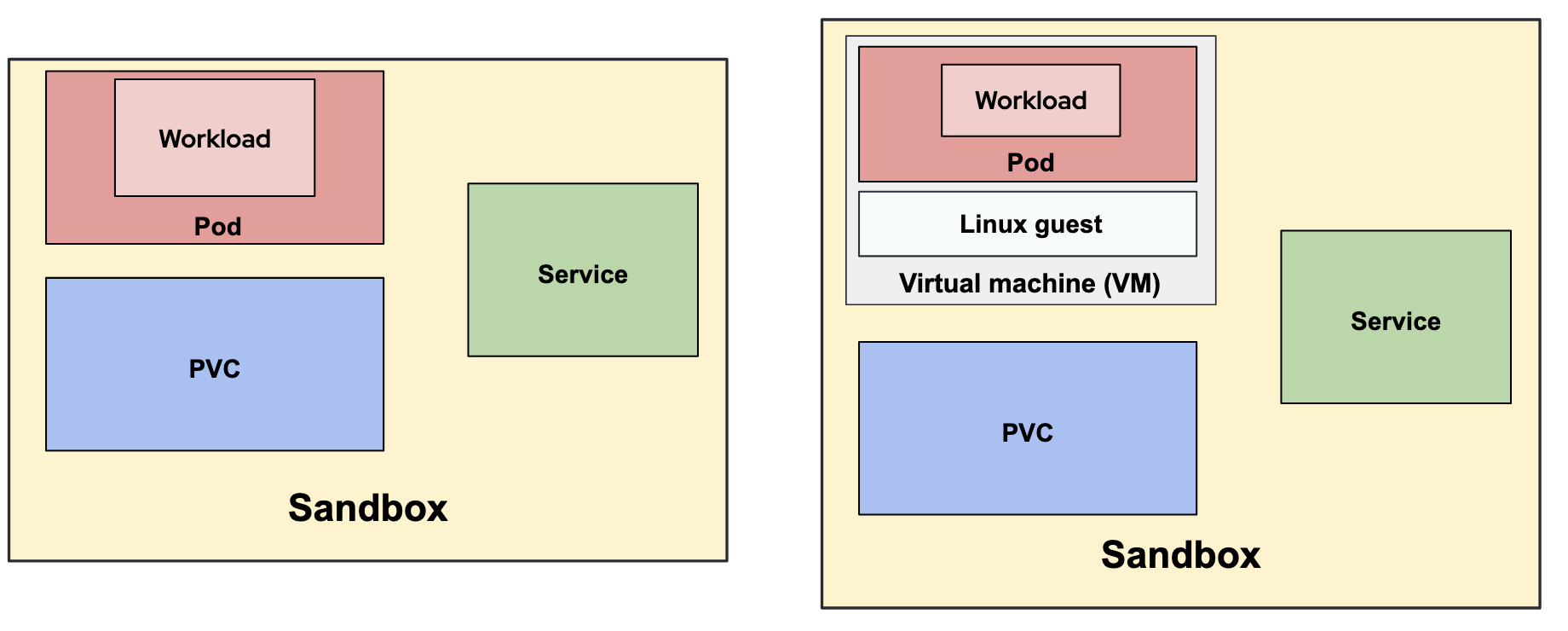
- The sandbox concept: It provides additional features like expiration and aggregates multiple Kubernetes objects—such as pods, services, and storage—into a single manageable entity, the Sandbox. Future updates are expected to introduce suspend and resume capabilities to further simplify resource control.
- Strengthened security posture: The platform supports the Kata Containers
runtimeClass, which allows sandboxes to execute within lightweight virtual machines (VMs), providing a hardware-assisted isolation boundary. - The warm pool concept: By maintaining a pool of pre-prepared environments, the system enables near-instant allocation of sandboxes in milliseconds, effectively eliminating traditional provisioning delays.
Each of these capabilities is independent. The Sandbox resource provides lifecycle management, stable identity, and resource aggregation for any workload without requiring Kata Containers or any specific runtime. Warm pools are an optional performance optimization for scenarios that demand near-instant provisioning. When the threat model requires hardware-level isolation, for example when running AI-generated code or operating in multi-tenant clusters, the platform administrator enables Kata Containers through OpenShift sandboxed containers by setting a single field in the SandboxTemplate. Developers and end users are not affected by this change because the API they use remains the same.
The sandbox CRDs
Red Hat build of Agent Sandbox introduces four primary custom resource definitions (CRDs) that work together to manage the lifecycle, provisioning, and blueprinting of isolated workloads:
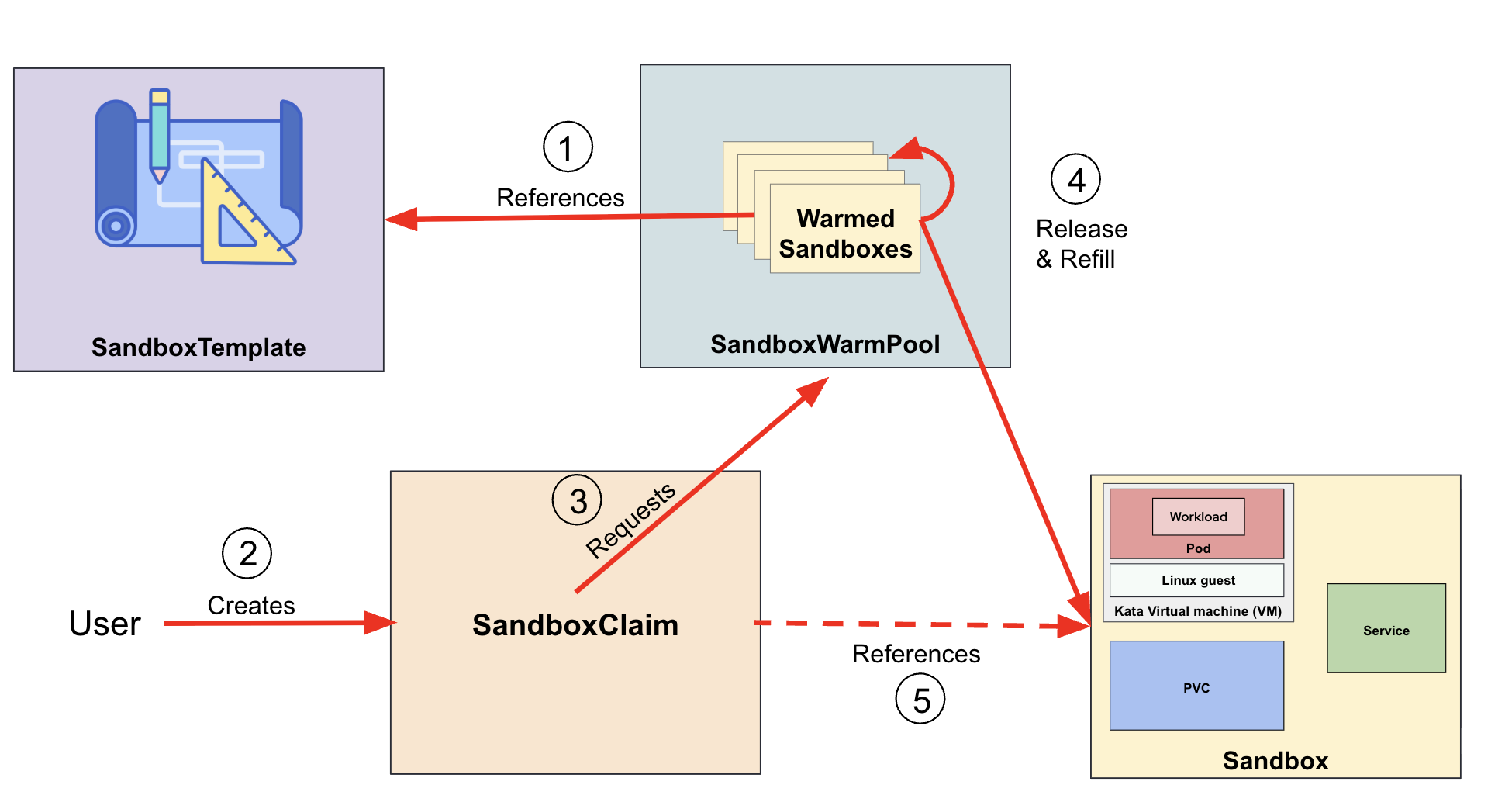
Sandbox: This is the core resource that declares a single, stateful, long-running pod. It provides a stable identity, persistent storage, and built-in lifecycle management for an isolated agent runtime. It also optionally provides a service and a persistent volume claim (PVC).SandboxTemplate: Acts as a reusable blueprint for creating sandboxes. It defines the pod specification, including container images and environment settings, as well as networking policies and optional service configurations to ensure consistent deployments.SandboxWarmPool: This resource eliminates provisioning delays by maintaining a pool of pre-provisioned sandboxes. By pre-warming these environments, the system can allocate new workloads in milliseconds, effectively bypassing the typical "cold start" wait times.SandboxClaim: Used to request a specific sandbox instance from a warm pool or based on a template. It manages the allocation for a specific session and can include optional time-to-live (TTL) settings and automated shutdown behaviors to reduce resource use. Once a claim is performed, the warm pool automatically reprovisions its own pool.
The interaction between these resources follows a logical flow, as shown in Figure 1:
- The
SandboxWarmPooluses aSandboxTemplateconfiguration (blueprint) of the sandbox workload to pre-provision sandboxes. For example, assume we want to execute a code runner within a Sandbox environment: theSandboxTemplateis where we define the container image and specs, and theSandboxWarmPoolobject defines that we want X code runner sandboxes ready in the pool. - When the workload is required, a
SandboxClaimis created. This step occurs when a user wants to actually run some code in the runner, and wants to use an existing warmed Sandbox instead of waiting for one to boot up. - The
SandboxClaimrequests a readySandboxfrom theSandboxWarmPool. This signals to the WarmPool that a code runner Sandbox is being needed and should be released from the pool. - The
SandboxWarmPoolthen releases aSandboxand proceeds to replenish its pool with a newSandbox. This means that an existing code runner from the pool is used while a new one is created to fill the pool up again. - The
SandboxClaimnow points to theSandboxthat was released. This allows the user to find which Sandbox code runner is actually deployed by a reference in theSandboxClaim.
Strengthening your security posture with OpenShift sandboxed containers
Red Hat build of Agent Sandbox provides meaningful operational benefits on its own: lifecycle management, warm pools, and a programmable API for isolated workloads. However, without Kata Containers, the workload still runs directly on the worker node's kernel and shares operating system-level resources with other cluster processes. Platform engineers should evaluate whether their workloads execute arbitrary or AI-generated code. If they do, or if the risk cannot be confidently ruled out, the workload should run with Kata Containers through OpenShift sandboxed containers to provide hardware-level isolation. If all interfaces are read-only and access is tightly scoped, the operational benefits of Agent Sandbox can be sufficient without additional runtime overhead.
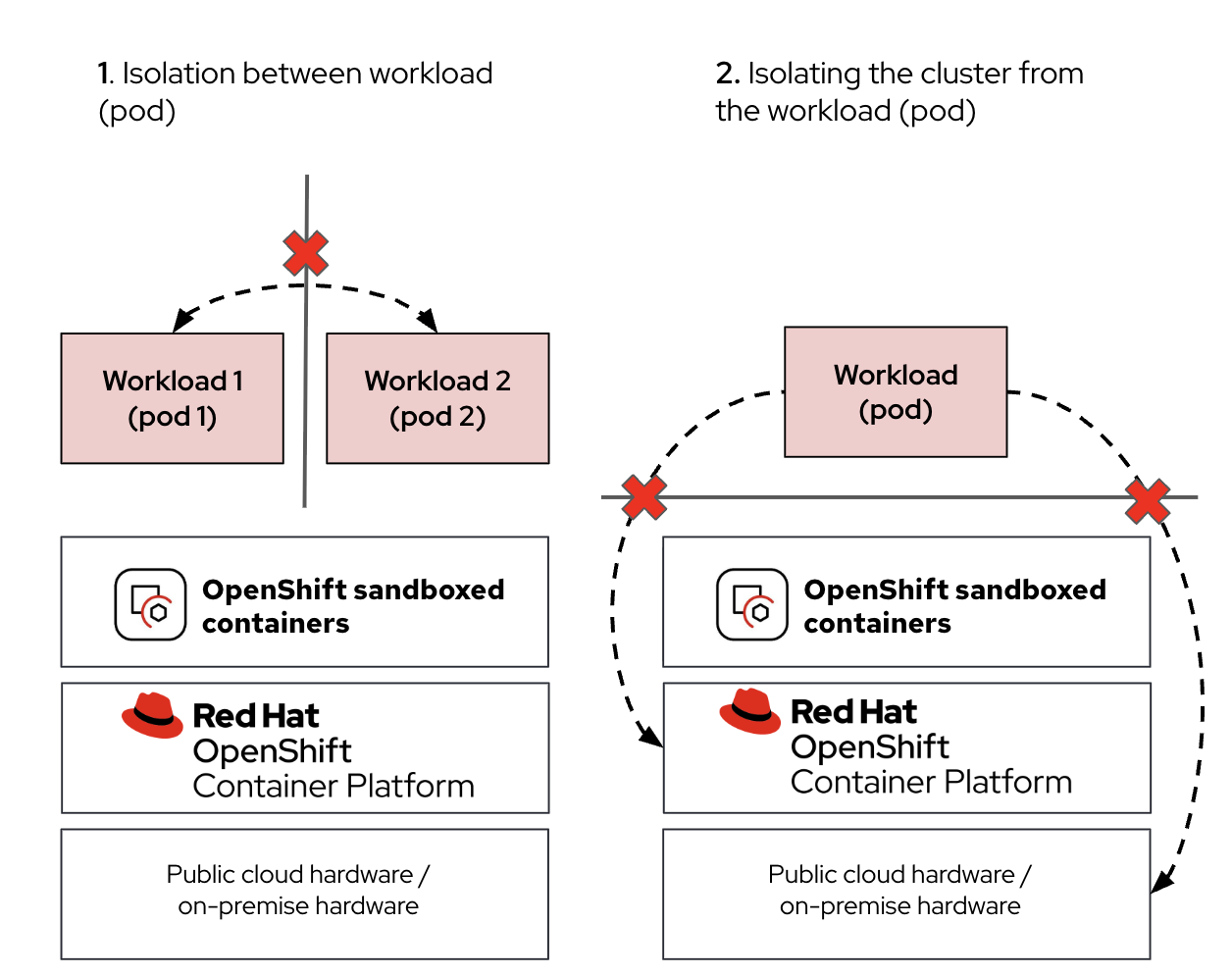
This shared-kernel boundary is particularly concerning for AI-driven workloads that execute generated code. A malicious actor could exploit this through a prompt injection attack, manipulating an AI model into generating harmful code. Without a hardware isolation boundary, such an attack could lead to a container breakout, potentially exposing sensitive cluster secrets or other workloads on the same node.
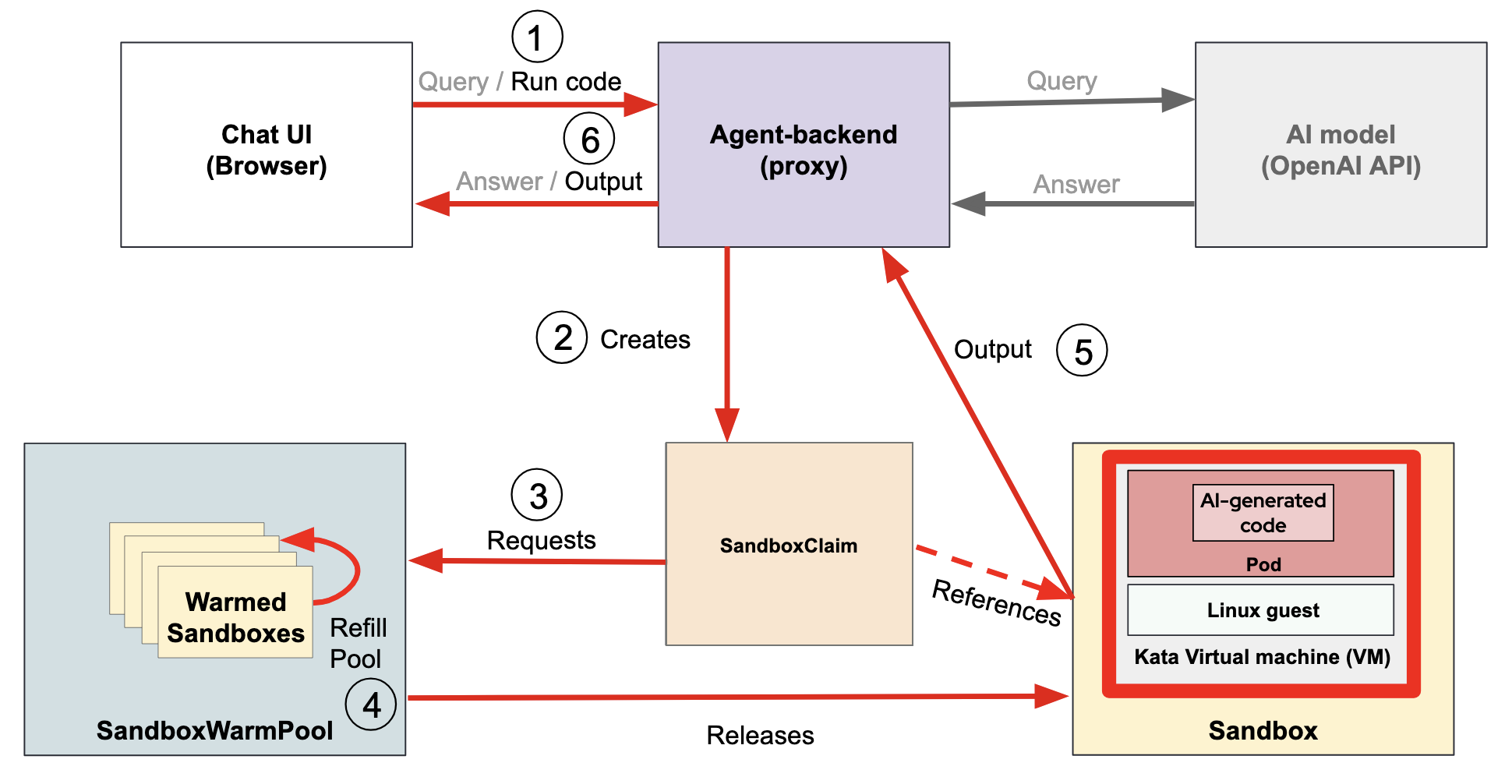
Red Hat OpenShift sandboxed containers mitigates these risks by integrating Kata Containers to provide hardware-assisted isolation. OpenShift sandboxed containers encapsulates each pod within its own dedicated virtual machine (VM), as shown in Figure 2. This architecture ensures that even if an AI workload is compromised, the malicious activity remains confined within the VM boundary. This isolation prevents unauthorized access to the underlying worker node, sensitive cluster resources, or secrets. For more information on how OpenShift sandboxed containers and Kata Containers work, see What are sandboxed containers?.
While Red Hat build of Agent Sandbox provides meaningful operational benefits for managing isolated execution environments, including both stateless workloads that need rapid provisioning and stateful workloads that require persistence, identity, or lifecycle control, it does not by itself provide a hardened security boundary. Because the "sandboxed" workload still runs directly on the worker node's kernel, it shares the same OS-level resources as other node processes.
The integration of OpenShift sandboxed containers with Red Hat build of Agent Sandbox provides a "secure-by-default" architecture for high-density agentic workloads (Figure 3). While the Agent Sandbox manages the lifecycle, pre-warming, and stable identity of stateful singleton containers, OpenShift sandboxed containers ensures these containers are encapsulated in a lightweight VM using the kata or kata-remote RuntimeClass. This combination is particularly effective for AI agent runtimes where near-instant provisioning (milliseconds) via warm pools must be balanced with strict security boundaries.
For further context on why standard container isolation is insufficient, refer to this article, which highlights the importance of a defense-in-depth strategy. Agent Sandbox and Kata Containers are part of the Layer 2: runtime isolation step.
Demo: Running AI-generated code using Red Hat build of Agent Sandbox and OpenShift sandboxed containers
In this demonstration, we showcase an integrated environment where users can interact with an AI model via a web interface to generate code snippets. The web UI provides a simplified experience, allowing users to execute the AI-generated code directly within the cluster environment.
To ensure performance and responsiveness, this setup uses Red Hat build of Agent Sandbox.
In this demo, we have three main components:
- The Chat user interface, which allows a user to interact with the model
- The AI model exposing an OpenAI API to answer the queries from the user
- A custom agent-backend proxy that connects the UI with the AI model and offers the possibility to run the AI model generated code.
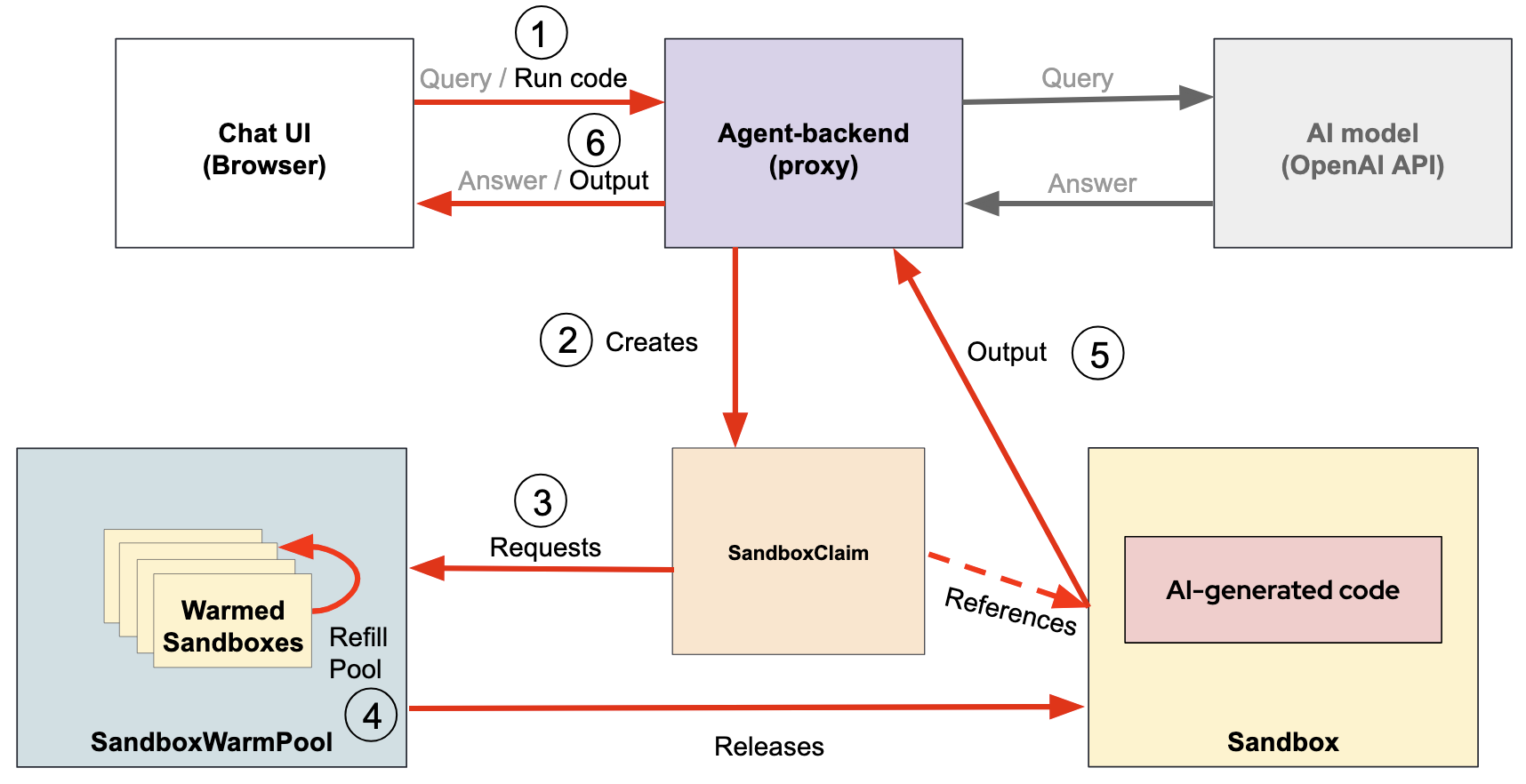
There are two flows, as shown in Figure 4:
- Agent query: The user types a query in the chat UI. It is directly sent to the model and the model returns an answer. This could be a generic or even code-oriented query. In this case, the agent-backend just forwards messages back and forth and no code is actually executed, only generated.
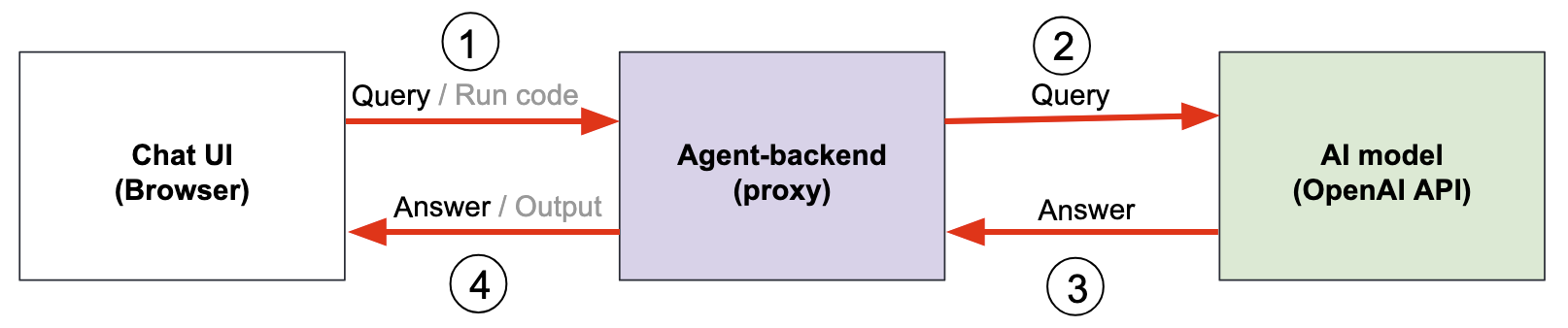
- Code execution: The generated code needs to be run.
- If the AI model returns some code, the user selects Run in the web UIto test it.
- This request triggers the agent-backend to take the provided code and run it in a sandbox. More precisely, when a user triggers code execution, the system creates a
SandboxClaim. - The
SandboxClaimis used to instantly acquire a pre-warmed container from aSandboxWarmPool. - The
SandboxWarmPoolthen releases theSandboxto run the code and simultaneously refills its pool.
This mechanism eliminates the latency associated with traditional "cold boot" scheduling, ensuring that execution starts in milliseconds instead of potential minutes or seconds, as boot time depends on container startup (plus VM boot for Kata) and image size and pull speed.
We also use this demo to contrast two security scenarios, highlighting the importance of hardware-level isolation against prompt injection attacks. In these attacks, a malicious user manipulates the AI model into generating harmful code specifically designed to access sensitive cluster secrets or resources:
- Standard Agent Sandbox (No OpenShift sandboxed containers): We show how a successful prompt injection allows the generated code to run directly on the worker node's kernel. In this scenario, the malicious code can successfully perform a container breakout to access sensitive cluster secrets.
- Agent Sandbox with OpenShift sandboxed containers (Kata VM): By using the
kataRuntimeClass, the same malicious code is confined within a dedicated virtual machine. Even if the code executes, the hardware-assisted isolation boundary prevents it from reaching the host node or other cluster resources, maintaining a strict security posture despite the compromise.
Conclusion
Red Hat build of Agent Sandbox offers a flexible framework for managing long-running, stateful workloads through its Kubernetes-native CRDs. By bundling compute, networking, and storage into a single resource, it simplifies the lifecycle management of complex containers like AI agents.
However, the true potential of Agent Sandbox is realized when paired with OpenShift sandboxed containers. While the Agent Sandbox provides operational efficiency and near-instant provisioning through warm pools, OpenShift sandboxed containers delivers the necessary hardware-level isolation to mitigate risks like prompt injection, container escape, kernel-level exploits, resource abuse, noisy neighbor, persistence, and lateral movement. Together, they provide a cohesive, secure-by-default architecture that allows organizations to innovate with AI while protecting the integrity of their OpenShift clusters.
The Agent Sandbox project provides a standard Kubernetes-native API for managing sandbox pod lifecycles, providing a more efficient management model for complex, stateful workloads. By providing this API, other projects like NVIDIA OpenShell can delegate pod creation and management to Red Hat build of Agent Sandbox rather than handling these low-level operations directly. This delegation allows OpenShell to benefit from consistent storage, lifecycle management, cleanup semantics, and instant provisioning via the SandboxWarmPool automatically.
For more information on the security advantages brought by OpenShell, how it links with agent sandboxing and Kata Containers, and how all these components work together, read Layered sandboxing for AI agents: OpenShift and OpenShell.
Last updated: July 16, 2026
