If you read our previous article on how an unfiltered ConfigMap cache took down the Kubeflow Spark Operator, you might have fixed that one operator and moved on. But the Spark Operator was not unique. When we audited other controller-runtime operators for the same pattern, we found it in the majority of them. Not just with ConfigMaps, but with Secrets, Services, and other high-volume resource types. Another engineer independently reported the Kubeflow Training Operator issue (kubeflow/trainer#3374) after experiencing the same problem in production, confirming this is a systemic problem across the ecosystem.
This post catalogs the five anti-patterns that cause the vulnerability, explains why each one fools experienced Go developers into thinking they are protected, and provides a complete fix that addresses both the obvious and the hidden code paths where unfiltered informers get created. Everything in this post applies equally to Secrets, which are typically more numerous on production clusters (such as ServiceAccount tokens, TLS certificates, and registry authentication) and equally vulnerable to flooding.
The informer cache, revisited
Quick context (see part 1 for the full explanation): controller-runtime operators cache Kubernetes objects in memory using informers. An unfiltered informer caches every object of that type across every namespace. A user with edit permissions can flood the cache with approximately 1 MB ConfigMaps or Secrets, causing a out-of-memory (OOM) termination of the operator, or worse, silently deadlocking it by poisoning the API server's HTTP/2 connection pool.
The first article fixed one operator. This article covers the five ways unfiltered informers sneak into your code.
Anti-pattern 1: "My predicate filters it, so I'm safe"
This is the most common misunderstanding. You write something like this in your controller setup:
builder.Watches(&corev1.ConfigMap{},
    handler.EnqueueRequestsFromMapFunc(mapToOwner),
    builder.WithPredicates(predicate.NewPredicateFuncs(func(obj client.Object) bool {
        return obj.GetName() == "my-operator-config"
    })),
)
The intent is clear: only watch a single ConfigMap named my-operator-config. The predicate filters everything else out. And it does, at reconciliation time. Events for other ConfigMaps will not trigger your reconciler.
But the informer does not know about your predicate. The predicate sits between the informer and the work queue. The informer itself still does a full LIST and WATCH on every ConfigMap in every namespace, deserializes each one into a corev1.ConfigMap Go struct, and holds them all in memory. The clear separation between event filtering and cache storage is illustrated in Figure 1.
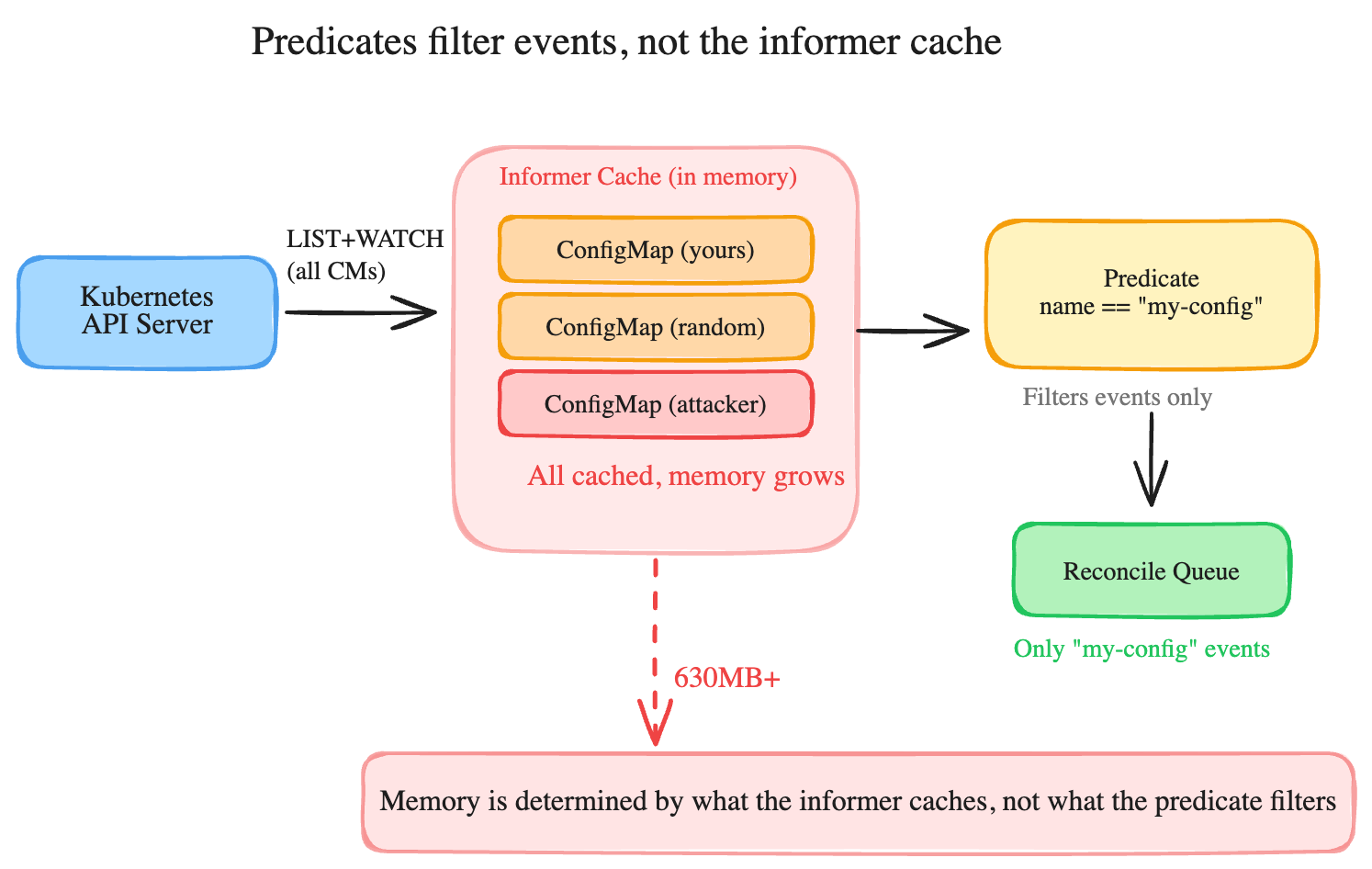
The same applies to WithEventFilter(). It is a reconciliation-time gate, not a cache-time gate. Your operator's memory footprint is determined by what the informer watches, not by what your predicates let through to the reconciler.
We found this pattern in operators that watched ConfigMaps for CA bundle updates. The predicate filtered events down to a single ConfigMap by name, but the informer cached every ConfigMap in the cluster. On a cluster with a few hundred large ConfigMaps, the operator went down.
The fix
If you only need to read a specific ConfigMap occasionally (like a CA bundle), do not use Watches() at all. Use a direct API call through an uncached client:
// Create an uncached reader in main.go
apiReader := mgr.GetAPIReader()

// In your reconciler, read directly from the API server
var caCM corev1.ConfigMap
if err := apiReader.Get(ctx, client.ObjectKey{
    Namespace: "openshift-config-managed",
    Name:      "default-ingress-cert",
}, &caCM); err != nil {
    return err
}
No informer, no cache, no memory growth. The tradeoff is latency (approximately 50 ms per API call versus 1 ms from cache), which is acceptable for resources you read once during reconciliation.
If you genuinely need real-time watch events for a resource type (like your operator creates ConfigMaps and needs to reconcile when they change), then you need a label selector on the cache, which is what the first article covered in detail.
Anti-pattern 2: "I used DisableFor, so caching is off"
The controller-runtime client has a DisableFor option that looks like it turns off caching for specific types:
mgr, err := ctrl.NewManager(cfg, ctrl.Options{
    Client: client.Options{
        Cache: &client.CacheOptions{
            DisableFor: []client.Object{
                &corev1.ConfigMap{},
            },
        },
    },
})
Reading this code, you would reasonably conclude that ConfigMaps are not cached. And for client.Get() and client.List() calls, that is true. Those bypass the cache and go straight to the API server.
But there is a separate code path that DisableFor does not touch. When your controller setup includes:
func (r *MyReconciler) SetupWithManager(mgr ctrl.Manager) error {
    return ctrl.NewControllerManagedBy(mgr).
        For(&myv1.MyResource{}).
        Owns(&corev1.ConfigMap{}).  // creates an informer
        Watches(&corev1.Secret{}, ...). // also creates an informer
        Complete(r)
}
That Owns() call registers a ConfigMap informer through the controller builder. The same applies to Watches() and For(): any controller builder call that references a resource type creates a shared informer for it, regardless of DisableFor. This is a completely independent code path from the client cache. The informer starts, watches every ConfigMap cluster-wide, and caches all of them. DisableFor has zero effect on it. The divergence of these independent programmatic execution routes is mapped in Figure 2.
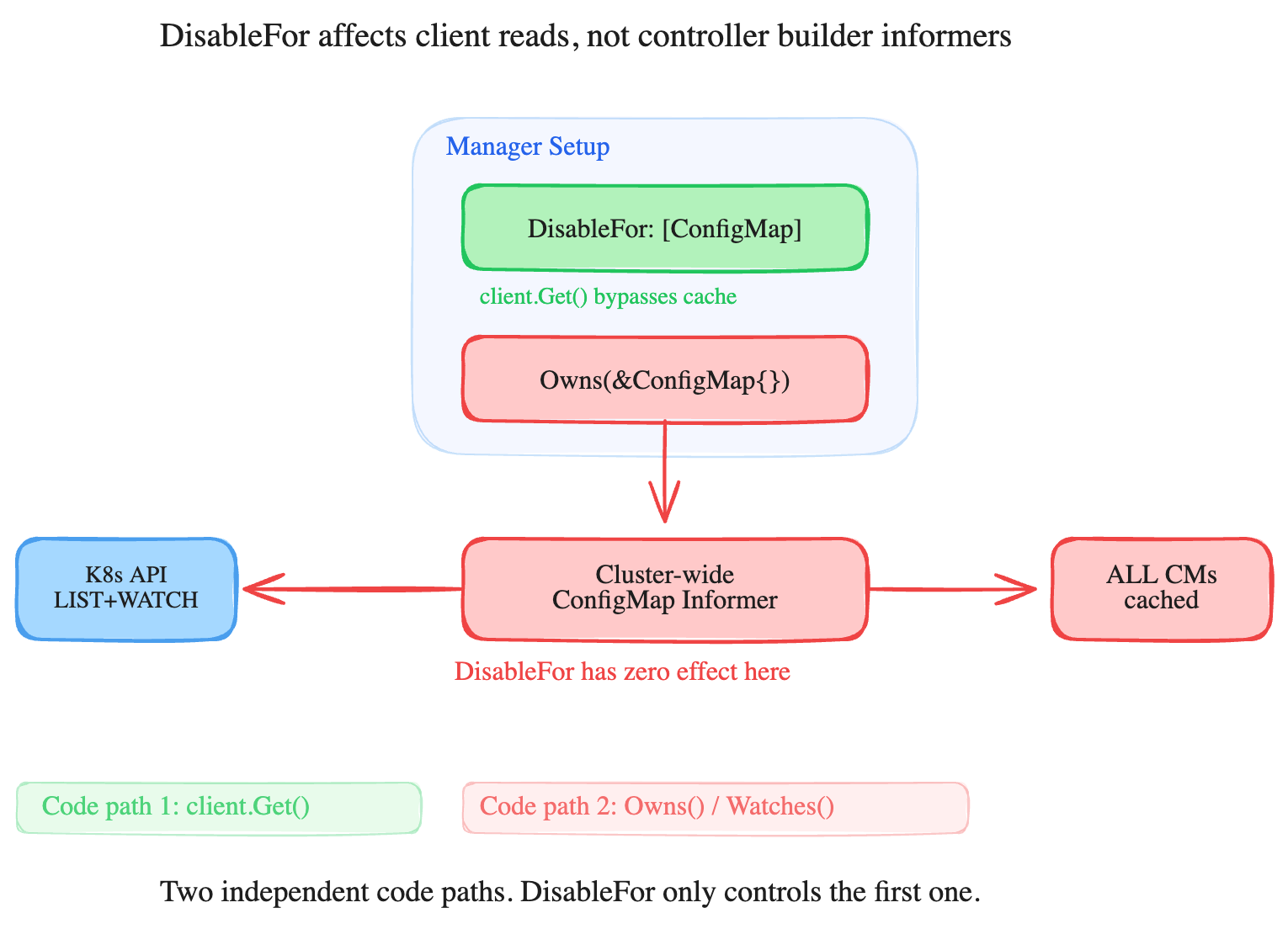
The developer's intent was probably: "I disabled ConfigMap caching using DisableFor, but I still need to reconcile when my owned ConfigMaps change using Owns." The result is that client.Get(ConfigMap) correctly goes to the API server, but Owns(ConfigMap) creates a cluster-wide informer anyway.
The fix
The proper fix configuration depends on whether you actually need the Owns() relationship.
If you own ConfigMaps and need to reconcile when they change, keep Owns() but add a label selector to the ByObject cache configuration and label your ConfigMaps. This is the approach from the previous article.
If you are using Owns() just for garbage collection, you might not need it at all. Owner references handle cleanup automatically without informers (note: only within the same namespace; cross-namespace ownership requires explicit cleanup in your reconciler). However, Owns() also serves another purpose: it triggers reconciliation when owned resources are modified outside the operator's control, allowing the operator to detect drift and revert to the desired state. If your operator needs this drift detection, keep Owns() but add a label selector to the ByObject cache configuration to limit what the informer caches. If you truly only need garbage collection on delete, removing the Owns() call removes the informer.
Anti-pattern 3: The invisible informer from client.Get()
This is the most dangerous anti-pattern because it is completely invisible during code review. There is no Watches() call, no Owns() call, nothing that explicitly indicates the creation of an informer. It is just a regular client.Get() call:
func (r *MyReconciler) Reconcile(ctx context.Context, req ctrl.Request) (ctrl.Result, error) {
    var cm corev1.ConfigMap
    if err := r.Client.Get(ctx, client.ObjectKey{
        Namespace: req.Namespace,
        Name:      "some-config",
    }, &cm); err != nil {
        return ctrl.Result{}, err
    }
    // ...
}
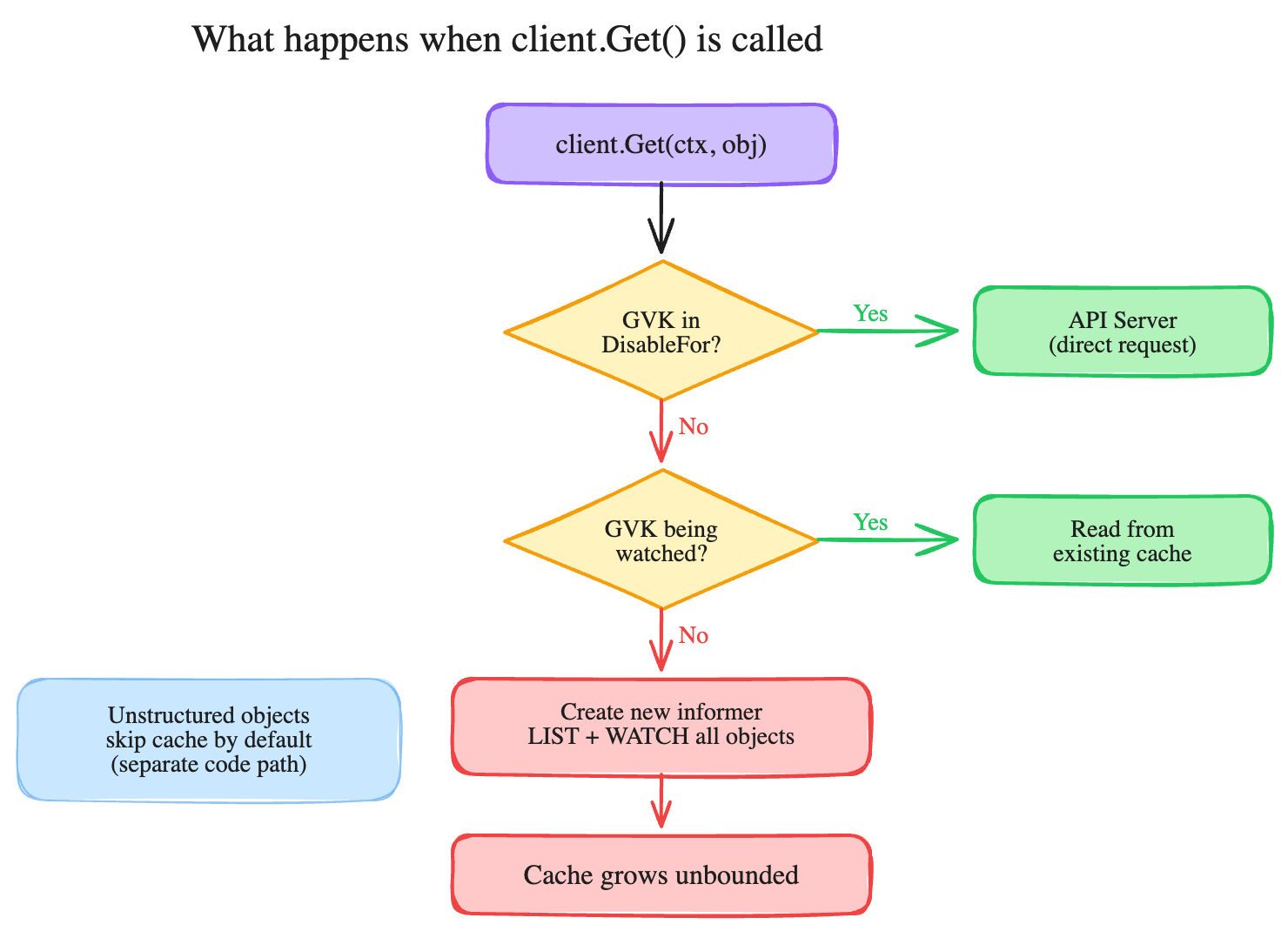
This configuration looks completely innocent. But if ConfigMap is not listed in your cache.Options.ByObject and not in DisableFor, here is what happens the first time this code runs:
r.Client.Get()routes to the cached client (the default).- The cache does not have an informer for ConfigMap yet.
controller-runtimecreates a new cluster-wide ConfigMap informer on the fly.- The informer does a full LIST of every ConfigMap in every namespace.
- All of them get deserialized and cached in memory.
- Your
Get()returns the one ConfigMap you asked for.
Steps 2 through 5 happen silently, once, on the first access. Every subsequent Get() call for any ConfigMap hits the now-populated cache. You never asked for a cluster-wide informer, but you got one.
This is easy to miss even when you are actively protecting against it. We found one operator that had label selectors on nine resource types in its ByObject configuration (Deployments, ConfigMaps, PVCs, ServiceAccounts, Services, NetworkPolicies, ClusterRoleBindings, RoleBindings, Roles) but omitted Secrets from the list. A single client.Get() call for a Secret in the reconciler triggered this exact anti-pattern: an implicit unfiltered cluster-wide Secret informer. The step-by-step logic of this implicit cache behavior is detailed in Figure 3.
The fix
The fix is to add ConfigMap to DisableFor in your client cache options, which tells controller-runtime to bypass the cache for that type. Any client.Get() or client.List() call goes straight to the API server instead of triggering implicit informer creation:
mgr, err := ctrl.NewManager(cfg, ctrl.Options{
    Cache: cache.Options{
        ByObject: map[client.Object]cache.ByObject{
            // Resources your operator manages (with label filtering)
            &appsv1.Deployment{}: {
                Label: labels.SelectorFromSet(labels.Set{
                    "app.kubernetes.io/managed-by": "my-operator",
                }),
            },
        },
    },
    Client: client.Options{
        Cache: &client.CacheOptions{
            // Resources your operator reads but should NOT cache
            DisableFor: []client.Object{
                &corev1.ConfigMap{},
                &corev1.Secret{},
            },
        },
    },
})
Any client.Get() or client.List() for ConfigMap or Secret now goes directly to the API server, bypassing the cache entirely. No implicit informer gets created.
The key insight: if your operator reads a core resource type but does not need it cached, add it to DisableFor. Without this, an unlisted type gets an implicit unfiltered cluster-wide informer the first time client.Get() is called.
A common trap: you might think adding the type to ByObject with an empty namespaces map (map[string]cache.Config{}) would disable the informer. It does not. An empty map still creates a cluster-wide informer. The DisableFor configuration is the correct mechanism.
Anti-pattern 4: Everything is cluster-wide by default
The controller-runtime cache has a DefaultNamespaces option:
Cache: cache.Options{
    DefaultNamespaces: map[string]cache.Config{
        "my-operator-ns": {},
    },
}
When this is set, informers only watch the listed namespaces. When it is not set (the default), every informer watches all namespaces in the cluster.
Most operators cannot simply restrict to a single namespace because they manage resources across user namespaces. But awareness matters: if your operator creates resources in five namespaces, and you do not set DefaultNamespaces or per-resource label selectors, your ConfigMap informer watches ConfigMaps in all 500 namespaces on the cluster, not just the five you care about.
For multi-namespace operators, the fix is usually label selectors (the anti-pattern 1 fix) rather than namespace scoping. But if your operator genuinely only operates in one or two namespaces, DefaultNamespaces is the simplest protection. For operators with a known set of namespaces, combine DefaultNamespaces with per-resource label selectors for the most effective protection.
Anti-pattern 5: The typed/unstructured cache trap
This problem trips up operators migrating between typed and unstructured client usage. The controller-runtime library maintains three completely separate caches, one for each object representation:
- Typed cache: Stores full Go structs (
corev1.ConfigMap,corev1.Pod) - Unstructured cache: Stores
map[string]interface{}representations (bypassed by default, the client sends unstructured reads directly to the API server unlessCacheOptions.Unstructuredis set totrue) - Partial/Metadata cache: Stores only
ObjectMeta(name, namespace, labels, annotations)
These caches do not share entries. A ConfigMap cached as a typed corev1.ConfigMap is invisible to a client.Get() call that requests an unstructured.Unstructured. The isolated nature of these three distinct cache paths is diagrammed in Figure 4.
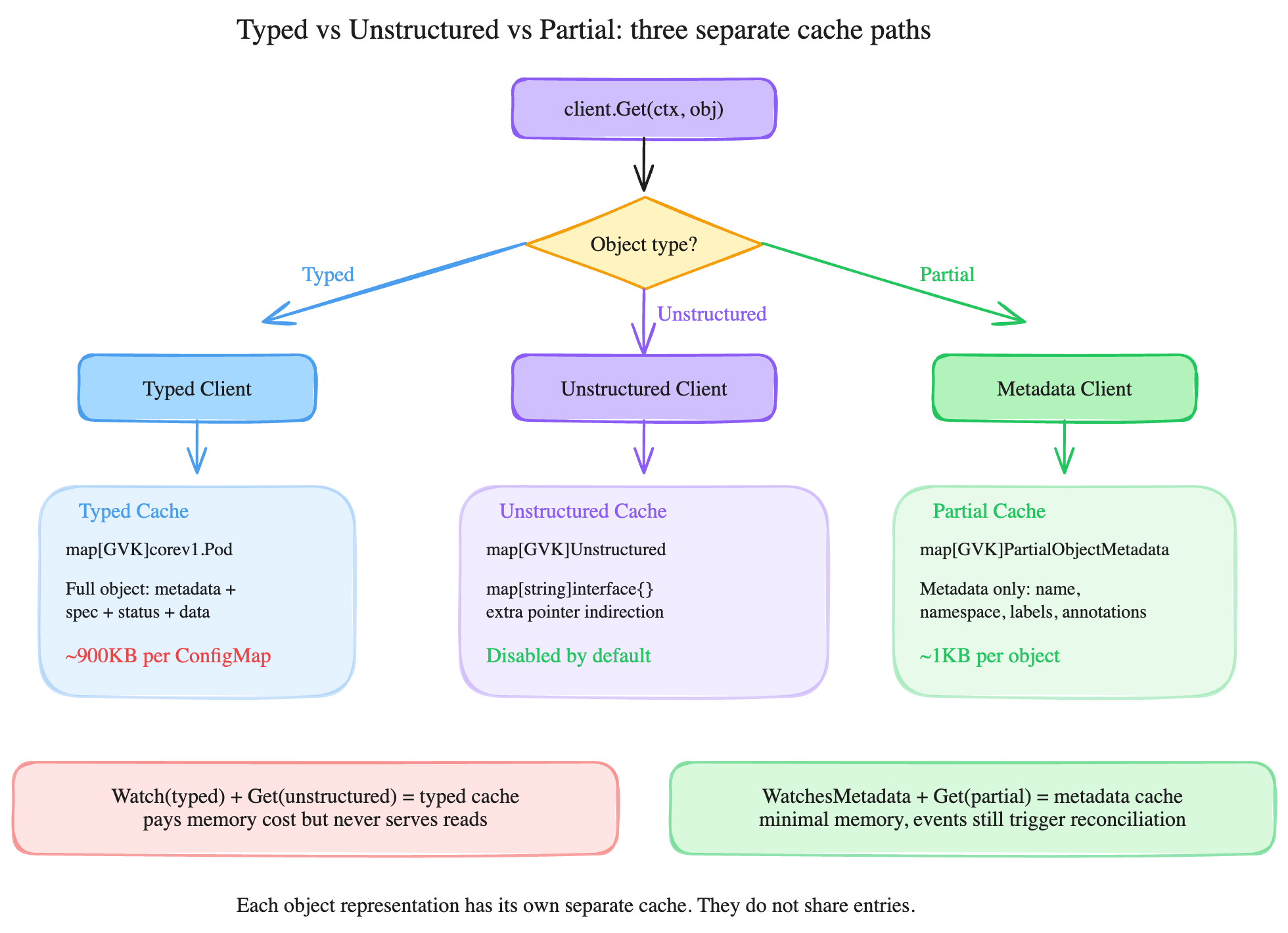
This configuration creates a subtle problem. If your controller uses Watches(&corev1.ConfigMap{}) to register a typed informer for reconciliation events, but then reads the ConfigMap in your reconciler using an unstructured Get call, the typed cache pays the full memory cost of caching every matching ConfigMap, but none of those cached objects ever serve a read. The unstructured Get call either goes to the API server directly (because unstructured caching is disabled by default) or creates a second separate cache.
The fix
The correct approach depends on what your system requires.
If you only need reconciliation triggers (knowing that a ConfigMap changed, not its contents), use WatchesMetadata() instead of Watches(). The metadata cache stores only ObjectMeta (approximately 1 KB per object instead of up to 900 KB for near-limit ConfigMaps), and your reconciler can fetch the full object on-demand via an uncached reader when it actually needs the data.
If you need both the trigger and the data, make sure your watch and your Get operations use the same object representation. Watch typed, get typed. Or watch metadata, get partial. The structural difference in pointer overhead between these data representations is shown in Figure 5.
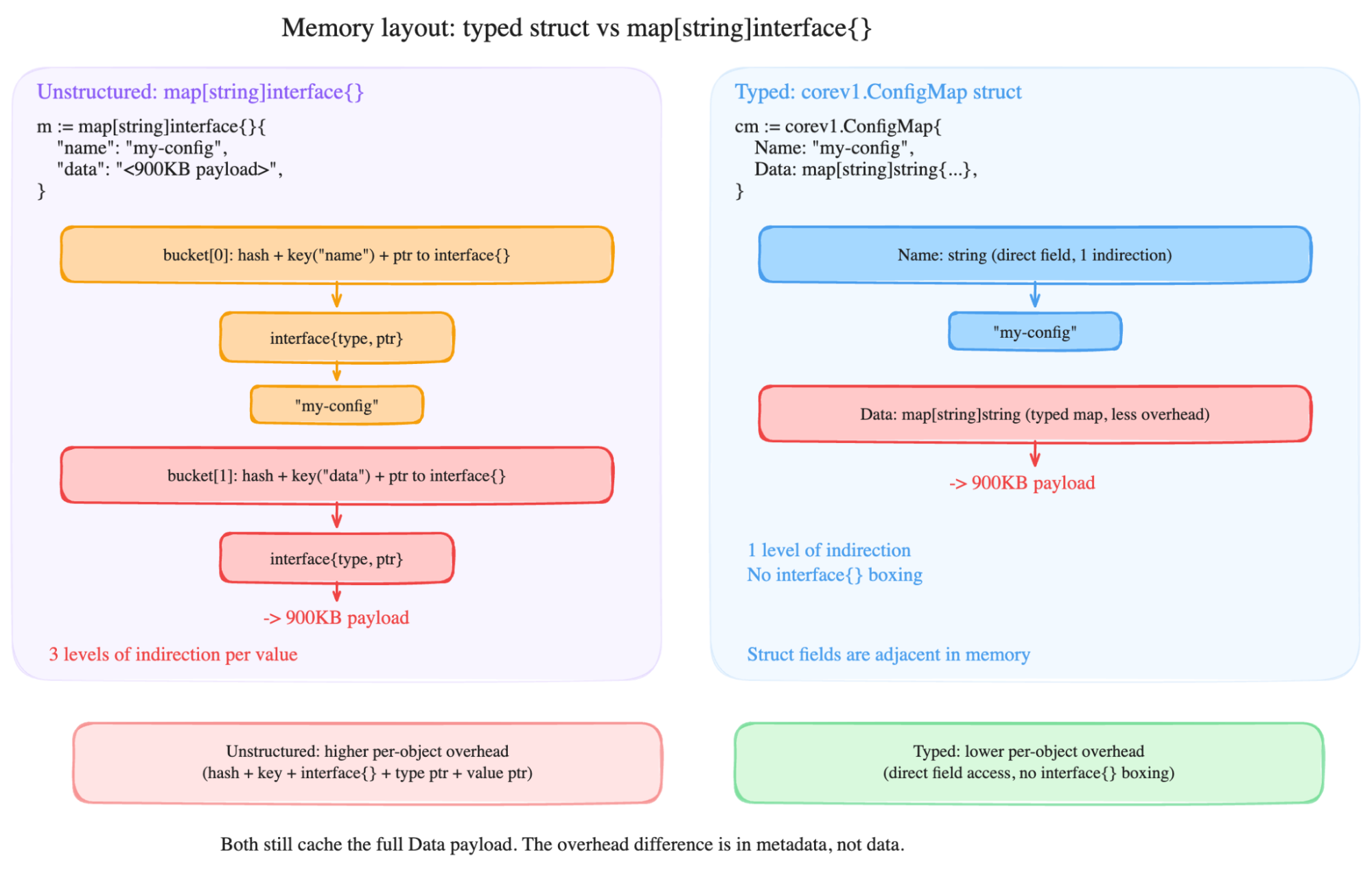
The memory overhead difference between typed and unstructured representations is in the per-field metadata, not the payload data. Both representations still cache the full Data field (the 900 KB payload). But unstructured objects use map[string]interface{} internally, which adds three levels of pointer indirection per field (hash bucket, interface header, value pointer). Typed structs use direct field access with one level of indirection. On a cluster with thousands of cached objects, this per-field overhead adds up.
The complete fix: Both code paths
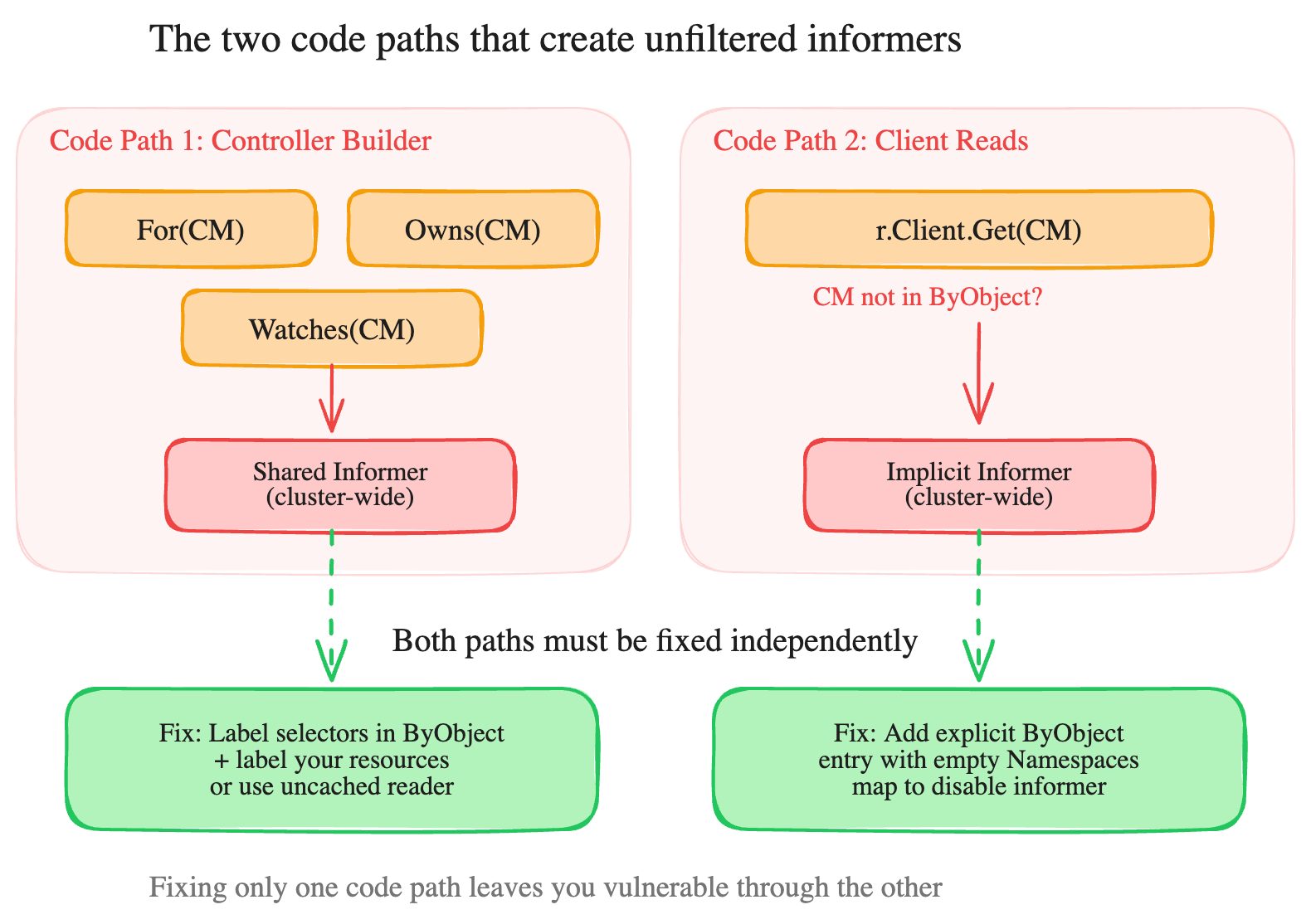
The most important thing to understand about this vulnerability is that there are two independent code paths that create unfiltered informers. Fixing only one leaves you exposed.
Code path 1: Controller builder registrations
These are the explicit informer registrations in your controller's SetupWithManager() method:
// Each of these creates a shared informer for the resource type
For(&corev1.ConfigMap{})       // primary watch
Owns(&corev1.ConfigMap{})      // owned resource watch
Watches(&corev1.ConfigMap{})   // custom watch
For each of these, you need to complete one of the following steps:
- Add a label selector to
ByObjectand label your resources (when you own them). - Replace with direct API reads via an uncached reader (when you do not own them).
- Remove if unnecessary (
Owns()is for garbage collection only; owner references suffice).
Code path 2: Implicit informers from client reads
These are the silent informers created by client.Get() and client.List() for types not listed in ByObject:
// If ConfigMap is not in ByObject and not in DisableFor,
// this silently creates a cluster-wide informer on first call
r.Client.Get(ctx, key, &corev1.ConfigMap{})
The fix is a two-part manager configuration: ByObject with label selectors for types you own, and DisableFor for types you read but should not cache:
mgr, err := ctrl.NewManager(cfg, ctrl.Options{
    Cache: cache.Options{
        ByObject: map[client.Object]cache.ByObject{
            // Managed resources: filtered by label
            &appsv1.Deployment{}: {Label: mySelector},
        },
        // Strip managedFields from all cached objects
        DefaultTransform: cache.TransformStripManagedFields() (available in controller-runtime v0.15+),
    },
    Client: client.Options{
        Cache: &client.CacheOptions{
            // Read-only resources: bypass cache entirely
            DisableFor: []client.Object{
                &corev1.ConfigMap{},
                &corev1.Secret{},
                &corev1.Pod{},
                &corev1.Service{},
            },
        },
    },
})
Both structural architectural entry points create separate vulnerabilities that require independent remediation as shown in Figure 6.
The DefaultTransform line is an additional optimization. Kubernetes attaches managedFields metadata to every object, and it can be substantial. The TransformStripManagedFields() function removes it from cached objects, reducing memory per object. Unless your operator specifically needs field management data (which is rare), there is no reason not to include this configuration.
How to audit your operator in five minutes
You do not need to understand every line of your operator to check for this vulnerability. Run these five steps:
Step 1: Find explicit informer registrations
Search your controller code for For(), Owns(), and Watches() calls that reference core Kubernetes types:
grep -rEn 'For\(&corev1\.|Owns\(&corev1\.|Watches\(&corev1\.'
    internal/ pkg/ controllers/
Any match means your operator has an explicit informer for that type. Check whether it is protected by a label selector in ByObject.
Step 2: Find your ByObject configuration
Search for the cache setup:
grep -rEn 'ByObject' cmd/ main.go internal/Look at the map entries. Any entry with {} (empty configuration) is an unfiltered cluster-wide informer. Any core resource type that appears in step 1 but is missing from this map gets the default behavior: unfiltered, cluster-wide.
Step 3: Find client reads that might trigger implicit informers
Search for client.Get() and client.List() calls on core types:
grep -rEn 'r\.Client\.Get|r\.Get|r\.Client\.List|r\.List'
    internal/ pkg/ controllers/ | grep -Ei 'configmap|secret|service|pod'
Cross-reference each match against your ByObject map and DisableFor list. If the type is in neither, that Get() or List() call will silently create a cluster-wide informer on the first call.
Step 4: Check for DisableFor mismatches
grep -rEn 'DisableFor' cmd/ main.goIf you have DisableFor entries, check whether the same types appear in Owns(), Watches(), or For() calls. DisableFor only affects client reads. Controller builder registrations ignore it completely.
Step 5: Check memory limits
grep -rEn 'memory' config/ manifests/ | grep -Ei limitIf your operator deployment has no memory limit (or just a requests block with no limits), the cache can grow until it consumes the entire node's memory, which is much worse than a container restart.
Bonus: Find phantom watches with ReaderFailOnMissingInformer
If you want to catch every implicit informer in your operator, you can set ReaderFailOnMissingInformer: true on your cache configuration:
mgr, err := ctrl.NewManager(cfg, ctrl.Options{
    Cache: cache.Options{
        ReaderFailOnMissingInformer: true,
    },
})
With this option enabled, any client.Get() or client.List() for a type that does not have a pre-registered informer will return an ErrResourceNotCached error instead of silently creating a cluster-wide informer. This behavior can be disruptive in practice because it causes your operator to crash on any forgotten type. But that is the point: this strict check surfaces phantom watches (implicit informers you did not know about) at startup instead of letting them silently consume memory in production.
Use this feature during development and testing to audit your operator. Run it, see what errors surface, then fix each issue with either DisableFor (for types you read but do not need to cache) or a proper ByObject entry with label selectors (for types you own). Once you locate all the phantom watches, you can decide whether to keep ReaderFailOnMissingInformer enabled as a safety net or disable it.
Testing your operator for OOM
For a step-by-step OOM test with ConfigMaps, see the testing section in part 1. The same approach works for Secrets: replace kubectl create configmap with kubectl create secret generic.
What we found across the ecosystem
Another engineer independently reported the Kubeflow Training Operator issue (kubeflow/trainer#3374) after experiencing the same problem in production. The MPI plug-in registers cluster-wide watches on both ConfigMap and Secret with no label selector or namespace filter. The pull request that resolves this issue (kubeflow/trainer#3377) uses WatchesMetadata instead of full-object watches, which is another valid approach.
Anti-patterns summary
| Anti-pattern | What developers think | What actually happens | Fix |
|---|---|---|---|
Predicates and EventFilter | "My predicate filters what gets cached" | Predicates only filter which events reach the reconciler. The informer caches every resource. | Use an uncached reader for occasional reads, or use label selectors for owned resources. |
DisableFor | "I disabled caching for this type" | The DisableFor configuration only affects client.Get() and List(). Controller builder calls (Owns(), Watches(), and For()) still create informers. | Match DisableFor with the ByObject configuration. Remove unnecessary Owns() calls. |
Implicit informer from client.Get() | "I only listed the types I want to cache" | Unlisted types get implicit cluster-wide informers on the first client.Get() access. | Add types to DisableFor so client reads bypass the cache. Do not use an empty Namespaces map because it still creates a cluster-wide informer. |
| No namespace scoping | "My operator only runs in one namespace" | Without DefaultNamespaces or label selectors, every informer watches all namespaces. | Set DefaultNamespaces for single-namespace operators and label selectors for multi-namespace operators. |
| Typed and unstructured mismatch | "I watch typed and get unstructured, same thing" | The typed cache pays full memory use costs, but an unstructured Get call never hits it. Separate caches exist per representation. | Use the same representation for watch and get operations, or use WatchesMetadata for triggers plus an uncached reader for data. |
Tips and best practices for cache optimization
Apply these practical configuration choices and architectural adjustments to keep your operator's memory footprint stable and optimize your cache paths.
Use DisableFor for types you read but do not need cached
The DisableFor configuration option forces client.Get() and client.List() calls to go directly to the API server. Do not confuse this adjustment with ByObject: an empty ByObject entry still creates a cluster-wide informer.
Use WatchesMetadata when you only need metadata
If your controller only needs to know that a ConfigMap exists (not its contents), WatchesMetadata caches just ObjectMeta, which is a fraction of the size of the full object. There are two ways to express this::
// Option A: WatchesMetadata (standalone)
builder.WatchesMetadata(
    &corev1.ConfigMap{},
    handler.EnqueueRequestsFromMapFunc(mapToOwner),
)


// Option B: Watches with OnlyMetadata
builder.Watches(
    &corev1.ConfigMap{},
    handler.EnqueueRequestsFromMapFunc(mapToOwner),
    builder.OnlyMetadata,
)
Both create a metadata-only informer that caches ObjectMeta (name, namespace, and labels) instead of the full object including the Data field. The WatchesMetadata method is a convenience wrapper that ensures the metadata-only flag is always set, while Watches with builder.OnlyMetadata passes it as an option, which makes it possible to accidentally omit. Prefer WatchesMetadata when possible.
Use ReaderFailOnMissingInformer during development
Setting this parameter to true on cache.Options makes any unlisted client.Get() fail loudly instead of creating a phantom watch. This configuration is too aggressive for production, but it catches every implicit informer during testing.
Match your watch and get representations
If you watch a typed object, execute a typed Get call. If you watch metadata, retrieve a partial object. Mixing representations (watching typed items while running an unstructured Get call) wastes the cache and might create duplicate informers.
Add DefaultTransform: cache.TransformStripManagedFields() to every operator
You can add DefaultTransform: cache.TransformStripManagedFields() (available in controller-runtime 0.15 or later) to every operator. The ManagedFields data can add substantial overhead per cached object, and operators rarely need that data.
Set memory limits on every operator deployment
A memory limit turns an unfiltered cache into a CrashLoopBackOff, which is visible and recoverable. Without a limit, the operator silently consumes node memory until all workloads on that node stop.
Test with realistic cluster data
The flooding test outlined earlier uses a few hundred resources at about 900 KB each. This volume is well within what a regular user can create with the edit ClusterRole configuration.
Advanced: Observing informer creation at runtime
If you want to see exactly which informers your operator creates at runtime, the controller-runtime cache provides a NewInformer hook. This hook is a function on cache.Options that overrides how the system creates every SharedIndexInformer instance. By wrapping the default implementation, you can log every GroupVersionKind (GVK) that receives an informer, emit Prometheus metrics, and detect duplicate caches:
mgr, err := ctrl.NewManager(cfg, ctrl.Options{
    Cache: cache.Options{
        NewInformer: func(
            lw toolscache.ListerWatcher,
            obj runtime.Object,
            d time.Duration,
            idx toolscache.Indexers,
        ) toolscache.SharedIndexInformer {
            gvk, _ := apiutil.GVKForObject(obj.(client.Object), scheme)
            log.Info("informer created", "gvk", gvk)
            return toolscache.NewSharedIndexInformer(lw, obj, d, idx)
        },
    },
})
This function fires for every informer, whether created explicitly by Owns(),Watches(),For() methods, or implicitly by client.Get(). Run your operator with this hook during development to gather a complete inventory of what your cache is watching. If you see a GVK that you did not expect, you have located a phantom watch.
Wrap up
The previous article fixed one operator. This article explains why multiple operators require the same fix. The five anti-patterns (predicates do not filter cache, DisableFor does not affect informers, implicit informers from client.Get() create implicit informers, a lack of namespace scoping defaults to cluster-wide access, and the typed andunstructured cache mismatch) all stem from the same root cause: the controller-runtime library's cache defaults optimize for convenience, not for security in multi-tenant environments.
If you maintain a controller-runtime operator, the audit takes five minutes with grep and the test takes 10 minutes with kubectl. The results might change how you think about your cache configuration.
Learn more:
- Protect your Kubernetes Operator from OOMKill (Part 1)
- kubeflow/spark-operator#2878: The upstream Spark Operator fix
- kubeflow/trainer#3374: Training Operator issue (independently reported)
- kubeflow/trainer#3377: Training Operator fix using
WatchesMetadata - controller-runtime Cache Options: Official documentation for cache configuration
- Kubernetes Informers: How the watch/cache mechanism works

