Redhat Developers  Logo
  • AI

    Get started with AI

    • Red Hat AI
      Accelerate the development and deployment of enterprise AI solutions.
    • AI learning hub
      Explore learning materials and tools, organized by task.
    • AI interactive demos
      Click through scenarios with Red Hat AI, including training LLMs and more.
    • AI/ML learning paths
      Expand your OpenShift AI knowledge using these learning resources.
    • AI quickstarts
      Focused AI use cases designed for fast deployment on Red Hat AI platforms.
    • No-cost AI training
      Foundational Red Hat AI training.

    Featured resources

    • OpenShift AI learning
    • Open source AI for developers
    • AI product application development
    • Open source-powered AI/ML for hybrid cloud
    • AI and Node.js cheat sheet

    Red Hat AI Factory with NVIDIA

    • Red Hat AI Factory with NVIDIA is a co-engineered, enterprise-grade AI solution for building, deploying, and managing AI at scale across hybrid cloud environments.
    • Explore the solution
  • Learn

    Self-guided

    • Documentation
      Find answers, get step-by-step guidance, and learn how to use Red Hat products.
    • Learning paths
      Explore curated walkthroughs for common development tasks.
    • Guided learning
      Receive custom learning paths powered by our AI assistant.
    • See all learning

    Hands-on

    • Developer Sandbox
      Spin up Red Hat's products and technologies without setup or configuration.
    • Interactive labs
      Learn by doing in these hands-on, browser-based experiences.
    • Interactive demos
      Click through product features in these guided tours.

    Browse by topic

    • AI/ML
    • Automation
    • Java
    • Kubernetes
    • Linux
    • See all topics

    Training & certifications

    • Courses and exams
    • Certifications
    • Skills assessments
    • Red Hat Academy
    • Learning subscription
    • Explore training
  • Build

    Get started

    • Red Hat build of Podman Desktop
      A downloadable, local development hub to experiment with our products and builds.
    • Developer Sandbox
      Spin up Red Hat's products and technologies without setup or configuration.

    Download products

    • Access product downloads to start building and testing right away.
    • Red Hat Enterprise Linux
    • Red Hat AI
    • Red Hat OpenShift
    • Red Hat Ansible Automation Platform
    • See all products

    Featured

    • Red Hat build of OpenJDK
    • Red Hat JBoss Enterprise Application Platform
    • Red Hat OpenShift Dev Spaces
    • Red Hat Developer Toolset

    References

    • E-books
    • Documentation
    • Cheat sheets
    • Architecture center
  • Community

    Get involved

    • Events
    • Live AI events
    • Red Hat Summit
    • Red Hat Accelerators
    • Community discussions

    Follow along

    • Articles & blogs
    • Developer newsletter
    • Videos
    • Github

    Get help

    • Customer service
    • Customer support
    • Regional contacts
    • Find a partner

    Join the Red Hat Developer program

    • Download Red Hat products and project builds, access support documentation, learning content, and more.
    • Explore the benefits

Implement GPU-as-a-Service with Kueue and NVIDIA MIG

Allocate partitioned cluster slices using a custom self-service dashboard

June 29, 2026
Cedric Clyburn James Harmison
Related topics:
AI inferenceArtificial intelligence
Related products:
Red Hat AI InferenceRed Hat OpenShift AI

    Many organizations buying GPUs today end up with the same problem: the cards are expensive, the demand across teams is uneven (about 52% utilization on average), and there's no clean way for a developer to actually get their hands on one without filing a ticket. The result is usually some mix of GPUs sitting idle and GPUs being hoarded… sometimes both (and somehow on the same cluster).

    GPU-as-a-Service (GPUaaS) is the pattern that fixes that. A central platform team owns the hardware, and developers reserve slices of it on demand, almost like booking a meeting room. This post walks through how we put that workflow together on Red Hat OpenShift using the Red Hat build of Kueue, NVIDIA Multi-Instance GPU (MIG), and a small custom dashboard plug-in for self-service requesting of GPU resources, as shown in Figure 1.
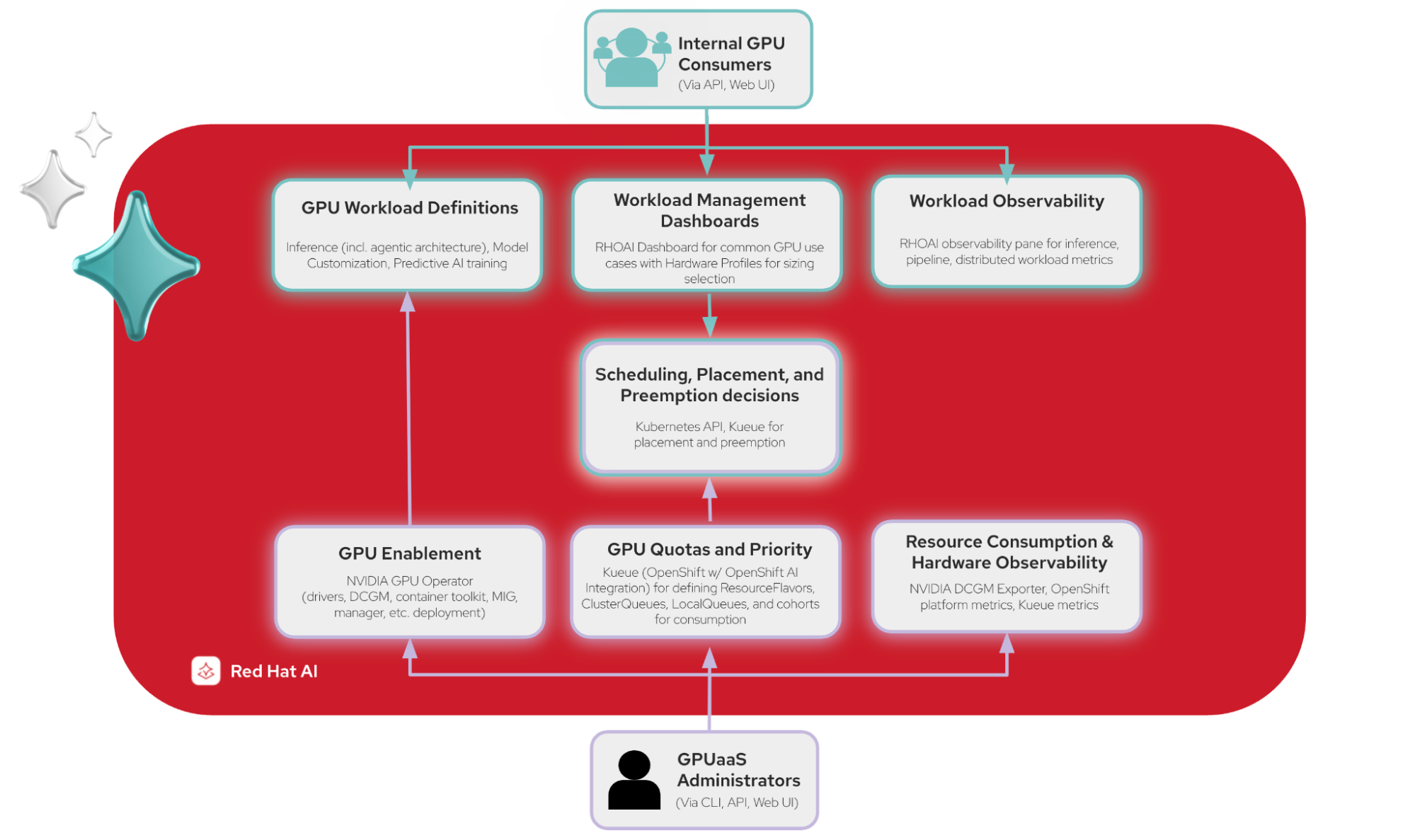
    Consumers and administrators interfacing with Red Hat AI modules for workload definitions, scheduling, and enablement.
    Figure 1: GPU-as-a-Service connects AI workloads to shared infrastructure through a layer that handles scheduling, partitioning, and quota management.

    How GPUaaS works: Kueue and NVIDIA MIG

    We use OpenShift core platform features and OpenShift AI workload integration to manage a central pool of shared compute.

    Kueue is a queueing and quota system for Kubernetes workloads. It lets a platform admin define resource pools, assign them to specific teams or users, and apply rules like fair sharing when things get busy, as shown in Figure 2.
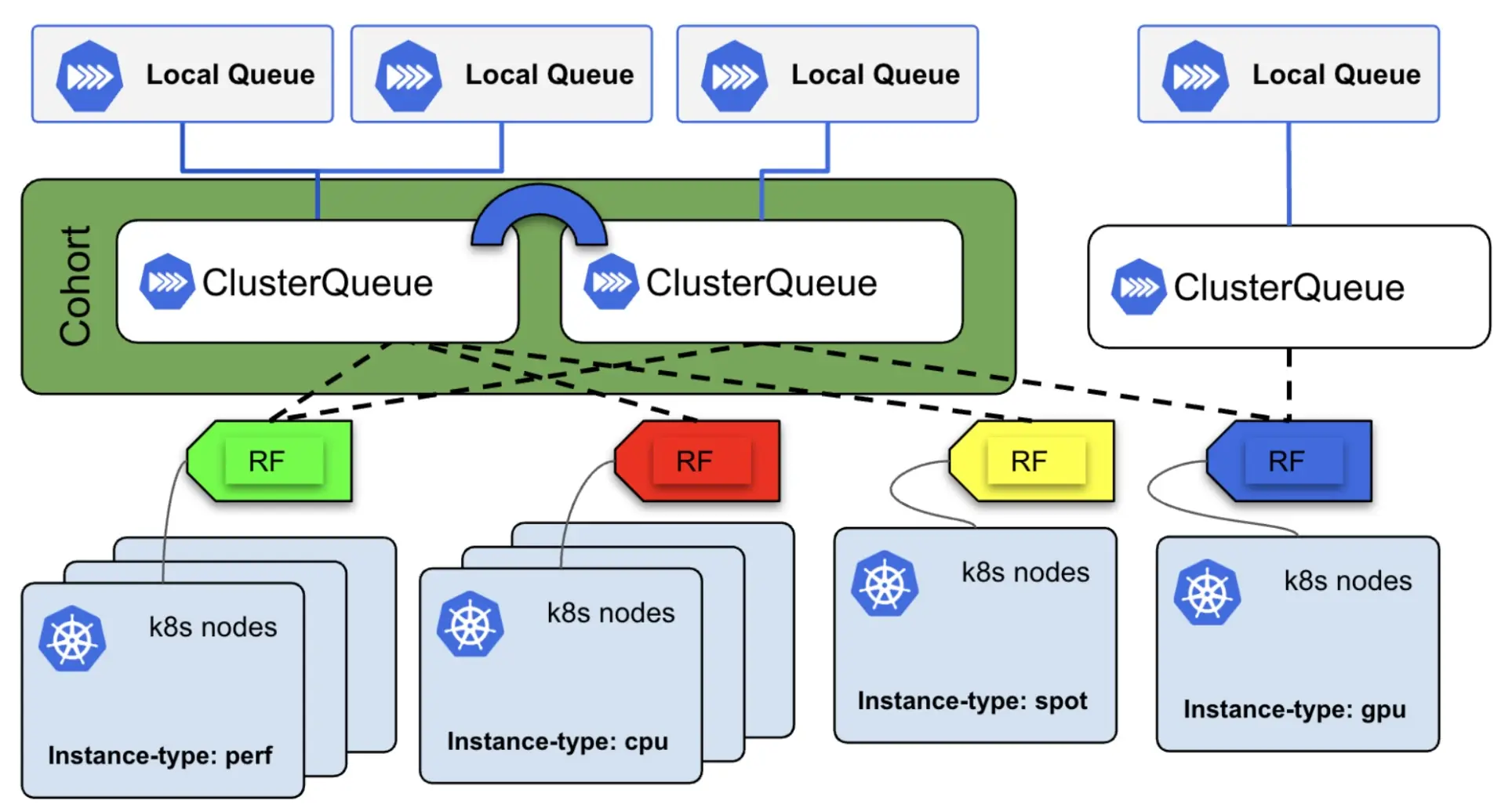
    LocalQueues route workloads into ClusterQueues, which map to Kubernetes nodes across performance, CPU, spot, and GPU instance types.
    Figure 2: Kueue organizes work into LocalQueues and ClusterQueues, grouped into a cohort that shares capacity across node pools.

    NVIDIA MIG lets a single physical GPU be sliced into smaller, isolated instances. For example, an H200 can be carved into smaller pieces like a 1g.18gb slice or a 2g.35gb slice, each of which behaves like an independent GPU. MIG makes GPU-as-a-Service more flexible because instead of allocating a whole accelerator to someone running a small model, they can request the slice they actually need, as shown in Figure 3.
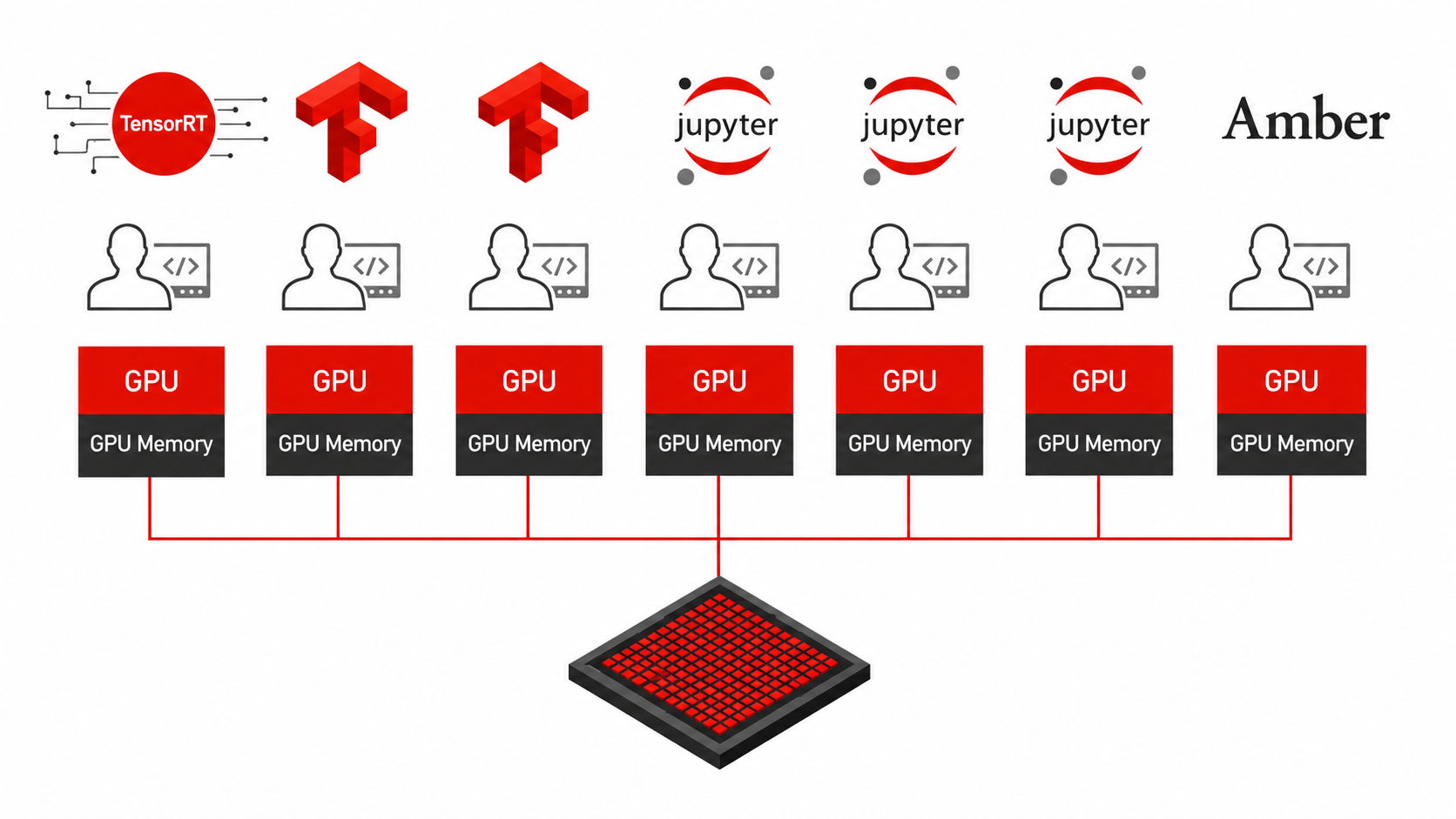
    Seven application workloads, including TensorFlow and Jupyter, map directly to separate GPU slices powered by a single physical processor.
    Figure 3: NVIDIA MIG partitions a single physical GPU into isolated instances, each with dedicated memory and compute, so multiple users can share one accelerator.

    MIG partitions are configured in the NVIDIA GPU Operator using a combination of labels on nodes and platform-level enablement in the operator's ClusterPolicy resource.

    Kueue and MIG meet in a resource called a ClusterQueue. The coveredResources block in this configuration file (Figure 4) lists each MIG slice size alongside CPU, memory, and full GPUs.
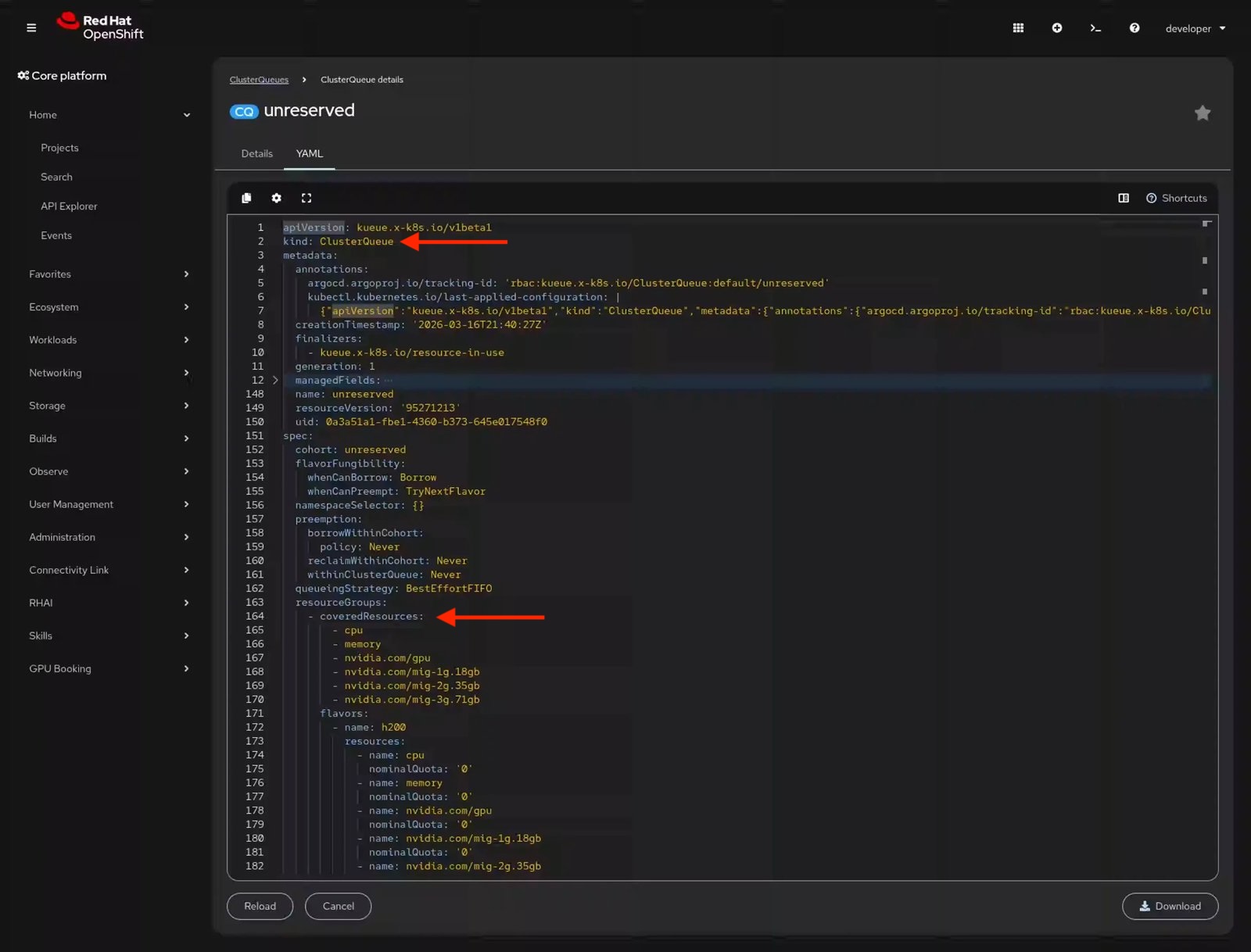
    OpenShift web console YAML editor highlighting the ClusterQueue kind and the covered resources configuration for multiple MIG slices.
    Figure 4: ClusterQueue YAML configuration showing MIG slice quotas in the OpenShift web console.

    With the Red Hat build of Kueue, our platform team can define resource quotas (including individual MIG slice sizes) with flexible fair sharing, preemption, and queue prioritization. With that setup, let's look at what a developer actually sees when booking GPU resources. The ClusterQueue in this example does not have any direct quota; instead, it borrows from within its assigned cohort. This system allows teams to request unclaimed GPUs on a self-service basis without availability guarantees, making it ideal for lower-priority batch jobs.

    How can we self-serve GPU quota reservations?

    Kueue's APIs provide extensive scheduling options, but most developers don't want to write YAML to request a GPU for the afternoon. To simplify this process, our platform team built a custom GPU booking plug-in for the OpenShift web console (Figure 5), and it's just as cool as you'd expect.
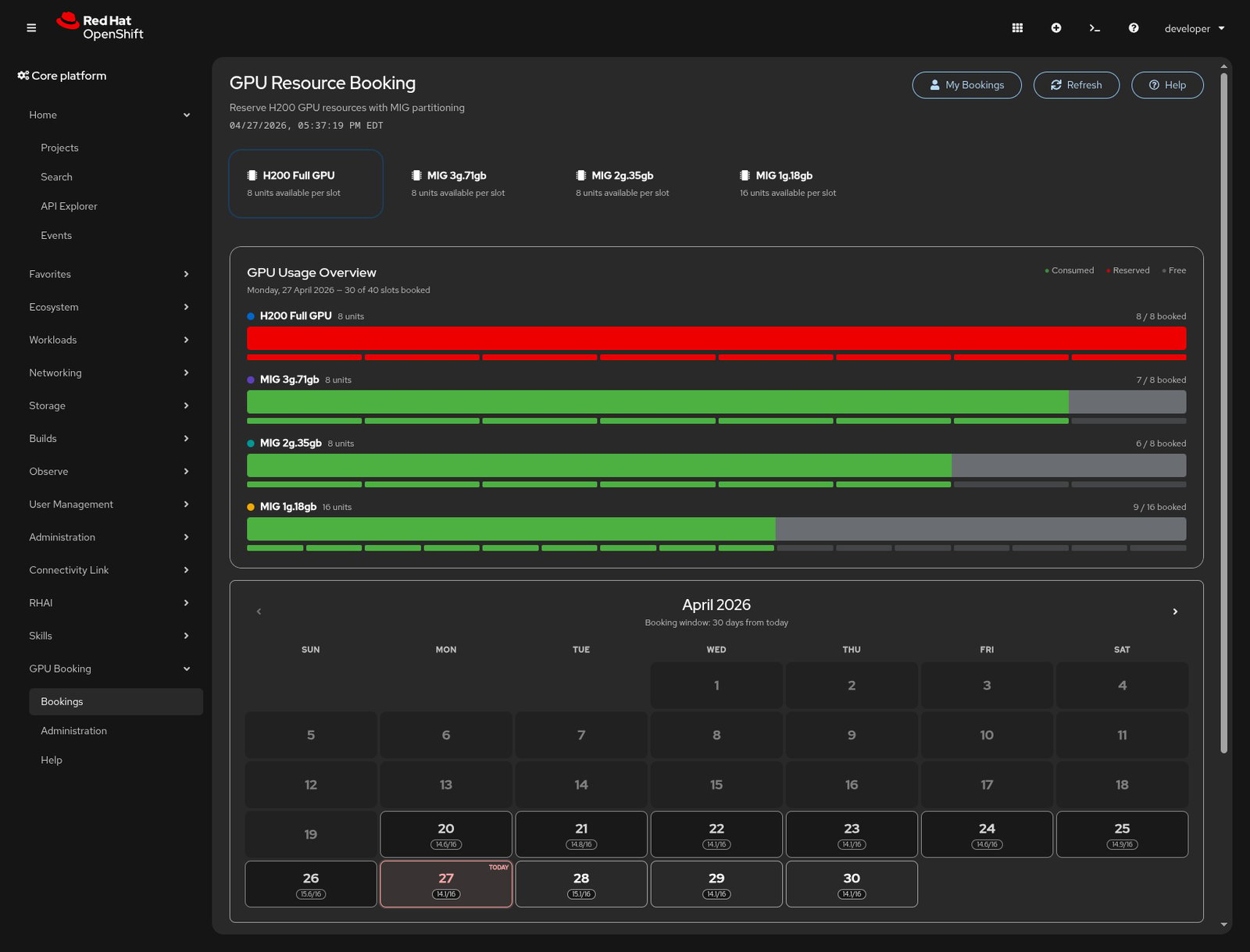
    OpenShift web console interface showing the GPU Resource Booking dashboard with resource usage charts and a reservation calendar.
    Figure 5: GPU booking plug-in dashboard showing usage overview and calendar.

    This GPU booking plug-in pulls live data from the Kueue APIs to show which resources are reserved or available, allowing you to schedule time on a calendar. The dashboard shows availability for each tier across full H200 GPUs and the three MIG slice sizes. When you're ready to reserve a slice, it's just as easy as setting the configuration and partition size. See Figure 6.
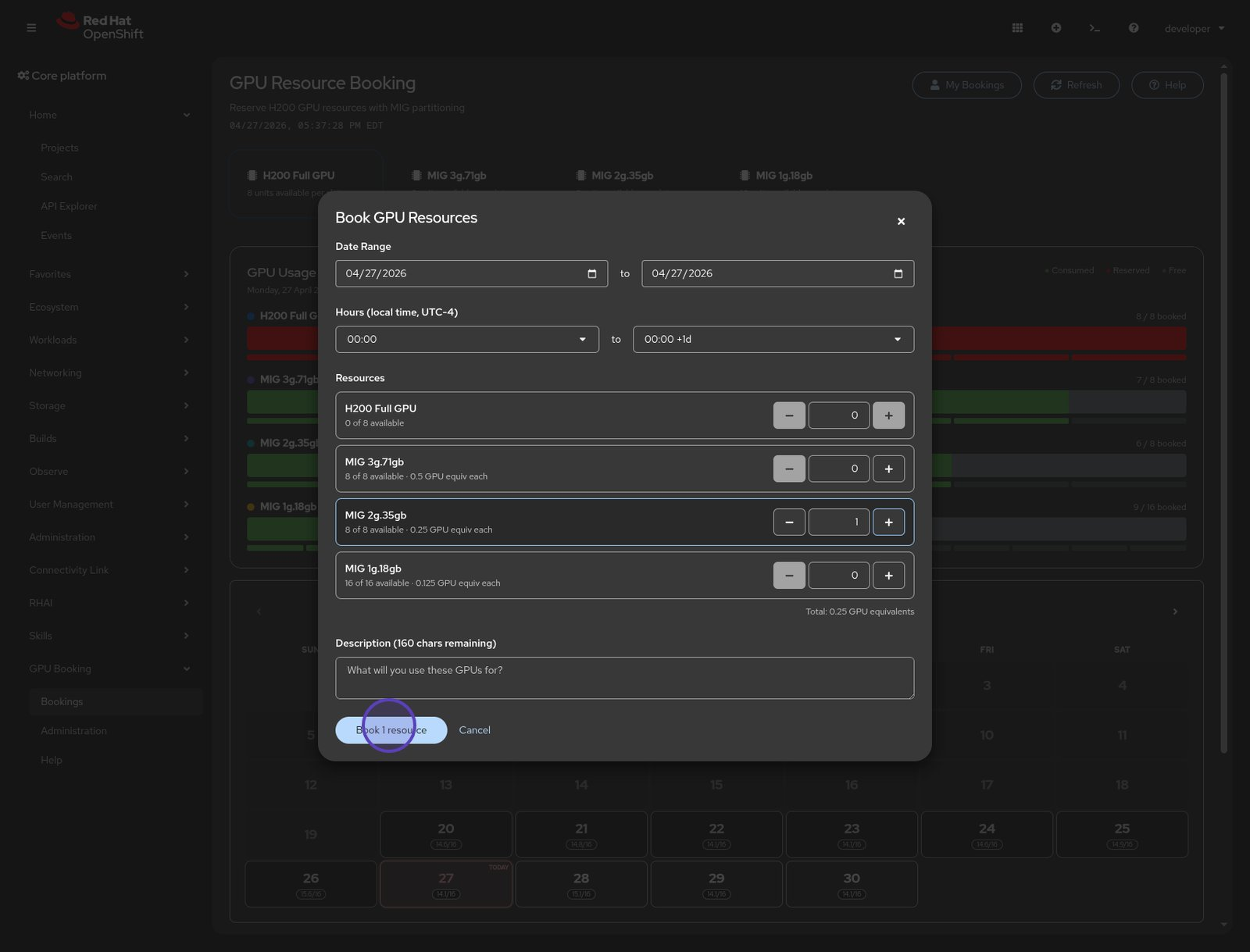
    OpenShift web console configuration modal containing date range, time, and MIG slice resource selectors for booking a GPU.
    Figure 6: The Book GPU Resources modal with a date range and partition selectors.

    This custom plug-in relies on standard Kubernetes and Kueue architectural designs rather than introducing a unique data model. Because it generates native Kueue resources, operations tools like GitOps pipelines and the command-line interface (CLI) continue to function without interruption. Reviewing the ClusterQueue configuration shows the assigned quota for the requested MIG 2g.35gb resource size (Figure 7).
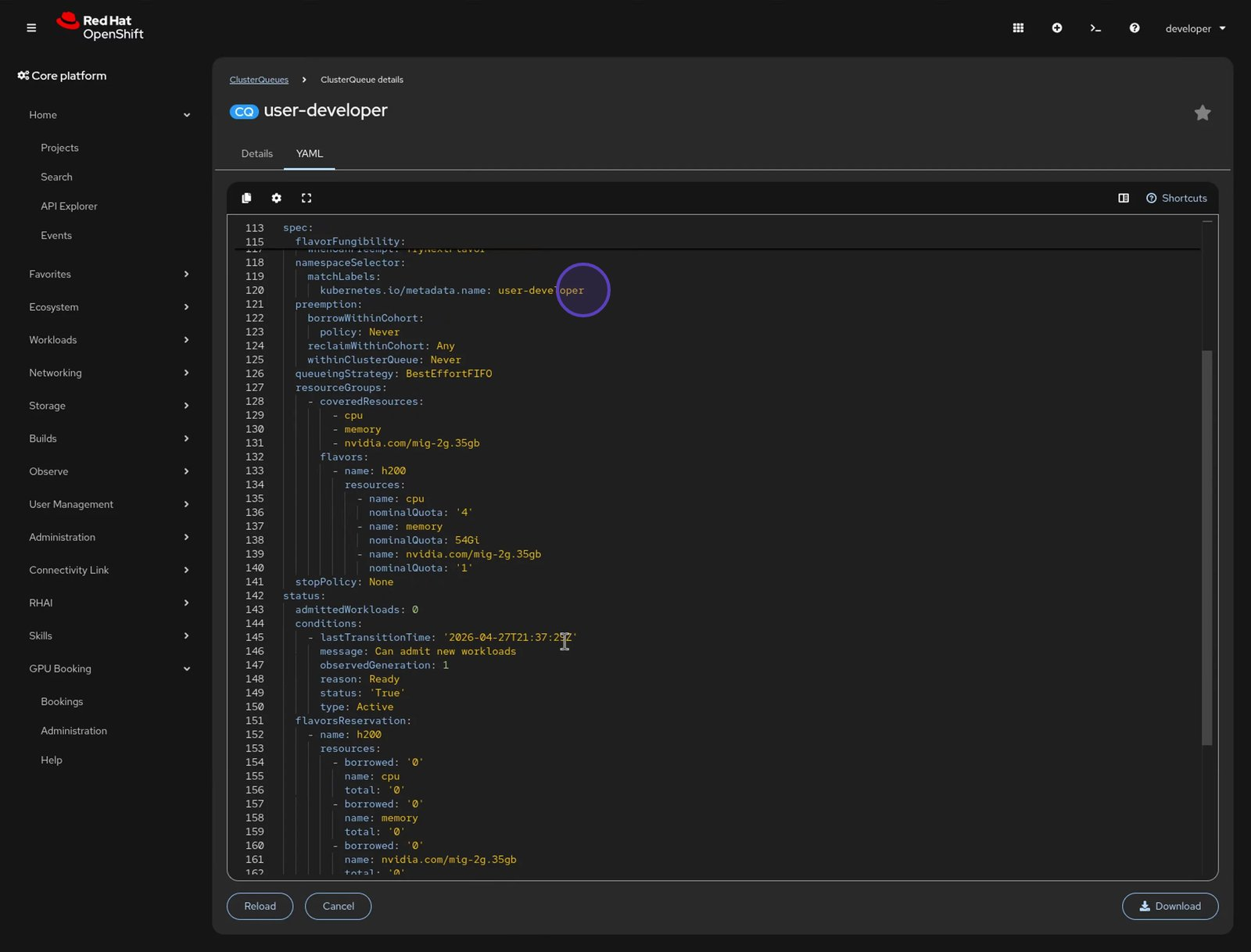
    OpenShift web console YAML editor displaying configuration fields for the user-developer ClusterQueue resource.
    Figure 7: ClusterQueue YAML with namespace selector and quota for reserving MIG 2g.35gb resources.

    Because our plug-in uses the namespaceSelector field within the ClusterQueue, developers from other projects cannot accidentally schedule workloads against this dedicated quota. It still participates in the broader cluster cohort, so it benefits from fair sharing when other workloads aren't pushing. While our booking UI offers an accelerated way to write the YAML, the system manages all actions through native Kubernetes resources.

    Deploying a model onto the reserved GPU slice

    With a reservation in hand, configuring OpenShift AI is simple. You can select an appropriately sized model from the model catalog (Figure 8). Each model provides performance details and standard benchmarks across different types of accelerators, reducing the guesswork of “Will this model fit properly on my hardware?”
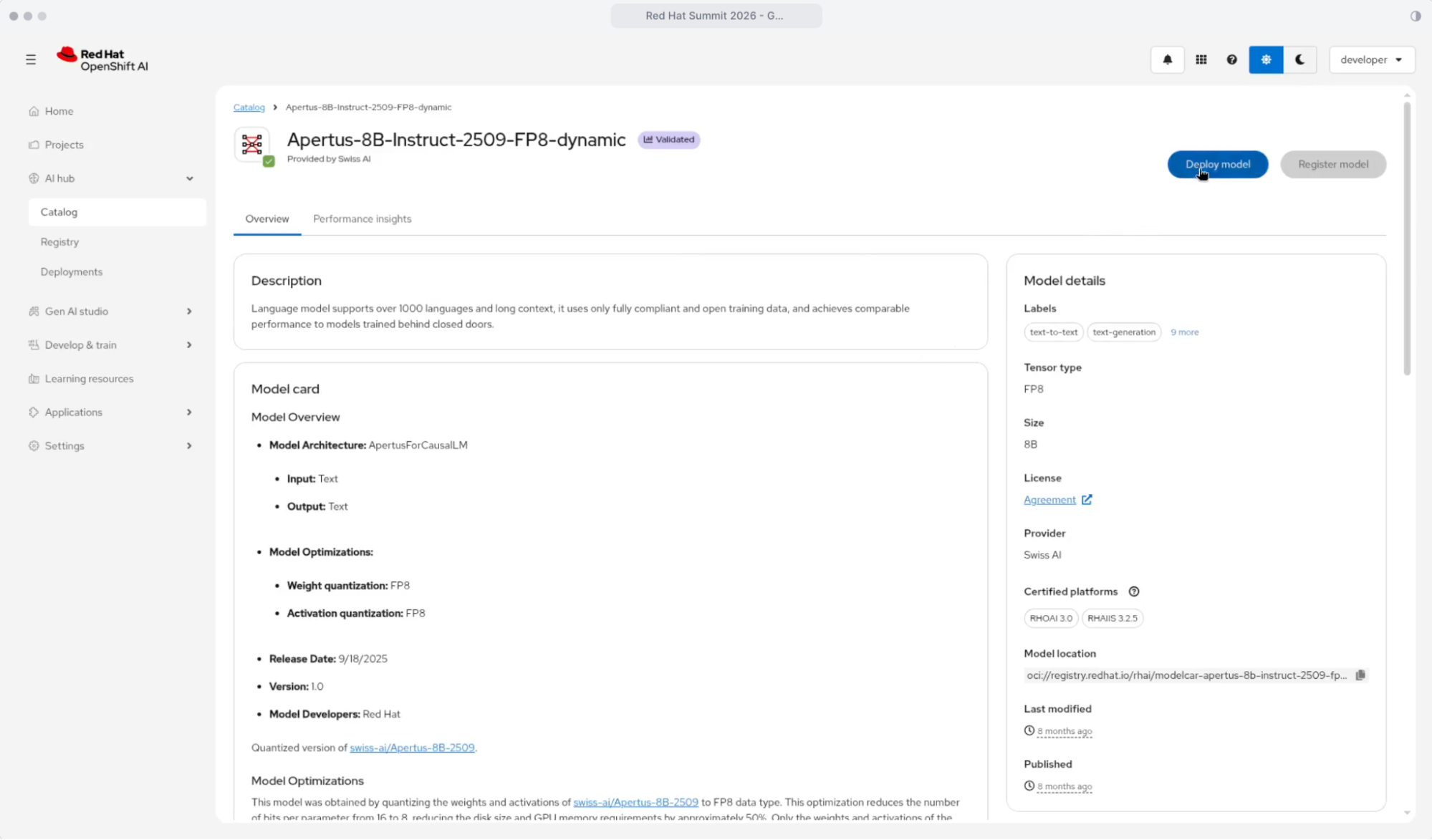
    Model details page for Apertus-8B-Instruct in the Red Hat OpenShift AI catalog with a highlighted Deploy model button.
    Figure 8: The OpenShift AI catalog showing a Red Hat AI validated model.

    The deployment guide prompts you to choose a hardware profile (Figure 9). An administrator preconfigures hardware profiles to link a model deployment to a LocalQueue and its corresponding reserved ClusterQueue. The custom plug-in automates the creation of these HardwareProfile resources alongside the LocalQueue and ClusterQueue, providing immediate self-service access.
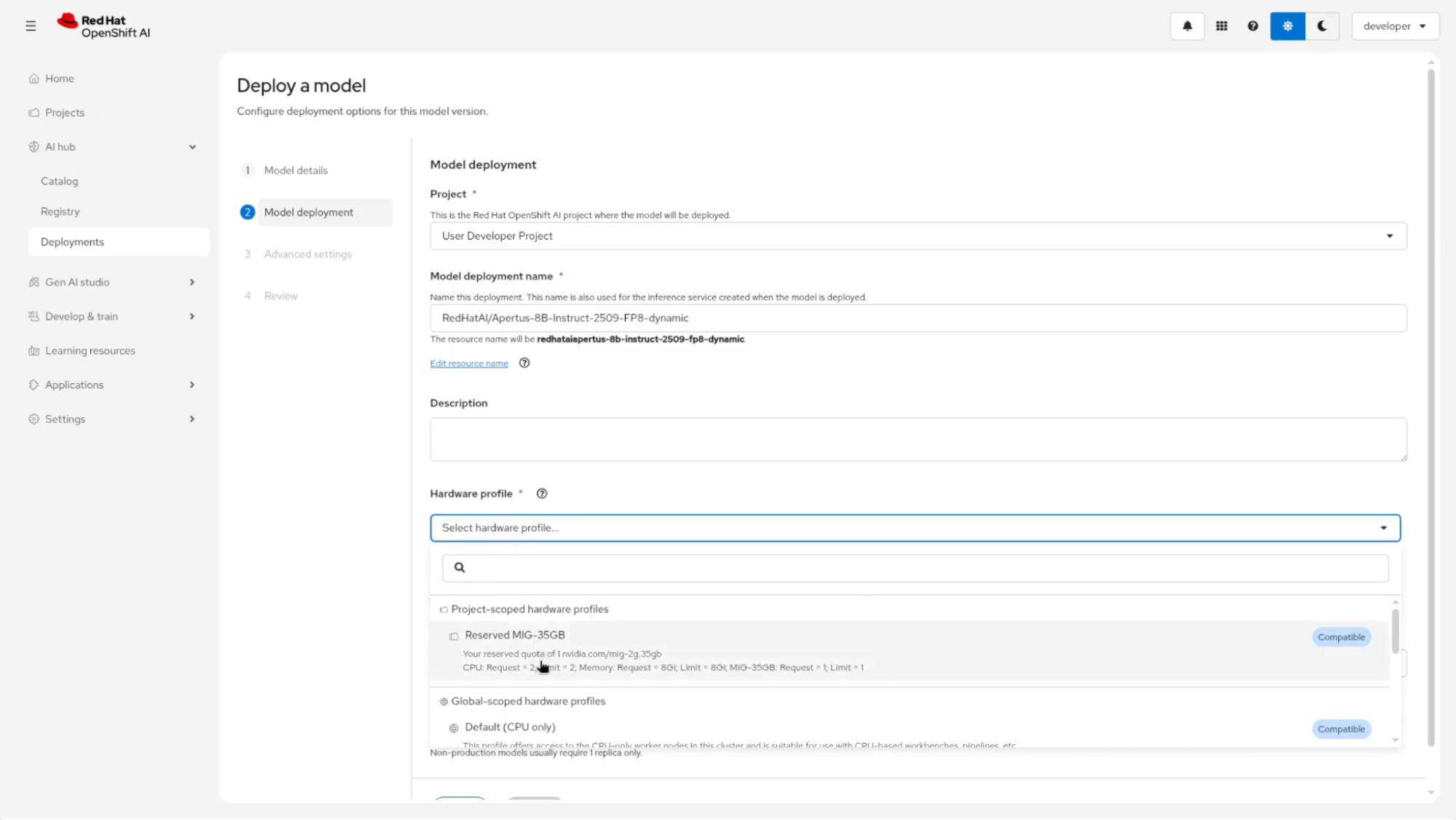
    OpenShift AI model deployment page highlighting a dropdown menu with the reserved MIG-35GB hardware profile option.
    Figure 9: The model deployment page with the reserved hardware profile selected.

    Selecting the Reserved hardware profile tethers this deployment to your booked GPU resource. The deployment operates as a standard OpenShift AI workload while executing within the defined Kueue reservation. Select the reserved profile, choose the vLLM NVIDIA image, and deploy (Figure 10). The model deploys exclusively to your reserved multi-instance GPU slice.
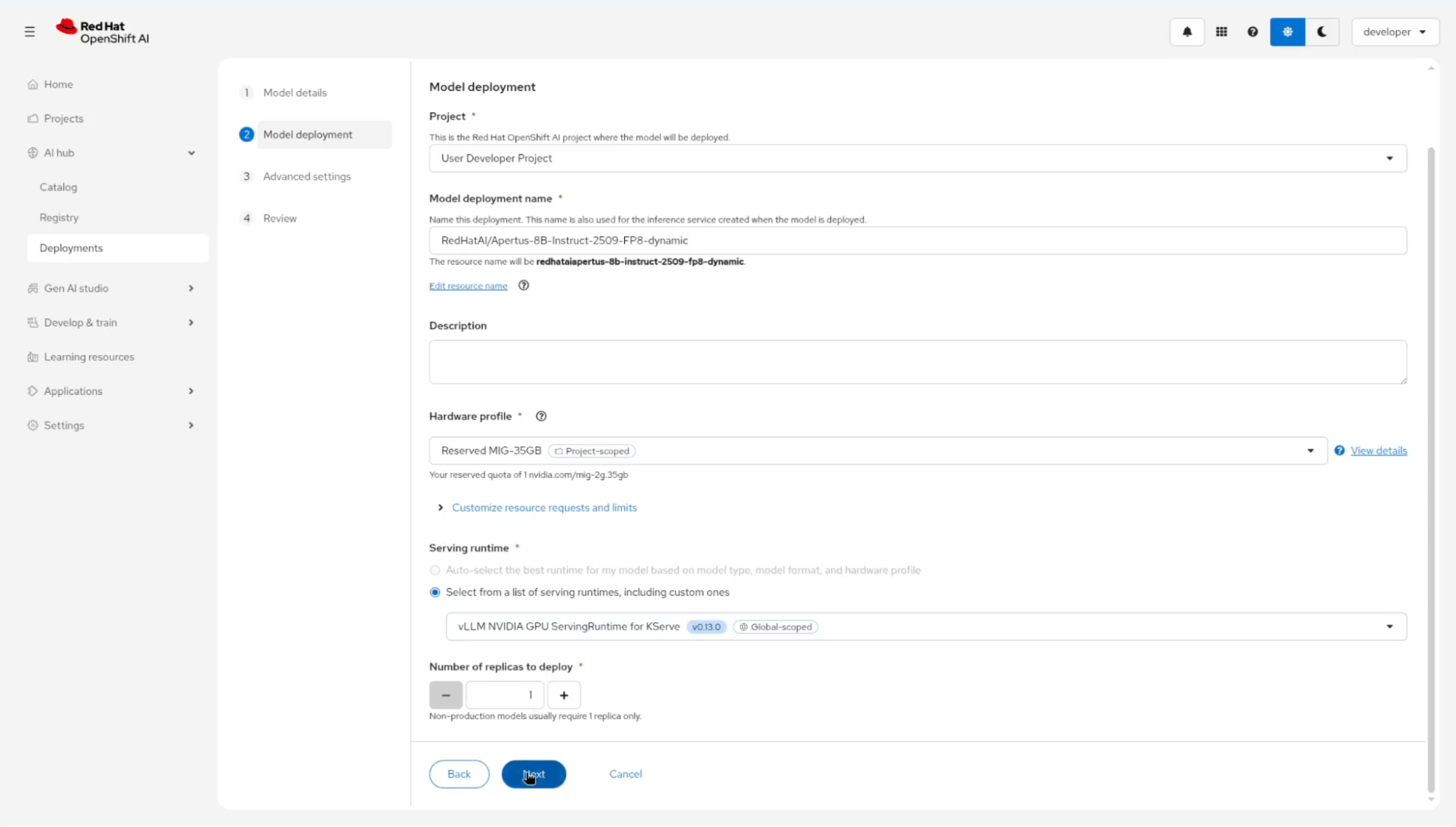
    OpenShift AI model deployment form showing the selected vLLM serving runtime with a cursor hovering over the Next button.
    Figure 10: The model deployment screen with the reserved MIG-35GB hardware profile and the vLLM NVIDIA serving runtime selected for KServe.

    Why GPU-as-a-Service matters

    We're seeing a wide variety of practical use cases for AI, from traditional recommendation systems to the latest AI agents and coding assistants. These workloads depend on consistent access to underlying hardware accelerators. This standardized approach allows developers to build features without being bottlenecked by tickets or GPU availability, while the platform team maintains visibility into resource use patterns. Long-running jobs like real-time inference can share resources elastically with batch jobs like AI model fine-tuning, governed by your established access policies.
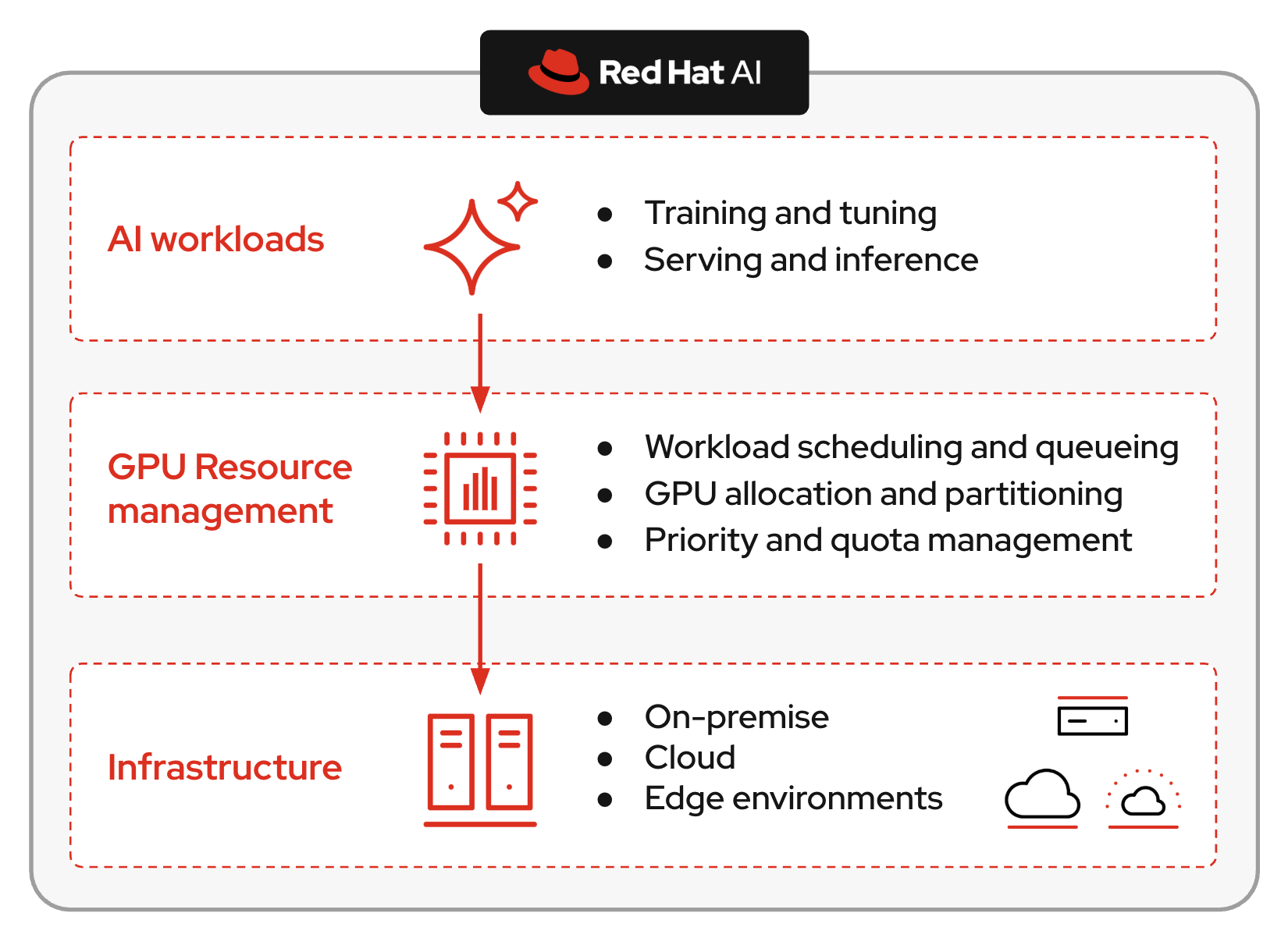
    A three-tiered architecture mapping AI workloads through a GPU resource management layer down to various infrastructure environments.
    Figure 11: The complete GPUaaS picture in Red Hat AI with scheduling, enablement, and observability.

    These components integrate as hybrid cloud resources using Red Hat OpenShift and OpenShift AI. Explore the interactive GPU-as-a-Service demo or visit the Red Hat AI inference product page to get started.

    Related Posts

    • What GPU kernels mean for your distributed inference

    • Designing distributed AI inference: Core concepts and scaling dimensions

    • Configure NVIDIA Blackwell GPUs for Red Hat AI workloads

    • Red Hat build of Kueue 1.3: Enhanced batch workload management on Kubernetes

    • Estimate GPU memory for LLM fine-tuning with Red Hat AI

    • Optimize GPU utilization with Kueue and KEDA

    Recent Posts

    • Implement GPU-as-a-Service with Kueue and NVIDIA MIG

    • Red Hat UBI vs. Red Hat Hardened Images: How to choose

    • What's New in OpenShift GitOps 1.21

    • Deploying distributed AI inference: Blueprints & troubleshooting

    • How to integrate OpenShift AI and PG Airman MCP Server

    Red Hat Developers logo LinkedIn YouTube Twitter Facebook

    Platforms

    • Red Hat AI
    • Red Hat Enterprise Linux
    • Red Hat OpenShift
    • Red Hat Ansible Automation Platform
    • See all products

    Build

    • Developer Sandbox
    • Developer tools
    • Interactive tutorials
    • API catalog

    Quicklinks

    • Learning resources
    • E-books
    • Cheat sheets
    • Blog
    • Events
    • Newsletter

    Communicate

    • About us
    • Contact sales
    • Find a partner
    • Report a website issue
    • Site status dashboard
    • Report a security problem

    RED HAT DEVELOPER

    Build here. Go anywhere.

    We serve the builders. The problem solvers who create careers with code.

    Join us if you’re a developer, software engineer, web designer, front-end designer, UX designer, computer scientist, architect, tester, product manager, project manager or team lead.

    Sign me up

    Red Hat legal and privacy links

    • About Red Hat
    • Jobs
    • Events
    • Locations
    • Contact Red Hat
    • Red Hat Blog
    • Inclusion at Red Hat
    • Cool Stuff Store
    • Red Hat Summit
    © 2026 Red Hat

    Red Hat legal and privacy links

    • Privacy statement
    • Terms of use
    • All policies and guidelines
    • Digital accessibility

    Chat Support

    Please log in with your Red Hat account to access chat support.