As virtualization density continues to grow in modern data centers, selecting the right storage protocol has become increasingly important, and directly impacts CPU efficiency, I/O overhead, and overall application responsiveness. In this article, we take a closer look at how two IP-based storage protocols—iSCSI and NVMe/TCP—compare within a Red Hat OpenShift Virtualization environment to help you determine whether a transition makes sense for your infrastructure.
For many years, the go-to solution for accessing block-level storage over standard ethernet networks has been iSCSI. It established itself as a dependable, widely adopted standard by packaging SCSI commands into TCP/IP packets. In the age of spinning disks, iSCSI delivered more than adequate performance. However, its single-queue architecture can become a limiting factor when paired with a modern SSD (solid-state drive).
NVMe/TCP, on the other hand, represents a newer approach built specifically for high-performance flash storage. It extends the NVMe protocol—designed with parallelism and efficiency in mind—across standard TCP/IP networks. The fundamental distinction is straightforward: iSCSI adapts a legacy, sequential protocol (SCSI) to modern networking, whereas NVMe/TCP leverages a natively parallel protocol (NVMe) on the same fast infrastructure. This architectural shift enables lower latency and higher IOPS in practice.
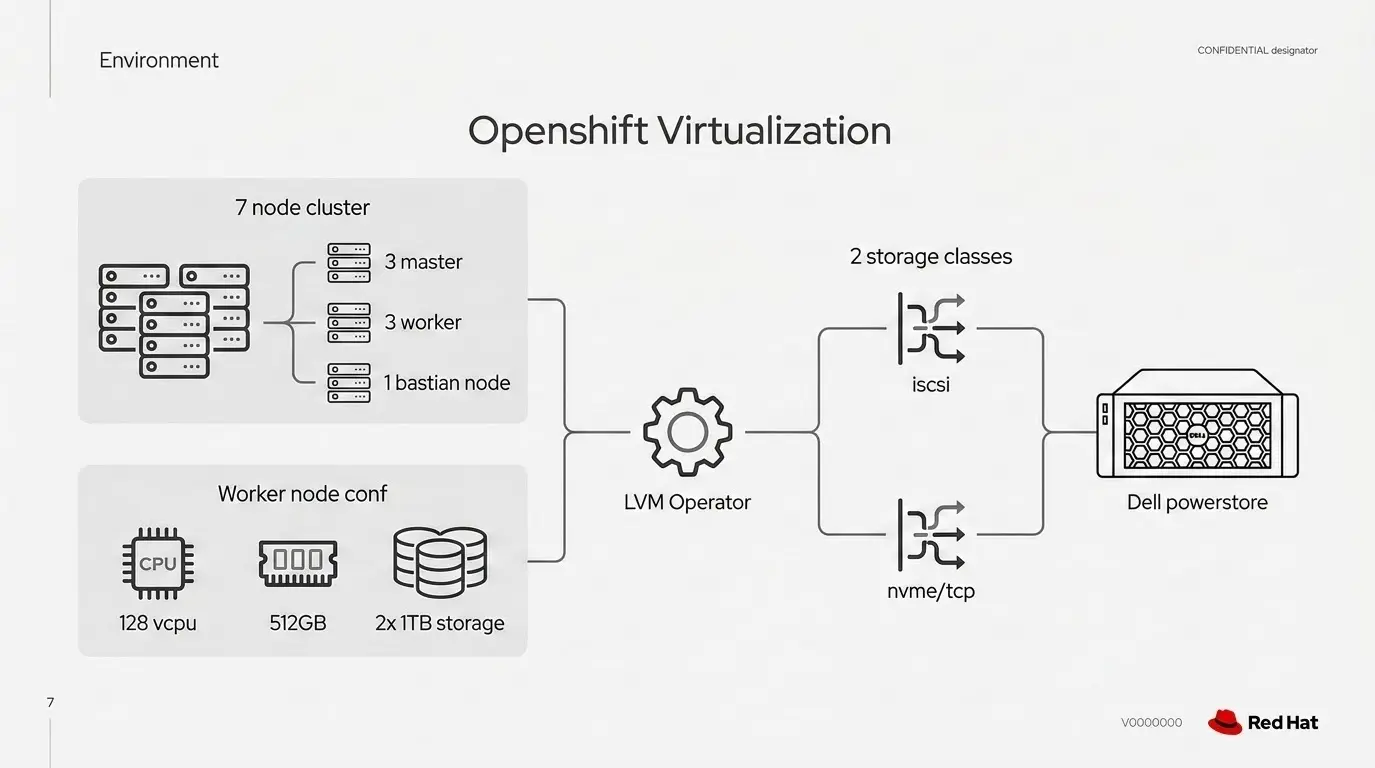
Tests in this article are based on a 7-node Dell server cluster connected to a Dell PowerStore all-flash array, allowing us to measure tangible performance differences.
The hardware and software behind the numbers
To evaluate iSCSI and NVMe/TCP under realistic conditions, we built a controlled environment using a fully Dell-based infrastructure. All compute, networking, and storage components were kept identical across tests to ensure that the storage protocol was the only variable influencing performance.
Platform:
- Red Hat OpenShift Container Platform: v4.19.1
- Red Hat OpenShift Virtualization: v4.19.3
Compute: The cluster was deployed on 7 Dell PowerEdge R760 servers, split across:
- 3 Control Plane (Master) nodes
- 3 Worker nodes
- 1 Bastion node
Each server was identically configured to eliminate hardware-induced variability:
- CPU: 128 x Intel Xeon Gold 6430 processors (64 threads/socket)
- Memory: 512 GB RAM
- Network interfaces:
- 2 × Mellanox ConnectX-6 Dx 100GbE adapters. These network cards were used for both iSCSI and NVMe/TCP storage traffic on the worker nodes.
- OpenShift used 25 GbE network interfaces for pod networking.
- Operating system (Bastion node) : Red Hat Enterprise Linux 9.4
- This OS detail applies only to the bastion node.
Storage
At the heart of our SAN was a Dell PowerStore 9200 all-flash array. This platform was chosen specifically for its native support for both iSCSI and NVMe/TCP, allowing us to perform a true like-to-like comparison by simply changing the host-side protocol. Six ports were used at the storage side, and the port speed for both the protocols was fixed at 25 Gb/s.
Provisioning
We provisioned two separate sets of storage from the Dell array: 3x 1 TB LUNs for iSCSI and another 3x 1 TB LUNs for NVMe/TCP. Each worker node was assigned two 1 TB volumes—one exposed over iSCSI and the other over NVMe/TCP—allowing a direct, side-by-side comparison of both protocols. The LVM operator in OpenShift was used to configure and manage storage in both cases, with dedicated storage classes created for each protocol.
To enable a side-by-side comparison, separate storage classes were defined: lvms-iscsi for iSCSI and lvms-nvme for NVMe/TCP. While iSCSI leveraged traditional multipathing with asymmetric logical unit access (ALUA), NVMe/TCP volumes were accessed over multiple paths using a round-robin I/O policy with asymmetric namespace access (ANA).
Network
All traffic ran over high-speed, low-latency IP fabric switches. The network was configured for storage best practices, including end-to-end 25GbE and jumbo frames (MTU 9000) enabled.
With this hardware in place, we established a clean, reproducible environment to accurately evaluate the performance and efficiency differences between the two protocols. Beyond the configurations already described, a few additional performance tuning adjustments were applied, which are discussed later. Figure 1 displays an architectural overview of our setup.
Test results and methodology
Benchmarks were structured to evaluate protocol performance across three distinct layers: The operational lifecycle (including cloning and deployment), raw disk I/O, and application-level database stress.
Our testing methodology involved three steps.
1. Operational agility: Virtual machine cloning and deployment
In this test, a virt-clone workload was executed using a kube-burner tool in which a single base image is created and then cloned into the required number of virtual machines (VM) across worker nodes. A "1 VM" configuration refers to one VM being deployed on each of the three worker nodes. Testing began with a single VM for both storage classes and was progressively scaled to 2, 5, 10, 20, and 50 VMs per node to evaluate control plane scalability. The total time taken to complete the full VM provisioning (cloning) process was measured for each storage class and compared.
The configuration of the VM used in this test:
- 1 vCPU
- 512 Mi memory
- 6 Gi root volume
- 1 Gi data volume
- Fedora 41
Figure 2 illustrates the VM provisioning (completion) time across the evaluated storage classes.
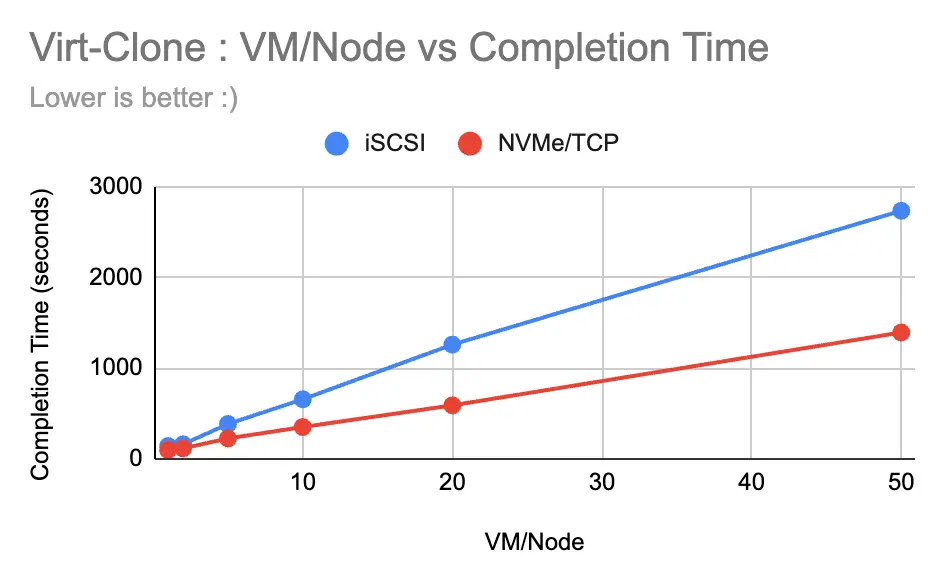
When it comes to deploying virtual machines quickly, NVMe/TCP offers a massive operational advantage. NVMe/TCP demonstrated significantly faster provisioning times compared to iSCSI.
- At a low scale (1 VM per node), NVMe/TCP was about 44% faster.
- As the workload scaled to 20 VMs per node, NVMe/TCP achieved a staggering 113.73% improvement in cloning speed.
- Even at a massive scale of 50 VMs per node, it maintained an approximate 96% performance gain.
This drastic reduction in deployment windows is a game-changer for rapid scaling and improving disaster recovery times.
2. Raw disk I/O: Thriving under high queue depth
In this evaluation, raw disk I/O performance was analyzed using a fio workload run for 300 seconds with numjobs=4 and iodepth=16 across sequential read, sequential write, random read, and random write operations. The tests were executed on 10 VMs for both storage classes using block sizes of 4K, 8K, 128K, 1024K, and 4096K, with workloads designed to evaluate disk performance for VMs running on OpenShift Virtualization.
Performance tuning was applied as part of the evaluation, including a worker node kernel upgrade, which fixes uneven CPU utilization and I/O distribution on NVMe/TCP hosts to prevent long outages under heavy workloads. Also enabled multithreading within VMs during fio testing. Additionally, the supplemental pool value was set equal to the number of vCPUs in line with the OpenShift Virtualization tuning and scaling guide.
The configuration of the VM used in this test:
- 8 vCPU
- 8 Gi memory
- 10 Gi root volume
- 50 Gi data volume
- Fedora 41
Figure 3 presents the percentage performance improvement of NVMe/TCP over iSCSI.
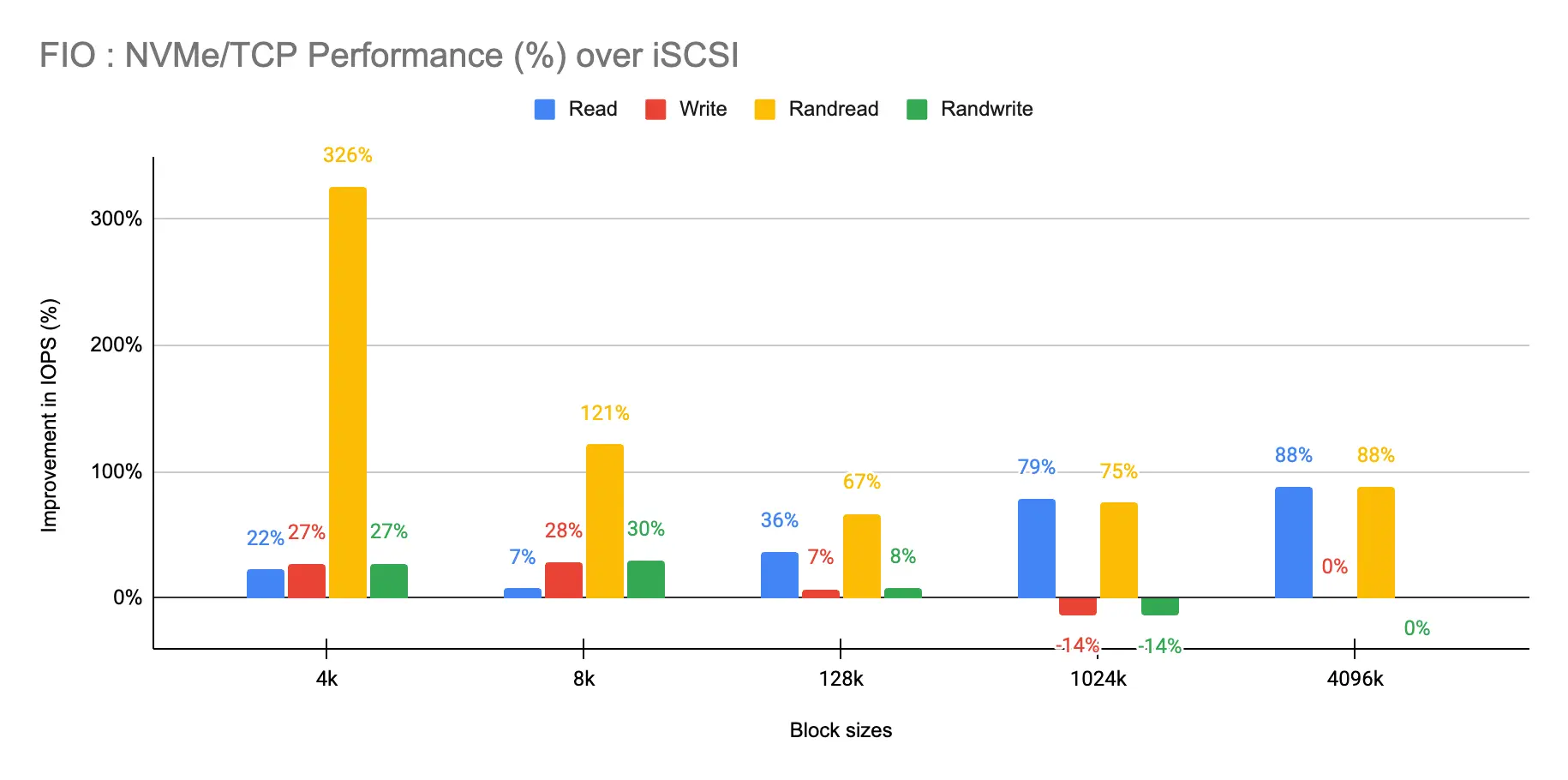
The data revealed that NVMe/TCP dominates in read operations, particularly in highly concurrent, small-block workloads.
- Random reads: NVMe/TCP achieved an incredible >300% IOPS improvement over iSCSI at 4K and 8K block sizes.
- Writes: While the advantage is less extreme, NVMe/TCP still showed moderate improvements of ~27–30% for smaller block sizes. As block sizes increased, iSCSI slightly matched or outperformed it in write tasks, though NVMe/TCP maintained a higher overall performance baseline.
3. Application-Level Database Stress
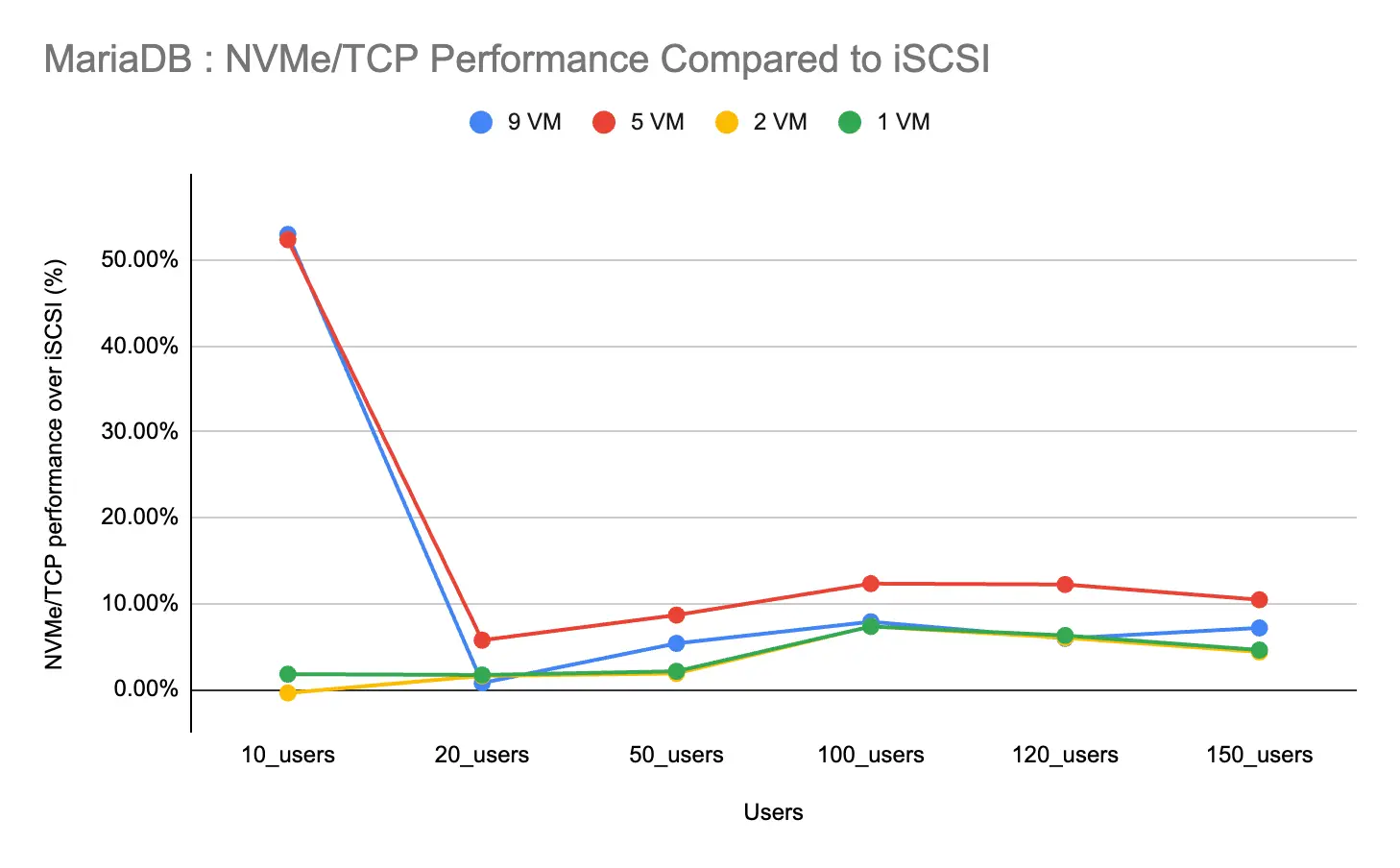
Furthermore, HammerDB workloads were executed to evaluate application-level database stress across both MariaDB and PostgreSQL. MariaDB (TPC-C–like) workloads were tested with 500 warehouses and a 15-minute runtime, scaling across 1, 2, 5, and 9 VMs, while PostgreSQL workloads were evaluated in both single and distributed configurations, scaling up to 5 VMs. This allowed assessment of performance behavior under increasing database concurrency and cluster scale.
Additionally, performance tuning was applied during the HammerDB testing, where CPU pinning was enabled to ensure consistent CPU allocation, and multithreading was disabled since both cannot be used simultaneously.
The configuration of the VM used in this test:
- 32 vCPU
- 32 Gi memory
- 10 Gi root volume
- 200Gi data volume for MariaDB
- 500Gi data volume for PostgreSQL
- Fedora 41
Figure 4 below shows the percentage performance improvement of NVMe/TCP over iSCSI.
MariaDB: NVMe/TCP showed its strongest advantage in scale-out setups (5–9 VMs). It delivered peak throughput gains of ~53% at lighter loads and maintained up to a 12% improvement under moderate to heavy loads. In consolidated, smaller setups (1–2 VMs), the differences between the two protocols were minimal.
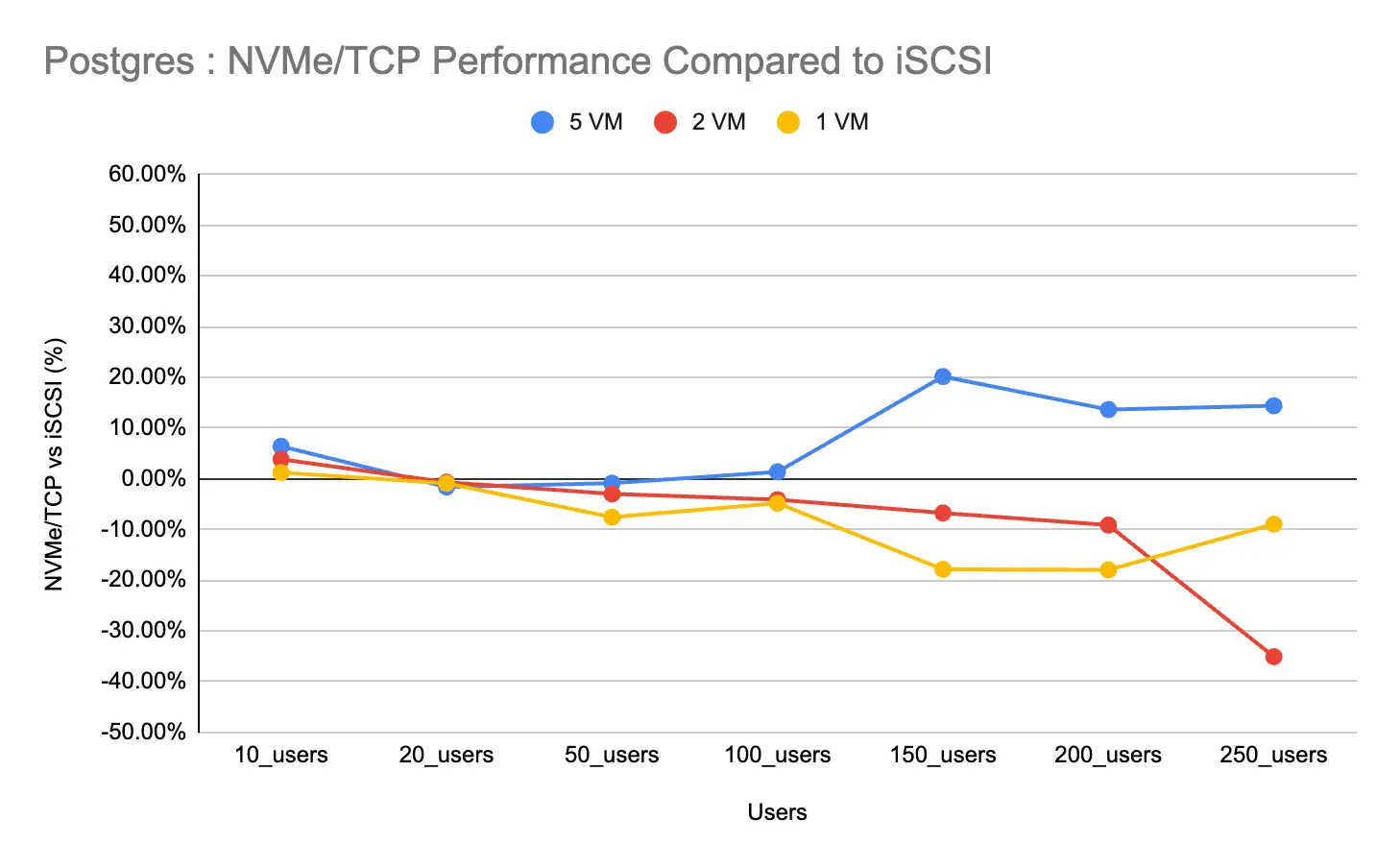
PostgreSQL: This test (Figure 5) revealed some interesting nuances. In consolidated environments (1–2 VMs), iSCSI consistently delivered better throughput across most load levels. NVMe/TCP only showed clear benefits (around 20% higher TPM) under extreme contention in a 5-VM scaled-out setup with 150+ users.
Conclusion
The data confirms that NVMe/TCP is the superior architectural standard for 95% of modern, distributed virtualized workloads. It excels under high queue depth and provides the decisive bandwidth and parallelism required for cloud-native storage, high-density scale-out environments, and random read-intensive tasks.
However, iSCSI shouldn't be completely discarded. It is recommended to be retained as a fallback for specific legacy single-node applications where masking latency-variance and maintaining stability under high user counts is your absolute priority.
Note
The performance and test results presented in this blog are specific to the environment described in the hardware section above, including storage configuration, OpenShift versions, and hardware setup. Variations in infrastructure—such as different storage systems, network configurations, hardware specifications, or software versions—may lead to different results.
Thanks to the Red Hat Performance and Scale Team, with special thanks to Abhishek Bose, Elvir Kuric, Shekhar Berry, and Jenifer Abrams.

